dsh-custom-style
yutao8/dsh-custom-style
Adds a Custom CSS section to Settings for adjusting dialog dimensions, font sizes, full-window wallpapers, and inspecting stable selectors.
Install
dsh plugin --profile web add github:yutao8/dsh-custom-styleREADME
dsh-custom-style
English | 中文
把你自己写的 CSS 注入 DeepSeek Harness 界面——设置弹窗宽度、字号、配色、间距,想改什么就改什么。
只需编辑 $DSH_HOME/dsh-custom-style/ 下的 *.css 文件,保存约 2 秒后自动生效:不改应用本体、不重新打包、不重启。
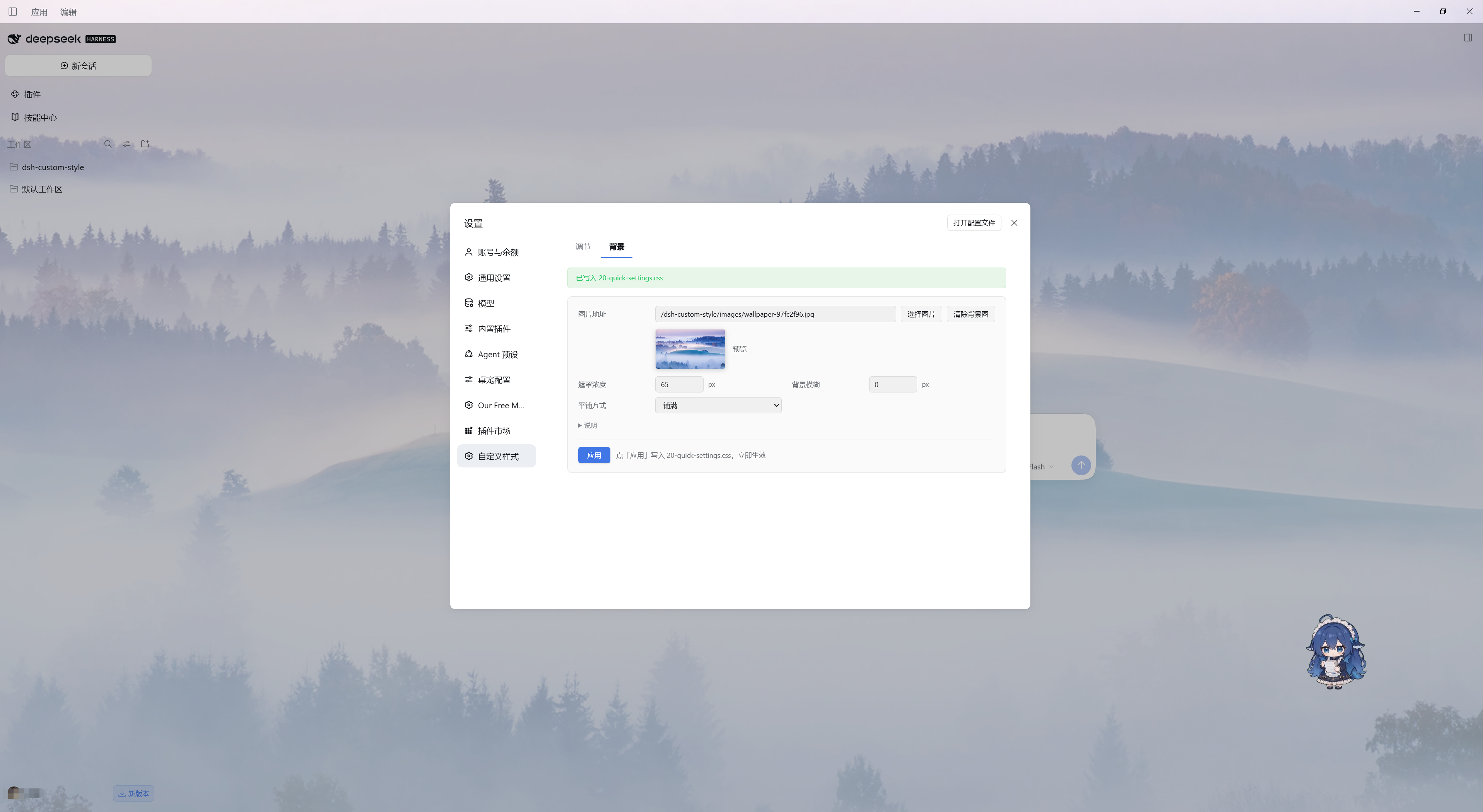
它还会在 DSH 设置界面里加一栏「自定义样式」:用几个常用数值一键调整弹窗宽度、高度、正文字号与内容居中,或是设置一张带磨砂遮罩的全屏背景图——不用离开应用就能调界面。
- 宿主半身(
index.js):把$DSH_HOME/dsh-custom-style/*.css按文件名顺序拼成一张样式表,经GET /dsh-custom-style/all.css提供;首次运行自动创建目录并播种起始样式表,绝不覆盖已有文件。 另外为设置面板提供文件接口(/files、/file、/file/delete、/reveal)。 - 浏览器半身(
client.js):把样式表注入自己持有的<style data-plugin-css="dsh-custom-style">, 每 2 秒重新拉取一次(页面隐藏时暂停),所以改完保存就会生效,无需刷新;设置分区通过客户端 slot API 注册。 - 零第三方运行时依赖:宿主半身只用
node:内置模块,浏览器半身只用 DOM、fetch和平台提供的 React。 因此 harness 升级不会破坏它;用户 CSS 存在包外,重装插件也不会丢样式。
目录
环境要求
- 带 web/桌面客户端的 DeepSeek Harness(
dsh0.2.x),已在0.2.0-rc.2上验证。 - Node.js
^22.19.0 || >=24.0.0(只有可选的本地安装器与测试套件需要)。
安装
A. 从插件目录 / npm 安装(本仓库被收录之后):
dsh plugin add dsh-custom-style
没有构建步骤——client.js 是手写的、不是打包产物——所以直接从本仓库源码安装也可以。
B. 从本仓库安装到当前这台机器(仓库自带安装器做的事):
node install.mjs            # 只预览(dry run)
node install.mjs --apply    # 安装到 $DSH_HOME/profiles/desktop
它会幂等地把插件登记进 DSH profile:
| 位置 | 变成什么 |
|---|---|
<profile>/local-plugins/dsh-custom-style | 目录联接 → 本仓库(单一源码);--copy 则改为复制文件 |
<profile>/node_modules/dsh-custom-style | 目录联接 → 上面那一层 |
<profile>/package.json | dependencies["dsh-custom-style"] = "link:./local-plugins/dsh-custom-style" 加一条 dsh.profile.bundles 登记(改前备份) |
$DSH_HOME/dsh-custom-style/00-starter.css | 你的样式表——仅在缺失时写入 |
浏览器版 DSH 用 --profile web;非默认 DSH_HOME 用 --dsh-home <路径>。
安装后完全退出并重开 DSH 一次(宿主半身在启动时注册路由);之后改 CSS 再也不需要重启。
使用
打开 设置 → 自定义样式。
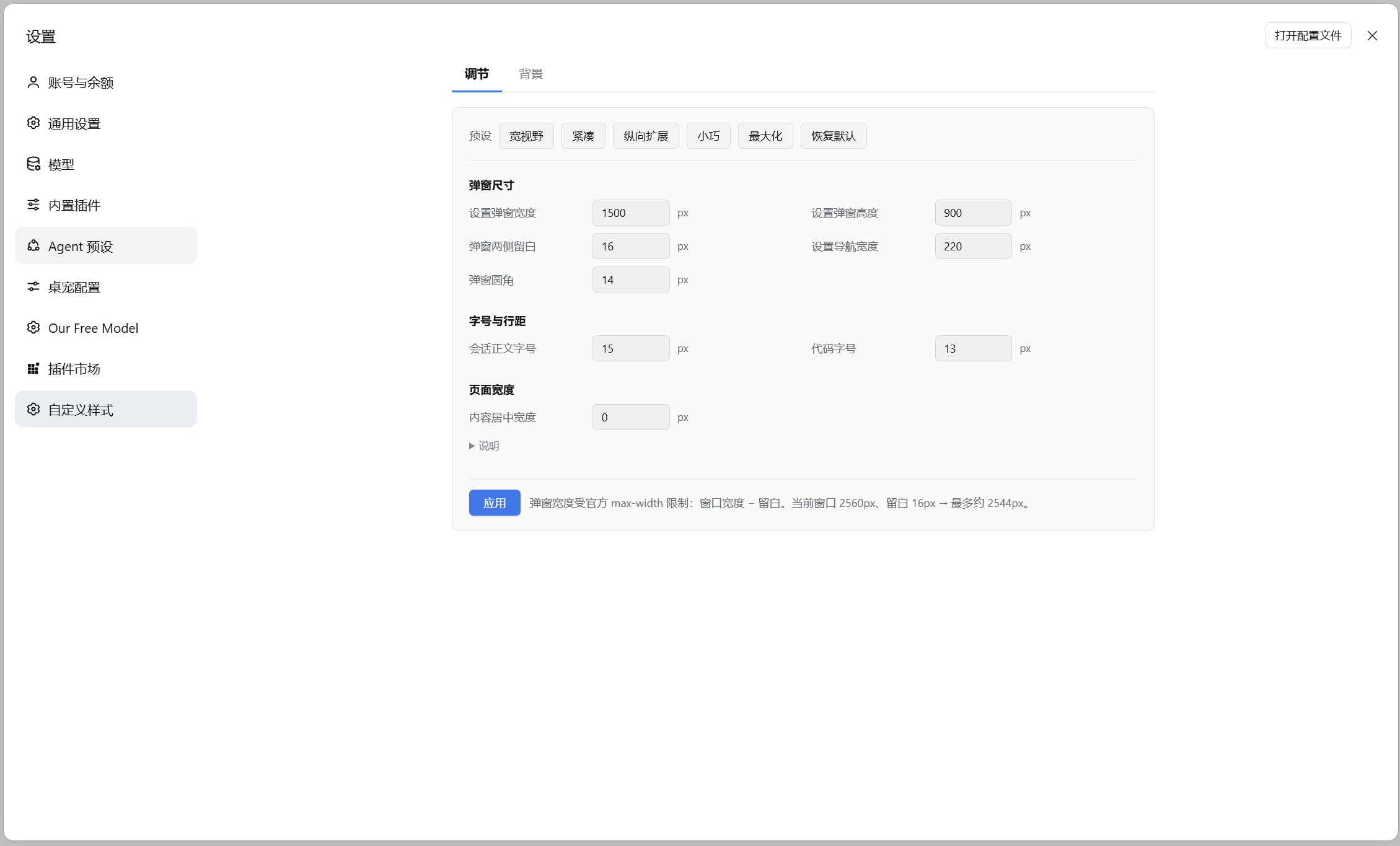
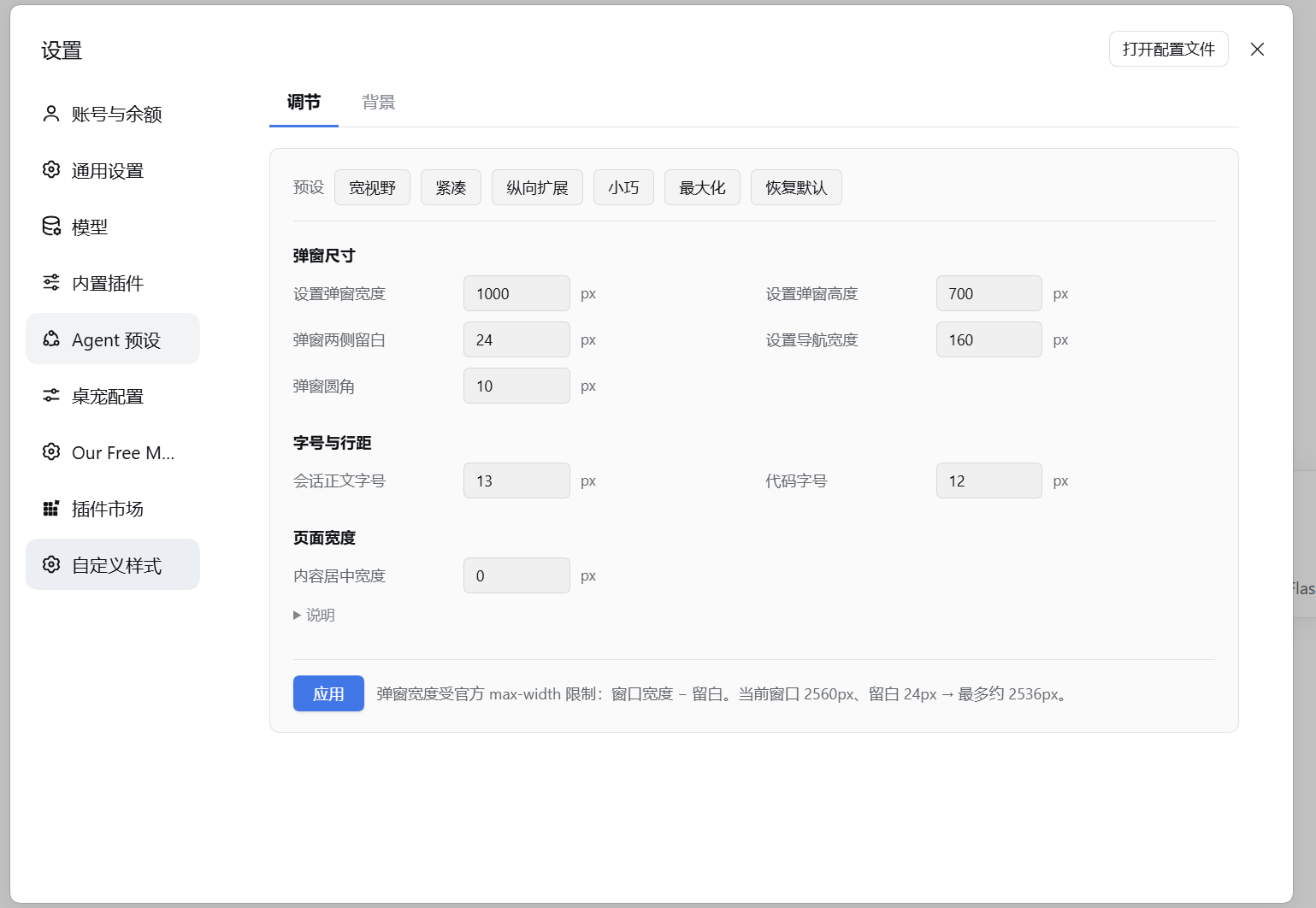
| 调节:宽视野 (1500px) | 调节:紧凑 (1000px) |
|---|---|
 |  |
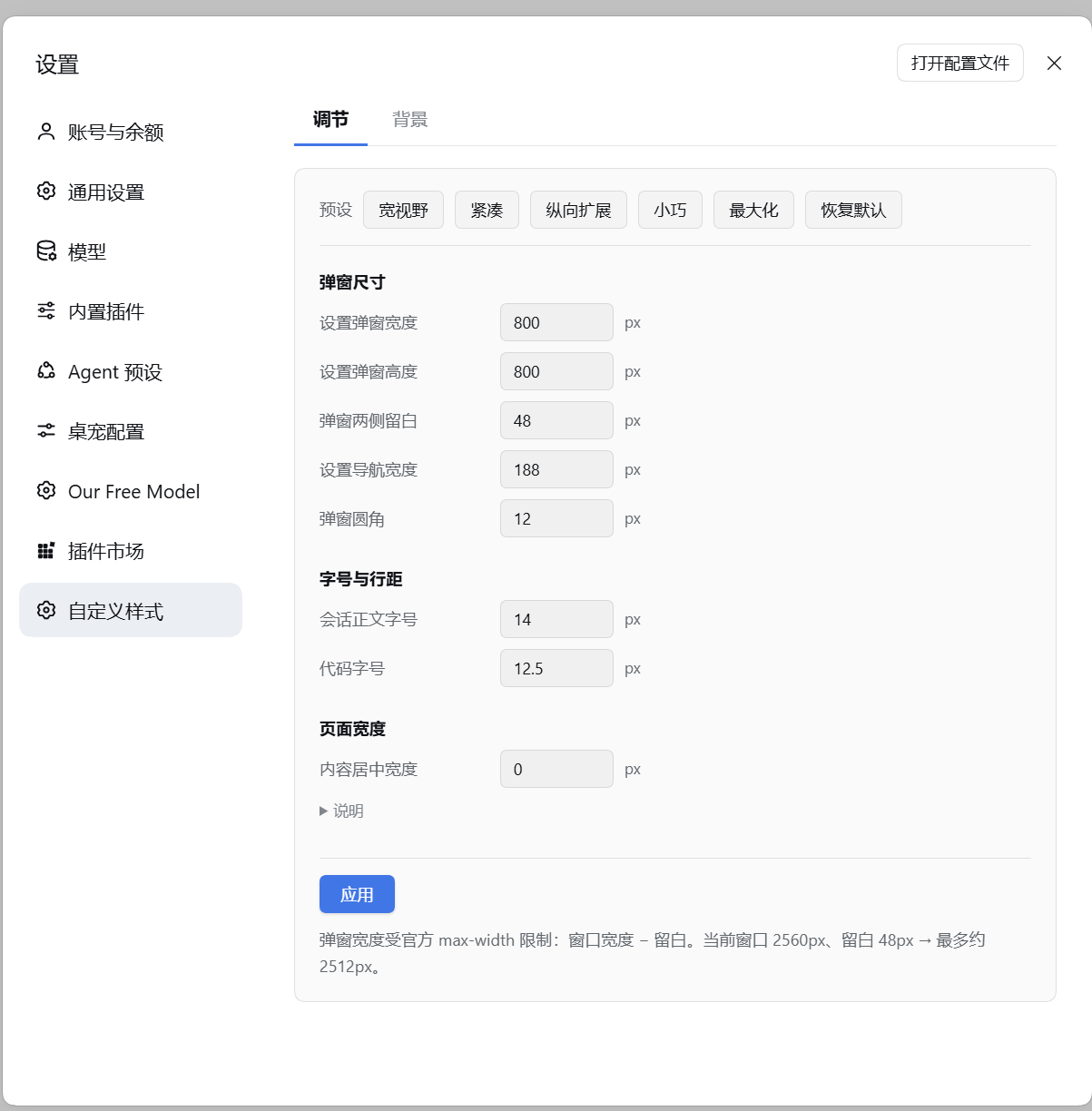
| 调节:默认尺寸 (800px) | 背景:设置全屏壁纸与遮罩 |
|---|---|
 | |
面板分为「调节」、「背景」与「选择器与目录」三页:
| 顶部 tab | 能做什么 |
|---|---|
| 调节 | 八个数字 + 六组预设(宽视野 / 紧凑 / 纵向扩展 / 小巧 / 最大化 / 恢复默认)。预设按钮在输入项上方,先套用再微调;点「应用」写入 20-quick-settings.css |
| 背景 | 图片地址(填网址,或点「选择图片」从本机挑)/ 遮罩浓度 / 背景模糊 / 平铺方式;带缩略图预览与「清除背景图」 |
| 选择器与目录 | 显示当前 CSS 样式文件存放路径与「打开目录」按钮;提供从 deepseek-harness 源码核对过的稳定选择器举例与一键「复制」代码片段 |
三个 tab 各一页,一次只显示一页。较长的解释收在「说明」折叠里,默认收起。
习惯直接改文件也行:编辑 %DSH_HOME%\dsh-custom-style\
(默认 C:\Users\<你>\.dsh\dsh-custom-style\)下的任意 *.css——面板和文件夹改的是同一批文件:
/* 01-my-tweaks.css —— 保存后约 2 秒生效 */
[data-shortcut-modal="settings"] { width: 1200px !important; }    /* 设置弹窗宽度(默认 800px) */
[data-shortcut-modal="settings"] nav { width: 220px !important; } /* 左侧导航宽度(默认 188px) */
body { --dsh-content-font-size: 15px !important; }                /* 会话正文字号 */
- 文件名决定拼接顺序(
00-在前、99-在后),同特异性下后者胜出。 - 只有在与官方规则特异性相同时才需要
!important(弹窗宽度就是这种情况)。 - 新建、改名、删除文件都会在下一轮询(≤2 秒)自动反映。
- 想把样式放在别处:设
DSH_CUSTOM_STYLE_DIR为绝对路径,宿主半身会改读那个目录。
稳定选择器
官方类名是构建期哈希(今天是 .wCInkW_panel,升级后就变),所以优先用能活下来的钩子。
下面这张表可以直接抄进你的 CSS。
| 目标 | 稳定选择器 | 示例 |
|---|---|---|
| 设置弹窗(尺寸、圆角、背景) | [data-shortcut-modal="settings"] | width: 1200px !important; |
| 它的左侧导航 | [data-shortcut-modal="settings"] nav | width: 220px !important; |
| 导航里的单个条目 | [data-shortcut-modal="settings"] nav button | height: 44px !important; |
| 当前所在的那一条导航 | [data-shortcut-modal="settings"] nav button[aria-current] | background: … !important; |
| 右侧内容列 / 滚动区 | [data-shortcut-modal="settings"] > div:last-child | padding-inline-start: 4px !important; |
| 任意模态(兜底) | div[role="dialog"][aria-modal="true"] | border-radius: 14px !important; |
| 设置页的错误提示 | [role="alert"] | font-size: 12px !important; |
| 正文字号 | body 上的 --dsh-content-font-size | 15px !important; |
| 低一档字号(表格、摘要) | body 上的 --dsh-content-font-size-secondary | 13px !important; |
| 颜色、圆角、描边、阴影、焦点环 | body 上的 --dsw-* 令牌 | --dsw-radius-panel: 14px !important; |
| 深色模式画布 | body[data-ds-dark-theme] | background: #0f1114 !important; |
| 指针输入(焦点环被置透明) | html[data-input-modality="pointer"] | 恢复焦点环颜色 |
| macOS 桌面端 | html[data-platform="darwin"] | border-radius: 12px !important; |
| 滚动条(官方令牌) | body 上的 --dsh-scrollbar-width 等 | 10px !important; |
| 滚动条(WebKit 伪元素) | ::-webkit-scrollbar | width: 10px; |
| 代码块与行内代码 | pre, code, kbd, samp | font-size: 12.5px !important; |
| 内置插件页标签栏 | [role="tablist"] / [role="tab"][data-active] | gap: 18px !important; |
| 设置页输入框 / 校验失败 | … input / … input[aria-invalid] | border-radius: 8px !important; |
| 插件市场里展开的卡片 | [data-open="true"] | border-color: … !important; |
| 侧栏会话行 / 工作区分组 | [data-row-key^="session:"] / ^="workspace:" | border-radius: 8px !important; |
| 侧栏账户浮层菜单 | [role="menu"] / [role="menuitem"] | border-radius: 12px !important; |
| 本插件注入的样式表 | style[data-plugin-css="dsh-custom-style"] | 在 DevTools 里定位自己的规则 |
完整清单(每条都标了它在出厂 bundle 里的核对出处)见 selectors.json。
要找别的元素:DevTools 里选中它 → Copy selector,优先挑由 data-*、aria-*、role 组成的写法,
而不是由哈希类名组成的。
两条已核实不再成立的选择器:旧版文档写过的
[data-shortcut-modal="dialog"]与[data-shortcut-modal="shortcut-edit"],在0.2.0-rc.2的出厂 bundle 里都不存在—— 整棵树上data-shortcut-modal只有"settings"这一个值。要命中别的模态浮层, 请用div[role="dialog"][aria-modal="true"]。
弹窗自带 max-width: calc(100vw - 48px),所以设得再宽也不会溢出窄窗口。反过来说:窗口比
你的设定值 + 48px 更窄时,弹窗其实已经顶到上限——要么把 DSH 窗口拉大,要么自己缩小这条留白
(面板里的「弹窗两侧留白」就是干这个的):
[data-shortcut-modal="settings"] { max-width: calc(100vw - 16px) !important; }
为什么有些页面右侧还是留白
弹窗宽度只是一半原因。外壳的内容列本身不限宽,但各个页面会限制自己内容的宽度, 留白正是这个上限造成的。来自出厂 bundle 的实测:
| 页面 | 被限宽的元素 | 上限 | 出处 |
|---|---|---|---|
| 内置插件 | .amjGKq_section | 760px | ui-settings-plugins/lib/client.js:11 |
| 插件市场 tab | .RotMhW_section | 760px | ui-settings-plugin-inventory/lib/client.js:57 |
| 模型 | ._3nPmjq_section | 720px | ui-settings-models/lib/client.js:58 |
| 通用设置 | .zZnCHW_section | 不限宽 | ui-settings-general/lib/client.js:618 |
| Agent 循环 / Shell | 无自带样式 | 不限宽 | 这两个包没有 CSS |
(第三方插件另算:它们常用 _root / _shell / _wrap 之类的容器名把自己卡窄,
所以清单里一并按后缀命中。)
两个事实决定了修法。第一,外壳结构(来自出厂的 ui-settings-general 源码):
div[data-shortcut-modal="settings"]          role=dialog, aria-modal=true
├─ nav                                      188px
│  ├─ div(标题行,「设置」两个字)
│  └─ div(列表)
│     └─ button*(每个分区一条,选中的带 aria-current)
└─ div(内容列)
   ├─ div(顶部动作行:打开配置文件 + 关闭)
   └─ div(滚动区)
      └─ …                                  slot 渲染层,然后才是页面自己的容器
(结构出自 ui-settings-general/lib/client.js:280-342。)
滚动区是普通块级盒子,所以给被限宽的容器加 margin-inline: auto 就能把剩余空间均分——
内容居中而不是贴左——而且对没有限宽的元素这是空操作。第二,被限宽的元素不是滚动区的
直接子节点(中间隔着 slot 层),而且它的类名是构建期哈希,所以要按稳定的后缀匹配:官方页是
_section,第三方页常见 _root / _shell / _wrap。面板里的「内容居中宽度」写的就是这个:
0 表示保留各页自己的宽度、只做居中;填数字表示把它们统一成该宽度并居中。
[data-shortcut-modal="settings"] [class*="_options"] > *,
[data-shortcut-modal="settings"] [class*="_section"],
[data-shortcut-modal="settings"] [class*="_root"],
[data-shortcut-modal="settings"] [class*="_shell"],
[data-shortcut-modal="settings"] [class*="_wrap"],
[data-shortcut-modal="settings"] [style*="max-width"] { margin-inline: auto !important; }
如果你希望内容铺满而不是居中,对同一组选择器再加 max-width: none。
它会把按窄列设计的页面拉伸(卡片网格摊开、文字行长变大),所以不作为默认。
工作原理
$DSH_HOME/dsh-custom-style/*.css
        │  按文件名顺序拼接,每个文件前加一条 "/* ===== 名字 ===== */" 横幅
        ▼
index.js(宿主半身)──GET /dsh-custom-style/all.css──▶  client.js(浏览器半身)
        │                                                    │
        └─ 自动创建目录、播种 00-starter.css                   └─ <style data-plugin-css="dsh-custom-style">,每 2 秒轮询
- 路由面:
GET /dsh-custom-style/all.css(拼接后的 CSS,Cache-Control: no-store)、GET /dsh-custom-style/status与/files(JSON:目录、文件列表、字节数)、POST /dsh-custom-style/file与/file/delete(写入/删除一个*.css)、POST /dsh-custom-style/reveal(打开目录);支持HEAD,其余返回404/405/413。 - 只读写那个目录直接内部的
*.css;文件名必须匹配[A-Za-z0-9][A-Za-z0-9._-]{0,63}\.css—— 不接受调用方传入的路径,因此没有路径穿越面。写入是原子的(临时文件 + rename),单文件上限 256 KiB。 - 插件被卸载时,浏览器半身会移除自己的
<style>并清掉定时器;设置分区来自客户端 slot API (settings.section),所以它的边框、导航与生命周期都由 harness 掌管。
排查
- 看拼接结果:打开
/dsh-custom-style/all.css;文件清单与大小:/dsh-custom-style/status。 Ctrl+Shift+I→ 搜data-plugin-css="dsh-custom-style"就是注入的完整样式表; Console 里[dsh-custom-style]前缀的日志会报告应用了什么、或拉取为何失败。- 规则没生效:先确认选择器命中的是哪个元素(DevTools → 检查),再确认是否需要
!important。 - 路由 404:宿主半身没加载——检查
<profile>/package.json的dsh.profile.bundles里是否有dsh-custom-style,然后重启 DSH。
开发
node test-host.mjs                        # 宿主半身:44 项断言(假 ctx / req / res,临时 DSH_HOME)
node test-client.mjs                      # 浏览器半身:59 项断言(假 ModuleLoader / DOM / fetch / React / slots)
npm test                                  # 依次跑完以上两组
node tools/local-preview.mjs              # 本地预览服务(不需要 DSH),见下
不重启 DSH 就预览样式
node tools/local-preview.mjs                                            # 临时样式目录,弹窗从 1200px 开始
node tools/local-preview.mjs --css-dir "$env:USERPROFILE\.dsh\dsh-custom-style"   # 预览你真实的样式
node tools/local-preview.mjs --width 1400 --port 7799
它在 http://127.0.0.1:7788/ 起一个仿真设置弹窗页,驱动的是真实的两个半身:宿主半身拼接样式并
提供 /dsh-custom-style/all.css,页面加载真实的 client.js 完成注入与轮询。
GET /__set?w=1400 会改写预览样式,让你看着两秒重载发生。全程不联网,也不涉及 DSH 本体。
预览页没有 DSH 服务,所以只验证样式注入这一条链路:设置分区需要真实 harness(那里 Console 会打
slots 服务不可用,这是预期的优雅降级)。
开发工具
tools/asar/—— 读取并就地修改出厂app.asar,用于那些确实无法用 CSS 完成的改动;patch_panel_width.py以等长改写调整设置弹窗宽度,并可--revert还原。scan-all-maxwidth.py列出出厂设置 bundle 里所有max-width规则(每条独立 seek—— 把过滤后的条目连着读会产生假阴性)。需要设ASAR_PATH指向你的app.asar。
这些工具只是开发辅助,不属于安装的插件(files 字段已把它们排除在 npm 包之外)。
兼容性
| DSH 版本 | 状态 |
|---|---|
0.2.0-rc.2 | 兼容 —— 本插件的开发与验证版本 |
在 package.json 的 dsh.compatibility.dshReleases 中声明。
许可证
MIT —— 见 LICENSE。
Related plugins
dsh-web (dsh-task-board)
zhu1090093659/dsh-web
dsh-web (dsh-web-all)
zhu1090093659/dsh-web
dsh-web-ui (dsh-task-board)
zhu1090093659/dsh-web-ui
dsh-web-ui (dsh-web-ui-all)
zhu1090093659/dsh-web-ui