dsh-plugin-mailharbor
zac-linley/dsh-plugin-mailharbor
MailHarbor: a multi-account IMAP/SMTP mail workspace for DeepSeek Harness with local backup, AI search and compose, CalDAV tasks and reports.
Install
dsh plugin --profile web add github:zac-linley/dsh-plugin-mailharborREADME
MailHarbor


A multi-account IMAP/SMTP mail workspace for DeepSeek Harness.
MailHarbor adds a Mail entry to the DSH sidebar and a full mail workspace to the main panel:
browse a local backup or live server mail, search, read HTML safely, write and send, keep drafts,
and let the model read mail through mail_* tools. Every account keeps its own database, drafts
and read state.
- Package:
@zaclinley/dsh-mailharbor - Requirements: DSH
>=0.2.2-0 <0.3.0, Node >=24.9 (the runtime bundled with DSH is fine) - License: MIT
- Status: v0.7.0 — mail workspace with a collapsible account/folder sidebar, AI search, conversation grouping, projects and a Kanban task board. Server mail is the default view. OAuth2 is next (see Roadmap).
Features
| Area | What you get |
|---|---|
| Accounts | Any IMAP/SMTP mailbox; password or app password; per-account data directory; accounts and folders in the left column |
| Local backup | Incremental IMAP → SQLite backup with UIDVALIDITY handling, batched transactions, content-addressed attachments and a trigram full-text index |
| Browse | Accounts and folders in a collapsible left column, paging, conversation grouping by subject, and AI search that understands a sentence like "王敏上个月发的报价" |
| Live server | Default view. Newest messages straight from IMAP with paging; the folder list is cached and the IMAP session stays warm, so reopening is instant |
| Reader | Sandboxed HTML rendering with a strict CSP, remote images off by default, plain-text fallback, attachment download |
| Compose | Rich-text body, attachments (8 MB), reply / reply-all / forward with In-Reply-To and References, drafts, explicit send confirmation |
| Drafts | Save, list in the Drafts folder, reopen to continue editing, delete |
| AI | Persistent per-mail workspace: Chinese summary, reply (中/EN), translation, free-form Q&A, writing style; Markdown answers; cards convert into a reply, draft or body text; composer draft/polish/shorten with a version stack; AI search parses a sentence into sender/keywords/dates |
| Projects | Turn a mail and its whole AI conversation into a project folder (BRIEF.md, CONVERSATION.md), registered in DSH Workspaces with a starting session; append later AI records, add more mails from the list, and pick the folder in Finder |
| Tasks | Kanban board (待处理 / 进行中 / 已完成 / 终止) with drag & drop, due/priority/owner/project, project filter, source-mail links, and AI extraction from the current mail |
| Credentials | macOS Keychain, libsecret on Linux, Windows Credential Locker; passwords never enter config.json |
| Agent tools | mail_status, mail_list, mail_read, mail_search, mail_drafts, mail_draft, mail_backup |
| Settings | DSH Settings → MailHarbor: accounts, servers, checks, signature, read behaviour, list size, AI model and writing style, default project root |
Screenshots
| Unified inbox | Reader |
|---|---|
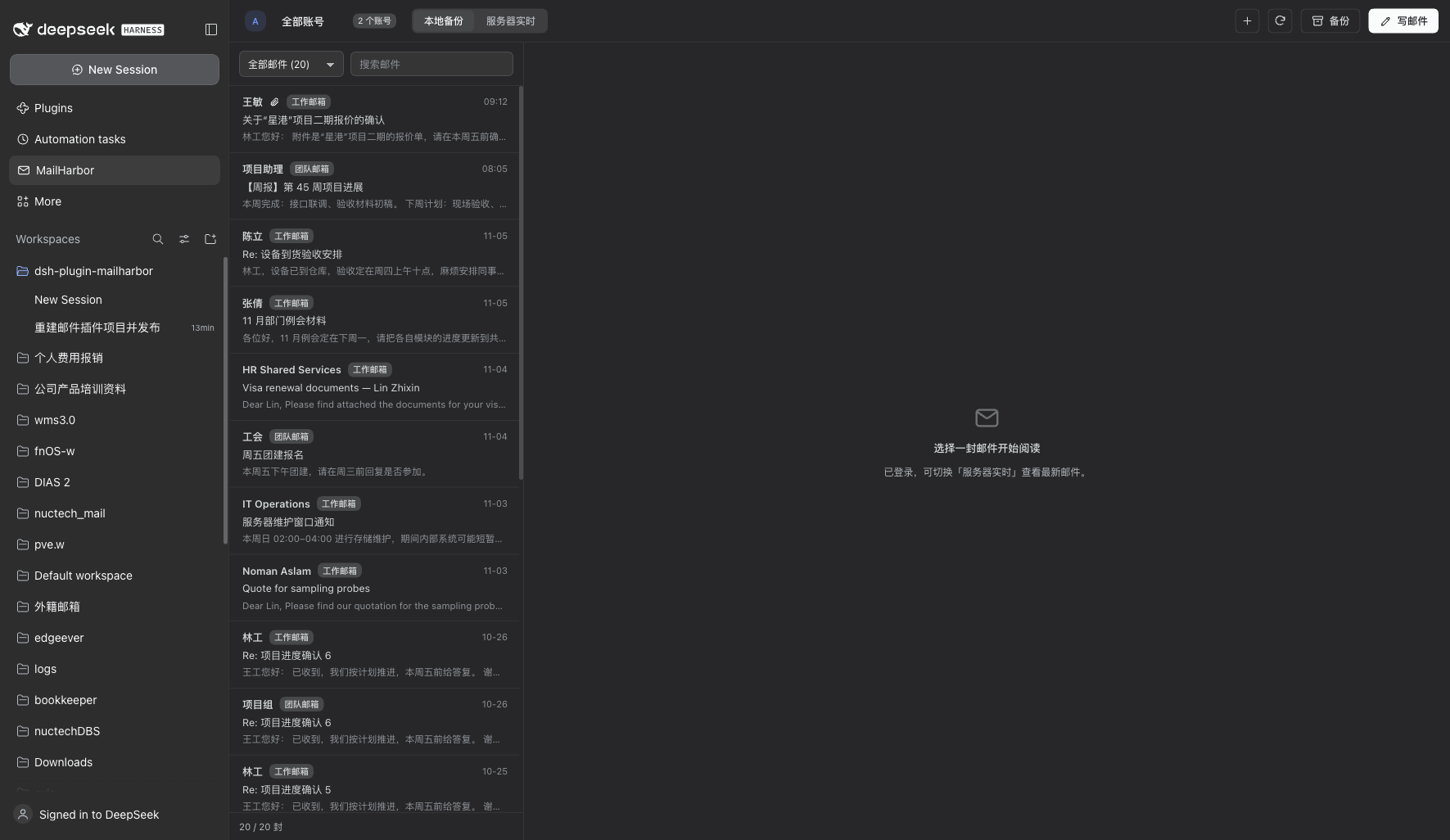 | 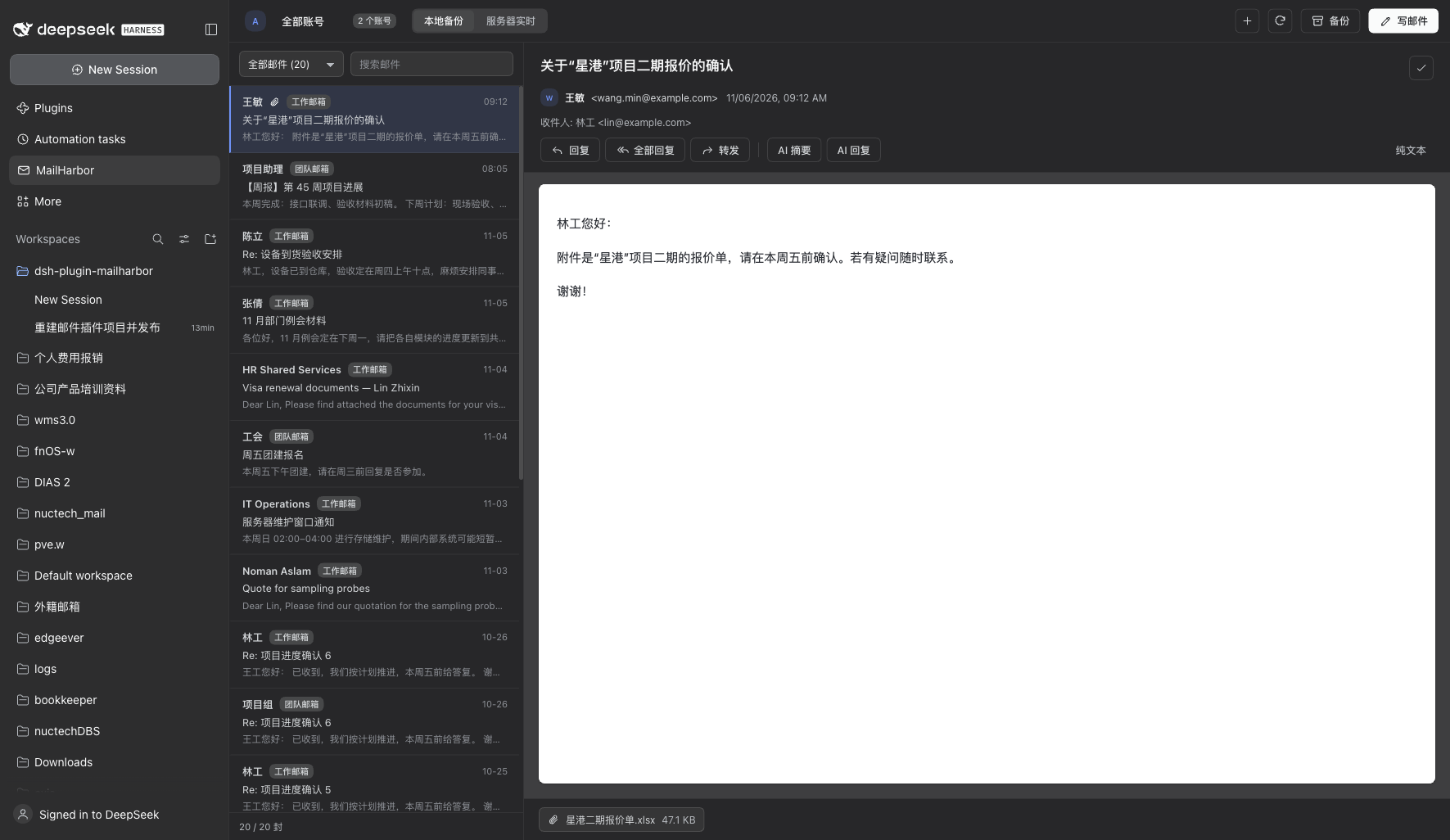 |
| AI workspace (per mail, persisted) | Composer AI with version stack |
|---|---|
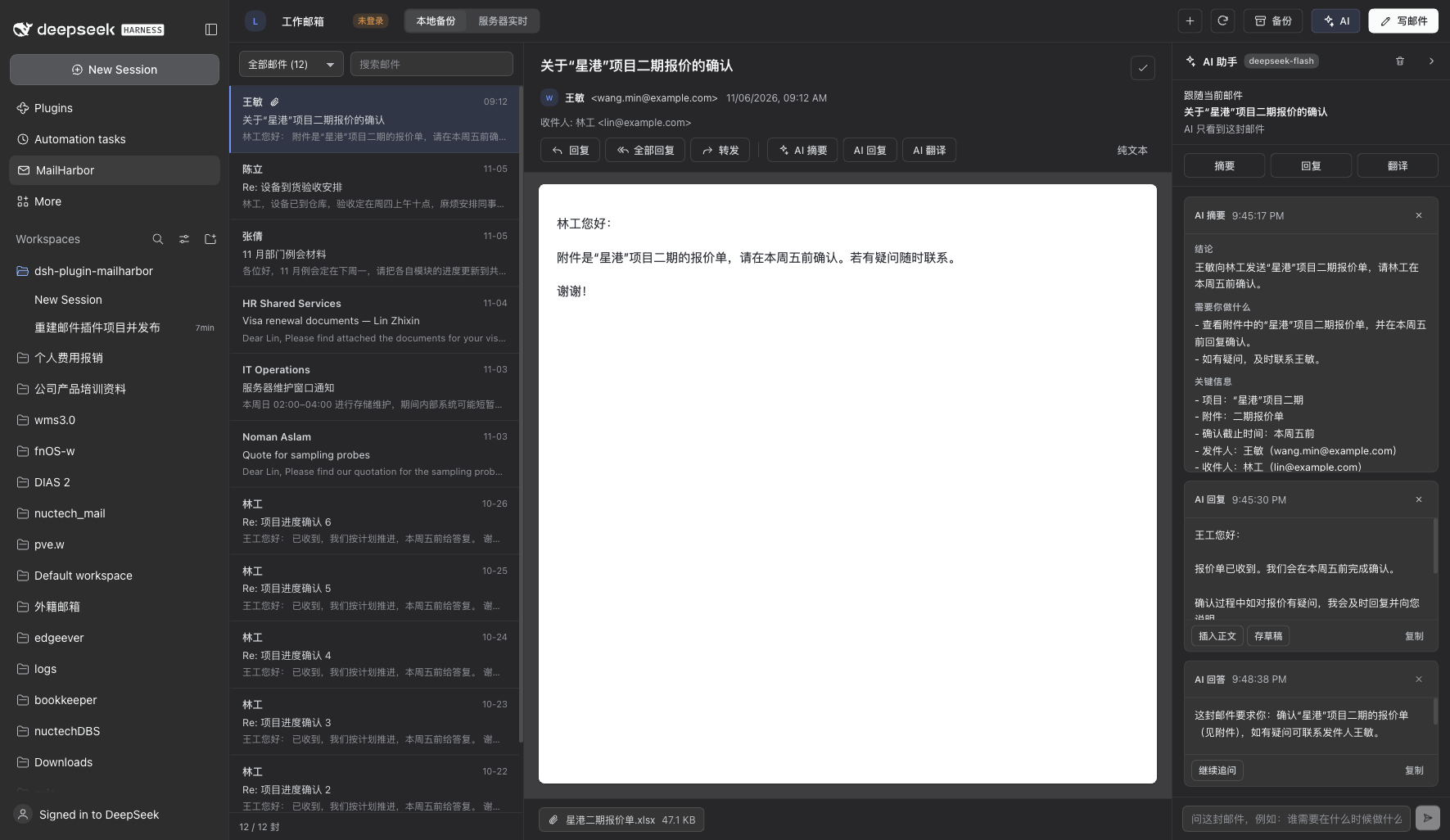 | 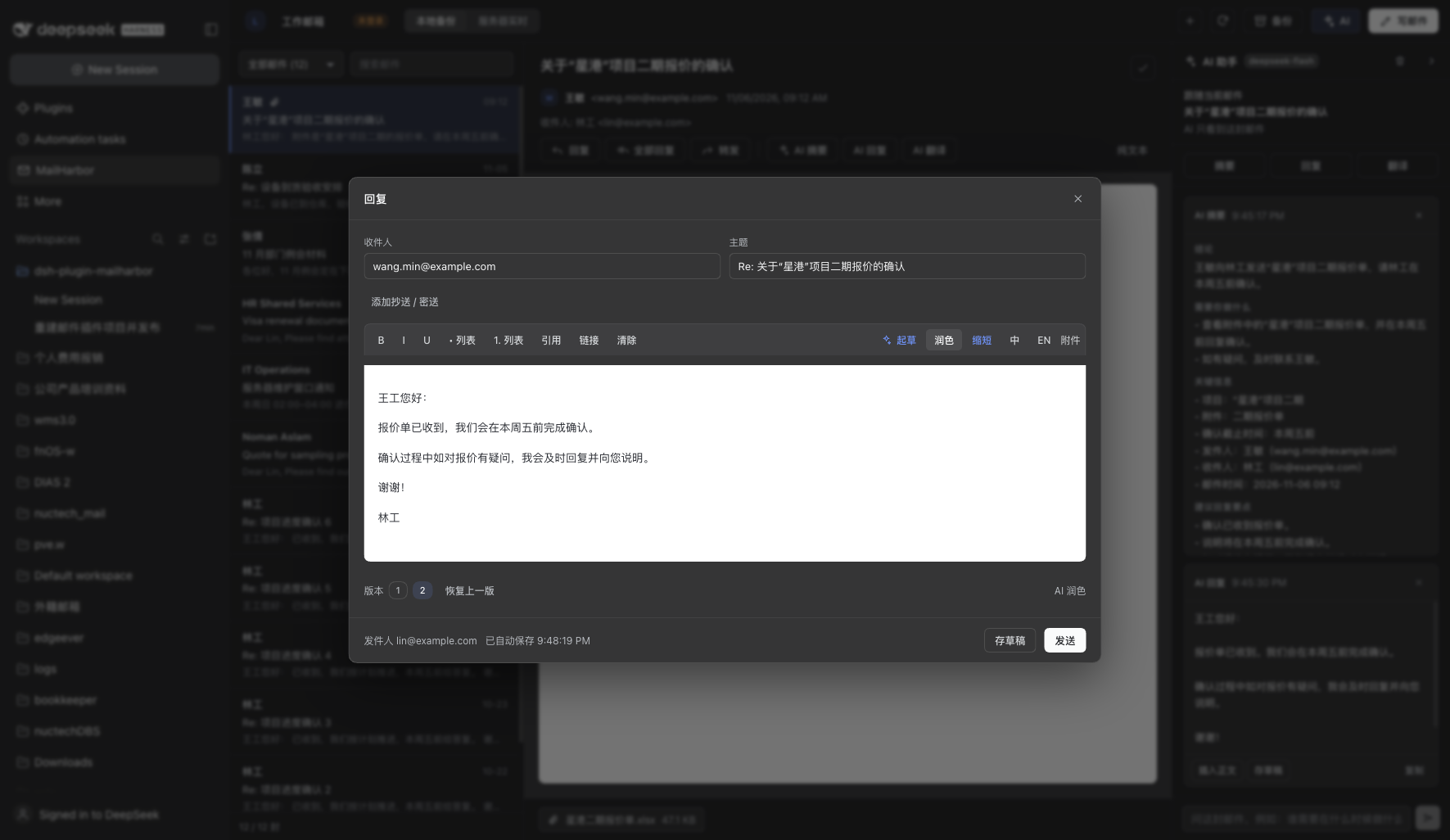 |
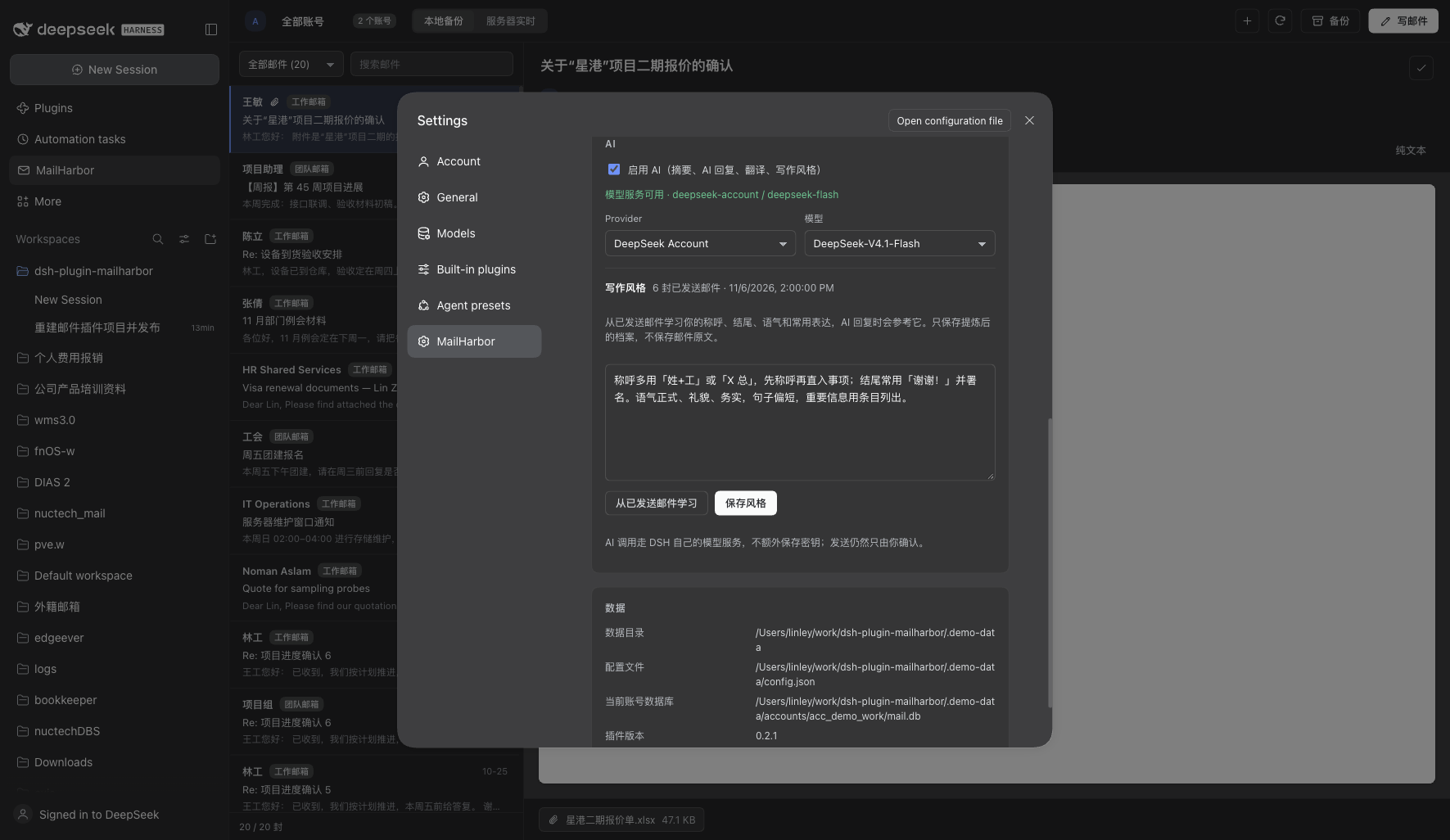
Screenshots use fabricated demo data (
node scripts/seed-demo.mjs), not a real mailbox.
Install
dsh plugin --profile desktop add @zaclinley/dsh-mailharbor
Reload the app window (or restart DSH) once so the browser bundle is picked up. The bundle layer in
cordis.patch.yml inserts the mailharbor row automatically.
From a local checkout:
git clone https://github.com/Zac-Linley/dsh-plugin-mailharbor.git
cd dsh-plugin-mailharbor
npm ci && npm run build
dsh plugin --profile desktop add link:$PWD
If you previously installed the older
dsh-plugin-mailpackage, remove that row first — both plugins claim the/mail-pluginHTTP prefix, and only one can own it.
First run
- Open the MailHarbor panel from the sidebar.
- Add an account: address + password (or app password). Advanced lets you set IMAP/SMTP hosts, ports and TLS. The account is verified against IMAP before it is saved.
- Browse Local backup right away; press Backup to pull mail from the server.
- Switch to Server live for the newest messages. Press Write to compose.
Gmail, Outlook, and other providers
- Gmail: enable IMAP in Gmail settings and use an app password (2-Step Verification required). OAuth2 sign-in arrives in v0.2.
- Microsoft 365: basic auth is disabled; use an app password only if your tenant still allows IMAP AUTH, otherwise wait for the OAuth2 release.
- Yahoo: app password. Self-hosted: any IMAP/SMTP endpoints with STARTTLS or implicit TLS.
Migrating from dsh-plugin-mail
The package was renamed and the data root moved (~/.dsh/mail-plugin → ~/.dsh/mailharbor).
A migration script ships with the package:
# preview what would change
node node_modules/@zaclinley/dsh-mailharbor/scripts/migrate-legacy.mjs --dry-run

# point the new account at the existing backup (no copy; instant, keeps the large DB in place)
node node_modules/@zaclinley/dsh-mailharbor/scripts/migrate-legacy.mjs

# or make a self-contained copy under the new data root
node node_modules/@zaclinley/dsh-mailharbor/scripts/migrate-legacy.mjs --copy
It matches accounts by email, repoints dataDir, converts read-state keys and drafts to the new
shapes, and copies the macOS Keychain password to the new service name. OAuth2 accounts are skipped
until OAuth support ships. Restart DSH afterwards so the Host reopens the database.
Data and privacy
| What | Where |
|---|---|
| Plugin state | ~/.dsh/mailharbor (DSH_MAILHARBOR_DATA_DIR) |
| Config (no secrets) | ~/.dsh/mailharbor/config.json (DSH_MAILHARBOR_CONFIG) |
| Per-account mail backup | ~/.dsh/mailharbor/accounts/<id>/mail.db + attachments/ |
| Drafts / read state | <account>/drafts.json, <account>/read-state.json |
| Passwords | OS credential store only; DSH_MAILHARBOR_PASSWORD_<ACCOUNT_ID> for scripted setups |
- The backup database is opened read-only by the panel and tools; only the backup engine writes.
- HTML mail renders in a
sandboxiframe withdefault-src 'none'; scripts and forms never run, and remote images are blocked until you ask for them. - The HTTP API listens on DSH's own loopback server and rejects cross-site writes (
403). mail_*tools never send mail: there is nomail_sendtool. Sending is a user action in the panel.- AI calls go through DSH's own
ctx.llm; nothing is sent when AI is off. The writing style stores only the distilled profile, not the sent mail it was learned from. - AI cards are stored per account in
ai-threads.json(50 threads / 50 cards each, capped, with a clear button).
Agent tools
| Tool | Purpose |
|---|---|
mail_status | Account, login state, local total, last backup |
mail_list | List local or server messages (folder, keyword, limit) |
mail_read | Read one message, with attachment metadata |
mail_search | Full-text search over the local backup |
mail_drafts / mail_draft | List and write local drafts — never sends |
mail_backup | Start an incremental backup in the background |
Development
npm ci
npm run build        # lib/index.js (Host) + lib/client.js (browser bundle)
npm run dev          # rebuild on change; DSH hot-reloads the bundle
npm run typecheck
npm run lint
npm test             # Vitest: unit + HTTP integration + bundle contract
npm run check        # typecheck + lint + build + test + pack check
Architecture:
src/host/       Node half: config, credentials, IMAP, SMTP, SQLite, backup, HTTP API, tools
src/client/     Browser half: panel, reader, composer, settings, styles
src/shared/     Wire types shared by both halves
scripts/        build.mjs (esbuild), sync-version.mjs
test/           Vitest suites (fixtures are generated, no real mailbox needed)
The browser bundle is built by esbuild into the DSH module-loader format
(window.__ModuleLoader__.load({ id, factory })), with id equal to the package name. React and
React DOM come from the shell's shared module table and are never bundled.
Releasing
Versions are managed with Changesets:
npx changeset          # describe the change and pick a bump
npm run version        # writes CHANGELOG.md and bumps package.json + VERSION constants
CI publishes from main through .github/workflows/release.yml; the NPM_TOKEN repository secret
must be able to publish @zaclinley/*. See CONTRIBUTING.md.
Roadmap
| Version | Scope |
|---|---|
| 0.1.x | Core mail workspace, backup, tools, settings, publishing pipeline |
| 0.2 | UI overhaul, migration from dsh-plugin-mail, installer polish |
| 0.3 | Drafts, unified inbox, server paging, AI summary/reply/translate, writing style |
| 0.4 | Persistent AI workspace, composer version stack |
| 0.5 | Projects from mail, task panel |
| 0.6 | Mailbox sidebar, Kanban tasks, faster server browsing |
| 0.7 | AI search, conversation grouping, folder picker, four-column task board |
| 0.8 | OAuth2 + XOAUTH2 (Gmail loopback/PKCE, Microsoft device code), token refresh |
| Later | Reports, export/import, onboarding, richer attachments |
Star history
If MailHarbor is useful, a star helps other DSH users find it.
License
MIT © 2026 Zac Linley
Related plugins
dsh-web (dsh-ssh)
zhu1090093659/dsh-web
dsh-web (dsh-remote-web-ui)
zhu1090093659/dsh-web
dsh-web-ui (dsh-ssh)
zhu1090093659/dsh-web-ui
dsh-web-ui (dsh-remote-web-ui)
zhu1090093659/dsh-web-ui