dsh-desk-pet-plugin
zg-jun/dsh-desk-pet-plugin
Floating desk pet for DeepSeek Harness: a screen-level animated pet that mirrors live session status, jumps to the session on click, and installs pets from petdex.dev.
Install
dsh plugin --profile web add github:zg-jun/dsh-desk-pet-pluginREADME
dsh-desk-pet-plugin



一只悬浮在屏幕上的桌宠插件,为 DeepSeek Harness 而生。 A floating desk pet for DeepSeek Harness.
当前版本:2.0.0
中文
它是什么
一只真正站在你屏幕上的宠物——不在网页里,而是一个独立的透明置顶浮窗进程:DSH 最小化、被遮挡、不在当前屏、甚至在全屏 App 之上,它都在。
它和别的桌宠插件不一样的地方:
- 会话状态长在它身上:气泡圆点颜色 = 左侧会话列表的状态(运行中灰 / 等你操作琥珀 / 已完成绿),点气泡直接把 DSH 拉到前台并跳到那个会话
- 多显示器安心:拔了副屏,它自动回主屏,不会丢在不存在的屏幕上
- 不当常驻后台:开关一关,进程立刻杀掉;要用时一键回来
- 不静默下载:运行环境缺失时先问你,确认才下载;若你先拨了开关,装完它会自动激活
- 宠物多到挑不完:接入 petdex.dev 社区图鉴,5,200+ 只动画宠物持续上新——奶龙、蜡笔小新、皮卡丘、水豚……每只都带待机/跑动/挥手/跳跃多套动作,安装前可以先试看
功能
- 实时状态:气泡里带一个和左侧会话列表同色的圆点 —— 运行中(灰)、等待你操作/审批/回答(琥珀)、已完成(绿)
- 点击跳转:点气泡把 DSH 拉到前台并打开对应会话(静默跳转,不弹提示)
- 拖拽:拖到任意位置,松手自动吸附回屏幕内;多显示器支持——副屏拔线后宠物自动回主屏右下角
- 右键菜单:
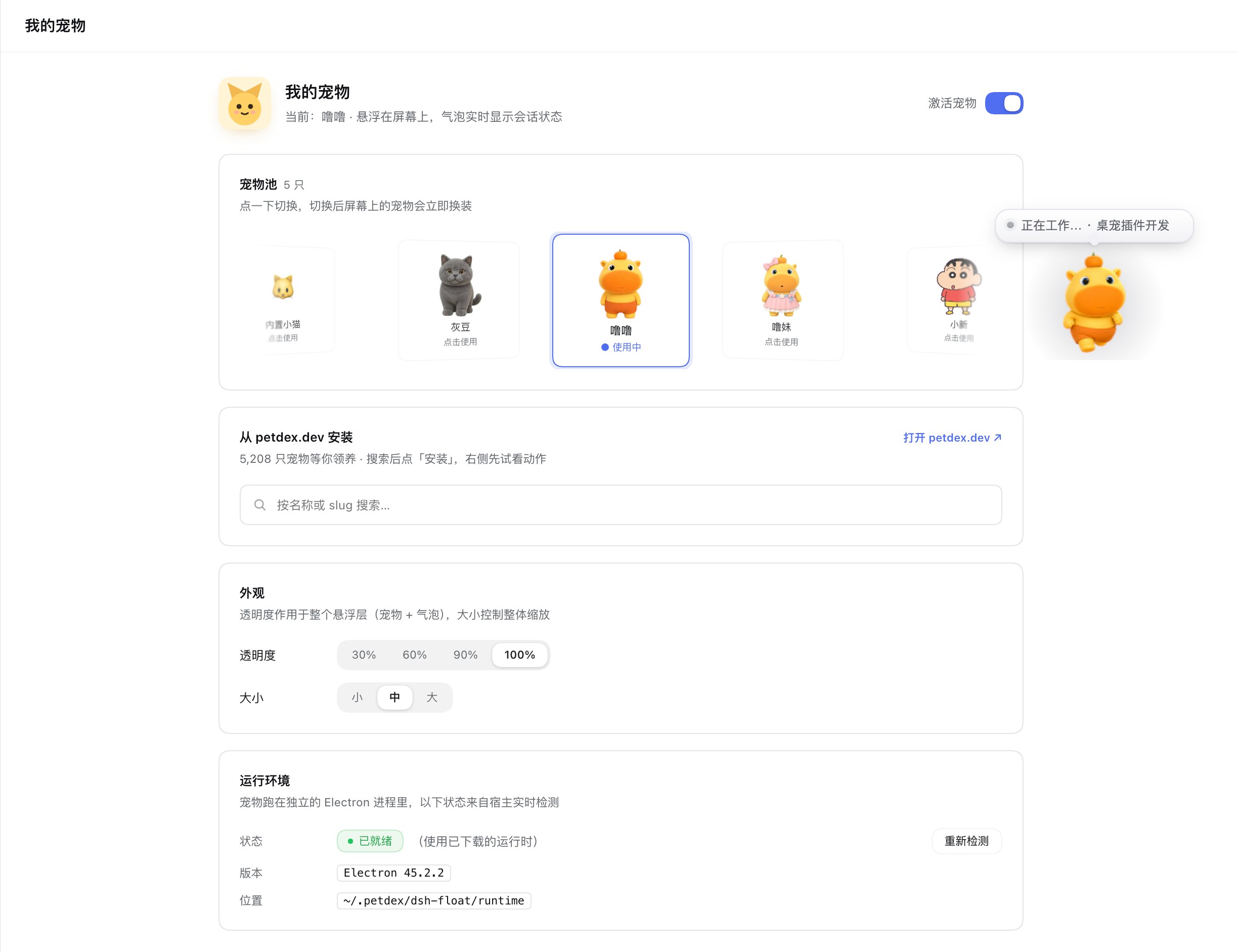
设置宠物/隐藏(隐藏前会冒泡提示去「我的宠物」页面激活,3 秒后消失) - 宠物池:3D 轮播展示已装宠物,选中项居中;拖动/滚轮浏览,点击切换
- 在线安装:内置小猫,或从 petdex.dev 搜索安装社区动画宠物;安装前可先看动作预览(待机/跑动/挥手/跳跃)
- 外观:透明度(30%–100%,默认 100%)与大小(小/中/大)实时生效
- 激活开关:设置页一键显隐,点击即翻转;关闭立即杀进程,不留后台
- 深色模式:跟随系统
安装
在 DSH 会话里(推荐,会同时装包并选入 profile):
plugin_manager action=install_bundle target="dsh-desk-pet-plugin"
或命令行:
dsh plugin --profile <你的profile> add dsh-desk-pet-plugin
装完后 DSH 左侧边栏会出现「我的宠物」入口,点击打开设置页。
运行时(首次启用时会询问)
宠物是一个独立的 Electron 浮窗进程,需要一个 Electron 运行时。不会静默下载,流程是:
- 打开设置页或激活宠物时先检查环境(不联网、不下载)
- 本机已有可用的 Electron(≥ 28)→ 直接复用,跳过下载
- 缺失或版本过旧 → 弹窗询问(显示包名,不显示体积)→ 点「下载」才开始下载
- 若你先拨了「激活宠物」再下载:下载完成后自动激活,宠物直接出现;点「取消」则清除意图,什么都不做
下载目标:
~/.petdex/dsh-float/runtime # Electron 45.2.2,约 120 MB,来自 npmmirror
- 最低可用版本 Electron 28:低于此值不采用,会提示「运行环境需要更新」
- 已下载的运行时带版本戳;与内置版本不一致时同样提示更新
- 手动指定任意 Electron:
DESK_PET_ELECTRON=/path/to/Electron - 二进制读取版本时会剔除
ELECTRON_RUN_AS_NODE(否则会读到 Node 版本)
数据与网络
| 位置 / 目标 | 内容 |
|---|---|
~/.petdex/pets/ | 已安装的宠物素材(与 petdex CLI 同目录结构) |
~/.petdex/dsh-float/ | 共享 runtime;instances/<profile>/ 下为位置 pos.json、pid、settings.json、userData |
petdex.dev / assets.petdex.dev | 只在打开图鉴、搜索、安装宠物时访问(由宿主代理,不受页面 CSP 限制) |
registry.npmmirror.com | 仅首次下载 Electron 运行时 |
清空 ~/.petdex/ 即可完全移除残留数据。
平台
- macOS:已完整验证(含 Retina、多显示器热插拔、全屏 App 之上置顶、Dock 隐藏)
- Windows / Linux:代码路径已兼容但未实测,欢迎反馈
卸载
plugin_manager action=remove_bundle target="dsh-desk-pet-plugin"
卸载后侧栏入口和页面会立即移除。
English
A desk pet that actually lives on your screen — not in a web page, but in its own always-on-top transparent window process: it stays visible when DSH is minimized, covered, on another space, even above full-screen apps.
What makes it different from other pet plugins:
- Your session state lives on it — the bubble dot mirrors the sidebar's session colors (running grey / waiting amber / done green), and clicking the bubble raises DSH straight into that session.
- Multi-monitor safe — unplug a display and the pet re-homes to your primary screen instead of vanishing into nowhere.
- No background babysitter — toggling it off kills the process instantly; one switch brings it back.
- Never downloads silently — a missing runtime asks first; if you had already flipped the switch, the pet activates itself the moment the download finishes.
- An endless pet roster — hooked into the petdex.dev community catalog with 5,200+ animated pets and counting: dragons, anime mascots, capybaras… each ships with idle / run / wave / jump action sets, and you can preview the moves before installing.
Features
- Live status — the bubble carries a status dot whose colour matches the sidebar: running (grey), waiting for you (amber, incl. approvals/questions), finished (green).
- Click to jump — clicking the bubble raises DSH and opens that session.
- Drag anywhere — released windows snap back inside the screen; on multi-monitor setups the pet re-homes to the primary display when its display is unplugged.
- Right-click menu —
Pet settings/Hide. Hiding shows a short bubble pointing to the settings page before the pet disappears. - Pet pool — a 3D carousel of installed pets with the active one centered; drag or scroll to browse, click to switch.
- Pet catalog — search and install animated pets from petdex.dev with an action preview (idle / run / wave / jump) before installing.
- Appearance — opacity (30–100 %, default 100 %) and size (S/M/L), applied live.
- Activate switch — show or hide the pet instantly; hiding kills the process, nothing stays in the background.
- Dark mode — follows the system appearance.
Install
plugin_manager action=install_bundle target="dsh-desk-pet-plugin"
or
dsh plugin --profile <profile> add dsh-desk-pet-plugin
After installation, a My pets entry appears in the DSH sidebar and opens the settings page.
Runtime (asked once, never silent)
The pet runs in a separate Electron process and needs an Electron runtime:
- Opening the settings page or activating the pet first checks the environment (no network, no download).
- A local Electron ≥ 28 is reused as-is — nothing is downloaded.
- Missing or too old → a card asks for confirmation (it names the package but shows no size) → only then does the download start.
- If you had flipped the Activate pet switch before downloading, the pet activates automatically once the runtime is ready; Cancel clears that intent and does nothing.
Download target: ~/.petdex/dsh-float/runtime (Electron 45.2.2, ~120 MB from
npmmirror). Minimum accepted local version is Electron 28; an already
downloaded runtime carries a version stamp and is refreshed when it disagrees.
Override the binary with DESK_PET_ELECTRON=/path/to/Electron.
Data
~/.petdex/pets/ holds installed pet assets. ~/.petdex/dsh-float/ holds the
shared runtime plus instances/<profile>/ (position, pid, settings, userData),
so two DSH profiles never share a pet or overwrite each other's switch. Network access happens only when you
open the catalog, search, or install a pet (proxied through the Host so the page
CSP never applies), plus the one-time runtime download.
Platform
macOS is fully verified (Retina, multi-display hot-plug, above full-screen apps, Dock hidden); Windows and Linux paths exist but are untested.
Development
npm install
npm run build             # dist/{index,client,pet-core}.js + dist/screen/ (generated)
npm run check             # build + typecheck + tests + parity + debt ratchet
npm run e2e               # isolated HOME + real Electron host/SSE/security check
npm run dev:install:apply # copy into the desktop profile, then restart DSH
dist/ is generated; sources live in src/.
See docs/architecture.md and
docs/extending.md.
License
MIT © ZGJ
Related plugins
dsh-web (dsh-task-board)
zhu1090093659/dsh-web
dsh-web (dsh-web-all)
zhu1090093659/dsh-web
dsh-TUI
ccch1mneyyy/dsh-tui
dsh-web-ui (dsh-task-board)
zhu1090093659/dsh-web-ui