dsh-tmux-xc
zhiweiwei-nami/dsh-tmux-xc
Remote tmux task cards for DeepSeek Harness: one-click native terminals, exact-pane references, snapshots, and approval-controlled agent actions.
Install
dsh plugin --profile web add github:zhiweiwei-nami/dsh-tmux-xcREADME
dsh-tmux-xc
Conversations change. Remote tasks keep running.
A shared control surface for remote tmux work in DeepSeek Harness: find a task, view its output, reference it in any conversation, and let an agent continue with the exact target—not a guessed name.
中文 · GitHub · npm · 1.0.0 · Node ≥ 22
Less tree. More task.
One host heading, one card per pane. Socket, session and window nesting no longer competes with your work. Friendly aliases come first; precise ancestry stays in Details and scoped action menus.
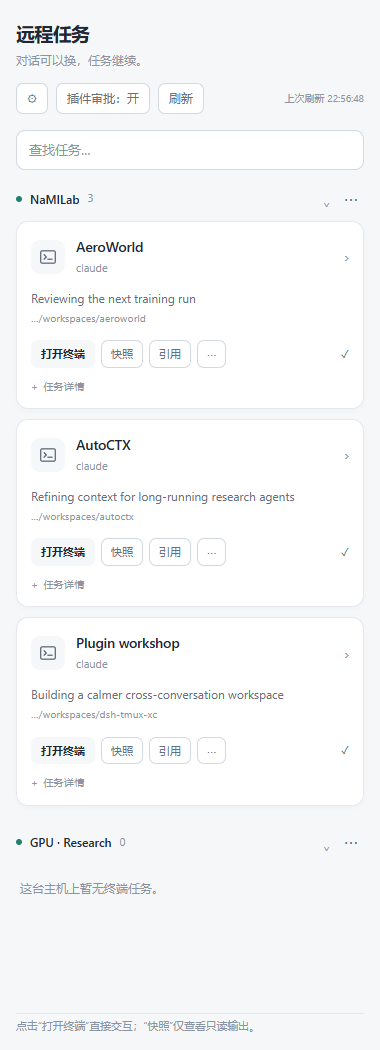
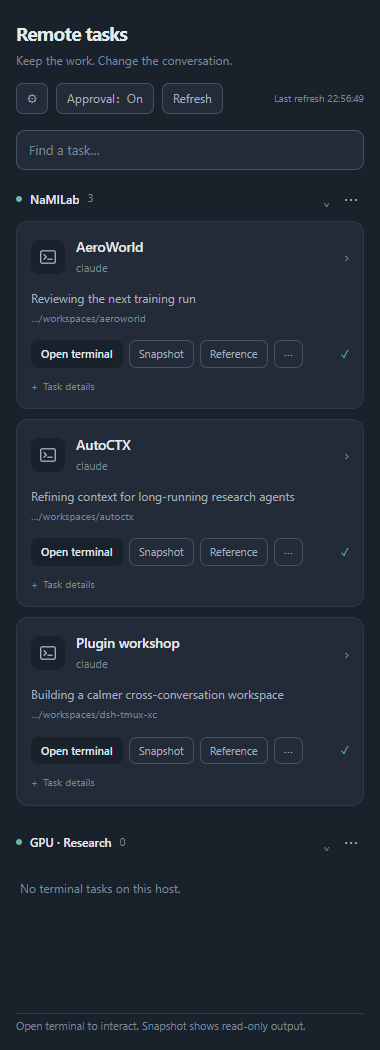
These 1.0.0 screenshots render the actual plugin component in an isolated browser harness with fixture inventory and output. They demonstrate layout, not a live production SSH connection or installed-DSH end-to-end validation.
What you can do
- Open terminal: click a card title or Open terminal to create a new native DSH terminal and connect to that exact tmux pane. The terminal is interactive; SSH authentication appears there if needed. Each click creates a fresh tab, without detaching other clients.
- Snapshot: the separate Snapshot action opens read-only, point-in-time output. Refresh for newer output and use Back to return to cards.
- Reference: insert an exact tmux target into a DSH conversation. Click a sent reference to return to its output. Inserting a reference sends no remote input.
- Continue across conversations: agents can list, create, adopt, inspect, capture, send, detach and delete configured targets. Plugin-created resources register automatically; externally created ones need adoption. Reference and alias actions also adopt as needed.
- Find and name tasks: search, local aliases, linked-pane deduplication, and compact multi-pane labels without losing exact parent targets.
- Control actions: plugin approval defaults ON. Switching it OFF removes only plugin approval—not DSH host rules or SSH authentication. Owner-side destructive confirmations remain.
- Clean up precisely: delete a pane, window or session; remove a host from the plugin, or explicitly choose remote session termination. Exact scope is shown before confirmation; no files are deleted.
- Connect externally: More → Copy Bash / PowerShell attach command remains available alongside the native terminal.
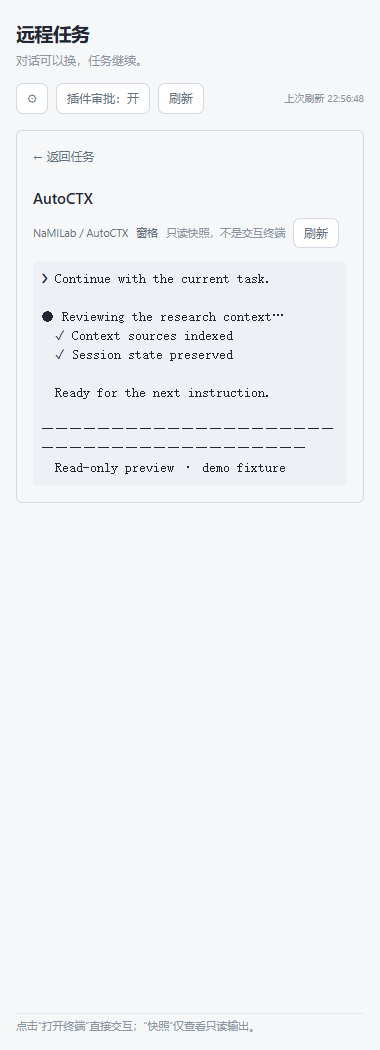
Install
Requires DSH (0.2.1-rc.2 tested), Node ≥ 22, target tmux ≥ 3.0a, and a working non-interactive OpenSSH alias.
1.0.0 is distributed through the GitHub tag; npm publication is separate. Do not assume npm's latest version matches this repository.
dsh plugin --profile <profile> add github:ZhiweiWei-NAMI/dsh-tmux-xc#v1.0.0
For Desktop, use its bundled dsh launcher or Plugins → Add plugin → third-party plugin, not an unrelated npm-installed CLI. A local release tarball is also supported. Refresh the page after installation; follow any restart-required notice from DSH.
Configure your hosts in the profile's cordis.patch.yml:
- id: tmux-xc
  config:
    hosts:
      - id: gpu
        label: GPU server
        ssh: gpu-server
        aliases:
          - { session: train-llm, alias: "LLM training" }
    approval:
      enabled: true
Aliases affect display only; they do not rename or create remote tmux resources. SSH aliases must exist on the machine performing the connection.
Safety and limits
References bind host, socket, server generation and tmux IDs. Stale targets fail rather than silently retargeting. Sending bytes does not prove a command executed; inspect/capture after sending instead of blindly repeating input. Session/window captures use their active pane.
Deleting uses native tmux containment/linking semantics; deleting the last object may stop that server. Host removal defaults to plugin-only, clearing local metadata while remote tasks keep running. Remote termination requires explicit mode and session selection. Unregister removes a registration, not processes or aliases.
Verification scope
1.0.0 changes the card interface and adds an owner-only terminal preparation route plus native terminal launch. All 565 unit tests passed. An isolated Chromium harness exercised light/dark, 320px width, search, snapshots, Back, fresh native-tab allocation, panel unmount, writable one-shot submission and close-before-ready cancellation. A real remote disposable PTY confirmed exact-pane attachment and stale-generation refusal. Independent source review found no concrete blocker. Fixture checks are not installed native DSH end-to-end tests.
Native launch requires the DSH terminal bundle and a discovered PowerShell or POSIX shell; cmd/fish are unsupported. Control characters and unsafe PowerShell quoting are rejected. Launch waits up to 30 seconds for a writable terminal, submits once and never replays after reconnecting. Submission does not prove SSH authenticated or tmux attached. Closing the terminal closes its local connection, not the remote tmux task.
Historical 0.1.1 hands-on evidence covers Linux DSH 0.2.1-rc.2, Node 22, tmux 3.0a, shell and Claude Code 2.1.302. It does not establish Windows SSH/PowerShell compatibility or all TUIs. cmd.exe is unsupported; local-transport PowerShell attach is disabled.
Changelog · Historical test evidence · Known limitations · Host configuration · MIT
Related plugins
archify (deepseek-harness)
tt-a1i/archify
WeKnora (dsh-weknora)
tencent/weknora
weknora
tencent/weknora
BrowserSkill (dsh-plugin-browserskill)
tencent/browserskill