comfy-png-inspector
zzcyydshhh/comfy-png-inspector
Reads ComfyUI PNG metadata in a model-facing comfy_png_inspect tool: point it at one PNG or a whole output folder and it reports, per image, the LoRA execution chain with every strength value, sampler settings, base model, CLIP, VAE, latent size, both prompts and bypassed nodes.
Install
dsh plugin --profile web add github:zzcyydshhh/comfy-png-inspectorREADME
English | 简体中文
ComfyUI Params Inspector
One PNG is a full recipe. Drop a ComfyUI image on the page and you get the workflow that produced it, the whole LoRA chain, and every sampler setting — export it as-is, or pour those parameters into your own template and get a fresh workflow back.
A single page you open by double-clicking index.html. No dependencies, no uploads: images never leave your machine and nothing touches the network.
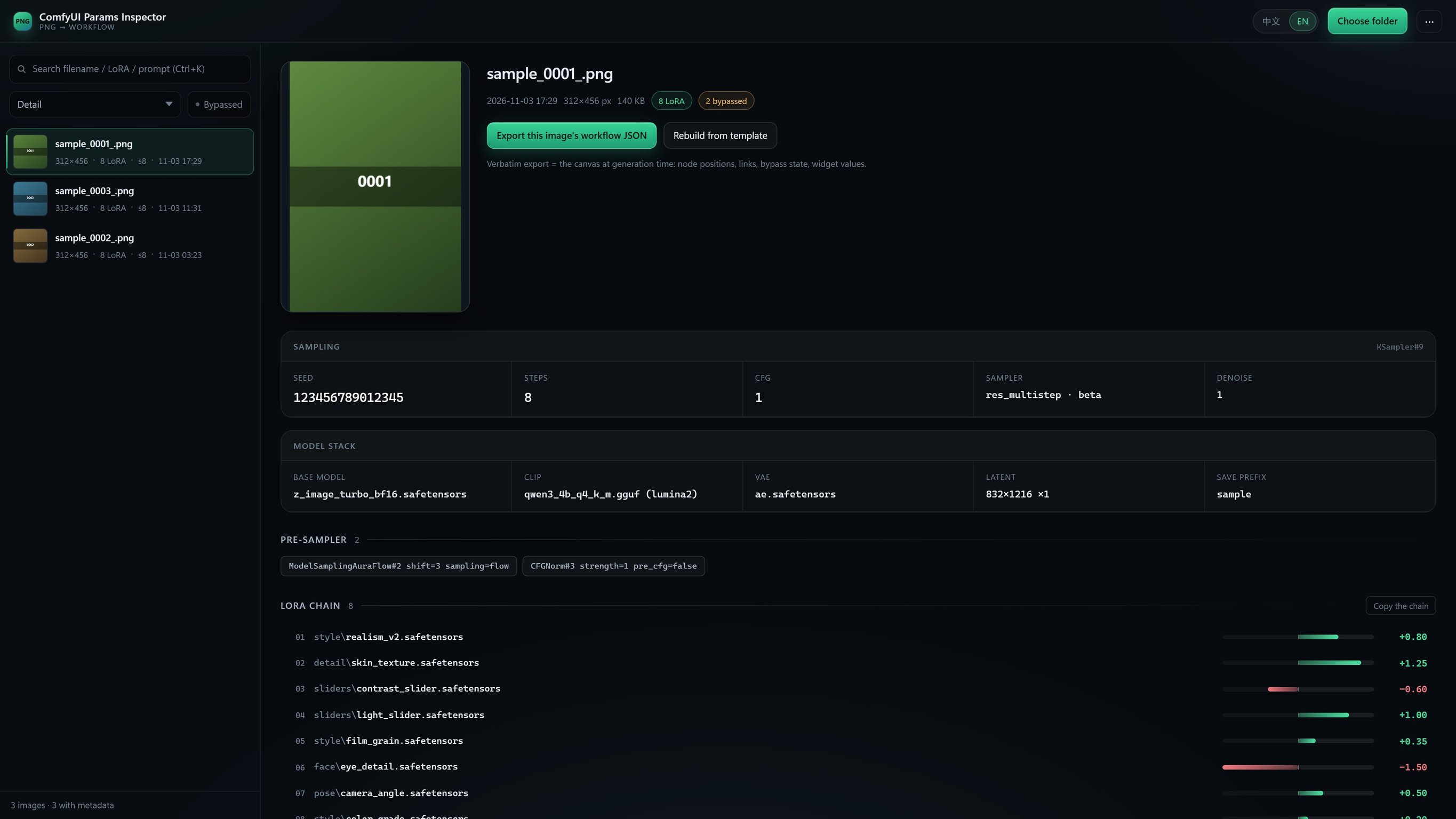
Every filename, model name, LoRA name and prompt in the screenshot is synthetic demo data, unrelated to any real asset. The UI itself is in Simplified Chinese.
What it does, in thirty seconds
| What you want | What you get |
|---|---|
| "How was this image made?" | Drop the PNG (or a whole output folder) → LoRA order and strengths, seed / steps / CFG / sampler, base model, CLIP, VAE, both prompts |
| "I want to reproduce that result" | Click export this image's workflow JSON → a .workflow.json you can drop back onto a ComfyUI canvas |
| "The PNG has parameters but no canvas graph" | Load a template workflow → rebuild from template → every parameter (including the full LoRA chain) is poured in and a new workflow is written out |
| "I need the parameters for a few hundred old images" | Export CSV / JSON, or batch-pack every workflow into a zip |
Four things you think you can see, but can't
- On the canvas ≠ in the run. The demo image has
#91and#92sitting right there — bothmode: 4(bypassed), absent from the execution graph entirely. They get their own list here: present but not part of the render. - Reading the prompt directly gives you an empty string.
CLIPTextEncode.textis usually blank because the text arrives over a link (the output ofZhPromptEnhance, say). The tool walks the link to its source and names it:CLIPTextEncode#4.text[slot 0] ← ZhPromptEnhance#79.text[slot 0]. - The negative prompt may be computed at runtime. Slot 1 of an enhancer is generated on the spot and never stored in the PNG. It is marked generated at runtime instead of passing the enhancer's input off as the result.
- Parameters are scattered across dozens of nodes. Seventeen LoRAs chained together, each at its own strength — the tool climbs back from
KSampler.modeland lists them in true execution order.
Features
- Browse: pick a folder (recursive) / drop a folder / drop single PNGs. Inline thumbnails in the list, a 212px preview that opens full-size in the detail pane.
- Parameters: seed, steps, CFG, sampler / scheduler, denoise, latent, base model, CLIP (with type), VAE, save prefix, pre-sampler patches (
ModelSamplingAuraFlow,CFGNorm, …). - LoRA chain: execution order plus strength, drawn as a zero-centred slider (green positive, red negative), copyable as one line per LoRA.
- Prompts: link resolution with slot annotations, expandable and copyable.
- Search: filename / LoRA name / prompt body.
Ctrl+Kto focus,↑↓to move. - Export: parameter table as CSV (UTF-8 BOM, opens cleanly in Excel) and as JSON.
- Workflow export: emit
.workflow.jsonverbatim, or zip a whole batch. - Template rebuild: use an existing workflow as a template, pour the parsed parameters in, get a new workflow. The template is deep-cloned and never written back.
- DeepSeek Harness plugin: the same parser ships as a DSH bundle exposing
comfy_png_inspectto the model.
Quick start
git clone https://github.com/zzcyydshhh/comfy-png-inspector.git
cd comfy-png-inspector
Open comfy-png-inspector.html (Chrome / Edge 103+, DecompressionStream required) and drag your ComfyUI output folder into the window.
- The
index.htmlat the repo root is a one-line redirect kept for GitHub Pages; opening it offline lands on the app too. - The UI is bilingual (Chinese / English): switch with
中文 / ENin the top bar, the choice is remembered, and the default follows your browser language. - Force a language with the URL:
comfy-png-inspector.html?lang=en(or?lang=zh).
Reproducing a workflow: two modes, don't mix them up
After selecting an image the detail pane offers two buttons. The difference is how much data the file carries:
| Export verbatim | Rebuild from template | |
|---|---|---|
| Button | Export this image's workflow JSON | Rebuild from template |
| Needs | A workflow chunk inside the PNG | Any canvas workflow loaded as a template |
| Result | The exact canvas from the moment of generation — node positions, links, bypass state | The template's layout, with the parsed parameters poured in |
| Best for | Straight reproduction, most reliable | API-only PNGs, or mapping back onto the template you use today |
Rebuilding replaces base model / CLIP / VAE / latent size / SaveImage prefix / prompt / KSampler fields, then rebuilds the entire LoRA chain in parsed order and rewires its tail into the consumer the template originally used (e.g. the model input of ModelSamplingAuraFlow). An itemised change list is shown first, followed by a self-check: link endpoints exist, no self-links, KSampler wiring complete.
CLI
python cli/comfy_png_parse.py ./output --no-text
python cli/comfy_png_parse.py ./output --csv index.csv --json index.json
python cli/comfy_png_parse.py a.png --full     # full prompt text
Standard library only. Same output as the web UI.
DeepSeek Harness plugin
This repository is also a DSH bundle (dsh.bundle in package.json). Installed into the Harness it adds one model-facing tool:
comfy_png_inspect(path, limit?, include_prompt?)
Point it at a PNG or an output directory and it reports, per image, the LoRA chain, sampler settings, base model / CLIP / VAE, latent size, prompts, and bypassed nodes. Parsing is shared with the web UI through comfy-png-core.js — there is no second implementation.
dsh plugin add https://github.com/zzcyydshhh/comfy-png-inspector
How it works
- PNG chunk parsing: reads
tEXt/zTXt/iTXt;zTXtand compressediTXtare inflated withDecompressionStream('deflate')(zlib stream). - Chain tracing: start at
KSampler.modeland followinputs.modelbackwards, bucketing by node class (LoraLoader*= slider,CFGNorm/ModelSampling*= pre-sampler patch). Stops atUNETLoader/CheckpointLoaderSimple, then reverses into execution order. - Bypass detection: purely from
workflow.nodes[].mode—4= bypass,2= mute. These nodes are absent from the API graph, which is exactly why "on canvas" ≠ "in the run". - Prompt resolution: a string
textis used as-is; a[node_id, slot]ref walks the link to its source. Slot ≠ 0 means the value is produced at runtime, so it is not treated as a literal. - Template rebuild: deep-clone the template → strip its LoRA nodes and links → append new nodes in parsed order and chain them → rewire the tail into the original consumer → self-check.
Known limitations
- PNG only. ComfyUI metadata lives in PNG chunks; jpg / webp have none.
- Re-saving through a screenshot tool, an IM app, or Photoshop drops the
tEXtchunk — the UI will say "no ComfyUI metadata". - Under
file://the browser will not let JavaScript scan a directory, so you must pick or drop once per session. - Rebuild is bounded by the node classes present in the template: a node class in the PNG but not in the template will not be invented (LoRA nodes are the exception — recreated from the parsed count). Read the change list before exporting.
- The zip writer is store-only (no compression) to stay dependency-free; a few hundred workflows land in the low tens of MB.
Layout
comfy-png-inspector.html  single-page app (UI + interaction, bilingual)
index.html                redirect kept for the GitHub Pages root
comfy-png-core.js         parsing & rebuild core, browser and Node
lib/index.js            DSH plugin: the comfy_png_inspect tool
cordis.patch.yml        DSH bundle plugin rows
cli/comfy_png_parse.py  CLI equivalent, standard library only
License
MIT
Related plugins
archify (deepseek-harness)
tt-a1i/archify
next-ai-draw-io (dsh-plugin)
dayuanjiang/next-ai-draw-io
WeKnora (dsh-weknora)
tencent/weknora
weknora
tencent/weknora