dsh-provider-info
cowwo/dsh-provider-info
Exibe o provider do modelo atual à esquerda da área do modelo (prioriza o nome exibido e usa Provider ID como fallback). Apenas decoração de runtime; não altera o código-fonte da página nativa.
Instalar
dsh plugin --profile web add github:cowwo/dsh-provider-infoREADME
dsh-provider-info
A DeepSeek Harness plugin.
It does exactly one thing: next to where you pick a model, it shows a small line of text saying which provider (company) is serving the currently selected model.
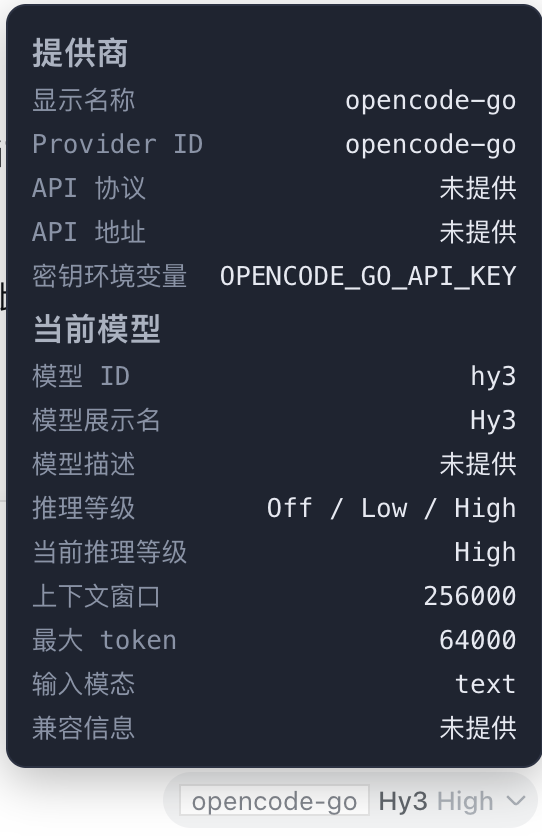
Move your mouse over that text and a small dark panel pops up with full details about the provider and the current model.
The problem it solves
DeepSeek Harness can be configured with several AI providers at once, and each provider has many models underneath. Just looking at a model name, it's hard to tell whose API it actually goes through. This plugin shows you at a glance: which provider is serving the model I'm using right now.
What it does
- Adds a small label next to the model selector showing the provider's display name for the current model. If the provider has no display name, it falls back to the provider's ID.
- Hover the label to open a small panel with two sections:
- Provider info: display name, provider ID, API protocol (e.g. OpenAI-compatible, Anthropic, etc.), API base URL, and the environment variable name for the API key.
- Current model info: model ID, display name, description, available reasoning efforts, the current reasoning effort, context window, max tokens, supported input modalities, and compat info.
- Missing values are shown as
未提供; long values wrap. - The label updates automatically as you switch models.
- Never touches your keys: it only shows the environment variable name for the credential — it never reads or shows the actual secret.
Screenshots
The small label next to the model selector (here showing the provider opencode-go):

The detail panel that appears when you hover over it:
Installation
This plugin is loaded through the DSH profile mechanism (for example the web profile).
Option 1: Install via command
dsh plugin --profile web add dsh-provider-info
Option 2: Configure manually
Add it to your profile's dependencies:
// profile package.json
"dependencies": { "dsh-provider-info": "^0.1.0" }
Then declare the bundle in your profile config:
# profile config
dsh:
  profile:
    bundles:
      - dsh-provider-info
After installing, restart dsh web once and refresh the page.
Usage
There's nothing to do. Open the chat interface and the small label appears next to the model selector automatically. Hover over it to see the details.
Privacy
This plugin only reads provider configuration from the running DSH instance on your machine to display it. All data is shown in your own browser and is never sent anywhere. The API key value is never read or displayed — only its environment variable name.
License
Plugins relacionados
dsh-our-free-model
ebony-vinyl/dsh-our-free-model
dsh-routing-suite
yjh051108/dsh-routing-suite
dsh-workbuddy-connect
corrinehu/dsh-workbuddy-connect
dsh-connect-workbuddy
dingminhua/dsh-connect-workbuddy