dsh-llm-quota
cs-qyzhang/dsh-llm-quota
Shows the balance or Coding Plan quota of the active model provider in the dsh status line, model menu and Current Model label, with background-collected history and trend charts.
Instalar
dsh plugin --profile web add github:cs-qyzhang/dsh-llm-quotaREADME
dsh-llm-quota


在 DeepSeek Harness(dsh)的状态行与模型选择器中显示当前模型供应商的剩余余额或 Coding Plan 额度,并通过历史趋势图掌握额度变化。
Displays the current model provider's remaining balance or Coding Plan quota in the DeepSeek Harness (dsh) status line and model selector, with historical trend charts for tracking changes over time.
功能 / Features
-
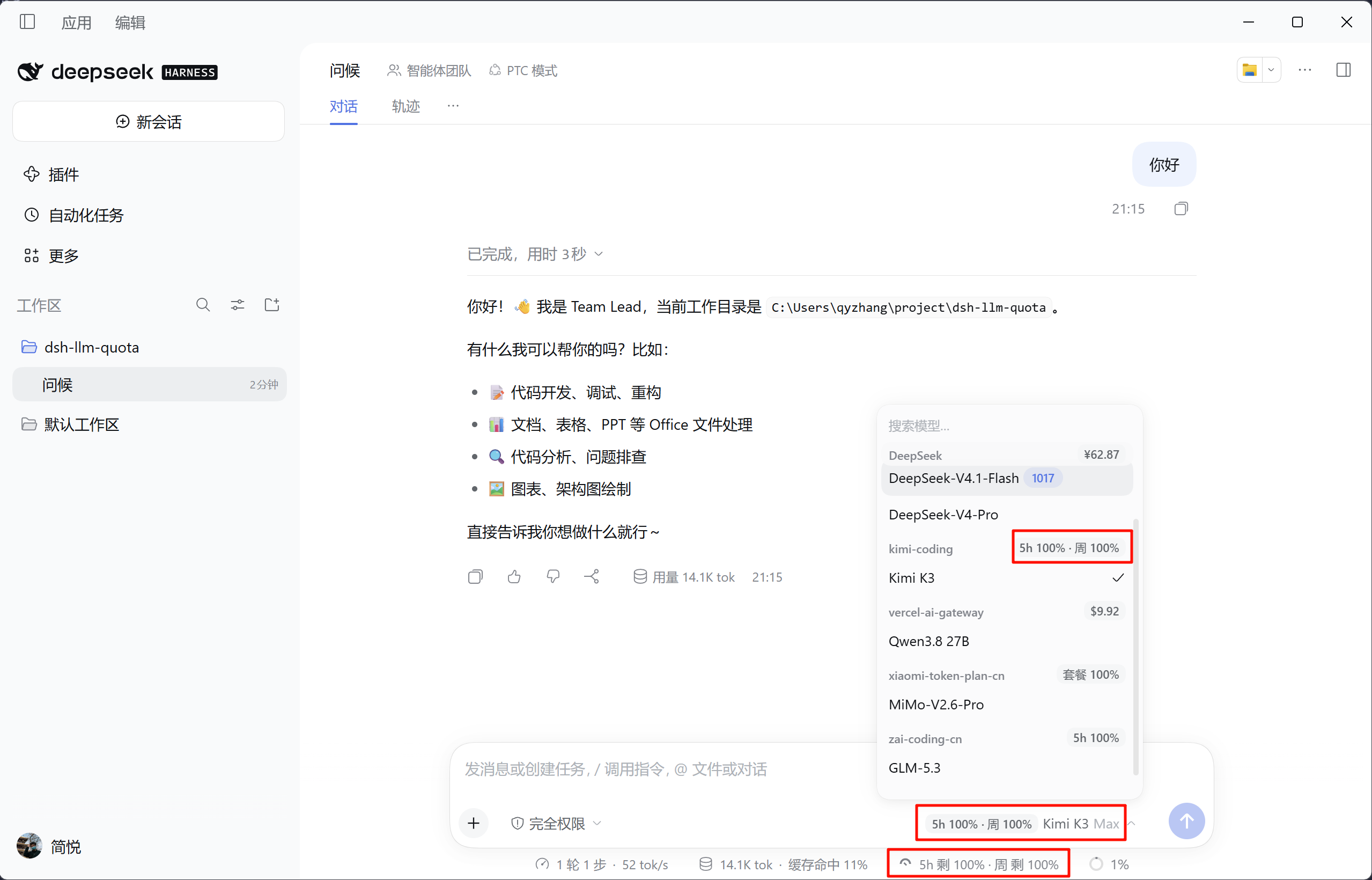
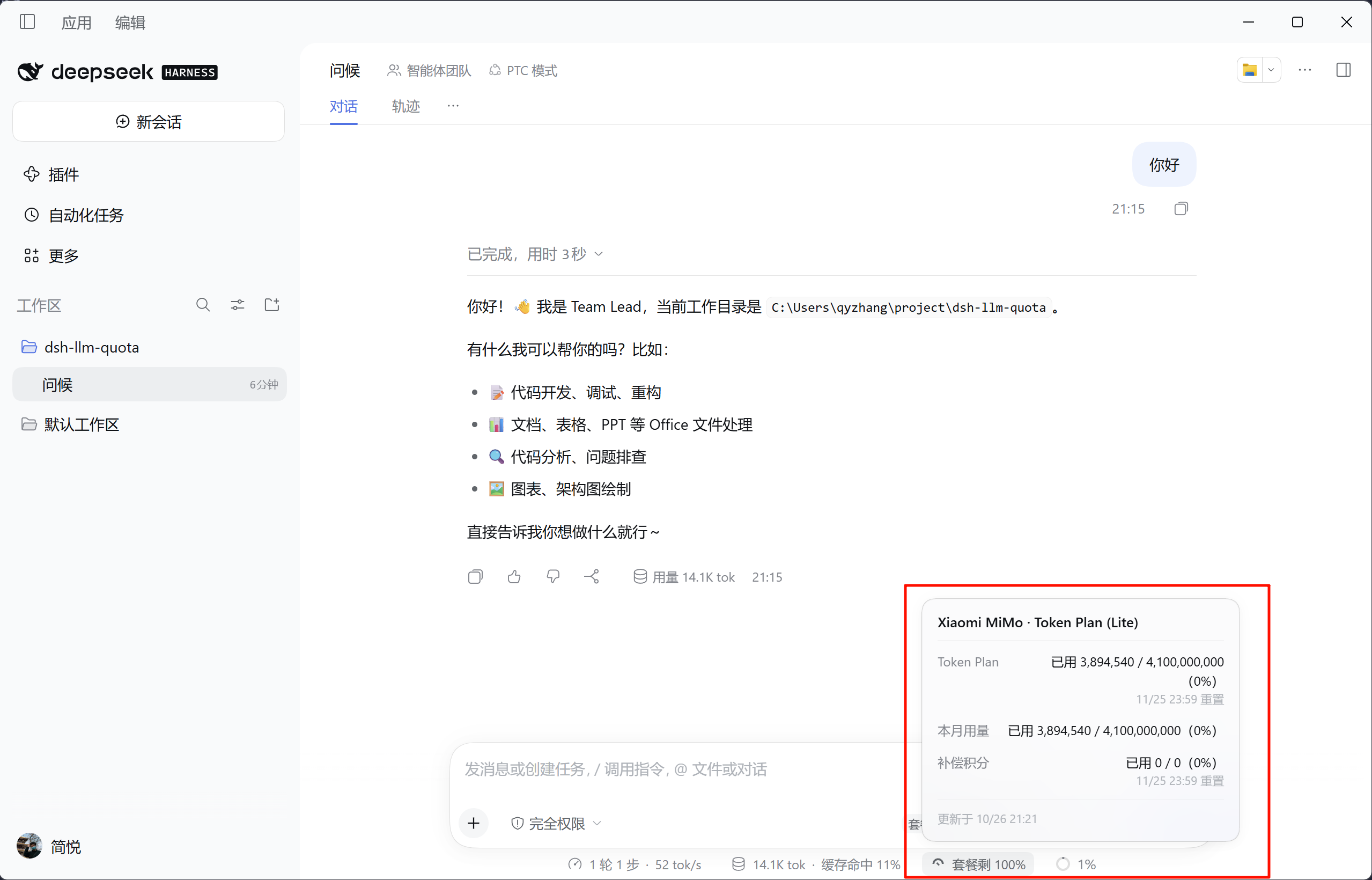
实时额度:显示余额、本月已用,或 5 小时 / 周额度的剩余百分比与重置时间。
-
多处展示:覆盖状态行、模型菜单和「当前模型」标签,点击状态行可查看详情。
-
历史趋势:后台定时采集,在详情浮层展示额度变化,无需保持会话页面打开。
-
多供应商:支持 DeepSeek、GLM、Kimi、MiniMax、OpenAI、OpenRouter 等主流服务。
-
可扩展:支持自定义 provider 路由,也可通过
providerModules加载受信任的 Host ESM Provider,接入代理、私有部署或新的额度体系。 -
Real-time quotas: Displays remaining balance, current month's usage, or the remaining percentage and reset time for 5-hour / weekly quotas.
-
Multiple locations: Available in the status line, model menu, and “Current Model” label. Click the status line entry to view details.
-
Historical trends: Collects data periodically in the background and displays changes in the detail popup, without keeping the session page open.
-
Multiple providers: Supports DeepSeek, GLM, Kimi, MiniMax, OpenAI, OpenRouter, and other popular services.
-
Extensible: Supports custom provider routes and trusted Host ESM Providers loaded through
providerModules, for proxies, private deployments, or new quota systems.
界面预览 / Preview
安装与更新 / Installation and Updates
要求 Node.js >=22.13.0。
Requires Node.js >=22.13.0.
dsh plugin --profile web add @cs-qyzhang/dsh-llm-quota@latest
也可以在 dsh 的 插件 → 添加插件 中填写 @cs-qyzhang/dsh-llm-quota,安装并启用。
Alternatively, enter @cs-qyzhang/dsh-llm-quota under Plugins → Add Plugin in dsh, then install and enable it.
卸载:
To uninstall:
dsh plugin --profile web remove @cs-qyzhang/dsh-llm-quota
卸载后重启 dsh 或刷新页面。
Restart dsh or refresh the page after uninstalling.
使用与配置 / Usage and Configuration
插件会根据当前模型的 provider 自动查询额度。完整的 provider ID、支持范围和凭证要求见供应商文档与 DSH provider 清单。
The plugin automatically queries quota based on the current model's provider. For complete provider IDs, supported scope, and credential requirements, see the provider documentation and DSH provider list.
-
凭证:默认复用 dsh 中已有的推理凭证。需要额外控制台凭证的供应商,可在 Plugins → Installed plugins → 模型额度 → 供应商额外凭证 中配置;各供应商的具体要求见供应商文档。
-
高级配置:在 Plugins → Installed plugins → 模型额度 的「插件配置」中可调整
queryIntervalSeconds、history、historyDefaultRange,并用 JSON 编辑providers与providerModules。保存会重建 Host 的路由、缓存与采集器;新增或修改自定义 Provider 的展示、文案或凭证字段后,需刷新已打开的页面以重新获取 manifest。historyDefaultRange默认近 1 小时,可选近 1 / 4 / 12 / 24 小时、7 天或 30 天,重新打开详情生效。自定义模块与手工 YAML 示例见接入新的额度体系。 -
历史数据:按查询间隔采集(默认 30 秒),仅在 Provider 声明的额度指标变化时写入本地 SQLite。关闭
history会同时停止采集、写入并移除历史查询路由。存储路径、保留策略、抽样和趋势图说明见架构文档。 -
Credentials: Reuses inference credentials already configured in dsh by default. For providers that require additional console credentials, configure them in the plugin's additional provider credentials section. See the provider documentation for provider-specific requirements.
-
Advanced configuration: Under Plugins → Installed plugins → Model quota, Plugin settings exposes
queryIntervalSeconds,history,historyDefaultRange, and JSON editors forprovidersandproviderModules. Saving rebuilds the Host routes, cache, and collector; refresh an already-open page after changing a custom Provider's view, messages, or credential declarations so the Client fetches the new manifest.historyDefaultRangedefaults to the last 1 hour, with options for the last 1 / 4 / 12 / 24 hours, 7 days, or 30 days; reopen the details to apply it. See adding a quota system for custom modules and manual YAML examples. -
Historical data: Collects on the query interval (30 seconds by default) and writes to local SQLite only when a Provider-declared quota metric changes. Disabling
historystops collection and persistence and removes the history query route. See the architecture documentation for the storage path, retention policy, sampling, and trend charts.
HTTP 接口 / HTTP API
GET /api/llm-quota?provider=<provider id>
GET /api/llm-quota/history?provider=<provider id>&days=7
GET /api/llm-quota/i18n
GET /api/llm-quota/views
接口均需要 dsh 登录认证;/history 仅在启用历史时注册,/i18n 和 /views 主要供 Client 初始化使用。完整查询参数、响应示例和失败原因见架构文档。
All endpoints require dsh authentication. /history is registered only when history is enabled; /i18n and /views primarily support Client initialization. See the architecture documentation for complete query parameters, response examples, and failure reasons.
故障排查与开发 / Troubleshooting and Development
常见错误及原因见失败原因,本地启动、浏览器验证和改动后的加载行为见本地开发与验证。
For common errors and their causes, see failure reasons. For local startup, browser verification, and reload behavior after changes, see local development and verification.
# 语法检查与自动化回归测试(不访问真实供应商)
# Syntax checks and automated regression tests (no real provider requests)
npm run check
npm test
本地 link 开发 / Local link development:以 link: 方式链接本仓库做开发时,请先在本目录执行 npm install 安装依赖;npm 正式安装不受影响。
When linking this repo for development with link:, run npm install in this directory first to install dependencies. Regular npm installs are unaffected.
文档 / Documentation
| 文档 / Document | 内容 / Contents |
|---|---|
| 架构与实现 / Architecture and Implementation | Host / Client、缓存、历史存储、HTTP 接口、故障排查与开发验证 Host / Client, caching, history storage, HTTP API, troubleshooting, and development verification |
| 供应商适配 / Provider Integration | 供应商接口、凭证、自定义 provider 与新适配器接入 Provider APIs, credentials, custom providers, and new adapter integration |
| DSH provider 清单 / DSH Provider List | dsh 三方模型 Provider 的支持清单与限制 Support status and limitations for third-party model providers in dsh |
许可证 / License
Plugins relacionados
DeepSeek-Balance-Whale-Widget
meteornox/deepseek-balance-whale-widget
dsh-context
bowenliang123/dsh-context
dsh-cost-meter
han-1413141/dsh-cost-meter
dsh-damage-pulse
wssfk12138/dsh-damage-pulse