dsh-bash-terminal-ts
drscrewdriver/dsh-bash-terminal-ts
Ferramenta shell com quatro backends do Windows (PowerShell/Git Bash/WSL/MSYS2) e terminal PTY interativo. O backend MSYS2 inicia bash.exe com -lc para que /etc/profile adicione /usr/bin e /mingw64/bin ao PATH, e injeta MSYSTEM=MINGW64 no ambiente PTY. Escrita em TypeScript, para DSH 0.1.2+.
Instalar
dsh plugin --profile web add github:drscrewdriver/dsh-bash-terminal-tsREADME
dsh-bash-terminal-ts
🌐 简体中文 | English | Français | Deutsch | Italiano | Русский | Español · 社区交流:LINUX DO · GitHub

DSH(DeepSeek Harness)插件:一个 shell 工具,在 Windows 上统一执行 PowerShell / Git Bash / MSYS2 / WSL 四种终端命令。
本仓库是
MAXeaglet/dsh-bash-terminal的 TypeScript 重写,带可用的 MSYS2/MINGW64 支持。兼容线按 DSH 宿主段划分,各线共用包名dsh-bash-terminal-ts,以 npm dist-tag 区分:
DSH 段 分支 插件版本 npm dist-tag 0.1.0-rc.2 – 0.2.1-rc.5(20 档精确枚举)main(本分支,跨版本主干)0.8.x latest>=0.2.0-rc.1 <0.2.1-0compat/0.2.0(历史,冻结)0.7.x dsh-0.2.00.1.7-rc.1 – 0.1.7.x compat/0.1.70.6.x dsh-0.1.70.1.5-alpha.1 – 0.1.5-rc.x ts/0.1.5(历史,冻结)≤ 0.5.2 dsh-0.1.50.1.2-alpha.1 – 0.1.2-rc.x main早期提交(按 tag 冻结)≤ 0.4.2 dsh-0.1.2请按你的 DSH 版本选线安装;各线版本系列互不重叠,
^安装不会跨线解析。
| 后端 | 实际执行 | 语法 / 路径 | 环境变量 |
|---|---|---|---|
powershell(默认) | pwsh -NoLogo -NoProfile -NonInteractive -Command <cmd> | PowerShell;C:\... | $env:NAME |
gitbash | Git for Windows bash -lc <cmd> | POSIX;/d/workspace;PATH 含 /usr/bin、/mingw64/bin | $NAME |
msys2 | MSYS2 bash -lc <cmd>(C:\msys64\usr\bin\bash.exe) | POSIX;/c/...;PATH 含 /usr/bin、/mingw64/bin(gcc / make) | $NAME(自动注入 MSYSTEM=MINGW64) |
wsl | wsl [-d <distro>] -e bash -lc <cmd> | Linux;/mnt/d/... | $NAME(经 WSLENV) |
每次调用都启动全新 shell:不保留状态(cwd / 变量 / 别名)——请传 workdir 而不是用 cd。
界面预览
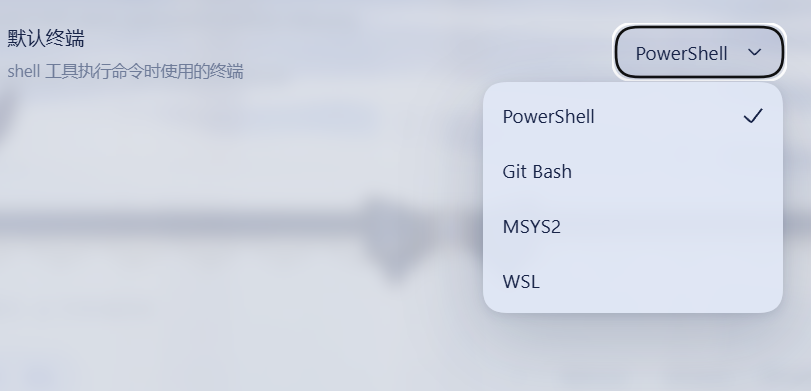
设置 → 通用 里的「默认终端」行:用户在 PowerShell / Git Bash / MSYS2 / WSL 之间选择,shell 工具只按这个设置执行,模型无法覆盖:
设计要点
- 终端由用户决定,AI 无法更改:Web UI 设置页(设置 → 通用)出现"默认终端"下拉(PowerShell / Git Bash / MSYS2 / WSL);
shell工具永远只使用该设置,不暴露终端参数给模型。设置通过 DSH settings 系统持久化(settings.yaml)。 - 不占用
ctx.shell能力接缝:DSH 自带的沙箱化pwsh工具保持原样可用;本插件的shell工具是额外的多终端入口。 - 通过共享的
ctx.subprocessseam 派生进程:进程树终止(Windowstaskkill /T)、SIGTERM→grace→SIGKILL、输出 spill 文件,与官方dsh-tool-bash/dsh-tool-pwsh行为一致。 - 后台任务注册进通用
jobsregistry,支持run_in_background/job_output/job_kill。 - 前端设置页的「默认终端」是枚举(UI 自动渲染为下拉),模型每次调用都只按该设置执行,无法自行切换终端。
- 钉版 POSIX 运行时载荷(第五个一等终端后端,默认关):载荷包
@drscrewdriver/posix-runtime-win32-x64(命名政策:我们的制品不带 bash/gitbash/msys token;里面是 Git-for-Windows 运行时树)。两层开关:enablePosixPayload: true(操作者门,启动时跑摘要校验)+ 设置页里的「POSIX payload」行开关shellPayload(默认关,决定已装载载荷能否进选择器/被选为默认终端);它有自己的目录行、专属工具描述(bash -lc)、交互终端与payload-unconfined执法面,不顶替 Git Bash 槽位。载荷不随包下载,用node scripts/provision-payload.mjs --from <本地 PortableGit SFX>自备(反解包 + SHA-256 钉版,自管不取用任何第三方载荷包);检测到已装 WSL 发行版时只记一条建议日志(WSL 里的 bash 通常更好用,拿不准选wsl),不屏蔽载荷行——硬门只有摘要校验一条;校验不过即 fail-closed,绝不裸跑、绝不静默换执行器。详见src/payload.ts头注释。 - 终端语义预设模板(
agent-presets/):把「默认终端 + 命令语法 + 终端归属权」显式声明在 Agent Preset 层的可分发模板(PowerShell / Git Bash / MSYS2 / WSL2 / 钉版 POSIX 载荷五变体,含 Terminal authority 锚),用npm run presets:install装机——对标那些「安装即改写默认终端语义」的插件:同一份 bash-first 体验,由你在预设层自己选,可审计、可复现。
安装(web profile)
标准安装(npm 发布后,官方 bundle 机制)
插件带官方 dsh.bundle manifest(包内 cordis.patch.yml),profile 列出本包时 DSH 自动应用挂载,无需手改 profile 配置:
# 1. 安装插件包
npm install -g dsh-bash-terminal-ts
dsh plugin --profile web add dsh-bash-terminal-ts   # 自动加进 profile 的 bundles 并应用 patch

# 2. patch DSH 设置白名单(DSH 限制,见下方说明)
powershell -ExecutionPolicy Bypass -File install.ps1 install

# 3. 重启 dsh web
已用临时 profile 实测:
bundles: [dsh-bash-terminal-ts]→ dump-config 自动出现tool-bash-terminalentry。
pnpm 用户须知:node-pty 构建脚本放行
本插件依赖原生 PTY 库 node-pty(微软维护,VS Code 同款)实现交互终端。自 0.7.1 起钉在 1.2.0-beta.15(与 DSH 宿主两条版本线同版):该线 tarball 自带全平台预编译产物,pnpm 10+ 即使拦截安装脚本,运行时加载器也会兜底从 prebuilds/<platform>-<arch>/ 加载,不编译即可运行。pnpm add 末尾的下述提示只是告知脚本被跳过,放行一次即可消除:
Error: ERR_PNPM_IGNORED_BUILDS
  Ignored build scripts: node-pty@1.2.0-beta.15
pnpm approve-builds      # 交互式勾选 node-pty
# 或在 profile 的 package.json 声明后重建:
#   "pnpm": { "onlyBuiltDependencies": ["node-pty"] }
pnpm rebuild node-pty
自有 dsh 插件中仅本插件带原生依赖;其余 0.2.0 线插件(search-index、session-steward、patch-edit-plus、browser-cdp、date-wrapper)与 live-token-stats 均为纯 JS 包,pnpm 直接安装即可,无需放行。
本地开发安装(junction 直连,改源码即时生效)
# 1. 链接插件包到 profile 的 node_modules(junction,改源码即时生效)
$profile = "$env:USERPROFILE\.dsh\profiles\web"
New-Item -ItemType Junction -Path "$profile\node_modules\dsh-bash-terminal-ts" -Target "D:\workspace\projects\dsh-bash-terminal-ts" | Out-Null

# 2. 让插件能解析 @deepseek-ai/* 依赖(junction 到 profile 的依赖树,插件与宿主共用同一份模块实例)
New-Item -ItemType Junction -Path "D:\workspace\projects\dsh-bash-terminal-ts\node_modules\@deepseek-ai" -Target "$profile\..\node_modules\@deepseek-ai" | Out-Null

# 3. 让 profile 通过官方 bundle 挂载插件(install.ps1 install 会自动做;等价于在 dsh.profile.bundles 加 "dsh-bash-terminal-ts")
# 4. (仅修改前端源码后)重新打包 client bundle:
#    cd D:\workspace\projects\dsh-bash-terminal-ts && node scripts/build-client.mjs
# 5. 重启 dsh web
⚠️ 不要在本项目里跑
npm install:它会删掉上面第 2 步的 junction,转而给插件装一份独立的@deepseek-ai/*副本 —— 插件和宿主就不再共用模块实例,宿主升级后插件会停在旧 API 上 (本项目曾因此停在 0.1.0-rc.6)。只刷新 lock 时用npm install --package-lock-only。
兼容性:要求 DSH ≥ 0.1.7-rc.1(
compat/0.1.7线)或 ≥ 0.2.0-rc.1(compat/0.2.0线,本分支)。 历史背景:0.1.5 把浏览器模块表里的@deepseek-ai/dsh-client-runtime改名为@deepseek-ai/dsh-client-store且只按精确裸名命中;旧 bundle 在新宿主上会报Failed to load plugins/require(...) missed the module table。另:0.1.5 的 Web 设置面改为
settings.describe()动态枚举,不再有 namespace 白名单 (settings-not-exposed已不存在),install.ps1里的白名单 patch 只是历史遗留、可忽略。
当前已不再需要手动改 profile 的
cordis.patch.yml:插件包内自带dsh.bundle.patch(包内cordis.patch.yml),只要 profile 的dsh.profile.bundles里有dsh-bash-terminal-ts,DSH 就会自动挂载。
验证组合树(无需重启):
node "$env:APPDATA\nvm\<node-version>\node_modules\@deepseek-ai\dsh\lib\bin.js" --profile web --dump-config | Select-String dsh-bash-terminal-ts
shell 别名:让宿主官方终端也列出 Git Bash / MSYS2(可选)
本插件自带的「终端(多 shell)」tab 不依赖任何东西,四种 shell 开箱即用。但宿主官方右栏终端的 shell 菜单是按可执行文件名去重的(discoverShells 拿 basename 当 Map 键、保留最早一条),而 Git Bash 与 MSYS2 都叫 bash.exe —— 二者在官方菜单里最多只能出现一个。
包内 cordis.patch.yml 因此给官方终端追加两个带自己文件名的候选:C:\msys64\usr\bin\msys-bash.exe 和 C:\Program Files\Git\bin\git-bash.exe。它们是硬链接(同一 inode,不占空间,删掉即恢复原状),必须机器上真存在才有条目;不存在时宿主按候选逐个跳过,菜单与改动前完全一致,不报错。
第三个候选是钉版 POSIX 载荷的菜单入口:%LOCALAPPDATA%\dsh-bash-terminal-ts\payloads\bash-terminal\bin\bash-terminal.exe(路径由 !!js 从 LOCALAPPDATA 拼出,每用户自适应)。它同样是指向载荷 bin\bash.exe 的硬链接,但名字故意叫 bash-terminal.exe 而不是任何裸 bash:官方菜单的 bash 键已经属于 WSL 转发器,重名会把 WSL 挤出菜单。链接与稳定 junction 由 scripts/provision-payload.mjs(摘要校验通过后才写)或 node scripts/link-shells.mjs 自动创建在用户可写的 LOCALAPPDATA 里,不需要提权;没装载过载荷的机器上该路径不存在,同样按候选跳过。插件自己的底部终端选择器与官方菜单同口径:WSL 发行版在场只是一条建议日志(「真 WSL bash 通常更好用」),不屏蔽载荷行——硬门只有摘要校验一条。
建别名(任选一条路径):
# A. 包内脚本:能建的就建,建不了的原样打印出管理员命令
node scripts/link-shells.mjs

# B. 手工建(MSYS2 那条普通权限即可;Git 那条要在**管理员** PowerShell / cmd 里)
cmd /c mklink /H "C:\msys64\usr\bin\msys-bash.exe"       "C:\msys64\usr\bin\bash.exe"
cmd /c mklink /H "C:\Program Files\Git\bin\git-bash.exe" "C:\Program Files\Git\bin\bash.exe"
手上没有现成的管理员终端时,从普通权限的会话里拉一个起来(会弹一次 UAC,点“是”):
Start-Process cmd -Verb RunAs -Wait -ArgumentList '/c','mklink /H "C:\Program Files\Git\bin\git-bash.exe" "C:\Program Files\Git\bin\bash.exe" > "%TEMP%\mklink.log" 2>&1'
Get-Content "$env:TEMP\mklink.log"
别名与原件行为完全一致(实测 git-bash.exe -i:MSYSTEM=MINGW64、POSIX 根 C:\Program Files\Git\、$0=/usr/bin/bash、git 可用)—— 因为链接就待在 Git\bin\ 里,bash 按自身路径推根时拿到的仍是同一个根。
Git 那条绕不开提权,两个独立原因:CreateHardLink 要求对源文件有写权限(Program Files 对标准用户拒绝,所以链接也挪不到别的目录去建);而链接又必须留在 Git\bin\ 里 —— bash 按自身路径推导它的 POSIX 根,换目录就找不到 /usr/bin、/etc。
交给 agent 代劳 —— 把下面这段原话贴给一个以完全权限(管理员)运行的 agent:
请以管理员权限为 DSH 宿主官方终端创建两个 shell 别名硬链接:
  cmd /c mklink /H "C:\msys64\usr\bin\msys-bash.exe" "C:\msys64\usr\bin\bash.exe"
  cmd /c mklink /H "C:\Program Files\Git\bin\git-bash.exe" "C:\Program Files\Git\bin\bash.exe"
目标文件已存在时跳过创建、不要覆盖。然后跑本包内的 node scripts/link-shells.mjs 校验,
两条都应输出 ok ... (same inode, nlink=2)。最后重启 DSH 让官方终端重新发现 shell。
约束:不要复制文件、不要建符号链接(symbolic link)、不要把链接放到其它目录、
不要改动 bash.exe 本身。若提权失败,把确切的命令和错误码回报给我,不要改用拷贝兜底。
改完重启 DSH,官方终端「新建」下拉应出现 msys-bash.exe / git-bash.exe,同时 bash(Windows 上解析到 WSL 转发器 C:\Windows\System32\bash.exe)必须仍然在列 —— 本包不会为了 Git 去占 bash 这个键而把 WSL 挤出菜单。
⚠️ MSYS2 还差一步:
~/.bashrc的 PATH 守卫(C:\msys64\home\<你>\.bashrc)。 宿主把每个候选都当交互式非登录 shell 起(shellCandidates是纯字符串数组,传不了-l),而非登录 shell 不会 source/etc/profile—— MSYS2 的/usr/bin正是由它加进 PATH 的。不补这一步,msys-bash.exe能开、但uname/ls一律「未找到命令」。 Git Bash 不需要这个守卫(它自己就会把/usr/bin、/mingw64/bin注入 PATH,实测cygpath、git直接可用)。# >>> dsh-bash-terminal-ts PATH guard >>> case ":$PATH:" in *":/usr/bin:"*) ;; *) PATH="/usr/bin:$PATH" ;; esac # <<< dsh-bash-terminal-ts PATH guard <<<前置在这里是安全的:
/usr/bin/gcc.exe不存在,mingw64 工具链仍然先命中(实测command -v gcc仍为/mingw64/bin/gcc)。但跑过pacman -S mingw-w64-*之后要重测一次,否则可能反过来抢掉编译器。回滚:删掉两段哨兵注释之间的内容。
使用
用户在 Web UI 设置默认终端:打开设置(齿轮)→ 通用 →「默认终端」下拉,选择 PowerShell / Git Bash / MSYS2 / WSL 之一。改动即时生效并持久化。
模型看到 shell 工具后,执行命令时自动使用你选择的终端(工具不暴露终端参数,模型无法更改你的选择):
- 默认终端 = Git Bash 时:
shell(command: "git status")走 Git Bash - 默认终端 = MSYS2 时:
shell(command: "gcc --version")走 MSYS2(MINGW64 环境,/mingw64/bin的 gcc、make 可用) - 默认终端 = WSL 时:
shell(command: "ls -la /mnt/d/workspace")走 WSL;传distro: "Ubuntu"可指定发行版 - 默认终端 = PowerShell 时:
shell(command: "Get-Process node")走 PowerShell
模型使用示例
- 一次性命令(默认终端):
shell(command: "git status", description: "查看 git 状态") - 跨轮保持状态(交互式):
terminal(action: "open")→ 记下sessionId→terminal(action: "send", sessionId, input: "cd /d/project\n")→terminal(action: "send", sessionId, input: "npm run dev\n")→terminal(action: "close", sessionId) - 中断正在运行的程序:
terminal(action: "signal", sessionId, signal: "SIGINT") - 查看活动会话:
terminal(action: "list") - 沙箱拒绝后升级:
shell(command: ..., sandbox_permissions: "workspace-write", justification: "...")
配置
Web UI 设置(推荐):设置 → 通用 →「默认终端」。
插件 row 的 config(覆盖默认,作为设置的 composition 基准):
| 键 | 默认 | 说明 |
|---|---|---|
defaultShell | powershell | 设置未覆盖时的后端 |
timeoutMs | 120000 | 默认超时 |
maxTimeoutMs | 600000 | 调用方 timeoutMs 上限 |
pwshPath | 自动探测 | 固定 pwsh.exe 路径 |
gitBashPath | 自动探测 | 固定 git bash.exe 路径 |
msys2Path | 自动探测(C:\msys64\usr\bin\bash.exe 优先,msys2.exe 兜底) | 固定 MSYS2 bash.exe 路径 |
wslPath | 自动探测 | 固定 wsl.exe 路径 |
发布(npm)
npm 账号已启用 2FA 发布验证,需一次性验证码:
cd D:\workspace\projects\dsh-bash-terminal-ts
npm publish --otp <验证码>   # 验证码来自你的认证器
发布前先 npm pack --dry-run 检查内容、跑 npm run build 重建(tsc 服务端编译 + client bundle + 测试编译)。
卸载
推荐直接运行:
powershell -ExecutionPolicy Bypass -File install.ps1 uninstall
它会删除 junction、恢复设置白名单、清理旧版遗留的 cordis.patch.yml 挂载块,并从 dsh.profile.bundles 移除 dsh-bash-terminal-ts。之后重启 dsh web 即可。
手动卸载时,除了删除 node_modules\dsh-bash-terminal-ts,还要记得从 profile package.json 的 dsh.profile.bundles 中移除 dsh-bash-terminal-ts。
交互式终端(terminal 工具)
terminal 工具在 PTY 接缝(node-pty;Windows 上因上游 spawnTerminal 的 process inspector 仅支持 POSIX,由 lib/terminal.js 直连 node-pty,非 Windows 仍走官方 ctx.subprocess.spawnTerminal)上提供持久交互会话:
action: open启动一个真实终端会话(按你设置的默认终端;wsl 可传distro),返回sessionIdaction: send写入输入并读新输出;action: read只读不写;action: signal向前台进程组发信号(SIGINT = Ctrl+C)action: close终止会话- 会话状态跨调用保持(cwd / 变量 / 别名),适合 REPL、ssh、交互式 CLI
send会等待输出稳定(300ms 静默,上限 5s)返回完整回复;输出超 1MB 时报truncated提示- 输入用
\\n(或 \r)结尾表示回车
沙箱(官方机制对接)
shell 工具走 DSH 官方沙箱接缝(ctx.sandboxPolicy + ctx.sandbox):
- 每次调用解析当前沙箱策略;
danger-full-access会话直接执行(不包装)。 - PowerShell 后端经
ctx.sandbox.confine包装 argv —— 与官方 executor 相同的 fail-closed 语义:请求受限模式但无可用后端时抛SandboxUnavailableError,拒绝裸跑。 - Git Bash 后端不包装:DSH 的 Windows ACL 受限令牌 runner 与 Cygwin/MSYS2 不兼容(bash 启动即因
CreateFileMappingWin32 error 5 终止),因此 Git Bash 在受限模式下也不经沙箱包装;结果报告enforcement: gitbash-unconfined。 - MSYS2 后端同样不包装(同一 Cygwin/MSYS2 运行时不兼容);结果报告
enforcement: msys2-unconfined。 - WSL 后端不包装:WSL 独立 Linux 虚拟机本身就是隔离(结果报告
enforcement: wsl-isolation)。 - 受限模式下被沙箱拒绝时,结果携带官方标记
[sandbox: file access denied under <mode> mode]与同轮升级提示;模型可凭sandbox_permissions+justification发起一次升级(经ctx.approval用户审批),与官方 bash/pwsh 工具完全一致。 - 注意:DSH 的 Windows ACL runner 可用时,PowerShell 的受限模式会经它包装;Git Bash 与 MSYS2 因 Cygwin/MSYS2 不兼容而保持不包装。
⚠️ 安全说明
shell 工具在受限模式下:PowerShell 会经 ctx.sandbox.confine 包装(fail-closed);Git Bash 与 MSYS2 因 Cygwin/MSYS2 与 Windows ACL 受限令牌不兼容而不包装(与 dsh 进程同权限);WSL 因独立 Linux VM 不包装。它是额外的多终端入口,不享受官方 pwsh 工具的 ConstrainedLanguage 限制。DSH 的文件操作工具(read/write/edit)仍受文件沙箱约束。仅在你信任的会话中使用;需要受沙箱保护的 PowerShell 时请继续使用官方 pwsh 工具。
交互终端已知限制(ConPTY)
- PowerShell 5.1 无法在 ConPTY 启动(0x8009001d)—— 交互式 PowerShell 需要安装 PowerShell 7(一次性命令不受影响)。
- wsl.exe 交互模式在 ConPTY 下可能触发 WSL 服务 RPC 错误(0x8007072c,偶发)—— 一次性
wsl -e bash -lc ...命令正常;交互会话建议直接用 Windows Terminal / WSL 终端,或重试。 - Windows 上 node-pty 不接受命名信号:
signal的SIGINT映射为 Ctrl+C(\x03),其他信号(SIGTERM/SIGKILL/SIGTSTP/SIGHUP)退化为终止会话。 - Git Bash 交互会话完全正常。
已知限制
- WSL 后台进程在超时/中断后可能在发行版内短暂残留(WSL 实例在最后一个进程退出后自动关闭)。
- Git Bash 是 msys2 环境,与 WSL 的 Linux 行为存在差异(路径映射、包可用性)。
- MSYS2 后端需要本机安装 MSYS2(默认
C:\msys64);未安装时shell报backend unavailable,可用msys2Path指定自定义位置。候选顺序永远是bash.exe优先、msys2.exe兜底——msys2.exe在管道 stdio 下会静默返回零字节,仅作最后手段。 - 本插件的
shell/terminal工具仅在win32平台注册;底部终端不限制平台(它在 win32 用 node-pty,在其他平台用宿主ctx.subprocess.spawnTerminal)。
底部终端(浏览器内嵌 shell,0.8.0+)
一个面向人的终端,跟面向模型的 shell/terminal 工具共用同一套 shell 知识,但环境完全不同。
入口:dsh-better-sidebar 0.25+ 的底部工作台。本插件在那里注册自己的 tab「终端(多 shell)」,四个 shell 都能用:
| 宿主 | 会发生什么 |
|---|---|
| 自带终端控制器(DSH 0.2.0-rc.2+,官方 CLI/GUI 构建) | 官方那行「终端」由宿主供电、照常可用;本插件不碰 webTerminals,只额外提供自己的多 shell tab |
| 没挂控制器(部分 Desktop 构建,官方那行是死的) | 多 shell tab 照常工作。若你确实需要点亮官方那行,再往下面打开「接管官方终端行」开关 |
为什么要自己的 tab:官方终端菜单按可执行文件名去重(shellKind = 文件名去 .exe 转小写),而 Git Bash 与 MSYS2 的主 shell 同名 bash.exe,在默认候选下只能出现一个(本包用一步硬链接绕过了它,见下文)。本插件的 tab 按 catalog 行选 shell,所以四个能并存;官方那行仍在原地,互不遮蔽。
「接管官方终端行」默认关闭,这不是保守而是必需。
webTerminals这个名字宿主的控制器 client 半也会注册,而 cordis 拒绝同名二次 provide、抛错的是后到的一方——控制器的 provide 没有保护,所以我们先到就会把官方终端整个打挂,页面变成Failed to load plugins / web boot: 1 entry did not activate(实测于 0.2.0-rc.2)。开关打开时本插件会先活读一次服务,确认名字没人占才提供,并在设置行里明说结果(「已接管」/「宿主已提供,未接管」)。也就是说:这个开关只在没有控制器的部署上有意义,在有控制器的宿主上打开它也不会造成破坏。
这个 tab 只在 ctx.betterSidebar 存在时注册,走 ctx.inject(['betterSidebar']) 到达即注册(软读兜底)——不能属性读 ctx.betterSidebar:client ctx 是 Proxy,读未声明的服务名会直接抛 cannot get property "betterSidebar" without inject。xterm 打包进本插件自己的 bundle(DSH 的 client 模块表只认平台 seed words / shell 自有模块 / 已登记包工厂 / boot 模块四类,第三方包不在其中,外部 require("@xterm/xterm") 会在挂载时报 missed the module table)。设置节会明说当前是哪条路径(「当前由宿主终端提供」)。
设置面一共两个落点,两处渲染同一个组件(不会一边改了另一边没改):
| 落点 | 插槽 | 适用宿主线 |
|---|---|---|
| 插件详情页(bundle 设置) | plugins.bundle.config(按包名 dsh-bash-terminal-ts 派发) | 0.1.7-rc.1+ / 0.2.0 |
| 家族节「起子插件设置」下的 tab | dsh-family.tab(容器 = dsh-thinking-levels) | 同上,且需安装 TL |
两个注册臂都在,哪个有渲染宿主哪个就生效。没有可寄生的家族节时,本插件自己注册一个顶级 settings.section(id bash-terminal,永远不冒用 dsh-family——同 id 遮蔽位会出双导航行)。这个判定发生在宿主声明 section 的那一刻(设置面板打开),不是 apply 期——容器是另一个插件的 client,apply 期赌的就是 bundle 顺序。
另外两个臂是为了跳版本:settings.plugin.item(key = 设置命名空间)是 0.1.2/0.1.5 上相当于 bundle 详情页的那个面;shell.overlay 浮窗只在宿主自己报「没有设置页」时渲染(组件其余时候 return null)。该判定不读版本号、也不依赖 import 宿主包(宿主包在 app 树里,插件目录根本解析不到),而是看 settings 服务实例的能力面:installSection 在 → 0.1.2/0.1.5(有页);只有 register → 0.1.0/0.1.1(槽位表在但没有页渲染它,所以卡片注册了也打不开,只能自带入口);两者都不在 → 0.1.7+/0.2.0(有页)。
开关与默认 shell
| 项 | 默认 | 语义 |
|---|---|---|
| Git Bash | 开 | 开关 = 允许;实际可用 = 允许 ∧ 本机探到,所以“探到即开”无需额外配置 |
| MSYS2 | 开 | 同上;候选永远是 usr\bin\bash.exe 优先,msys2.exe 拒用(它开自己的窗口,管道零字节) |
| WSL bash | 开 | 同上;wslDistro 为空用 WSL 默认发行版 |
| PowerShell | 恒开 | 保底后端,不可关闭(关掉保底就不叫保底) |
defaultShell 下拉只列「已激活 ∧ 可用」项,服务端二次校验(越界回 bad-request)。分配时的回落链:
候选 = 已激活 ∧ 可用,顺序 [powershell, gitbash, msys2, wsl]
stored == ""      → 取候选首项,不提示(“用户未选”不是“选错了”)
stored ∈ 候选      → 用它
stored 越界        → 取候选首项 + 可见提示(不回写存值)
候选为空          → pwsh → powershell.exe → cmd.exe,提示“已兜底”
UI 终端与模型工具的环境差异(为什么不能复用)
| shell | 模型工具 argv | 底部终端 argv | 底部终端 env |
|---|---|---|---|
| powershell | -NoLogo -NoProfile [-NonInteractive -Command <cmd>] | -NoLogo(保留用户 profile) | process.env + TERM=xterm-256color |
| gitbash | -lc <cmd> | -i | 同上,不注入 MSYSTEM(Git 自己会设 MINGW64) |
| msys2 | -lc <cmd> | -l(绝不 -lc:无操作数会 exit 2) | 同上 + MSYSTEM=MINGW64(显式值赢) |
| wsl | [-d <d>] -e bash -lc <cmd> | 有 distro -d <d> -e bash -i;无 -- bash -i | 同上 |
工具路径额外钉 TERM=dumb/NO_COLOR=1/PAGER=cat,这对一次性命令正确,对用户看到的屏幕错误(无颜色、无光标控制、无 profile)。两者共用同一个 node-pty 分配器(spawnPtyHandle(spec, style)),只是 style 不同 —— 写两份就会让其中一份慢慢漂到错的终端类型上。
另:ConPTY 下 bash 的 $TERM 实测为空(终端类型靠 node-pty 的 name 选项传递),所以 TERM=xterm-256color 主要作用于 POSIX 缝路径。
官方终端菜单也被改了(以及为什么需要两步机器前置)
本包的 cordis.patch.yml 覆盖宿主 terminal-controller 那一行的 shellCandidates,只在原生列表前插一项:
- id: terminal-controller
  config:
    shellCandidates:
      - 'C:\msys64\usr\bin\msys-bash.exe'   # 硬链接,kind 不同 → 新增一项
      - zsh
      - bash                                  # ← 保留:Windows 上它解析到 WSL 转发器
      - fish
      - pwsh
      - powershell
      - cmd
    # …以及其余 10 个限制键,均照宿主默认值写全
为什么不能把 Git\bin\bash.exe 也排到前面(上一版就是这么写的,已回退):discoverShells 按可执行文件名去重且保留最早一条,而 Windows 上裸名 bash 解析到的是 C:\Windows\System32\bash.exe——WSL 转发器。把 Git 排在它前面等于把 WSL 从官方菜单里删掉,这不是任何人的需求。Git Bash 拿不到自己的 key 是因为改名需要往 C:\Program Files\Git\bin\(需管理员权限)里建硬链接,而且该链接必须留在 Git 树内——Cygwin/Git-bash 按可执行文件所在路径推导它的 POSIX 根。所以 Git Bash 由本插件自己的 tab 提供,官方行只动了一处:把被去重抹掉的 MSYS2 加回来。
实测(POST /api/terminal/shells,同一沙箱实例):
cmd.exe=C:\Windows\system32\cmd.exe | msys-bash.exe=C:\msys64\usr\bin\msys-bash.exe
bash=C:\Windows\system32\bash.EXE   | powershell=...\powershell.EXE
→ WSL bash retained AND MSYS2 added
两个必须知道的风隙:
- 整块替换。patch 对该行是全量替换 config,少写一个键就是静默删掉那个限制(
.default()只在输入缺字段时生效)。所以十一个键全部显式写出,并由test/webterminals.ts断言键集完整且六个原生候选一个不少——以后谁再把绝对路径的bash.exe插到裸名前面,构建会直接失败。 - 去重键是文件名。所以 MSYS2 需要一个不同名的入口:
# 前置一:给 MSYS2 一个不同名的硬链接(同 inode,不占空间,删文件即回滚)
New-Item -ItemType HardLink -Path C:\msys64\usr\bin\msys-bash.exe -Target C:\msys64\usr\bin\bash.exe
# 前置二:非登录 shell 不 source /etc/profile,/usr/bin 会缺(uname/ls 报“未找到命令”)
# 宿主给候选的参数是按文件名猜死的 `-i`,插件无法改成 `-l`、也没有 env 通道,
# 所以这一段必须落在 MSYS2 自己的 ~/.bashrc 里(幂等,删 sentinel 之间即回滚)
case ":$PATH:" in
  *":/usr/bin:"*) ;;
  *) PATH="/usr/bin:$PATH" ;;
esac
实测(真 node-pty,完全复现宿主的启动方式):
| 条目 | uname / ls | gcc |
|---|---|---|
bash.exe(Git Bash) | ✅ | —(Git 本身不带编译器) |
msys-bash.exe(两项前置后) | ✅ | ✅ /mingw64/bin |
msys-bash.exe(缺前置二) | ❌ MISSING | ✅ |
前置二用前置 /usr/bin 在本机是安全的:/usr/bin/gcc.exe 不存在,所以 mingw64 工具链仍然优先;但如果你日后 pacman -S mingw-w64-x86_64-gcc 装了 MSYS 层级的 gcc,需要重新测一遍优先级。
边界
- 两条 HTTP 路由(legacy
/api/bash-terminal/config与新的/api/bash-terminal/terminals)+ 一条 WS(/bash-terminal/ws),均仅限回环地址(防 DNS rebinding / 局域网,不是认证)。 - 不给模型新增任何能力:不注册工具、不写 systemPrompt 段落、不碰沙箱审批。
- 生命周期沿用官方语义:关掉标签才终止进程;退出的终端仍占配额直到关闭;刷新页面靠 grace 重接同一 shell。
实测记录(win32 + 真 node-pty)
seam backend = node-pty | socket mount = mounted
PASS powershell  powershell.exe argv=[-NoLogo]   resized=true
PASS gitbash     bash.exe     argv=[-i]          resized=true
PASS msys2       bash.exe     argv=[-l]          msys=MINGW64 uname=MINGW64_NT-10.0-26300
PASS wsl         wsl.exe      argv=[-- bash -i]  uname=Linux
terminals after close: 0
测试
cd D:\workspace\projects\dsh-bash-terminal-ts
npm install          # 安装依赖(含 typescript)
npm run build        # tsc 编译 src/*.ts → lib/*.js;client.tsx → lib/client.js + dist/client.js;test/*.ts → test-dist/
npm test             # unit / apply / client / terminal / shells / webterminals
node _smoke-ui.mjs    # 真机冒烟:四类交互 shell 走真 node-pty + 真 WebSocket
源码为 TypeScript(strict + noUncheckedIndexedAccess),编译产物 lib/、dist/ 随仓库提交,DSH 直接按 lib/index.js 加载,无需安装即可使用。
Plugins relacionados
archify (deepseek-harness)
tt-a1i/archify
next-ai-draw-io (dsh-plugin)
dayuanjiang/next-ai-draw-io
WeKnora (dsh-weknora)
tencent/weknora
weknora
tencent/weknora