dsh-market
dsh-market/dsh-market
Navegue, pesquise e instale plugins da comunidade diretamente nas configurações do DeepSeek Harness, com filtros por categoria, atualizações com um clique, ativação/desativação, troca de tema e backup de configuração.
Instalar
dsh plugin --profile web add github:dsh-market/dsh-marketREADME

dsh-market
English | 中文




The plugin market inside DeepSeek Harness: browse 12,000+ community plugins, install with one click, keep them updated.
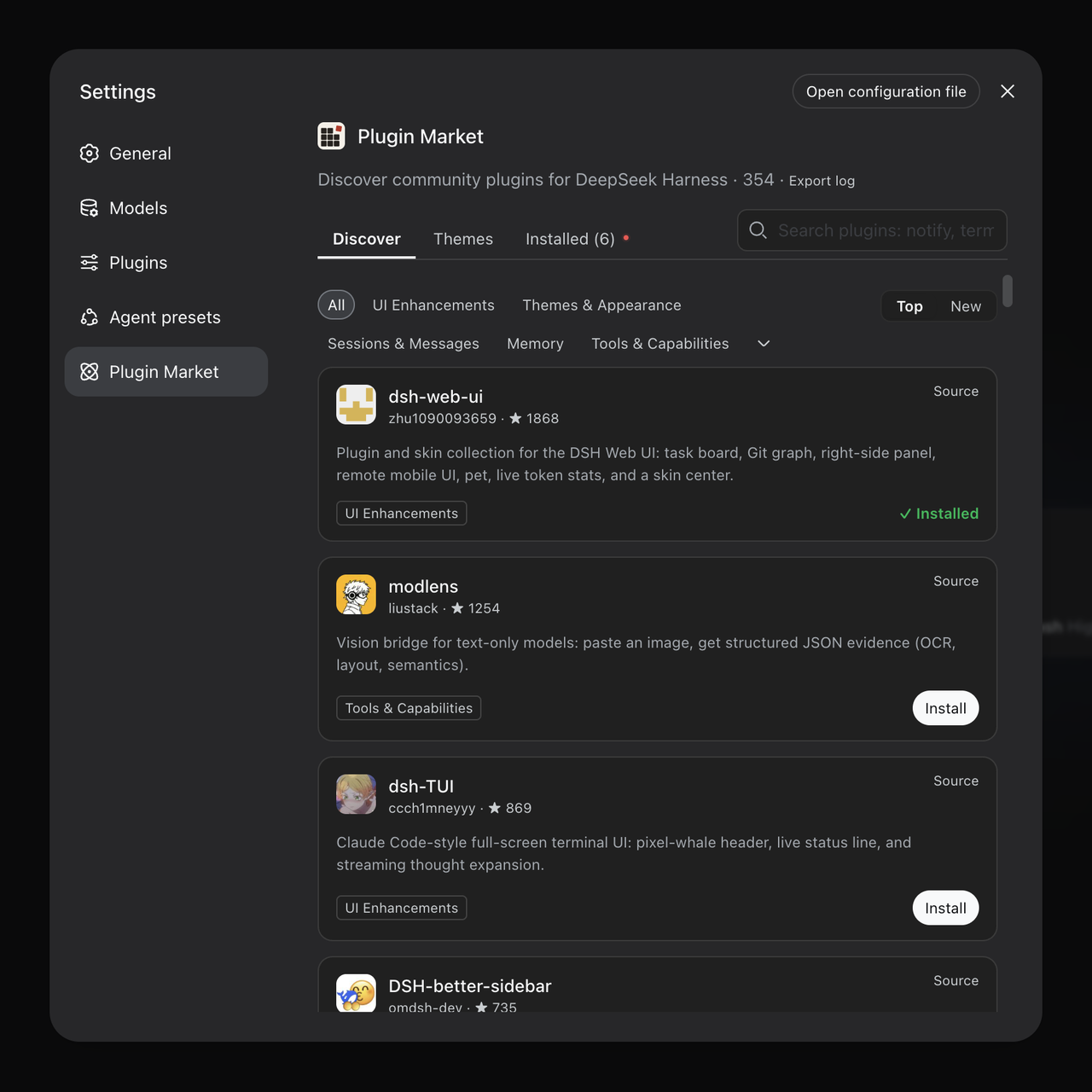
One-click themes: install, switch live, no restart.
Sponsors
 |
Thanks to Qiniu Cloud for sponsoring this project! Qiniu Cloud (02567.HK) runs an enterprise MaaS platform: one place to call 150+ leading models from around the world, compatible with the major model vendors' protocols, covering text, image, audio, video and file processing. It serves more than 1.8 million enterprise developers. New enterprise users get 20 million tokens free. Year-end offer: new users can get up to 1 billion free tokens a day. |
 |
Thanks to Fenno.ai for sponsoring this project! Fenno.ai is an API relay service built for coding, best known for its Codex relay. It puts GPT, Claude, Grok and other coding models behind one API key, speaks both the OpenAI and Anthropic protocols, and plugs straight into Codex, Claude Code, Cline, OpenCode and other popular coding tools. Company-to-company billing and invoicing are available for both mainland China and overseas entities. New users get $50 of credit for $1.99; invite friends and earn up to 20% back. |
 |
Thanks to HuaLongAI for sponsoring this project! HuaLongAI is a stable, efficient API relay service focused on Codex, DeepSeek and Claude models: 100% direct from official sources, never diluted, highly available, with average SLA above 99.2%. Billing is transparent, with token-level bills you can verify line by line, and enterprise contracts and invoices are supported. dsh-market.hualong-ai.com |
Install
-
Official DSH Desktop: Open Settings → Plugins in the app, search for
dshmarket, and install it through the app's plugin manager. No command line is needed. -
Regular
dsh web: Run this command, then restartdsh web:dsh plugin --profile web add dshmarket -
Custom profile: Replace
webin that command with your host's actual profile name:dsh plugin --profile <profile> add dshmarket. Follow your host's restart instructions. -
From the GitHub source (no build):
add github:dsh-market/dsh-marketmakes pnpm ask before running the package's build scripts. The prebuilt tarball attached to the same release installs without that step:dsh plugin --profile <profile> add https://github.com/dsh-market/dsh-market/releases/download/v<version>/dshmarket-<version>.tgz
On a machine with DSH Desktop, running dsh plugin --profile web add dshmarket
may report success but installs the market into profiles/web, not the
profile used by the Desktop app. It will not appear in Desktop. Install through
the app's Settings → Plugins instead; Desktop's profile is managed by the app.
Once installed, open Plugins → Plugin Market (dsh 0.2.1+). On dsh 0.2.0 and earlier it is under Settings → Plugin Market.
Other entries, older hosts and plugin pages
Once it is installed, open the Plugins page and pick the Plugin Market
tab next to Installed (dsh 0.2.1 and newer — plain dsh web included, no
desktop app needed). The market is also still a section of Settings → Plugin
Market, but that entry will be phased out: it is only needed on dsh 0.2.0 and
older, where it is the only way in. If you would rather reach it in one
click from anywhere, the market can also put its own Plugin Market row in
the sidebar; turn it on from the market's card under Plugins. All three
entries can be switched individually under Advanced in that card, and the
market refuses to close the last one. Going the
other way, an installed plugin's ··· menu offers View in Plugins on
dsh 0.2.1+: it opens the host's own page for that plugin, which is the only
place its individual rows can be switched one by one.
Requires dsh web 0.1.0-rc.6 or newer. On an older host the market
disables itself and says so in the browser console rather than rendering
against primitives that are not there — if the Plugin Market entry never
appears, that is usually why. Worth checking when a desktop build bundles
its own dsh: it may be older than the one npm would give you (#139).
Features
| AI search Describe the plugin you want in a sentence; the model you configured in DSH picks from the catalog, and the results are ordinary plugin cards. Off by default; it uses your tokens only when you switch it on and press Enter. 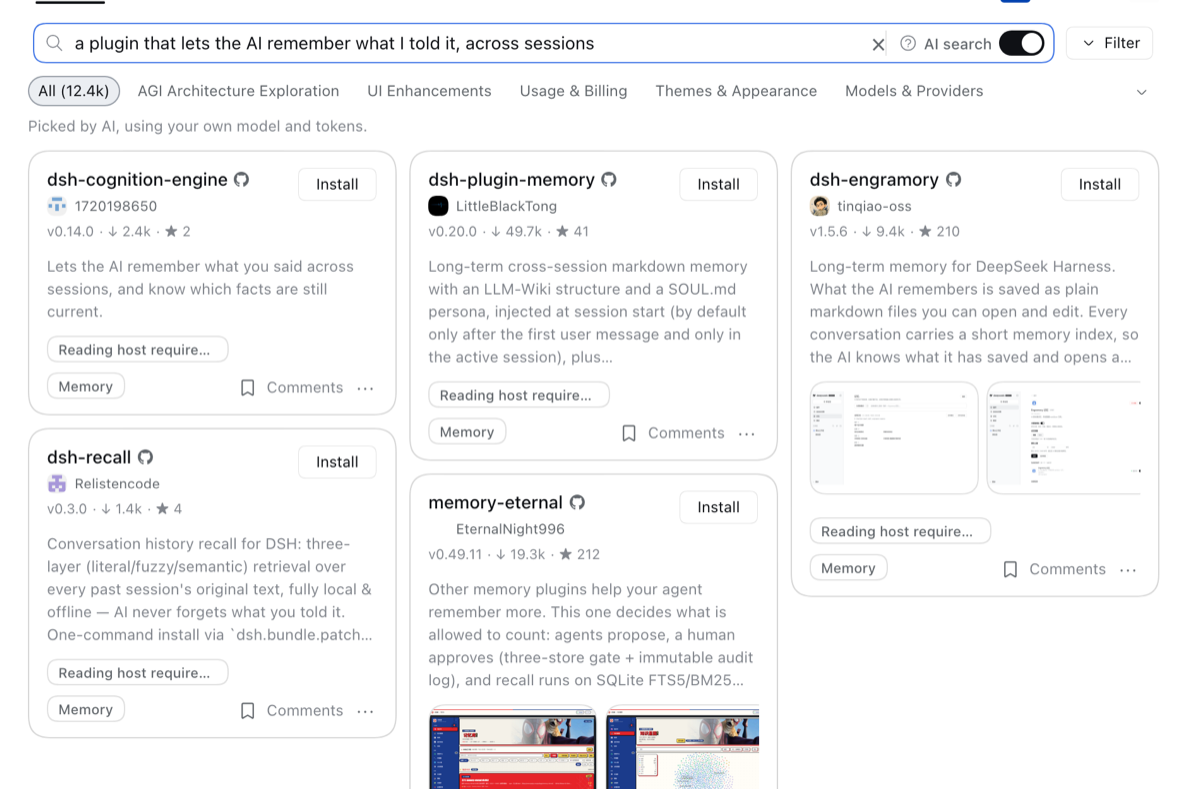 |
Let AI guess what you'd like One click, and your model looks at the plugins you installed and favorited and picks others you may want. The two lists are read, and your tokens spent, only when you click. 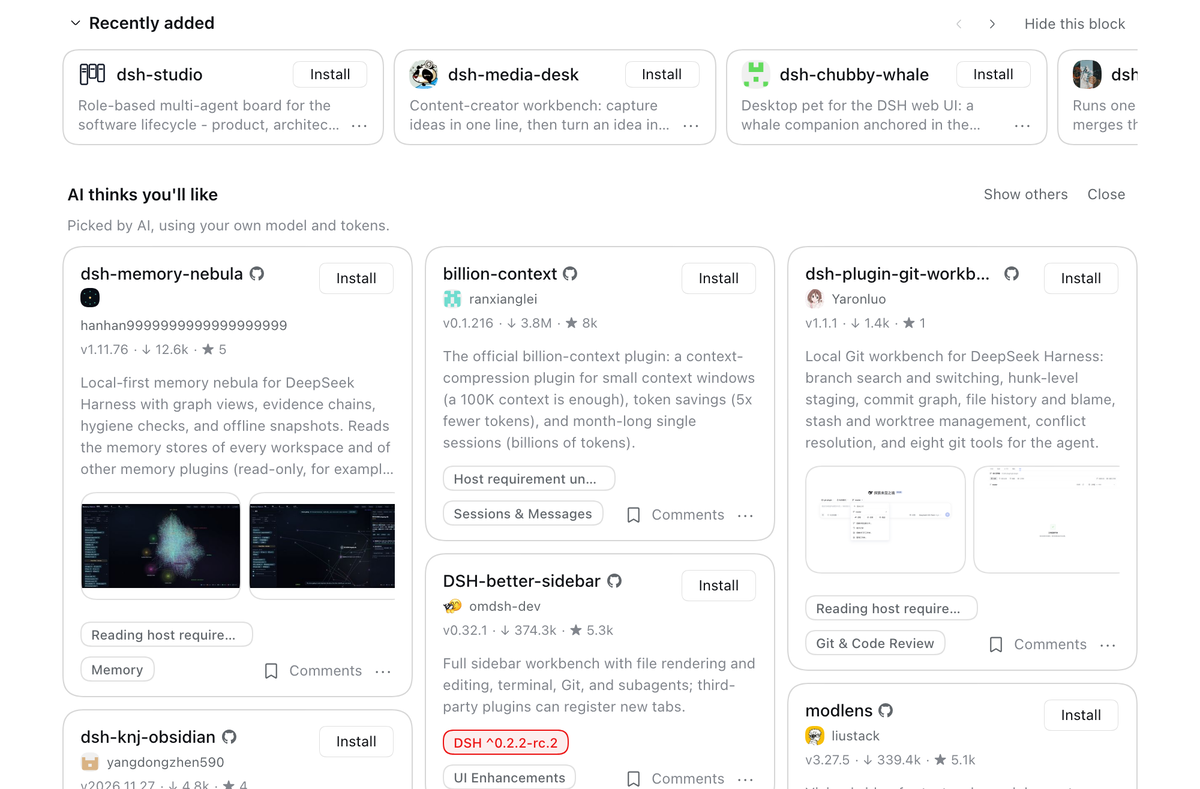 |
| /find-plugin in the chat Say what you need mid-conversation; the model picks a few plugins from the market and says why. Each card offers install in the market, install here, or copy the command. 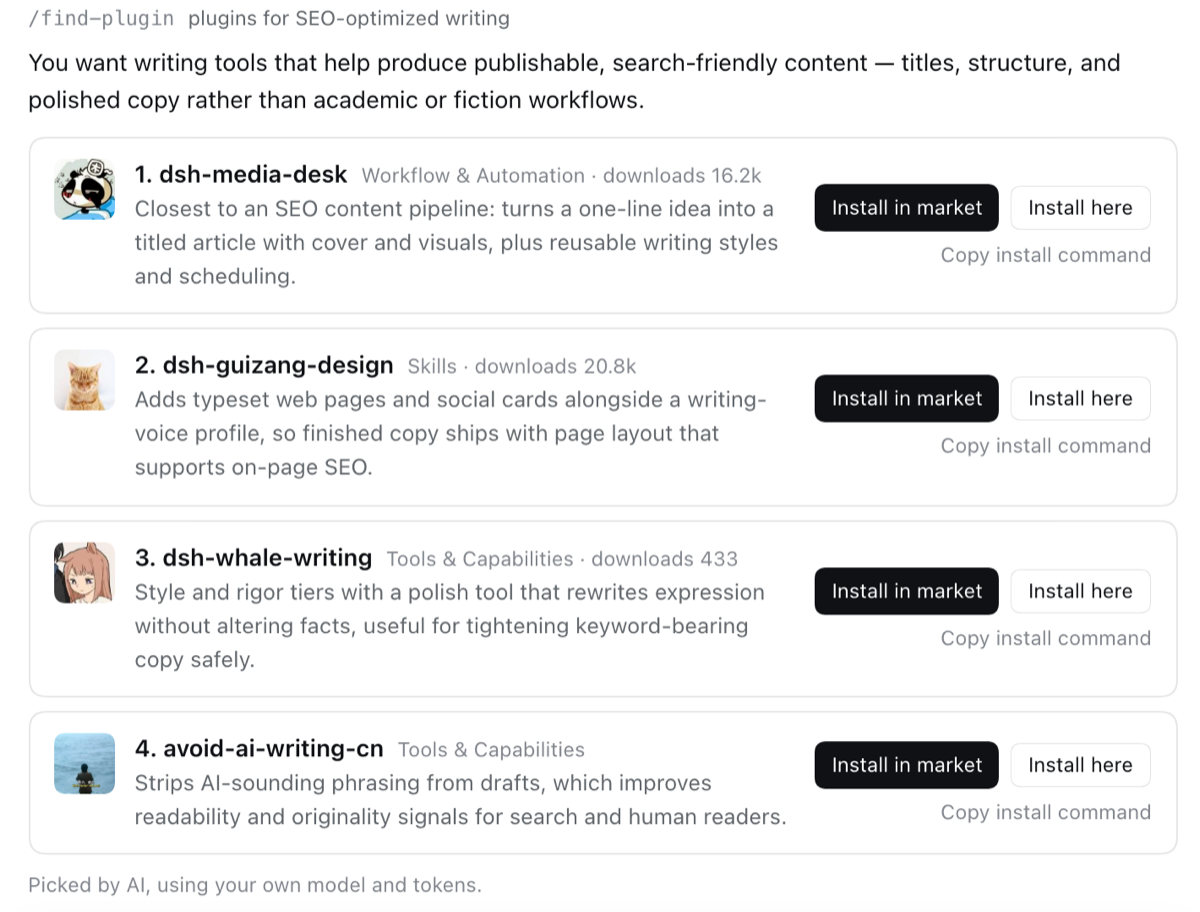 |
See what it does before installing Every plugin is statically scanned: file access, network, running commands, at a glance. Build scripts do not run by default. 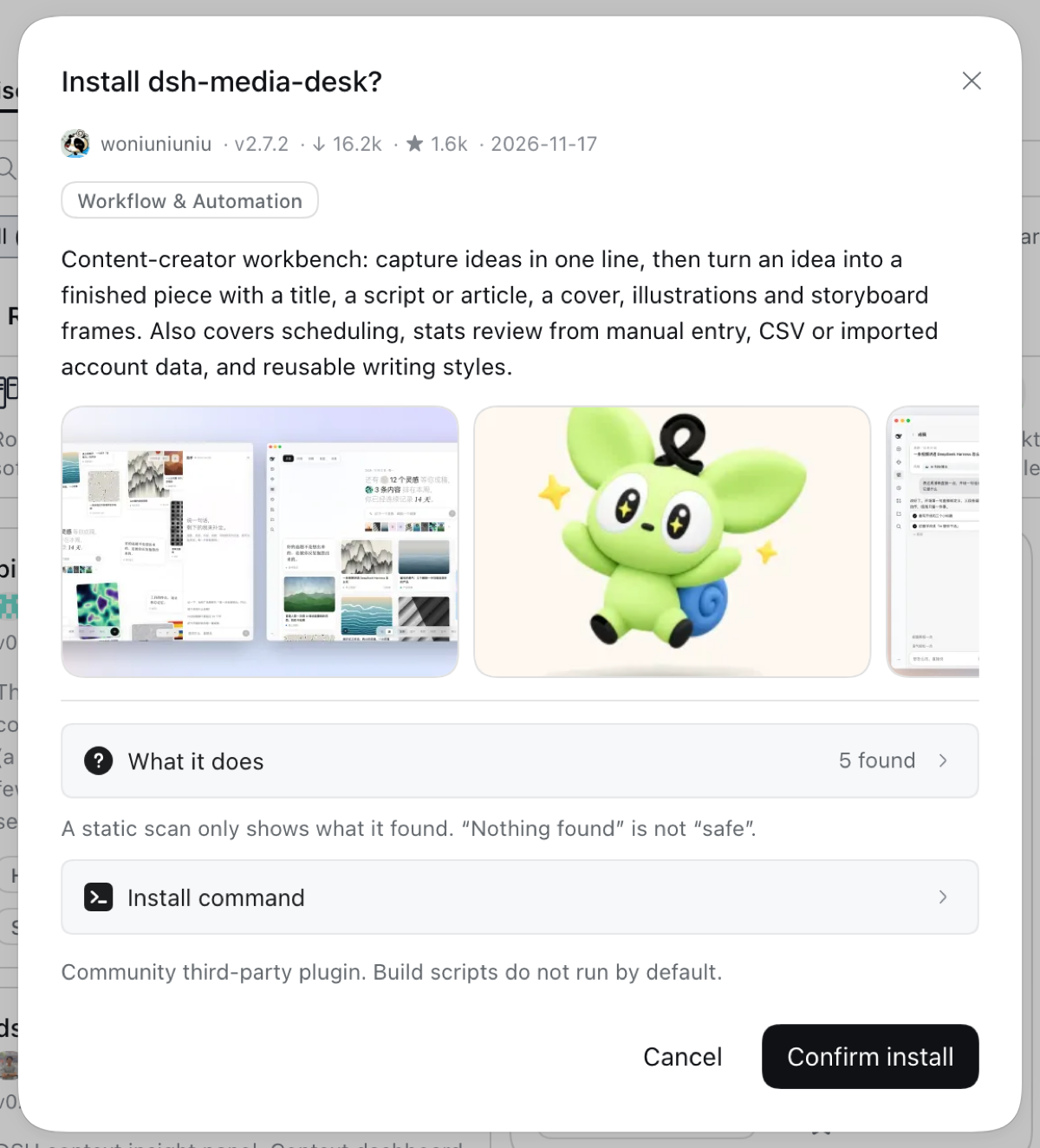 |
| Themes in one click Install and it applies; themes are mutually exclusive and your choice survives restarts.  |
Updates Update one plugin or all of them, each with its "What changed"; the market updates itself the same way. 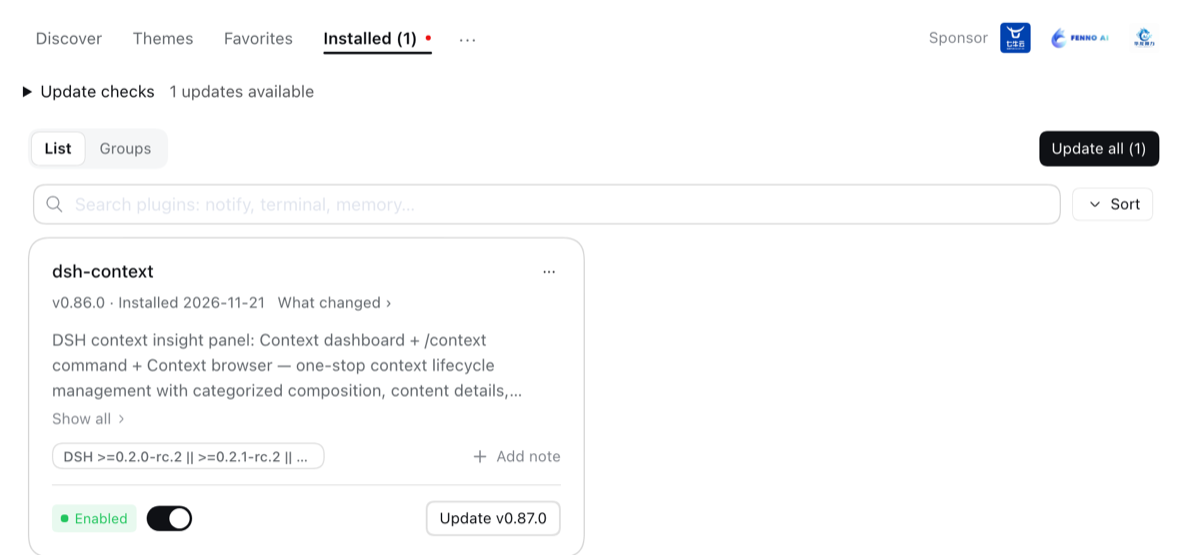 |
| Backup & restore Export to a file, WebDAV or a private Gist; restores are validated first and roll back on failure. 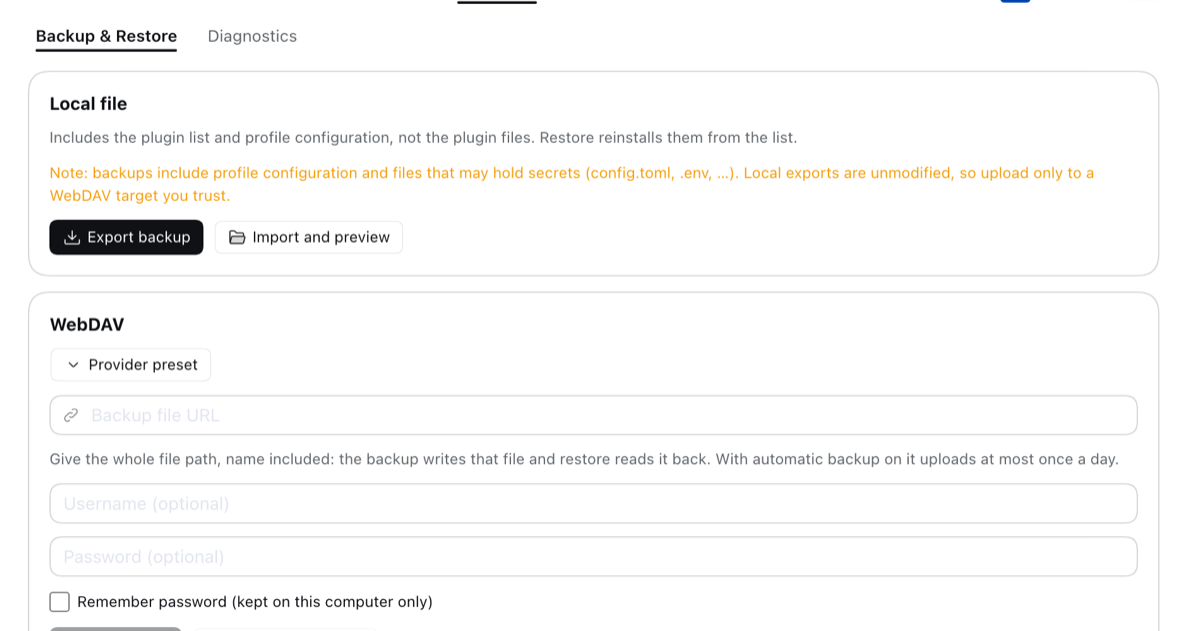 |
Favorites Save plugins to install later; the Favorites tab searches, sorts and installs them, and AI recommendations take them into account. 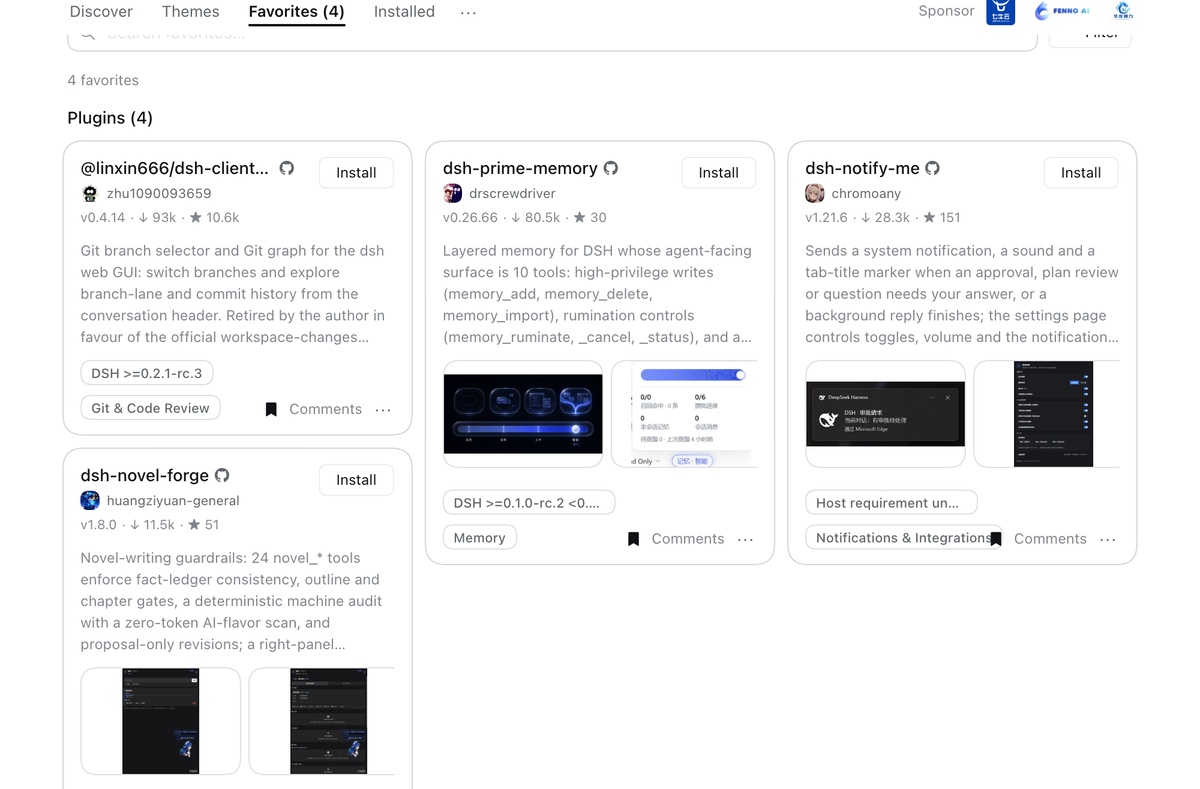 |
What you get
- AI search,
/find-pluginand AI recommendations: find plugins by describing what you want, or let AI guess from what you have, picked by your own model - Browse & search 12,000+ community plugins, with screenshots and comments
- One-click install: most plugins work after a page refresh, no restart
- Themes: install and switch with one click
- Updates: one click for one plugin or all of them; reminders are off unless you turn them on
- Turn plugins on and off without a restart
- Groups, favorites and notes to keep a long list tidy
- Backup & restore: export to a file, WebDAV or a private Gist
- When something breaks: a diagnostics page, a recovery page if DSH will not start, and a one-click log export
Full feature list
- AI search — a switch inside the Discover search box: describe the plugin you want in a sentence and the model you configured in DSH (its default model and API key) picks from the catalog; the picks show as ordinary plugin cards in the model's order. Off by default and remembered; it runs only on Enter, so it spends your tokens only when you ask. With no model or key set up it says so and points at Settings → Models instead of failing
/find-pluginin the chat — on DSH 0.2.0+ the market registers a slash command:/find-plugin plugins that send notifications. The same recall-then-pick runs on the model of the current chat, and the result draws as cards with Install in market (opens that plugin's install dialog), Install here (confirms first) and Copy install command. The answer is a command result, so it never enters the conversation the model sees. Run on the home screen, where DSH draws no conversation yet, the same cards open in an overlay. A line under the result offers to let AI consider the plugins you installed and favorited; once you allow it (one click, undone the same way), searches leave out what you already have and lean towards what goes with it- Let AI guess what you'd like — a link under Recently added on Discover. Click it and your default model reads the plugins you installed and favorited and picks up to ten others, drawn as ordinary plugin cards; Show others asks again without repeating the last set. Nothing is read and no token is spent until you click; the last set is kept on this device. With no model set up, Set up a model opens Settings → Models
- Browse & search the full community catalog (12,000+ plugins, growing daily) — category filters, star counts, top/new sorting, bilingual descriptions that follow your UI language
- Host-aware discovery — cards show the DSH requirement declared by
engines.dshor lockstep@deepseek-ai/dsh-*peers; the compatibility filter hides only confirmed mismatches with the running host. GitHub-only entries read the linked package's manifest, including monorepo subdirectories; Release downloads read the selected release tag, including the current tag behindlatest/download. Undeclared, malformed or unavailable requirements stay unknown and visible. Public manifest facts are cached; compatibility is evaluated against the running host - Screenshots — AppStore-style screenshots, auto-carousel when there's more than one, click to preview full-size: author-curated shots show right on the card (zero extra requests); plugins without curated shots fall back to automatic README extraction once you open the install dialog. Images load from GitHub hosting only
- Comments — every card opens the plugin's discussion thread in place. It is the same thread its pages on dshmarket.com and the catalog show, so a plugin has one conversation rather than three. Backed by GitHub Discussions through giscus: it loads when you open it, needs a GitHub account only to post, and the note above it says plainly that opening it contacts giscus.app and GitHub. On local dsh web, reading stays embedded while a dedicated GitHub action opens the exact discussion in a new tab for sign-in and posting, so the cross-site return never carries or depends on the host session
- Favorites — bookmark plugins and themes from Discover or the Themes tab; a dedicated Favorites tab lists them with search, sort, and install actions. Bookmarks persist in the profile's market state (
state.json); entries that leave the catalog can be cleared in one click - Groups — organise installed plugins into named groups (rename, delete, and per-group search); a plugin lives in one group and ungrouped is the default. Collapse all / Expand all folds the whole list at once. A group carries its own switch: all-on, all-off, or the mixed state its members are really in, so a working set can be switched as a unit without touching the rest. A group holds at most one theme. The grouping itself is local state in the profile's
state.json - Notes — write your own one-line description for any installed plugin and it replaces the author's on that row, so a shelf of forty plugins answers "why did I install this" in your words. Stored locally beside groups and favorites, never sent anywhere
- Themes — a dedicated tab for community themes and skins: install → active immediately, switch with one click (themes are mutually exclusive, your choice survives restarts), uninstall to revert
- One-click install — confirm the source, watch live progress; most plugins go live after a page refresh, no restart
- Backup & restore — export your profile's plugin list and configuration as readable JSON, import it on another machine, store it on WebDAV with daily auto-backup, or sync through a private GitHub Gist; restores merge (plugins installed after the backup are kept), validate before writing, and roll back on failure
- Updates — per-plugin update checks (npm version or pinned commit vs HEAD), one-click update, or update everything at once; the market updates itself the same way. A plugin installed from an archive link is updated only through its own source: a catalog entry that merely shares the name is never offered as its update, so updating cannot silently replace it with a different plugin. Each row with an update pending carries a What changed link — the release notes, or the commits when the version cannot be aligned to one. A notice you are not acting on can be ignored for the rest of the boot instead of being dismissed again on every reload — scoped to the running host, so a restart brings the reminder back and ignoring it is never the same as turning it off
- Resilient GitHub routes — in the China download region, Git refs, README content, and avatars each keep their own fallback order. The market remembers the last working route, switches only after transport/HTTP/payload validation fails, and rejects proxy error pages disguised as HTTP 200. If every built-in route fails, Settings → Plugins → Plugin configuration → GitHub acceleration accepts one persistent custom HTTPS prefix;
DSHM_GITHUB_PROXYremains the operator-owned override - Background update reminders — automatic checks are off by default. When enabled, checks start 30 seconds after the market loads, then repeat every 6 hours, 12 hours, 3 days, or 7 days while Harness is running, even if you stay in chat. The default interval is 6 hours. Supported hosts show a dot on the existing Plugins icon for unseen updates. Opening Plugins clears the dot while keeping the update offers available. With browser storage available, seen targets stay quiet across refreshes and restarts of the same profile; a new target can notify again. Older servers remember seen updates for the current boot only. Unsupported hosts keep their original entry without an error or empty placeholder. Review the same results in Plugin Market → Installed → Update checks, or change the interval and turn automatic checks on or off there. Choosing an interval does not enable automatic checks. Checks never install or restart anything; failures keep the last confirmed results, and ignored or exempt updates stay quiet. Desktop-managed plugins open their host page. This does not change the host’s own
Updates availablecounter. - Public update API — plugin-owned settings pages can use the versioned, capability-gated update API v1 (beta) instead of copying package-manager logic or depending on private Market UI responses
- Uninstall — two-step confirm; plugins installed this session are removed live
- Hot disable / enable — toggles write
- id: …+disabled: true|falseinto the profile'scordis.patch.yml(the official patch layer, mechanism ported from dsh-plugin-hub): DSH's HMR re-composes within ~1s, no restart, and the loader re-applies the choice on every boot; hand-edited patch rows show as badges, host-infrastructure plugins are protected from toggling, and a malformed patch file is never made worse - Restart when needed — changes that cannot hot-load show a one-click restart beside the pending-change banner; the action is restricted to same-origin loopback requests
- Recovery when a restart does not come back — DSH's boot is all-or-nothing: one plugin that cannot load stops the whole process, and the market's own UI dies with the host it was serving from. Now that failure prompt offers Adjust plugins: the ones DSH blamed are marked red and left unticked, you choose what should be enabled at the next start, the choice is written through the same
cordis.patch.ymlrows the market's own toggles use (plusdsh.profile.bundlesfor a disable-carrier), and the boot is retried. It is served by the detached restart helper on the same address the page was already polling, so it works even though the host is gone — and opening the URL fresh renders a standalone version of the same page. When DSH starts normally, none of it appears - Missing tools set up for you — if a component is missing (pnpm), the market detects it and offers a one-click automatic setup
- Log export — one click produces a sanitized plain-text log for bug reports (home paths and credential shapes are masked; nothing is ever sent anywhere). The market's version sits next to the page heading, so a screenshot of a problem already carries it
- Settings card — on dsh 0.1.0-rc.7 and newer the market manages itself next to every other plugin — under Settings → Plugins → Plugin configuration while the host still has a Settings page, and on the market's own card on the Plugins page from dsh 0.2.1, where Settings is gone: see the running version, pick a release channel (stable, or beta to try builds still being verified — the market only, never your other plugins; a third dev channel appears once developer mode is switched on, and carries builds published straight off a branch), update, or remove the market — with an opt-in cleanup that also drops the disable rows it wrote, so plugins it switched off start running again rather than staying off with no UI left to switch them back on
- Diagnostics — the plugin load order and conflict surface, one page: bundle stack with official/community badges, duplicate loader entries, dependency version mismatches, multi-version core packages, overrides and invalid config entries, and leftover directories — a package directory an interrupted update left without its
package.json, and pnpm's own*_tmp_*staging directories. Nothing there stops a start, so it is listed rather than warned about, and it is the only place that names what is on disk. Plain-language terms, problem blocks highlighted, everything collapsible - Load order — drag community bundles into the order you want, or take the suggested one derived from the plugins' own before/after rules. Nothing is written until a trial composition passes, and the panel tells you what the new order would change (overrides, invalid or duplicate entries) before you apply it
- AI fix — one click copies a diagnostics-driven fix prompt (errors/warnings/order conflicts + conservative scope instructions) to the clipboard; you paste it into a new conversation and decide whether to send. The prompt first asks the agent to detect whether it is itself the harness running this profile — if so it hard-forbids mutating the live composition, upgrading/restarting the harness or core packages, or reinstalling deps, and instead has it write an idempotent
applyscript plus arollbackscript, have you run them in an external terminal, and paste the output back
Speed
Installs prefer repo-verified npm packages, then author-supplied prebuilt GitHub Release tarballs, before falling back to full-repo GitHub source downloads. Prebuilt installs are typically seconds and do not need local build scripts; source-only plugins depend on your connection to GitHub.
Security
- Installs are restricted to sources listed in the curated awesome-dsh-plugin registry — anything else is rejected
- Build scripts stay blocked by default (pnpm ≥10); allowing one is your explicit per-package choice
- Terminal/CLI-surface plugins are flagged before you install them into the web profile
- The install endpoint accepts same-origin POST only; one anonymous count a day, no personal information, can be turned off in Settings (details in SECURITY.md)
- Backups can contain credentials from your profile config — the UI warns before export and upload; WebDAV sync is https-only, refuses private-network targets, and never stores your password in the browser
- Authenticated Gist requests always go directly to
api.github.com; bearer tokens are never sent to a public GitHub acceleration service. GitHub source archives also stay on canonical codeload URLs so pnpm's integrity policy remains in force - The restart endpoint additionally requires a direct loopback client (forwarded requests are rejected) and relaunches the exact DSH entry, arguments, environment, and working directory
- Listing ≠ endorsement: plugins are third-party code, install sources you trust
Submit your plugin
This repo is the market app, not the catalog. The plugin list comes from the curated awesome-dsh-plugin registry — to get your plugin listed in the market, open a PR there (one entry in the list; the site and this market pick it up automatically, usually within a day). Please don't PR plugin entries against this repo.
Roadmap & feedback
- Bugs go in issues — attaching the market's "Export log" makes diagnosis roughly ten times faster
- Feature ideas go on the Roadmap. Issues are kept for things that are broken, so a proposal filed as an issue gets moved there and closed; the discussion stays where you wrote it either way
- Every roadmap item welcomes community PRs — say so on the item before starting, so two people don't build it twice
Advanced
Restart and build settings (systemd, pm2, compilers)
-
One-click restart launches a detached replacement. When this host is systemd's own service process the button is hidden automatically — the market would otherwise kill the takeover process along with the unit's cgroup and the service would not come back. The pending-change notice stays visible and says so. Detection requires both a systemd marker AND being the unit's main process, because
INVOCATION_IDis inherited by every descendant of a unit (an ordinary terminal included) and hiding the button for those would be the worse bug. pm2 and launchd are not detected, so those deployments need the explicit setting below. Either flip Allow restart off in Settings → Plugins → Plugin configuration, or write it into the profile patch — where it has to sit underconfig:, because the loader passes only that sub-object to a plugin and a top-levelallowRestart:is silently ignored (#227 by @Fantasymax):- id: dsh-market name: dshmarket config: allowRestart: false # NOT at the top level beside `name:`On dsh 0.1.7 and newer there is no switch to flip: the host derives a plugin's settings from its own Config schema and no longer serves a plugin-registered settings namespace, so the market has no control there. The profile patch below is the way on every host.
GET /dsh-market/statusreports"restart": falseonce it has taken effect. -
Plugins that compile (native modules) build under the environment the dsh process inherited — which a GUI, a systemd/launchd unit, or a Windows Start-menu launch does not inherit from your shell. If a plugin needs a newer compiler than the machine's default (
g++too old while other work depends on that version), pin the build-time variables withbuildEnvunderconfig:— the config equivalent ofCC=... CXX=... dshfrom a terminal, without changing anything globally. Pinned values may override inherited ones but never thePATHorCIthe market computes for its children (issue #336):- id: dsh-market name: dshmarket config: buildEnv: CC: /usr/bin/gcc-11 # or CXX, NODE_OPTIONS, ... CXX: /usr/bin/g++-11In the UI the same variables are edited live in Settings → Plugins → Plugin configuration → dshmarket → Build environment (one
KEY=valueper line; saving applies to the next install without a restart, and saving an empty list goes back to the profile config above).PATHandCIare always managed by the market and cannot be overridden from either place. -
For terminal-attached launches, the detached replacement keeps running after the original terminal closes
Use this catalog as a DSH index source
The same catalog is also a plugin market index. On dsh 0.2.1+, open Plugins → Discover → Index sources and add https://cdn.jsdelivr.net/npm/dsh-plugin-catalog/index.json. That is this list as a format-1 index, served from npm so it loads quickly everywhere — dsh gives a source 15 seconds, and the GitHub Pages copies (https://awesome-dsh-plugin.com/index.json and https://dshmarket.com/index.json) can exceed that from some networks. The host's Discover tab and the plugin_market agent tool then search it.
Where the catalog comes from
Catalog statistics preserve their source: npm counts cover the stated 30-day window; GitHub-only releases can show lifetime downloads of all public repository Release assets, including packages, checksums and companion files. The counts are never added together or called installations/users. Tooltips include the available collection time; npm-download sorting keeps its existing window. Catalog host declarations are accepted only for the exact pinned install URL, with the existing on-demand manifest lookup retained for older catalogs.
Fetched live on every open from awesome-dsh-plugin.com/plugins.json — curated entries, npm mapping, and star counts refreshed daily by CI, with no stale cache behind it. A failure reports the actual reason and elapsed time, with a Retry button.
There is deliberately no bundled snapshot to fall back on: for a catalog that grows daily, a stale answer is not a degraded one but a wrong one — a plugin published this morning would read as "does not exist".
In the China download region the same catalog is read from npm first, through the same region-aware routes the plugins themselves arrive on: every China mirror already carries it, it comes off the mirror rather than bouncing back to the origin registry, and it carries a version, so a bad catalog build can be rolled back instead of only being fixed forwards. The origin stays last in the list as the route that has always worked. Region detection happens once and the answer is remembered; Settings → Plugins → Plugin configuration can override it.
If that host is unreachable from your network, point the market at a mirror. Set DSHM_REGISTRY_URL in the environment dsh runs in, to anything serving the same plugins.json shape:
DSHM_REGISTRY_URL=https://your-mirror.example/plugins.json dsh web
Enterprise
For teams that want their own plugins next to the public catalog, or need the market locked down. All optional; with nothing configured the market behaves as before.
- Private catalogs: add your own
plugins.jsonby URL or file. Its plugins show on Discover with a source tag, and AI search and recommendations include them - Private npm: Verdaccio, Nexus, Artifactory and GitHub Packages through the profile's
.npmrc; updates and changelogs work for private packages too - Internal Git: install from GitLab, Gitea and other Git hosts over https or ssh
- Offline bundles: pack a catalog with its plugin files and import it on machines without npm access
- Policy file: an administrator decides which catalogs load, what may be installed, which versions are pinned, and turns off telemetry, comments or outside images
- Same safety boundary: only entries from loaded catalogs can be installed, and tokens never leave the server
Setup, the full policy.json reference and examples: ENTERPRISE.md.
Friends
DSH Desktop (dataelement)
dsh-desktop — a desktop app for DeepSeek Harness: run and manage a local Harness without installing Node.js yourself. Ships with this plugin market preset as the default. dshdesktop.com
DeepSeek Harness Desktop (hairyf)
deepseek-harness-desktop — a native desktop app for DeepSeek Harness built with Tauri (Rust + Web): one-click local install and launch with no Node.js setup required. On first run it offers to install this plugin market as a recommended preset.
DeepSeek Harness Desktop (anywhere-labs)
deepseek-harness-desktop — an Electron desktop app for DeepSeek Harness built around the idea that everything is a plugin, including the desktop itself: profile switching, a bundled Node and pnpm, and a recoverable install path that snapshots the profile before a change. dshdesktop.cn
DSH App
dsh-app — a DeepSeek Harness desktop client built on Tauri 2 rather than Electron, so it ships a much smaller binary and uses the system webview. AGPL-3.0.
Local DSH
local-dsh — a DeepSeek Harness desktop client that can run the model on your own machine: it bundles llama.cpp next to Node, pnpm and DSH, so a downloaded GGUF model answers without any external API. Built on Tauri; Apple Silicon Macs for now. localdsh.com
dsh desktop (MochiNek0)
dsh-desktop — a cross-platform DeepSeek Harness desktop client built on Tauri (Windows, macOS, Linux). It uses the system webview, so the installer is a few megabytes: 2.3 MB on Windows, 5.8 MB on macOS. It starts dsh web in the background on launch and embeds it in a native window, sharing sessions and config with the CLI. This market sits first in the recommended list of its built-in plugin panel, one click to install. A Runtime panel enumerates and switches the machine's Node installs and installs or upgrades dsh, no administrator privileges required, and native notifications fire when a turn ends or dsh is waiting on you. dsh-desktop.cc.cd
DSH Get
DSH Get — a searchable web directory for discovering DeepSeek Harness plugins: category filters, bilingual descriptions, install commands and per-plugin detail pages. Its normalized catalog snapshot is public at bobby-sheng/dshget-data.
modlens
modlens — the first vision plugin for DeepSeek Harness: bolts visual understanding onto text-only models like DeepSeek and GLM. Paste an image, get structured JSON evidence back — OCR, layout, semantics. Available right in this market:
dsh plugin --profile web add @liustack/modlens
Business inquiries
For partnerships, sponsorship or anything commercial: fkysly@gmail.com. Bugs and feature requests belong in issues, not email.
License
MIT · dshmarket.com
Plugins relacionados
deepseek-harness
deepseek-ai/deepseek-harness
dsh-web (dsh-plugin-manager)
zhu1090093659/dsh-web
dsh-web
zhu1090093659/dsh-web
dsh-web-ui (dsh-plugin-manager)
zhu1090093659/dsh-web-ui