dsh-usage-meter-harness
faith1688/dsh-usage-meter-harness
Medidor em tempo real de uso, custo e saldo para DeepSeek Harness: saldo da API oficial, precisão de custo dentro de ¥0.02, livro-razão de custo por turno/sessão/modelo, velocidade de tokens ao vivo com níveis de cor e popup acoplado de um clique.
Instalar
dsh plugin --profile web add github:faith1688/dsh-usage-meter-harnessREADME
dsh-usage-meter-harness
A real-time usage / cost / balance meter plugin for DeepSeek Harness (DSH). See tokens, spending and real wallet balance right next to the chat input — for the official DeepSeek models and any custom model registered in DSH.
Install
Prerequisite (methods 1 & 2): the DSH CLI itself runs on pnpm — install it once per machine:
npm install -g pnpm(orcorepack enable), then verify withpnpm --version.
Pick one of the three methods. Methods 1 and 2 need pnpm (a one-time machine
setup used by the DSH CLI itself): npm install -g pnpm or corepack enable.
Method 1 — npm registry via DSH CLI (needs pnpm)
dsh plugin --profile web add --verbose @faith1688/dsh-usage-meter-harness@latest
(--verbose shows the install progress; drop it if you prefer a quiet install.
@latest explicitly requests the newest release — always install this way.)
Method 2 — GitHub via DSH CLI (needs pnpm)
dsh plugin --profile web add --verbose github:faith1688/dsh-usage-meter-harness#main
(--verbose shows the install progress. #main always installs the latest
main branch — the newest release.)
Method 3 — one-line installer, no pnpm (recommended)
npx -y @faith1688/dsh-usage-meter-harness@latest
One command: installs into the DSH web profile and registers the bundle (idempotent).
(@latest explicitly requests the newest release — always install this way.)
Prefer not to use npx? The same logic ships as scripts in the repo:
Windows (cmd):
curl -fsSL https://raw.githubusercontent.com/faith1688/dsh-usage-meter-harness/main/scripts/install.cmd -o "%TEMP%\um-install.cmd" && "%TEMP%\um-install.cmd"
Linux / macOS:
curl -fsSL https://raw.githubusercontent.com/faith1688/dsh-usage-meter-harness/main/scripts/install.sh | sh
The script does everything for you: cd into the DSH web profile, installs the
package with visible progress, and registers the bundle in dsh.profile.bundles
(idempotent — safe to re-run after upgrades).
Note: Method 3 uses plain
npmand does not do pnpm coordination. If your profile is managed with pnpm (the default fordsh plugin), prefer Method 1.
After any method: restart dsh web.
Updating
Two cases — pick the right one:
Fresh install (never had the plugin), or the npx method: just run the
install command; it always fetches the latest release.
Upgrading an existing install (plugin already present): the profile's
package.json / pnpm-lock.yaml may be pinned to an old version, and a bare
add can be skipped by pnpm as "already satisfied". Always ask for the new
version explicitly:
dsh plugin --profile web add @faith1688/dsh-usage-meter-harness@latest
or, from inside the profile directory (~/.dsh/profiles/web):
pnpm update @faith1688/dsh-usage-meter-harness
(You may also pin an exact version, e.g. ...@1.0.28.)
Marketplace update failed? If it reports "targeted vX but installed vY; the previous version was restored automatically", that is pnpm's new-release cooldown (
minimumReleaseAge— a freshly published version is skipped for roughly 24h). Your install is not broken and nothing in your config or data was touched. Wait 24 hours and click update again, or upgrade right away with thenpxcommand below (or add this package name, without a version, tominimumReleaseAgeExcludein your profile'spnpm-workspace.yaml).
If your package.json binds the plugin via a file: path or a pin that add
won't override (you see Already up to date / downloaded 0), use the
one-line installer instead — it always requests @latest, which rewrites the
binding to ^<latest> and upgrades in a single command:
npx -y @faith1688/dsh-usage-meter-harness@latest
(Re-running this same command is the permanent update path: it is idempotent
and upgrades regardless of whether you currently bind via file:, a pin, or ^.)
After updating: restart dsh web (or reload the browser page). Note that
restarting alone never fetches a new version — it only reloads what is already
in node_modules.
Why this never duplicates the mount entry and never touches your config:
- The mount entry lives inside the package (
cordis.patch.yml, thedsh.bundlemechanism). Every release ships its own complete entry; DSH reads it from the installed package at startup — installing a newer package automatically brings the correct entry with it. - Installers only edit the profile's
package.json(dsh.profile.bundles, de-duplicated) andnode_modules. They never write the profile-rootcordis.patch.yml, so anything you added there yourself (or your other plugin configs) stays untouched. - A duplicate mount entry can only happen if you manually added the same
idto the profile-rootcordis.patch.ymlyourself — the installers never do that.
Features
Conversation usage card (next to the chat input)
| Feature | Description |
|---|---|
| Live cost | Session cost in CNY or USD, updated every step |
| Token breakdown | Input (miss) / cache hit / cache write / output |
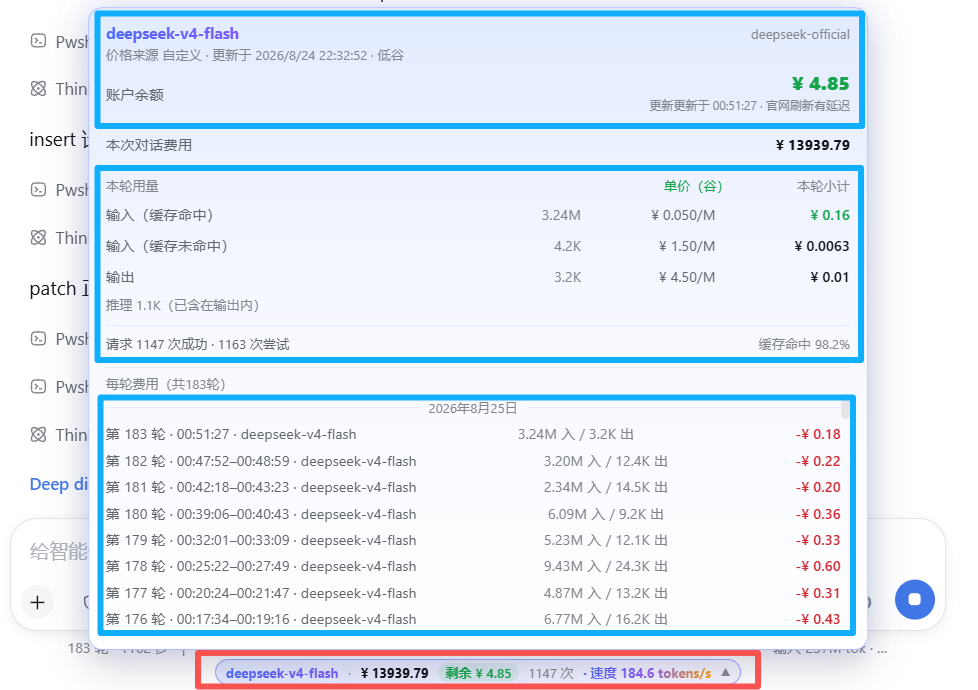
| Turn usage panel | Per-turn subtotals with unit prices tagged peak/off-peak |
| Token speed | Live tokens/s while streaming; resets cleanly when output stops or tools run |
| Cache hit rate | Share of cached tokens for the session |
| Account balance | Real DeepSeek wallet balance; local-ledger estimate for other providers |
| Budget & remaining | Set a budget, see used / remaining / over-budget |
Billing engine
| Feature | Description |
|---|---|
| 6 billing templates | Basic · Cache hit/miss · Peak/off-peak (DeepSeek official hours) · Cache write+hit · Combined input+output · Batch half price |
| Custom price rows | Up to 4 user-defined rows; the popup mirrors your setup verbatim |
| Peak/off-peak billing | Beijing-time weekday + hour windows, cross-midnight supported; each request is billed by its start time |
| Accurate turn attribution | Each turn is billed to the model that actually ran it — switching models mid-session never re-labels open or finished turns; the turn's currency is fixed at its first billed usage, so USD-priced turns convert correctly |
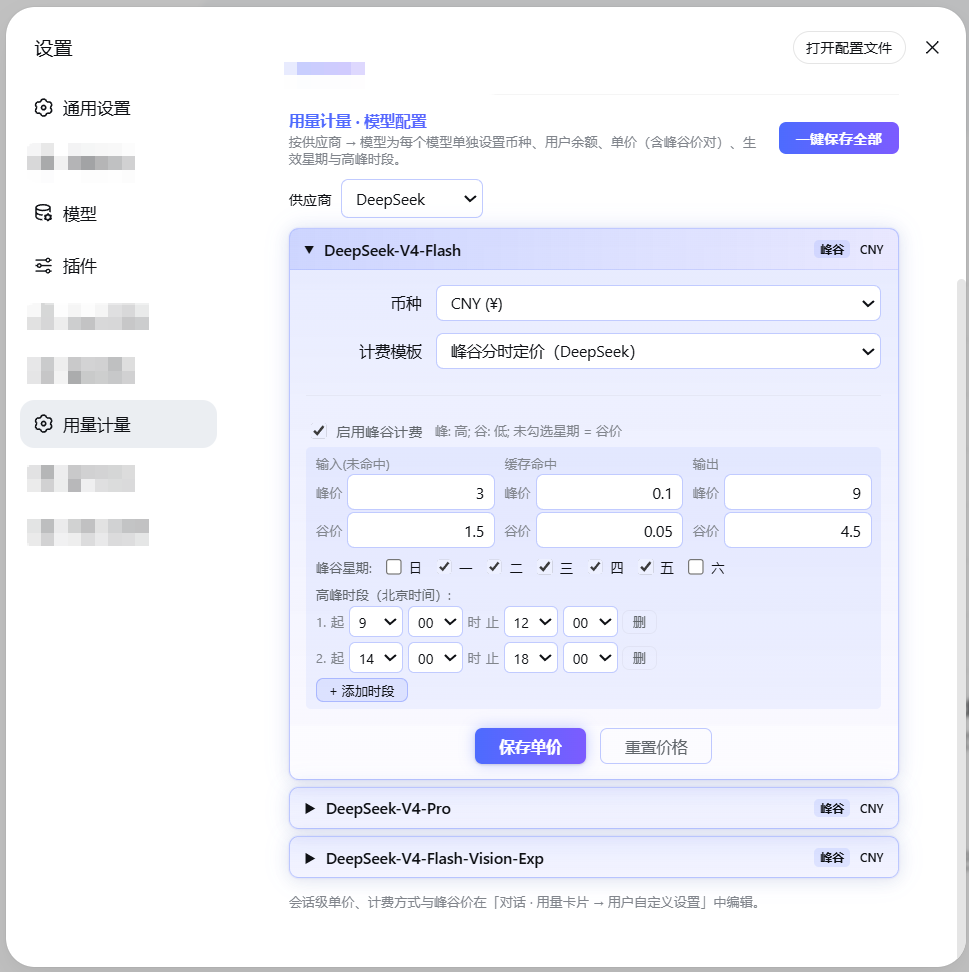
| Per-model pricing | Currency (CNY/USD), unit prices and balance per model |
| Shared provider wallet | One balance shared by all models of a provider — single checkbox |
| Official price prefill | DeepSeek official models come pre-filled with official prices and the official peak schedule |
| Built-in price table | 137 models across 19 vendors bundled; optional LiteLLM-shaped remote price source |
| Exchange rate | USD→CNY fetched automatically, refreshed when older than 24 h |
| Sync official prices | One click on the settings page fetches the DeepSeek official price page, parses the latest prices and peak/off-peak windows, and writes them as overrides (a global API Key must be set first) — keep official pricing current at any time |
| Legacy migration | Old manual initial-balance/top-up settings migrate into provider wallets automatically |
Settings & UX
| Feature | Description |
|---|---|
| Bilingual UI | Language switch at the top-right of the settings page: Follow system / 中文 / English; applies everywhere instantly (popup included) and the choice is remembered. Display only — saved data never changes |
| Themes | 20 built-in themes (light first, dark after; default forest-beach-dawn) plus per-theme custom pill & breathing colors — quick switch at the top of the usage popup, full palette on the settings page, saved locally |
| In-use lock | While a model is generating, its editor is locked so a running turn keeps consistent prices |
| WYSIWYG popup | Usage-card rows are copied verbatim from your template selection |
| Non-intrusive | Standard DSH cordis plugin; touches no other plugin and no DSH core files |
| Peak/off-peak capsule | The usage capsule turns light-green on off-peak and light-red on peak (with a soft breathing glow while billing), so the active tier is obvious at a glance |
| Unsaved / saved state | The model card shows Unsaved after you edit and Saved after you click Save — no more ambiguous "saving…" |
| Current-session dashboard | The popup opens straight into the Current session view (total + per-category cost + per-turn ledger); the axis labels use provider · model so official vs custom models with the same name are never confused |
| DS API Key guard | Non-official models picking "DS API Key" get a centered hint that the option is for DeepSeek models only; a custom model never falls back to the official global key — unset shows "未配置/not configured" |
Supported models
- DeepSeek official models (
deepseek-chat,deepseek-reasoner, …): official prices pre-filled; real wallet balance via API Key. - Any custom model registered in DSH (OpenAI-compatible providers, Ollama, OpenRouter, …): set unit prices and balance yourself; everything else works the same.
Screenshots
Settings page:
Usage popup:
Configuration
All settings live in the usage-meter settings namespace and can be edited
directly in the plugin UI:
| Key | Type | Default | Description |
|---|---|---|---|
currency | string | CNY | Display currency |
budget | number | – | Session budget; shows "remaining" when set |
priceSourceUrl | string | – | LiteLLM-shaped price JSON URL; optional |
refreshIntervalMs | number | 4 h | Price / balance / rate refresh interval |
deepseekApiKey | secret | – | Only used to query the DeepSeek balance (stored AES-encrypted; never read from the DEEPSEEK_API_KEY env var) |
Compatibility
- Node.js ≥ 22.
- Peer versions track the supported DSH releases (see
package.json); updating DSH does not break the plugin, and it never modifies your other plugins.
License
MIT © faith1688
Privacy
- The plugin makes no telemetry and no analytics calls.
- Network requests are limited to four optional ones, all initiated by you: querying the official DeepSeek balance API with the API key you configure yourself, fetching a public USD→CNY exchange rate, fetching the official pricing page during a one-click price sync, and — only when rule parsing fails — sending that page's content to the DeepSeek API with your global key for extraction. Nothing else leaves your machine.
- The source is MIT-licensed and fully readable on GitHub.
Plugins relacionados
DeepSeek-Balance-Whale-Widget
meteornox/deepseek-balance-whale-widget
dsh-context
bowenliang123/dsh-context
dsh-cost-meter
han-1413141/dsh-cost-meter
dsh-damage-pulse
wssfk12138/dsh-damage-pulse