dsh-quick-compact (dsh-quick-compact)
frontiermindlab/dsh-quick-compact/plugins/dsh-quick-compact
Context ring gauge in the DSH composer toolbar: view usage, open a breakdown panel, and run /compact from the panel, with a fireworks animation.
Instalar
dsh plugin --profile web add github:frontiermindlab/dsh-quick-compactEste plugin está no subdiretório plugins/dsh-quick-compact do repositório.
README
dsh-quick-compact
每次压缩都要手打 /compact?点一下就行了。
DSH(DeepSeek Harness)输入框工具栏里的一枚小环:显示上下文用量,点开看构成,再点一下执行官方 /compact。纯客户端插件,不替换官方 UI,无遥测、不向第三方上报;唯一的同源请求是「压缩阈值」联动接口(未安装联动插件时自动隐藏)。



中文
两种形态
小环形态:输入框工具栏里的一枚小环
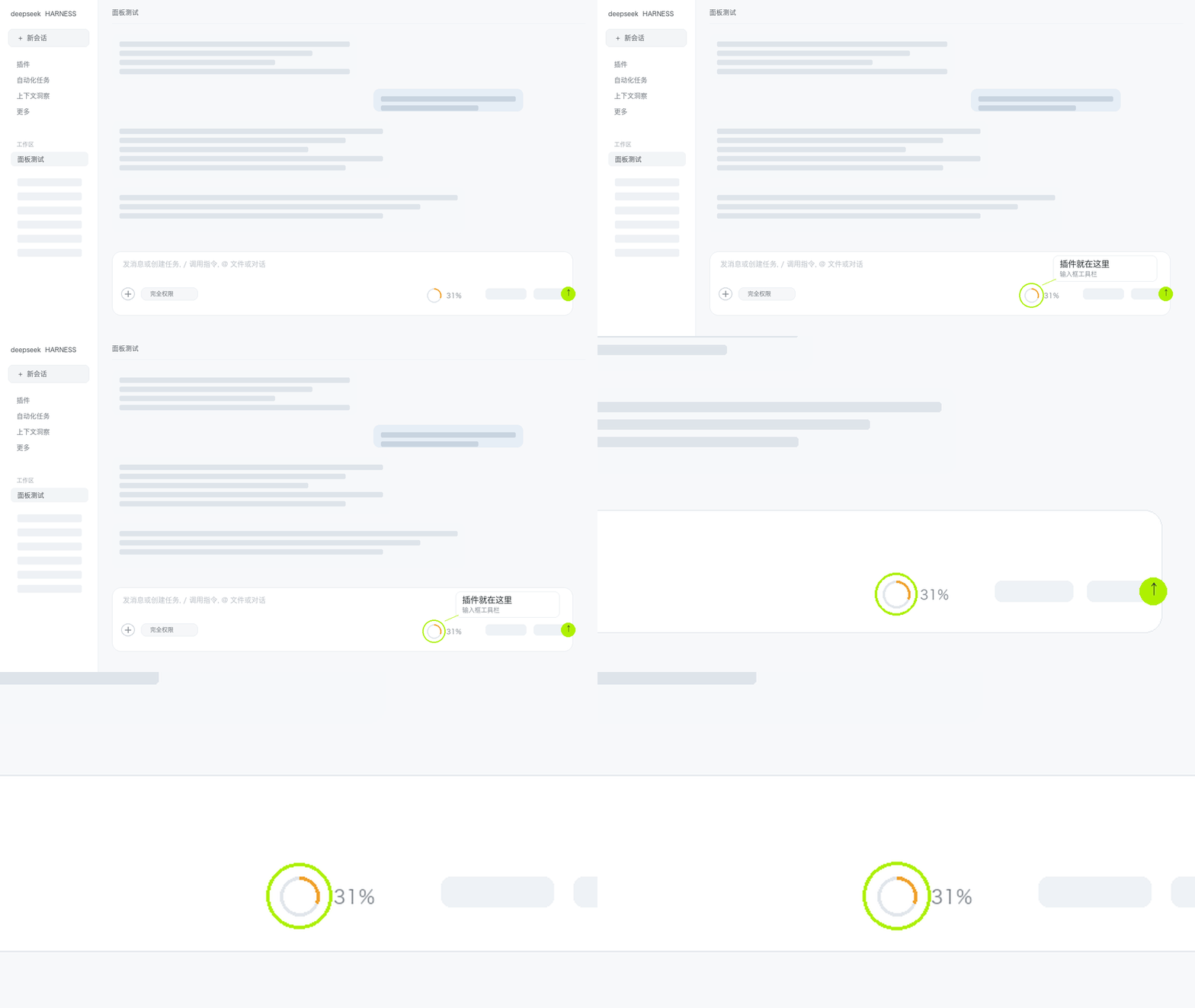
DSH 的输入框下面有一行工具栏(+、权限、额度、模型、麦克风、发送)。插件的小环就长在这一行——打完字那一行的右侧、额度信息左边。它不抢官方的位置,只在旁边多一枚更小的环。
卡片形态:点开就是面板
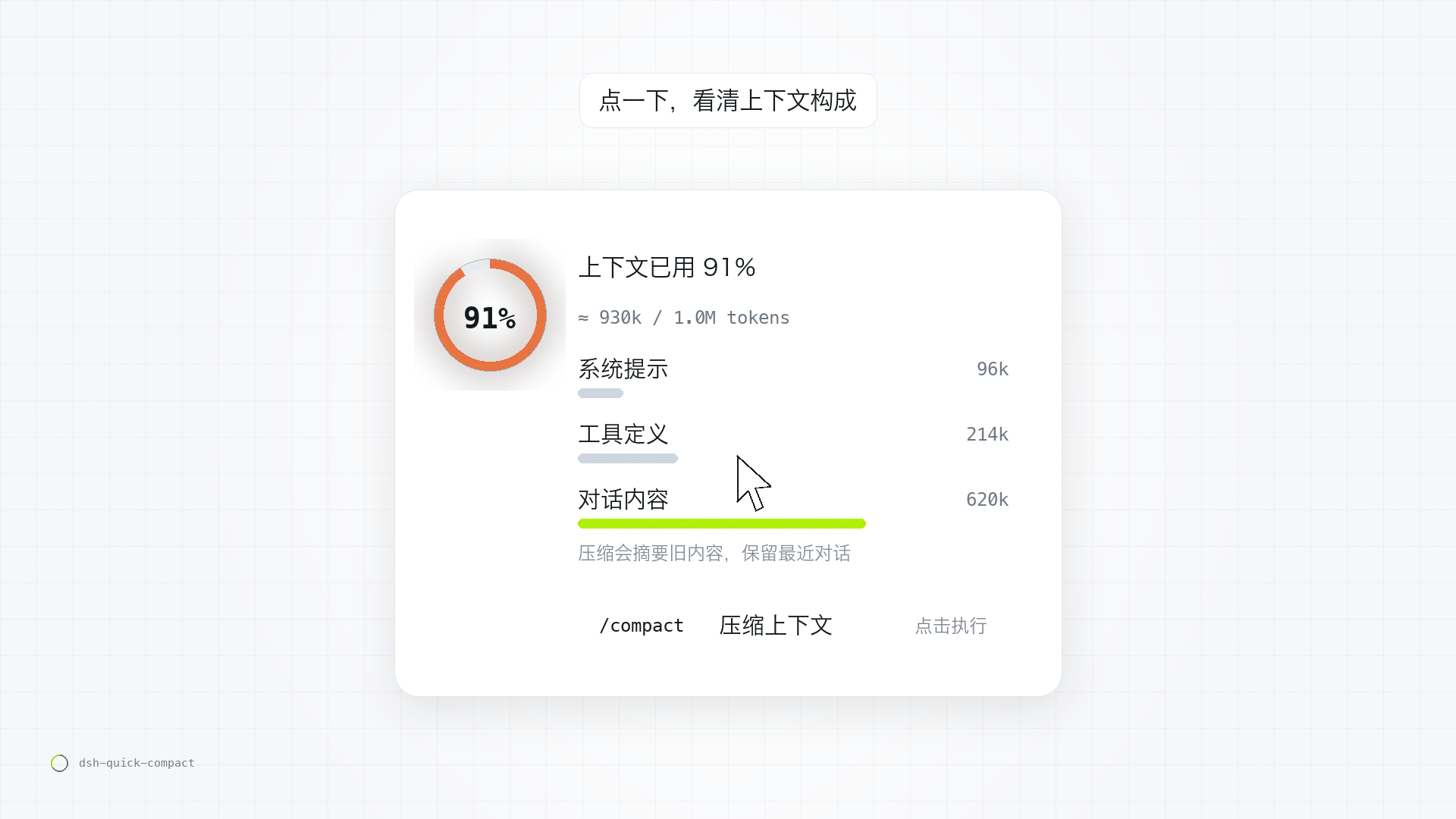
点一下小环,展开面板:大环 + 上下文已用 N% + 三段构成(系统提示 / 工具定义 / 对话内容),最下面是 /compact 压缩上下文 一行。看用量、看构成、点一下压缩,都在这里。
点一下的样子
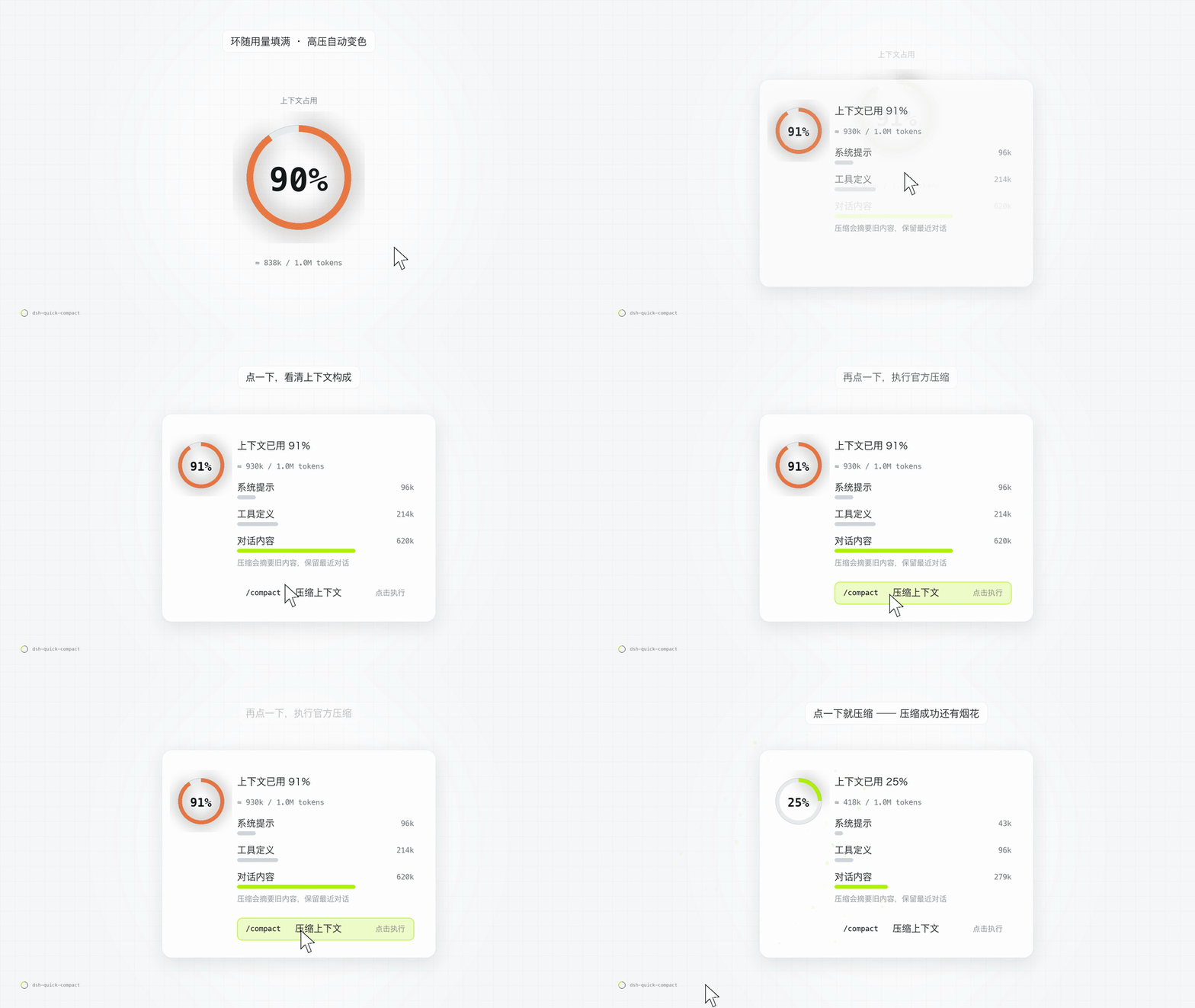
GIF 是示意:插件里的压缩烟花更细腻,动画约 2.2 秒,而且整页放——不打开面板也会放。
为什么做它
DSH 本来就有上下文环,但它只告诉你「用了多少」;想压缩,得自己记得去打 /compact。真实使用里往往是——先看到快满了,才想起来要压缩,中间已经多烧了几轮 token。
这个插件把「看」和「压」放在同一个控件上:环告诉你还剩多少,点开告诉你为什么用了这么多,再点一下就直接压。
功能
| 用量小环 | 18px 环 + 整数百分比,读宿主 contextPressure 投影(已用 ÷ 路由容量)。填充随用量增长,高压自动变色:青柠 → 橙 → 红。数据没出来时不显示假数字。 |
| 用量构成 | 点开面板:大环 + 上下文已用 N% + ≈ 148k / 1.0M,下面是 contextBreakdown 给出的三段构成:系统提示 / 工具定义 / 对话内容,各自 token 数。 |
| 一键压缩 | 面板里 /compact 压缩上下文 一行,点击调命令通道 remote.commands.execute(sessionId, '/compact', [])——和手打命令完全等价,不是自己实现的假压缩。失败会把宿主返回的错误原样显示。 |
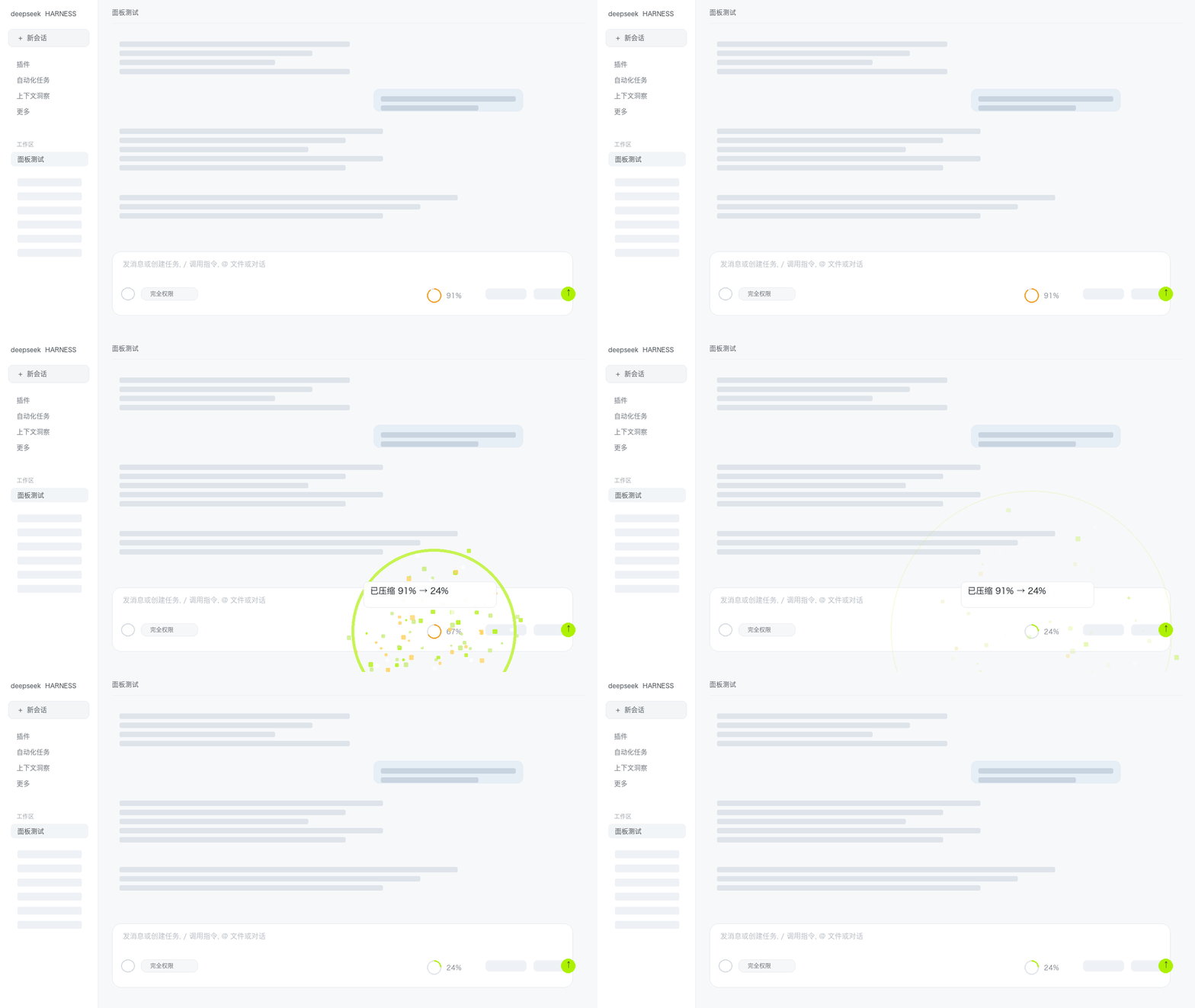
| 压缩烟花 | 压缩发生那一刻,环心炸开一簇小方点 + 一圈冲击波,约 2.2 秒散尽。它铺在整个页面上(全屏画布)——不打开面板也会放:插件按钮的 /compact 调用返回未明确失败时播放;上下文用量一次下降 15 个百分点以上时也会触发(自动压缩通常满足)。pointer-events:none 不挡输入、不吃点击;prefers-reduced-motion 时不放。 |
| 零侵入 | 官方那只环原样保留,插件只在自己的插槽里画;不接管官方 UI,升级不易碎。 |
压缩烟花
| 压缩烟花:不用打开面板,界面里直接放 |
|---|
 |
安装
dsh plugin --profile <profile> add dsh-quick-compact
或本地安装:插件管理器 install_bundle → 选 plugins/dsh-quick-compact/ 目录 → 装完硬刷新页面(Cmd/Ctrl + Shift + R)。
工作原理
- 插槽:
conversation.input.right(输入框工具栏右侧),纯增量实现; - 数据:宿主投影
contextPressure与contextBreakdown(随 DSH 基础包提供); - 动作:
remote.commands.execute(sessionId, '/compact', []),与手打命令等价; - 降级:以上任一不可用时,退化成「只有压缩图标 + 点击面板」,不报错、不显示假数据。
隐私与请求范围
- 不向第三方上报、不发遥测,不读取对话内容、不写日志。
- 打开面板时会尝试
GET一次当前宿主同源的阈值接口/compaction-threshold/api/state(用于显示「压缩触发阈值」滑块);未安装联动插件时请求失败、控件自动隐藏。 - 拖动滑块会
POST同一个同源接口,只写thresholdRatio一个字段。 - 压缩本身通过宿主官方命令通道执行,后续压缩行为由宿主配置决定。
兼容
DSH 0.2.x(桌面版 / Web 版)。无需额外依赖,安装后即生效。
相关插件与致谢
- 自动压缩引擎:DSH 官方的
@deepseek-ai/dsh-compaction-basic,本插件只是触发官方/compact命令,不实现压缩逻辑。 - 可选联动:安装了 windwhiterain/dsh-compaction-threshold(MIT)时,面板里会多一条「压缩触发阈值」滑块,直接读写它的
/compaction-threshold/api/state接口——仅调用公开 HTTP 接口,未复制其代码;未安装时该控件自动不显示,互不影响。
仓库里的其他东西
experiments/— 性能基准(bench/)、A/B 对比(ab/)、脱敏样例(fixtures/)、聚合结果(results/)scripts/— 仓库自动化;提交前跑scripts/check-hygiene.sh自查绝对路径 / 凭据形态 / 大文件.github/workflows/ci.yml— PR 校验(语法、package.json 完整性、禁止绝对路径)
参与
欢迎 issue / PR。规则见 CONTRIBUTING.md,安全问题见 SECURITY.md。
许可
MIT,见 LICENSE。
English
A tiny ring in your DSH composer: see your context, compact with one click.
A client-side plugin for DeepSeek Harness that adds a ring gauge next to the built-in context meter. It shows context usage, breaks it down by system prompt / tool definitions / conversation, and runs the official /compact command when you click. No telemetry and nothing sent to third parties; the only requests are same-origin calls to the optional threshold endpoint. No UI replacement.
Two forms
Ring form — in the composer toolbar
DSH has a toolbar row under the composer (+, permissions, usage, model, mic, send). The ring sits on that row — right side of the composer, just left of the usage meter.
Panel form — click the ring
Click the ring and the panel opens: a big ring, context used N%, a three-part breakdown (system prompt / tool definitions / conversation), and a /compact row.
See it in action
This GIF is illustrative: the real fireworks are finer, run for about 2.2s on a full-page canvas, and play with or without the panel open.
Features
- Ring gauge — 18px ring + integer percentage from the host's
contextPressureprojection; fills as context grows and shifts lime → amber → red under pressure. - Breakdown — a popover with a big ring,
context used N%,≈ 148k / 1.0M, and a three-part breakdown (system prompt / tool definitions / conversation) fromcontextBreakdown. - One-click compact — runs
remote.commands.execute(sessionId, '/compact', []), identical to typing the command yourself. - Fireworks — a ~2.2s particle burst + shockwave drawn over the whole page; plays with or without the panel open, when the plugin's
/compactcall does not explicitly fail, and when measured context usage drops by ≥15 percentage points (auto-compaction usually does).pointer-events:none, disabled underprefers-reduced-motion. - Zero-invasion — the built-in meter stays untouched; the plugin renders in its own slot.
Install
dsh plugin --profile <profile> add dsh-quick-compact
Compatibility & privacy
DSH 0.2.x (desktop / web). Client-side only: no telemetry, nothing sent to third parties, no conversation content read. The only requests are same-origin calls to the optional /compaction-threshold/api/state endpoint (hidden when that plugin is absent).
Repo layout
plugins/dsh-quick-compact/— the pluginexperiments/— benchmarks, A/B runs, fixtures, aggregated resultsscripts/— repo automation (check-hygiene.shruns before commits).github/workflows/ci.yml— PR validation
License
MIT.
Plugins relacionados
dsh-web (dsh-task-board)
zhu1090093659/dsh-web
dsh-web (dsh-web-all)
zhu1090093659/dsh-web
dsh-TUI
ccch1mneyyy/dsh-tui
dsh-web-ui (dsh-task-board)
zhu1090093659/dsh-web-ui