touchstone-dsh
gavinc-cn/touchstone-dsh
Plataforma de testes automatizados conduzidos por agente IA para DeepSeek Harness (dsh): sessões longas e multipasso para escrever e executar casos Markdown, relatar bugs, corrigir código e verificar o conserto. Inclui fila serial por projeto, quadro de desenvolvimento e teste de carga integrado.
Instalar
dsh plugin --profile web add github:gavinc-cn/touchstone-dshREADME
Touchstone
An AI-agent-driven automated testing platform. Point it at a repository; it explores the code, writes and runs test cases, files what breaks, fixes it, and re-verifies the fix.



English | 中文
Quick start · Try the interactive demo
What is Touchstone?
Touchstone turns "we really should test more" into a running loop. You register a project — its source
directory, a working directory, and the house rules the agent must follow — and
Touchstone drives an AI agent through DeepSeek Harness
(dsh) to generate test cases, execute them, report failures as bug reports, fix the code, and
re-verify the fix. Every artifact lands on disk in a reviewable form: a case library of Markdown case
files, a bug_report/ directory, and per-round logs.
It is not a one-shot "run my test suite" CLI. Touchstone is built around long-lived, multi-round agent sessions: a task runs round after round in the same session with its context intact, so the agent remembers what it already tried. A unified queue keeps exactly one writer per project (no two agents editing the same checkout at once), and the whole thing is observable — live round logs, a rendered session window, and an SSE-backed board.
Touchstone runs locally. Standalone mode is a Python web site; plugin mode defaults to the bundled Node
backend (since 2026-10-15, with backend: python as the one-line fallback). Either way it is a SQLite
database plus a file-system workspace, and no data leaves your machine except for the model calls your
dsh host makes.
Quick start
Touchstone runs inside DeepSeek Harness (dsh): the
platform serves its own UI from the dsh host, and the agent that writes and runs tests is that host's
agent. Nothing else has to be installed — no Python, no git clone.
What you need: Node.js 24.9+ (the floor of current dsh releases; Touchstone's own floor is 22.19),
a model route configured in dsh, and a repository you want tested.
The panel UI is Chinese-only today. The commands below and every artifact on disk are language-neutral; where a label is Chinese, its meaning is given in parentheses.
1. Start dsh and give it a model
npx @deepseek-ai/dsh web
The first run creates the web profile under ~/.dsh/profiles/web and prints a URL that carries an
access token (default port 3080). Open that URL, go to Settings → Models, and save a DeepSeek API key
(other providers and OpenAI-compatible endpoints work too). Leave this process running: it is the agent
runtime.
2. Install the Touchstone plugin
In a second terminal:
npx @deepseek-ai/dsh plugin --profile web add @gavinc-cn/touchstone-dsh
The package is self-contained (UI, both backends, prebuilt front end), and the install also adds it to the
profile's bundle list. No manifest to edit, no Python dependencies to install. dsh forwards this command to
pnpm: if pnpm is not on your PATH the command stops and says so — enable the shim that ships with Node
(corepack enable pnpm) and run it again.
3. Restart dsh and open the panel
Stop dsh (Ctrl+C) and start it again with the same command. A Touchstone entry now appears in the
sidebar — click it, or press Alt+T. The panel opens already signed in as admin (plugin mode is
password-free by default; set a password later under 设置 → 修改密码 (Settings → Change password)
in the panel).
4. Add your first project
In the panel, click 添加项目 (Add project) and fill in the form:
| Field | What to enter |
|---|---|
| 项目名称 (Project name) | Any label, e.g. my-service |
| 项目目录 (Project directory) | Absolute path of the repository to test — the agent reads and edits it |
| 工作目录 (Work directory) | Leave empty to use ~/.touchstone/projects/<path id>; cases and bug reports are written here |
| 智能体 (Agent) | Keep the scanned dsh (plugin, in-process) entry |
| 模型 (Model) | Leave empty for the dsh default; the list is the host's model catalog |
| 权限 (Permission) | The permission preset agent sessions run under; it can edit files and run commands |
| 项目附加提示词 (Project guidance) | How to build, test and deploy the project, plus the rules the agent must follow; injected into every first round |
The case library (free_style/) and bug_report/ are created inside the work directory; nothing extra is
written into the tested repository.
5. Run one task and read the result
Open the 测试任务 (Test tasks) tab → 新建任务 (New task). The defaults are already what a first run needs: type 探索 (Exploration), end stage 生成报告 (Generate report), stop after one round. Give it a name and submit.
What happens, in order:
- The task enters the project's queue (排队中, queued) and then starts (运行中, running). The queue is serial per project — one agent round at a time — so a second task waits for the first; different projects run in parallel.
- The task detail refreshes its round log every couple of seconds, and the session window renders the full agent transcript (messages, reasoning, tool calls and results) as it grows.
- When the round ends,
free_style/under the work directory holds the new cases (case.md+status.md, plus anINDEX.md), and any failure has a directory underbug_report/(severity, reproduction steps, log evidence, related case). - The task finishes at 生成报告 and shows its round count and new-bug count.
Follow-up tasks close the loop: a bug report can spawn a fix task, a fix a retest, a rejected report a case-revision task. See How it works and Task types.
If it doesn't work
| Symptom | Cause and fix |
|---|---|
| No Touchstone entry in the sidebar | The package is not in the profile. Re-run step 2 and read its output; ~/.dsh/profiles/web/package.json must list the package under dependencies and in dsh.profile.bundles. Then restart dsh. |
| The panel opens, but the page reports that the backend did not start | Another Touchstone instance already holds the database (~/.touchstone/touchstone.db). Only one runs at a time: stop the other one, or point this one at another database with TOUCHSTONE_DB. |
| A round ends instantly and leaves nothing | dsh has no usable model route. Configure one under Settings → Models; the session window shows only what the host reported, so a missing model looks like an empty round. |
dsh: pnpm was not found | Enable Corepack's pnpm shim once (corepack enable pnpm) and re-run step 2. |
| The task sits in 排队中 | Another task or board card holds this project's serial slot. Wait for it, stop it, or use a different project. |
| Port 3080 is taken | Start dsh on another port: dsh web --port 8081. |
| The panel is not in your language | It is Chinese-only today (see Capabilities and limits). |
Plugin backend diagnostics are appended to ~/.touchstone/plugin-backend.log.
Other ways to run
Interactive demo
Open the interactive demo to walk the project, task, board and session workflow in a browser tab. It is a static simulation: no backend, no repository and no model calls.
Standalone site (no agent execution)
Useful for browsing projects, the case library, bug reports, the board and monitoring. It serves the same UI
but cannot execute an agent — the agent only exists inside the dsh host. Requires Python 3.12+.
git clone https://github.com/gavinc-cn/touchstone-dsh.git
cd touchstone-dsh
python3 -m pip install -r backend_py/requirements.txt
./touchstone.sh start          # builds the front end on first run, then serves 127.0.0.1:4601
./touchstone.sh status         # PID and the actual port
./touchstone.sh stop
Open http://127.0.0.1:4601. The first start seeds an admin account; without TS_ADMIN_PASSWORD a
random one-time password is printed once in the startup banner:
grep '一次性初始口令' .run/server.log # or: ./touchstone.sh status
First login forces a password change. Set TS_ADMIN_PASSWORD=<your-password> before the first start to skip
the one-time password and the forced change.
The standalone site and the plugin share one database (~/.touchstone/touchstone.db) and are mutually
exclusive while running: the second instance refuses to start and names the current holder.
Python backend in plugin mode
The plugin's default backend is Node. To use the observation-window fallback instead, set backend: python
in the plugin config (deleting the key does not change the default) and install that backend's dependencies
with pip, not npm:
pip install -r ~/.dsh/profiles/web/node_modules/@gavinc-cn/touchstone-dsh/backend_py/requirements.txt
# Windows: python -m pip install ...   (the official installer ships python.exe, not python3)
The plugin probes python, then python3, and uses the first interpreter that runs. If that is not where
you installed the dependencies, pin another interpreter in the profile patch:
- id: touchstone-dsh
  config: { backend: python, pythonPath: /path/to/python }
From a checkout (development)
git clone https://github.com/gavinc-cn/touchstone-dsh.git
cd touchstone-dsh
./dsh-plugin/install.sh           # idempotent install of this checkout into the profile
The installer prints an optional profile patch for pointing the plugin at your working copy or choosing a specific interpreter; skip it to use the package's own directory:
- id: touchstone-dsh
  config: { repoDir: /path/to/touchstone-dsh, pythonPath: /path/to/python3 }
Windows
The cross-platform launcher offers the same commands for the standalone site; the plugin is installed the same way as on Linux:
python touchstone.py start | stop | restart | status | build | test
Highlights
- Six task types covering the whole QA loop — exploration, regression, stress, fix, retest, and case revision — each following a seven-stage lifecycle (generate cases → execute → report → analyze → fix → deploy → retest).
- A case library, not a test log. Cases are human-readable Markdown (
case.md+status.mdper case, plus anINDEX.mdper directory). Agents read and extend them across tasks; you can fix a bad case by editing a file. - Bug reports as first-class artifacts. Failures are written up as structured reports (severity, reproduction steps, log evidence, related cases) and can be routed back into fix / retest / case-revision tasks from the UI.
- Unified per-project queue. Tasks, board cards, and chat messages all take the same serial slot per project; queue position, the current holder, and evidence are queryable rather than guessed.
- A board for agent-driven development. Kanban cards start, queue, block, and complete agent sessions;
cards can run in an isolated
git worktreeso exploratory work never touches your main checkout. - Observable sessions. Render the full transcript of any agent session (messages, reasoning, tool calls, results), reply to it, inject into the running turn, compact it, fork it, or rewind to an earlier point through a fork.
- Stress testing built in. A stress task asks the agent for a scenario + script; the platform then drives the load itself, N runs per task, with per-run metrics, charts, and Markdown/JSON reports.
- Optional integrations. Feishu (Lark) push notifications with two-way answering from chat cards, and RAG-based semantic search over the case library.
- Self-contained stack. Backend: the bundled Node backend (plugin-mode default, needs Node 24.9+) or
the Python standard library plus four small dependencies (standalone mode /
backend: python). Frontend: React + Vite. Storage: SQLite + plain files. Runs on Linux and Windows.
Screenshots
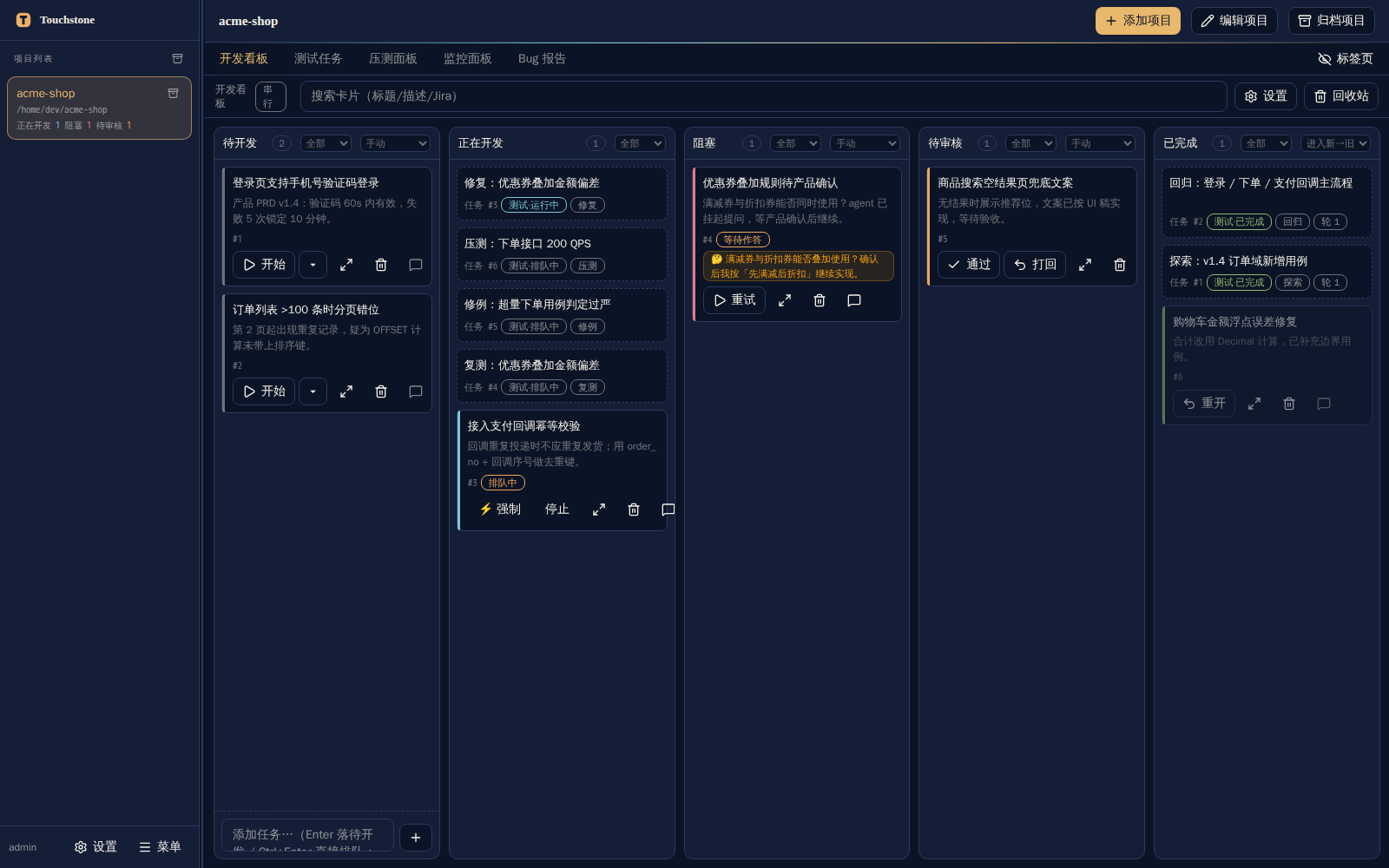
The development board — cards per column, task entries inline, per-project queue badges:
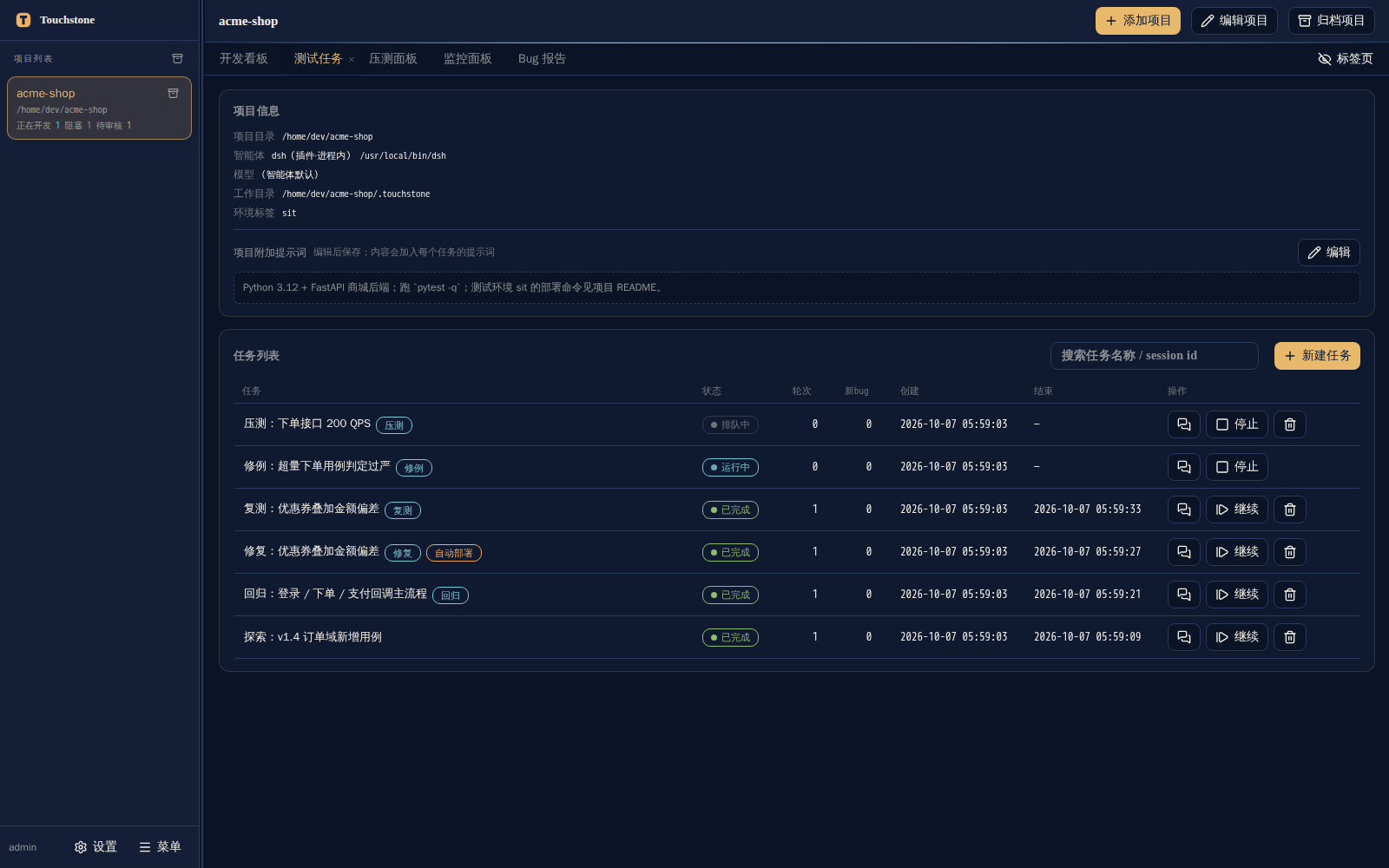
Test tasks — six task types, round counts, statuses, and per-task actions:
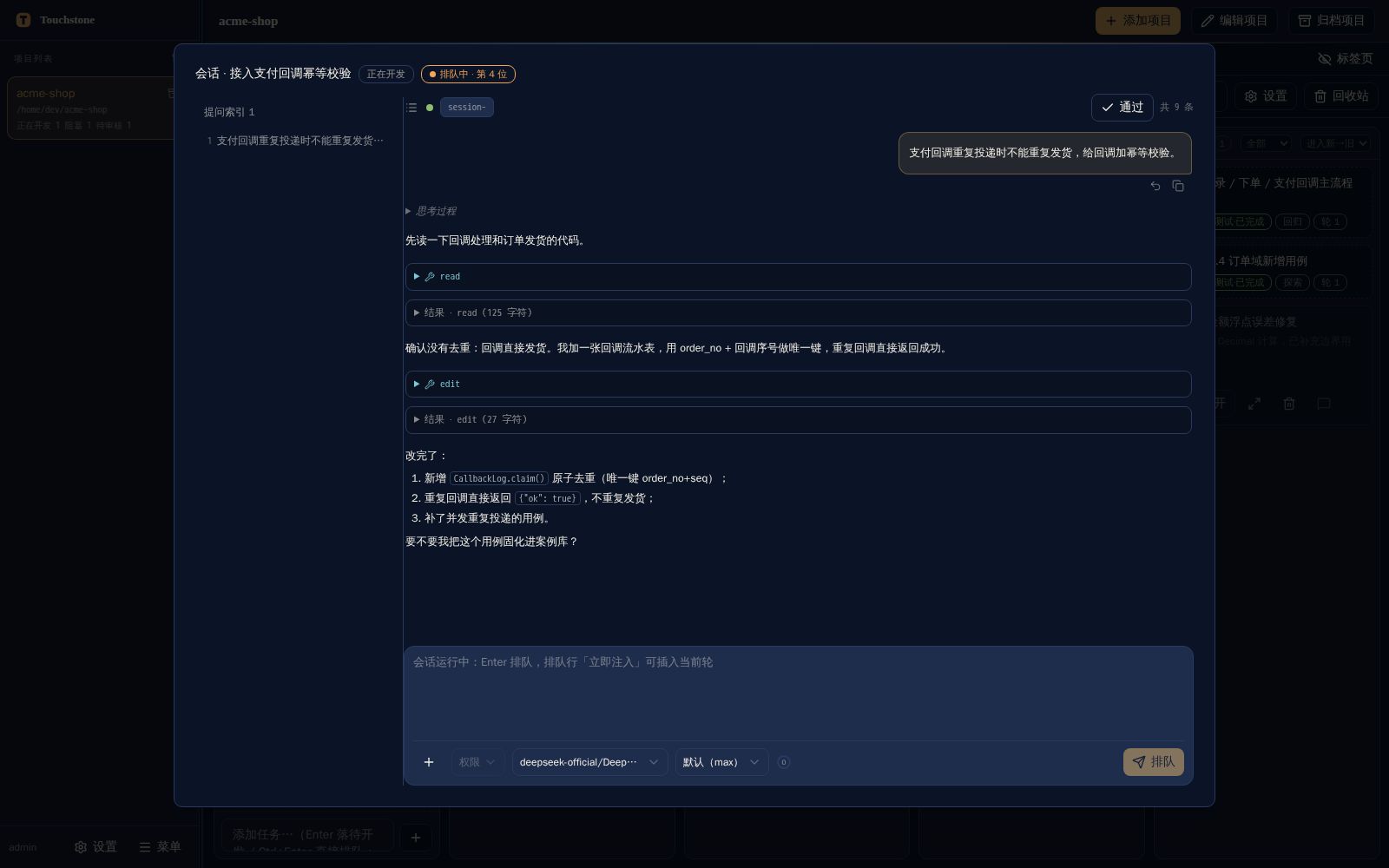
The session window — the full agent transcript rendered from the dsh session store, with reply,
approval, and model controls:
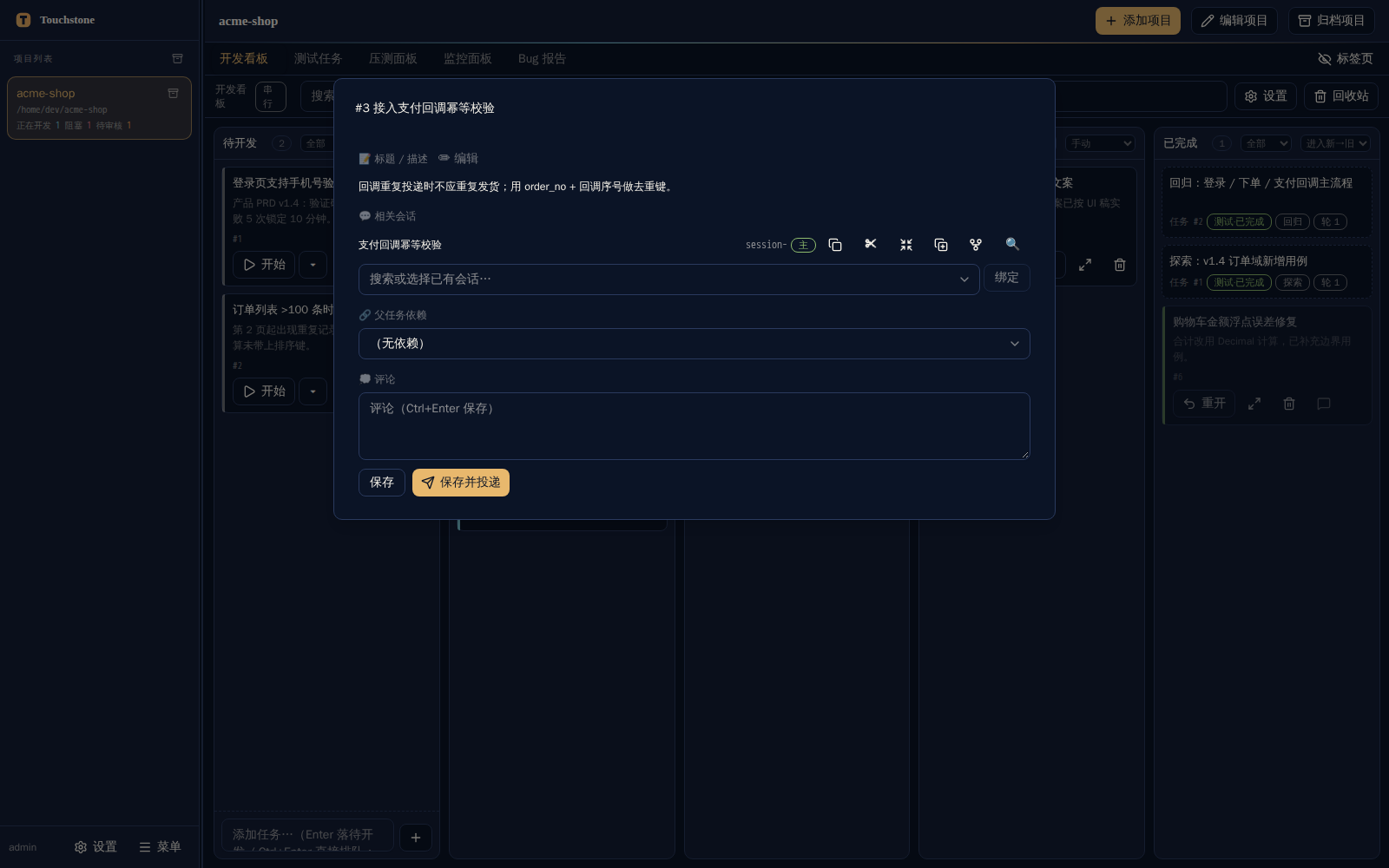
Card detail — description, scheduling, dependent cards, bound sessions, and comments:
How it works
flowchart LR
  U[Browser] -->|REST + SSE| S["Touchstone server<br/>bundled backend · SQLite · files"]
  S -->|"/touchstone-agent<br/>resident sessions"| D["dsh host<br/>DeepSeek Harness"]
  D -->|"read / edit / bash"| R["Your repository"]
  D --> C[("Case library<br/>free_style/")]
  D --> B[("Bug reports<br/>bug_report/")]
  S --- C
  S --- B
- You create a project. Touchstone stores the repository path, a work directory, optional project skills, and free-form guidance that is injected into every first-round prompt.
- You create a task. Pick a type (say, Exploration) and an end stage (say, report), and Touchstone queues it for that project.
- Rounds run in a resident agent session. Touchstone asks the
dshplugin to create or resume a session and sends the round prompt. Rounds stream back to the UI and to<work_dir>/.web/task_<id>_round_<n>.logas they happen. - Artifacts land in your work directory. New cases under
free_style/, bug reports underbug_report/, monitoring state under.live/. You review them like code. - Follow-up tasks close the loop. A report can spawn a fix task, a fix can spawn a retest, and a rejected report can spawn a case-revision task. When a task's end stage goes past "report", the platform appends the downstream stages as a follow-up task automatically.
Task types
| Type | What the agent does | Typical end stage |
|---|---|---|
| Exploration | Reads the code and writes new test cases into the case library | Report |
| Regression | Re-runs existing cases (optionally limited to a commit date range) | Report |
| Stress | Produces a load scenario + driver script, then the platform runs the load | Report |
| Fix | Analyzes a bug report, patches the code, deploys, and re-tests | Fix / Deploy / Retest |
| Retest | Re-verifies one bug report (retest only, deploy + retest, or deploy only) | Retest |
| Case revision | Rejects a bug report as a bad case and rewrites the case instead | Revision |
Core concepts
| Concept | Meaning |
|---|---|
| Project | A repository plus its work directory, agent binding, and guidance |
| Task | One queued unit of work: a task type, a stage range, a stop condition, and a round history |
| Round | One prompt/response cycle in the task's agent session |
| Case library | <work_dir>/free_style/ — Markdown cases, status files, and per-directory indexes |
| Bug report | <work_dir>/bug_report/<timestamp>_FS_<title>/ — the failure dossier for a case |
| Card | A board item that can start, queue, and drive its own agent session |
| Queue | The per-project serial slot shared by tasks, cards, and chat messages |
Configuration
| Variable | Default | Purpose |
|---|---|---|
TS_PORT / TS_HOST | 4601 / 127.0.0.1 | Listen address. Use TS_HOST=0.0.0.0 to expose the site on your LAN |
TS_PYTHON | python3 | Interpreter used by the launcher (must have the runtime dependencies) |
TOUCHSTONE_DB | ~/.touchstone/touchstone.db | SQLite database. Must live on a local disk — file locking does not work on CIFS/network shares |
TS_ADMIN_PASSWORD | (random, printed once) | Initial admin password; setting it skips the forced change |
TS_ADMIN_PASSWORDLESS | 1 in plugin mode | Seed admin with an empty password and no forced change (the plugin shell sets this); ignored when TS_ADMIN_PASSWORD is set |
TS_WEB_DIR | webui/dist | Static front-end directory the server serves |
TOUCHSTONE_RUN_DIR | .run/ in the repository | PID / log / port files |
TS_EXT_DIR | extensions | Root of the built-in asset manifests |
TS_ARCHIVE_SYNC | 1 | Keep board "Done" and dsh session archive in sync (set 0 to disable) |
TS_DSH_PROFILE / TS_DSH_PYTHON | web / auto-detected | dsh profile and interpreter used by the plugin installer |
Runtime paths inside a project's work directory:
| Path | Contents |
|---|---|
free_style/ | Case library (cases, status files, indexes) |
bug_report/ | Bug reports, one directory per report |
.web/ | Round logs, chat logs, stress metrics and reports |
.live/live.json | Agent live state used by the monitoring page |
board_media/ | Attachments pasted onto board cards |
Capabilities and limits
| Area | Supported |
|---|---|
| Agent sessions | Create, resume, reply, inject into the running turn, cancel, compact, fork, rewind-by-fork, model and permission-preset switching (presets follow your DSH permission catalog) |
| Session observability | Full transcript rendering, archive state, attachment preview, live status stream (no polling) |
| Tasks | Six types, seven stages, stop conditions, date-range scoping, per-round logs, restart, continue |
| Board | Cards across five columns, drag & drop, queue position, parent dependencies, scheduled start, trash, isolated worktrees |
| Case library | Derived indexes, change-based retest triage, optional semantic (RAG) search |
| Stress testing | Scenario validation, concurrent load, second-by-second metrics, charts, Markdown/JSON reports per run |
| Notifications | Feishu (Lark) outbound push, inbound commands, and answering questions from chat cards |
| Multi-user | Login, admin/user roles, per-project ownership checks on every project-scoped endpoint |
Known limitations, stated plainly:
- The UI is currently Chinese-only.
- Agent execution requires plugin mode; standalone mode is the site without the agent.
- Rewind and "compact into a new session" are approximations — rewind starts a new branch at an earlier point (the original session is kept), rather than truncating in place.
- No error banner for failed model requests —
dshhas no event for it, so the session window shows what the host reported and nothing more. - The Windows launcher is implemented but
dshitself has not been verified on Windows yet. - End-to-end test scripts are not distributed in this repository (see below), so
test-fullandtest-uireport a skip rather than running.
Repository layout
touchstone-dsh/
├── backend/             Node backend (the plugin-mode default): server.js + lib/ + routes/ + schema/
├── backend_py/          Python backend: server.py, runner.py, waitq.py, board.py, chat.py, db.py, …
│                        (+ requirements.txt). Legacy-but-kept; used by standalone mode / backend: python
├── builtin_prompts/     Prompt assets injected into first-round prompts
├── dsh-plugin/          The dsh plugin package (thin Node shell + driver + client bundle)
│                        + autocommit/ (auto-commit guard, bundle row 2, shipped in the package)
├── extensions/          Built-in asset manifest root (empty: its only asset moved into dsh-plugin/autocommit/)
├── webui/               React + Vite front end
├── tests/               pytest / vitest suites and the isolated-instance harness
└── touchstone.sh|py|cmd Launchers (Linux / cross-platform / Windows)
Development
./touchstone.sh build        # install front-end deps and build webui/dist
./touchstone.sh test         # backend pytest + front-end vitest
./touchstone.sh test-full    # + isolated end-to-end scripts (scripts are not distributed here)
./touchstone.sh test-ui      # Playwright end-to-end (needs a running site; scripts not distributed)
cd webui && npm run dev      # front-end dev server on :5173, /api proxied to :4601
Optional commit gate:
git config core.hooksPath githooks # pre-commit runs the fast test layer (SKIP_TS_TESTS=1 to skip once)
See tests/README.md for the test matrix and prerequisites.
Security notes
- The site listens on
127.0.0.1by default and requires a login. Exposing it (TS_HOST=0.0.0.0) puts it on your network — do that deliberately. - Every project-scoped endpoint checks ownership before returning data; the
adminaccount is the only administrator and cannot be renamed or deleted. - The agent runs with the permission preset you configure. The default is the most permissive one (no approval prompts), which is convenient and sharp-edged: review the project guidance and the preset before pointing it at a repository you care about.
- Passwords are stored with the hashing scheme the project was specified against (unsalted MD5 for new passwords, PBKDF2-SHA256 for legacy seed accounts). Treat this as a local-development-grade store.
License
MIT © Touchstone contributors
Plugins relacionados
webnovel-writer
lingfengqaq/webnovel-writer
loopx (dsh-loopx-plugin)
loopx-project/loopx
ouroboros (dsh-plugin)
q00/ouroboros
loopx (dsh-loopx-plugin)
huangruiteng/loopx