dsh-image-skin
hwayn-pixel/dsh-image-skin
Region & sticker image skin for the DSH (DeepSeek Harness) web UI - paint the window, center, sidebar, welcome, right panel and composer with your own images, GIFs or videos, add two draggable stickers, and let the interface take its colour from your wall
Instalar
dsh plugin --profile web add github:hwayn-pixel/dsh-image-skinREADME
dsh-image-skin
Your DSH web UI — but it finally looks like yours.



npm: dsh-image-skin · one-line install: dsh plugin --profile web add dsh-image-skin
Drop your own images, GIFs and looping video onto the big regions of the DeepSeek Harness web UI, stick draggable stickers on the sidebar and composer, let the whole interface take its colour from your wallpaper, and decide how much the panels let through. No account, no upload, no cloud — everything stays on your machine.
中文说明 → README.zh-CN.md
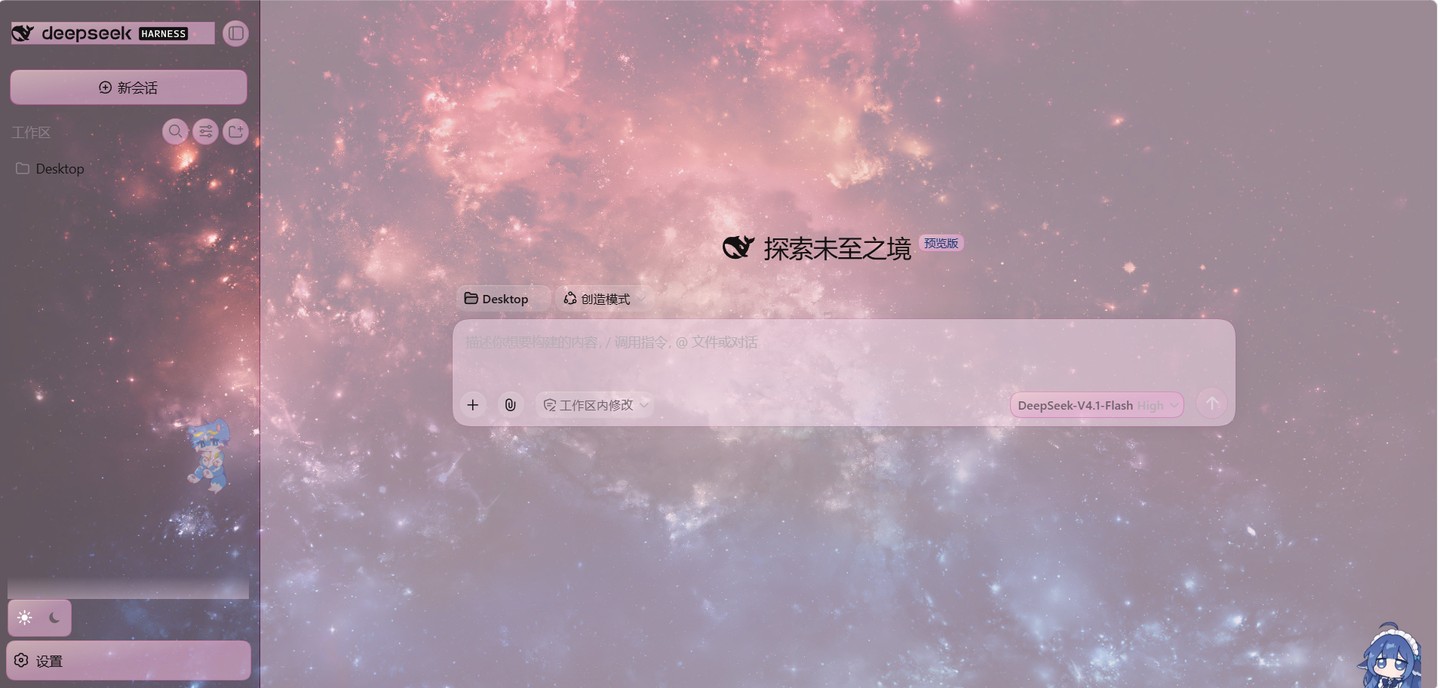
The plugin at work — a wallpaper behind frosted panels, with the UI's colours sampled from the picture. Everything you see here is local: the image, the palette, the stickers.
What it does
| 🖼️ Per-region artwork | Window backdrop, center column, sidebar, welcome/empty state, right panel, composer — each with its own image, fit mode and on/off switch. |
| 🎬 Motion | A looping mp4/webm as the window backdrop, GIFs anywhere, one slider for playback rate. |
| 🌗 Light and dark, configured separately | Two independent sets of artwork; flipping the theme swaps the wallpaper too, and a shared image is the fallback. |
| 🧸 Stickers | Two free-floating images on the sidebar and the composer — drag to move, drag the corner to scale, positions persist. |
| 🫧 Panel translucency | One slider makes DSH's own surfaces see-through so the wallpaper shows through — while the wallpaper itself is deliberately not dimmed. |
| 🎨 The interface takes colour from your picture | Buttons, inputs, dialogs and rails stop being grey: one hue is sampled from your wallpaper (a real frame, even for video), every step is contrast-checked, and the depth slider is stepless. |
| 🪶 Smooth, and it stays smooth | Big DOM, long conversation — the cross-fade only animates what a compositor can, and stops touching text colour when the tree gets heavy. |
| 🔒 Local-only, and reversible | Files live in $DSH_HOME/image-skin/. Disable the plugin and every style, sticker and video layer it added goes away. |
A feature that came and went. An early line of work tried letting a text-to-image model draw an ornamental border around panels ("AI ornament"). We built it, shipped it publicly, and then judged it not good enough — an ornament frame collapses into a colour clash on a 30px button. The UI entry was removed; the code stays in git history (
e19c633/34c3002/b66006e). This version does not do that. The colour screen now does exactly one thing: sample, and tint.
Why this one
There are several plugins in this space, and most of them do the same thing: take one picture and generate a colour palette from it. This one takes the opposite approach — you place artwork exactly where you want it — and does a few things the others do not:
- Artwork, not just a palette. A window backdrop, a sidebar image, a sticker you can drag — these are first-class here. (A single auto-picked colour scheme is not what this is.)
- The whole scheme from one hue. The sampler's colours are reduced to a single hue; every role (hairline / ink / surface) is derived from it and contrast-checked, so the UI harmonises instead of clashing. The depth slider only decides how deeply the colour is laid on (淡 / 标准 / 浓 / 呼吸), never what gets drawn.
- Built for the long haul. Other implementations stutter on a long conversation; this one only animates compositor-friendly properties and drops text-colour work on heavy trees.
- Reversible by design. Turn it off and nothing is left behind.
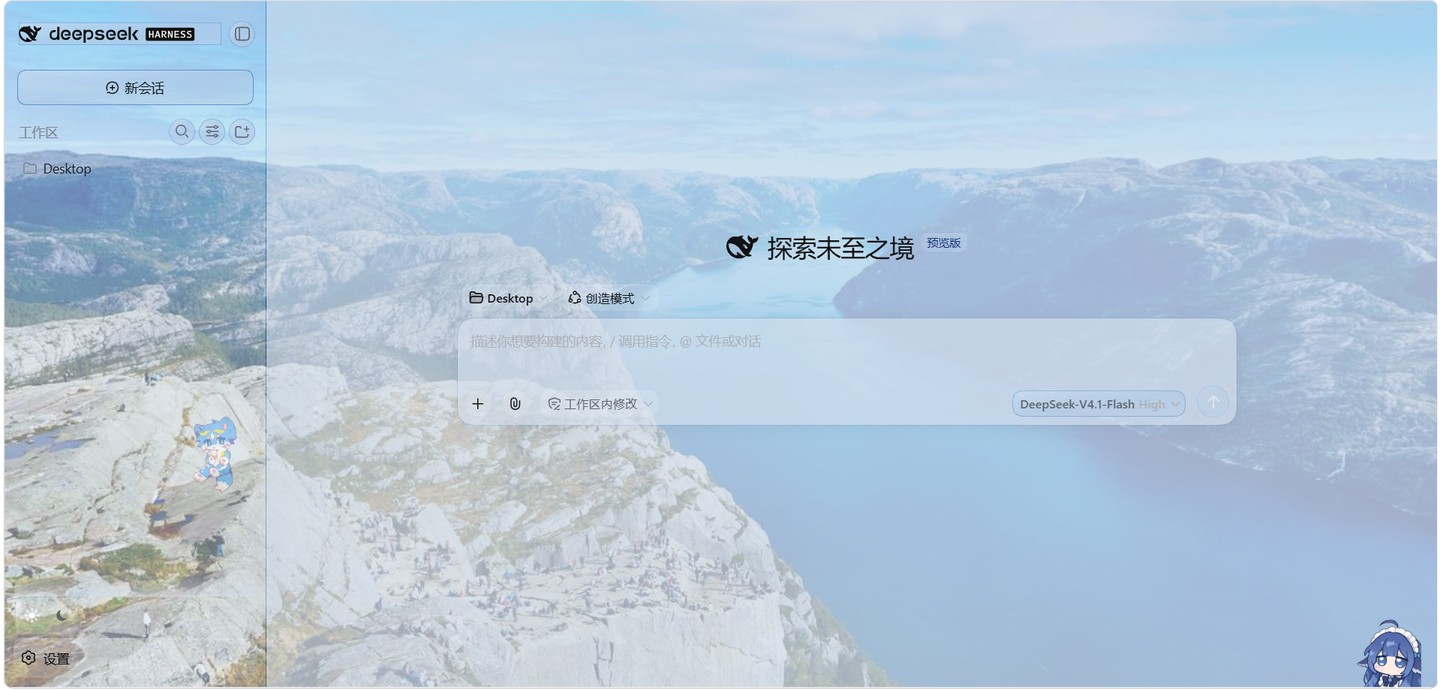
Same interface, another wallpaper — panels, hairlines and ink all re-derive from the new picture.
Install
DSH composes its web UI from a profile, and dsh plugin is a thin passthrough to pnpm inside
that profile.
# 1. from npm
dsh plugin --profile web add dsh-image-skin

#    ...or from a local checkout
git clone https://github.com/Hwayn-pixel/dsh-image-skin.git
cd dsh-image-skin
npm install
npm run build
dsh plugin --profile web add -w .

# 2. restart the web host so the profile is recomposed
dsh --profile web --no-open

# 3. hard-refresh the browser (Ctrl+F5)
The bundled helper does steps 1–2 for you: node scripts/install.mjs --profile web
(add --dry-run to preview the commands it would run).
⚠️ Desktop app (Electron) users — read this first. Versions ≤ 0.4.1 declare the client service
settingsScope, which DSH 0.2 removed. DSH 0.2 treats a client entry that never activates as a fatal boot error, so the desktop app refuses to start:web boot: 1 entry did not activate — dsh-image-skin: pending (waiting for service: settingsScope). 0.4.2 and newer are fine. If your installer keeps handing you 0.4.1, ask for the version by name — a pinned install bypasses the age policy:dsh plugin --profile web add dsh-image-skin@0.4.8 # or: pnpm add dsh-image-skin@0.4.8In the desktop app's plugin installer, type the same thing —
dsh-image-skin@0.4.8, not just the package name. A bare name is a range: pnpm'sminimumReleaseAge(default: one week) only auto-picks versions that old, so it will silently install something ancient (measured:0.3.0), or error withThe latest release of dsh-image-skin is …when the range you asked for is too new. A pinnedname@versionis exempt.“I want the newest build right now” — go straight to the official registry (mirrors lag minutes):
npm i dsh-image-skin@latest --registry=https://registry.npmjs.org/(
npmhas no release-age policy, so a bare name is fine there.) (The app's own “禁用第三方插件… / disable third-party plugins” recovery button also gets you back in.)
Usage
Settings → 图片皮肤 / Image skin. Two screens, usable independently:
「贴图」/ Images — put the artwork in:
- 正在编辑 / Editing — a segmented control for 浅色模式 / 深色模式, i.e. which set of images you are editing. Flipping it also flips the live theme, so you configure what you see.
- 界面区域 / Regions and 角标贴图 / Stickers — one card per area: thumbnail, name, where
its artwork comes from (
浅色专用/两模式共用/未设置), and its controls. - 全局效果 / Global — panel opacity, video playback rate.
- 存储 / Storage —
清理未使用图片collects stored files no area references any more.
「配色」/ Colour — let the interface follow the picture (give the Window region an image first; the palette is sampled from it):
- Depth, 0 – 4, stepless — 0 is a whisper (a single hairline), each step lays the colour on more deeply and follows the light in the picture. The interface updates while you drag.
- Colour routes — three, and the difference is visible at a glance:
整屏染色(wash) — every surface carries the hue, hairlines everywhere; the UI reads as soaked in colour;只染三处(marks) — surfaces stay neutral, only the selection, the focus ring and one rule are coloured;双声部(duo) — surfaces borrow the main hue, interaction colour uses the picture's second hue.
- 取自壁纸 / Sampled — shows the colours it took, plus the material it recognised (sky / paper / wood / water / neon).
| Control | Meaning |
|---|---|
| Upload | image, GIF, mp4 / webm (≤ 24 MB) |
| Shared image | one image used by both modes unless a mode overrides it |
| 启用 | per-area on/off |
| 填充 | cover / contain / tile (regions only) |
| 编辑位置 | stickers only — drag to move, corner handle to scale |
| 面板不透明度 | one slider for all DSH surfaces |
Sampling and tinting happen entirely on your machine: no network, no cost, no key.
Compatibility
Developed and tested against @deepseek-ai/dsh@0.1.5-rc.1.
DSH is a Cordis-based app: this plugin is one row in the web profile, contributing a settings
namespace (host) and a settings.section page (browser). Region hosts are located through
CSS-module class-name suffixes (_centerCol, _sidebarCol, _hero, _pane,
_composerSeat, …) rather than hashed prefixes, but they are still DSH internals: a release that
renames them can break region targeting. Panel translucency overrides the documented theme tokens
(--dsw-alias-bg-base, --dsw-alias-bg-layer-1/2, --dsw-alias-bg-overlay,
--dsw-specific-sidebar-fill, --dsw-specific-app-shell) and nothing else.
Development
npm install
npm run build       # src/index.ts -> lib/index.js (ESM host half)
                    # src/client/index.ts -> lib/client.js (browser half, ModuleLoader format)
npm run watch       # rebuild on change
npm run typecheck   # tsc --noEmit
npm test            # offline suite: 99 host assertions + 38 client units, no DSH process, no network
lib/ is committed on purpose — DSH loads the built halves — and prepublishOnly rebuilds it so a
published artifact can never drift from src/.
Extending
- add an id to
IMAGE_AREASinsrc/index.ts— the settings schema is generated from it; - add the same id and a label to
AREASinsrc/client/index.ts; - add a
REGION_SELECTORSentry, and clean it up indisposeSkinDom()if it adds DOM.
A note on maintenance 🐢
This is a student side-project. I build it in the gaps between classes and coursework, so replies and fixes can be slow — please bear with me.
That said: issues, ideas and pull requests are genuinely welcome, and I read every one. If you enjoy the plugin, a ⭐ helps a lot — it tells me the thing is worth coming back to.
Credits / 图片致谢
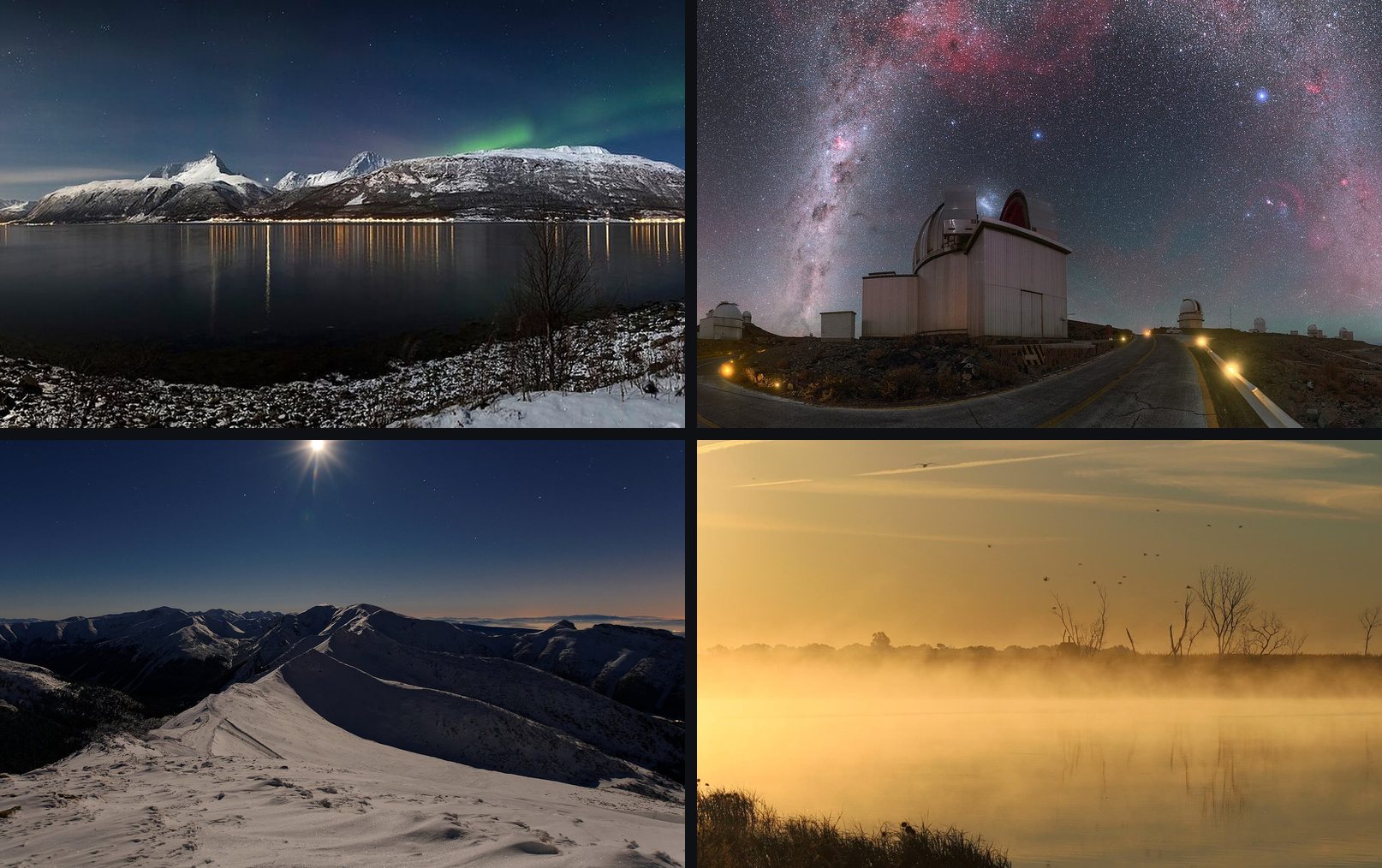
The gallery images are not part of the plugin; they are licensed wallpapers used to illustrate the docs.
| File | Author | License |
|---|---|---|
01-aurora-lyngen.jpg — Aurora borealis above Storfjorden and the Lyngen Alps in moonlight | Ximonic | CC BY-SA 3.0 |
02-milkyway-la-silla.jpg — Milky Way Arching Over La Silla | P. Horálek / ESO | CC BY 4.0 |
03-winter-night-moon.jpg — Winter night in mountains with moon | Maciej Kraus | CC BY 2.0 |
04-misty-lake-sunrise.jpg — Misty Morning Sunrise, Lake Andes NWR | USFWS | Public domain |
All four were retrieved from Wikimedia Commons and resized; only the resized copies live in this repository.
Authors / 作者
- Hwayn(幻弈)— author / 作者:设计、实现与主要代码。
- Yucheng Xiao(肖宇成)— contributor / 协作者:方向、需求、测试,以及让这个项目得以公开。
License
MIT — see LICENSE.
Plugins relacionados
dsh-deep-whale (maid-atelier)
small-tailqwq/dsh-deep-whale
dsh-deep-whale
small-tailqwq/dsh-deep-whale
dsh-wallpaper-engine
elysia395/dsh-wallpaper-engine
open-sea-skin
d-dev0101/open-sea-skin