dsh-theme-atlas
john-20260101/dsh-theme-atlas
Nine skins for the Web GUI — six material studies and three Leshan photo skins (River Night, Lingyun Dusk, Emei Mist) that use the author's photographs as wallpapers; one engine derives the 119 --dsw-* alias tokens from six colour inputs per appearance, in light and dark.
Instalar
dsh plugin --profile web add github:john-20260101/dsh-theme-atlasREADME
dsh-theme-atlas
Six material skins for the DeepSeek Harness Web GUI. One token engine, light and dark, switched from inside the app — no images, no host route.
中文说明 · Theme document · Palette reference · Image sizes
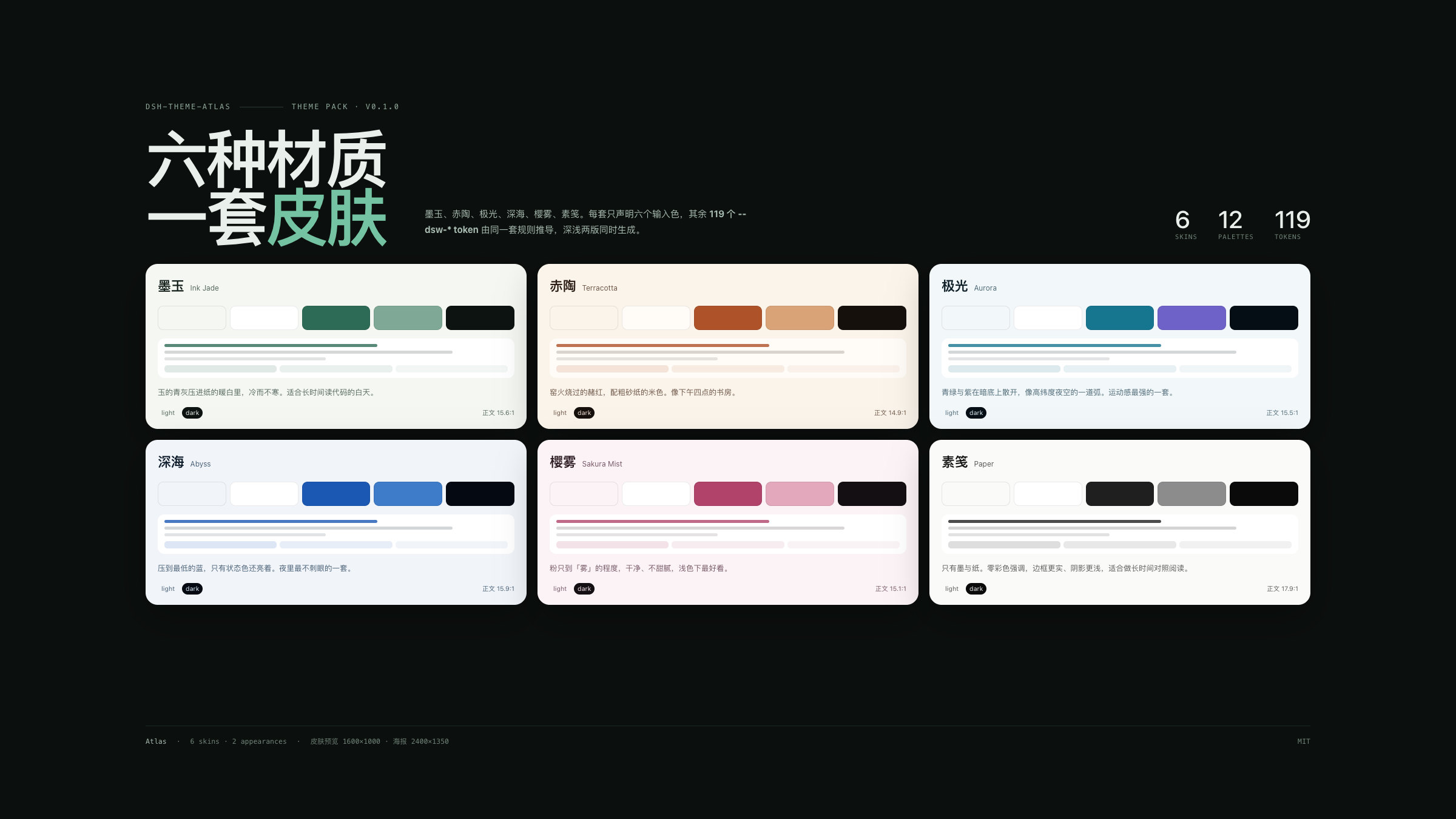
Atlas is a theme pack, not a single recolour. Each skin declares six input colours per appearance; the engine derives the 119 --dsw-* alias tokens the Web shell reads from them, then measures the result. Six skins × two appearances = twelve palettes that all share the same semantic rules, so a state that reads in light mode reads in dark.
Every skin is painted with CSS: a signature gradient wash, selection colour and focus ring. The pack ships no bitmap and registers no plugin-owned route, so it works on exactly the same shells with or without a host webServer service. The three Leshan photograph skins that used to live here now ship separately as dsh-theme-leshan.
The six skins
| Skin | Material | Accent light / dark | Body contrast | Preview |
|---|---|---|---|---|
| 墨玉 Ink Jade | 和田青玉 · 宣纸 / Hetian jade on rice paper | #2E6B57 / #74C3A2 | 15.6:1 / 16.0:1 | light |
| 赤陶 Terracotta | 未上釉的陶土 · 砂 / Unglazed clay and sand | #AE5229 / #E08C5F | 14.9:1 / 15.0:1 | light |
| 极光 Aurora | 极地冰晶 · 夜光 / Polar ice and night glow | #16758F / #55D6D2 | 15.5:1 / 16.3:1 | light |
| 深海 Abyss | 深海蓝 · 微光 / Deep water and faint light | #1B58B4 / #5B8DEF | 15.9:1 / 16.1:1 | light |
| 樱雾 Sakura Mist | 薄樱 · 雾面 / Thin blossom on mist | #B1436B / #E78BA8 | 15.1:1 / 15.8:1 | light |
| 素笺 Paper | 无涂布纸 · 墨 / Uncoated paper and ink | #1F1F1F / #E8E8E8 | 17.9:1 / 16.9:1 | light |
Dark examples: Aurora dark · Paper dark. Full palettes, token tables and measured contrast live in docs/palettes.md.
Install
# Web profile, straight from GitHub
dsh plugin --profile web add github:John-20260101/dsh-theme-atlas

# or the prebuilt tarball (no build step)
dsh plugin --profile web add https://github.com/John-20260101/dsh-theme-atlas/releases/latest/download/dsh-theme-atlas.tgz
Desktop: 插件 → 添加插件, paste github:John-20260101/dsh-theme-atlas, enable it, then reload the window if the shell asks.
The plugin is a normal bundle: package.json declares dsh.bundle + a cordis.patch.yml, so dsh plugin add can load it. There is no build step to approve — client.js ships prebuilt.
Switch skins
- Click the Atlas pill at the bottom-right of the window, or press Alt+K to cycle.
- The choice is browser-local (
localStorage: dsh.theme-atlas.skin), so different browsers can run different skins. - “隐藏此钮” hides the pill (
dsh.theme-atlas.rail); Alt+K keeps working, and clearing that key brings the pill back. - Light/dark still belongs to the shell’s own Appearance setting — Atlas has both palettes and never overrides your preference.
What it actually does
- Token layer. On load it calls
ctx.theme.overrideTokens('dsh-theme-atlas', layer), wherelayermaps every--dsw-*alias token to a{ light, dark }pair. Switching a skin replaces that layer; unloading the plugin removes it. On a shell without the theme service it falls back to a scoped stylesheet with the same values. - Signature wash. One small plugin-owned stylesheet adds the skin’s page gradient, selection colour and focus ring, keyed by
html[data-dsh-atlas]. No layout is touched and no image is loaded. - Skin rail. A shadow-DOM panel so no shell rule can reach it, keyboard reachable, removed with the plugin.
On unload the plugin removes its attributes, custom properties, style tags, rail and token layer — the page returns to the shell’s own painting. Nothing else is written: no host settings document, no files, no network calls.
Images in this repo
| Set | Size | Count | Where |
|---|---|---|---|
| Storefront screenshots | 1600×1000 (16:10) | 8 | assets/screenshots/ |
| Contact sheet | 2400×1350 (16:9) | 1 | assets/screenshots/ |
| Key art | 1536×1024 (3:2) | 6 | assets/keyart/ |
| Storefront icon | 1024, 512, 180 square | 3 | assets/ |
These are documentation and storefront images only — no skin reads them. Sizes, display guidance and regeneration commands are specified in docs/images.md; screenshots.json points the storefront at the eight UI shots.
Compatibility
- DeepSeek Harness Web 0.2.0-rc.1 … 0.2.x (
dsh.bundle+dsh.client). - Works in the official Desktop app and in
dsh web; needs a browser withcolor-mix()(Chromium 111+, Safari 16.2+). - No host service is required: the bundle row is inert, and the theme applies with or without the theme service (the fallback layer still applies both palettes).
Develop
npm install
npm run verify   # build + token completeness + WCAG gates
npm run shots    # re-render every image at the documented size
Source layout: src/color.mjs (colour maths), src/tokens.mjs (the 119-name contract), src/skins.mjs (six skins, six inputs per appearance), src/derive.mjs (role derivation), src/runtime.mjs (tokens, rail, unload cleanup), index.js (the inert bundle row). client.js is generated — edit src/ and run npm run build.
Adding a skin is one row in src/skins.mjs; run npm run verify and the contrast gate tells you whether the two new palettes hold up.
License
MIT. Palette names and copy are original to this repository; the --dsw-* token names belong to DeepSeek Harness. The Leshan photographs are not part of this package — they ship with dsh-theme-leshan.
Plugins relacionados
dsh-wallpaper-engine
elysia395/dsh-wallpaper-engine
dsh-deep-whale (maid-atelier)
small-tailqwq/dsh-deep-whale
dsh-deep-whale
small-tailqwq/dsh-deep-whale
dsh-claude-style
nwflower/dsh-claude-style