HarnessKit
laoliang-agent/harnesskit
Multi-agent engineering workflow for individual developers and small teams on DeepSeek Harness: seven roles, four flow profiles, human approval gates, guards, and a shared asset repository that accumulates specs and memory with every archived task. Its HTTP routes have no DSH access check, so a web page open in your browser could call them.
Instalar
dsh plugin --profile web add github:laoliang-agent/harnesskitREADME
Harness Kit
Turn AI coding from a personal habit into a team process.
Harness Kit is a DeepSeek Harness plugin that gives AI work a repeatable engineering workflow: fixed roles for analysis, design, implementation, review and testing; human approval gates; and a git asset repository that keeps every round's output. AI executes, humans gate, assets accumulate.
Used alone, it is your project memory and a second pair of eyes. Used by a team, it is a shared process and shared assets.
7 roles · 4 flow profiles · 10 commands · zero runtime dependencies · local-first
English | 简体中文
A harness is a set of restraints. The stronger the model, the more it needs a stable process instead of reinventing the approach on every task.
It makes your project legible to AI first
Harness Kit is not only a workflow. After the workspace is created, Start initialization orchestration probes the registered source repositories and fills in the project knowledge AI would otherwise rediscover every time:
- a root
AGENTS.mdand a one-lineCLAUDE.mdpointer - per-repository
CLAUDE.md(stack, module entry points) anddocs/CODE_STANDARDS.md(coding rules) <repo>/.harness/build.json: build, start and test commandscodebase-guide/: module docs loaded on demand instead of into every prompt- per-repository
.codegraph/: class, method and call-chain indexes the AI can query instead of reading everything .harness/scripts,rules,templates: board, health checks, spec lint and coding baselines
You confirm the plan before anything is written; existing files are skipped and build.json only
gains missing keys. If CodeGraph is not installed, the scripts try to install it, and you can skip it.
Three steps in the UI (no commands to memorize)
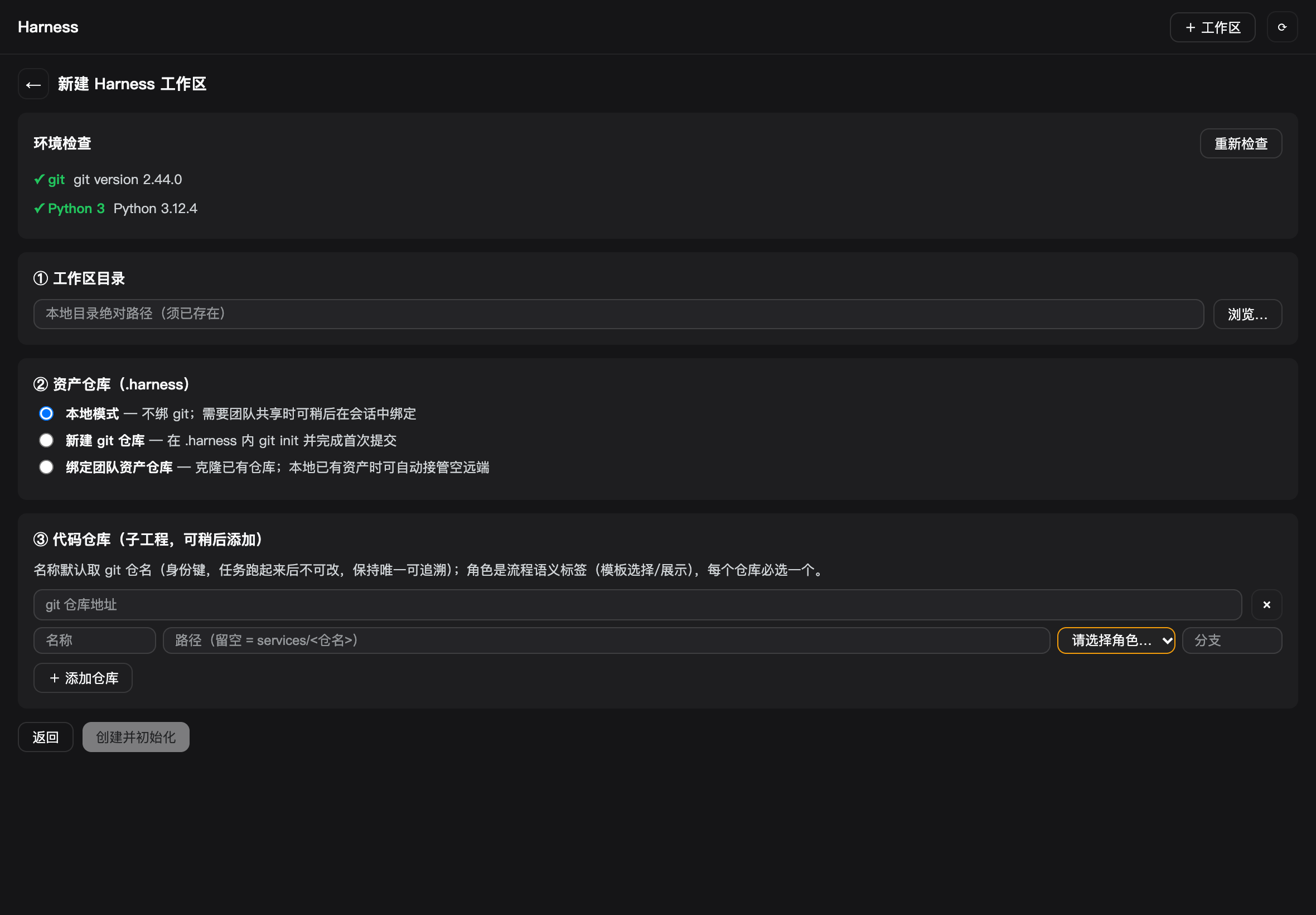
1. Open the sidebar and create a workspace
Harness Kit → + Workspace → New workspace:
- pick a local directory (it can be empty)
- choose the asset repository: local, a new git repository, or an existing team repository
- register source repositories (URL, role, branch), or add them later
- click Create and initialize
The wizard runs an environment check first: if git or Python 3 is missing, it shows the
install command for your platform instead of failing after submission. Initialization runs in the
background, survives a page refresh, and reports back in the panel; then Start initialization
orchestration probes the repositories and generates the docs and indexes described above.
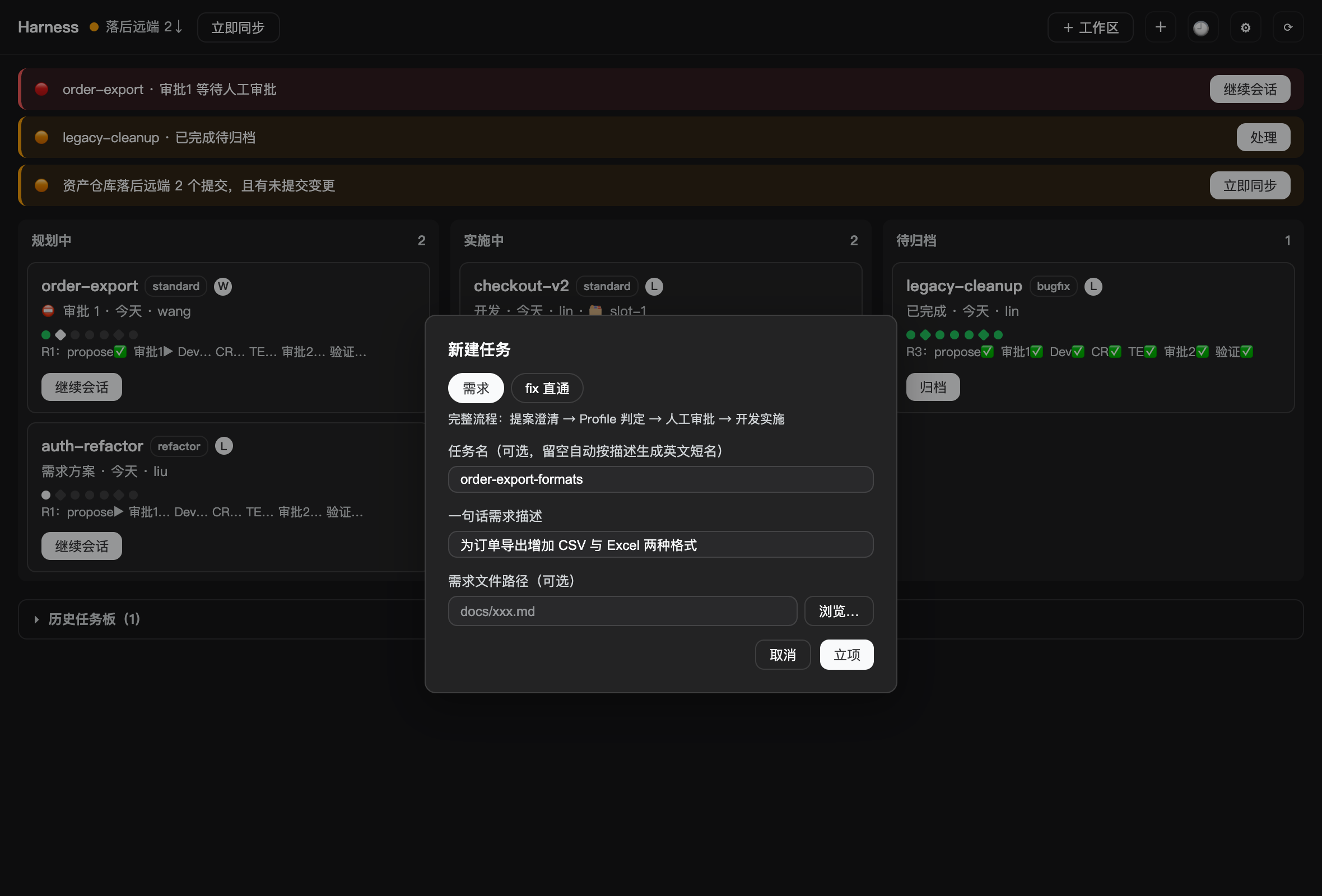
2. Click + to create a task
- choose Requirement or Fix
- write one sentence; the task name can stay empty and is generated from the description
- optionally attach a requirements file
Creating the task opens a dedicated session: requirement mode starts from the proposal, fix mode starts from the defect document and the quality gate.
3. Work from the panel
- task cards move between Planning / Implementing / To archive
- Needs you lists pending approvals, archives, and sync problems
- Continue session jumps to the task session; after an approval, the host advances the next
phase automatically (set
autoAdvance: falsein.harness/kit.jsonto disable) - archive finished work into the collapsible history board
- 🕘 team activity shows who archived what and when
- ⚙ configuration edits source branches, auto-sync and model mappings
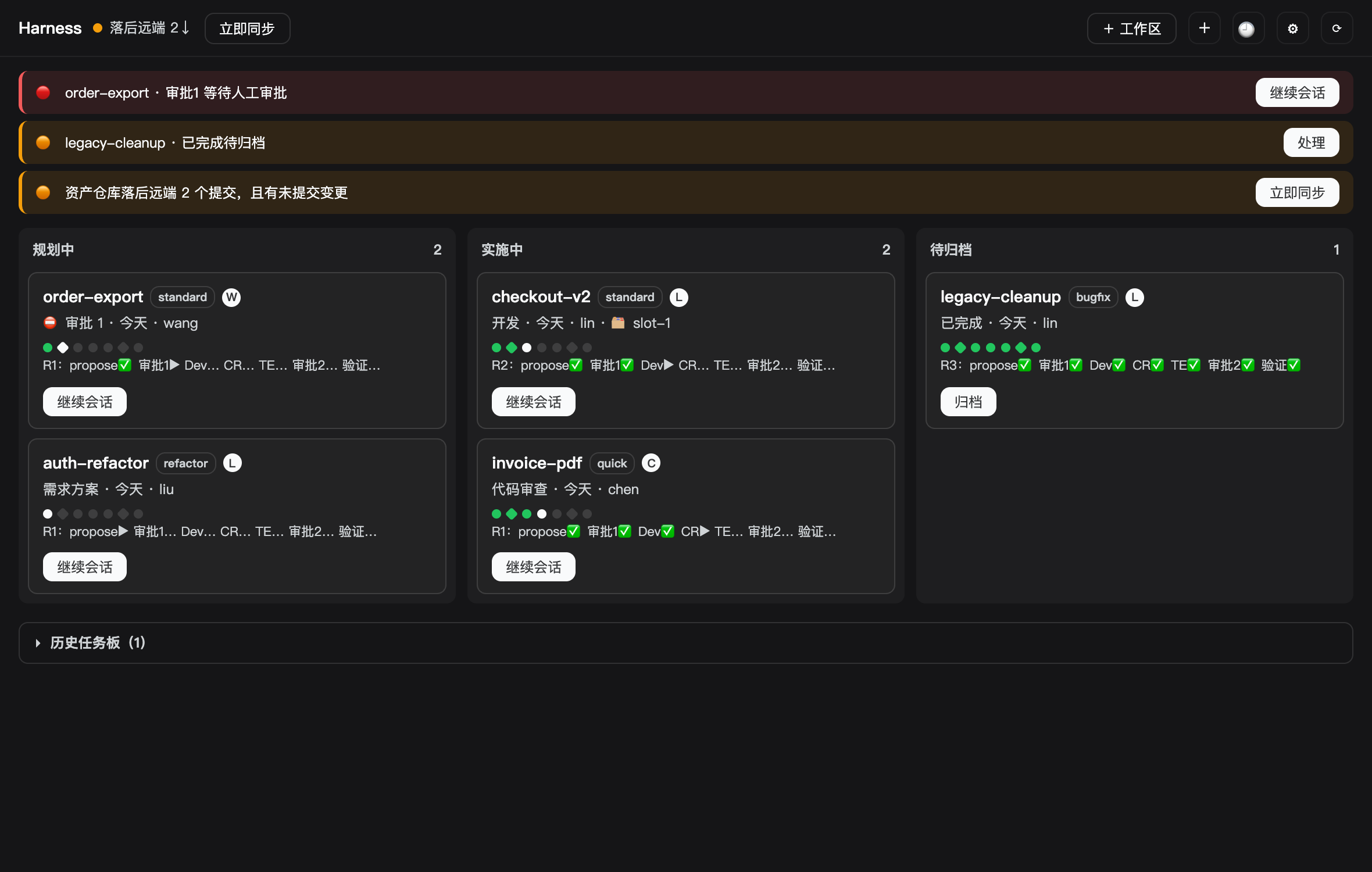
Screenshots use a sample workspace (
acme-platform), not real project data.
Approvals are written by a human; the panel only reminds. Approval 1 is recorded in
proposal.md, the quality-gate decision inbugfix.md. That is deliberate: it keeps approvals from becoming a button-click ritual.The panel covers daily work. Asset rebinding, deleting a source repository and batch operations stay in the commands below.
How it differs from personal vibe coding
| Personal vibe coding | Harness Kit | |
|---|---|---|
| Context | Lives in one session and disappears | Files under .harness/, diffable, committable, handover-ready |
| Quality | Depends on the individual's review at that moment | Fixed roles + approval gates + tool guards |
| Collaboration | Separate sessions, synchronized by word of mouth | Task claims, parallel worktrees, a serial test-environment lease |
| Models | One model for everything | Role/stage routing; strong models only where they matter |
| Audit | Chat history | Artifacts + approval markers + git history |
| Best for | One-off, exploratory, quick | Work that needs stable quality, iteration and handover |
Vibe coding wins by "think and type". The price is deferred: rework, review, rebuilding context. Harness Kit moves part of that cost earlier, into specs and gates. A one-file change is slower; iterative, cross-module work that you return to weeks later is faster.
Why it's worth it, even solo
None of this requires a team. For a solo developer, the harness addresses the you of three months from now, on another machine, in a new session: the process keeps quality stable and the assets keep you from re-explaining.
Review cost: a second pair of eyes
The faster AI writes, the more there is to check. Fixed roles make CR and TE each do one job and
produce code-review.md and test-report.md, so review has an object and a conclusion instead of a
glance that depends on the day.
Handover: the next person may be future you
Context lives in proposal.md, requirements.md and design.md, not in a session. Come back a
month later, or hand the task to someone else, and reading the files is enough.
Consistency: not dependent on today's state
Four flow profiles and fixed approval points make "how we work" repeatable instead of a personal
habit. Roles and flows are plain files, overridable per project in .harness/agents/ and
.harness/flows/.
Parallel: several tasks without collisions
Task claims, pooled worktrees and a serial test-environment lease address the three collisions that appear when several tasks run at once: duplicate work, branch pollution, and fighting over the test environment.
Model cost: spend where it matters
Use strong models for design and difficult review, fast models for routine work. The mapping lives
in .harness/kit.json and is not tied to one provider.
Assets compound, especially solo
Every round settles specs and memory entries into the asset repository: this round's lessons, last
month's specification. The longer you use it, the thicker your assets, and the less each new task
starts from zero. Templates and rules live under .harness/ too, ready to adapt and commit.
Data and security
The plugin runs locally with zero runtime dependencies and no install scripts, and collects no telemetry. Project assets live in your own git repository (your team's when shared); model requests go only to the provider you configure.
How it works
Seven roles
| Role | Owns | Artifact |
|---|---|---|
| Project Manager | The session Lead: orchestration, review, approvals, board | proposal.md, board |
| Business Analyst | Requirement clarification and acceptance criteria | requirements.md |
| Solution Architect | Technical design and blast radius | design.md |
| Readiness Reviewer | Readiness review with PASS / BLOCK | readiness-report.md |
| Developer | TDD implementation and self-test | Code, dev-log.md |
| Code Reviewer | Code review with PASS / send-back | code-review.md |
| Test Engineer | Build, unit tests, critical-path verification | test-report.md |
Four flow profiles
| Flow | Use | Path |
|---|---|---|
standard | New features, cross-module work | BA → SA → RR → approval 1 → Dev → CR → TE → approval 2 |
quick | Small changes | BA → SA (self readiness) → approval 1 → Dev → CR → TE → approval 2 |
bugfix | Defect fixes, full flow | BA (bugfix.md) → approval 1 → Dev → CR → TE → approval 2 |
refactor | Refactoring, cross-module | SA blast radius → BA → SA → RR → approval 1 → Dev → CR → TE → approval 2 |
fix shortcut | Lightweight fixes | Quality gate → Dev → (--full adds CR/TE; --light verifies only) → archive |
Approval points and guards
- Approval 1: the plan is ready; a human decides whether to start implementation
- Quality gate: for the
fixshortcut a human chooses "light" or--full - Approval 2: implementation and testing are done; a human decides whether to archive
- Guards: source writes are blocked until the quality gate is recorded; destructive git commands
(
reset --hard,clean -f,push --force) are rejected
The asset repository
.harness/ is the working copy of the asset repository:
.harness/
├── kit.json              # sources, model mapping, asset repository binding
├── deliverables/         # per-round artifacts + _archive/
├── specs/                # capability specs, appended per round
├── memory/               # lessons, one file per entry
├── tasks/                # board + machine-local state (sessions, claims, worktrees, test lease)
├── agents/ flows/        # project-level role and flow overrides
└── scripts/ rules/       # refreshed with the plugin, not committed
Parallelism and model routing
- Pooled worktrees: concurrent tasks reuse a worktree slot per repository instead of fighting over one branch
- Test-environment lease:
/hk-tekeeps one task at a time on the single test environment - Model routing:
kit.jsonmaps logical names (reasoning,coding,fast, or a role name) to a concrete provider/model; unmapped names fall back to the session default
Command reference (advanced)
| Command | What it does |
|---|---|
/hk-setup [--add <git-url>] | Register source repositories in kit.json, cloning missing ones |
/hk-init [--assets <url|init|local>] | Initialize or refresh .harness/, bind the asset repository |
/hk-new [<task>] <description> [--file <path>] | Start a full-flow task |
/hk-propose <task> | Run the propose phase |
/hk-apply <task> [feedback] | Run the apply phase |
/hk-archive <task> | Archive the round and run Spec/Memory merge |
/hk-fix [<task>] <description> [--full|--light] | Run the lightweight fix path |
/hk-te [acquire|release <task> | status] | Serial test-environment lease |
/hk-sync | Sync the asset repository (commit → rebase → append merge → push) |
/hk-doctor | Check workspace health: kit, roles, rules, flows, scripts, board, model mappings |
Install
In the app (recommended)
Plugins → Add plugin, then enter:
dsh-harness-kit@0.1.1
Enable the bundle after installation.
Command line
dsh plugin --profile desktop add dsh-harness-kit@0.1.1
Quit DSH Desktop first; replace desktop with your profile name for other profiles.
From a checkout
dsh plugin --profile desktop add /absolute/path/HarnessKit
Requirements
- DeepSeek Harness 0.2.x with the Web client (Desktop or
dsh web) gitandPython 3(the wizard checks both and shows install commands)- A DSH session working directory to use as the Harness workspace
Compatibility and known limits
- Declared DSH range:
>=0.2.0 <0.3.0. DSH 0.3 will need a new plugin release. - The panel is a Web client feature; commands and guards work in any profile with the Host plugin.
- The bundled
ai-codingpack and the panel text are Chinese-first. Roles and flows are plain files and can be overridden per project. - No MCP host support yet (Claude Code, WorkBuddy): this release targets DSH only.
- The panel does not write approvals and does not rebind asset repositories; those stay in the session commands.
FAQ
Is it slower than just asking AI to write? A one-file change: yes. Iterative, cross-module work that you return to weeks later: no. It moves rework and handover cost earlier instead of removing them.
Is it worth it for a solo developer?
Yes. Solo work loses context and rhythm most easily: the harness keeps each round's specs, lessons
and decisions in files, so the next session does not start from zero. The CR/TE roles act as a fixed
second pass, and the generated CLAUDE.md, build.json and CodeGraph index save the AI from
re-reading the project every time.
Do I have to use the full flow?
No. Four profiles plus the /hk-fix shortcut; start with the light one.
How does sharing work?
The asset repository is git. Each person has a local workspace whose .harness/ binds to the same
repository; sync through /hk-sync or git. Solo, local mode is enough: binding git is for moving
machines, backup and later sharing.
Where does data go?
Project assets stay in your local .harness/ and your git (your team's when shared). The plugin
collects no telemetry; model requests go only to the provider you configure.
Which hosts are supported? DeepSeek Harness only for now. MCP hosts are not implemented, and this document does not claim they are.
Development
npm test              # mock-agent regression suite
npm run pack:check    # pack the tarball and verify its contents
Client and panel changes still need a manual check in the real Web GUI.
Contributing
- Issues: https://github.com/LaoLiang-agent/HarnessKit/issues
- Release and maintenance runbook: docs/PUBLISHING.md
License
MIT © 2026 leo. See LICENSE.
Plugins relacionados
webnovel-writer
lingfengqaq/webnovel-writer
loopx (dsh-loopx-plugin)
loopx-project/loopx
ouroboros (dsh-plugin)
q00/ouroboros
loopx (dsh-loopx-plugin)
huangruiteng/loopx