dsh-transparent
lemon357/dsh-transparent
Translucent window background for DSH Desktop — a slider sets the page tint opacity (0-62%) and a switch picks the acrylic (blurred) or transparent (no blur) window material; the material switch rewrites the desktop shell's app.asar and needs one restart.
Instalar
dsh plugin --profile web add github:lemon357/dsh-transparentREADME
dsh-transparent — 透明背景
给 DeepSeek Harness 桌面版加上可调透明度的亚克力毛玻璃窗口背景,让桌面壁纸透出来。
本 bundle 自带桌面壳补丁:安装后自动打补丁,无需再单独运行 acrylic/ 里的脚本。
截图
磨砂(亚克力)
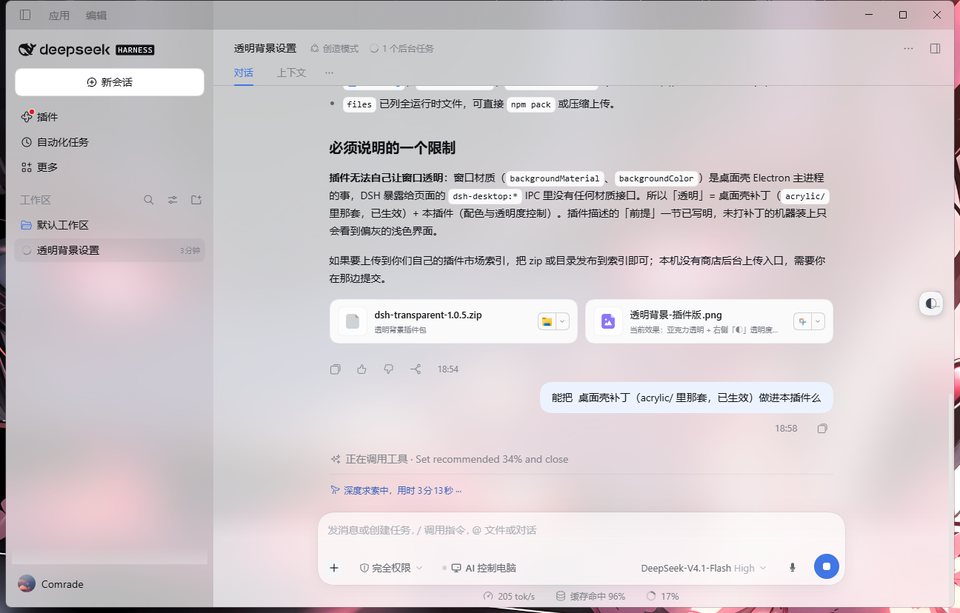
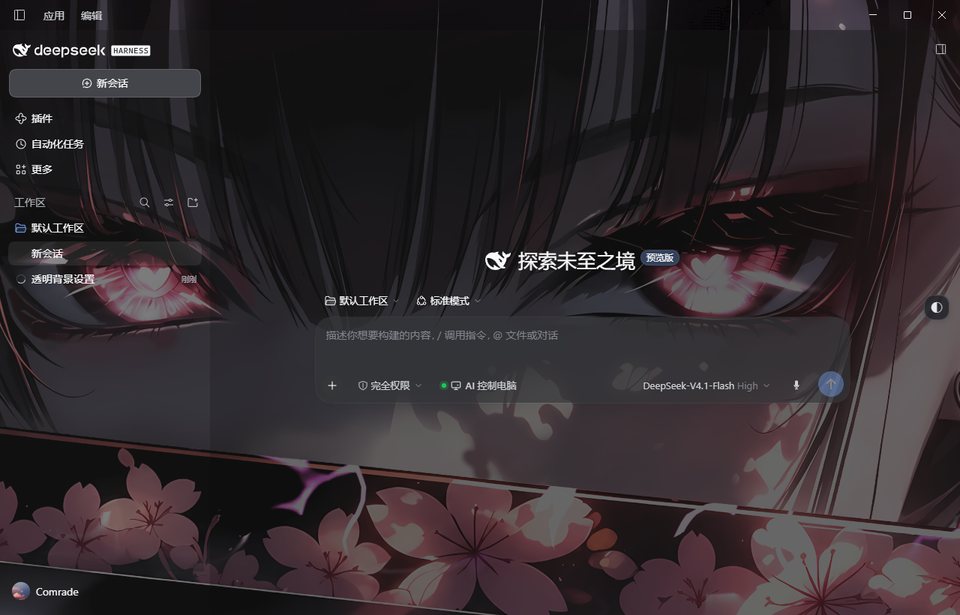
无磨砂(原始壁纸)
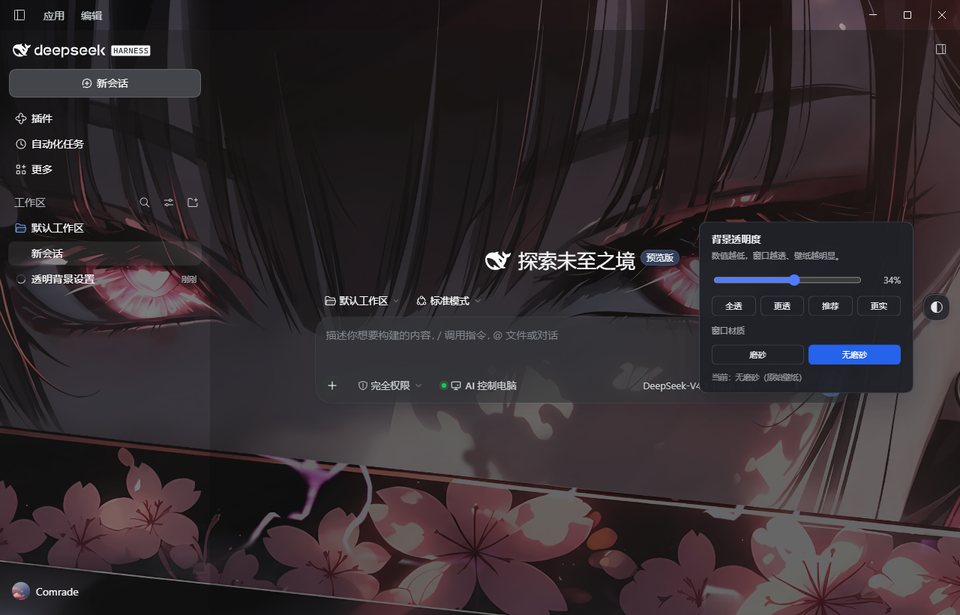
调节透明度
安装
- 下载仓库:
git clone https://github.com/Lemon357/dsh-transparent.git,或下载 ZIP 解压。 - 打开 DSH → 左侧「插件」→ 右上「添加插件」→ 选择该目录;也可用
plugin_manager install_bundle <目录绝对路径>。 - 首次加载后插件会给桌面壳
resources/app.asar打补丁(可逆,原版备份为resources/app.asar.original)。 - 重启一次 DSH,窗口即变为半透明毛玻璃。
使用
- 点窗口右侧中部的「◐」按钮打开面板:滑杆 0%–62%,预设 全透 0% / 更透 22% / 推荐 34% / 更实 46%,数值自动记住。
- 面板里的「窗口材质」可切换 磨砂(亚克力)/ 无磨砂(透明窗口),切换后需重启一次 DSH 生效。
桌面补丁
窗口材质(backgroundMaterial / backgroundColor)只能由 Electron 主进程设置,DSH 没有向页面暴露这类 IPC,所以必须改桌面壳。本插件在 Host 半边做这件事:
desktop/patch.mjs:不重打包 asar,把新的lib/main.js追加到末尾并原地改写头部(DSH 的 asar 完整性校验 fuse 为关闭状态)。- 改动 4 处:主窗口
backgroundColor/backgroundMaterial/标题栏色、nativeTheme重设、enterWorkspace重设、标题栏颜色同步 IPC。 - 备份:
resources/app.asar.original;恢复:node desktop/patch.mjs restore。 - 关闭自动补丁:环境变量
DSH_TRANSPARENT_SKIP_PATCH=1。 - 手动操作:
node desktop/patch.mjs status|apply|restore [--root <安装目录>]。
应用内升级会覆盖 app.asar,下次启动插件会重新打补丁(同样需要再重启一次才生效)。若大版本改了 main.js 锚点,补丁会安全失败并在 Host 日志留下 [dsh-transparent] desktop patch skipped: ...,窗口保持原样。
目录
package.json        # bundle manifest:patch / client / files / icon
cordis.patch.yml    # 插入 dsh-transparent 行
index.js            # Host 半边:首次加载自动打桌面补丁
desktop/patch.mjs   # 桌面补丁工具(asar 原地改写;status/apply/restore)
client.js           # Client 半边:token、控件、持久化
locale/{zh,en}.json # 名称 / 描述 / 详情文档
docs/               # DETAIL.md + preview.svg + screenshots/(README 截图)
icon.svg            # 商店图标
卸载
插件页禁用或移除即可;桌面补丁若想一并撤销,运行 node desktop/patch.mjs restore 后重启 DSH。
localStorage["dsh-transparent.alpha"] 会保留,重新安装后沿用。
无磨砂(原始壁纸)
默认材质是 Windows 亚克力(壁纸模糊)。想要不模糊的原始壁纸,把桌面壳补丁切换成透明窗口:
node desktop/patch.mjs apply --material none --root "<DSH 安装目录>"
切换后重启一次 DSH。恢复磨砂:
node desktop/patch.mjs apply --material acrylic --root "<DSH 安装目录>"
说明:none 模式使用 Electron transparent: true + backgroundColor: "#00000000",
保留原生标题栏按钮;部分显卡/远程桌面下透明窗口可能没有系统阴影,属于平台行为。
磨砂开关(面板内)
点「◐」面板里的 窗口材质 两个按钮即可切换:
- 磨砂:亚克力毛玻璃(壁纸模糊);
- 无磨砂:
transparent: true透明窗口(原始壁纸,不模糊,保留原生按钮)。
切换会立刻改写桌面壳补丁(app.asar),重启 DSH 后生效;面板只负责切换,重启请用托盘菜单/快捷键或重新打开 DSH。
Host 半边在本地 127.0.0.1:39124 提供 status / material / restart 三个接口供面板调用;
它需要本机有 Node.js(用于执行 desktop/patch.mjs),没有 Node 时面板会提示「桌面 Host 未响应」。
Plugins relacionados
dsh-web (dsh-task-board)
zhu1090093659/dsh-web
dsh-web (dsh-web-all)
zhu1090093659/dsh-web
dsh-TUI
ccch1mneyyy/dsh-tui
dsh-web-ui (dsh-task-board)
zhu1090093659/dsh-web-ui