dsh-capability-toggle-plugin
lifeopsgo/dsh-capability-toggle-plugin
Adds session, project, and global controls in the DSH WebUI for skills, MCP servers, tools, prompt injections, approval escalation, and safety guards; enforcement is scoped to the current agent.
Install
dsh plugin --profile web add github:lifeopsgo/dsh-capability-toggle-pluginREADME
dsh-capability-toggle-plugin
Control agent capabilities from the DSH WebUI — with real runtime enforcement.




English · 简体中文
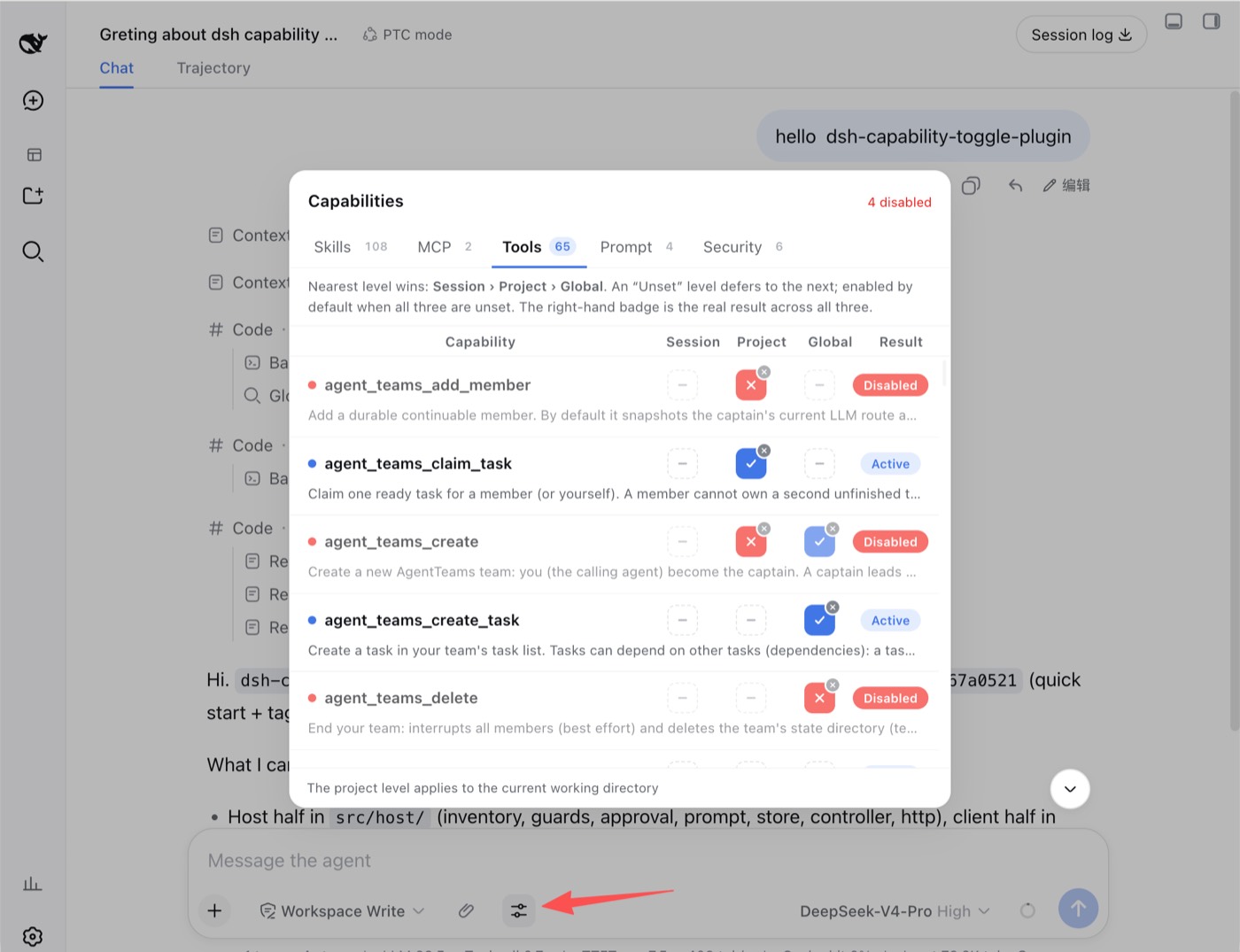
Session · Project · Global — blue check = on, red cross = off, dashed dash = unset.
What it is
A DeepSeek Harness (DSH) WebUI plugin for controlling skills, MCP servers, tools, prompt injections, approval escalation, and safety guards at session, project, or global scope. Depending on the family, disabling removes, suppresses, rejects, or intercepts the capability on the agent's next step.
Compatible DSH versions
This release targets DSH 0.2.0-rc.1. Every DSH peer dependency is pinned to that
release candidate. The Host uses the agent/created lifecycle, persistent
configEditor edits, and Loader volatile-config updates; each committed change
reconciles every live agent binding.
| DSH version | Status | How it was checked |
|---|---|---|
| 0.2.0-rc.1 | supported | Host and Client typechecks, 363 automated tests, production build, framework-link validation, composed-profile inspection, and browser verification |
This release makes no compatibility claim for other DSH versions.
Quick start
Requires Node.js ^22.19.0 or ≥ 24.0.0 (same as DSH 0.2.0-rc.1).
dsh plugin --profile web add github:lifeopsgo/dsh-capability-toggle-plugin#v2.0.0
Restart the existing DSH Web GUI process, then refresh the page. Start it with the command below when it is stopped:
dsh --profile web web
Open the control beside the ➕ button while the agent is idle. Replace web with another profile name when needed.
Upgrade or remove
# Upgrade or downgrade: use any tag listed on the releases page
dsh plugin --profile web add github:lifeopsgo/dsh-capability-toggle-plugin#v2.0.0

# Remove
dsh plugin --profile web remove dsh-capability-toggle-plugin
Features
Three-level resolution
Each capability has three independent levels:
session › project › global › default (enabled)
The nearest explicit value wins. Unset defers to the next level; with every level unset, the capability remains enabled. The row badge always shows the resolved result.
The button displays only its current state: click to toggle on ↔ off, or use its small clear badge to return to unset.
Capability families
| Tab | Controls |
|---|---|
| Skills | Individual model-invocable skills, including project-level skills discovered from the session's workspace (.dsh/skills, .agents/skills) |
| MCP | MCP servers; expand a row to inspect member tools |
| Tools | Individual model-visible tools and their guidance sections |
| Prompt | A safe, presence-checked allowlist of prompt injections |
| Security | Approval escalation and five opt-in safety guards |
Enforcement
Every mechanism is scoped to the current agent; global registrations are not mutated.
| Family | Enforcement |
|---|---|
tool / mcp | Removed with ctx.tools.restrict({ deny }); forced calls are refused |
skill | Shadowed by a same-named modelInvocable:false runtime skill |
prompt | Shadowed with empty text, or suppressed with suppressRuntimeContext() |
approval | Scoped approval requests resolve to rejected |
guard | tools/pre-execute blocks or requests confirmation for matching calls |
Security controls
Turning off Approval escalation rejects every approval request from that agent without changing the system /permission setting.
Safety guards are opt-in:
| Guard | Action |
|---|---|
| Read-only mode | Block file writes, creates, and edits |
| Protect secrets | Block access to common secret files and credentials |
| Dangerous shell | Confirm high-risk shell commands |
| Destructive git | Confirm history- or work-losing git commands |
| Outbound network | Confirm network tools and outbound shell actions |
Usage stats
Skills, MCP servers, and tools carry a small badge showing how many times the model called them this session (called 7). Counts update when a turn ends while the panel is open, live for one agent's lifetime, and are never persisted — the same retention as a safety guard's matched N badge.
The tally counts requests, not successful runs: a call a guard blocked or sent to confirmation still counts, because the model asking for a capability is the signal worth seeing. Guards are matched against rather than called, so they keep their own badge and show no usage count; prompt and approval rows show none either.
Panel preferences
A disclosure arrow beside the panel title opens three display preferences, stored in localStorage so they survive page reloads and restarts:
| Preference | Effect |
|---|---|
| Show “enabled / total” on tabs | Renders each tab badge as a fraction (67/106) instead of a bare total, so the strip reports how much of each family is active at a glance. The tooltip states both numbers in words either way. |
| Show call stats | Hides or shows the per-row usage badge described above. |
| Level columns to show | Narrows the grid to Session, Session + Project, or all three columns. |
The fraction counts a guard as enabled only while it is active. A guard row reuses the same disabled field to mean ACTIVE — the inverse of every default-on family — so a Security tab with the approval gate open and all five guards inactive reads 1/6, not 6/6.
Narrowing the level columns is display-only: the three-level resolution keeps running exactly as before, so a hidden project or global override still applies. Each row's badge and level switches always reflect the resolved state — a default-on family reads Active/Disabled, a guard reads Guarding/Inactive — which is why hiding a column cannot hide an effect. The name column absorbs the freed width, and the layout is driven by CSS variables so it stays aligned with the narrow-screen adaptation.
Additional behavior: while the agent runs, the controls that write a stance lock — each row's level switches, their clear badges, and the bulk menus — but browsing stays open, so the search box, the level-column selector, the tabs, and a row's expand still work. State survives popup close and turn boundaries, and the UI follows the WebUI language.
Roadmap
Planned, not yet implemented:
- Cross-project config sync — copy or link project-level settings from another project instead of configuring each project from scratch.
Capability invocation stats— shipped in v1.2.0: skills, MCP servers, and tools badge how many times the model called them this session.Fraction-format tab counts— shipped in v1.3.0: each tab badge renders asenabled / total, and the panel's disclosure arrow holds three display preferences. A guard counts as enabled only while active, so its inverteddisabledflag never inflates the Security numerator.- Settings menu for customizable defaults — expose the plugin's own options in a settings menu, such as the default stance for newly discovered capabilities (today a capability with all three levels unset resolves to enabled, except the opt-in safety guards, which stay inactive).
- Show only enabled / only disabled — add a state filter next to the search box, which today matches names and descriptions only. Guards need the same care the fraction counts need: a guard reuses
disabledto mean ACTIVE, so "only disabled" must not list a guard that is actually enforcing. The filter would also narrow what bulk actions apply to, since they act on every currently visible row. Filter and select-all— shipped in v1.1.0: the toolbar's search box filters rows, and each level's bulk menu applies enable/disable/clear to every currently visible row.Bulk actions on a filtered selection— shipped in v1.1.0 together with the filter (search narrows, bulk acts on what's shown).
Related plugins
archify (deepseek-harness)
tt-a1i/archify
WeKnora (dsh-weknora)
tencent/weknora
weknora
tencent/weknora
BrowserSkill (dsh-plugin-browserskill)
tencent/browserskill