dsh-tui-pro
lk251066/dsh-tui-pro
Uma bancada de trabalho de terminal em ecrã inteiro para DeepSeek Harness, com assistente persistente, sessões de projeto agrupadas por espaço de trabalho, deslocação apenas de transcrições e vistas estruturadas de raciocínio, ferramentas, diff, plano e subagentes.
Instalar
dsh plugin --profile web add github:lk251066/dsh-tui-proREADME
dsh-tui-pro
A multi-session terminal workbench for DeepSeek Harness. Keep a durable Assistant and the project sessions you actively maintain in one full-screen TUI.


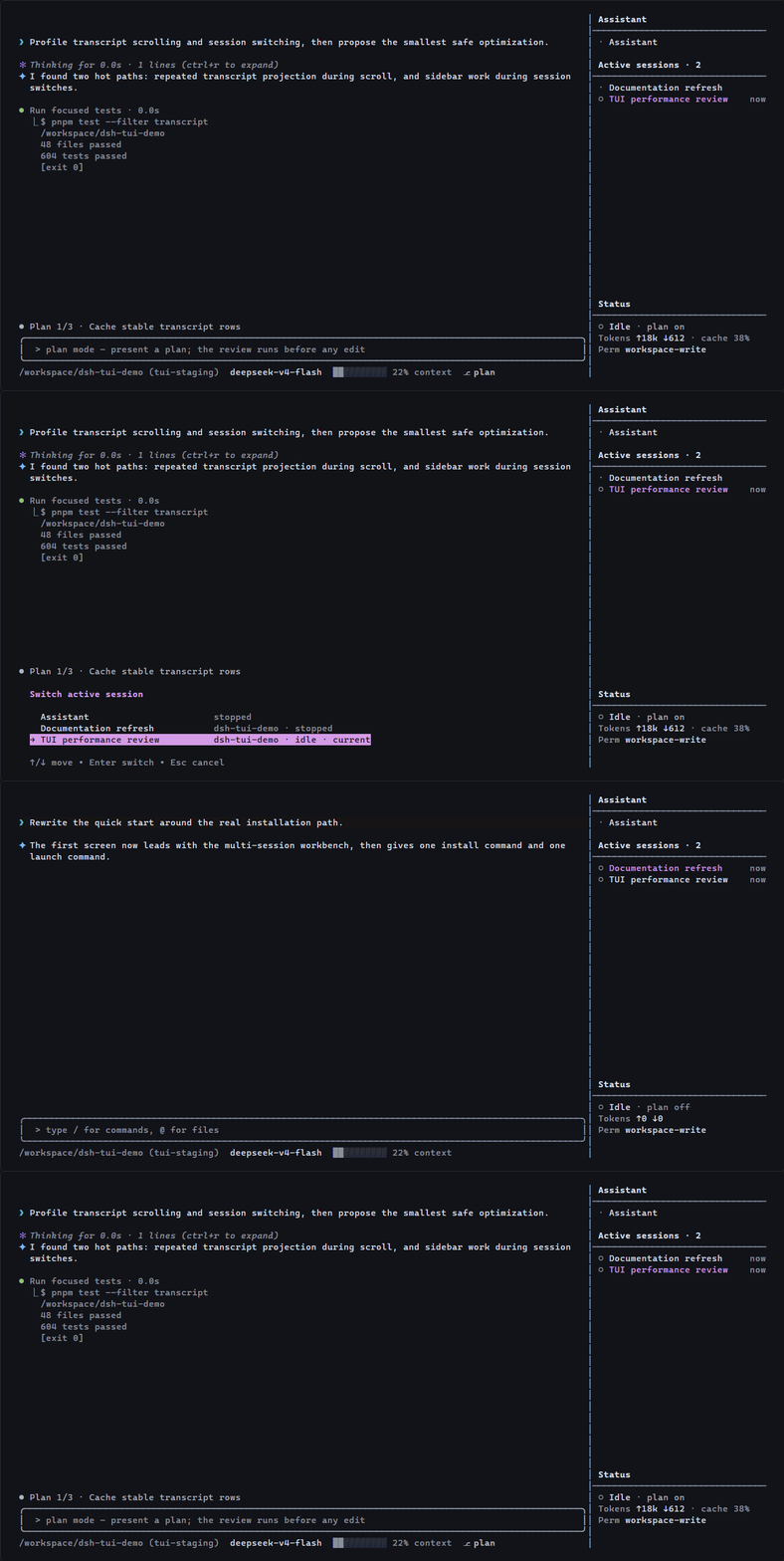
Install · Latest release · dshfind · Report an issue
Quick start
You need Node.js ^22.19.0 || >=24.0.0 and DEEPSEEK_API_KEY configured outside this repository.
Already have the dsh CLI? Install the plugin and its profile layer once:
dsh plugin --profile tui add @lk251066/dsh-tui
Then launch it from any project directory:
dsh --profile tui
Without a global dsh installation, use the same profile through npx:
npx -y @deepseek-ai/dsh@latest plugin --profile tui add @lk251066/dsh-tui
npx -y @deepseek-ai/dsh@latest --profile tui
The package owns both the TUI plugin and its cordis.patch.yml profile layer. No second bundle package is required.
Why this TUI
One terminal, multiple projects
The Assistant is one durable session outside every project workspace. It keeps a permanent working directory and continues the same conversation across launches; bounded context is renewed through dsh compaction while the durable log and plugin-local long-term memory remain available. Active project sessions stay grouped by workspace in the fixed sidebar.
A stable full-screen canvas
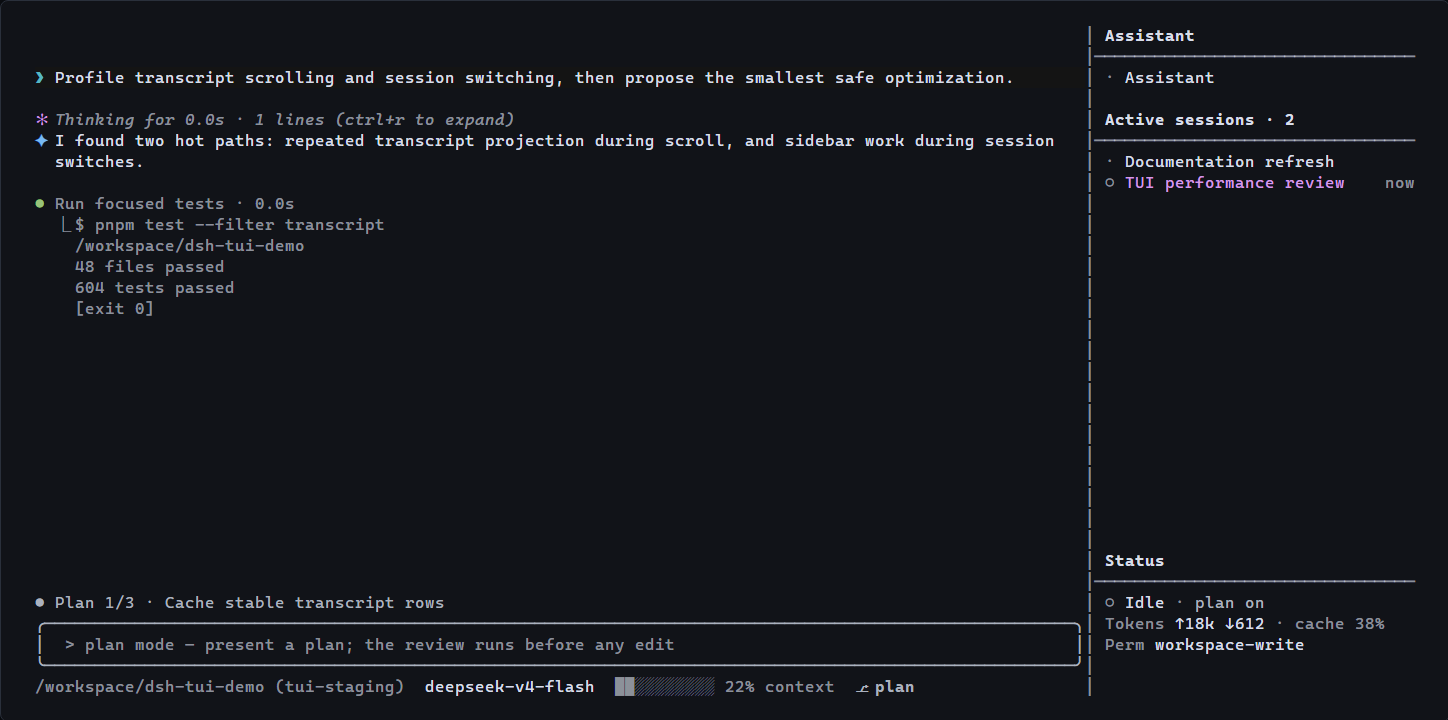
Only the transcript scrolls. The editor, current plan, live status, model, context usage, and active sessions remain in place while user messages, Markdown, thinking, tools, diffs, plans, todos, and subagents use distinct compact treatments.
The terminal title keeps the mounted session name visible. While work is active, a low-frequency spinner and the total number of running sessions appear in the title, and supported terminals also expose a taskbar progress state.
Native DeepSeek Harness composition
The package is an out-of-tree dsh plugin bundle, not a fork of the harness. Sessions, tools, skills, models, permissions, compaction, and subagents continue to use the services provided by the selected dsh profile.
Session workflow
Launching from a directory opens its first manually ordered active project session. If the directory has none, dsh creates one and adds it to that workspace.
/newcreates another session in the current project./new <path>creates a session for another project./assistantreturns to the fixed Assistant./switch,Alt+Left,Alt+Right, or a sidebar click changes the active project session./quitcloses the current project session, preserves its history, and returns to the Assistant./sessionsbrowses complete history;/exitcloses the TUI.
The Assistant can manage active project sessions and read their completed user/assistant dialogue. Hidden reasoning, tool traffic, and unfinished output are not exposed across sessions.
Assistant replies always remain fully rendered; transcript scrolling handles long answers. Thinking and tool bodies can collapse, but a tool's identity, status, and failure remain visible. Memory is enabled for the Assistant by default and persists durable user facts without silently evicting older records; /memory off removes memory from that session's model context without deleting it.
Interaction
| Action | Control |
|---|---|
| Send immediate steering | Enter while a turn is running |
| Queue the next turn | Tab |
| Recover the latest queued message | Esc before cancellation |
| Recall the latest submission | Empty-input Up |
| Browse current-conversation checkpoints | Double Esc |
| Toggle tool and context body detail | Ctrl+O |
| Expand settled reasoning | Ctrl+R |
| Select and copy transcript text | Drag with the left mouse button |
| Attach a clipboard image | Alt+V |
| Control session memory | /memory, /memory on, /memory off |
Run /help for the complete command list. Models, reasoning effort, skills, themes, settings, permissions, questions, and approvals use the fixed bottom area instead of centered popup windows.
Images and terminals
@ completes workspace files. Alt+V attaches a clipboard image when the selected model advertises image input. Windows uses PowerShell to read clipboard images, macOS requires pngpaste, and Linux requires wl-paste or xclip.
The TUI requires an ANSI-capable terminal. The sidebar hides below 65 inner columns, and a terminal height of at least 24 rows is recommended.
Configuration
- id: tui
  name: '@lk251066/dsh-tui'
  config:
    sidebarWidth: 32
    assistantCwd: '/absolute/path/to/assistant'
    showReasoning: false
    maxToolOutputLines: 6
See the package reference for the supported entry path and exported composition plugins.
Project links
- npm package
- GitHub releases
- Community discussions
- Development setup
- Verification guide
- Change history
- Contributing
This plugin follows the developer-preview dsh release line. Each release is checked from source, from its packed npm artifact, through a clean public dsh profile, and through a real Linux PTY before publication.
License
MIT. Based on the original TUI implementation from DeepSeek Harness.
Plugins relacionados
dsh-web (dsh-task-board)
zhu1090093659/dsh-web
dsh-web (dsh-web-all)
zhu1090093659/dsh-web
dsh-web-ui (dsh-task-board)
zhu1090093659/dsh-web-ui
dsh-web-ui (dsh-web-ui-all)
zhu1090093659/dsh-web-ui