dsh-archived-sessions
lwklbb/dsh-archived-sessions
Plugin web do DSH para gerenciar sessões locais arquivadas e ativas: arquivar/restaurar/excluir em lote, detalhes da sessão, uso de disco, arquivos gerados e acesso à pasta de registros.
Instalar
dsh plugin --profile web add github:lwklbb/dsh-archived-sessionsREADME
dsh-archived-sessions
DSH Web 本地归档会话管理插件。安装后,左侧栏会多一个「归档会话」入口,可以集中查看已归档会话和未归档会话,支持归档、移出归档、搜索、批量操作、查看详情、打开记录文件夹和删除本地记录。
中文
截图
| 归档会话面板 | 选中后的操作栏 |
|---|---|
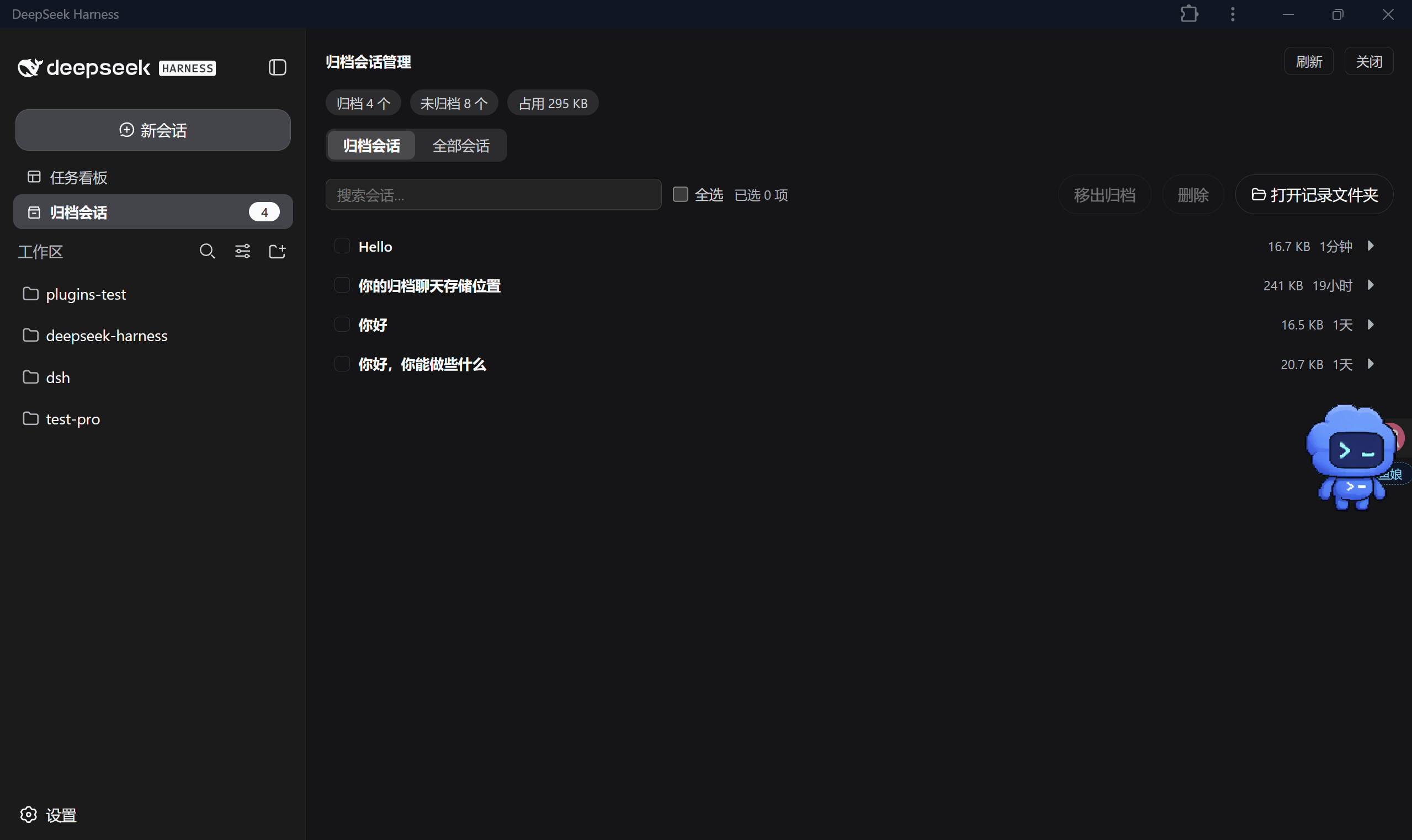 | 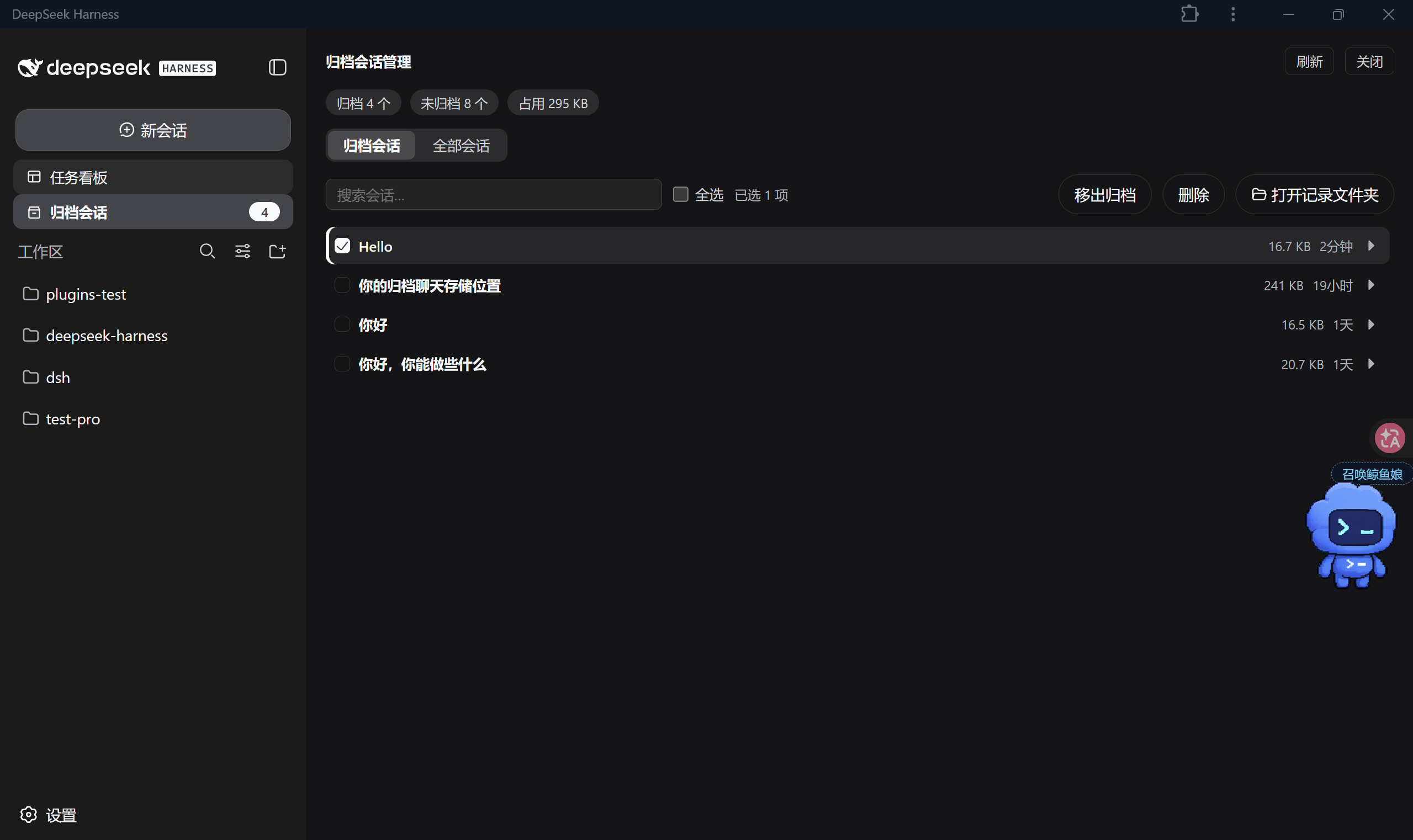 |
| 详情展开 | 删除确认 |
|---|---|
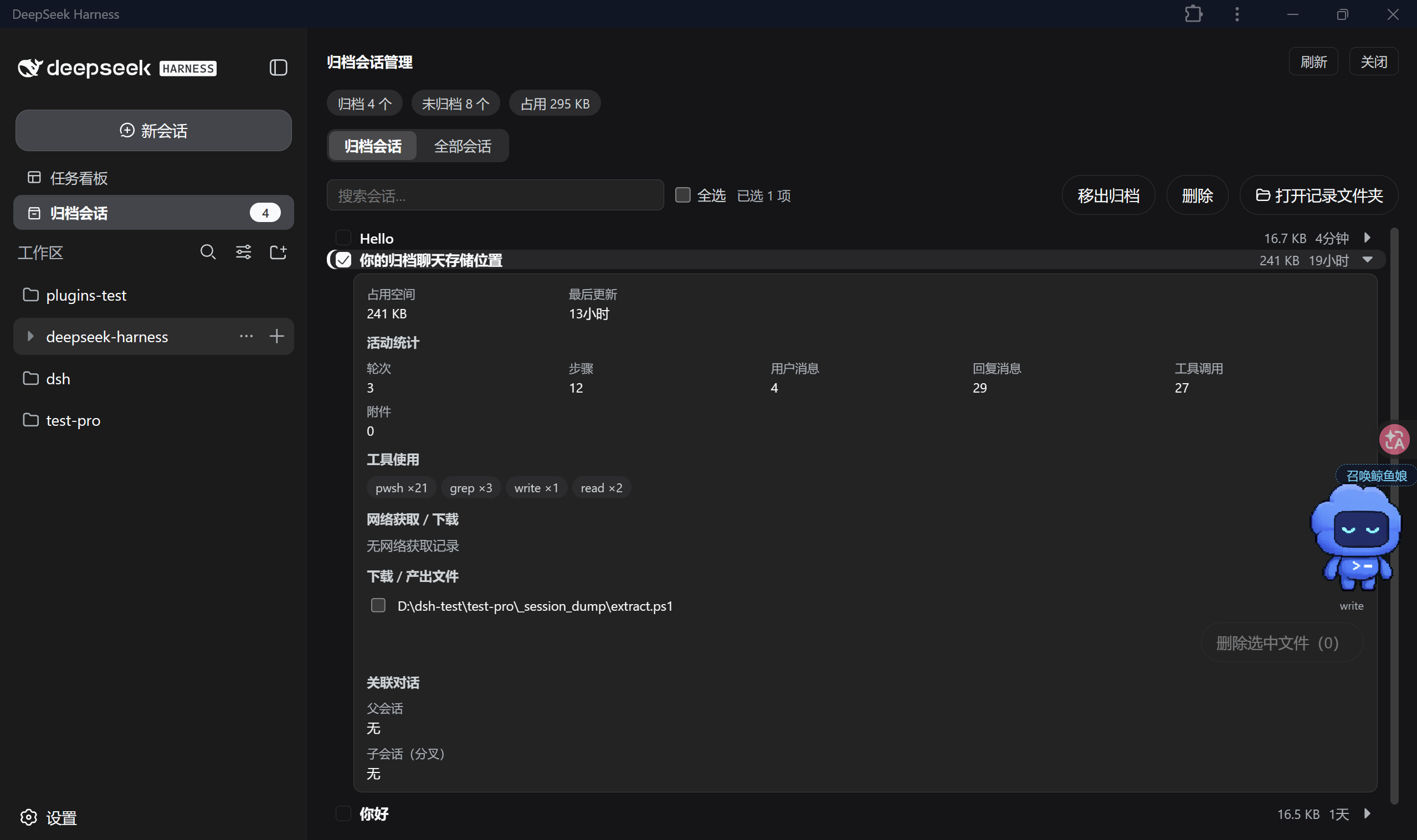 | 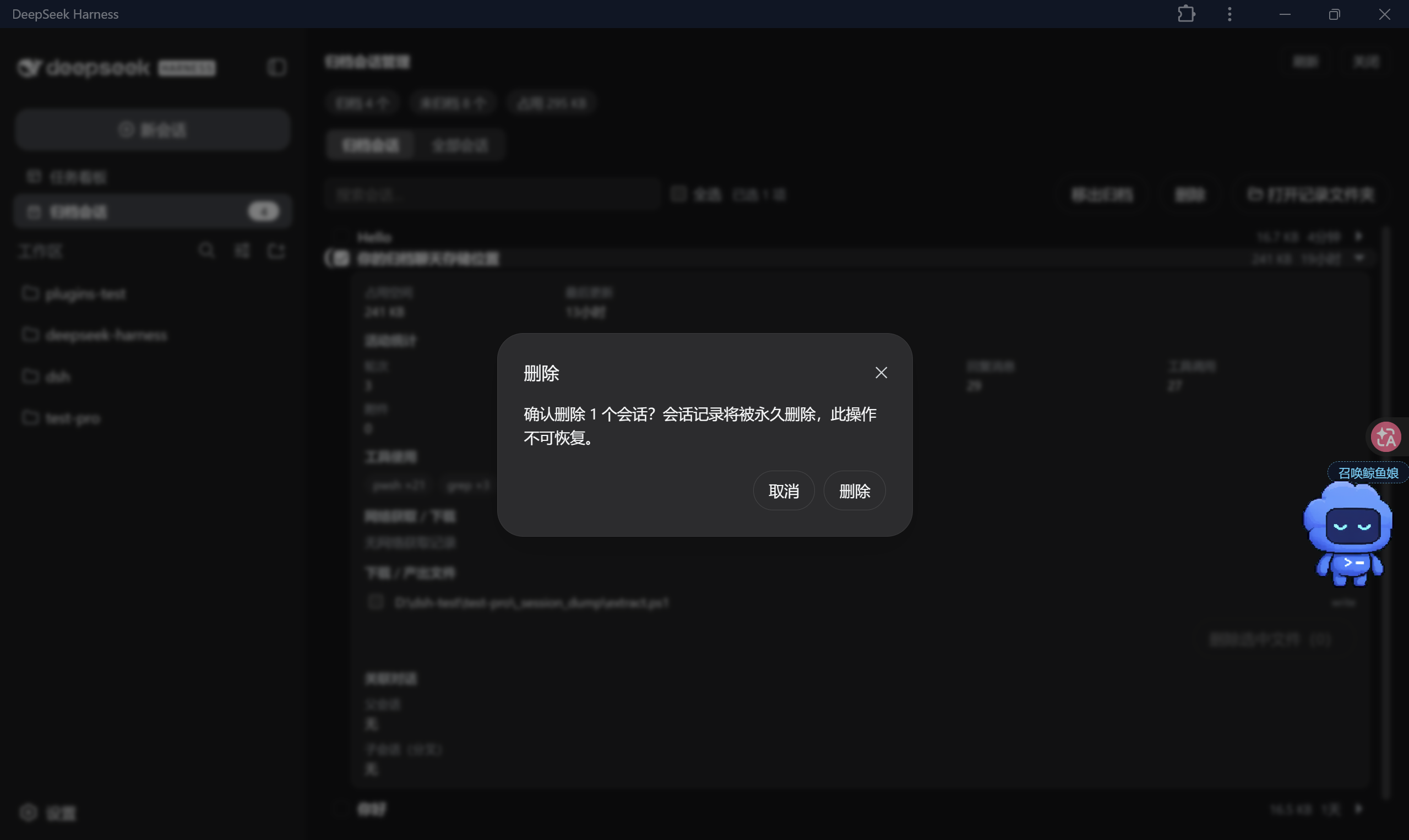 |
功能
左侧栏入口
- 在 DSH Web 左侧栏显示「归档会话」按钮。
- 按钮右侧显示已归档会话数量。
- 点击后在中间区域打开管理面板,不需要跳转页面。
- 面板右上角提供「刷新」和「关闭」。
归档会话 / 全部会话
面板顶部有两个标签页:
- 归档会话:查看已经归档的会话。
- 全部会话:查看当前未归档的会话。
顶部统计会显示:
- 已归档数量;
- 未归档数量;
- 已归档会话占用的记录空间。
列表中每个会话会显示标题、记录大小、最近更新时间。搜索框支持按标题或会话 ID 过滤。
视图和分组
- 支持普通列表视图。
- 在「全部会话」页可以按工作区分组。
- 没有工作区归属的会话会放到「未分组」。
- 子代理会话会缩进显示在父会话下面;父会话不存在时会作为普通行显示。
批量操作
- 支持单选、全选、拖动连续勾选。
- 在「全部会话」页,可以把选中的会话批量归档。
- 在「归档会话」页,可以把选中的会话批量移出归档。
- 支持批量删除,删除前会弹出确认框。
- 一次请求最多处理 100 个会话,宿主端会按顺序执行。
会话详情
点击行尾箭头可以展开详情。详情中会显示:
- 记录目录占用空间;
- 最后更新时间;
- 轮次、步骤、用户消息、回复消息、工具调用、附件数量;
- 工具使用统计,例如
pwsh、grep、write、read; - 网络获取 / 下载记录;
- 下载或产出的文件;
- 父会话和子会话 / 分叉关系。
文件和记录目录
- 「打开记录文件夹」会调用系统文件管理器打开该会话的记录目录。
- 详情里的产出文件可以勾选后删除。
- 删除产出文件时会检查文件是否在已登记工作区内,并且是否属于该会话的产出文件列表。
删除规则
- 当前打开的会话不能删除。
- 运行中的会话不能删除。
- 删除会话只删除选中的会话记录,不会连带删除子代理、分叉会话或产出文件。
- 删除已经失效的归档项时,会顺便清理归档列表里的无效 ID。
本地接口
插件宿主端使用 /archived/api/* 接口,只接受本机同源的 POST 请求。归档、移出归档、删除、打开文件夹等操作都在本机 DSH Web 进程内完成。
安装
GitHub 仓库地址:lwklbb/dsh-archived-sessions
dsh plugin --profile web add https://codeload.github.com/lwklbb/dsh-archived-sessions/tar.gz/refs/heads/main
如果 pnpm 拦截构建脚本,可以加上 --ignore-scripts:
dsh plugin --profile web add https://codeload.github.com/lwklbb/dsh-archived-sessions/tar.gz/refs/heads/main --ignore-scripts
本地开发安装:
dsh plugin --profile web add . --ignore-scripts
安装后重启 DSH Web。
使用
- 打开左侧栏的「归档会话」。
- 在「全部会话」里搜索和勾选要隐藏的旧会话,点击「归档」。
- 在「归档会话」里查看已归档内容;需要恢复时点击「移出归档」。
- 展开会话可以查看记录大小、活动统计、工具使用和产出文件。
- 确定不再需要的会话,可以勾选后删除。
项目结构
dsh-archived-sessions/
  package.json
  cordis.patch.yml
  lib/index.js
  lib/client.js
  docs/screenshots/
  CHANGELOG.md
  LICENSE
  SECURITY.md
  README.md
实现
lib/client.js负责左侧栏入口和管理面板。lib/index.js负责宿主端接口,包括列表、详情、归档、移出归档、删除、删除文件、打开记录文件夹。- 会话标题、工作区归属、当前会话和归档状态来自 DSH Web 运行时数据。
- 记录大小、详情统计和文件信息由宿主端读取会话记录和磁盘状态得到。
- 会话目录优先由 DSH 持久化后端定位,必要时回退到默认
$DSH_HOME/sessions布局。
发布前检查
npm pack --dry-run
node --check lib/index.js
node --check lib/client.js
License
MIT。见 LICENSE。更新记录见 CHANGELOG.md,安全说明见 SECURITY.md。
English
A local archived-session manager for DSH Web. It adds an Archived sessions entry to the left sidebar and opens a management panel for archived and active local sessions.
Screenshots
| Archived sessions panel | Selected actions |
|---|---|
| |
| Expanded details | Delete confirmation |
|---|---|
| |
Features
- Sidebar entry with an archived-session count badge.
- Archived and active-session tabs.
- Counters for archived sessions, active sessions, and archived disk usage.
- Search by session title or session ID.
- Flat list view and workspace grouping.
- Single select, select all, drag select, batch archive, batch restore, and batch delete.
- Expandable details with disk usage, update time, turns, steps, messages, tool calls, attachments, tool usage, fetch/download records, produced files, and lineage.
- Open a session record folder in the system file manager.
- Delete produced files after checking workspace ownership and session ownership.
- Protect the current session and running sessions from deletion.
- Non-cascading delete: child sessions, forks, and produced files are not removed unless selected separately.
- Local-only host API under
/archived/api/*.
Installation
dsh plugin --profile web add https://codeload.github.com/lwklbb/dsh-archived-sessions/tar.gz/refs/heads/main
If pnpm blocks build scripts:
dsh plugin --profile web add https://codeload.github.com/lwklbb/dsh-archived-sessions/tar.gz/refs/heads/main --ignore-scripts
Local development install:
dsh plugin --profile web add . --ignore-scripts
Restart DSH Web after installation.
Layout
dsh-archived-sessions/
  package.json
  cordis.patch.yml
  lib/index.js
  lib/client.js
  docs/screenshots/
  CHANGELOG.md
  LICENSE
  SECURITY.md
  README.md
Implementation
lib/client.jsrenders the sidebar entry and the management panel.lib/index.jsprovides the host endpoints for list, details, archive, unarchive, delete, delete-file, and open-folder.- Session titles, workspace ownership, current session, and archive state come from DSH Web runtime data.
- Disk usage, activity details, produced files, and folder actions are handled on the host side.
- Session directories are located through the DSH persistence backend first, with
$DSH_HOME/sessionsas the fallback layout.
Prepublish checks
npm pack --dry-run
node --check lib/index.js
node --check lib/client.js
License
MIT. See LICENSE. See CHANGELOG.md and SECURITY.md for project notes.
Plugins relacionados
dsh-web-ui (dsh-chat-recovery)
zhu1090093659/dsh-web-ui
dsh-synapse
liangmianya/dsh-synapse
billion-context
ranxianglei/billion-context
dsh-chat-import
nwflower/dsh-chat-import