dsh-image-context-menu
moh114514/dsh-image-context-menu
Adds a right-click menu with five original-image actions to Codex-generated images in DeepSeek Harness — open in a tab, copy the PNG, add to the composer without sending, reveal the file, download — as a companion to dsh-codex-subscription.
Instalar
dsh plugin --profile web add github:moh114514/dsh-image-context-menuREADME
Image Context Menu for DeepSeek Harness
中文说明 · Independent community companion · MIT
Adds these five actions to Codex-generated images:
- Open image in a new tab.
- Add the original image to the conversation composer without changing its text or sending a message.
- Copy the original PNG.
- Reveal the original file in the host file manager, when a validated local-path hint is available.
- Download an original-byte copy.
It wraps the existing generated-image cards and enhanced viewer through Harness Slots. It does not overwrite the Codex subscription plugin, inspect React internals, replace the app root, add model tools, or access account credentials. Existing click-to-view, editing, annotation and gallery controls remain upstream-owned.
Screenshot
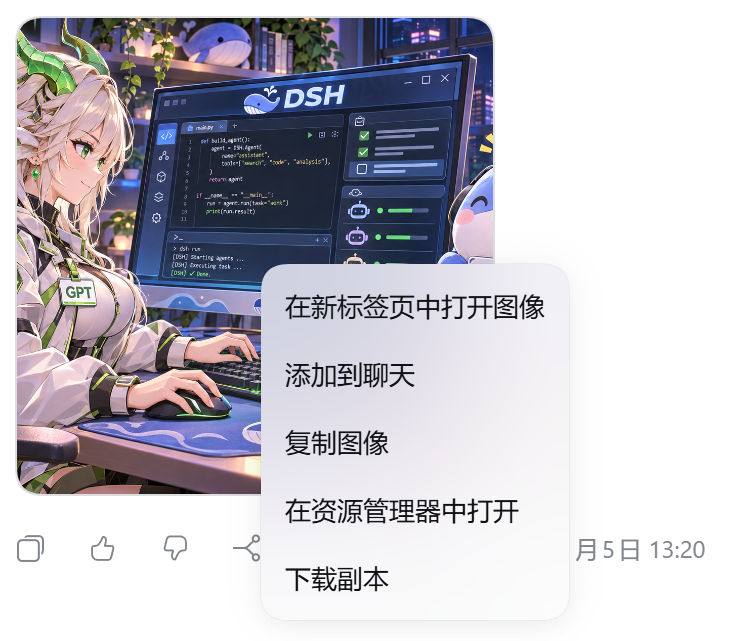
Real capture on DeepSeek Harness 0.2.2-rc.1 with dsh-codex-subscription 3.2.10: right-clicking a generated image opens the five actions, in the order listed above. The Chinese UI labels come from this plugin's own locale bundle. The storefront listing reads screenshots.json, which points at the image in this repository.
Compatibility
The adapter is verified against DeepSeek Harness 0.2.2-rc.1 and dsh-codex-subscription 3.2.6, 3.2.7 and 3.2.11. The manifest declares the compatible ranges instead of one pinned release: engines.dsh is >=0.2.2-rc.1 <0.2.3-0 and the upstream peer is >=3.2.6 <3.3.0. This is a version-specific companion, not an official stable Codex extension API. A new upstream minor (3.3.x) or host minor (0.2.3) needs fresh adapter tests before the ranges move; do not bypass the version checks just to install a newer host or a newer upstream. node scripts/check-codex-contract.mjs <path-to-dsh-codex-subscription> re-checks the slot keys, viewer classes and chunk RPC the adapter depends on.
- Covers generated-image cards and Codex's enhanced image viewer, not every image in the application.
- If the enhanced viewer is disabled, the generated card still has a menu, but the alternative native viewer is outside this adapter.
- Browser: opens an original PNG Blob in a browser tab. Pop-up permission may be required.
- Desktop: Electron blocks Blob pop-ups, so this action opens an independent Harness image tab instead.
- Reveal is disabled for missing or invalid host-path hints. On a remote host it reveals on the serving host, not necessarily the device displaying the browser.
- Missing originals, ambiguous image identities, unsupported source entries and integrity failures fail closed. No preview is silently substituted for an original.
Install
Install and enable the compatible upstream dsh-codex-subscription plugin first. Download the .tgz from this repository's Releases and use Harness's plugin installation flow, or run:
dsh plugin add ./dsh-image-context-menu-0.1.2.tgz
Restart the desktop application fully if its current frontend bundle is cached. Installing this companion does not restore any previously hand-patched upstream files; for a clean migration, reinstall the same upstream release through your normal plugin manager and then install this companion. Keep backups until migration is verified.
No install-time script or network build is required: the archive includes the built browser module. Disabling/uninstalling this companion releases its menus, subscriptions, keyboard guard, Blob URLs and Slot overrides; the original components remain installed.
Privacy and permissions
The plugin reads an original only after an image action or image-tab load, using the existing session-authorized Codex chunk RPC. Every chunk's metadata, offset, byte count and canonical encoding are checked, followed by a full SHA-256 check. The Codex host still owns session/fork authorization.
There is no telemetry, analytics endpoint, extra server, filesystem scan, credential reader or automatic message submission. Clipboard, file save and file reveal use the existing Harness services. Reveal uses the already-emitted host path only after strict validation; it never guesses a user's home directory. The upstream path hint is not a signed or stable typed API; it is optional.
Development
Node 24 is used for development and release checks. There are no build or test package dependencies:
node scripts/build.mjs
node --test --test-isolation=none test/*.test.mjs
node scripts/check-package.mjs
npm pack --ignore-scripts --pack-destination dist
The tests exercise original-byte validation and isolated Slot/adapter/lifecycle behavior. They are not a claim of live-browser or cross-platform end-to-end validation. Before extending a compatibility range, also verify actual clipboard, save/reveal, viewer navigation, menu keyboard handling and disable/re-enable behavior on the target host.
See publishing notes, changes and third-party attribution. This project is not affiliated with DeepSeek, OpenAI or the upstream Codex subscription plugin.
Plugins relacionados
dsh-web (dsh-task-board)
zhu1090093659/dsh-web
dsh-web (dsh-web-all)
zhu1090093659/dsh-web
dsh-TUI
ccch1mneyyy/dsh-tui
dsh-web-ui (dsh-task-board)
zhu1090093659/dsh-web-ui