dsh-ui-liteglass
mumuer1024/dsh-ui-liteglass
Tema leve para DeepSeek Harness, com papel de parede personalizado, transparência de painel semelhante a vidro e cor de destaque. Os ajustes ficam no servidor e são compartilhados entre dispositivos; o modo claro/escuro nativo não muda.
Instalar
dsh plugin --profile web add github:mumuer1024/dsh-ui-liteglassREADME
dsh-ui-liteglass
LiteGlass — English | 简体中文
A lightweight appearance skin for DeepSeek Harness.
Wallpaper. Glass. Accent. That's it.
Screenshots
Real captures of the running plugin — light / dark main interface and the
LiteGlass settings block — under docs/screenshots/, wired into
screenshots.json for storefront display.
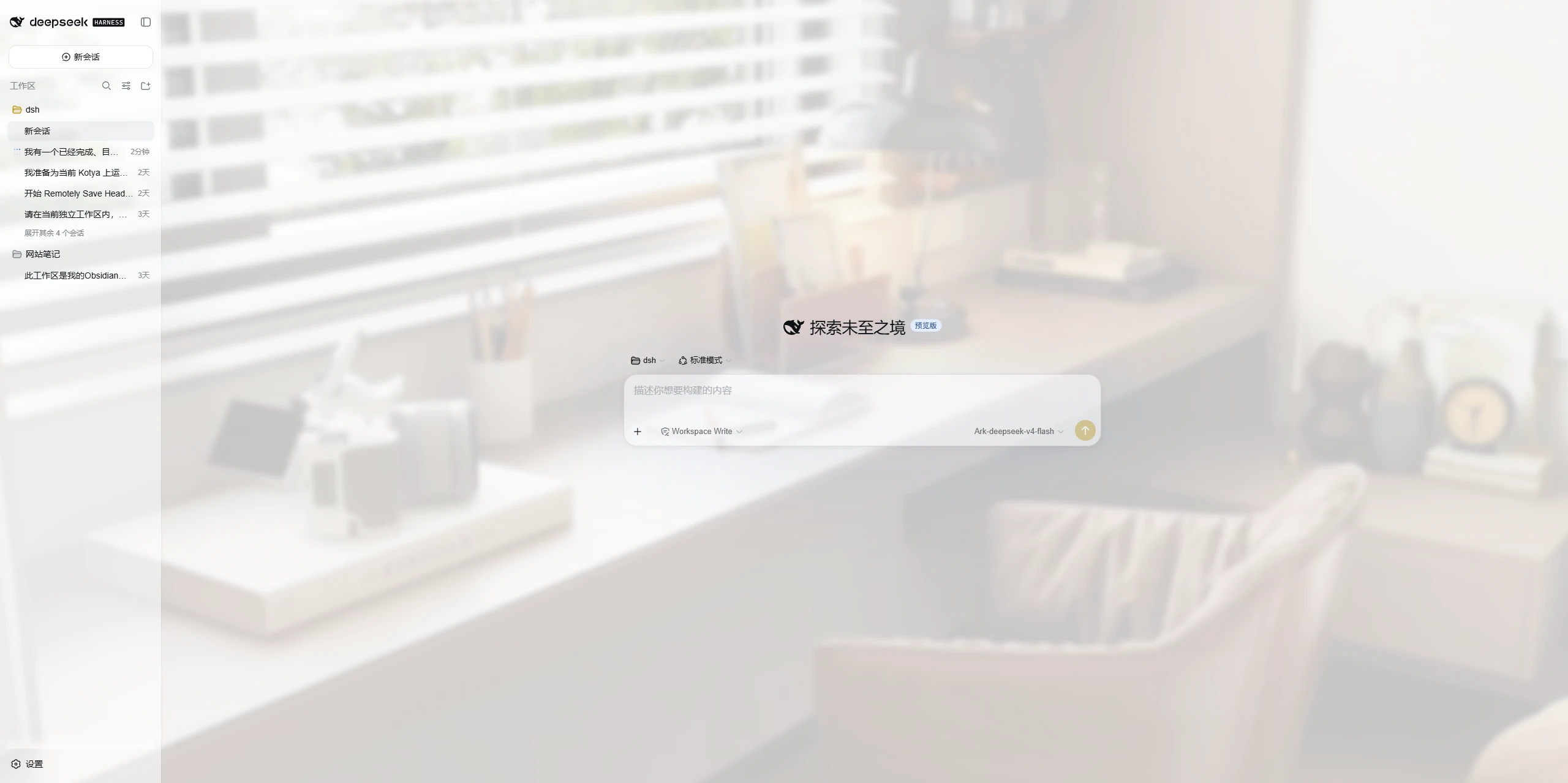
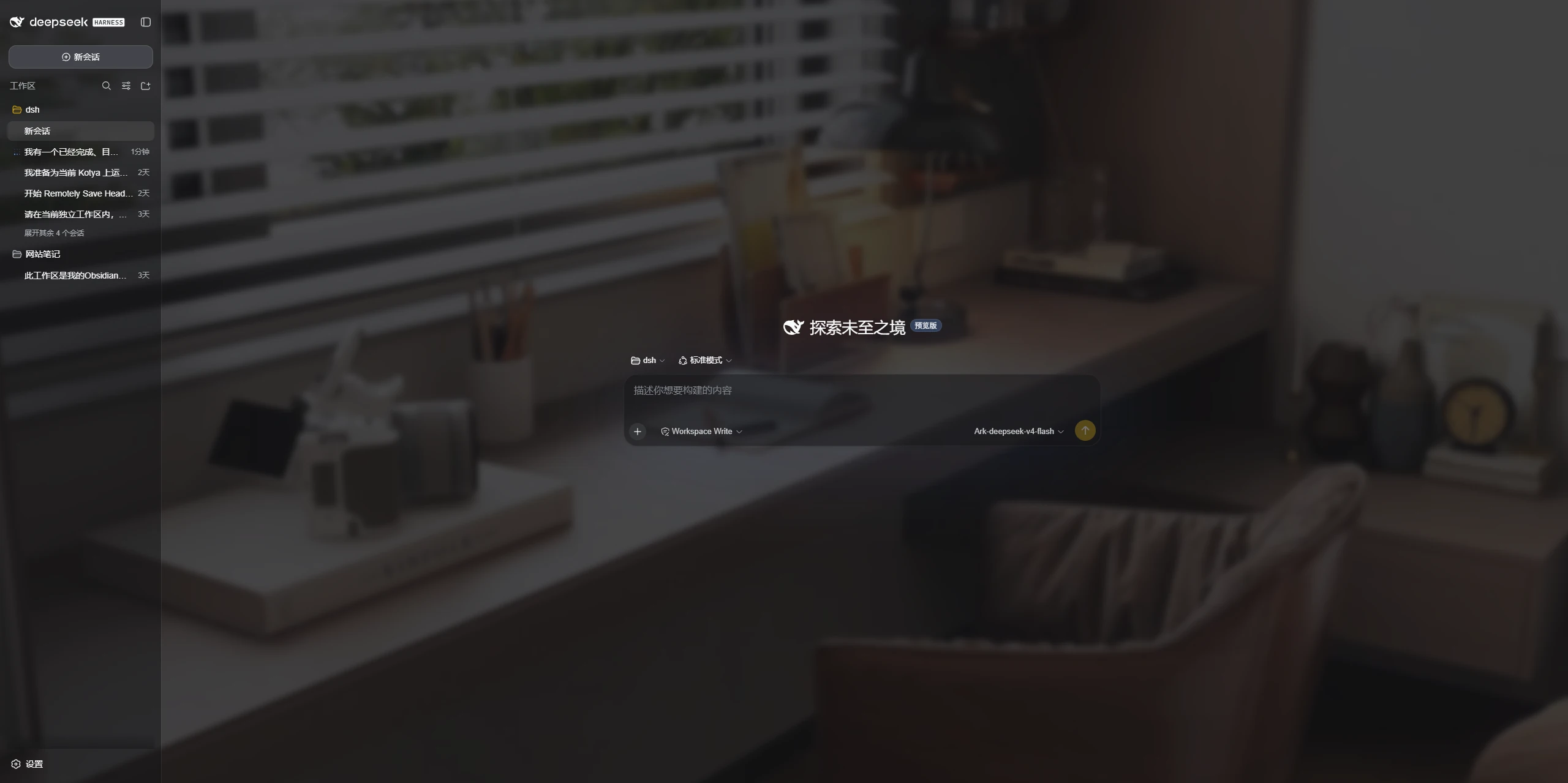
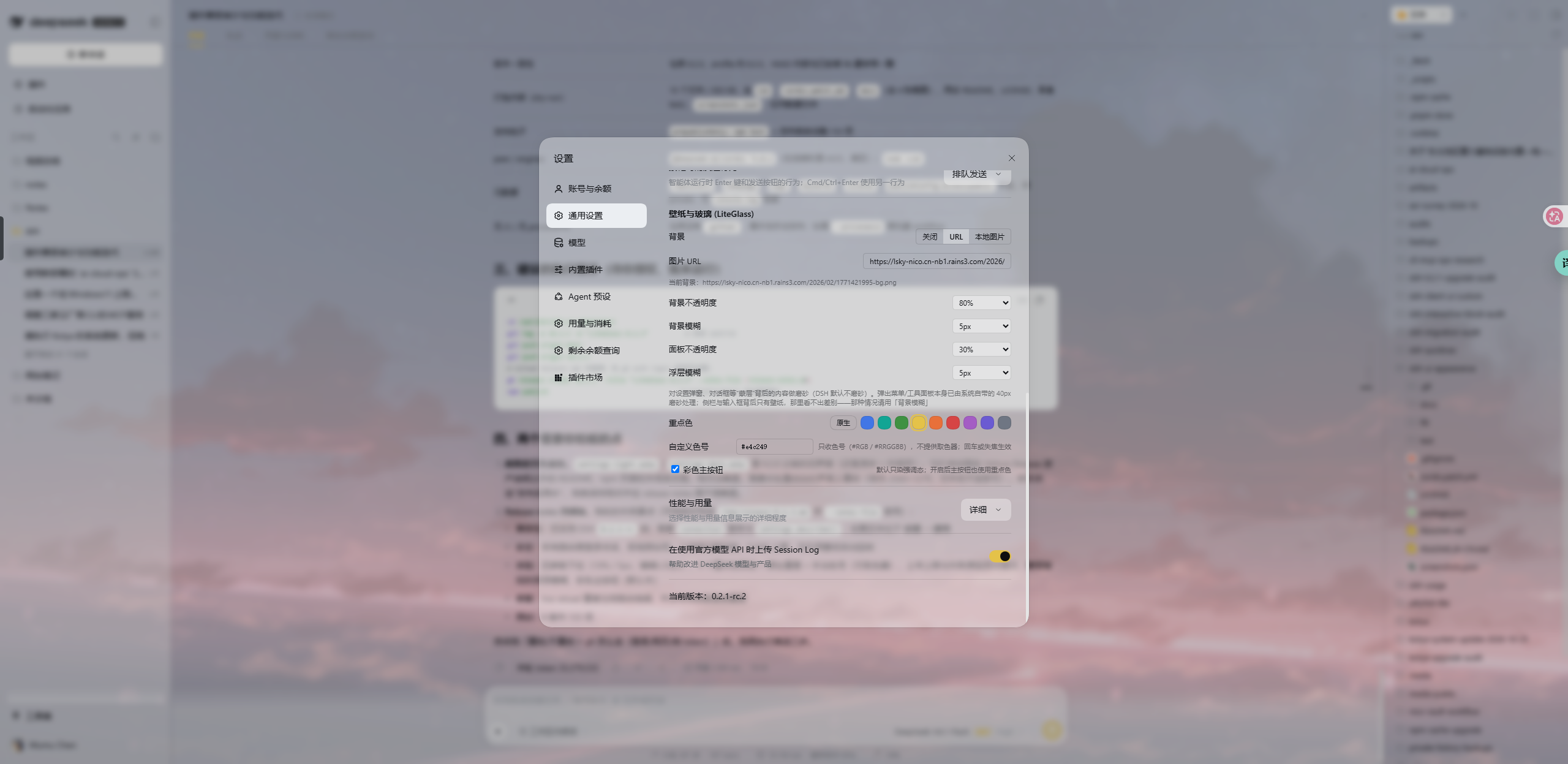
Features
-
Custom Wallpaper
- Remote image URL, or upload a local image
- Background opacity and background blur, chosen from a dropdown: opacity in 10% steps, blur in 5px steps up to 30px
-
Glass-like Panels
- Panel transparency from a dropdown, for a lightweight glass-like look
- Optional blur behind modal layers, so the page behind Settings falls out of focus
-
Accent Color
- Nine presets, a native reset, or any hex code typed in by hand (no color picker)
- Customize the accent color used across supported DSH interface states
- Adapts automatically to DSH's native Light / Dark appearance
What makes it different
- Server-side persistence, multi-device. Settings and uploaded wallpaper are stored on the DSH host (not in the browser), so every device that reaches the host shares the same look.
- Does not take over the native color mode. Light / Dark / System stays fully owned by DSH native settings; the plugin only enhances appearance on top.
- No second theme system. Built on the official
theme.overrideTokensseam and the DSH token system — no bundled CSS framework, no competing theme model. - Small, focused, predictable. Wallpaper + glass + accent, nothing else.
Identity
| Field | Value |
|---|---|
| package | dsh-ui-liteglass |
| display name | LiteGlass |
| plugin id (client module / settings row seat / theme source) | dsh-ui-liteglass |
| rowId / wiring.id (loader entry / skin-market) | ui-liteglass |
rowId matches the loader entry id in cordis.patch.yml, which is what skin
markets use for mutual-exclusion wiring. See docs/IDENTITY.md for the canonical
record.
Compatibility
- Supported: the DeepSeek Harness
0.2.1-rcline. The plugin uses only stable official seams (webServer.register,ctx.effect, theconnectionauthentication service,settings.describe(),theme.overrideTokens,dsh.clientinject and thesettings.general.itemslot). - Tested with: DeepSeek Harness
0.2.1-rc.2(client theme bundle and settings shell from the same build). - Not supported: the
0.1.0-rcline. The0.2.xline requires theconnectionservice and thesettings.describe()API, neither of which exists there.
DeepSeek Harness is still evolving quickly, so a future release may change plugin interfaces; the supported range above is a declaration, not a promise of forward-compatibility.
Installation
From npm (once published):
dsh plugin --profile web add dsh-ui-liteglass
Or directly from the GitHub repository (works today):
dsh plugin --profile web add git+https://github.com/mumuer1024/dsh-ui-liteglass.git
dsh --profile web
To pin a specific release, add the tag:
dsh plugin --profile web add 'git+https://github.com/mumuer1024/dsh-ui-liteglass.git#v0.2.4'
dsh plugin add initializes the profile on first use and wires the bundle
automatically. After that, start the Web UI and open Settings → General; the
LiteGlass block sits directly under the native Appearance row.
Configuration
Open Settings → General (the plugin contributes a block to that page, right below the native Appearance row):
- Background: Off / URL / local upload. Uploads accept PNG / JPEG / WebP / GIF and are capped at 8 MiB per file — the ceiling is shown in the panel, and a file over it is refused in the browser before anything is sent. Failures are reported in the panel (too large, wrong format, expired session, network).
- Background opacity, background blur, panel opacity and overlay blur are dropdowns: opacity in 10% steps, blur in 5px steps up to 30px. One choice is one save, and there is no drag to fire a write per pixel.
- Accent color: nine presets, a native reset, and a plain hex field for any
other code (
#RGB,#RRGGBB, or#RRGGBBAA— no color picker). DSH has no accent setting of its own (ui-themestores only the color mode and font sizes), so this palette belongs to the plugin. Colorful primary buttons is a separate, default-off switch that additionally paints the primary button — on by default it would override the monochrome primary fill that DSH 0.2.x uses.
Overlay blur (the panelBlur setting) frosts what is behind a modal layer:
open Settings and the page behind it falls out of focus. It is implemented purely
by overriding DSH's own --dsw-mask-blur token — the platform ships it as none
and every mask that dims the page for a dialog consumes it — so no DOM selector,
no layout change, and 0 restores none immediately.
Two things it deliberately does not do. Popover and tool panels already ship
with their own material blur (--dsw-menu-backdrop-filter, 40px + 150% saturate),
so the plugin leaves that alone. And the sidebar columns and the composer sit
over nothing but the wallpaper, so a blur there would repeat what background blur
already does — use background blur when the goal is a soft wallpaper.
Changes are saved to the server and shared across devices that reach the DSH host.
All plugin routes require a signed-in DSH session and reject cross-origin writes, so an unauthenticated visitor who can reach the host cannot read or rewrite the plugin config.
Uninstallation
dsh plugin --profile web remove dsh-ui-liteglass
Removing the plugin restores the original appearance. Note that uploaded
wallpaper files and the plugin config under $DSH_HOME/ui-liteglass/ are not
removed by the uninstall command — delete that directory manually if you want
them gone.
Known Limitations
- Overlay blur only reaches masked layers. It frosts what sits behind modal masks (Settings and other dialogs). Popover and tool panels keep DSH's own material blur, which the plugin does not override; surfaces that sit over the wallpaper alone (sidebar columns, composer) show no separate effect, so background blur is the control for those.
- The color mode (Light / Dark / System) is always controlled by DSH native settings — this plugin does not provide a color-mode switch.
- The settings block is registered into the
settings.general.itemslot. A composition that ships without the General settings page has no seat for it, so the block simply does not appear there.
Development / Testing
Automated Node test suites cover the host routes, the client state model, and the no-color-mode guarantee:
npm test
# host-smoke       routes: auth, sanitization, upload limits, pruning, dispose
# client-contract  settings block, dropdowns, accent presets + hex field,
#                  upload feedback, mask-blur token, unload restore
# lifecycle        config store
# no-appearance    never touches the native color mode
npm publish runs the same suites via prepublishOnly. See
docs/ARCHITECTURE.md for design details.
License
Plugins relacionados
dsh-wallpaper-engine
elysia395/dsh-wallpaper-engine
dsh-deep-whale (maid-atelier)
small-tailqwq/dsh-deep-whale
dsh-deep-whale
small-tailqwq/dsh-deep-whale
dsh-claude-style
nwflower/dsh-claude-style