cortex
revcloudi/cortex
Ambiente Cortex para DeepSeek Harness. A interface original do Cortex — vulnerabilidades, ativos, operações internas, Memory Nebula, snapshots, retestes, Web Fuzzer e engenharia reversa de miniapps — aparece como painel nativo do DSH, junto com 22 ferramentas nativas de agente…
Instalar
dsh plugin --profile web add github:revcloudi/cortexREADME
Cortex
Cortex: local-first pentest intelligence hub. Agents (pure stdio MCP server), the terminal (ctx CLI) and humans (desktop dashboard with a tactical 3D Memory Nebula) share one SQLite pentest memory; the same UI is also available in a browser on the local machine or a trusted intranet.






Authorized testing only. Cortex is built for systems you own or have explicit written permission to test. You are responsible for complying with applicable laws, contracts and scope boundaries.
English · 简体中文 · DSH plugin · Web UI (intranet only) · Windows desktop app · CLI (ctx) · MCP tools
DSH plugin (recommended)
Cortex also ships as a native DeepSeek Harness plugin (dsh-cortex/ in this repository):
- the full Cortex workbench — vulnerability board, internal operations, 3D Memory Nebula, assets, snapshots and retest;
- a Yakit-style Web Fuzzer for manual HTTP requests with JSON-formatted request/response views;
- a WeChat mini-program reverse-engineering workbench (wxapkg detect / decrypt / unpack / analyze / import); each mini-program is its own appid-keyed asset (package-hash fallback), with domains stored as relations;
- 22 native agent tools over the same local SQLite, without any MCP server.
Requirements: DeepSeek Harness ≥ 0.2.2-rc.1, Node.js ≥ 22.19 (bundled with the DSH desktop app) and a Cortex database with schema v5.
Install from the DSH Plugin Market (Plugins → Market, search @lievclouds/dsh-cortex), or run:
dsh plugin --profile desktop add @lievclouds/dsh-cortex   # from npm
dsh plugin --profile desktop add ./dsh-cortex             # local development
See dsh-cortex/README.md for installation details, configuration (CORTEX_DB_PATH,
read-only mode), the security model, the agent-tool reference and architecture.
Web UI (intranet only)
ctx web serves the same React UI from a local HTTP server that reads and writes the same SQLite file as the desktop app, the CLI and the MCP server. It is for one user on the local machine or a trusted intranet: there are no accounts, no multi-user access and no public deployment — never expose this port to the internet.
Install directly from npm and start it:
# Node.js >= 22.12 required
npm install -g @lievclouds/cortex
ctx init --yes            # auto-detect and write MCP config + skills + hard rules for Claude Code / DSH / Codex / Cursor / WorkBuddy / ZCode
ctx web
ctx init --yes auto-detects installed agents and writes their MCP config, the four skills and the system-level hard rules. To target agents explicitly (lowercase ids, comma separated) use ctx init --yes --agents dsh,codex,claude,cursor,workbuddy,zcode, or a single agent such as ctx init --yes --agents claude; for English skills add --skill-lang en (skill language defaults to zh and can be overridden with CTX_SKILL_LANG).
Command-line options
Common options:
ctx web                                      # default 127.0.0.1:8787
ctx web --port 9000 --db /data/cortex.db     # explicit port and database
ctx web --host 192.168.1.20 --allow-intranet # trusted intranet only (explicit opt-in)
ctx web --no-open --json                     # no browser; JSON with tokenUrls, dbPath, readOnly…
| Option | Meaning |
|---|---|
--port <port> | Listen port, default 8787 |
--host <host> | Bind address, default 127.0.0.1; any non-loopback address also requires --allow-intranet |
--db <path> | SQLite file, default ~/.cortex/data.db (%USERPROFILE%\.cortex\data.db) or CTX_DB_PATH |
--allow-intranet | Explicit opt-in for a non-loopback bind on a trusted intranet |
--no-open | Do not open a browser automatically |
--json | Global flag; print machine-readable JSON (tokenUrls, dbPath, readOnly, loopbackOnly, intranetAllowed) |
Logging in
Startup prints one or more login URLs containing a per-run ephemeral token (http://…/?token=…, regenerated on every server start). Opening one sets an HttpOnly + SameSite=Strict session cookie (12 h) and redirects so the token disappears from the address bar; reloads keep the session, restarting the server invalidates it. The token exists only in that URL — it is never logged, persisted or accepted from any other query string. Scripts may send Authorization: Bearer <token> instead of the cookie.
Security red lines
- Default is loopback (
127.0.0.1); a non-loopback bind is refused unless--allow-intranetis passed, and then it is only for a trusted intranet. - On a server, allow only the private ranges in the firewall / security group (
10.0.0.0/8,172.16.0.0/12,192.168.0.0/16). Never create a port mapping, public reverse proxy or tunnel for this port. - Keep the SQLite file, the token and the logs out of any public directory.
- Treat the printed login URL as a secret: do not screenshot, share or paste it into chat tools. The token is never logged, and restarting the server invalidates the old link and prints a fresh one.
- Every API call requires the session cookie or Bearer token; HTML and static assets require it too. There is no CORS: only same-origin requests are accepted,
Hostis validated against DNS rebinding, and writes are additionally gated byOrigin/Referer/Sec-Fetch-Site. - CSP (scripts restricted to
'self'; inline styles are allowed for Tailwind runtime styles),X-Content-Type-Options: nosniff,Referrer-Policy: no-referrer,X-Frame-Options: DENYandCache-Control: no-storeon API responses; 2 MB JSON body limit; per-IP rate limit (~300 requests / 10 s); errors are sanitized, and request logs never contain tokens, cookies or bodies./api/app,/api/dband/api/configexpose only the database file name, never its absolute path.
Web vs desktop differences
- No frameless-window controls: the minimize/maximize/close buttons are hidden in a browser.
- The database is fixed by the server (
ctx web --db); the sidebar row is a read-only display and the database picker is unavailable. - Report export returns the Markdown to the browser and saves it as a download; the server writes nothing to disk.
- Clipboard uses
navigator.clipboardwith a legacy fallback; there is no native save dialog. - Connect agents and first-run setup write agent configs on the machine running
ctx web, not on the browser's machine; Web mode asks for confirmation first. GET /api/events(SSE) refreshes the UI when an agent, the CLI or the desktop app writes the database.- If the SQLite file is not writable, the server starts in read-only mode (
/api/configreportsreadOnly: true) and write APIs return 403 with a clear message. - The Re-test lab (manual HTTP repeater) and Model configuration pages are desktop-only in v1: both sidebar entries are hidden in
ctx web, their IPC calls fail closed, and the HTTP server serves no/api/poc/*routes.
Optional intranet reverse proxy
If an internal TLS reverse proxy preserves a custom Host, add that hostname to the opt-in allow-list; keep the upstream on HTTP and add TLS plus extra authentication at the proxy:
CTX_WEB_ALLOWED_HOSTS=cortex.corp.example ctx web
Windows desktop app
The Windows installer is published to GitHub Releases by the release workflow. Current release: cortex-v0.1.5. macOS and Linux: install from npm (see CLI (ctx)).
| Platform | Download |
|---|---|
| Windows 10/11 x64 | Cortex-0.1.5-setup.exe |
The link always points at the newest Cortex release; the full list is on the Releases page. The installer is unsigned: Windows SmartScreen may warn ("More info → Run anyway").
On GPU-less, VM or remote-desktop Windows machines, ctx open --software forces software rendering. The installer already enables SwiftShader, so the 3D Memory Nebula keeps rendering instead of dropping straight to the 2D fallback.
Connect agents after installation
The installer only installs Cortex and its shortcuts. Start Cortex, open MCP Access, then either:
- click Connect agents — detects local agents, writes their MCP config and the bilingual skills (skill language follows the UI language), then restart the agent; or
- run
ctx init --yesin a terminal (ctx init --yes --agents dsh --skill-lang ento choose explicitly).
Uninstalling removes the program only — %USERPROFILE%\.cortex\data.db is preserved. The UI supports 中文 / English switching at any time; skill language can also be changed later with ctx init --skill-lang.
CLI (ctx)
Runs on Node without Electron and reads the same SQLite database. All commands accept --json; exit codes are 0 success, 1 parameter/IO error, 2 data not found.
Recommended: install from npm (Node.js >= 22.12 required):
npm install -g @lievclouds/cortex
ctx init --yes            # auto-detect and write MCP config + skills + hard rules for Claude Code / DSH / Codex / Cursor / WorkBuddy / ZCode
ctx --version            # verify the command works
ctx doctor               # verify DB, MCP runtime and agent configs
ctx init --yes auto-detects installed agents; to target agents explicitly (lowercase ids, comma separated) use ctx init --yes --agents dsh,codex,claude,cursor,workbuddy,zcode, or a single agent such as ctx init --yes --agents claude; for English skills add --skill-lang en (skill language defaults to zh, and CTX_SKILL_LANG overrides the default), and for manual setups use ctx mcp print-config <agent>.
The database is created on first launch at %USERPROFILE%\.cortex\data.db (macOS/Linux: ~/.cortex/data.db); override with CTX_DB_PATH.
| Command | Description |
|---|---|
ctx init [--dry-run] [--yes] [--agents dsh,codex,claude,cursor,workbuddy,zcode] [--skill-lang zh|en] | Detect agents, show the planned diff, back up, then write MCP configs + skills + system rules |
ctx doctor | Check database, schema, MCP/CLI runtime, agent configs, GUI install and versions |
ctx mcp print-config [agent] | Print the stdio config snippet for DSH / Codex / Claude Code / Cursor / WorkBuddy / ZCode |
ctx vulns list [--severity] [--host] [--limit] | List vulnerabilities |
ctx vulns get <id> | Show one full vulnerability: description, impact, interfaces, Markdown reproduction steps (HTTP requests/responses), remediation, retests and status |
ctx vulns export <id[,id...]> [--out <dir>] [--all] [--severity …] [--host …] [--limit …] | Export Markdown reports using the same template as the desktop app; default output directory ./cortex-reports |
ctx assets list [--search] [--status] | List asset contexts |
ctx assets get <host_port> | Show one asset context with full interfaces (raw requests), leaks and test parameters |
ctx snapshots list [--keyword] | List cognitive snapshot sessions |
ctx snapshots get <session_id> | Show one snapshot session |
ctx internal overview|hosts|routes --project <name> | Read-only internal operations queries: overview, hosts/services, proxy routes (all accept --json) |
ctx loot import <file> --project <name> [--entry <host_port>] [--format auto] | Parse a local Loot file into the internal operations domain (untrusted input: parsed only, never executed, no network) |
ctx loot list --project <name> | List Loot import records |
ctx search <keyword> | Search vulnerabilities, assets and snapshots together |
ctx open [--dev] [--path <exe>] [--software] | Launch or focus the desktop app (Windows install or source build); --software forces software rendering for GPU-less / VM / remote-desktop machines |
ctx web [--port <port>] [--host <host>] [--db <path>] [--allow-intranet] [--no-open] | Serve the same dashboard in a browser (loopback or trusted intranet only) |
Troubleshooting: claude opens Bun instead of Claude Code
Running claude prints Bun's help instead of starting Claude Code:
C:\Users\you>claude
Bun is a fast JavaScript runtime, package manager, bundler, and test runner...
The claude on PATH is resolving to a Bun global shim, not to Claude Code. Cortex does not create or replace the claude command — ctx init only writes ~/.claude/CLAUDE.md, copies the skills and runs claude mcp add — so this is a PATH / alias problem, not an MCP or database problem. ctx init detects the Bun shim and skips claude mcp add / remove instead of registering against the wrong CLI.
Check what claude really resolves to:
where.exe claude          # every claude on PATH
Get-Command claude -All   # PowerShell: aliases and functions too
ctx doctor                # resolved path, kind (exe / cmd / bat) and probe result
ctx doctor shows the resolved command path, its kind (exe / cmd / bat) and the probe result, and calls out the Bun shim explicitly.
To fix it, remove the Bun global package and install Claude Code from the official installer (or npm):
bun remove -g @anthropic-ai/claude-code
irm https://claude.ai/install.ps1 | iex # Windows official installer
npm install -g @anthropic-ai/claude-code # or npm, any platform
Reopen the terminal so PATH is re-read, re-register Cortex and verify:
ctx init --agents claude --yes
claude --version    # should contain "Claude Code"
claude mcp list     # should contain "cortex"
- Do not delete
~/.claude: Cortex's rules and skills live there. - PowerShell aliases/functions are invisible to Cortex subprocesses. If
where.exe claudefinds nothing but runningclaudeby hand still opens Bun, install the real CLI and reopen the terminal. CORTEX_CLAUDE_BINoverrides the resolved command path for tests or unusual installs.
Daily workflow
Once installed, Cortex is the memory layer for every engagement:
- Findings go in through MCP. While the agent hunts, it writes confirmed vulnerabilities, recon asset context and the current task snapshot into the local SQLite database (the installed skills/rules tell it when and how). No manual report assembly.
- Agents read the library back at any time. Before a new task, the agent queries asset context and existing vulnerabilities, so recon is reused and duplicate findings are avoided.
- Humans review from the desktop app, the terminal or the optional browser Web UI. The desktop app provides the vulnerability dashboard, asset library, snapshot sessions and Markdown report export.
ctxprovides vulnerability / asset / snapshot queries, full-text search, diagnostics and Markdown report export.ctx webserves the same pages to a browser on this machine or a trusted intranet. - Resume a task in a new chat. Just name the task, for example: “Continue the Example Program IDOR task.” The agent runs
manage_snapshot list, loads the matching session (by project name, phase orsession_id) and continues fromunfinished_tasks/next_steps. If several sessions match, it asks you whether to continue one or create a new one.
You:  continue the "Example Program" IDOR task and resume the unfinished checks
Agent: manage_snapshot(list) -> manage_snapshot(load, SESS-...) ->
       query_asset_context / query_vulnerabilities -> continue testing
Features
- Vulnerability model: host, entry point, type, severity, URL, description, impact, affected interfaces, Markdown reproduction, remediation, crypto notes, test boundaries, append-only retests, related IDs and status.
- Asset context: full URLs, project, tech stack, structured interfaces (
path/method/params/ raw request), leaked info, non-secrettest_parametersand related vulnerabilities. Legacyinterface_dirarrays are normalized automatically. - Internal operations domain (Plan B, schema v3): Web and internal findings are logically isolated, and the main dashboard splits into "Web vulnerabilities" (default) and "Internal operations" tabs; footholds bridge entry assets to internal hosts / services / credentials / pivots, and the internal page provides an overview, subnet heatmap, credential-service matrix, proxy route view and local Loot import.
- One MCP server with exactly seven tools:
save_vulnerability,query_vulnerabilities,update_vulnerability,sync_asset_info,query_asset_context,manage_snapshot,sync_internal_scope(internal operations: register footholds, internal hosts / services, credentials and pivots). ctx initdetects installed agents and writes their MCP config, the four skills and system-level hard rules idempotently (with backups, a dry-run mode and JSON / TOML / YAML validation).- GUI: vulnerability dashboard with server-side filtering/pagination, asset library with interface explorer, cognitive snapshot sessions (project → child hierarchy), Markdown report export, and a compact bilingual MCP page with a one-click Connect agents action and the seven-tool reference.
- Memory Nebula (details below): an interactive 3D HUD view of the same memory, with tactical HUD chrome, wireframe nodes, a holographic grid floor, projected DOM labels, all/asset/task scopes, search/filter/focus,
+Naggregation, fullscreen and PNG export. - Optional Web UI (
ctx web): the same dashboard, asset library, snapshot and MCP pages in a browser on the same machine or a trusted intranet; per-run token login, no accounts, loopback-only by default, SSE refresh when the shared database changes. - The sidebar database button can attach another Cortex SQLite file for browsing (desktop view only; agents keep using the default database).
- The main process watches the SQLite files (
data.db,-wal,-shm) with chokidar and pushesdata:changed, so agent writes usually show up in under a second without losing filters or open detail panels. - Bilingual skills:
skills/zh/**andskills/en/**; choose per installation.
Memory Nebula
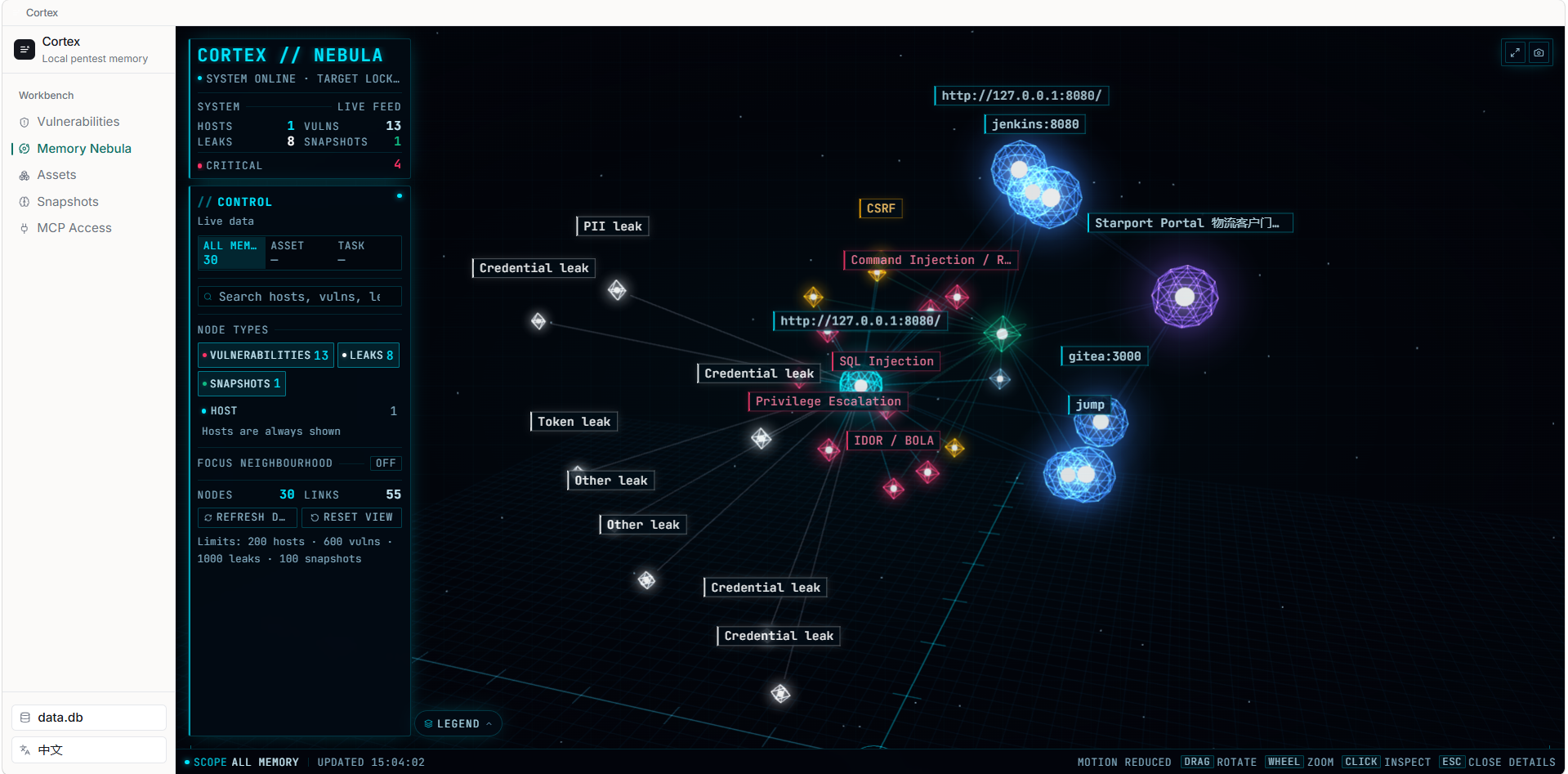
Memory Nebula turns the local SQLite memory into an explorable 3D star map: project/target hubs, host assets, vulnerabilities, leaks and snapshot sessions are connected by derived, read-only relations (no extra tables). It supports all-library / single-asset / single-task scopes, search and type filters, a focus neighbourhood, +N performance aggregation, fullscreen view and PNG export, plus a 2D SVG fallback when WebGL is unavailable.
Requirements
- Node.js ≥ 22.12 for the CLI and source builds. The Windows desktop installer bundles its own Node runtime, so Windows end users do not need Node.
- The packaged desktop app is Windows 10/11 x64; macOS/Linux install from npm (see CLI (ctx)).
MCP access
The MCP server is stdio only: the agent starts it in its own process; there is no listening port and the GUI never starts MCP. Server name: cortex, version 0.1.5.
| Scenario | Launch command |
|---|---|
| Source build | node <repo>/out/mcp/stdio.cjs |
| Windows install | <install>\bin\node.exe <install>\bin\mcp-stdio.cjs |
DeepSeek Harness ($DSH_HOME/cordis.patch.yml, i.e. ~/.dsh/cordis.patch.yml — the home-level patch layer that DSH applies to every profile and keeps across profile recovery):
- insert:
    - id: mcp-cortex
      name: "@deepseek-ai/dsh-mcp-client"
      config:
        serverName: cortex
        transport: stdio
        command: "node"
        args:
          - "<repo>/out/mcp/stdio.cjs"
        toolCallTimeoutMs: 120000
Upgrading from an older Cortex? Earlier releases wrote this block into
~/.dsh/profiles/<profile>/cordis.patch.yml. Re-runctx init --agents dsh --yes: it writes the home-level layer and strips the old per-profile block (DSH rejects a duplicateserverName: cortex), so the registration survives profile resets and applies to every DSH surface.
Codex CLI (~/.codex/config.toml):
[mcp_servers.cortex]
command = "node"
args = ["<repo>/out/mcp/stdio.cjs"]
startup_timeout_sec = 20
tool_timeout_sec = 120
Claude Code:
claude mcp add --transport stdio cortex -- node <repo>/out/mcp/stdio.cjs
Cursor (~/.cursor/mcp.json) and WorkBuddy (~/.workbuddy/mcp.json):
{
  "mcpServers": {
    "cortex": {
      "command": "node",
      "args": ["<repo>/out/mcp/stdio.cjs"]
    }
  }
}
ZCode (~/.zcode/cli/config.json, user scope; project scope: <project>/.zcode/config.json):
{
  "mcp": {
    "servers": {
      "cortex": {
        "command": "node",
        "args": ["<repo>/out/mcp/stdio.cjs"]
      }
    }
  }
}
One-command setup
npm run build
node out/cli/ctx.cjs init --dry-run                    # preview only
node out/cli/ctx.cjs init --yes                        # detect agents, back up and write
node out/cli/ctx.cjs init --yes --agents dsh --skill-lang en
node out/cli/ctx.cjs init --yes --agents workbuddy,zcode
node out/cli/ctx.cjs doctor                            # diagnose config + runtime
ctx init backs up existing files as .bak-YYYYMMDD-HHmmss, merges marker-managed blocks idempotently (old PENTEST markers are migrated), validates JSON / TOML / YAML before writing, and installs the selected skill language. Restart the agent afterwards (not the GUI); then verify a read-only tool call such as manage_snapshot({ "action": "list" }).
Skills (bilingual)
skills/
  zh/  vuln-db.skill.md  asset-context.skill.md  snapshot.skill.md  internal-ops.skill.md
  en/  vuln-db.skill.md  asset-context.skill.md  snapshot.skill.md  internal-ops.skill.md
ctx init copies the selected language to the agent skill directories (~/.agents/skills/<name>/SKILL.md, plus client-specific skill directories for Codex / Claude Code / ZCode; import the shared .agents/skills copies through the WorkBuddy Skill UI). The desktop MCP page and the installer both use the same generator, so configs and skills never drift apart.
Build from source
Only for development, custom builds, or building the desktop installer; normal use should go through npm install -g @lievclouds/cortex.
# Node.js >= 22.12 required
git clone git@github.com:Revcloudi/Cortex.git
cd Cortex
npm install
npm run build            # typecheck + Electron + MCP + CLI
npm run build:web        # standalone Web SPA (required for ctx web)
npm run build:server     # Web HTTP server bundle (required for ctx web)
npm link                 # exposes `ctx` on PATH; without link: node out/cli/ctx.cjs
ctx --version
Other development commands:
npm run dev          # Electron + Vite dev mode
npm run typecheck    # Node + Web TypeScript projects
npm start            # preview the built desktop app
npm run dist:win     # Windows installer (bundled Node runtime, artifact in release/)
Installer build
npm run build:runtime materializes the staged runtime/ directory (out/web → runtime/web/, out/server/web.cjs → runtime/web-server.cjs); electron-builder then maps runtime/ to <install>/bin/ in the installer. npm run dist:win runs build:web + build:server before packaging, so a freshly built installer includes the Web UI. The runtime build downloads a pinned Node LTS (v24.22.2) from the configured mirror (CTX_NODE_VERSION overrides the version). A runtime built without the Web artifacts still works for CLI/MCP (it prints a warning); a half-built state (SPA present but server bundle missing) fails the build on purpose.
Packaging and releases
npm run dist:win           # build + bundled runtime → Windows x64 NSIS installer (release/Cortex-0.1.5-setup.exe)
npm run build:runtime      # only materialize runtime/ (manual/advanced packaging)
The installed layout (per-user on Windows):
%LOCALAPPDATA%\Programs\Cortex\
  Cortex.exe                                    Electron shell
  resources/app.asar                            main / preload / renderer bundles
  bin\
    node.exe                                    bundled Node LTS runtime
    mcp-stdio.cjs                               stdio MCP entry
    ctx.cjs  ctx.cmd                            CLI + wrapper
    ctx-path.cjs                                installer PATH helper
    web-server.cjs                              HTTP server bundle for ctx web
    web\                                        standalone Web UI (index.html + hashed assets)
    skills\{zh,en}\...                          skill sources for ctx init
    node_modules\                               better-sqlite3 (Node-API)
.github/workflows/release.yml builds the Windows installer on v* / cortex-v* tags and publishes it to GitHub Releases. macOS/Linux install from npm (see CLI (ctx) above), so no macOS artifacts are produced.
Project layout
src/
  shared/      shared contracts (types, IPC channels, AI config/repeater types, MCP config generator)
  core/        Electron-free database, paths, logging, version; core/poc (provider presets)
  mcp/         pure stdio MCP server and the seven tools
  cli/         ctx commands and agent config writers
  server/      ctx web HTTP server (auth, security, static SPA, REST/SSE routes; no /api/poc/*)
  main/        Electron main process (IPC, watcher, database switching); main/services
               (PocConfigService, RepeaterService, HttpBridge)
  preload/     contextBridge API (no eval/runCode surface)
  renderer/    React UI + lightweight zh/en i18n; pages/RetestPage and pages/AiConfigPage
skills/        bilingual agent skills (zh / en)
scripts/       build, runtime, packaging and legacy install scripts
build/         NSIS customizations
Data and concurrency
- Default database:
%USERPROFILE%\.cortex\data.db(Windows) or~/.cortex/data.db; override withCTX_DB_PATH(legacyPDH_DB_PATHis still honoured). PRAGMA journal_mode=WAL,busy_timeout=5000,synchronous=NORMAL,foreign_keys=ON; write transactions useBEGIN IMMEDIATEwith bounded SQLITE_BUSY retries; schema version lives inPRAGMA user_version.- Migrations run in one immediate transaction, so concurrent agent processes cannot partially migrate a database.
- Schema v5 drops the abandoned
poc_artifacts/poc_runstables; the v3 vulnerability / asset / internal-operation tables and all original vulnerability evidence fields are untouched. The AI/retest config fileconfig.jsonlives next to the activedata.db. - The database is plaintext, including credentials in
leaked_infos— an explicit trade-off of this version.
Security and engineering constraints
- MCP is stdio only: the MCP server has no listening port; the agent starts it and it lives and dies with that agent. stdout carries JSON-RPC frames only; logs go to stderr or
CTX_MCP_LOG. The optional Web UI (ctx web) is a separate token-authenticated HTTP server that is off unless started, loopback-only unless--allow-intranetis passed. - Process isolation:
contextIsolation+sandbox, nonodeIntegration; the desktop renderer talks only towindow.apiand the main process re-validates every IPC payload (the browser Web build uses same-origin HTTP instead, see Web UI). - Re-test isolation: the renderer never executes retest code. Repeater requests are built in the main process and restricted to the finding's target origin via
HttpBridge(redirects re-validated, request/response caps, retest proxy credentials never reach the renderer). The retest proxy only applies to repeater traffic; AI keys and proxy passwords remain in the main process. - Zod validation at MCP and IPC boundaries; parameterized SQL everywhere.
- Concurrency: WAL, busy timeout, immediate transactions and retries keep transient lock contention away from tool calls.
License
MIT. See LICENSE.
Plugins relacionados
archify (deepseek-harness)
tt-a1i/archify
WeKnora (dsh-weknora)
tencent/weknora
next-ai-draw-io (dsh-plugin)
dayuanjiang/next-ai-draw-io
weknora
tencent/weknora