dsh-telegram-relay
sflaer/dsh-telegram-relay
Ponte de Telegram para DeepSeek Harness: reencaminha para o bot perguntas do agente (com botões inline), pedidos de aprovação de ferramentas, resumos de turnos e mensagens de subagentes. Aceita a resposta do Telegram ou da DSH Web UI, consoante qual chegue primeiro. Inclui um painel de controlo loopback; apenas para o host, sem interface de cliente.
Instalar
dsh plugin --profile web add github:sflaer/dsh-telegram-relayREADME
dsh-telegram-relay
A Telegram bridge for DeepSeek Harness. While DSH is running with this plugin, it starts a loopback control panel and forwards to a Telegram bot:
- agent questions (
ask_user_question) with inline buttons, waiting for an answer; - tool approval requests with Allow / Deny buttons;
- a turn summary after every finished turn: status, duration, tool count and the final text;
- subagent messages — completion summaries, questions and approvals, all on by default and switchable in the panel.
Answers can be given in Telegram or in the DSH Web UI — the first complete answer wins, and the other copy is marked as already resolved. The plugin is host-only: it has no client UI and does not touch the model prompt.
Screenshots
| Control panel | Telegram |
|---|---|
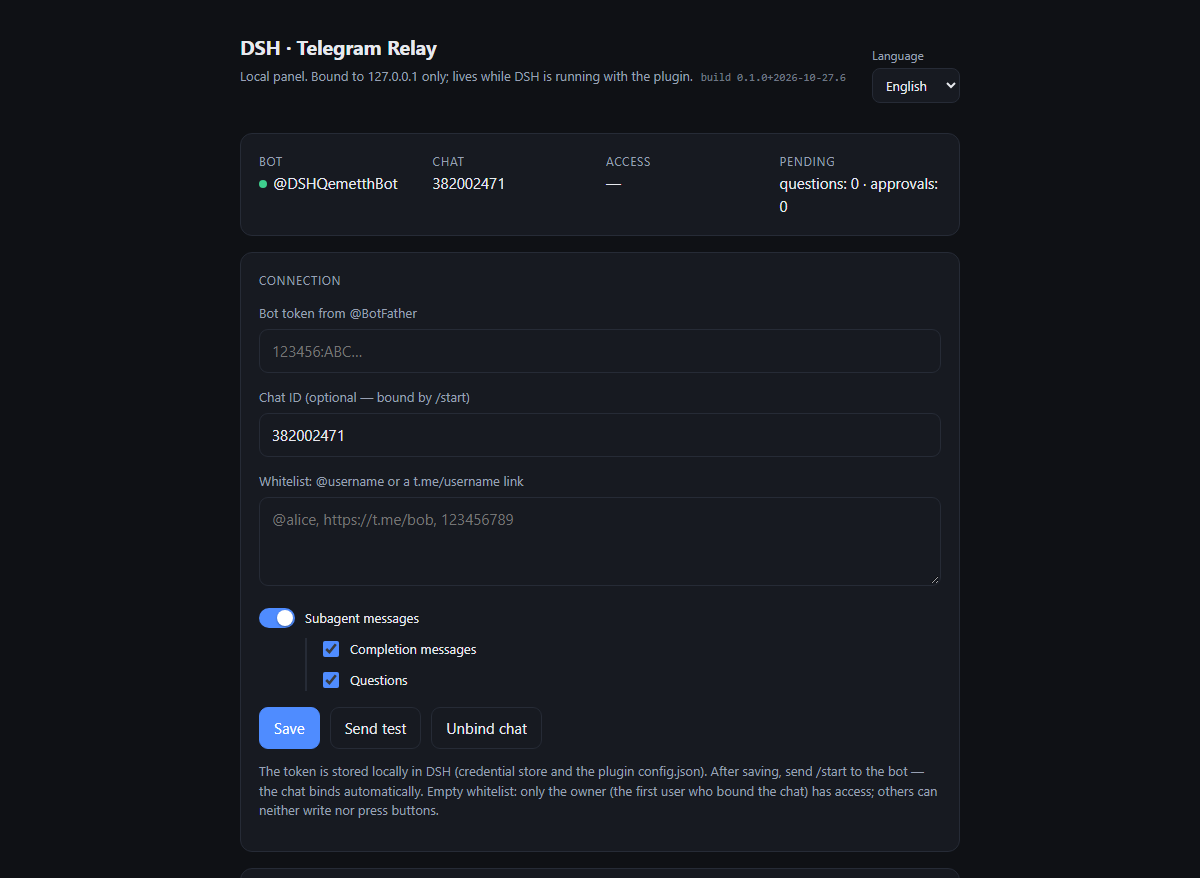 | 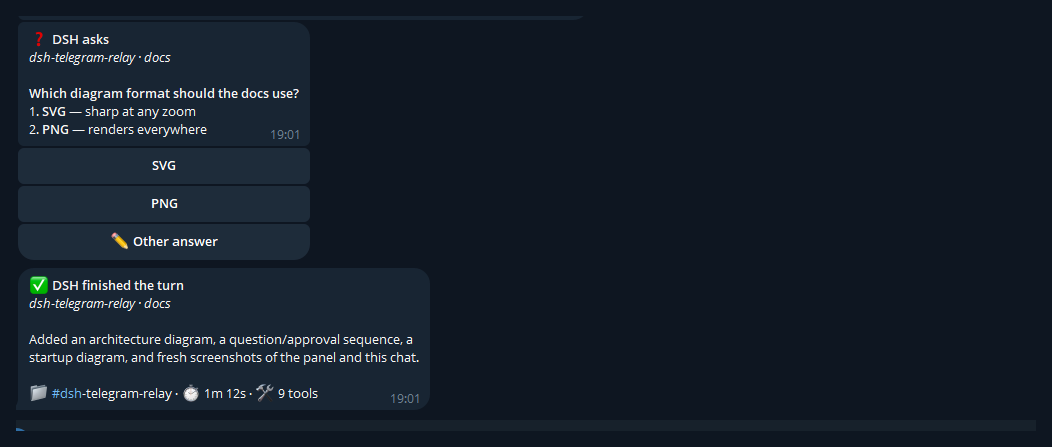 |
The visual guide explains the architecture, the question/approval race and the startup flow, with diagrams.
Languages
The panel and every bot-facing message are available in Russian, English and Chinese. The selector lives in the panel header; the choice is persisted in config.json and applies to new messages, the command menu, the panel and error messages. Already-sent messages are not rewritten.
Until a language is chosen explicitly, the plugin follows the system locale (LC_ALL / LANG / the JS locale). ru, en and zh are supported; any other system language (Spanish, German, …) falls back to English.
Requirements
- DeepSeek Harness with the
sessionsservice (the standard Web desktop profile has it). - Outbound HTTPS access from the DSH host to
api.telegram.org(DSH's global proxy settings apply). - A bot token from @BotFather.
Install
Desktop profile
The desktop profile is managed by the Electron app, so dsh plugin --profile desktop add refuses to run. Install through the GUI instead:
- Open DSH → Plugins in the sidebar → Add plugin.
- Enter either the GitHub URL
https://github.com/sflaer/dsh-telegram-relayor the absolute path to a local checkout. - Install and restart DSH.
The manager adds the package to dsh.profile.bundles automatically.
Other profiles
dsh plugin --profile web add github:sflaer/dsh-telegram-relay
or, from a local checkout:
dsh plugin --profile web add link:/absolute/path/to/dsh-telegram-relay
Restart the profile after installing or updating a linked package.
Panel
Once the plugin is loaded, the host log contains:
[telegram-relay] control panel: http://127.0.0.1:7810
If port 7810 is busy, an OS-assigned port is used; the actual URL is stored as panelUrl in $DSH_HOME/storages/telegram-relay/config.json.
- Open the panel.
- Paste the bot token and press Save.
- Send
/startto the bot — the chat is bound automatically. - Use Send test to verify delivery.
The token is written to the DSH credential store (TELEGRAM_RELAY_BOT_TOKEN) when that service is available, and a local copy is always kept in $DSH_HOME/storages/telegram-relay/config.json (mode 0600). The local copy makes a restart independent of service load order: if the credential service mounts after the plugin, the relay retries the lookup and starts the bot without asking for the token again. Neither copy belongs in cordis.patch.yml. Chat id, owner, whitelist, language and the update cursor live in the same config.json.
Below the whitelist, Subagent messages is a master switch for subagent-originated notifications. When it is on, Completion messages and Questions appear underneath; all three default to on. Questions also covers subagent approval prompts.
Whitelist
The panel's Whitelist field accepts @username, t.me/username, https://t.me/username, tg://user?id=… or a numeric id — separated by commas, spaces or newlines.
- Empty whitelist — the owner is assigned automatically: the first user who sends
/startin a private chat. Only the owner can write to the bot and press buttons. - Non-empty whitelist — only listed users can bind the chat, send messages and press buttons. Everyone else is rejected; their button presses are ignored.
- The owner always has access, even when not listed.
- If you bind a group by its chat id in the panel, every member sees notifications and replies. The whitelist only limits who can write and press buttons.
- Usernames can change. For a stable rule use
tg://user?id=…or a numeric id. - Unbind chat clears the binding and the owner; the whitelist is kept.
To prevent someone else from binding the bot first, fill in the whitelist before sending /start.
How it works
See the visual guide for the architecture diagram, the full sequence and the screenshots.
The plugin subscribes to three seams:
| Seam | Behaviour |
|---|---|
user-questions/request (waterfall, prepended) | Sends the question to Telegram and waits for an answer, while calling next() so the Web UI question stays available. |
approval/request (waterfall, prepended) | Sends Allow / Deny buttons, while passing the request to the Web UI. |
session/event (turn/end) | Builds the summary for the finished turn. |
Sub-agent sessions (session.header.origin === 'subagent') are forwarded by default. The panel's Subagent messages switch is the master control; once it is on, Completion messages and Questions choose what is sent. The Questions checkbox also covers subagent approval prompts, because an approval is an interactive subagent question. All three default to on. Turning the master switch off keeps the two nested choices for later; it does not erase them.
Telegram transport is long polling (getUpdates), so no public IP, webhook or TLS certificate is needed. The loopback HTTP server only serves the control panel and is protected by a per-process CSRF token.
Markdown in the assistant's final text is rendered into Telegram HTML: bold, italic, strikethrough, inline code, fenced code blocks, links, quotes, headings and ||spoilers||. The folder/time/tool line always goes last.
Configuration
Override fields in the profile's cordis.patch.yml — edit the existing row, do not add a duplicate:
- id: telegram-relay
  config:
    port: 7810
    language: en
    notifyTurnEnd: true
    notifyQuestions: true
    notifyApprovals: true
    notifySubagents: true
    notifySubagentTurnEnd: true
    notifySubagentQuestions: true
    summaryMaxChars: 1500
    minTurnMs: 0
| Field | Default | Meaning |
|---|---|---|
port | 7810 | Panel port; a free port is used when busy. |
language | system | Panel and bot language: ru, en, zh; unsupported system locales fall back to en. |
notifyTurnEnd | true | Send a summary after each turn. |
notifyQuestions | true | Forward ask_user_question. |
notifyApprovals | true | Forward approval requests. |
notifySubagents | true | Master switch for subagent-originated messages. |
notifySubagentTurnEnd | true | Forward subagent completion summaries. |
notifySubagentQuestions | true | Forward subagent questions and approvals. |
summaryMaxChars | 1500 | Maximum final text in the summary. |
minTurnMs | 0 | Skip summaries for turns shorter than this. |
apiBase | https://api.telegram.org | Alternative Bot API endpoint (reverse proxy). |
tokenEnv | TELEGRAM_RELAY_BOT_TOKEN | Credential reference; a local copy is also kept in config.json. |
Bot commands
/start— bind the chat and show the status;/status— bridge state, access mode and pending counts;/help— short usage notes.
While a question is open, answer with a button, with Other answer, or by replying to the question message with plain text. Multi-select questions use toggle buttons plus Done.
Security notes
- The panel binds
127.0.0.1only. Any local process can still reach it; do not expose the port to a network. - The bot token grants full control over the bot. Never share it or put it in a repository.
- Only the bound chat receives notifications. In a group, every member can read them.
- Question and approval text is sent to Telegram's servers; attachments and file contents are never uploaded.
Limits
- Notifications stop when the DSH host is closed — the plugin lives inside that process.
- Telegram only receives text: attachments are not forwarded.
- Long-polling requires outbound HTTPS; webhook mode is not implemented.
- Group chats require the bot to be allowed to post; the whitelist still gates who can answer.
- Only one poller may use a bot token. Stop other bridges or webhooks before enabling this plugin.
Development
node --test tests/
node --check lib/index.js
The tests do not touch the network: the Telegram transport is patched, and the suite covers formatting, Markdown rendering, the turn tracker, the control panel, question/approval flows, the whitelist and the three languages.
The panel header shows a build marker (build 0.1.0+…); it is the quickest way to confirm which code the running host actually loaded.
License
MIT — see LICENSE.
Plugins relacionados
dsh-web (dsh-ssh)
zhu1090093659/dsh-web
dsh-web (dsh-remote-web-ui)
zhu1090093659/dsh-web
dsh-web-ui (dsh-ssh)
zhu1090093659/dsh-web-ui
dsh-web-ui (dsh-remote-web-ui)
zhu1090093659/dsh-web-ui