dsh-image-gen
shanliuling/dsh-image-gen
Geração de imagens conversacional nativa para DeepSeek Harness: peça ao agente para criar uma imagem e ele cuida da geração e mantém o resultado diretamente na conversa.
Instalar
dsh plugin --profile web add github:shanliuling/dsh-image-genREADME
简体中文 · English
🎨 dsh-image-gen
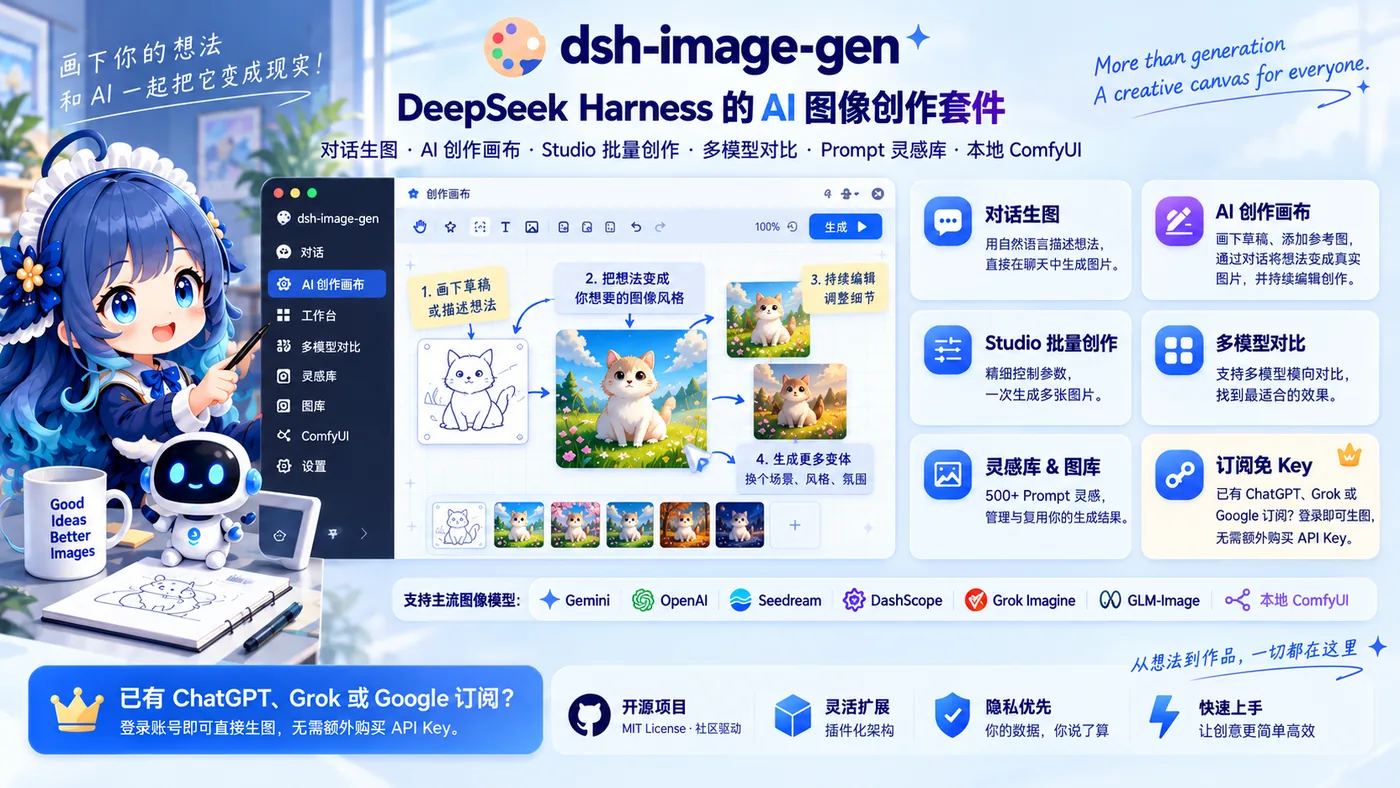
DeepSeek Harness 的原生 AI 图像创作套件
AI 创作画布 · 对话生图与编辑 · Studio 批量创作 · 多模型对比 · 500+ Prompt 灵感 · 图库管理 · 本地 ComfyUI · 订阅免 Key






快速开始 · 核心能力 · Provider 支持 · 常见问题


左:在画布中绘制草稿、摆放参考图,并通过对话生成成图。 · 右:基于已有结果继续对话修改,在画布中持续迭代创作。

左:在对话中直接描述并生成图片。 · 右:工作台批量创作、灵感库与图库等更多功能。
为 DeepSeek Harness 带来完整的 AI 图像创作工作流。
dsh-image-gen 不只是简单的对话生图,而是为 DSH 补齐从 对话生成与连续修图、AI 创作画布、Studio 批量创作、多模型横向对比,到 Prompt 灵感库 与 本地 ComfyUI 的完整图像创作能力。
支持主流云端图像模型与本地私有化工作流,既可使用 BYOK(自带 Key),也支持通过订阅账号直接使用,生成结果支持按工作区隔离存储。
已有 ChatGPT、Grok 或 Google 订阅?直接登录即可生图,无需额外购买 API Key。
支持:Gemini · OpenAI / Compatible · Seedream · DashScope · Grok Imagine · GLM-Image · 本地 ComfyUI
pnpm dsh plugin --profile web add dsh-image-gen@latest
版本更新提示: 本次版本变化较大,老用户请更新至最新版本。
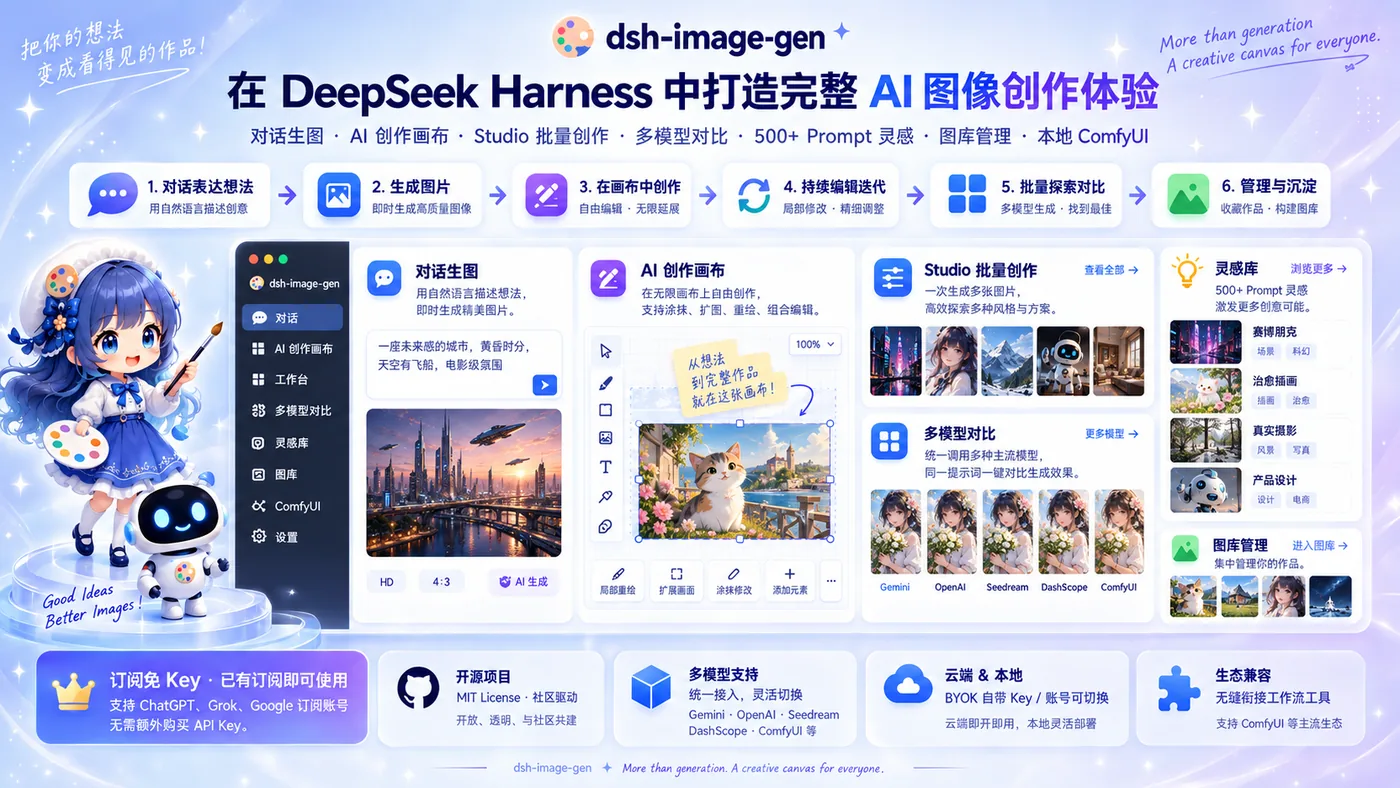
一个插件,覆盖完整 AI 图像创作流程
| 入口 | 最适合 | 你可以做什么 |
|---|---|---|
| 💬 对话 | 快速表达想法 | 文生图、图生图、连续编辑、版本迭代 |
| ✏️ 画布 | 表达视觉创意 | 草稿生成、参考图组合、空间创作、持续修改 |
| 🎛️ 工作台 | 精细控制创作参数 | 批量生成、多图参考、高级参数调整 |
| ✨ 灵感 | 寻找创作方向 | Prompt 案例、风格探索、一键复用 |
| 🖼️ 图库 | 管理生成结果 | 搜索、收藏、下载、重新使用 |
快速开始
1. 安装插件
环境要求:DeepSeek Harness 稳定版本,Node.js ^22.19.0 或 >= 24.0.0。
在你的 DeepSeek Harness 项目根目录下运行:
pnpm dsh plugin --profile web add dsh-image-gen@latest
💬 极客提示:你也可以直接把这句话发送给 DSH 对话中的 Agent:
帮我安装生图插件,在终端执行:pnpm dsh plugin --profile web add dsh-image-gen@latest
其他安装方式(全局 / GitHub 直装 / 本地调试)
# 若已将 dsh 安装为系统全局命令:
dsh plugin --profile web add dsh-image-gen@latest

# 从 GitHub 仓库直接安装最新代码:
pnpm dsh plugin --profile web add git+https://github.com/shanliuling/dsh-image-gen.git

# 本地克隆源码开发安装:
git clone https://github.com/shanliuling/dsh-image-gen.git
pnpm dsh plugin --profile web add ./dsh-image-gen
2. 配置 Provider
重启 DSH 后进入:

设置 → 插件 → 图像生成
DSH 0.1.5 及更早版本的入口为「设置 → 插件 → 插件配置 → 图像生成」,插件已同时兼容两种入口。
选择 Provider,填写自己的 API Key,并按需调整模型、Endpoint / Base URL 与工作区保存选项。填好 Key 后可点击**「测试连接」验证可用性,或点击「拉取模型」**一键获取该厂商支持的全部生图模型,无需手动查文档。使用 ComfyUI 时,请填写 DSH Host 可访问的服务地址,并导入 API Format Workflow JSON。
已有 ChatGPT、Grok 或 Google 订阅?无需填写 API Key:展开对应的订阅 Provider 行,点击**「登录」**并在浏览器完成授权,即可直接开始文生图与图生图。
3. 开始创作
在聊天框中直接描述你想要的图片:
画一张雨夜霓虹街头的赛博朋克猫咪,电影感光线,16:9。
也可以直接上传参考图,让 Agent 进行风格重构或局部编辑:
保持角色与构图不变,给猫咪戴上一副黑色墨镜。
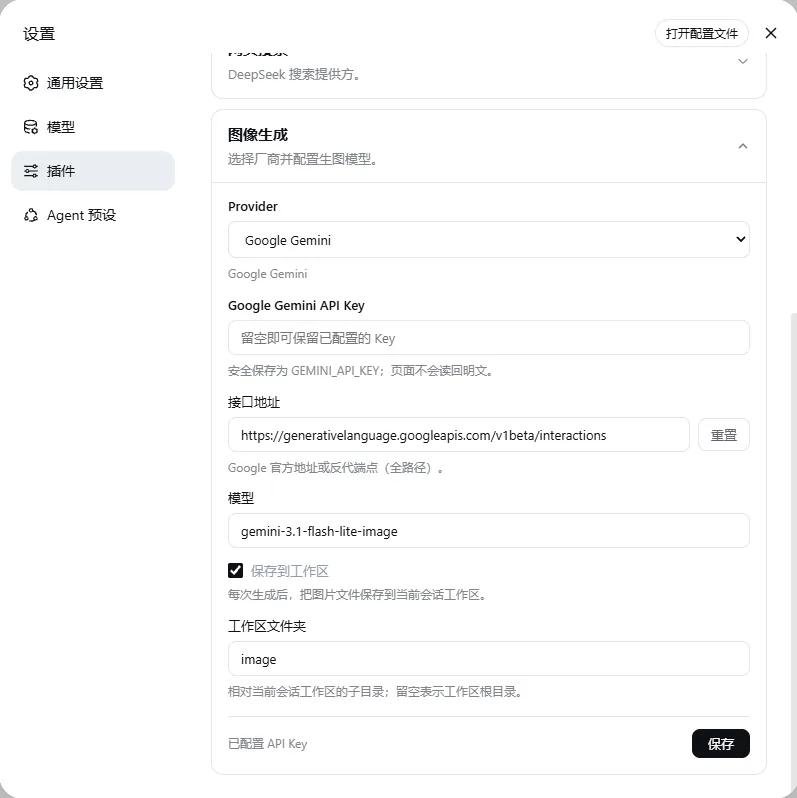
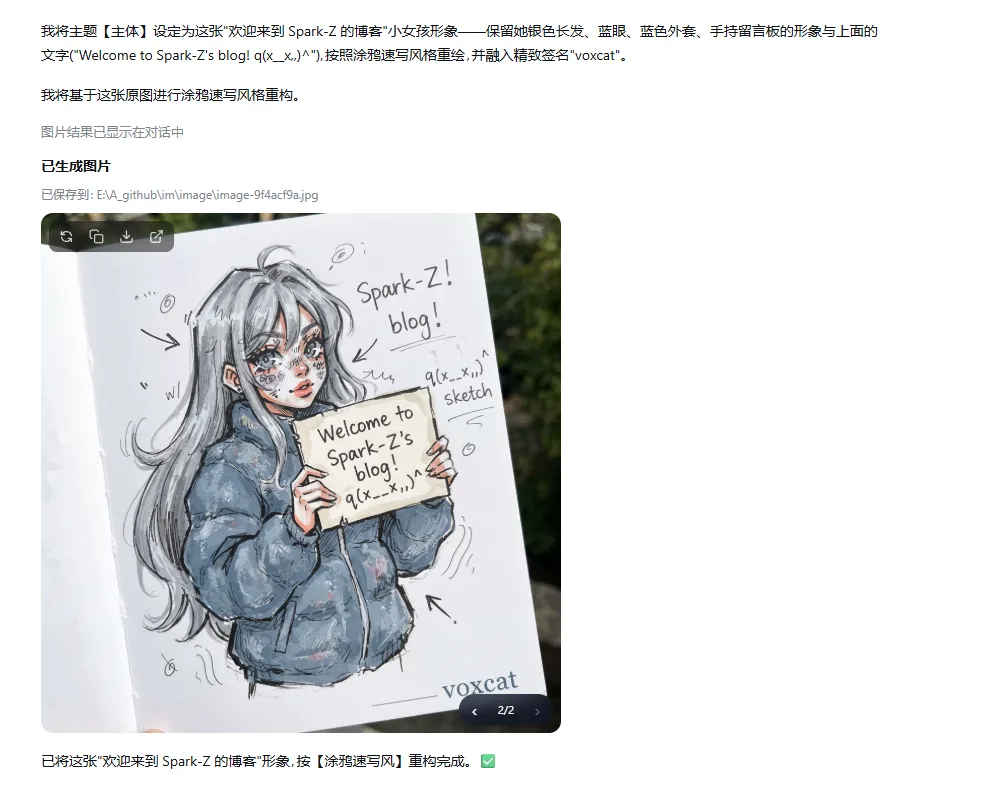
左:Provider 配置 · 右:在 DSH 对话中直接生图、图生图与连续编辑。
需要更细的参数控制时,点击会话顶部的 画廊 入口,进入 图库 / 工作台 / 灵感 / 收藏。
核心能力
💬 对话生图、编辑与版本切换
- 用自然语言完成文生图、图生图、多图参考和风格迁移。
- 直接修改原图 Prompt 重新生成,并在同一卡片中切换历史版本。
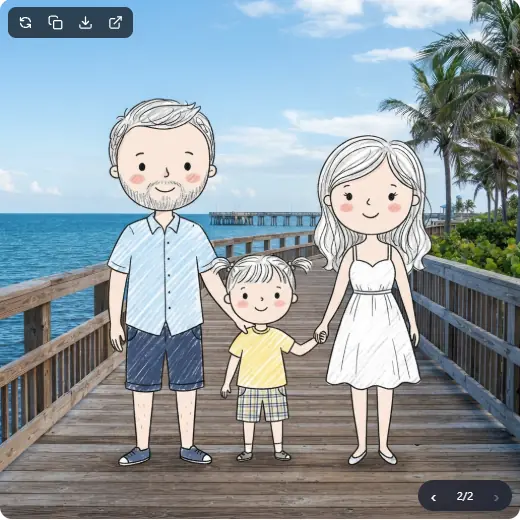
修改 Prompt 后原位重新生成,并在同一张图片卡片中切换历史版本。
✏️ 从草稿到成图:AI 创作画布
在无限画布中表达你的创意,通过对话将草稿、构图和想法转化为真实图片。
- 在画布中自由绘制草稿、添加参考素材并组织创意。
- 通过自然语言与 AI 对话,让草稿快速变成完整作品。
- 基于已有结果持续编辑、修改和生成新的方向,保留创作过程,让每一次探索都可以继续迭代。
左:在画布中绘制草稿、摆放参考图,并通过对话生成成图。 · 右:基于已有结果继续对话修改,在画布中持续迭代创作。
🎛️ Studio 批量创作
- 支持多张参考图,一次生成多张候选图。
- 自由控制 Provider、模型、比例和清晰度,只保存满意的结果。
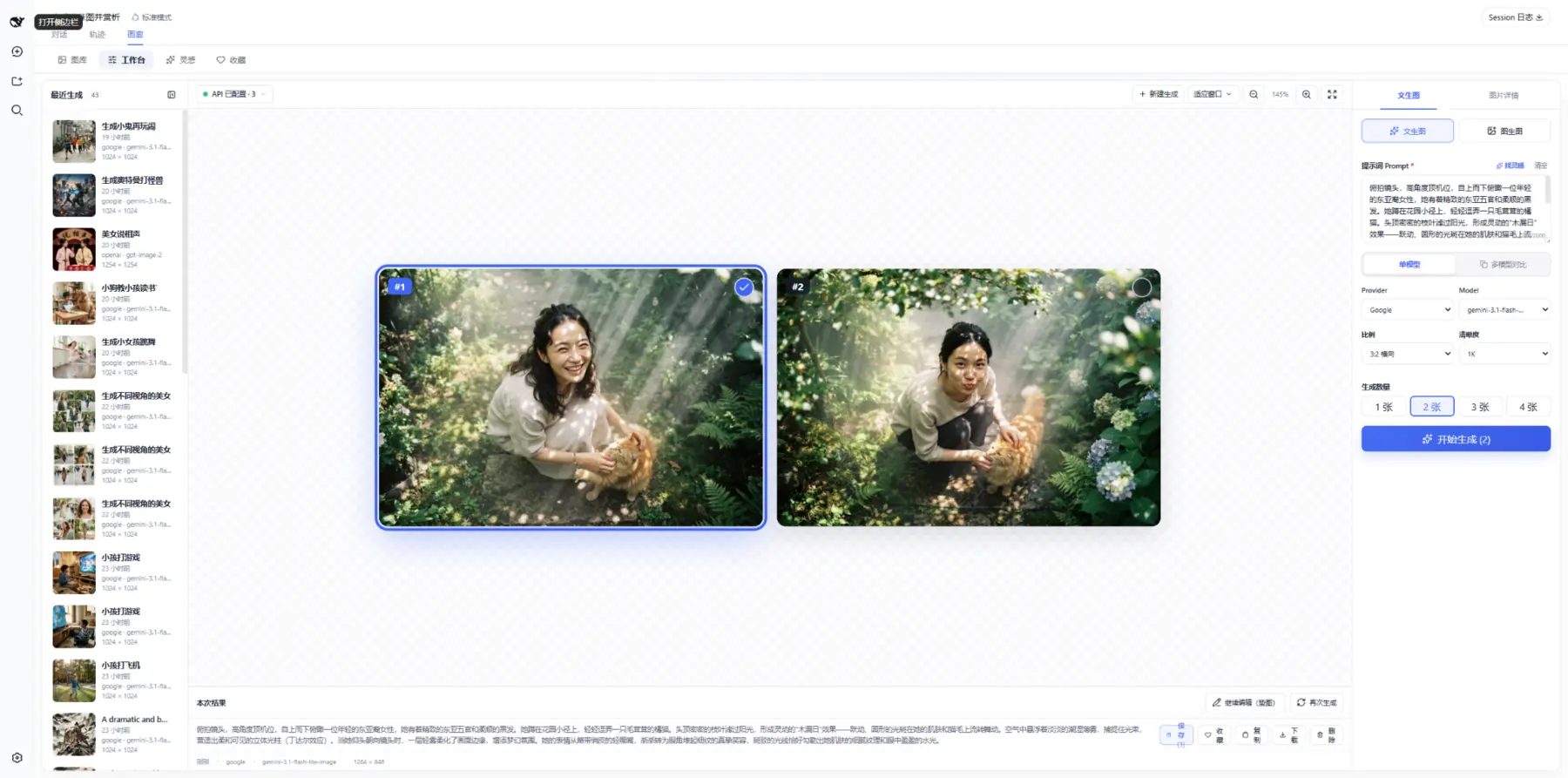
在同一个 Studio 中完成参考图导入、参数控制、批量生成、结果筛选与保存。
⚖️ 多模型横向对比
使用同一组 Prompt 和参考图并发调用多个模型,在一张画布中比较并保存结果。
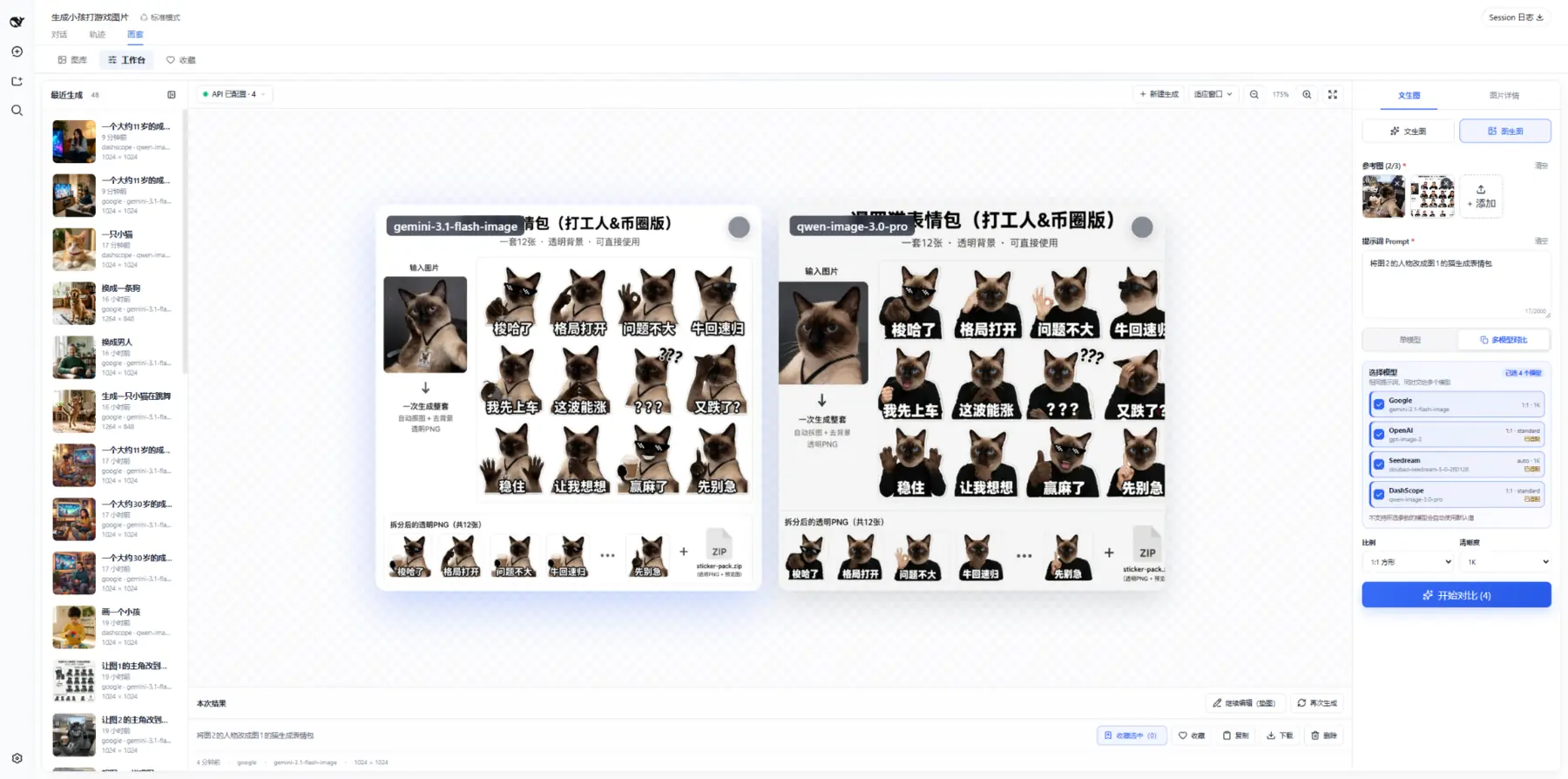
在同一画布中比较不同模型结果,再批量保存满意的图片。
✨ 500+ Prompt 灵感案例
- 浏览和筛选 500+ Prompt 案例,支持收藏、复制及一键带入 Studio。
- 图片缓存在本地,浏览和学习不消耗 Token 或生成额度。
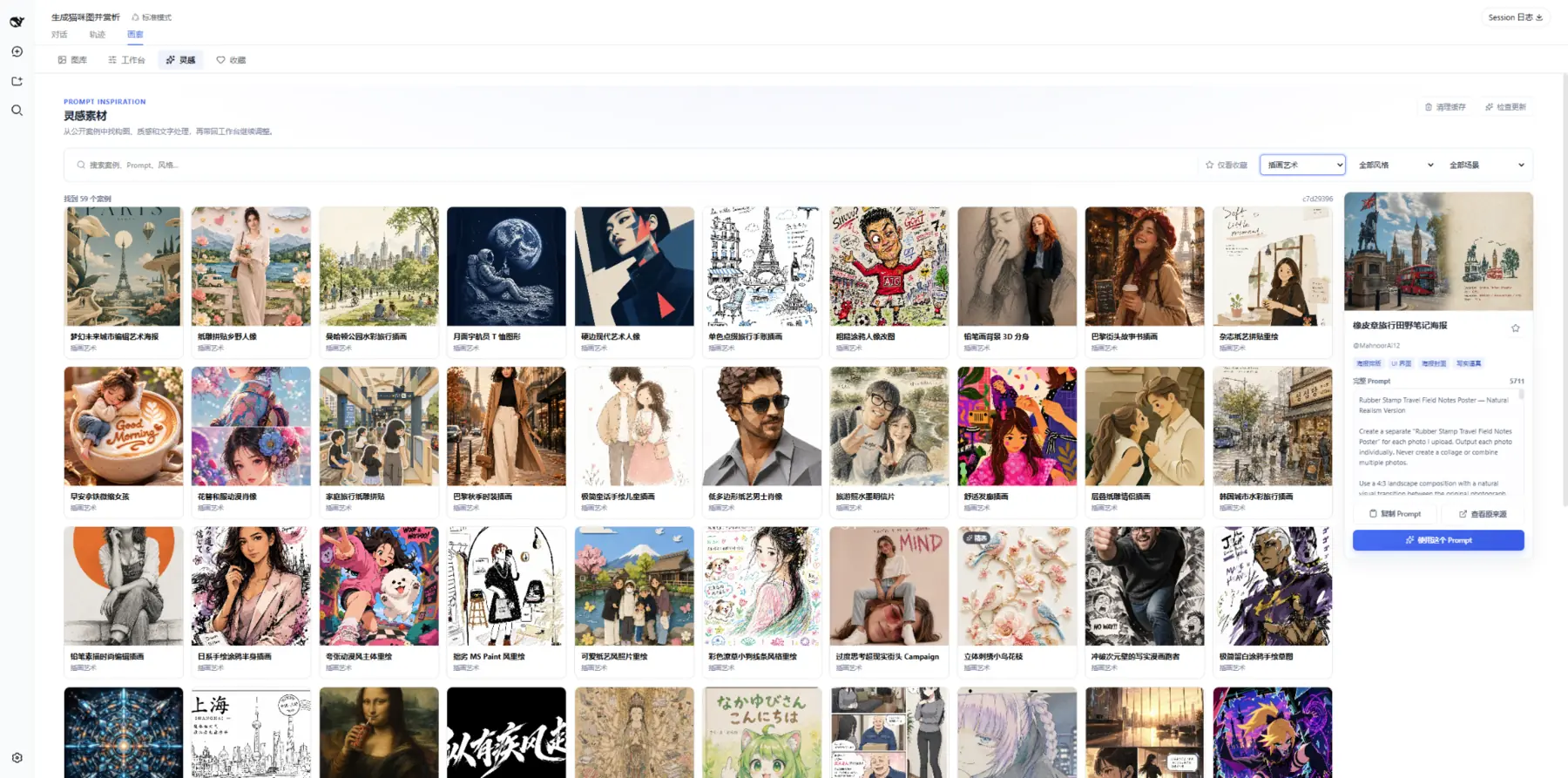
先找灵感,再把 Prompt 带入工作台;全本地缓存,浏览或复制不消耗生成额度。
🖼️ 图库、收藏与批量管理
- 统一管理对话和 Studio 中保存的图片,并按工作区隔离。
- 支持搜索、筛选、收藏、下载、继续编辑、重新生成和批量管理。
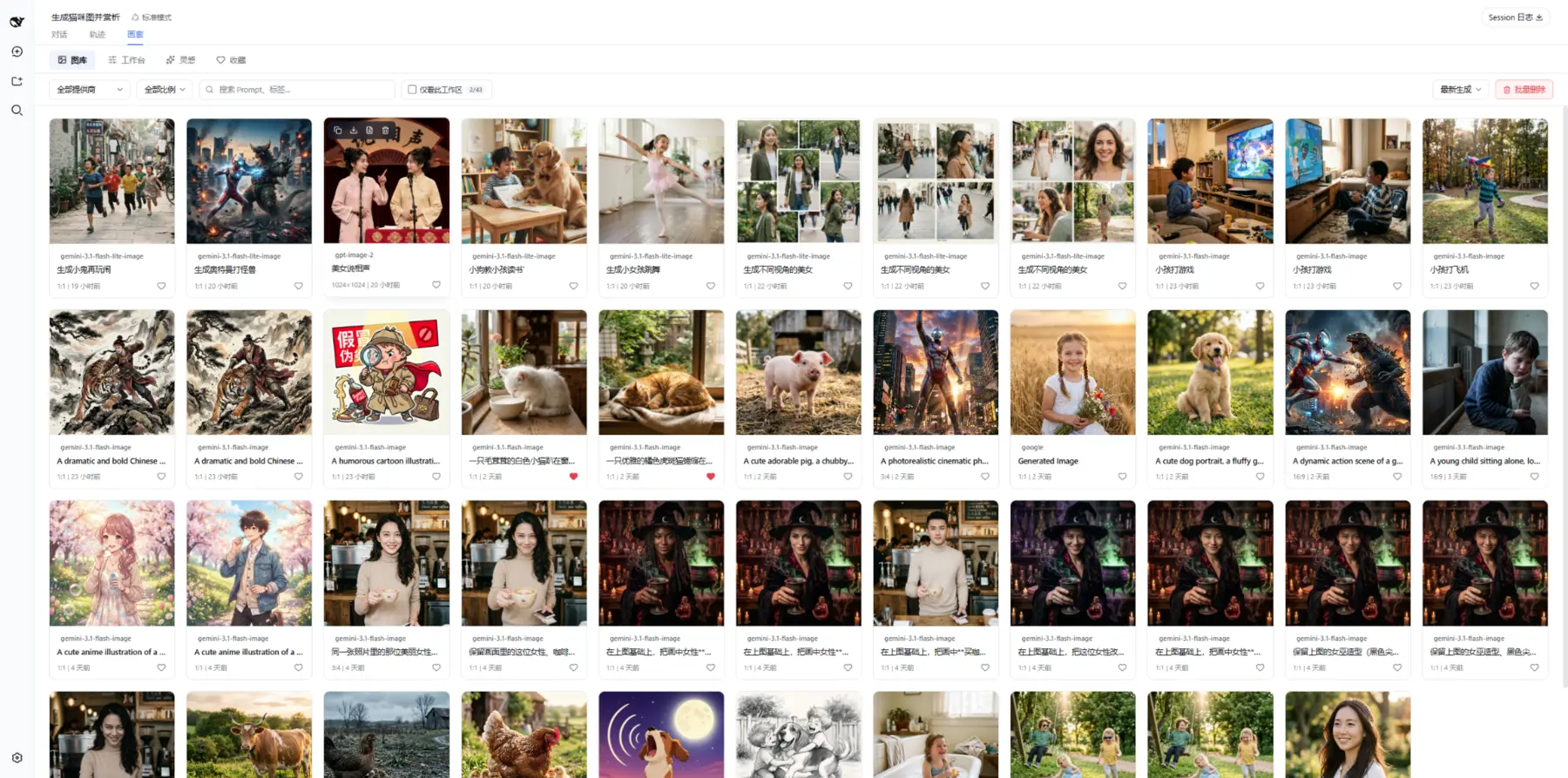
图库支持多维度筛选、收藏、批量管理与工作区数据隔离。
🧩 本地 ComfyUI 多工作流
灵活调用本地 GPU 算力,让私有化绘图无缝融入 Agent 对话。
- 导入并管理多个命名工作流,支持预设 Prompt 和常用占位符。
- Agent 可按名称选择工作流,在对话中完成文生图和图生图。
ComfyUI 暂未接入 Studio 和多模型对比。
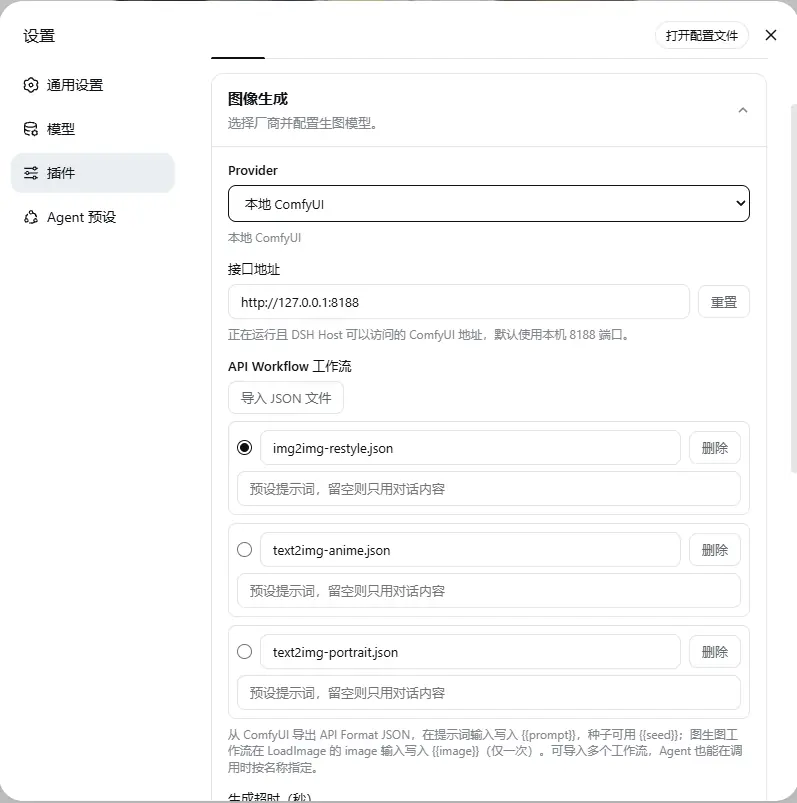
为不同用途维护独立工作流,并通过名称让 Agent 精确选择。
Provider 支持情况
| Provider | 对话生图 | 对话编辑 | Studio | 多模型对比 |
|---|---|---|---|---|
| Google Gemini | ✅ | ✅ 多图 | ✅ | ✅ |
| OpenAI Images | ✅ | ✅ 多图 | ✅ | ✅ |
| OpenAI Compatible(中转站) | ✅ | ✅ 多图 | ✅ | ✅ |
| ByteDance Seedream / 火山方舟 | ✅ | ✅ 多图 | ✅ | ✅ |
| Aliyun DashScope / Qwen Image | ✅ | ✅ 多图 | ✅ | ✅ |
| xAI Grok Imagine | ✅ | ⚠️ 有限 | ✅ | ✅ |
| 智谱 GLM-Image | ✅ | — | ✅ | ✅ |
| Local ComfyUI | ✅ | ✅ 单图 | — | — |
| ChatGPT 订阅(免 Key) | ✅ | ✅ 多图 | ✅ | ✅ |
| Grok 订阅(免 Key) | ✅ | ✅ 多图 | ✅ | ✅ |
| Google 订阅(免 Key) | ✅ | ✅ 多图 | ✅ | ✅ |
Studio 与多模型对比目前只支持云端 Provider(含订阅通道);多模型对比调用的是各 Provider 在设置中已配置的模型。 智谱 GLM-Image 上游本身不支持图生图;xAI 图生图走 OpenAI 兼容协议(multipart),部分网关可能需等待后续适配。 订阅通道通过账号登录使用(免 API Key),支持对话文生图 / 图生图、Studio 批量生成与多模型对比;图生图走各订阅渠道的编辑接口(最多 5 张参考图),比例与清晰度可在 Studio 中直接选择。
当前默认模型与 Endpoint(均可修改)
| Provider | 默认模型 | 默认 Endpoint / Base URL |
|---|---|---|
| Google Gemini | gemini-3.1-flash-image | https://generativelanguage.googleapis.com/v1beta/interactions |
| OpenAI Images | gpt-image-2 | https://api.openai.com/v1 |
| OpenAI Compatible | 自定义 | 自定义 Base URL |
| ByteDance Seedream | doubao-seedream-5-0-260128 | https://ark.cn-beijing.volces.com/api/v3 |
| Aliyun DashScope | qwen-image-3.0 | https://dashscope.aliyuncs.com/api/v1 |
| xAI Grok Imagine | grok-imagine-image | https://api.x.ai/v1 |
| 智谱 GLM-Image | glm-image | https://open.bigmodel.cn/api/paas/v4 |
| Local ComfyUI | 用户导入的 API Workflow | http://127.0.0.1:8188 |
| ChatGPT 订阅 | gpt-image-2.5-flare(通道固定) | 账号登录,无需配置 |
| Grok 订阅 | grok-imagine-image-2.0(通道固定) | 账号登录,无需配置 |
| Google 订阅 | gemini-3.1-flash-image(通道固定) | 账号登录,无需配置 |
各 Provider 可选比例与清晰度
| Provider | 比例 | 清晰度 |
|---|---|---|
| Google Gemini | 1:1 · 3:2 · 2:3 · 4:3 · 3:4 · 4:5 · 5:4 · 16:9 · 9:16 · 21:9 | 1K / 2K / 4K |
| OpenAI Images | 1:1 · 3:2 · 2:3 · 4:3 · 3:4 · 16:9 · 9:16 | 自动 / low / medium / high |
| OpenAI Compatible | 由 openaiCompatSizes 配置决定(默认 1:1 · 3:2 · 2:3) | 同上(默认 standard) |
| ByteDance Seedream | 自动 · 1:1 · 3:2 · 2:3 · 4:3 · 3:4 · 16:9 · 9:16 · 21:9 | 2K / 3K / 4K |
| Aliyun DashScope | 1:1 · 3:2 · 2:3 · 4:3 · 3:4 · 16:9 · 9:16 | 标准 |
| xAI Grok Imagine | 自动 · 1:1 · 3:2 · 2:3 · 4:3 · 3:4 · 16:9 · 9:16 · 21:9 | 1K / 2K |
| 智谱 GLM-Image | 1:1 · 3:2 · 2:3 · 4:3 · 3:4 · 16:9 · 9:16 | 高清 |
| ChatGPT 订阅 | 自动 · 1:1 · 3:2 · 2:3 · 4:3 · 3:4 · 16:9 · 9:16 | 自动 / low / medium / high / xhigh / max |
| Grok 订阅 | 自动 · 1:1 · 3:2 · 2:3 · 4:3 · 3:4 · 16:9 · 9:16 · 21:9 | 1K / 2K |
| Google 订阅 | 自动 · 1:1 · 3:2 · 2:3 · 4:3 · 3:4 · 4:5 · 5:4 · 16:9 · 9:16 · 21:9 | 标准 / 高清(4K) |
「自动」比例表示由模型按 Prompt 自行决定构图;上游已移除的档位(如 Seedream 5.0 的 1K)插件不会暴露。 OpenAI Compatible(中转站)的比例与清晰度由设置中的
openaiCompatSizes表驱动,格式为「比例 → 档位 → 像素」,例如{ "16:9": { "2K": "2048x1152" } };留空时保持 1:1 / 3:2 / 2:3 + standard 的兼容行为。
数据与隐私
- BYOK:API Key 通过 DSH Credentials 服务保存,设置页不会回显 Key 明文。
- 订阅登录:订阅账号令牌经你授权登录后保存于 DSH Credentials,与 API Key 完全隔离,浏览器侧不接触令牌。
- 云端请求:Prompt 与本次使用的参考图会发送给所选 Provider,请遵守对应服务条款。
- 本地 ComfyUI:请求发送到用户配置的 ComfyUI 地址。
- 工作区文件:开启工作区保存后,对话结果会落盘;Studio 仅保存用户选中的候选图。
- 图库与收藏:图库元数据和收藏状态保存在当前浏览器本地存储中。
- 灵感缓存:案例元数据随插件提供,图片按需加载并缓存在本机,可随时清理。
常见问题
安装后找不到“图像生成”设置怎么办?
设置入口随 DSH 版本不同:0.1.6 及以上位于「设置 → 插件 → 图像生成」,0.1.5 及更早位于「设置 → 插件 → 插件配置 → 图像生成」。
若两处都没有,先完全重启当前 DSH Profile,再检查插件配置:
dsh --profile web --dump-config
如果输出中没有 dsh-image-gen,请重新执行安装命令。提交 Issue 时请附 DSH 版本、插件版本和错误日志,不要上传 API Key。
生成图片保存在哪里?
开启“保存到工作区”后,对话生成结果默认保存在当前工作区的 dsh-image-gen/ 子目录,也可以在设置中修改。Studio 候选图先留在临时画布,只有用户选中的结果才会进入图库并保存。
为什么 ComfyUI 没有出现在 Studio 中?
当前 Studio 与多模型对比仅支持云端 Provider,暂未接入 ComfyUI。ComfyUI 已支持在 Agent 对话中进行文生图、单图编辑以及多个命名工作流。
从图库删除会删除聊天记录吗?
不会。删除图库记录不会修改原聊天消息。你可以额外选择是否清理工作区中的本地图片文件;文件删除通常无法恢复,请确认后操作。
如何升级?
pnpm dsh plugin --profile web add dsh-image-gen@latest
升级后重启对应的 DSH Profile。
本地开发
git clone https://github.com/shanliuling/dsh-image-gen.git
cd dsh-image-gen

pnpm install
pnpm run typecheck
pnpm test
pnpm run build
pnpm run pack:check
欢迎通过 Issues 反馈问题,或阅读 CONTRIBUTING.md 后提交 Pull Request。
License
本项目基于 Apache License 2.0 开源。
如果 dsh-image-gen 对你的工作流有所帮助,欢迎在 GitHub 点亮一颗 ⭐ Star 支持持续维护。
查看 Releases · 提交 Issue · 参与贡献
Plugins relacionados
dsh-web-ui (dsh-tool-describe-image)
zhu1090093659/dsh-web-ui
ipollowork
devin-axis/ipollowork
modlens
liustack/modlens
dsh-vision-router
ysr666/dsh-vision-router