daruma (dsh-daruma)
sischoi/daruma/packages/dsh-daruma
Mantém sessões longas do DSH quando um canal de modelo falha. Assume após o esgotamento das tentativas internas; um disjuntor autorrecuperável atua após 429/5xx repetidos ou erro terminal e envia a próxima solicitação a outro canal da cadeia. Compatível com DSH 0.1.x e 0.2.x; failover e RPC de gerenciamento de backup foram verificados no 0.2.1-rc.2. O backup pode ser escolhido em Configurações ou no painel ao lado do compositor; ambos ficam sincronizados. Cada troca entra no log de auditoria JSONL, não como aviso na conversa, para evitar que um evento desconhecido impeça o host de carregar toda a sessão.
Instalar
dsh plugin --profile web add github:sischoi/darumaEste plugin está no subdiretório packages/dsh-daruma do repositório.
README
daruma
Daruma — automatic failover & backup channels for DeepSeek Harness
DeepSeek Harness (DSH) is a great place to run long agent tasks — until a third-party API subscription hiccups. Rate limits (429), server errors (500), network jitter, provider-side model stalls, moderation gatekeeping: any of them kills a long-running task mid-flight. Daruma catches the failure and fails over to another channel, so the session keeps going without you.
Screenshots
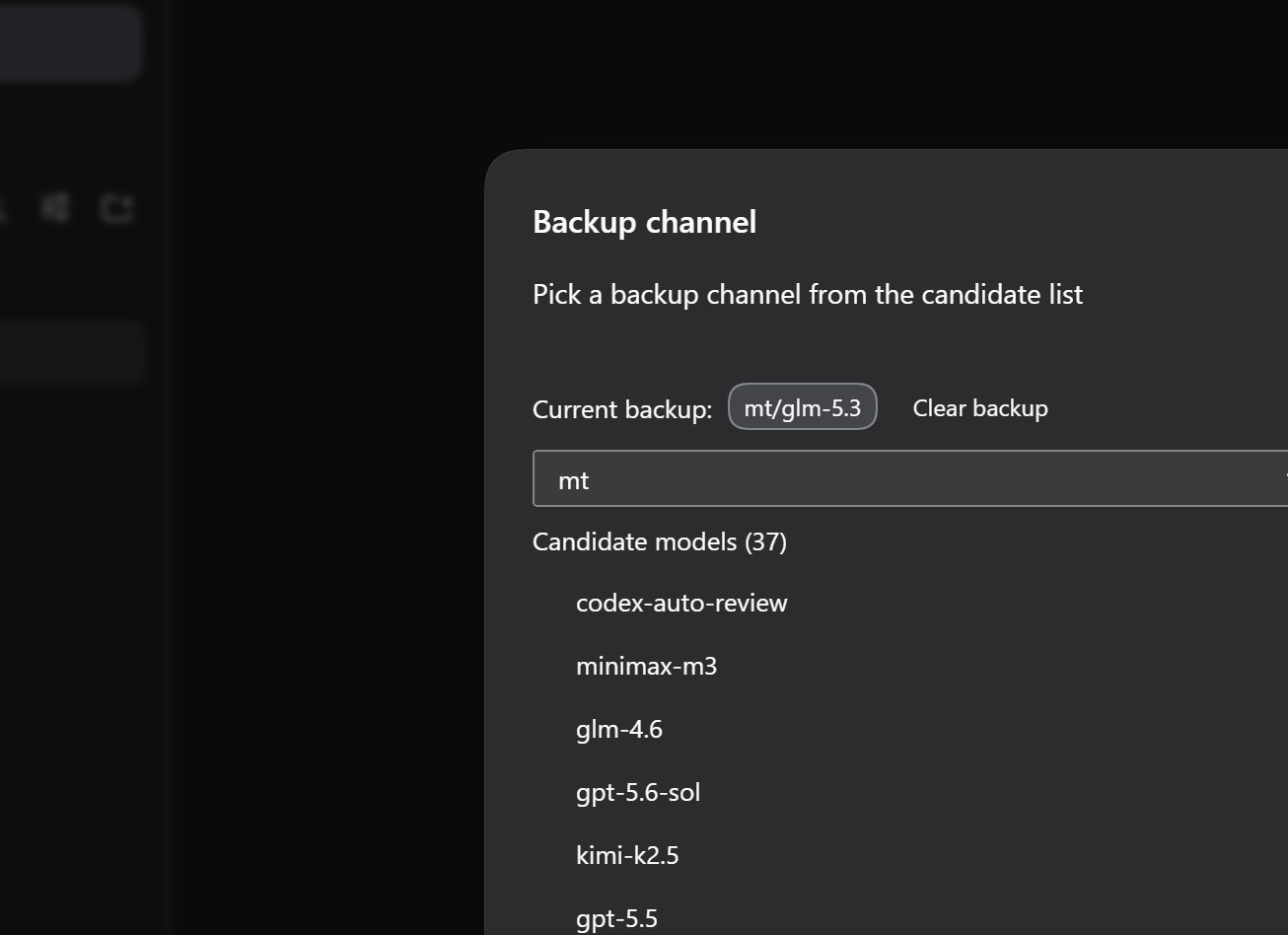
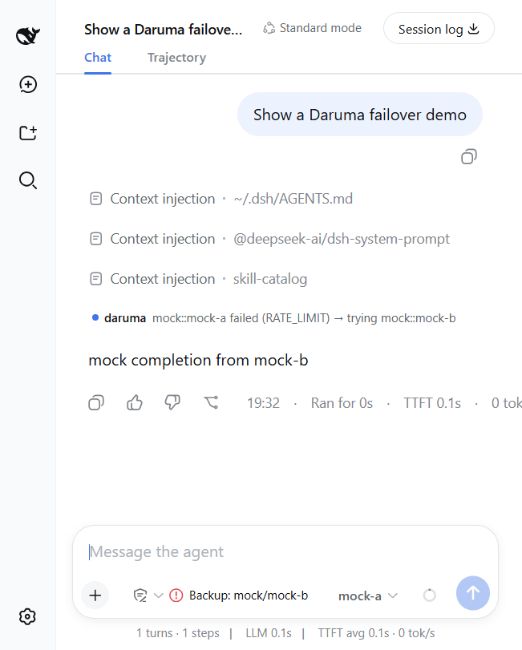
The daruma control lives at the right end of the composer tool row, next to the model selector; clicking it opens the backup-channel picker.

What it does
- Automatic failover. When the current model/channel trips after repeated failures (or hits a terminal error like
QUOTA/INVALID_CREDENTIAL/CONTEXT_WINDOW_EXCEEDED), daruma switches the next request to another channel in your configured chain. The in-flight generation continues on the new channel — no lost sessions. The switch is recorded in the audit log below, not as a row inside the conversation: a plugin session event of an unknown type makes current harnesses refuse to load that session. - Circuit breaker with persistent, self-healing state. Each channel carries a health record (failures, cooldown) persisted to
~/.dsh/daruma/channel-health.json. A tripped channel stays cooled down across restarts — and the first successful request closes the circuit again, so recovered channels never linger as zombieCOOLDOWNentries. - Backup channel UI. A compact status dock next to the model selector shows overall health and your current backup. The backup panel lists candidate models per provider and lets you set/clear the backup channel manually — picked from real traffic, no synthetic speed tests. The same picker is also a Backup channel section in Settings, beside the other plugin sections.
- Durable JSONL audit log. Every failover / give-up / boot decision is appended to
~/.dsh/daruma/failover-log.jsonl(2 MiB rotation, best-effort). See Auditing failovers. - Deterministic decision engine. All recovery logic lives in a pure function package (
daruma-core): same failure history + same channel state → same recovery plan. No I/O, fully unit-tested.
How it works
Daruma rides three of DSH's native extension points:
| Mechanism | Owner | Effect |
|---|---|---|
| Retry | in-box dsh-llm-retry | same channel, bounded exponential backoff |
| Fail over | dsh-daruma | after retry gives up, or on a terminal error, switch to the next routable channel (user-chosen backup first) |
| Self-heal | dsh-daruma | the next agent/pre-step / agent/turn-stopping without a pending failure proves the last request succeeded → reset the breaker |
request → 429 → dsh-llm-retry (backoff, same channel)
                ↓ still failing
          dsh-daruma: trip circuit, arm failover target   ── appended to failover-log.jsonl
                ↓ next request
          swapped onto backup/next channel → task continues
                ↓ succeeds
          circuit closes, failure counter resets (self-heal)
The host exposes no request-success event, so success is inferred: an agent whose previous model request never tripped agent/request-error is considered healthy at its next step boundary or turn close.
Install
# from npm (daruma-core is pulled in automatically as a dependency)
dsh plugin --profile web add dsh-daruma

# or from a checkout (local development)
dsh plugin --profile web add link:./packages/daruma-core link:./packages/dsh-daruma
Also listed in the community awesome-dsh-plugin market (searchable via dshmarket).
Configure
Add a failover chain to your profile's cordis.patch.yml:
- id: dsh-daruma
  name: dsh-daruma
  config:
    channels:
      - { provider: mt, model: glm-5.3 }
      - { provider: mt, model: deepseek-v4-flash }
      - { provider: mt-cc, model: claude-3-5-haiku-latest }
    failureBudget: 3      # consecutive failures before a channel trips
    cooldownMs: 30000     # how long a tripped channel stays in cooldown
    giveUpBudget: 8       # per-agent failover budget before giving up
| Option | Default | Meaning |
|---|---|---|
channels | [] | ordered failover chain; the first entry is your normal primary, the rest are fallbacks in priority order |
failureBudget | 3 | consecutive failures before the circuit trips |
cooldownMs | 30000 | how long a tripped channel stays unroutable |
giveUpBudget | 8 | per-agent failover count at which recovery gives up |
stateFile | ~/.dsh/daruma/channel-health.json | where circuit-breaker state persists |
logFile | <stateFile dir>/failover-log.jsonl | where the JSONL audit log is written |
⚠️ Every chain channel must exist in your
settings.yamlproviders. A channel whose provider is missing there gets armed on failover, burns one budget slot, and fails again — the chain effectively loses a link. (This bit the author once: a removed provider left a dead channel first in line.)
⚠️ Test profiles must isolate
stateFile. If you point a mock/test profile at the default file, mock channels pollute your production health records. SetstateFile(and the co-locatedlogFilefollows) to a profile-local path — seedocs/e2e-test.md.
When the primary starts returning 429, daruma trips it and continues on the next channel. Then either click the channel-status dock next to the model selector, or open Settings → Backup channel → pick a backup channel from the candidate list; the backup is tried before the configured chain.
Auditing failovers
Every decision lands as one JSON line in ~/.dsh/daruma/failover-log.jsonl — one boot line per plugin start (aligning restart boundaries), then one line per failover / give-up:
{"kind":"boot","t":1788860215489,"pid":38660,"channels":["mt::glm-5.3","mt::deepseek-v4-flash","mt-cc::claude-3-5-haiku-latest"],"failureBudget":3,"cooldownMs":30000,"giveUpBudget":8}
{"kind":"failover","t":1788850743199,"agentId":"session-2c50…","from":"mt::glm-5.3","to":"mt::deepseek-v4-flash","reason":"RATE_LIMIT","turn":1,"step":1,"failoverCount":1,"giveUpBudget":8}
{"kind":"give-up","t":1788850876140,"agentId":"session-295a…","from":"mt::deepseek-v4-flash","reason":"no-routable-fallback","turn":1,"step":1,"failoverCount":1,"giveUpBudget":8}
Fields: from/to are channel ids, reason is the failure code (RATE_LIMIT, QUOTA, …) or give-up reason (give-up-budget-exhausted / no-routable-fallback), failoverCount/giveUpBudget show the budget state at the decision, turn/step locate it in the session. The log rotates at 2 MiB to a single .1 generation; write failures are swallowed (a lost line never breaks recovery).
Packages
| Package | Role |
|---|---|
dsh-daruma | the DSH plugin — hooks agent/request-error + agent/request + success inference, mounts the /dsh-daruma RPC channel, the web client, and the JSONL audit log |
daruma-core | pure domain layer — failure taxonomy, circuit breaker, recovery decision engine |
Status
- On npm:
dsh-daruma/daruma-core(latest:dsh-daruma0.1.11,daruma-core0.1.7) - Cross-platform: Windows, Linux and macOS — CI runs typecheck, lint, unit tests, build and the BOM guard on all three, and the failover end-to-end check on Linux and macOS; additionally verified locally inside WSL 2 (Ubuntu 24.04)
- Unit tests:
daruma-core46 +dsh-daruma111, all green - End-to-end failover verified: mock
429on primary → automatic switch → task completes; give-up and self-heal rounds verified live (seedocs/e2e-test.md) — reproducible anywhere withpnpm run e2e:failover - Battle-tested in production on the author's DSH web instance: survived a real rate-limit storm on the primary (15 consecutive failures, multiple trips) and self-healed back to
HEALTHYon the first successful request afterwards
Development
pnpm install
pnpm build
pnpm test            # 157 tests across both packages
pnpm lint            # eslint
pnpm typecheck       # tsc --noEmit
pnpm check:no-bom    # repo hygiene: no file may start with a UTF-8 BOM
The BOM guard also runs on prepublishOnly of both packages.
pnpm build must run once in a fresh clone before pnpm test / pnpm typecheck:
the workspace packages resolve each other through their built lib/.
Local test environments (any OS)
pnpm run start:test     # mock LLM + the daruma-test web profile (Ctrl+C stops both)
pnpm run e2e:failover   # headless failover check: builds a throwaway DSH home in the OS temp dir
Both are plain Node scripts, so they behave the same on Windows, Linux and
macOS; scripts/start-daruma-test.ps1 remains as a Windows wrapper around the
same launcher. e2e:failover accepts --dsh <command|path-to-bin.js> to test
against a specific DSH build, and --keep to inspect the generated profile.
WSL note (testing Linux from Windows)
WSL appends the Windows PATH, so a bare dsh can resolve to the Windows
install under /mnt/c/…; loading that with the Linux node fails on its platform
binaries (sharp, koffi). e2e:failover now refuses a /mnt/ host before
starting anything and prints the fix — install the host inside the distro and
put its bin directory first:
npm install --global @deepseek-ai/dsh@0.1.0-rc.7
export PATH="$(npm prefix --global)/bin:$PATH"
pnpm run e2e:failover
Supported DSH hosts
| Host line | Failover engine | Web panel (/dsh-daruma) |
|---|---|---|
0.1.0-rc.7 … 0.1.1-rc.2 | works | works |
0.1.2-alpha.2 … 0.1.3-* | works | works |
0.1.5-alpha.1 … 0.1.5-rc.2 | works | blocked upstream — connection.rpc.handle() throws cannot get property "webServer" without inject on those hosts for every third-party plugin; daruma logs it loudly and keeps failing over |
0.2.0-rc.2, 0.2.1-alpha.2 | works (backup channel included) | works over the /api/dsh-daruma fallback (RPC probed; browser rendering not yet checked) |
0.2.1-rc.2 | verified — chain failover 7/7, user-selected backup 7/7 | backup-management RPC 12/12 over /api/dsh-daruma; browser rendering not yet checked |
DSH 0.2.1 support: tested with dsh-daruma 0.1.9 on 0.2.1-rc.2 (2026-10-20). The stable 0.2.1 release was not available at verification time. Inline failover/give-up chat notices still use the older conversation-event registry entry point and may be missing on this host; this UI limitation does not affect the verified failover engine or backup-management RPC. See the 0.2.1 verification report.
On 0.2.x the backup channel picked in the web panel is stored in
backup-channel.json next to channel-health.json; 0.1.x hosts keep it in
the daruma settings namespace.
Measured with pnpm run e2e:failover plus a route probe; details and raw
evidence: docs/aegis/evidence/2026-09-11-latest-harness-compat.md,
docs/aegis/evidence/2026-10-10-dsh-0.2-compat.md.
Why "daruma"
A Daruma doll is a traditional Japanese roly-poly doll associated with perseverance. Your long tasks are the same: hit them with a 429, and they get back up.
License
MIT © 2026 SISCHOI
daruma — DeepSeek Harness 的自动故障转移与备用渠道插件
DeepSeek Harness(DSH)跑长任务很顺手 —— 直到第三方 API 订阅抽风。限流(429)、服务端错误(500)、网络抖动、供应商侧模型卡死、内容审核拦截:任何一个都能把长任务拦腰打断。daruma 接住失败并切换到其他渠道,会话无需你介入就能继续。
截图
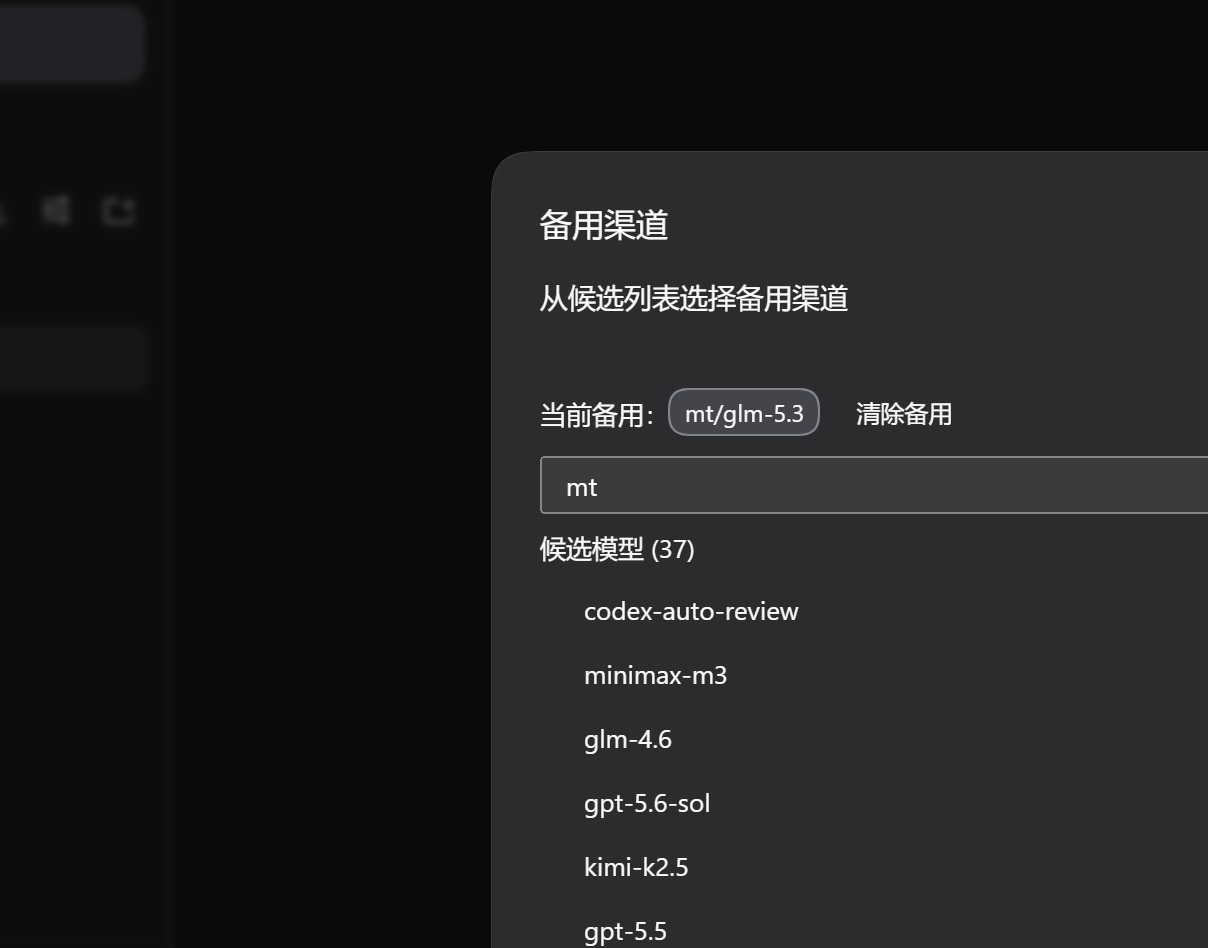
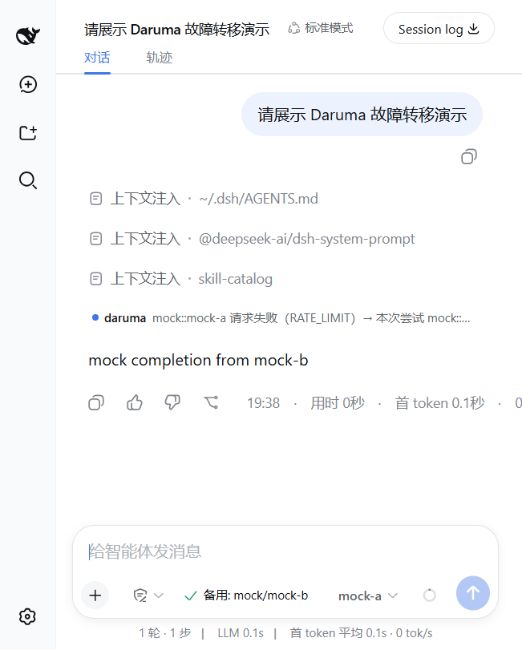
daruma 控件在输入框工具行最右端、模型选择器旁边;点开它即出现备用渠道选择面板。

功能
- 自动故障转移。 当前模型/渠道连续失败(或遇到
QUOTA/INVALID_CREDENTIAL/CONTEXT_WINDOW_EXCEEDED等终止性错误)后,daruma 把下一个请求切到你配置的链上的其他渠道,正在进行的生成在新渠道上继续 —— 会话不丢。切换只记入下面的审计日志,不再往会话里写事件:宿主不认识的插件事件类型会让整段会话加载失败。 - 持久化且自愈的断路器。 每个渠道有健康记录(失败数、冷却),持久化到
~/.dsh/daruma/channel-health.json,重启后冷却中的渠道保持冷却;第一个成功请求即重新闭合断路器,早已恢复的渠道不会滞留成僵尸COOLDOWN记录。 - 备用渠道界面。 模型选择器旁的状态控件显示整体健康度与当前备用渠道。备用面板按 provider 列出候选模型,手动设置/清除备用 —— 基于真实流量,不做合成测速。同一个选择器也是设置页里的 备用渠道 栏目,和其他插件栏目并列。
- 持久化 JSONL 审计日志。 每次切换/放弃/启动决策都追加到
~/.dsh/daruma/failover-log.jsonl(2 MiB 轮转,best-effort)。见审计切换记录。 - 确定性决策引擎。 全部恢复逻辑在纯函数包(
daruma-core)里:同样的失败历史 + 同样的渠道状态 → 同样的恢复方案。无 I/O,完整单测覆盖。
工作原理
daruma 挂在 DSH 的三个原生扩展点上:
| 机制 | 归属 | 效果 |
|---|---|---|
| 重试 | 内置 dsh-llm-retry | 同渠道有界指数退避 |
| 故障转移 | dsh-daruma | 重试放弃后、或终止性错误时,切到下一个可路由渠道(用户选的备用优先) |
| 自愈 | dsh-daruma | 下一个无未决失败的 agent/pre-step / agent/turn-stopping 证明上个请求成功 → 复位断路器 |
请求 → 429 → dsh-llm-retry(退避,同渠道重试)
                ↓ 仍然失败
          dsh-daruma:跳闸断路器,武装转移目标   ── 追加到 failover-log.jsonl
                ↓ 下一个请求
          换到备用/下一渠道 → 任务继续
                ↓ 成功
          断路器闭合,失败计数清零(自愈)
宿主没有 request-success 事件,成功靠推断:某 agent 的上一个模型请求没有触发 agent/request-error,则在其下一个 step 边界或回合结束时视为健康。
安装
# 本地开发(链接 workspace 包)
dsh plugin --profile web add link:./packages/daruma-core link:./packages/dsh-daruma

# 发布到 npm 后:
dsh plugin --profile web add dsh-daruma
也已收录进社区 awesome-dsh-plugin 市场(dshmarket 可搜索)。
配置
在 profile 的 cordis.patch.yml 里加一条故障转移链:
- id: dsh-daruma
  name: dsh-daruma
  config:
    channels:
      - { provider: mt, model: glm-5.3 }
      - { provider: mt, model: deepseek-v4-flash }
      - { provider: mt-cc, model: claude-3-5-haiku-latest }
    failureBudget: 3      # 连续失败几次后渠道跳闸
    cooldownMs: 30000     # 跳闸渠道冷却多久
    giveUpBudget: 8       # 每个 agent 放弃请求前的故障转移预算
| 选项 | 默认值 | 含义 |
|---|---|---|
channels | [] | 有序故障转移链;第一项是日常主渠道,其余按优先级排列 |
failureBudget | 3 | 连续失败几次后跳闸 |
cooldownMs | 30000 | 跳闸渠道多久不可路由 |
giveUpBudget | 8 | 每个 agent 的转移次数预算,用尽即放弃 |
stateFile | ~/.dsh/daruma/channel-health.json | 断路器状态持久化位置 |
logFile | <stateFile 同目录>/failover-log.jsonl | JSONL 审计日志位置 |
⚠️ 链上每个渠道必须存在于
settings.yaml的 providers 里。 provider 缺失的渠道会在跳闸时被武装、白烧一档预算后再次失败——链路实际短了一截。(作者踩过:删掉的 provider 残留在链首。)
⚠️ 测试 profile 必须隔离
stateFile。 mock/测试 profile 若用默认文件,mock 渠道会污染生产健康记录。把stateFile(连同同目录的logFile)指到 profile 本地路径——见docs/e2e-test.md。
当主渠道开始返回 429,daruma 跳闸它并继续用下一个渠道。然后点模型选择器旁的渠道状态控件,或打开 设置 → 备用渠道 → 在候选列表里选一个备用渠道;备用会在链之前优先尝试。
审计切换记录
每个决策以一行 JSON 落在 ~/.dsh/daruma/failover-log.jsonl——每次插件启动一行 boot(对齐重启边界),之后每次切换/放弃各一行:
{"kind":"boot","t":1788860215489,"pid":38660,"channels":["mt::glm-5.3","mt::deepseek-v4-flash","mt-cc::claude-3-5-haiku-latest"],"failureBudget":3,"cooldownMs":30000,"giveUpBudget":8}
{"kind":"failover","t":1788850743199,"agentId":"session-2c50…","from":"mt::glm-5.3","to":"mt::deepseek-v4-flash","reason":"RATE_LIMIT","turn":1,"step":1,"failoverCount":1,"giveUpBudget":8}
{"kind":"give-up","t":1788850876140,"agentId":"session-295a…","from":"mt::deepseek-v4-flash","reason":"no-routable-fallback","turn":1,"step":1,"failoverCount":1,"giveUpBudget":8}
字段:from/to 是渠道 id;reason 是失败码(RATE_LIMIT、QUOTA…)或放弃原因(give-up-budget-exhausted / no-routable-fallback);failoverCount/giveUpBudget 是决策时刻的预算状态;turn/step 定位它在会话中的位置。日志 2 MiB 轮转到单一代 .1;写失败静默吞掉(丢一行日志绝不影响恢复)。
包结构
| 包 | 角色 |
|---|---|
dsh-daruma | DSH 插件 —— 挂 agent/request-error + agent/request + 成功推断,提供 /dsh-daruma RPC 通道、Web 客户端与 JSONL 审计日志 |
daruma-core | 纯领域层 —— 失败分类、断路器、恢复决策引擎 |
状态
- npm 在架:
dsh-daruma/daruma-core(latest:dsh-daruma0.1.11、daruma-core0.1.7) - 跨平台:Windows / Linux / macOS —— CI 在三个系统上都跑 typecheck、lint、单测、构建与 BOM 守卫,故障转移 e2e 在 Linux 与 macOS 上实跑;另外在本机 WSL 2(Ubuntu 24.04)里全流程实跑通过
- 单元测试(
daruma-core46 +dsh-daruma111),全绿 - 端到端故障转移已验证:mock 主渠道
429→ 自动切换 → 任务完成;give-up 与自愈回路均实测过(见docs/e2e-test.md)——现在任何系统上一条pnpm run e2e:failover即可复现 - 在作者的 DSH web 实例生产实战:扛过一次主渠道真实限流风暴(15 连败、多次跳闸),事后第一个成功请求即自愈回
HEALTHY
开发
pnpm install
pnpm build
pnpm test            # 两个包共 157 个测试
pnpm lint            # eslint
pnpm typecheck       # tsc --noEmit
pnpm check:no-bom    # 仓库卫生:任何文件不得带 UTF-8 BOM
BOM 守卫同时挂在两个包的 prepublishOnly 上。
本地测试环境(任何系统)
pnpm run start:test     # mock LLM + daruma-test web profile(Ctrl+C 一起停)
pnpm run e2e:failover   # headless 故障转移验证:在系统临时目录里建一次性 DSH home
两个都是纯 Node 脚本,Windows / Linux / macOS 行为一致;scripts/start-daruma-test.ps1 保留为 Windows 上的薄封装。e2e:failover 支持 --dsh <命令|bin.js 路径> 指定宿主版本,--keep 保留生成的 profile 供排查。
WSL 注意(Windows 上的 Linux 实测)
WSL 会把 Windows 的 PATH 追加在后面,所以裸 dsh 可能解析到 /mnt/c/... 下的 Windows 安装,用 Linux 的 node 去加载它的平台二进制(sharp、koffi)必然失败。e2e:failover 现在会在启动任何东西之前直接拒绝 /mnt/ 开头的宿主并给出修复命令;正确做法是在发行版内装宿主并把它的 bin 目录放到 PATH 最前:
npm install --global @deepseek-ai/dsh@0.1.0-rc.7
export PATH="$(npm prefix --global)/bin:$PATH"
pnpm run e2e:failover
支持的 DSH 宿主
| 宿主代次 | 故障转移引擎 | Web 面板(/dsh-daruma) |
|---|---|---|
0.1.0-rc.7 … 0.1.1-rc.2 | 可用 | 可用 |
0.1.2-alpha.2 … 0.1.3-* | 可用 | 可用 |
0.1.5-alpha.1 … 0.1.5-rc.2 | 可用 | 上游阻塞 —— 这些宿主的 connection.rpc.handle() 对任何第三方插件都抛 cannot get property "webServer" without inject;daruma 会明确报警并继续保证故障转移 |
0.2.0-rc.2、0.2.1-alpha.2 | 可用(含备用通道) | 经 /api/dsh-daruma 兜底通道可用(RPC 已实测;浏览器渲染未检查) |
0.2.1-rc.2 | 实测通过——链式切换 7/7、指定备用 7/7 | 备用管理 RPC 经 /api/dsh-daruma 通过 12/12;浏览器渲染未检查 |
支持 DSH 0.2.1 版本线: 2026-10-20 使用 dsh-daruma 0.1.9 在 0.2.1-rc.2 上完成验证,验证时尚无 0.2.1 正式版。会话内切换/放弃提示仍使用旧的聊天事件注册入口,在该宿主上可能缺失;这项 UI 限制不影响已实测的故障转移引擎和备用管理 RPC。详见 0.2.1 验证报告。
在 0.2.x 上,Web 面板选的备用通道存在 channel-health.json 旁边的
backup-channel.json;0.1.x 宿主仍存在 daruma 设置命名空间里。
实测方式:pnpm run e2e:failover + 路由探针;细节与原始证据见 docs/aegis/evidence/2026-09-11-latest-harness-compat.md、docs/aegis/evidence/2026-10-10-dsh-0.2-compat.md。
为什么叫 "daruma"
达摩不倒翁是与坚韧和坚持相关的日本传统不倒翁。你的长任务也一样:挨一记 429,再爬起来就是了。
许可
MIT © 2026 SISCHOI
Plugins relacionados
dsh-our-free-model
ebony-vinyl/dsh-our-free-model
dsh-routing-suite
yjh051108/dsh-routing-suite
dsh-workbuddy-connect
corrinehu/dsh-workbuddy-connect
dsh-connect-workbuddy
dingminhua/dsh-connect-workbuddy