dsh-wsl-workspace-picker
williamshi666/dsh-wsl-workspace-picker
Navegador de diretório de workspace aprimorado para a interface web: acesso com um clique a drives /mnt do Windows sob WSL, ancestralidade completa de breadcrumbs e entrada de caminho sempre visível.
Instalar
dsh plugin --profile web add github:williamshi666/dsh-wsl-workspace-pickerREADME
dsh-wsl-workspace-picker

Enhanced workspace-directory browser for the DeepSeek Harness web UI: quick access to /mnt Windows drives, full breadcrumb ancestry from the filesystem root, and an always-visible path input.
| 中文说明 |
Screenshot
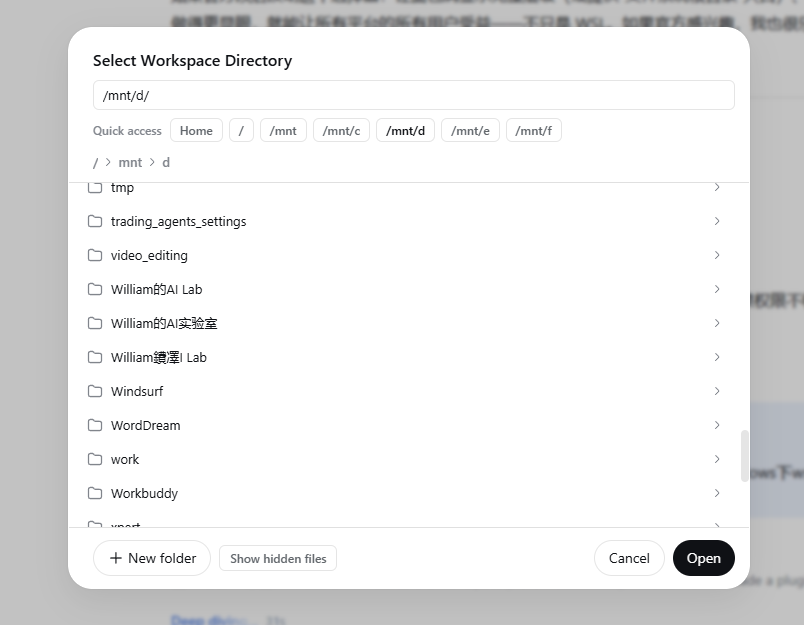
The enhanced "Select Workspace Directory" dialog: quick-access chips for /mnt Windows drives at the top, the always-visible path input, and full breadcrumbs from /.
Why
The stock in-app directory picker (the dialog behind the sidebar workspaces "+" button and the conversation-hero workspace picker) starts at the Linux home directory and folds its breadcrumbs at home. Under WSL, Windows drives live at /mnt/c, /mnt/d, … — reachable only by typing a path into a barely visible pencil-glyph editor that most users never find, and never clickable through the breadcrumbs at all.
This plugin shadows the stock dialog with a single-pane browser that makes every path reachable:
- Quick-access chips — Home,
/, and every mount point discovered on the host: the Windows drives under/mnt(WSL) or the volumes under/Volumes(macOS), one click each. - An always-visible path input — type any absolute path (e.g.
/mnt/d/projects) and press Enter. - Full breadcrumb ancestry from
/— click up and down through the whole filesystem; no more home-folding dead end. - New-folder creation and a hidden-files toggle, like the stock dialog.
Install
dsh plugin --profile web add dsh-wsl-workspace-picker
Restart dsh web and refresh the browser page. Open the workspace picker via the sidebar workspaces "+" button (or the conversation-hero workspace picker) — the enhanced dialog appears in place of the stock one.
Uninstall:
dsh plugin --profile web remove dsh-wsl-workspace-picker
How it works
The browser half of this dual-face package registers into both directoryFlow slots (sidebar.workspaces.directoryFlow and conversation.hero.workspace.directoryFlow) at slot priority −10. DSH's slot system is shadowing: the lowest-priority occupant of a slot renders, so priority −10 replaces the stock browse dialog (registered at priority 0) in both entry points. The stock plugin stays loaded and untouched, and uninstalling this plugin restores it.
The listing itself reuses the host's existing browse capability over the client runtime (ctx.workspaces.listDirectory / createDirectory) — no host-side code, no filesystem access of its own.
dsh-wsl-workspace-picker/
├── package.json      # dsh.bundle.patch + dsh.client (dual-face declaration)
├── cordis.patch.yml  # loader-entry insertion
├── scripts/build.mjs # ESBuild: src/ → lib/
├── src/
│   ├── client.tsx    # browser half (TypeScript source)
│   ├── styles.ts     # dialog stylesheet + injection
│   └── index.ts      # host half (empty apply)
└── lib/
    ├── index.js      # host half (built)
    └── client.js     # browser half (built: __ModuleLoader__ bundle)
The browser half is written in TypeScript and compiled with ESBuild
(npm run build). Runtime imports (react, react/jsx-runtime,
@deepseek-ai/dsh-client-ui-primitives, …) are external: they resolve
through the web shell's module table at load time, exactly like the official
client bundles. npm run typecheck runs tsc --noEmit.
Compatibility
- DeepSeek Harness
0.1.0-rc.6and later (web profile) - Any host with mounted directories to reach: WSL (Windows drives appear under
/mnt), macOS (external disks and disk images appear under/Volumes), or plain Linux with bind mounts under either root - Locales: English, 简体中文 (follows your UI language)
Security & scope
Pure UI plugin. It adds no host-side behavior, opens no network connections, and only lists/creates directories through the same host browse capability the stock dialog already uses — with whatever file-sandbox policy your profile has in effect.
License
MIT
Plugins relacionados
dsh-web (dsh-task-board)
zhu1090093659/dsh-web
dsh-web (dsh-web-all)
zhu1090093659/dsh-web
dsh-web-ui (dsh-task-board)
zhu1090093659/dsh-web-ui
dsh-web-ui (dsh-web-ui-all)
zhu1090093659/dsh-web-ui