dsh-session-clean-delete
wilsonchengassistant/dsh-session-clean-delete
Adds a permanent Delete session action to the sidebar session menu, behind a confirmation dialog that reports the log size, running turns, subagents, background jobs and reminders bound to the session; the id is then released from the live, archive and workspace registries, so the row stays gone on refresh instead of folding back in.
Instalar
dsh plugin --profile web add github:wilsonchengassistant/dsh-session-clean-deleteREADME
dsh-session-clean-delete
A permanent Delete session action for the DeepSeek Harness sidebar, behind a confirmation dialog that tells you what is about to go.
DSH ships a Archive action, which is reversible and keeps the session in the
Archived list. This plugin adds the irreversible counterpart, and — unlike a
naive rm of the session log — it actually makes the row disappear.
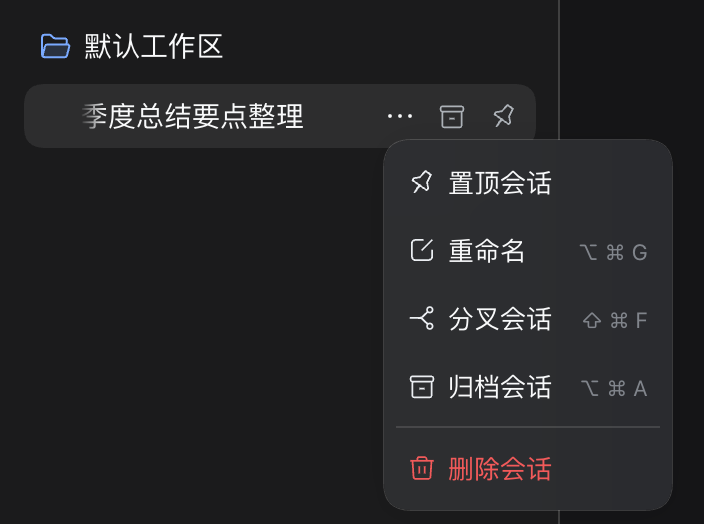
What it does
Adds one row to the per-session … menu in the left sidebar, ordered after
Pin / Rename / Fork / Archive. Choosing it opens a modal that reports:
- whether the session is still open on this machine (it cannot be reopened afterwards),
- the log size about to be removed,
- running turns, subagents, background jobs and reminders bound to the session,
- how many reminders are deleted with it.
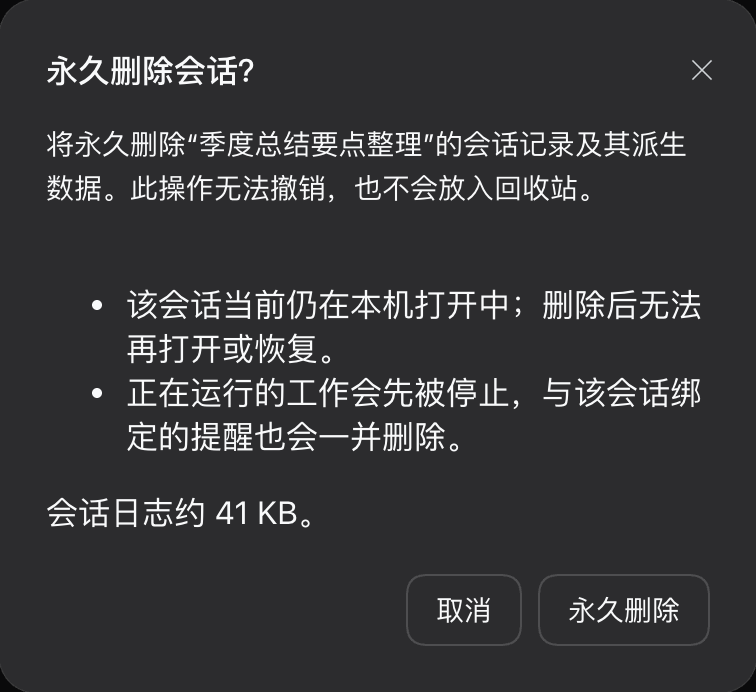
Confirming stops the session's work, unlinks its session directory and projection checkpoint, and releases the id from every registry that would otherwise keep listing it. Then the sidebar refreshes and the row is gone.
There is no undo and no trash folder. The dialog says so.
Why it is not just rm
A session's directory is not the only thing that makes it appear. The Host's
session corpus is persistence ∪ live, so a session the Host still holds live
keeps coming back after its log is deleted:
- the browser drops the row,
- the next
sessions.refresh()rebuilds the rows from the Host list and folds the live summary back in, - the row returns.
The visible symptom of this is that deleting several sessions in a row makes the earlier ones reappear, and that archived rows come back stuck in Archived forever (the old id was never removed from the archive set, so it accumulated dead ids).
release() therefore detaches through the same teardown the owning fiber uses,
in the order the agent loop's own disposal uses — agents first, then
sessions — plus unarchiveSession(id) and workspace.detachSession(id). The
browser keeps its own retired set and re-applies every retirement after each
refresh, so rows stay retired until the Host's api-session/removed agrees.
Install
This package ships a dsh.bundle manifest, so dsh plugin installs it as a
profile layer by itself — you do not need to edit cordis.patch.yml. Bare
@deepseek-ai/* imports are resolved by the host itself, so the package declares
zero dependencies — do not add them.
dsh plugin --profile web add dsh-session-clean-delete
That is the npm name, and it is also the repository name.
From a source clone, dsh plugin is a pnpm passthrough, so a file: path works
too:
dsh plugin --profile web add file:/path/to/dsh-session-clean-delete
That command does two things: it adds the package as a dependency, and it
appends it to dsh.profile.bundles in the profile's package.json. The second
half is the one people miss — without it the package is just an unused
dependency, because the bundle patch in cordis.patch.yml
is only read for packages the bundle list names.
Verify it joined the tree — the entry must appear under a banner naming the
plugin's own cordis.patch.yml, which is the part that is easy to miss:
dsh --profile <profile> --dump-config | grep -B1 session-clean-delete
# == …/dsh-session-clean-delete/cordis.patch.yml
- id: session-clean-delete
  name: dsh-session-clean-delete
A row under a banner for the profile's cordis.patch.yml means something
inserted this plugin by hand and it is not installed as a bundle — the
dependency is present but the layer never composes. --dump-config never
mounts, so it is safe against the live profile.
Finally restart the harness. The bundle is composed at boot, so there is no partial effect: until it restarts, the menu row is not there.
If nothing happens
- Re-running the same add is a no-op — same spec, same version.
rm -rf ~/.dsh/profiles/<profile>/node_modules/dsh-session-clean-deletefirst, or the profile keeps serving the old copy forever. - pnpm copies the package into the profile rather than symlinking it, so
editing your clone does not change the running plugin. Copy
lib/*.jsinto~/.dsh/profiles/<profile>/node_modules/dsh-session-clean-delete/lib/.client.jshot-reloads;index.jsis host-side and needs a restart. dsh pluginneedspnpmonPATH(corepack enable pnpm), or it fails with "pnpm was not found".- pnpm installs a version older than the registry
latestwhen a release is less than 24 h old — that isminimumReleaseAge, a supply-chain guardrail, not a stale cache. Wait, or use a^x.y.zrange so the newer release arrives on its own.
Design notes
A Typert Remote service, not an HTTP route. The host half registers one
TypertRemoteService named sessionDelete with describe and deleteSession.
The Gateway auto-claims every endpoint a live TypertRemoteService declares, and
the browser calls it over the ordinary channel:
ctx.connection.rpc.call('/api', `sessionDelete/${method}`, { args: { request } })
So there is no route to register and no permission to grant — the browser peer is the owner principal.
It deliberately does not check Origin. In the desktop app the renderer
origin is the custom scheme dsh-app://app, and the shell's protocol.handle
strips origin, host, cookie and sec-fetch-site before forwarding to the
Host. A plugin route that validates origin === 'http://' + host therefore 403s
every request from the desktop app while working fine under dsh web. The
Remote-service path avoids the question entirely.
The postcondition is checked against the disk. A successful rm is not
treated as proof; removeLog() stats the path afterwards and throws
delete/failed if it survived.
Localization
The screenshots above show the Simplified Chinese UI. The plugin ships
Simplified Chinese (zh) and English (en) dictionaries with identical key
sets, and the strings follow the app's language setting automatically — there is
nothing to configure.
Traditional Chinese is not part of this package. It comes from the separate
dsh-zh-hant language
pack, which owns the zh-Hant locale for the whole app and derives it
mechanically from every plugin's zh table. Install it and the dialog above
reads 永久删除会话?; without it you get the Simplified Chinese version, which is
the expected behaviour rather than a bug.
Files
| Path | Role |
|---|---|
lib/index.js | Host half: TypertRemoteService, the delete sequence, registry release. |
lib/client.js | Browser half: the menu row and the shell.overlay confirmation dialog. |
cordis.patch.yml | Bundle patch named by dsh.bundle; inserts this plugin into a profile. |
locale/en.json, locale/zh.json | Plugin titles for the Plugins panel. |
docs/*.png | Screenshots used by this README and by screenshots.json. |
The in-app dictionary lives in lib/client.js (zh is the key-set source of
truth, en is checked complete against it); locale/*.json is the metadata the
Plugins panel reads.
License
MIT — see LICENSE.
Plugins relacionados
dsh-web-ui (dsh-chat-recovery)
zhu1090093659/dsh-web-ui
billion-context
ranxianglei/billion-context
dsh-synapse
liangmianya/dsh-synapse
dsh-chat-import
nwflower/dsh-chat-import