dsh-outerwilds-theme
xikan0/dsh-outerwilds-theme
Outer Wilds theme with a static starfield, campfire effects, appearance settings, and bundled Jost and Source Han Sans fonts.
Instalar
dsh plugin --profile web add github:xikan0/dsh-outerwilds-themeREADME
dsh-outerwilds-theme
以《星际拓荒》(Outer Wilds)为灵感的 DeepSeek Harness(DSH)主题插件。
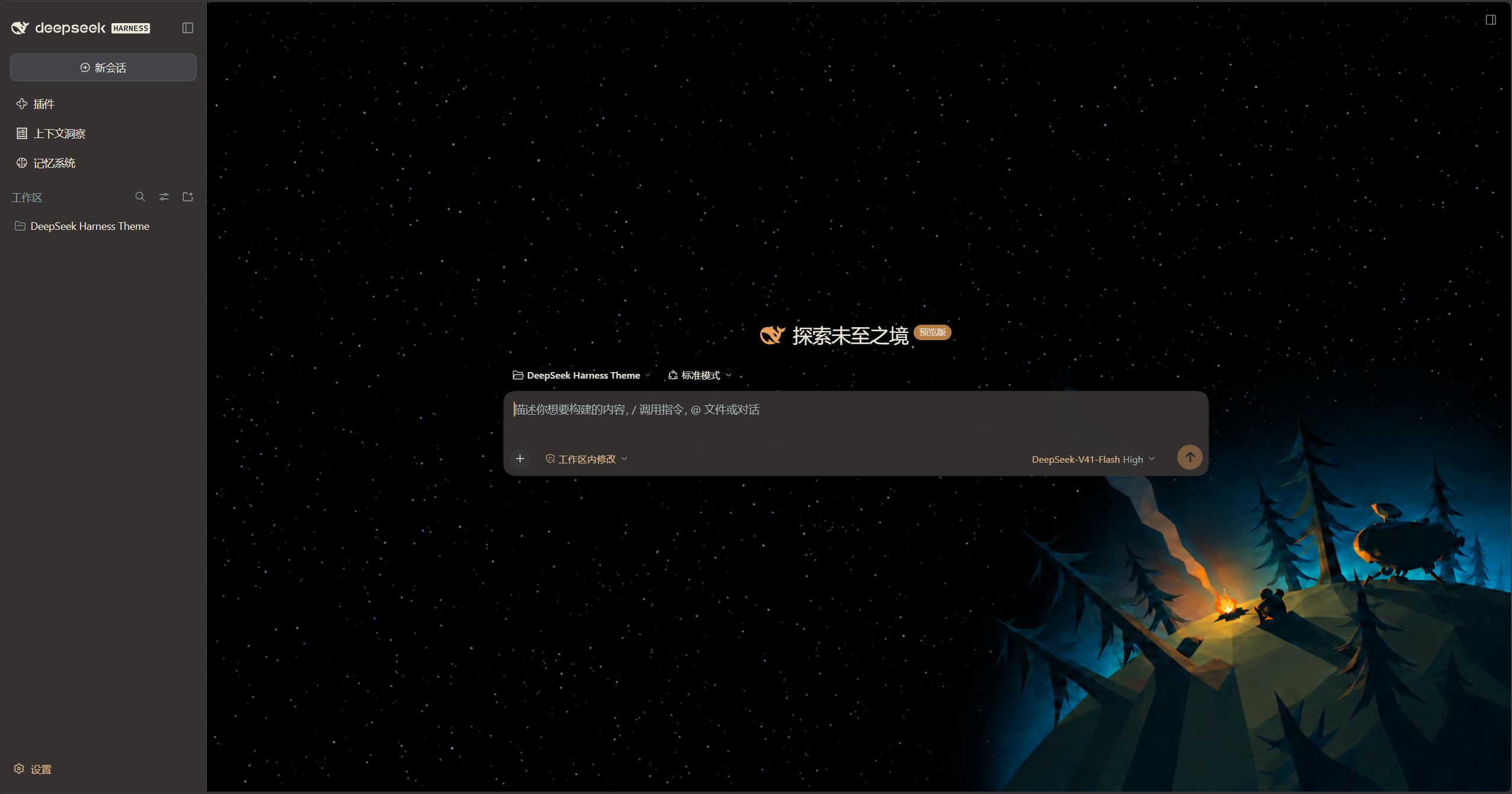
特色
- 支持调整背景亮度、星星数量、面板透明度、字号和布局密度。
- 提供轻微篝火动效,也可以切换为静止画面。
- 可选的侧栏音频显示屏,随系统声音呈现波形。
- 字体随插件提供,无需在线加载。
支持 DSH Web 与 Windows Desktop。系统音频响应目前支持 Windows x64。
安装
Web
确保已经安装 DSH,并且终端可以运行 dsh:
dsh plugin --profile web add dsh-outerwilds-theme
dsh web
如果 Web 已在运行,安装后需要重启。
Windows Desktop
完全退出 Desktop,包括托盘进程,然后使用桌面版随附的 dsh 命令安装:
dsh plugin --profile desktop add dsh-outerwilds-theme
安装后重新打开 Desktop。桌面版命令的使用方式见 DSH 官方说明。
也可以从 GitHub Releases 下载安装包,将安装命令中的包名替换为下载文件的完整路径。
启用
主题背景默认关闭,启用后显示。外观和音频响应均可在主题设置页面调整。
建议关闭其他完整主题、壁纸和自定义配色,以免相互覆盖。
更新
更新到 npm latest 标签对应的最新正式版:
Web
dsh plugin --profile web update dsh-outerwilds-theme --latest
完成后重启 Web。
Windows Desktop
完全退出 Desktop,使用桌面版随附的命令:
dsh plugin --profile desktop update dsh-outerwilds-theme --latest
完成后重新打开 Desktop。
如果此前通过本地安装包安装,可以重新运行安装命令,将包名写为 dsh-outerwilds-theme@latest,切换到 npm 最新正式版。
更新记录
各版本的新增、调整与修复见 CHANGELOG。
安装包与版本发布说明见 GitHub Releases。
关于项目
这是免费的非官方主题,与《星际拓荒》及其开发团队没有隶属关系。
Plugins relacionados
dsh-deep-whale (maid-atelier)
small-tailqwq/dsh-deep-whale
dsh-wallpaper-engine
elysia395/dsh-wallpaper-engine
dsh-deep-whale
small-tailqwq/dsh-deep-whale
open-sea-skin
d-dev0101/open-sea-skin