DeepSeekHarness-MCP-Manager
xxxyz/deepseekharness-mcp-manager
Gerenciador de servidores MCP para o DeepSeek Harness: adicione, edite, ative/desative, reinicie e exclua servidores MCP em Settings → MCP 管理, com exportação/importação JSON, quatro ferramentas de modelo mcp_manager_* e uma API HTTP; instale via npx, npm ou scripts multiplataforma.
Instalar
dsh plugin --profile web add github:xxxyz/deepseekharness-mcp-managerREADME
dsh-mcp-manager
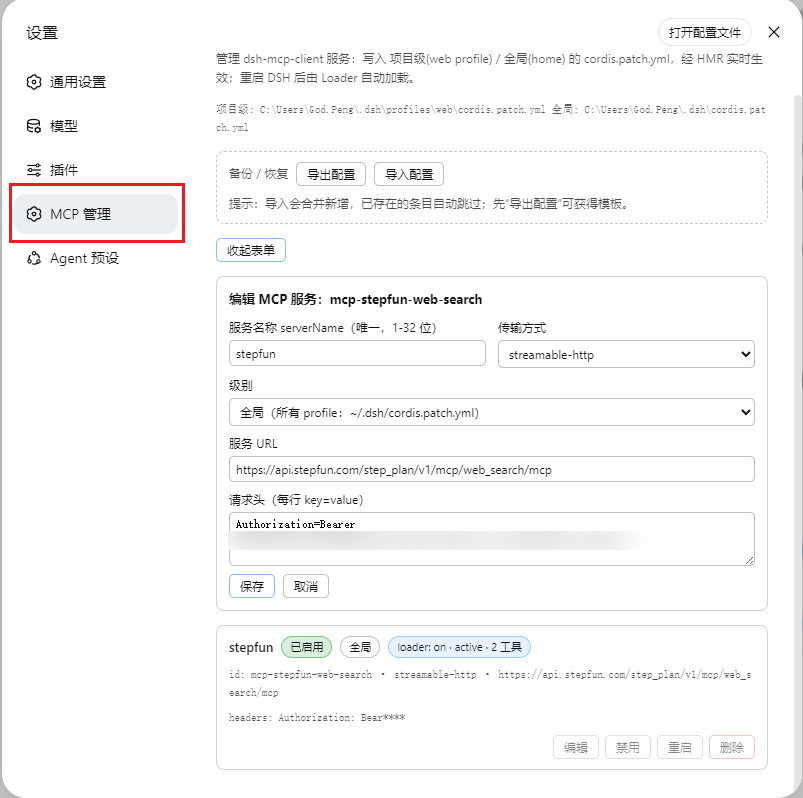
服务器列表 新增 / 编辑 / 删除 启用 / 停用 重启 工具数健康 JSON 导出 / 导入Skills 浏览 / 搜索 / 停用 4 个模型工具 HTTP API dsh plugin 一条命令设置 → MCP 管理 管理项目级与全局
cordis.patch.yml 中的 @deepseek-ai/dsh-mcp-client 行,设置 → Skills 管理 浏览并停用各来源的技能——无需再手改配置文件,所有修改即改即生效(HMR 热应用),重启、升级后依然存在。






✨ 功能一览
- 📋 服务器列表:列出所有已配置的 MCP 服务器(
@deepseek-ai/dsh-mcp-client实例)——serverName、传输方式(stdio/streamable-http)、URL / 命令、启用状态、loader 实时加载阶段、已注册工具数 - ➕ 新增 / ➖ 删除:表单添加 MCP 服务器(支持 env / headers / args),带格式与重名校验;一键删除
- 🔌 启用 / 停用:随时切换,工具随之热连接 / 热断开
- 🔄 重启:disable + re-enable,自动重连并重新同步工具
- 💾 持久化:写入项目级(
profiles/<profile>/cordis.patch.yml)或全局(~/.dsh/cordis.patch.yml),重启后保留;页面底部显示文件路径 - 🩺 健康检查:每台服务器实时工具数与 loader 阶段,异常一目了然
- 📦 备份 / 恢复:JSON 导出 / 导入,合并新增、已存在自动跳过
- 🤖 模型工具:宿主注册 4 个
mcp_manager_*工具,模型可直接查询与操作 MCP 服务 - 🧠 技能管理:设置 → Skills 管理 页列出 DSH 全部技能,按来源分组(项目级 / 运行时 / 自定义 / 用户级 / 内置 / 插件自带)并支持搜索与按 provider 折叠;一键停用 / 启用任意技能(rank-0 override provider,任何来源层级都可禁),状态持久化到
dsh-skill-manager.json,HMR 即时生效 - 🌐 HTTP API:
POST /dsh-mcp-manager/api(JSON{op, args}→{ok, ...}),供客户端与脚本调用。带跨站(CSRF)防护:仅接受 POST、必须携带x-dsh-plugin: dsh-mcp-manager请求头、校验同源 Origin(curl 等本地脚本无需 Origin) - 📦 一键安装:
dsh plugin --profile web add一条命令装包 + 自动挂载(Windows / macOS / Linux)
🚀 安装
前置:已装好 DSH(dsh web 能正常运行),Node.js ≥ 18、pnpm ≥ 9。
方式一 · dsh 命令安装(推荐)
一条命令装包 + 自动挂载(dsh.bundle.patch 机制,无需手动改任何配置文件):
dsh plugin --profile web add @xxxyz/dsh-mcp-manager@latest
装完硬刷新浏览器(Cmd/Ctrl+Shift+R)即可看到 设置 → MCP 管理(DSH 对 client 改动热加载,无需重启;仅 host 半更新时需要重启)。
方式二 · 让 DSH 自己装
把下面这段提示词发给任意一个 DSH 会话:
帮我安装 dsh-mcp-manager 插件(DSH MCP 服务管理器),步骤:
1. 执行 dsh plugin --profile web add @xxxyz/dsh-mcp-manager@latest
2. 完成后提醒我硬刷新浏览器(Cmd/Ctrl+Shift+R)
遇到报错先查 https://github.com/xxxyz/DeepSeekHarness-MCP-Manager README 的常见问题表。
更新
dsh plugin --profile web add @xxxyz/dsh-mcp-manager@latest
也可把 ~/.dsh/profiles/web/package.json 里的版本号改高后 pnpm install。改完硬刷新浏览器(Cmd/Ctrl+Shift+R)即可(client 改动无需重启 DSH)。
常见问题
| 现象 | 原因与解决 |
|---|---|
| 装完设置里没有「MCP 管理」 | 硬刷新(Cmd/Ctrl+Shift+R);仍没有就重启 DSH 一次。 |
| 页面出现两个 MCP 页签 / 工具重复 | 双挂载:同时存在旧的 loader 行与新的 bundle 条目。删掉 cordis.patch.yml 里的旧 loader 行,或 dsh.profile.bundles 里的条目,重启 DSH。 |
| 之前用旧方式装过,现在想升级 | 新版 bundle 自带防双挂载 guard,直接 dsh plugin --profile web add @xxxyz/dsh-mcp-manager@latest 不会重复挂载。要切到新代码:删掉 ~/.dsh/profiles/web/cordis.patch.yml 里的 - id: mcp-manager 行,再删 local-packages/dsh-mcp-manager 与 profiles/node_modules/dsh-mcp-manager 两个副本,重启 DSH。 |
提示 dsh: command not found | 先安装 DSH;或直接用 npx -y --package @deepseek-ai/dsh dsh plugin --profile web add @xxxyz/dsh-mcp-manager@latest。 |
npm view 报 404 | 国内镜像(npmmirror)同步有延迟:加 --registry=https://registry.npmjs.org 或稍等再试。 |
| 修改配置后未生效 | 所有修改走 HMR 热应用,等 1–2 秒自动刷新;页面会自动轮询。 |
卸载
dsh plugin --profile web remove @xxxyz/dsh-mcp-manager
然后重启 DSH。
📖 使用说明
打开 设置 → MCP 管理:
- 添加服务器:填写
serverName(唯一,1–32 位[A-Za-z0-9_-])、传输方式及对应字段(streamable-http填 URL / headers;stdio填 command / args / env),选择级别(项目级 / 全局)。面板做格式与重名校验。 - 每张卡片显示实时状态、连接目标与工具数;可 启用 / 停用、重启、编辑、删除。
- 备份 / 恢复:一键导出 JSON,或粘贴 JSON 导入(合并新增,已存在自动跳过)。
- 页面底部显示正在编辑的补丁文件路径。
打开 设置 → Skills 管理:
- 浏览 / 搜索:列出 DSH 全部技能,按来源分组(项目级 / 运行时 / 自定义 / 用户级 / 内置 / 插件自带),组内按 provider 折叠;搜索框实时过滤。
~/.dsh/skills/下的用户级技能(2.2.0+)同样可见——即使官方 scoped 层不向无 scope 查询暴露它们。 - 启用 / 停用:一键切换任意技能的启用状态——通过 rank-0 override provider(
dsh-mcp-manager-override)实现,任何来源层级(含项目级与用户级文件系统技能)都能禁用。 - 持久化:停用状态写入
<profileDir>/dsh-skill-manager.json,重启后保留;改动经 HMR 即时生效。
⚙️ 配置
插件自身在 loader 行中的配置:
| 字段 | 说明 |
|---|---|
version | loader 行 config.version,仅用于触发 HMR 重应用;官方通道安装下由 bundle 自动管理,无需手动修改。 |
token | 可选访问令牌(写操作鉴权,纵深防御)。设置后写操作(增删改/启停/重启/导入导出/技能停用)须带 x-dsh-token: <token> 头;设置页提供令牌输入框(保存在浏览器 localStorage)。也可用环境变量 DSH_MCP_MANAGER_TOKEN 配置。默认关闭。 |
为什么需要 token? 插件的 CSRF 防护只拦"跨站浏览器请求"——它假设 DSH web 只监听本机(
127.0.0.1)。一旦你通过端口转发、dsh-web-lan-access类插件或反向代理把 3080 端口暴露到局域网/公网,任何能访问该端口的人都直接获得完整写权限:可以新增/修改 MCP 服务器,而stdio服务的command字段可填任意可执行文件——等同于远程任意代码执行。token 就是为这种暴露场景加的最后一道闸:没有密钥就无法做任何写操作,即使端口被暴露也不能注入命令。本地单机使用不需要配置。
loader 行必须为 insert 块形式(DSH patch 方言中普通 - id: 行只是对已存在条目的覆盖,无法新增插件):
- insert:
    - id: dsh-mcp-manager
      name: '@xxxyz/dsh-mcp-manager'
      config:
        token: 你的访问令牌   # 可选:开启写操作鉴权
无需手动写这行——
dsh plugin add的 bundle patch 会自动插入(见cordis.patch.yml)。
🏗️ 架构
- 宿主端(
src/index.ts→lib/index.js,对象形态 Cordis 插件{name, inject, apply}):inject声明timer/fs/settings/sandboxPolicy/webServer/tools,框架保证就绪并在依赖消失时自动重载——这是插件跨 DSH 升级存活的机制。注册 4 个模型工具(ctx.tools.register(defineTool(...)))与精确路由POST /dsh-mcp-manager/api(ctx.effect作用域化清理);对cordis.patch.yml做行级 CRUD(迷你 YAML 解析 + 按文件写锁)。 - 浏览器端(
lib/client.js,ModuleLoader CJS bundle):注册 设置 → MCP 管理 页(settings.section槽位,order 16),经同源fetch('/dsh-mcp-manager/api')与宿主通信,不直接访问文件系统。 - loader 行:由
dsh plugin add的 bundle patch 自动插入,client-modules 服务扫描启用的条目并下发客户端 bundle。
🛠️ 开发
npm install
npm run build        # tsc -p tsconfig.json → lib/index.js(宿主端)
- 宿主插件源码:
src/index.ts;浏览器 bundle:lib/client.js(手写,无需构建) - 包本身纯 JS、零依赖、跨平台;构建只需 devDependencies(typescript、
@deepseek-ai/cordis、@deepseek-ai/dsh-tools、@types/node) - 发布:
npm version patch && npm publish(prepublishOnly自动构建;scoped 包已配置publishConfig.access: public)
许可证
MIT
Plugins relacionados
dsh-web (dsh-task-board)
zhu1090093659/dsh-web
dsh-web (dsh-web-all)
zhu1090093659/dsh-web
dsh-web-ui (dsh-task-board)
zhu1090093659/dsh-web-ui
dsh-web-ui (dsh-web-ui-all)
zhu1090093659/dsh-web-ui