dsh-row-multiselect
1334104926/dsh-row-multiselect
Multi-select sessions in the sidebar and archive the whole batch at once, through the same archive call the row action uses.
Установка
dsh plugin --profile web add github:1334104926/dsh-row-multiselectREADME
dsh-row-multiselect
Batch-select sessions in the DeepSeek Harness sidebar and archive them in one go. Archiving in DSH is one session at a time; this adds the missing multi-select.
What it does
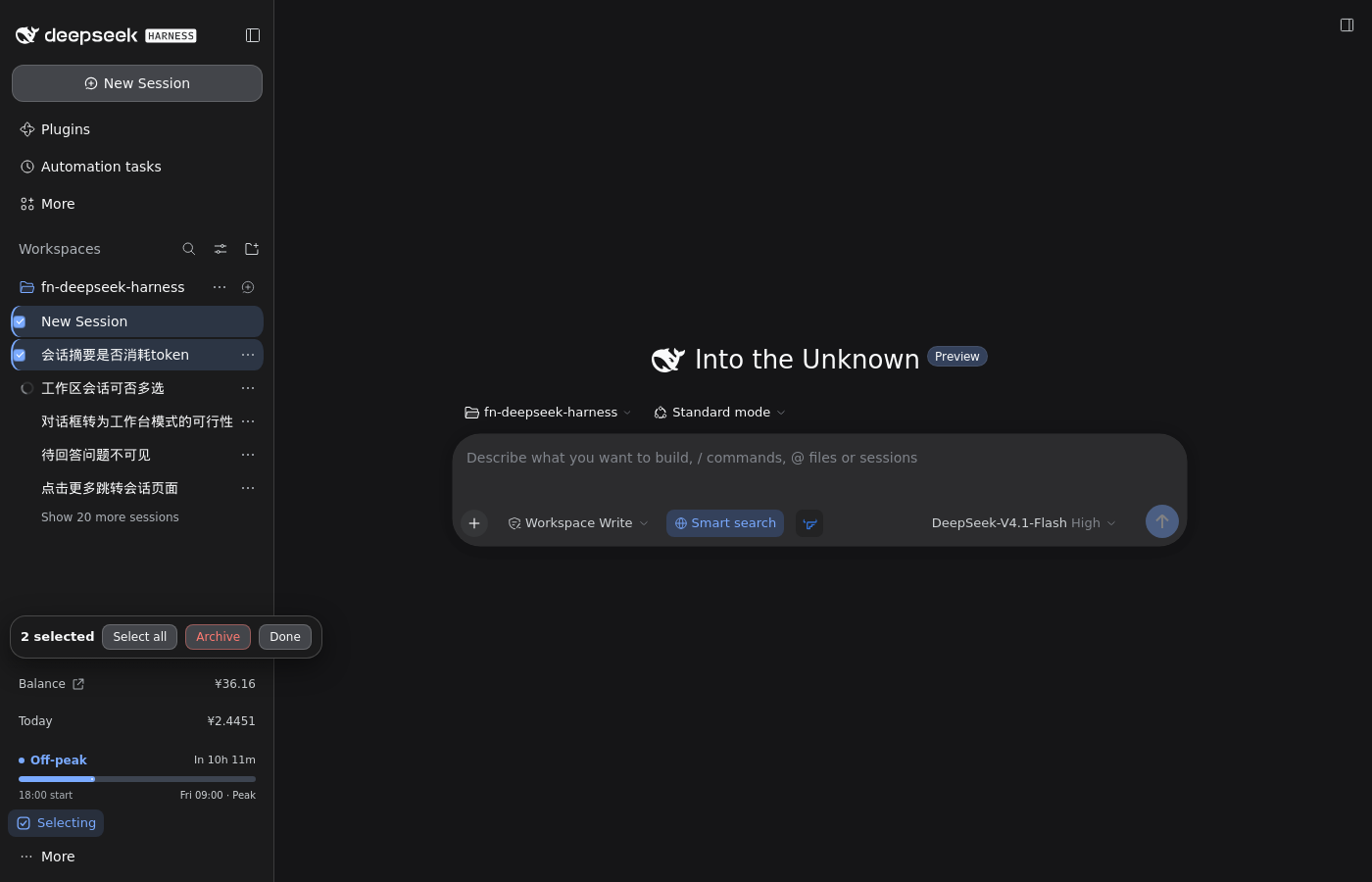
- Adds a Select button to the sidebar foot, above Settings.
- Inside the mode, a click on a session row toggles its selection instead of opening it.
Ctrl/⌘-click toggles one session without entering the mode;Shift-click selects every session from the last one you touched to this row; on a touch screen a long press (500 ms) enters the mode and selects that row.- A floating bar shows the count and offers Select all, Archive and
Done.
Escis the same as Done. - Archive turns into a confirmation first, then archives every selected
session through
ctx.workspaces.archiveSession(id, { stopActivity: true })— the call the row's own Archive action uses, so a running turn is stopped the same way in both places. - A failed archive stays selected and the bar names the first failure.
- Select all only covers rows currently in the list (sessions inside a collapsed workspace are not in the DOM) and skips archived ones.
It only touches session rows ([data-row-key^="session:"]), never workspace
rows or search-result rows. Selection lives in the page: a refresh clears it,
and two open windows do not share it.
Install
dsh plugin --profile web add dsh-row-multiselect
Straight from GitHub, if the package is not on npm yet:
dsh plugin --profile web add github:1334104926/dsh-row-multiselect
Then restart dsh web once. After that, changes to the client bundle only need
a page refresh.
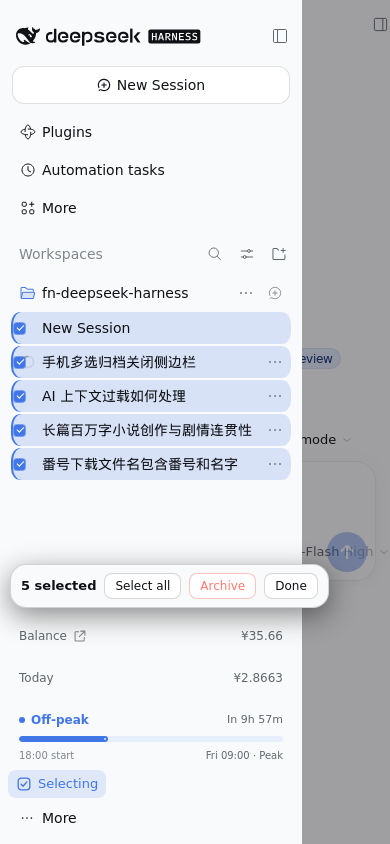
On a phone
The sidebar is a drawer on narrow screens, managed by
dsh-webui-mobile. That plugin
collapses the drawer 140/280 ms after a tap on any button inside it, unless the
tapped element opts out of it.
This plugin puts data-drawer-keep-open (and data-dsh-ms) on its own
controls, so a drawer that honours that attribute stays open while you pick
sessions. Upstream 0.4.4 does not read it yet, and a plugin cannot add itself
to its hardcoded, build-hashed exemption list. Until an upstream release
honours the attribute, tapping Select / Select all / Archive / Done also
collapses the drawer (the selection is kept, you just reopen the drawer between
taps). Tapping session rows is unaffected either way.
The change is one line: add [data-drawer-keep-open] to that plugin's
keep-open check (patches/keep-drawer-open.patch,
applies to dsh-webui-mobile 0.4.4). It is proposed to
bbtssama/dsh-webui-mobile; if
you run that plugin today, applying the patch to its src/client.js fixes
phones before the next release.
Compatibility
- Web GUI, DSH 0.2.x. It registers in the
sidebar.footer.actionslot and callsctx.workspaces.archiveSession. - No dependencies, no build step, no network, no credentials.
Development
node test/smoke.mjs
The smoke test stubs the DOM and React and exercises the selection state machine, the click rules and the batch-archive call; it needs no browser.
License
MIT
中文说明
侧栏会话支持多选,一次归档一批。
- 侧栏底部、Settings 上方多出「多选」;进模式后点会话即勾选。
Ctrl/⌘点选一个、Shift连选、手机上长按进模式。- 浮条:已选 N 个 / 全选 / 归档 / 退出(
Esc同效)。 - 归档先确认,再逐个调
archiveSession(id, { stopActivity: true }),和右键菜单单个归档同一条路;失败的留在选中状态并在浮条上报错。 - 全选只覆盖列表里看得见的、没归档的会话。
手机上侧栏是抽屉,点这些按钮会不会收抽屉取决于 dsh-webui-mobile 是否认
data-drawer-keep-open 这个属性;上游收下之前,点按钮会收抽屉,勾选本身不受影响。
Похожие плагины
billion-context
ranxianglei/billion-context
dsh-web-ui (dsh-chat-recovery)
zhu1090093659/dsh-web-ui
dsh-synapse
liangmianya/dsh-synapse
dsh-archive-manager
michengai/dsh-archive-manager