dsh-session-copy
2310770803/dsh-session-copy
Add one session-header button to copy the session deep link, the full conversation as Markdown, or the working directory.
Установка
dsh plugin --profile web add github:2310770803/dsh-session-copyREADME
dsh-session-copy
English | 中文





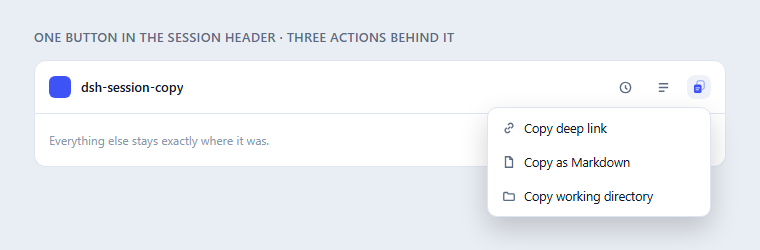
One button in the DSH Web session header. Click it and pick one of three things to copy — deep link, whole conversation as Markdown, or working directory. No more row of flat buttons competing with the toolbar.
Why this exists
The session header is a crowded strip of icon buttons, and copying a conversation out of DSH used to mean three of them. This plugin folds the three into one 28-pixel button whose menu carries the same three actions, so the header gains nothing but a single icon.
The one that actually takes work is Markdown. A session log is not a chat transcript: it is a stream of tool calls, retries, pruned rows, injected context and — after a while — compaction checkpoints. This plugin reconstructs the conversation from that stream on the Host side and hands back clean Markdown.
What you get
| Menu item | What lands on the clipboard |
|---|---|
| Copy deep link | @[title](dsh-session:<base64url(session id)>) — the canonical DSH session mention. Paste it into any composer and the Host attaches that session's snapshot, so another conversation can read this one. |
| Copy as Markdown | The whole conversation as clean Markdown: one section per message, every assistant step kept, tool output and reasoning folded away, compaction points marked, code fences balanced. |
| Copy working directory | The session's cwd, read from the Session list projection with the Host snapshot as fallback. |
Every action reports back in a small notice — including the character count on a Markdown copy, so you can tell a 400-character session from a 400,000-character one before you paste it somewhere.
Install
From npm
dsh plugin add dsh-session-copy
Inside the desktop app
The desktop app has its own plugin manager: open Settings → Plugins and install from there, rather than with the CLI (which targets a different profile while the app is running). Then restart DeepSeek Harness — the Loader assembles its plugin list at boot, so a reload of the page is not enough.
From this checkout
node scripts/install.mjs --check    # report profile health, change nothing
node scripts/install.mjs            # install or refresh in the current profile
node scripts/install.mjs --uninstall
From a release tarball
The catalog install path, for hosts that would rather not build from source:
dsh plugin --profile web add \
  https://github.com/2310770803/dsh-session-copy/releases/latest/download/dsh-session-copy.tgz
The asset name is deliberately version-free. A releases/latest/download/ URL
resolves latest at request time but takes the filename literally, so a
versioned filename would work until the next release and then quietly 404; the
release workflow re-uploads dsh-session-copy.tgz on every tag to keep that URL
stable.
How the Markdown is built
Three decisions here are the difference between a usable export and a broken one, and each of them replaced a bug:
Every assistant step is kept, not just the last one. A turn is not one reply
— an agentic turn is twenty model steps interleaved with tool calls. Keeping only
the final assistant/message of each turn discarded 41% of the assistant text on
a real session (15,717 of 26,657 characters), and lost all 29 intermediate
messages in one turn. All of them are emitted, in order.
Compaction is marked, not swallowed. When DSH compacts a conversation it
writes a compact-checkpoint message and a compaction/summary event, and the
pre-compaction turns stop being what the model sees. Dropping those as "injected
context" makes a long session export with its history silently missing — which
reads as "the copy is broken". They are rendered as an explicit
Conversation compacted marker instead, so an intentional summary is never
mistaken for lost content.
Fences are balanced across the document, not per message. A message that ends inside a fenced code block used to get a synthetic closing fence, which left the next message's fences mismatched; one 21 KB export came out with 34 stray fence markers. Fences are tracked over the assembled document so what you paste renders as written.
Reading is also bounded and version-tolerant:
sessionQuery.readSurface(the current model surface) is preferred overreadSession(the complete raw log including rowscompaction/prunehas shadowed), and falls back toreadSessionif the surface cannot be folded.- The response is capped at 220,000 characters and trimmed on a section boundary, because one real session produced a 434 KB document — past what a single clipboard write reliably accepts.
- Clipboard writes try the Host writer, then the
textarea+execCommandpath (the one that survives long text and a blurred window), then the async Clipboard API, twice. DSH's own bundled writer returnsfalseas soon asnavigator.clipboard.writeTextthrows and never falls back, so delegating to it alone was a trap.
Inside DSH: the plugin market
The repository publishes a single-plugin plugin market index — the format
DSH's Plugins → Discover tab and the plugin_market agent tool read:
- Turn on the market's Discover surface once, in Settings → Plugins:
@deepseek-ai/dsh-experimental-plugin-market-bundleships with DSH, switched off. - Plugins → Discover → Index sources → add
https://cdn.jsdelivr.net/gh/2310770803/dsh-session-copy@main/index.json - Search for "session copy" and install.
The index pins an exact commit rather than a branch, so what Discover installs is
reproducible. node scripts/build-index.mjs regenerates index.json from
package.json and locale/; node scripts/check-index.mjs validates the result
with the host's own parser. The index must name the commit before the one that
carries it, which is why the pinned SHA is not the file's own commit.
node scripts/search-index.mjs answers the other question — whether a word typed
into Discover actually surfaces the plugin. It runs the host's own search class
over the index, so a pass there means Discover's list narrows to this plugin
rather than merely that the JSON is well-formed:
node scripts/search-index.mjs --market <dir> --validator <dir>
Both <dir>s are @deepseek-ai/dsh-plugin-market and
@deepseek-ai/dsh-plugin-market-index as shipped inside an installed DSH app —
extract them from resources/app.asar under dsh/node_modules/@deepseek-ai/.
The plugin is also listed in the awesome-dsh-plugin catalog, whose
entry is one YAML file in that repository,
data/plugins/2310770803__dsh-session-copy.yml.
Supply chain
Releases are built by GitHub Actions and published with npm's trusted publishing: the workflow authenticates with a short-lived OIDC token, and no long-lived npm token exists in this repository. Every release carries a SLSA provenance statement, so the tarball on npm can be traced back to the commit and workflow that built it. Publishing is idempotent — re-running a release for an already-published version is a no-op, not an error.
Compatibility
| Host | DSH 0.2.1-rc.2 and newer (@deepseek-ai/dsh-* peers are pinned to the prerelease branches) |
| Surface | DSH Web and the desktop app's Web view |
| Permissions | none — the Host route is read-only and same-origin fenced |
Everything is feature-detected against the shared client module table. If a future
DSH release drops the Menu primitive, the same three actions render in a
self-contained popover instead of degrading into a row of flat buttons; if it
renames a service, the affected piece degrades rather than raising inside the boot
activation audit.
Display metadata
The Settings → Plugins card reads this package's metadata without evaluating
lib/client.js:
locale/en.jsonandlocale/zh.json—meta.title/meta.description;package.jsonname/descriptionas the fallback;package.jsonicon(./icon.svg) for the card artwork.
Layout
| Path | Role |
|---|---|
src/plugin.js | Host half: registers the read-only snapshot route on webServer. |
src/lib/route.js | The /api/session-copy.snapshot handler, its trust fence and body limits. |
src/lib/markdown.js | Session events → Markdown rendering. |
lib/client.js | Browser half, shipped prebuilt in the loader's closure-factory format. |
cordis.patch.yml | Inserts the session-copy row into the Web profile. |
locale/, icon.svg | Plugin-list title, description and artwork. |
License
Похожие плагины
dsh-web-ui (dsh-chat-recovery)
zhu1090093659/dsh-web-ui
billion-context
ranxianglei/billion-context
dsh-synapse
liangmianya/dsh-synapse
dsh-chat-import
nwflower/dsh-chat-import