dsh-plugin-offpeak-badge
ak-blank/dsh-plugin-offpeak-badge
Unofficial DSH (DeepSeek Harness) Web GUI plugin: shows whether the DeepSeek API is billing at the off-peak or peak rate right now — bilingual 空闲/高峰 · Idle/Peak, Chinese holiday calendar built in.
Установка
dsh plugin --profile web add github:ak-blank/dsh-plugin-offpeak-badgeREADME
dsh-plugin-offpeak-badge
DeepSeek API peak / off-peak billing badge for the DeepSeek Harness (DSH) Web GUI — as a plugin, in 中文 and English.
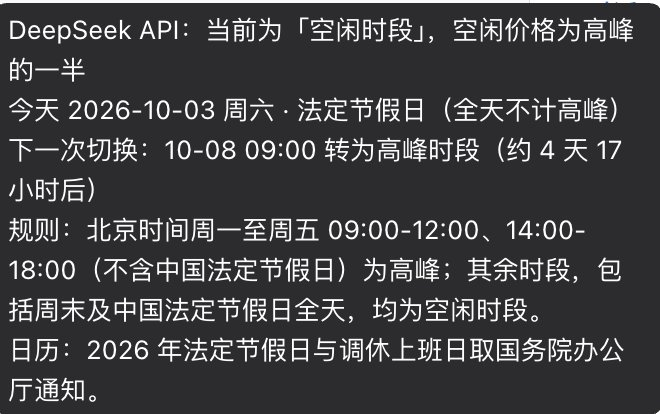
A pill in the top-left brand row tells you, at a glance, whether the DeepSeek API is charging you the off-peak rate (half price) or the peak rate right now. Hover it for the rule, today's day type and the exact moment of the next switch.

🐳 deepseek HARNESS  [Idle] / 〔空闲〕   ← green = off-peak (half price)
🐳 deepseek HARNESS  [Peak] / 〔高峰〕   ← amber = peak
Collapse the sidebar and the badge becomes a dot on the collapse button, so it stays visible in rail mode.
What it shows
| Surface | Content |
|---|---|
Sidebar brand row (sidebar.brand.name) | Idle / Peak pill, colour-coded, hover tooltip |
| Tooltip | current window · today's date, weekday and day type · next switch time and countdown · the rule · which holiday calendar is in use |
Collapsed rail (shell.overlay) | 8 px status dot on the sidebar collapse button |
Screen readers (shell.overlay) | visually hidden aria-live region (the brand seat itself lives inside an aria-hidden subtree) |
Install
Requires a DSH installation (dsh --version) and Node ≥ 18. The package is a DSH
bundle — it declares dsh.bundle.patch and ships a cordis.patch.yml — which is what
makes the one-line install work:
# straight from GitHub (pnpm fetches the sources; this package needs no build step,
# so there is no install-script approval to grant)
dsh plugin --profile web add github:AK-blank/dsh-plugin-offpeak-badge

# …or from a local clone
git clone https://github.com/AK-blank/dsh-plugin-offpeak-badge.git
dsh plugin --profile web add ./dsh-plugin-offpeak-badge
The same thing from the GUI: Plugins → Add plugin, paste the repository URL — the dialog section below lists every accepted input.
dsh plugin installs the dependency and appends the bundle to the profile's
dsh.profile.bundles; the running dsh web reloads the configuration live — no
restart. If the badge does not show up, reload the browser page once.
Alternative: script install
For deployments where the bundle path is unavailable (or if you prefer the plugin to sit in
~/.dsh/plugins/ instead of the profile's package store), install.mjs wires it up by
hand: it copies the package to ~/.dsh/plugins/dsh-plugin-offpeak-badge/, links it into
~/.dsh/profiles/node_modules/ and appends the row to
~/.dsh/profiles/web/cordis.patch.yml, after a timestamped backup. Nothing outside your
DSH home is touched.
git clone https://github.com/AK-blank/dsh-plugin-offpeak-badge.git
cd dsh-plugin-offpeak-badge
node install.mjs
Options: --home <dir> (DSH home, default $DSH_HOME or ~/.dsh), --profile <name>
(default web), --dir <path>, --copy (default), --link, --dry-run, --help.
Install from the GUI (no terminal)
Open Plugins in the sidebar, click Add plugin, paste a spec and press Install.

The dialog parses the spec exactly like dsh plugin add, so these all work:
| Paste into the box | Result |
|---|---|
github:AK-blank/dsh-plugin-offpeak-badge | installs from GitHub (append #v1.0.0 to pin a ref) |
https://github.com/AK-blank/dsh-plugin-offpeak-badge | the same, as a full repository URL |
/absolute/path/to/dsh-plugin-offpeak-badge | a local directory, installed as a pnpm link — no network, and edits to lib/client.js show up after a page reload |
https://…/dsh-plugin-offpeak-badge.tgz | a .tgz release tarball (none published yet) |
dsh-plugin-offpeak-badge | npm package name — a valid input, but the package is not on npm yet, so the lookup fails |
Two things that trip people up:
- A bare
owner/repois rejected. The git shorthand needs itsgithub:prefix, and the npm package-name rule forbids the uppercase owner, so the dialog reports an invalid spec before it tries anything. Writegithub:AK-blank/dsh-plugin-offpeak-badgeor the full URL. - The install-source (mirror) selector only affects npm installs, not GitHub ones.
If the plugin is already installed, adding the same spec reports already installed — remove it first.
Manage it from the same page
The plugin then appears under Installed, with a toggle for the bundle and one for the row it declares; Uninstall asks for confirmation and removes it. DSH does not auto-update plugins yet, so upgrading means uninstalling and installing the new version. The equivalent CLI verbs:
dsh plugin --profile web list                              # pnpm's view of profile packages
dsh plugin --profile web remove dsh-plugin-offpeak-badge
Uninstall
dsh plugin --profile web remove dsh-plugin-offpeak-badge   # bundle install
node install.mjs --uninstall [--purge]                    # script install
Why it is (or is not) listed in the GUI's Plugins page
That page is an inventory of packages: the profile's selected bundles, the profile's
dependencies, and the optional bundles the DSH installation itself ships. dsh plugin add
puts this plugin in all the right places, so it appears under Installed with an
enable/disable toggle.
A row written by hand into the profile's cordis.patch.yml — what install.mjs does — is a
real loader row (the badge works exactly the same), but it belongs to no package, so that
inventory has nothing to list. To get the page entry after a script install, switch to the
bundle install and drop the hand-written row:
dsh plugin --profile web add /path/to/dsh-plugin-offpeak-badge
# then delete the entry install.mjs appended to the profile's cordis.patch.yml
How the billing rule is decided
The plugin implements the footnote on DeepSeek's official pricing page, verbatim:
空闲时段价格为高峰时段价格的一半。北京时间周一至周五(不含中国法定节假日)9:00 - 12:00、14:00 - 18:00 为高峰时段;其余时段,包括周末及中国法定节假日全天均为空闲时段。
Off-peak rates are half of the peak rates. Peak hours are 01:00 - 04:00 and 06:00 - 10:00 UTC, Monday through Friday, excluding Chinese public holidays. All other hours are off-peak, including weekends and Chinese public holidays in full.
The two windows are identical (UTC + 8 h = Beijing); day classification is always the Beijing calendar day:
peak  ⇔  Beijing date is Mon–Fri  ∧  not a statutory holiday  ∧  time ∈ [09:00,12:00) ∪ [14:00,18:00)
idle  ⇔  every other instant
Two details people ask about:
- Adjusted ("调休") weekends. A weekend that holiday adjustment turns into a working day is still a weekend, and weekends are off-peak in full — so it stays off-peak all day. Chinese media summarised this as "调休上班的周末、中国法定节假日全天均按空闲时段计费"; that sentence is a news headline rather than official wording, but the conclusion is correct and needs no extra rule. The tooltip still names such a day, so the calendar never looks wrong.
- Holidays that fall on a weekday never enter peak hours ("excluding Chinese public holidays"). The plugin ships the statutory holiday list, so it knows the difference between a holiday Monday and an ordinary Monday.
Calendar coverage
| Year | Notice | Holiday days | Make-up workdays |
|---|---|---|---|
| 2025 | 国办发明电〔2024〕12号 | 28 | 5 |
| 2026 | 国办发明电〔2025〕7号 | 33 | 6 |
For a year whose notice is not published yet (2027 at the time of writing) the rule
degrades to "Monday–Friday are peak-eligible" and the tooltip says "the 2027 holiday
notice is not published yet; Monday to Friday is assumed" instead of pretending to know.
Adding a year means appending one entry to CALENDAR in lib/client.js; the self-test
then checks its day count, duplicate-free dates, that make-up days fall on a weekend, and
that an official source URL is recorded.
Language
The plugin ships both dictionaries in one registration call (ctx.locale.register(NS, { zh, en })),
which is what the DSH locale service requires, and every seat is registered with that
namespace so the framework re-renders on a language switch:
- the pill follows the GUI language:
空闲/高峰in Chinese,Idle/Peakin English; - the tooltip, the countdown wording, weekday names and the screen-reader announcement are translated too;
- the rule line quotes the official English wording on the English page and the official Chinese wording on the Chinese one;
node selftest.mjsfails if the two dictionaries ever drift: it asserts identical key sets, identical{placeholder}sets per key, no blank values, and renders the tooltip in both languages.
Verify
node selftest.mjs          # 89 offline assertions, no network, no browser
node selftest.mjs --now    # …and print the current verdict in both languages
The self-test loads lib/client.js the same way the browser module table does (stub
window.__ModuleLoader__, stub require), then covers the module contract, all ten
window boundaries of a working day, weekends and make-up work weekends, eight statutory
holidays that fall on weekdays, the calendar-uncovered degradation, the next-switch
computation (same day, across a weekend, across a holiday), calendar integrity, timezone
independence (the verdict is identical under TZ=UTC and TZ=America/New_York), both
dictionaries, and the registration contract through a stub context.
How it plugs into DSH
This is a dual-face Cordis plugin, exactly like the official
@deepseek-ai/dsh-client-ui-* packages:
| File | Role |
|---|---|
lib/index.js | host half — an empty apply() that gives the Loader a host row, which is what makes dsh-client-modules' incremental dsh.client scan add the browser half to the __DSH_BOOT__ graph |
lib/client.js | browser half — a hand-written window.__ModuleLoader__.load({ id, factory }) bundle: rule, calendar, dictionaries, seats |
package.json | dsh.client (platform: web, loader inject, module external) and exports["./client"] |
lib/client.js deliberately avoids a build step: it is the same pre-bundled CJS-factory
form the official client plugins ship in, so the repository can be read, diffed and
published as-is. It requires only platform seed words (react,
@deepseek-ai/dsh-client-ui-primitives) plus the slots and locale services.
Design notes
- Why the brand seat is taken at
priority: -1.sidebar.brand.nameis asingleslot: same-priority registrations throw, and only the lowest-priority registration renders. The official brand plugin sits at 0, so a lower priority is the only way to add anything next to the wordmark. This plugin re-renders the officialBrandWordmarkitself, so the branding is unchanged — only the pill is new. - Why the wordmark is 22 px tall instead of 24. At the default 280 px sidebar the brand
row is a fixed budget (24 icon + 8 + wordmark + 6 + pill ≤ 216 px). Trimming the wordmark
by 2 px is what lets a two-character pill fit without clipping. Below a 250 px row the
pill degrades to a dot automatically (measured with a
ResizeObserver). - Why the rail dot lives in
shell.overlayinstead ofsidebar.toggle.badge: that single slot is held by the official settings plugin'sDesktopUpdateBadge, which also reports a dropped/reconnecting host connection. Taking the slot would swallow those signals, so the dot is drawn additively into the overlay layer, positioned from the collapse button's viewport rectangle. - Click-through is blocked. The whole brand row is the "new session" button; the badge
stops
click/mousedown/pointerdown, so clicking it never starts a session. corner-shape: roundis set explicitly on the dots: DSH's global design language rendersborder-radiusas a superellipse (squircle), which would turn a dot into a rounded square.
Compatibility
- Built and verified against DSH
0.2.0-rc.2(client plugin APIdsh.client+__ModuleLoader__, slot registry, locale registry) — recorded indsh.compatibility.dshReleases. - Official packages are declared as peerDependencies with prerelease-carrying ranges
(
>=0.2.0-rc.1 <1.0.0-0), so-rcharness builds resolve instead of being silently excluded. Nothing is imported from them at runtime except the shell-provided seed@deepseek-ai/dsh-client-ui-primitives. - No runtime dependencies, no build step, no network calls: the badge is computed locally
from the clock and the bundled calendar. The git install therefore needs no pnpm
allowBuildsapproval.
Community
- Topics on this repo:
dsh-plugindshdsh-pluginsdeepseek-harnessdeepseek-harness-plugincordiscordis-plugini18n. DSH's own README asks plugin authors to add thedsh-plugintopic for discoverability, which is also howdsh-plugin-radarindexes plugins. - Community catalogs this plugin is submitted to / listed in:
awesome-dsh-plugin(the source behind awesome-dsh-plugin.com and dsh-market) — the ready-to-PR entry lives incontrib/AK-blank__dsh-plugin-offpeak-badge.yml. To submit it: fork the list, copy that file todata/plugins/AK-blank__dsh-plugin-offpeak-badge.ymland open a PR — the list's CI requires the repository to be at least one day old, and thedsh-plugintopic (which this repo already carries) is what makesdsh-plugin-radarpick it up automatically in the meantime. - Official DSH resources: repository · docs · Discussions · Discord · packaging guide “Package and install a plugin”.
Unofficial plugin. Not affiliated with, endorsed by, or supported by DeepSeek. “DeepSeek Harness” is a trademark of DeepSeek; this project uses the abbreviated “DSH” designation for the ecosystem, as the project's brand guidelines recommend.
License
MIT. The rule and calendar data are quoted from DeepSeek's public pricing page and the State Council holiday notices, with sources recorded in the code.
Похожие плагины
DeepSeek-Balance-Whale-Widget
meteornox/deepseek-balance-whale-widget
dsh-context
bowenliang123/dsh-context
dsh-cost-meter
han-1413141/dsh-cost-meter
dsh-damage-pulse
wssfk12138/dsh-damage-pulse