dsh-annotate
alaliqing/dsh-annotate
Панель аннотации элементов и рецензирования для веб-клиента DeepSeek Harness: выбирайте элементы интерфейса в живом предпросмотре приложения, пишите заметки и отправляйте их в беседу одним структурированным блоком
Установка
dsh plugin --profile web add github:alaliqing/dsh-annotateREADME


dsh-annotate adds a visual review panel to the DeepSeek Harness web client.
Open a local app, click the elements you want changed, leave notes, and send the
whole review to your conversation as structured text.
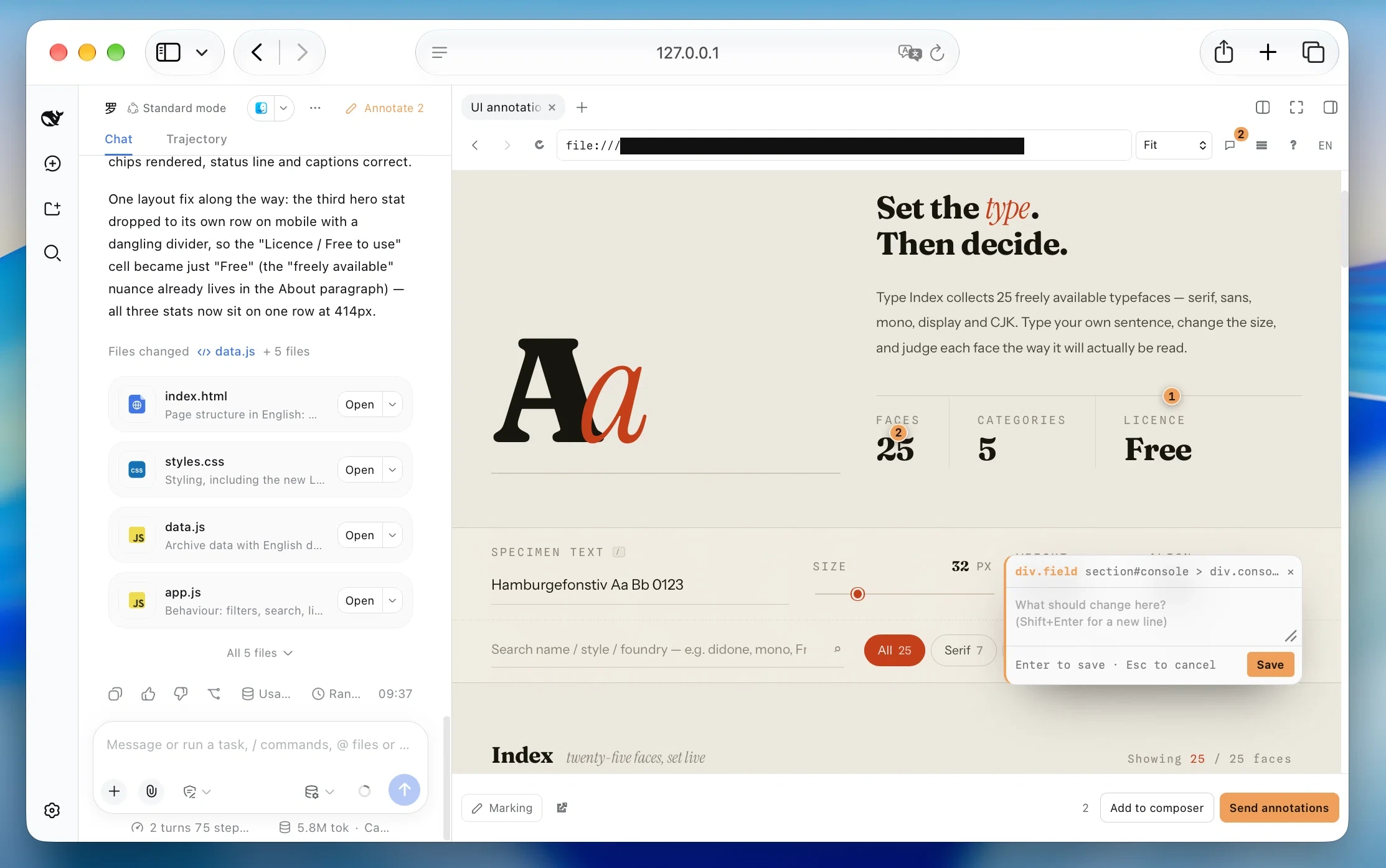
⌘/Ctrl ⇧ B → choose a local app → Mark → click → comment → send
Install
Give a coding agent this prompt:
Read https://github.com/alaliqing/dsh-annotate and install its latest published version into the local DeepSeek Harness web profile. Preserve existing configuration and do not stop the current Harness session. Verify the installation, then explain how to restart Harness and open Annotate.
Or install manually with Node.js 20+, the dsh CLI, and pnpm on PATH:
dsh plugin --profile web add dsh-annotate
The current package needs a profile entry in
$DSH_HOME/profiles/web/cordis.patch.yml (default
~/.dsh/profiles/web/cordis.patch.yml). Keep existing entries and add this only
once:
- insert:
    - name: dsh-annotate
Check for dsh-annotate with dsh --profile web --dump-config. Restart the web
profile and refresh the browser, then click Annotate or press ⌘/Ctrl⇧B.
If you use npx @deepseek-ai/dsh web, replace dsh above with
npx @deepseek-ai/dsh. See compatibility for tested
versions and limits.
What it gives you
- Zero-config discovery of running loopback development servers, including IPv4 and IPv6, with the services that belong to the current workspace first.
- Static pages need no server: an
index.html— or a built page underdist/,build/,out/orpublic/— is offered straight from the workspace and previewed from its own directory. - Element-level context: CSS selector and match count, semantic attributes, React component chain, geometry, computed styles, and visible text.
- Markers that stay attached through window or nested scrolling, resizing, and layout shifts.
- Two explicit send paths: send the review by itself, or add it to the current draft. Failed sends keep every annotation.
- Isolated previews that preserve app routes, assets, fetches, and WebSocket upgrades without sharing the Harness origin.
- English and Chinese UI, switchable from the toolbar.
No screenshot is captured and no app style is changed. By default, the plugin only discovers servers you already run; process control requires an explicitly configured command.
Use
- Start your app's development server.
- Open a Harness conversation, then press
⌘/Ctrl⇧Bor click Annotate. - Choose a detected service or one of the workspace's static pages, or enter a port or loopback URL.
- Click Mark, select an element, and write a note.
- Click a numbered marker to view its note; click elsewhere to close it. Press Mark to add another note.
- Choose Add to composer or Send annotations.
| Key | Action |
|---|---|
Enter | Save and leave marking mode |
Shift+Enter | Insert a newline |
Esc | Cancel and leave marking mode |
⌘/Ctrl + click | Save and send the batch |
Annotations and drafts are stored by Harness conversation and full app URL, so routes restore independently and conversations never share notes.
Rows are ordered by how likely they are to be yours: a service whose process was
started inside the conversation's workspace is tagged This project, a port
the workspace names in package.json or a Vite config is tagged Configured
port, then the common-port order follows. Static pages are listed under their
own heading, and when exactly one candidate exists it opens on its own — a
static page only when no server is running at all.
What gets sent
🎯 UI annotations · /settings · viewport 1440×900 (1)
#1 button.primary   component: SubmitButton
   semantics: aria-label="Save changes" · data-testid=save
   component chain: SettingsPage > SettingsForm > SubmitButton
   selector: #root > form > button.primary (matches: 1)
   position/size: 96×32 @ (640, 512) · viewport center
   computed styles: display:inline-block; padding:8px 16px; …
   text: Save changes
   note: Disable this until the form is dirty.
React component names require a development build. Visible text is capped at 120 characters.
How the preview stays isolated
A normal cross-origin iframe does not expose its DOM. Instead of moving the app
onto the Harness origin, dsh-annotate gives each conversation/app pair an
ephemeral loopback origin and injects a small shim and picking overlay.
- Panel and overlay validate both message source and origin.
- Targets are restricted to
localhost,127.0.0.1, and[::1]. - A static page is served by the plugin itself, read-only, from its own
directory on a loopback origin:
GET/HEADonly, nothing outside the workspace, no dotfiles, and a 64 MiB ceiling per file. - App cookies are namespaced; unprefixed cookies are stripped both ways.
- Closing a panel, returning to the service list, or switching apps releases its preview. Other windows using the same preview keep it alive. Abandoned previews expire after five minutes without activity or a renewed lease; plugin disposal closes all remaining servers and sockets.
This is a local development tool, not a browser sandbox. OAuth flows, strict origin allowlists, service workers, restrictive CSP, Shadow DOM internals, cross-origin child frames, and individual canvas objects may need a normal browser or app-specific setup. The full cookie model has only been validated in Chromium.
Optional configuration
- insert:
    - name: dsh-annotate
      config:
        detect:
          extraPorts: [4321]
          probeTimeoutMs: 900
          cacheMs: 2000
          staticPorts: false
          staticFiles: false
detect.staticPorts: false stops probing the common-port list and leaves only
real listeners; detect.staticFiles: false stops offering the workspace's own
HTML pages. detect.extraPorts adds ports people run on by habit.
The repository also includes dsh-app-bridge
for the narrower case where an app must be mounted at a fixed path on the
Harness origin. It is a reverse proxy, not an annotation UI.
Development
npm ci
npx playwright install chromium
npm run check
npm test
To use an unreleased checkout, link it into the web profile and then add the profile entry shown above:
git clone https://github.com/alaliqing/dsh-annotate.git
cd "${DSH_HOME:-$HOME/.dsh}/profiles/web"
npx --yes pnpm@10 add "link:/absolute/path/to/dsh-annotate/packages/dsh-annotate"
The default tests drive the real built client, shim, and overlay in Chromium
against a Harness fixture; no model is called. npm run test:harness separately
checks a packed install in a real, isolated Harness with a local model fixture.
Generated files under packages/dsh-annotate/lib/ are committed and must stay in
sync with their sources.
See CONTRIBUTING.md for repository conventions and SECURITY.md for private vulnerability reporting.
License
MIT, with third-party attribution in NOTICE.
Independent community plugin; not affiliated with or endorsed by DeepSeek.
Похожие плагины
dsh-web (dsh-task-board)
zhu1090093659/dsh-web
dsh-web (dsh-web-all)
zhu1090093659/dsh-web
dsh-web-ui (dsh-task-board)
zhu1090093659/dsh-web-ui
dsh-web-ui (dsh-web-ui-all)
zhu1090093659/dsh-web-ui