dsh-client-ui-aqua-patched
aliww2468/dsh-client-ui-aqua-patched
Тема Aqua в стиле глассморфизма для веб-интерфейса DeepSeek Harness, форкнутая из апстрима и исправленная для загрузки на DSH 0.1.2-rc.1: режимы mica и совместимости с настраиваемым размытием и морозным эффектом, подложка в виде живой анимации или обоев, яркость фона и общий переключатель, восстанавливающий стандартный интерфейс.
Установка
dsh plugin --profile web add github:aliww2468/dsh-client-ui-aqua-patchedREADME
Unofficial patched fork —
1.3.1-patch.4fixes the bottom scrollbar appearing when hovering over the composer. Hover fix and validation scope: Composer hover repair. Desktop fix and validation scope: Desktop layout repair. Upstreamdsh-client-ui-aqua@1.3.1(npm, 2026-08-17) and the upstream repository HEAD do not work on the DSH 0.1.2 line. The original repair was verified on DSH 0.1.2-rc.1; patch.2 adapts installation, settings and icons for 0.2.1-rc.3. Current validation and scope: DSH 0.2 repair. Original diagnosis, evidence and caveats: REPAIR.md. Not affiliated with, endorsed by, or maintained by the upstream author. Distributed under AGPL-3.0-only — see License. The upstream source that this fork is based on is described under Upstream and this fork.
dsh-client-ui-aqua — Aqua glassmorphism theme for DeepSeek Harness
English | 中文
What it does, in one line
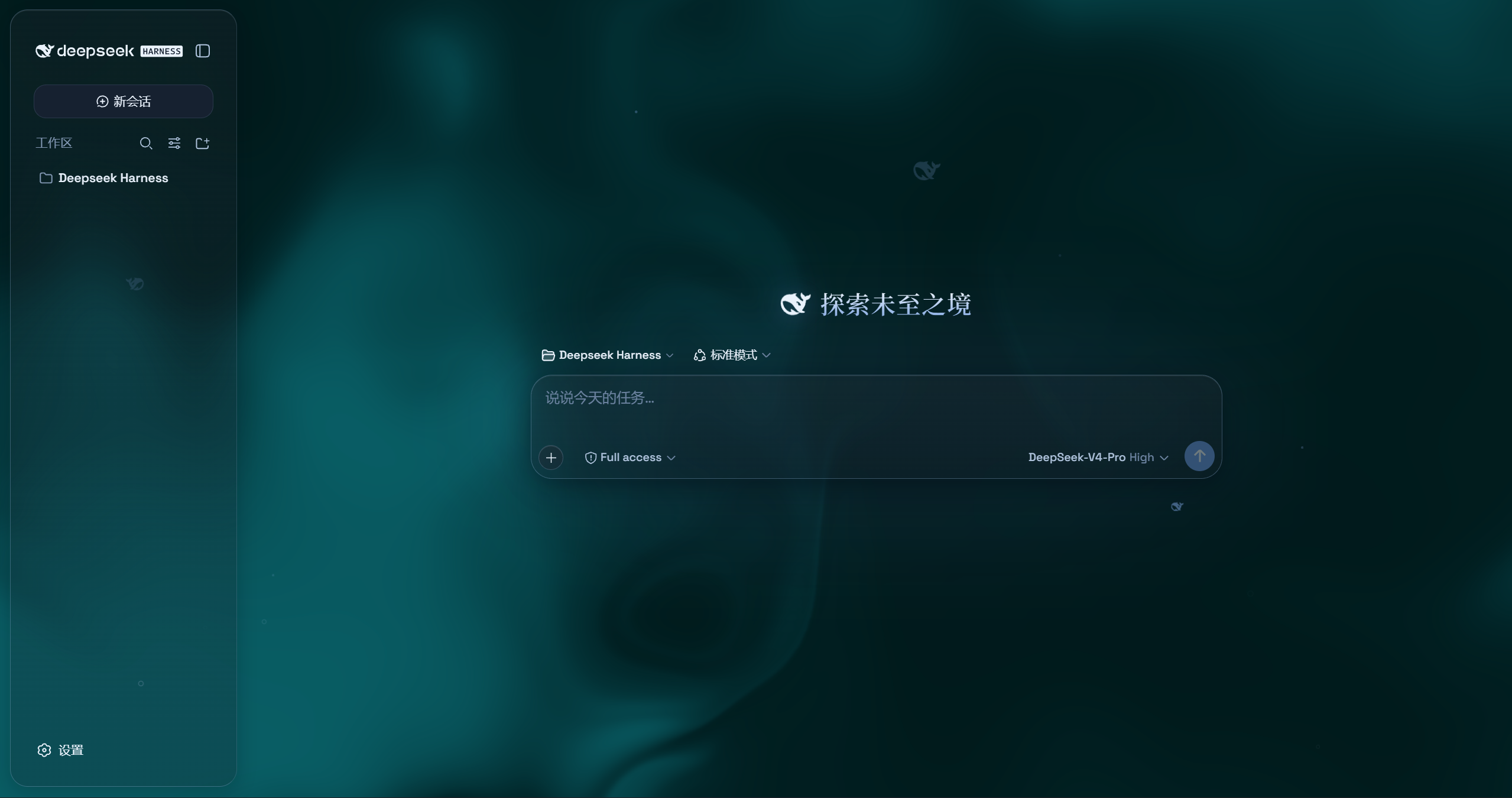
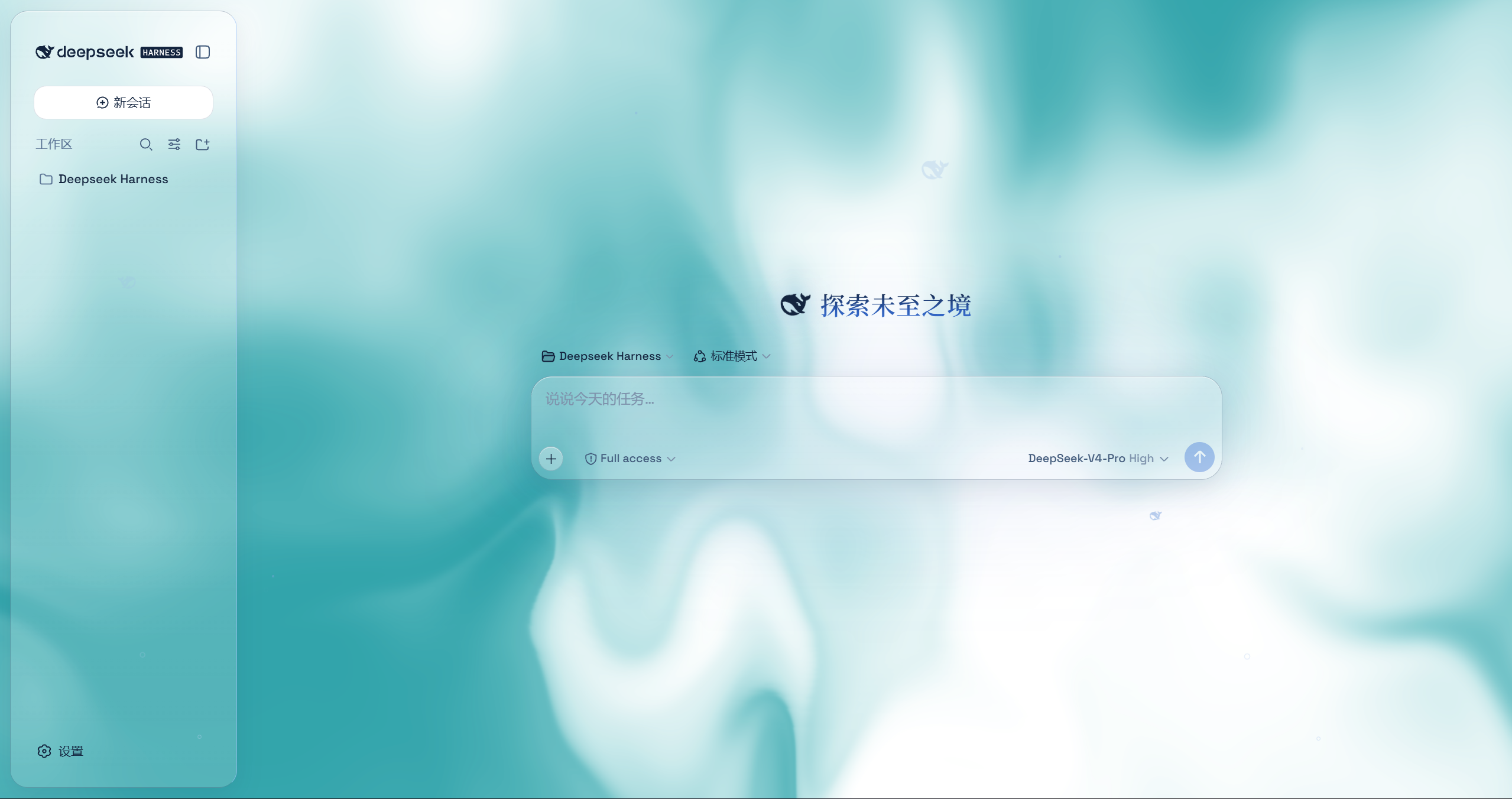
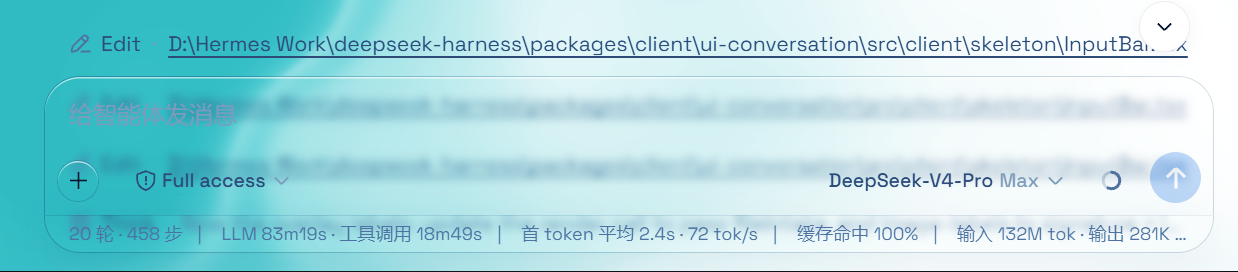
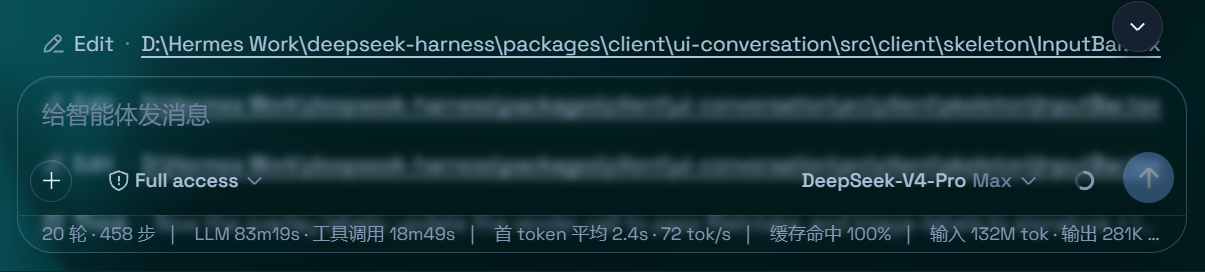
Install it and the DSH web UI becomes frosted glass — the header, sidebar, composer, stats line and trajectory view turn into floating glass panes over a living fluid board or your own wallpaper. Flip one switch and the stock UI comes back exactly, with nothing left behind.
Install
Profile: web — the browser UI profile. Copy-paste, three commands:
dsh plugin --profile web add github:Aliww2468/dsh-client-ui-aqua-patched
dsh --profile web --dump-config     # verify: an "# == dsh-client-ui-aqua" layer must appear
dsh web                             # restart the host; the theme is ON by default
git must be on PATH and github.com reachable (an HTTP proxy may be required). The plugin appends itself to dsh.profile.bundles. Controls are under Usage; permissions, external services and compatibility under Permissions, external services and compatibility.
From this repository (recommended)
The block above is the whole thing: it installs this patched build and registers it as a
profile plugin layer through the package's dsh.bundle.patch, on every platform.
From a local clone
git clone https://github.com/Aliww2468/dsh-client-ui-aqua-patched.git
dsh plugin --profile web add link:/absolute/path/to/dsh-client-ui-aqua-patched
Uninstall
dsh plugin --profile web remove dsh-client-ui-aqua
Then restart dsh web. Every visual effect is an effect handle disposed with the plugin,
so the stock UI returns.
Requirements
DSH 0.2.1-rc.3 (the runtime bundled with DSH NEXT 2.0.20-next), tested in an
isolated web profile using that distribution's packages and Node v24.21.0.
The original 0.1.2-rc.1 dependency ranges and legacy settings path are retained;
the old runtime's browser test has not been repeated for patch.2.
The added range accepts exactly 0.2.1-rc.3; other 0.2 releases need validation.
Installing appends dsh-client-ui-aqua to dsh.profile.bundles, so the host must be
restarted before the theme loads.
⚠️ Do not install the bare package name from npm
dsh plugin --profile web add dsh-client-ui-aqua # ← installs the UNPATCHED upstream 1.3.1
That bare name resolves to upstream's npm release, which does not work on the DSH 0.1.2
line: its browser half imports @deepseek-ai/dsh-client-runtime, a package DSH 0.1.2
removed, and its settings card throws on every page load. Use the github: form above (or
the local-clone form) until upstream ships a fix. Details in REPAIR.md.
What you get
Everything below is upstream's theme design, with compatibility adaptations described in REPAIR.md and REPAIR-0.2.md.
- Two modes: Mica restyles the layout into floating glass cards (blur and frost adjustable), while Compatibility Mode keeps the stock layout byte-for-byte and only swaps the material to generic glass — other plugins' UI gets the same treatment automatically
- Free backdrop: a living fluid board (hue adjustable) or your own wallpaper (fills the page, aspect preserved, with its own blur and frost); light wallpapers look best in light mode, dark wallpapers in dark mode
- Background brightness: follows the resolved scheme — dark mode darkens (0–50), light mode brightens (50–100), 50 is unchanged
- Particle whale: the deepseek.com/harness centerpiece fish (a 2D port of the site's particle engine), centered in the chat area right of the sidebar — white particles on dark, gray on light, toggleable in settings
- Glossy "Harness" badge: in dark mode the sidebar wordmark wears the official nameplate pill (135° gradient ring + soft glow); light mode keeps the stock plate
- Edge fades: 5px gradient blur bands pinned to the top and bottom of the page, above the chat content — scrolling content melts into the edges; faint white veil on light, faint black on dark
- One switch: off restores the stock UI exactly, and every effect is removed with the plugin
Visible proof
Historical patch.1 output from a throwaway DSH 0.1.2-rc.1 instance (host Node v22.21.1). For patch.2 results on 0.2.1-rc.3, see REPAIR-0.2.md.
$ dsh plugin --profile web add github:Aliww2468/dsh-client-ui-aqua-patched
+ dsh-client-ui-aqua github:Aliww2468/dsh-client-ui-aqua-patched

$ node tools/cdp-aqua-test.mjs "http://127.0.0.1:<port>/?token=<token>" 15000
DOM: {"title":"DeepSeek Harness","ambient":true,"fluidCanvas":true,"wallpaperLayer":true,"aquaStyleTags":1,"lsEnabled":null,"bodyChildren":25}
EXCEPTIONS: []
CONSOLE_ERRORS: []
LOG_ERRORS: []
RESULT: PASS

$ node tools/cdp-eval.mjs "<url>" 12000 @tools/expr-toggle.js
VALUE: {"cardText":"glass theme card ... master switch on","foundToggle":true,
        "appliedBefore":true,"switchedOff":true,"appliedAfterOff":false,
        "canvasAfterOff":false,"flagAfterOff":"false",
        "appliedAfterOn":true,"flagAfterOn":"true"}
EXCEPTIONS: []
Read it as: the layer really rendered (ambient, fluidCanvas, wallpaperLayer, one injected stylesheet), the page stayed clean (no exceptions, no console errors, no log errors), and the master switch genuinely turns the layer off and back on (appliedAfterOff:false → appliedAfterOn:true, with the flag persisted). Output is trimmed to the asserted fields.
To reproduce on your own machine: run the three install commands above, then the two harness commands — about a minute, and nothing beyond Node and Chrome is needed. Upstream's own screenshots of the theme are under Upstream and this fork.
Permissions, external services and compatibility
Audited from the shipped artifacts (lib/client.js, lib/index.js) — the exact bytes hashed in REPAIR.md §3.
| Question | Answer |
|---|---|
| Network calls at runtime | None. The browser half contains zero fetch, XMLHttpRequest, WebSocket, EventSource or sendBeacon occurrences; the node half imports nothing and never touches the network. |
| Files, credentials, cookies | None. No filesystem or credential-service use, no document.cookie, no eval / new Function, no remote code loading. |
| What it does touch | Injects one <style> element and a few decorative DOM nodes (ambient scene, wallpaper layer, edge fades) into the page, plus one settings namespace named aqua. That is the entire effect. |
| Stored state | Only localStorage keys under dsh.ui-aqua.* (enable flag, mode, blur, frost, backdrop, wallpaper, whale, critters, mesh, spotlight, press, …). A custom wallpaper is kept as a data URL in localStorage, so a very large image or video can hit the browser storage quota. |
| Telemetry / accounts | None. No analytics, no account, no API key. |
| Install-time code execution | None. package.json declares no install / postinstall / prepare script and lib/ ships prebuilt, so dsh plugin add never runs package code. |
| External services | None for the theme itself. Installing reaches GitHub once and needs git; on a restricted network an HTTP proxy is required. |
| Compatibility | Patch.2 is tested on DSH 0.2.1-rc.3 in an isolated web profile. Patch.1 was tested on 0.1.2-rc.1. The old dependency ranges remain; the new range is exact, not a blanket allowance for 0.2.x. See validation limits. |
| Uninstall | dsh plugin --profile web remove dsh-client-ui-aqua then restart. Every visual effect is an effect handle disposed on removal, so the stock UI returns. |
| Support | A one-off community repair, not upstream maintenance. No warranty; the audited artifact hashes are the only compatibility guarantee. |
DSH plugin spec conformance
- Host half exports
apply(ctx)—lib/index.jsshipsexport { apply }withfunction apply(ctx). It registers the settings namespace that the browser half's card is keyed by (aqua), which is what makes the master switch dispatchable on DSH 0.1.2. On 0.2 the obsolete registration is skipped and the card uses the client-ownedplugins.bundle.configslot instead. - Browser half exports
apply+inject—lib/client.jsis a lazy-CJSwindow.__ModuleLoader__.load({ id: "dsh-client-ui-aqua", factory })bundle whose factory returnsexports.applyandexports.inject = ['theme', 'slots', 'locale']. - Bundle patch —
dsh.bundle.patchpoints atcordis.patch.yml, which inserts the single loader row{ id: ui-aqua, name: 'dsh-client-ui-aqua' }. The package name matches that row, so onedsh plugin addboth installs and mounts the plugin. - Browser roster —
dsh.clientdeclaresplatform: webplus the module ids the web shell must have loaded first. - No build step — prebuilt artifacts ship in
lib/, so installation never runs a package script.
Usage
Reload the web UI. Aqua is on by default. On DSH 0.2, find the master switch under Plugins → dsh-client-ui-aqua → Glass theme. On DSH 0.1 it remains under Settings → Plugins → Glass theme. Every other control sits directly under Settings → General → Appearance: mode, blur/frost (Mica mode), fluid color, background brightness, backdrop (fluid/wallpaper), wallpaper controls and decorations. With the master switch off, that control block is hidden.
Upstream and this fork
This repository is a fork of WYH66666666/DSH-Transparent-UI-Plugin at commit d94431a (2026-08-22), based on the published npm package dsh-client-ui-aqua@1.3.1. Upstream calls the package @deepseek-ai/dsh-client-ui-aqua inside its own monorepo; the published name is the unscoped dsh-client-ui-aqua, which this fork keeps so it stays a drop-in replacement.
The theme design is upstream's work. This fork adapts the host interfaces and settings entry points. The original three fixes are in REPAIR.md; the 0.2 migration is in REPAIR-0.2.md.
Upstream's own notice — it describes upstream's build, not this fork
Notice ⚠️: As DSH has been updated, I am unable to promptly update the plugin with the new API due to my academic commitments. Please use an alternative agent to replace or repair it yourself to avoid crashes when installing this plugin.
That warning is precisely why this fork exists. It applies to upstream's published build: dsh plugin --profile web add dsh-client-ui-aqua installs the unpatched 1.3.1, whose browser half imports a package DSH 0.1.2 removed and whose settings card throws on every page load. This fork is the repair that notice asks for.
Upstream's original description
Aqua is a highly customizable glassmorphism theme for the DeepSeek Harness web UI. The header, sidebar, composer, stats line, and trajectory view all become panes of frosted glass. You can put video for wallpaper and switch it off and the stock UI comes back exactly, with no source changes to DSH itself.
Upstream's screenshots
Captured by upstream on the DSH version it targeted, so details of the surrounding chrome may differ from yours.
Repository layout
| Path | What it is |
|---|---|
lib/, package.json, cordis.patch.yml | The shipped, audited build — this is what dsh plugin add installs. |
src/ | Source-level mirror of the three fixes, for review. Upstream's tree cannot be built standalone (@deepseek-ai/* deps are workspace:^ and tsdown/typescript are undeclared), so these edits are not type-checked here. |
tools/ | The dependency-free Chrome DevTools Protocol harness used for the verification above. |
REPAIR.md | Diagnosis, diff, evidence, limitations, license situation. |
PUBLISH.md | How this fork was published (topics, install command, pushed artifact hashes). |
install.ps1, publish.ps1, build.ps1 | Upstream's scripts, kept for provenance only — they install the unpatched build and are not supported here. |
License
The upstream repository is AGPL-3.0 (its LICENSE file), while the npm tarball of the same version declares MIT — an inconsistency upstream introduced, documented in REPAIR.md §5. This fork follows the stricter reading: it keeps upstream's LICENSE untouched and is distributed as AGPL-3.0-only. If AGPL is incompatible with your deployment, do not install it. Copyright in the original work remains with the upstream author.
Похожие плагины
dsh-wallpaper-engine
elysia395/dsh-wallpaper-engine
dsh-deep-whale (maid-atelier)
small-tailqwq/dsh-deep-whale
dsh-deep-whale
small-tailqwq/dsh-deep-whale
dsh-claude-style
nwflower/dsh-claude-style