dsh-git-graph-sidebar
athosoo/dsh-git-graph-sidebar
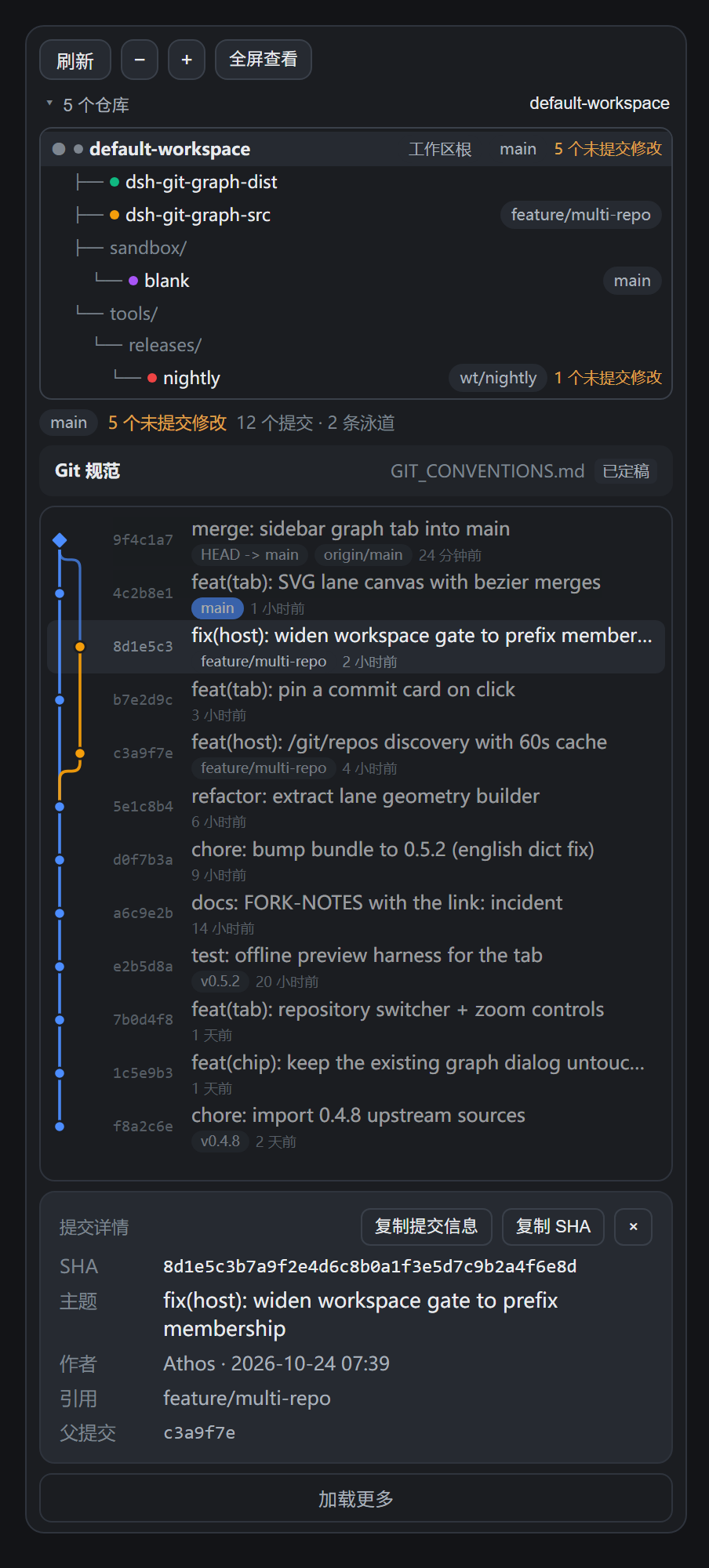
A repository graph tab for dsh-better-sidebar, forked from @linxin666/dsh-client-ui-git-graph 0.4.8, which linxin666 develops in zhu1090093659/dsh-web. Both halves own the /git route prefix, so this plugin and the upstream one cannot be installed at the same time - pick one. It discovers the Git repositories up to three levels below the workspace directory (at most 200, skipping node_modules, dist, build, out, coverage, target, vendor and dot-directories), lists them as a tree with branch, head, dirty-file and conflict counts, and draws the selected repository commit graph as an SVG lane canvas with curved cross-lane edges, merge diamonds, ref badges, row zoom and a pinned commit card. The tab writes to the repository: the Initialize Git repository button runs git init, and the conventions picker writes a GIT_CONVENTIONS.md document into the repository (or a workspace-wide .dsh/GIT_CONVENTIONS.md that nested repositories inherit) from six frameworks - Conventional Commits, GitHub Flow, Git Flow, Trunk-based, Conventional Branch, GitLab Flow. The host injects that document into the system prompt before every model step and flags the last 20 commit subjects that break the rules the document itself states; Chinese, English and mixed subjects are all accepted, and an optional strict mode writes strict: true. The composer branch chip, interactive graph dialog and worktree manager of the upstream plugin are carried over unchanged.
Установка
dsh plugin --profile web add github:athosoo/dsh-git-graph-sidebarREADME
dsh-git-graph-sidebar
English | 中文
A Git browsing plugin for DeepSeek Harness (DSH): a branch chip in the composer, plus a Repository graph tab inside dsh-better-sidebar that lists the Git repositories found up to three levels below the current workspace directory and draws the selected repository's commit graph as an SVG lane canvas.
What it does
Repository graph tab (better-sidebar)
The tab works from the session's working directory and treats that directory as a container: Git repositories up to three levels below it are reachable without registering each repository as a separate DSH workspace.
-
Multi-repository discovery — the workspace root itself, plus repositories nested up to 3 levels below it. Each entry carries its current branch, short head, dirty-file count and conflict count.
-
A scan that costs what it should — one
git for-each-refper repository returns the branch time, the upstream and the ahead/behind distance in one call; while the refs have not moved the whole answer comes from the last scan, and only the status probe (dirty files, conflicts) is repeated. A workspace full of repositories no longer gets slower with every extra one. -
Repository tree — the root, the intermediate directories and each repository, so the level relationship between them is visible rather than implied by a path.
-
SVG commit graph — one row per commit, one colored lane per branch line, curved edges where a commit's parent sits on another lane, merge commits drawn as diamonds, ref badges and relative timestamps.
-
One ref chip per branch —
mainandorigin/mainname the same branch, so they share a chip and mute together; symbolic refs such asorigin/HEADnever become chips; tags are not filters either (a tag points at a single commit, so muting it would hide one row) and stay on the commit rows as badges; the order is the current branch, other local branches, then remote-only branches, anything past twelve folds into+N, and a Clear filters chip appears while something is muted. Fewer than four filterable branches and the row is not drawn at all. Row badges and the exported SVG use the same labels. -
Zoom — rows are two lines by default;
−/+scale the rows and their text from a compact single line up to a roomy list. -
Commit detail card — the panel under the graph always shows the row you pinned: full hash, subject, author, absolute commit time, refs and parents. Click a row to pin it, click it again (or
×) to clear. -
Copy for the assistant — Copy commit info puts a ready-to-paste block on the clipboard (repository path, hash, subject, author, time, refs, parents), so asking the model to "roll back to this commit" needs no retyping; Copy SHA copies the full hash alone.
-
Export an image — Export image on the toolbar serialises the current view (filtered rows, lanes, ref chips, the highlight on the pinned row) into one standalone SVG: theme colours baked in, explicit size, downloaded as
git-graph-<repo>.svg; environments without Blob/object URLs fall back to copying the markup. -
Live updates, no flicker — the tab subscribes to the host's Git change events and also polls quietly in the background, so a new commit or branch appears on its own. Every background refresh keeps the current rows on screen: an unchanged result is dropped without a re-render, and a failed poll never replaces real data with an error.
-
Refresh — re-scans on demand. A manual refresh also keeps the panel content visible while it runs. The host caches a scan for 60 s (the refresh button bypasses it).
-
Reopens instantly — closing and reopening the tab used to start from an empty panel. The tab now keeps the last painted list, selection and graph in memory, so a reopen draws that on its first frame and refreshes behind it.
-
Selected repository is obvious — the active row in the repository tree is highlighted with a cyan tint and ring, so the repository whose graph is on screen is never ambiguous.
-
Git conventions — a strip above the graph states which convention document the selected repository carries (
draft/settled/ missing), opens it in the editor, and offers six proven frameworks to bootstrap a brand-new repository. -
One-click repository init — a workspace directory that is not a repository yet gets an Initialize Git repository button. It asks once (target path and initial branch:
main/master/trunk/develop), runsgit init -b <branch>there, and then the conventions scaffold and framework picker open by themselves. It refuses when the directory already sits inside a repository, so it can never re-root an existing checkout. -
The rules in force, at a glance — the conventions strip lists the checkable rules the document itself states as small chips:
type: feat / fix / docs,subject ≤ 72,lowercase start,no trailing period,imperative, plusChinese/English/Chinese + Englishwhen the document names a subject language, and an amber Strict chip for a strict document. What you see is exactly what the agent is told. It does not tally commits that are already written: nothing in the panel can change them, so a count would be noise. A document with no checkable rule says so instead of guessing. -
Upgrade preview — on a repository that already carries a document, Switch framework no longer overwrites it: the tab first shows What would change — how many sections are added, rewritten or removed, with the titles — and nothing is written until Write it is pressed. Cancel leaves the file untouched.
-
Workspace document — once the workspace holds more than one repository a Workspace conventions strip appears under the toolbar and writes
<workspace>/.dsh/GIT_CONVENTIONS.mdin one click; a repository without its own document inherits it and the injected block names the directory it came from. -
Strict mode — the picker used for a new document, a framework switch and the workspace document carries a Strict switch: it writes
strict: true, and the injected block then tells the agent to rewrite an offending message before committing; the conventions strip shows a Strict badge. The list collapses as soon as a card is picked. A switch clicked on an existing document is stored right away, so the list always shows what the document says. -
The workspace document reaches the prompt — when the session sits in a container that is not a repository, the content of
<workspace>/.dsh/GIT_CONVENTIONS.md(strict flag, subject language, machine-checkable rules and the body) goes into the injected block, followed by the index of the repositories below it. -
Subject language — the framework list carries one more row: Chinese, English or a mix. The choice lands in the document as
language: zh|en|mixed, and the injected block repeats it as a singleSubject language: …line; a Chinese subject under an English-only document is flagged, and the other way round, while a mixed document is judged by the other rules alone. A document withoutlanguage:checks no language at all. -
Chinese, English and mixed subjects — compliance accepts all three:
新增/修复/文档work as type aliases (so does a full-width colon), and the lowercase and imperative checks only run when the first word is Latin, so Chinese subjects are never flagged for case.
Branch chip (composer)
The chip that ships with the upstream plugin is unchanged: on a blank conversation it lets you switch or create a branch, and it opens the interactive commit-graph dialog and the worktree manager. Branch operations run in the host process; the chip hides itself on active sessions.
Requirements
| Item | Value |
|---|---|
| DSH | >=0.2.1-rc.2 <0.3.0-0 |
| Node (host runtime) | ^22.19.0 || >=24.0.0 |
dsh-better-sidebar | needed for the tab only — without it the plugin still loads and the chip keeps working |
Install
Grab the prebuilt bundle from the latest release — dsh-git-graph-sidebar.tgz, no build step needed — then install it as a plugin bundle:
-
Desktop app (the
desktopprofile is owned by the Electron app, so the CLI refuses it): install the.tgzfrom the app's plugin page. -
CLI-managed profile:
dsh plugin --profile <profile> add github:Athosoo/dsh-git-graph-sidebar
# or from the downloaded tarball
dsh plugin --profile <profile> add ./dsh-git-graph-sidebar.tgz
Restart DSH after installing. The host half registers its /git/* HTTP routes at startup, so a page refresh alone is not enough for a first install, and an upgraded build is not picked up until the process restarts.
The tab needs dsh-better-sidebar installed; without it everything else — the branch chip, the graph dialog, worktrees — keeps working and only the sidebar tab is absent.
Repository discovery rules
| Rule | Value |
|---|---|
| Scan depth | 3 levels below the working directory (a repository found at a level is not descended into) |
| Upper bound | 200 repositories per scan, then the result is flagged as truncated |
| Skipped directory names | node_modules, dist, build, out, coverage, target, vendor — plus every dot-directory |
| Repository marker | a .git entry (directory, file or symlink — so worktrees and submodules are both detected) |
| Per-entry status budget | 5 s; an entry whose git status did not return in time is still listed, without branch metadata |
| Cache | 60 s per base path, shared between concurrent requests; the tab's refresh button bypasses it |
Git conventions
A commit graph shows what happened; a conventions document records what the team agreed to do next time. The tab can bootstrap that document for every repository it lists.
-
Bring your own document — the plugin never invents house rules. It writes an empty scaffold with six sections marked
待定/ to decide andstatus: draft, so the team fills in the decisions instead of inheriting someone else's defaults. -
Triggered by a new repository — a repository that has no document and no commits yet (
unborn HEAD) gets the empty scaffold automatically, and the framework picker opens right away. Repositories that already contain commits but no document are listed as missing it; one click writes the scaffold. -
Six proven frameworks — picking one writes its full template into the document and flips it to
status: settled:Framework Best for Conventional Commits changelogs and semantic versions generated from commit messages GitHub Flow small teams shipping from mainwith short-lived feature branchesGit Flow versioned releases promoted across several environments Trunk-based development continuous delivery with very short-lived branches Conventional Branch branch names that encode type and issue reference GitLab Flow explicit environment branches between mainand production -
Never overwrites — an existing document is only replaced when the request carries
force, which the UI does not offer for settled documents. The document is plain Markdown in the repository root, so it is reviewed and revised like any other source file. -
The assistant actually reads it — the host registers a
systemPromptsection that is assembled before every model step, so the running agent is always told where the document is for the session's repository and gets its rules (up to 3 000 characters) inline. Nothing is injected for a workspace where no repository documents anything, and the text is cached per file mtime, so a step never re-reads an unchanged file. -
The nearest document wins — the section resolves the document in three steps: the repository the session directory is in, then the nearest enclosing repository (a monorepo container), then an index of the documented repositories below it. An inherited document is labelled
inherited Git conventionsand names the repository it came from, so an agent insidepackages/apifollows the container's rules untilpackages/apiwrites its own. The index walks up to three levels down, skipping dot directories andnode_modules.
Initializing a repository
A workspace does not have to start as a repository. When the root of the workspace is not one, the tab's toolbar offers Initialize Git repository (and a workspace with no repositories at all shows the same button in the empty panel).
- Two steps, never one click — the button opens a bar that names the target directory and the initial branch before anything is written.
- Only
.gitis written —git initcreates the metadata directory; no file in the workspace is touched, and existing repositories below the workspace are unaffected. - It refuses to nest — if the directory already sits inside a repository (including a parent outside the workspace), the host answers
already-repositoryinstead of creating a second root inside it. - It hands over to the conventions flow — because the new repository has no commits yet, the empty conventions document is scaffolded and the framework picker opens immediately, so the first commit already follows an agreed rule set.
HTTP routes
Registered by the host half under /git; all of them answer JSON ({ok:true,value} / {ok:false,error}), except /git/events, which is a server-sent event stream.
| Route | Purpose |
|---|---|
/git/repos | multi-repository discovery for a path ({path, refresh?}) |
/git/status | branch, head, dirty/untracked/conflict counts |
/git/branches | branch list with the current one marked |
/git/graph | commit list with parents and refs ({path, limit?}) |
/git/switch | switch branch |
/git/create-branch | create and switch |
/git/worktrees | worktree list |
/git/worktree-add | create a worktree |
/git/worktree-remove | remove a worktree |
/git/conventions | convention document state for a repository plus the framework catalog ({path}) |
/git/convention | write the document ({path, framework?, force?}) |
/git/init | initialize a repository in a directory that has none ({path, branch?}) |
/git/cleanup | branch cleanup hints: merged/unmerged counts per local branch ({path}) |
/git/health | repository health: detached HEAD, branches without upstream, stash, large untracked files, .git size ({path}) |
Note: since 1.6.1 /git/cleanup and /git/health stay as read-only HTTP routes only; the tab no longer has an entry point, and the toolbar dropped Overview and Full-window view. | |
/git/compliance | Commit compliance: the last 20 commits checked against the document's rules, with reasons (read-only; the panel shows the rules in force, not these historical offenders) ({path}) |
/git/convention/preview | upgrade preview: added/rewritten/removed section counts and titles, read-only ({path}, framework) |
/git/workspace-convention | workspace document: state, preview or write .dsh/GIT_CONVENTIONS.md ({path}, action, framework, force) |
/git/events | change notifications (polled by the UI) |
Every route resolves the requested path with realpath and rejects it unless it lands inside a registered workspace. Nested repository directories are accepted; anything outside a workspace gets workspace-unknown.
Known limitations
- The tab never changes an existing repository's Git state. It writes the conventions document, and it can run
git initfor a directory that is not a repository yet — nothing else. No commits, no branch switching, no worktrees: those stay in the chip's dialog. - Do not install this alongside
@linxin666/dsh-client-ui-git-graph. Both halves own the/gitroute prefix, and two registrations of the same prefix conflict. Install one or the other. - Repositories deeper than 3 levels are not listed, and a repository inside a skipped directory name (
node_modules,dist, …) is not listed either, by design. - The host half is a build output.
lib/index.jsis edited directly (the added parts sit in marked//#regionblocks);lib/client.jsis generated by splicingsrc/client/graph/SidebarTab.jsinto it. See DEVELOPMENT.md.
Development
npm run build     # splice src/client/graph/SidebarTab.js into lib/client.js
npm run check     # node --check on both bundles
npm run validate  # every t("…") key exists in both locale dictionaries
npm run preview   # render the tab to preview/*.html without a running DSH
npm run preview writes standalone HTML files (dark and light theme) that show the tab with sample repositories and commits, so layout changes can be checked in a browser without installing anything.
Attribution and license
Apache-2.0 — see LICENSE and NOTICE.
This is a fork of @linxin666/dsh-client-ui-git-graph 0.4.8 by linxin666, also Apache-2.0. The branch chip, the commit-graph dialog, the worktree manager and the host git service come from that project. Changes in this fork: renamed package, workspace gate widened from exact-path match to inside-a-workspace, added the /git/repos discovery route, added the better-sidebar tab (repository tree, SVG canvas, zoom, pinned commit card) and its locale keys.
Похожие плагины
dsh-web (dsh-git-graph)
zhu1090093659/dsh-web
dsh-web-ui (dsh-git-graph)
zhu1090093659/dsh-web-ui
codex-guard (dsh)
akimiya-z/codex-guard
dsh-file-review
left0ver/dsh-file-review