dsh-leafy-skin
badai147/dsh-leafy-skin
Leafy green skin for the DSH Web GUI that overrides the --dsw-* palette in light and dark themes, plus a CSS layer for corners, shadows and motion that can be switched off.
Установка
dsh plugin --profile web add github:badai147/dsh-leafy-skinREADME
dsh-leafy-skin
An eye-friendly green skin: a leafy palette layered over the official DSH web GUI theme, in a light emerald and a dark mint variant.
I wanted the effect of a Minecraft resource pack.
English | 中文
Compatibility
| Plugin version | DSH version |
|---|---|
| v0.2.1 | dsh-v0.2.1-rc.3 |
| v0.2.0 | dsh-v0.2.1-rc.2 |
| v0.1.2 | dsh-v0.2.1-rc.2 |
| v0.1.1 | dsh-v0.2.0-rc.2 |
| v0.1.0 | dsh-v0.2.0-rc.2 |
Screenshot
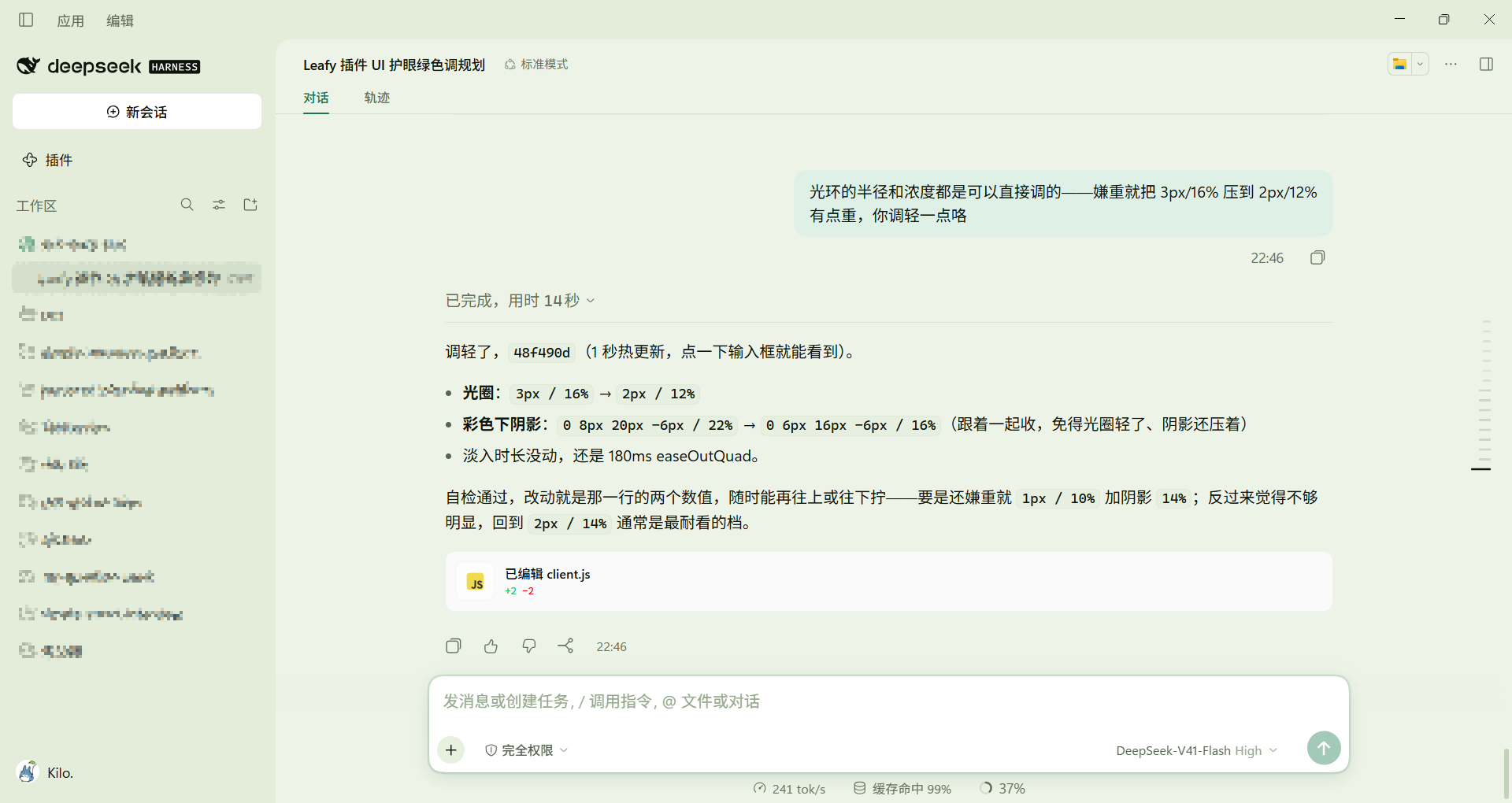
Features
- Layered greens — a mist-green canvas, raised panels, and a deeper sidebar, with emerald accents in light mode and mint in dark, instead of one flat wash of green.
- Comfortable by construction — no pure white or pure black, a single green hue family, and all body text at WCAG AA (≥ 4.5:1).
- Texture — softer corner radii, green-tinted diffuse shadows, low-contrast hairlines, and glassy menu surfaces.
- Details — mint text selection, Inter / Noto Sans SC / Cascadia Code font stacks, slim scrollbars, and restrained hover and menu motion.
- Tunable — the palette is one commented table, a self-check script guards contrast, and the style layer has a single on/off switch.
Install
dsh plugin --profile web add dsh-leafy-skin
Restart DSH once afterwards so the profile recomposes. After that, colour edits only need a page refresh (client changes hot-reload within about a second).
Usage
Install the plugin and load the app. The skin layers itself over the active theme, so light, dark, and follow-system each pick up their own variant automatically.
Customize
- Colours — the
TOKENStable inlib/client.js, grouped and commented by area. - Radii, shadows, fonts, motion — the same file, plus the small style layer below it.
- Palette only — set
ENABLE_CSS_LAYERtofalseinlib/client.jsto drop the style layer entirely. - Check your work —
node tools/check-palette.mjsvalidates token shape, the boot colour match, text and syntax contrast (including translucent surfaces and the focus ring), and the style layer's three constraints. - Coverage matrix —
node tools/audit-tokens.mjsreads the installed DSH and lists every--dsw-*token it declares: whether this skin covers it directly or through avar()chain, and how often official bundles consume it.--strictfails on tokens that are used but covered by neither the palette nor a written reason. - Stable hooks —
node tools/check-hooks.mjsconfirms thedata-*hooks the style layer relies on still exist upstream, so a DSH upgrade breaks the check instead of the look.
Uninstall
Any one of these, then restart DSH:
- Comment out the
insertentry incordis.patch.yml; - Drop
dsh-leafy-skinfromdsh.profile.bundlesin~/.dsh/profiles/<profile>/package.json; - Run
dsh plugin --profile web remove dsh-leafy-skin.
Known limitations
- The native window title bar belongs to the DSH desktop shell, not to this plugin, so it stays DSH grey for the instant before the page paints.
- Real see-through glass is impossible on Windows — the sidebar depth and translucent menus are colour layering, not blur through the window.
- Components hard-code font sizes and layout in hashed CSS modules, so this skin deliberately leaves them alone.
Changelog
See CHANGELOG.md
Contributing
Questions and suggestions are welcome as issues. Pull requests are not accepted.
License

Похожие плагины
dsh-deep-whale (maid-atelier)
small-tailqwq/dsh-deep-whale
dsh-wallpaper-engine
elysia395/dsh-wallpaper-engine
dsh-deep-whale
small-tailqwq/dsh-deep-whale
open-sea-skin
d-dev0101/open-sea-skin