dsh-editable-question-options
carvis0302/dsh-editable-question-options
Edits ask_user_question option cards before answering: select the closest option, adjust its label and details in place, and submit the original choice together with your revision.
Установка
dsh plugin --profile web add github:carvis0302/dsh-editable-question-optionsREADME
dsh-editable-question-options
English | 中文
A DeepSeek Harness Web plugin that makes ask_user_question option cards editable before you answer.
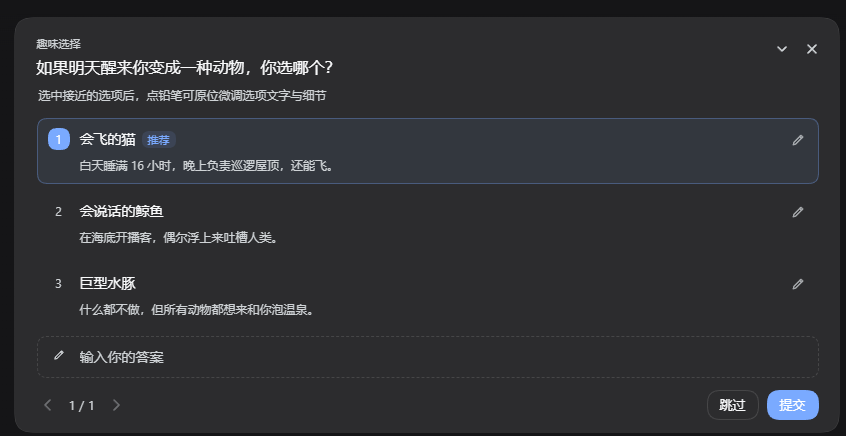
When an agent asks a choice question, the option closest to what you want often needs a small adjustment. The stock card only lets you pick an option or type a separate custom answer. This plugin adds a pencil to every option: pick the closest choice, edit its label and details in place, save, and submit the original option together with your revision.
Screenshots
Pick the closest option — every option has a pencil:
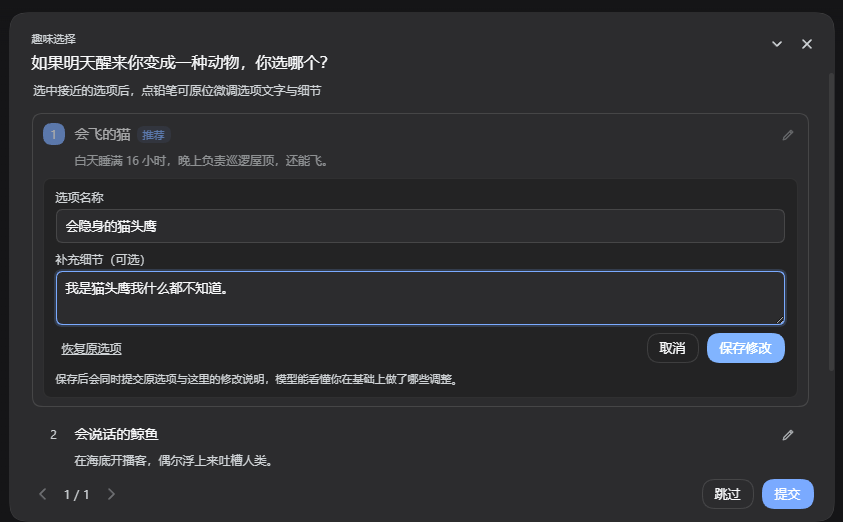
Edit the label and details in place:
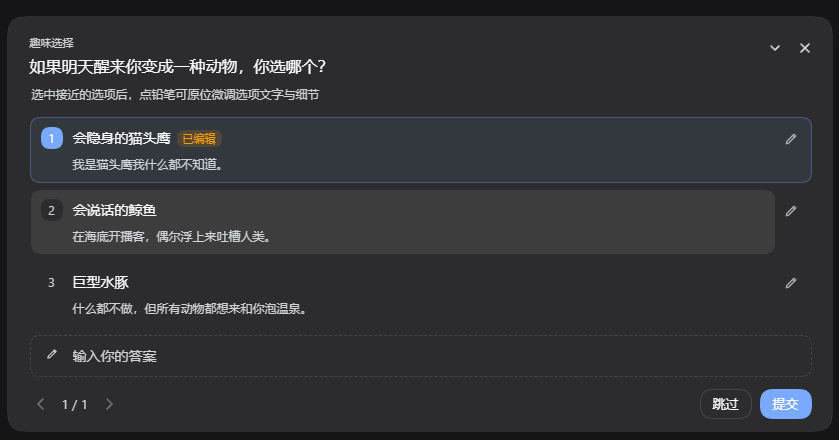
Save and submit — the option is selected and marked Edited; the answer keeps the original choice plus your revision:
What it does
- Takes over the composer for generic
ask_user_questionrequests that offer options. - Adds a pencil action to each option; it opens an inline editor for the option label and its optional description.
- Saving selects that option and shows an Edited badge on the card.
- Submitting keeps the original option label in
selectedand sends the revision in the question'scustomnote, so the model sees both the base choice and what changed. - Keeps the shipped behavior for multi-question paging, multi-select, the free-text answer, skip, the timed countdown (
Take time), minimize/close, and post-timeout answering. - Declines plan-review cards, read-only answered cards, and questions without options; those stay on the shipped UI.
- Has a small error-boundary fallback so a rendering failure can still skip the batch or close the panel instead of stranding the agent.
Install
Requires a DSH Web/Desktop build with the conversation.composer chain. Tested on DSH 0.2.1-rc.3 and 0.2.2-rc.5; other releases are unverified.
From GitHub (the repository ships plain JavaScript, so no build step or allowBuilds permission is needed):
dsh plugin --profile <profile> add github:CarviS0302/dsh-editable-question-options
Pin a release tag:
dsh plugin --profile <profile> add github:CarviS0302/dsh-editable-question-options#v1.0.0
If you prefer the Plugins page, use Plugins → Add plugin and point it at the checkout.
If an earlier local build named @local/editable-question-options is already installed, remove it first (dsh plugin --profile <profile> remove @local/editable-question-options); both bundles use the same plugin row id.
Usage
- Let an agent ask a question with options.
- Click the pencil next to the closest option.
- Adjust the option label and, if needed, the details; press Save changes.
- The option is selected and marked Edited; submit the answer as usual.
The submitted answer looks like this:
{
  "answers": [
    {
      "id": "question-id",
      "selected": ["Option B"],
      "custom": "Option \"Option B\" edited to: Option B+ stable-first, use port 8080 (based on Option B, change the service port)"
    }
  ]
}
The exact custom wording follows the UI language (Chinese or English).
Compatibility and conflicts
- No
engines.dshgate is declared. node-semver's prerelease rules make a broad range silently exclude future-rcreleases, so instead the plugin declines a question carrier it does not recognize at runtime and the shipped card takes over. Tested on 0.2.1-rc.3 and 0.2.2-rc.5; changes to the composer or question-carrier contract may still require an update. - Do not install this together with
dsh-question-noteordsh-better-choice. All three take over the same composer chain; those plugins register at priority-10, so they would win and this plugin would stay inactive. This plugin registers at priority-1, between the subagent takeover (-10) and the shipped question card (0).
Limitations
- Unsubmitted edits are component-local: reloading the page while the card is open loses the edit. The question itself remains answerable from its tool-call row.
question.detailis rendered as plain text instead of Markdown.- Only Simplified Chinese and English UI strings are registered.
- The plugin intentionally does not change the Host tool or the model-facing answer schema.
How it works
- The browser half registers one entry in the
conversation.composerchain and elects itself only for a live generic question carrier that offers at least one option. - The card is a plain-JavaScript reimplementation of the shipped generic question flow (paging, multi-select, custom answer, skip, countdown, channel handling), with an inline option editor.
- Answer items keep the original option labels in
selected; edited options are folded intocustom. This uses the existing answer protocol, so no Host changes are required. - The Host half is intentionally empty; it exists so the bundle has a host row whose
dsh.clientdeclaration loads the browser half.
Security
- No network requests, telemetry, credentials, or install scripts.
- Reads only the pending question object and submits through DSH's existing answer channel.
- No other plugin or profile configuration is modified.
中文
一个 DSH Web 插件:让 ask_user_question 的选择题卡片在提交前可编辑。
原卡片只能“选一个”或“另外填写自定义答案”。启用后,每个选项右侧会多一个铅笔按钮:先选最接近的选项,再就地修改它的名称和细节,保存后该选项被选中并显示“已编辑”;提交时保留原选项 label,并把修改说明放进该题的 custom,模型能同时看到基础选项和你的调整。
保留原有行为:多题翻页、多选、自由文本、跳过、倒计时/慢慢回答、收起面板、超时后续答。计划审批卡片、已回答的只读卡片、没有选项的问题仍由官方界面处理;另外有渲染失败兜底,可选择跳过或收起面板,不会让 agent 永久卡住。
安装
已在 DSH 0.2.1-rc.3、0.2.2-rc.5 验证。仓库内是纯 JS,无需构建,也不需要 allowBuilds:
dsh plugin --profile <profile> add github:CarviS0302/dsh-editable-question-options
固定版本:
dsh plugin --profile <profile> add github:CarviS0302/dsh-editable-question-options#v1.0.0
使用
等 agent 弹出带选项的问题 → 点最接近选项右侧的铅笔 → 修改名称/细节 → 保存 → 提交。
冲突与限制
- 不要与
dsh-question-note或dsh-better-choice同时安装:它们和本插件都接管同一个 composer 链,并且注册在 priority-10,会先赢,导致本插件不生效。本插件注册在-1(subagent 为-10、官方问题卡片为0)。 - 未提交的编辑不会持久化,刷新页面会丢失;问题本身仍可从工具调用行重新打开。
question.detail按纯文本渲染,不渲染 Markdown。- UI 文案目前只有简体中文和英文。
安全
无网络请求、无遥测、无凭据读取、无安装脚本;只读取当前待回答的问题对象,并通过 DSH 原有答案通道提交。
License and attribution
MIT. The question-card behavior was informed by the MIT-licensed DeepSeek Harness packages (notably @deepseek-ai/dsh-client-ui-user-questions); this plugin is an independent plain-JavaScript implementation and bundles no DSH build artifacts. Icon artwork is original. See NOTICE.md.
Похожие плагины
dsh-web (dsh-task-board)
zhu1090093659/dsh-web
dsh-web (dsh-web-all)
zhu1090093659/dsh-web
dsh-TUI
ccch1mneyyy/dsh-tui
dsh-web-ui (dsh-task-board)
zhu1090093659/dsh-web-ui