dsh-web-terminal
fightingfirefox/dsh-web-terminal
Claude-styled terminal panel for the DSH web GUI: agent shell commands run in a persistent real PTY with a genuine prompt, echo and exit codes, auto-open in the right sidebar and are scoped per conversation; optional live_terminal_* tools for reading, searching and screenshotting. Fork of Lancang-hzau/dsh-live-terminal (MIT); it shares its live_terminal_* tools and right-sidebar panel, so do not install it together with the upstream plugin in the same profile.
Установка
dsh plugin --profile web add github:fightingfirefox/dsh-web-terminalREADME
dsh-web-terminal
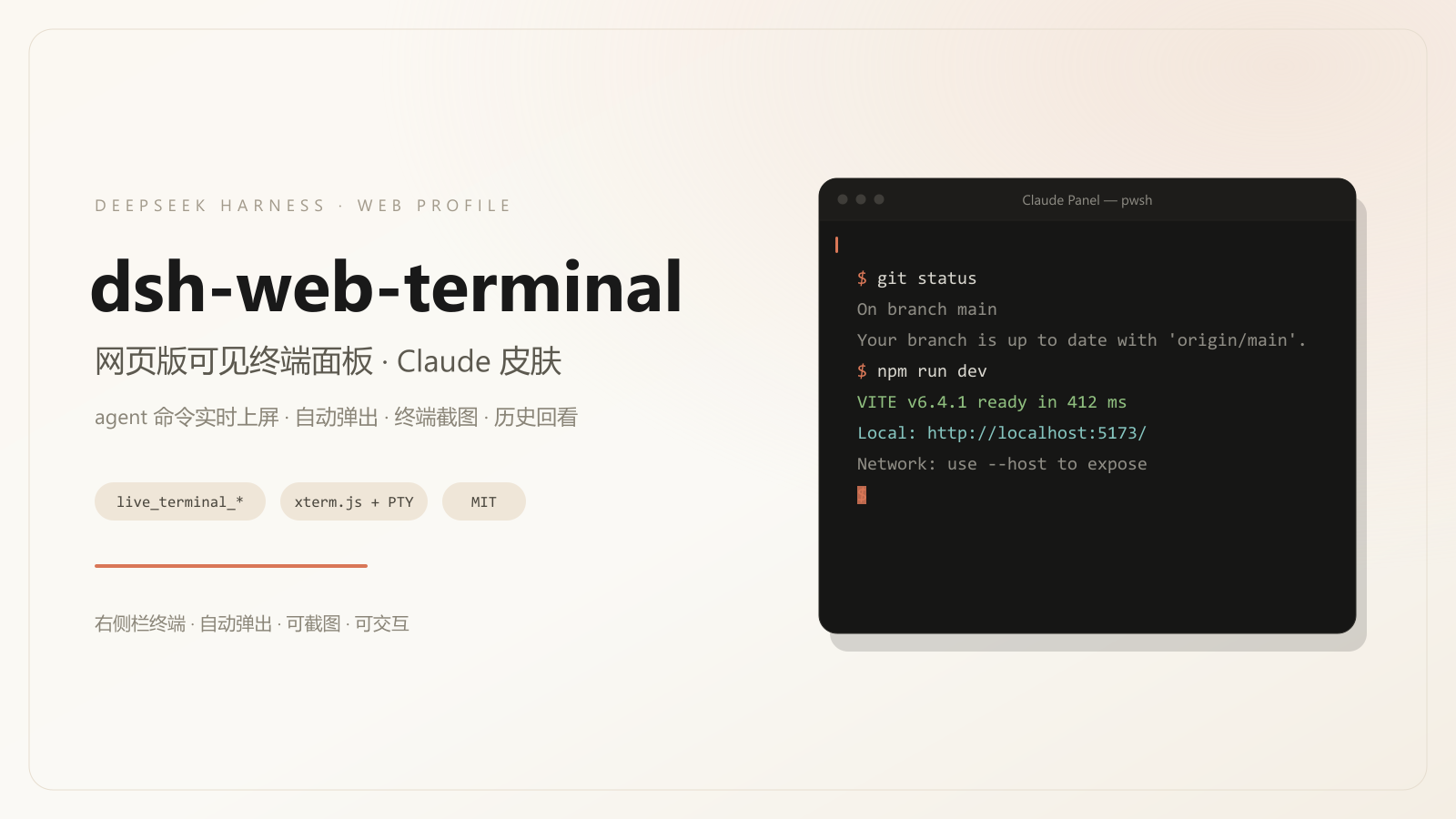
Claude 风格的可见终端面板插件,面向 DeepSeek Harness(DSH)Web profile。 agent 的前台 shell 调用直接跑在一个常驻的真实 PTY 里:提示符、命令回显、输出与退出码 全部由 shell 自己产生,右侧栏显示的就是那个终端本身;插件不拼接、不回放输出。
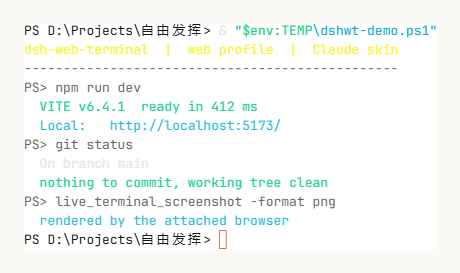
面板内终端的实际渲染(Claude ANSI 调色板,浅色主题,live_terminal_screenshot PNG 输出):
范围
- 仅面向 DSH web profile。客户端注入
@deepseek-ai/dsh-client-ui-sidebar-right, host 侧使用ctx.subprocess.spawnTerminal与webServer/connection服务。 - 桌面版(desktop profile)不在本仓库范围内,使用上游 dsh-live-terminal。
- 上游 fork:host 与客户端逻辑来自 dsh-live-terminal 1.3.1(MIT)。 本仓库改动集中在视觉层(Claude 皮肤、ANSI 调色板)、包名与安装链路。
环境要求
| 项 | 要求 |
|---|---|
| DSH | >= 0.2.1-alpha.3 < 0.3.0-0 |
| profile | web(~/.dsh/profiles/web) |
| Node.js | ^22.19.0 || >=24.0.0 |
| 系统 | Windows 为当前测试平台;macOS / Linux 复用同一 spawnTerminal 路径 |
安装
方式一:仓库内脚本(推荐)
git clone https://github.com/fightingFirefox/dsh-web-terminal.git
cd dsh-web-terminal
pwsh -NoProfile -File install.ps1
脚本行为:
- 备份 profile 的
package.json与cordis.patch.yml(带时间戳后缀) - 复制
lib/、package.json、cordis.patch.yml、LICENSE、NOTICE、icon.svg到~/.dsh/profiles/web/node_modules/dsh-web-terminal - 安装运行时依赖
@xterm/headless、@xterm/addon-serialize(仓库自带node_modules/@xterm时直接复制,否则执行npm install --omit=dev) - 在
dsh.profile.bundles中注册dsh-web-terminal - 在
cordis.patch.yml写入配置行(默认interceptShellTools: true)
安装后必须完全退出 DSH 再启动:host 插件与 client bundle 在启动时加载。
也可以直接下载 Release v1.1.0.1 的源码包,解压后执行同一份 install.ps1。
方式二:手动安装
$dest = "$env:USERPROFILE\.dsh\profiles\web\node_modules\dsh-web-terminal"
New-Item -ItemType Directory -Force $dest | Out-Null
Copy-Item lib, package.json, cordis.patch.yml, LICENSE, NOTICE, icon.svg $dest -Recurse
cd $dest; npm install --omit=dev
然后在 ~/.dsh/profiles/web/package.json 的 dsh.profile.bundles 加入
"dsh-web-terminal",并在 cordis.patch.yml 追加:
- id: dsh-web-terminal
  name: dsh-web-terminal
  config:
    interceptShellTools: true
卸载:
pwsh -NoProfile -File uninstall.ps1
安装后验证
- 重启 DSH(
dsh web),右侧栏出现终端标签页(kind:web-terminal-panel) - 在对话中触发一次前台 shell 命令(如「运行
npm test」)- 右侧栏自动打开一个
pwsh标签页,命令以PS <cwd>> <命令>的形式出现 - 命令结束后回到提示符,下一条命令在同一屏继续追加
- 右侧栏自动打开一个
- 面板内可直接键入(与 agent 共用同一个 shell);
+新建独立交互终端 - 模型侧可通过
live_terminal_list看到当前终端
行为说明
- 拦截范围:仅 agent 的前台
pwsh/bash调用。带run_in_background或sandbox_permissions的调用不拦截,保持 DSH 原生语义。 - 一个会话一个 shell:同一对话复用同一个常驻 PTY;命令串行排队,不并发写同一个 shell。
- 自动打开:出现新的可见终端时自动打开右侧栏。
- 常驻:命令结束后终端保持打开并停在提示符上,没有自动关闭计时器;
需要额外终端时用面板的
+或live_terminal_open。 - 传输:面板数据经宿主 HTTP/SSE 通道(前缀
/dsh-terminal-panel)在本地 浏览器与宿主之间传输,不访问外部服务。
终端实现
拦截路径不创建“命令终端”,而是把命令送进一个常驻交互 shell:
| 环节 | 做法 |
|---|---|
| 进程 | 每个会话每种 shell 一个 PTY(pwsh -NoLogo / bash -i),与面板共用 |
| 提示符 | 启动时注入 prompt 函数,输出 PS <cwd>> |
| 退出码 | prompt 把 $LASTEXITCODE;$? 追加到临时标记文件;标记不进入屏幕 |
| 发送 | 逐行写入并在末尾单独发送回车,模拟键盘输入,避免 PSReadLine 多打空行 |
| 完成判定 | 屏幕最后一行是提示符且静置 140 ms |
| 输出抽取 | 命令前后屏幕差异,去掉回显块与结尾提示符,仅保留命令输出 |
| 超时/中断 | 向 PTY 发送 Ctrl-C,shell 保留 |
| 回退 | 初始化或运行失败时交回内置工具,命令语义不变 |
因此面板里看到的是 shell 自己渲染的提示符、回显与提示符回归;命令历史保存在该 PTY 的滚动缓冲区中,切换会话标签不会重置内容。
配置
覆盖位置:~/.dsh/profiles/web/cordis.patch.yml 的 dsh-web-terminal 行。
| 键 | 默认 | 说明 |
|---|---|---|
interceptShellTools | true | 是否拦截 agent 前台 shell 调用 |
autoCloseCommandDelayMs | 8000 | 成功结束后自动关闭延迟;-1 永不 |
autoCloseFailedDelayMs | 30000 | 失败/超时/中止后关闭延迟 |
autoCloseToolTerminals | true | live_terminal_run 终端是否同样自动关闭 |
historySize | 20 | 历史条数上限 |
historyPath | <home>/.dsh/dsh-web-terminal/history.json | 历史文件路径;空串禁用 |
historyPersist | true | 是否落盘 |
shellPath | null | 交互 shell;null 表示依次探测 pwsh → powershell → cmd |
scrollback | 2000 | 单终端回滚行数 |
maxOutputBytes | 262144 | 单会话保留输出上限 |
maxSessions | 16 | 全局终端数上限 |
perSessionMaxSessions | 8 | 单 DSH 会话终端数上限 |
commandTimeoutMs | 180000 | live_terminal_run(wait:true) 默认超时 |
requireSandbox | false | true 时在非 danger-full-access 下拒绝接管 |
allowUnconfined | true | 是否允许未套 DSH 沙箱的 agent 终端 |
portDetection | true | 识别 loopback 端口并生成链接 |
工具接口
| 工具 | 说明 |
|---|---|
live_terminal_run | 在新终端执行命令,可等待或后台返回 |
live_terminal_screenshot | 截取终端屏幕:text / ansi / png |
live_terminal_send | 向交互终端写入文本或按键(keys、C-c、paste) |
live_terminal_read | 读取尾部 / 区间 / 全部输出;已关闭终端回退历史 |
live_terminal_search | 在保留输出中按字面量或正则检索 |
live_terminal_wait | 等待进程退出或输出匹配 |
live_terminal_expect | 等待指定模式出现 |
live_terminal_status | 返回状态、退出码、耗时、cwd、端口、沙箱标注 |
live_terminal_signal | 发送 SIGINT / SIGTERM / SIGKILL / SIGHUP |
live_terminal_resize | 调整 PTY 列数与行数 |
live_terminal_exec | 在既有交互终端中执行命令,保留 cwd/env |
live_terminal_list | 列出可见终端 |
live_terminal_history | 列出最近关闭的命令 |
live_terminal_open | 新建可见交互终端 |
live_terminal_close | 关闭终端并终止进程树 |
live_terminal_rename | 重命名终端 |
live_terminal_export | 导出 text / ansi,超长时落盘返回路径 |
安全属性
- 面板终端与 agent 终端以当前系统用户权限运行,PTY 不套用 DSH 文件沙箱;
该事实会出现在面板状态栏与工具结果的
sandbox字段中。 requireSandbox: true时,非danger-full-access环境不会接管命令, 回退到内置沙箱工具。- 升权调用(
sandbox_permissions)与后台调用不拦截,审批流程保持不变。
兼容性
- DSH
0.2.1-alpha.3起可加载;0.2.1-rc.2官方版本同样满足。 - 客户端依赖槽位
sidebar.right.pane.tab、服务sidebarRightTabs/sidebarRight;host 依赖服务subprocess、workingDirectory、webServer、connection。 - 与
dsh-claude-style主题共存:面板读取--dsw-alias-*设计 token, 浅色/深色随宿主主题切换。
排障
| 现象 | 检查 |
|---|---|
没有 live_terminal_* 工具 | dsh.profile.bundles 是否包含 dsh-web-terminal;宿主是否完整重启 |
| 面板标签页不出现 | cordis.patch.yml 是否有 - id: dsh-web-terminal 行;浏览器控制台是否有 client bundle 报错 |
| 命令不上屏 | interceptShellTools 是否为 true;是否带后台/升权参数;是否处于非 danger-full-access 且 requireSandbox: true |
| 安装被 engines 拒绝 | dsh plugin add 会校验版本;本仓库使用手工安装路径 |
构建
npm install
npm run build       # node 调 esbuild
npm run typecheck   # tsc --noEmit(需要先 npm install 装上 devDependencies)
npm run build:cli   # 受限环境下直接调用 esbuild CLI,再执行 wrap
产物:
lib/client.js:esbuild 打包后包在window.__ModuleLoader__.load({ id, factory })信封中lib/index.js+lib/host/*.js:host 半侧,Cordis 插件
目录:
client-src/   浏览器半侧(React + xterm,样式与主题见 styles.ts、theme.ts)
lib/host/     宿主半侧(PTY 注册表、拦截、工具、HTTP/SSE)
lib/index.js  Cordis 插件入口
tools/        构建脚本
docs/         图片与市场投稿材料
许可与来源
- 上游:dsh-live-terminal(LANCANG,MIT)
- 设计语言:参考 dsh-claude-style(Nwflower,MIT)
- 终端引擎:xterm.js(MIT)
Похожие плагины
dsh-web (dsh-task-board)
zhu1090093659/dsh-web
dsh-web (dsh-web-all)
zhu1090093659/dsh-web
dsh-TUI
ccch1mneyyy/dsh-tui
dsh-web-ui (dsh-task-board)
zhu1090093659/dsh-web-ui