dsh-composer-plus
furkancak1r/dsh-composer-plus
Composer Plus for DeepSeek Harness (dsh): git Changes panel, ↑/↓ input history, Shift+Tab /plan, one-click Continue, queue drag-and-drop, deeplinks, Auto Review allow-for-chat, notifications, 11 UI languages, auto-update
Установка
dsh plugin --profile web add github:furkancak1r/dsh-composer-plusREADME
dsh-composer-plus — Composer Plus for DeepSeek Harness


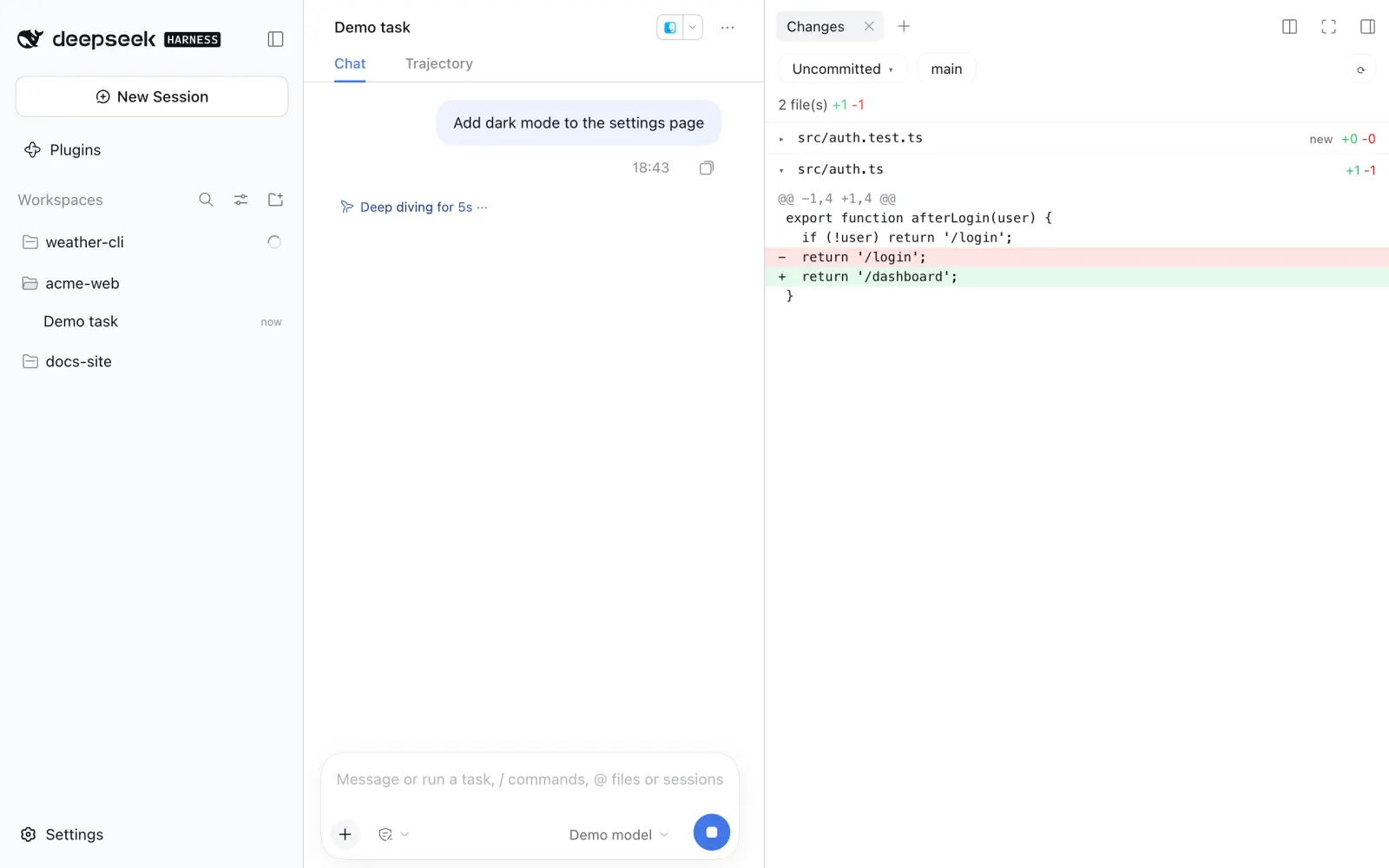
Codex-style quality-of-life features for the DeepSeek Harness (dsh) desktop and web UI: a Changes panel, project status in the sidebar, input history, a plan-mode shortcut, one-click Continue, queue drag-and-drop, session deeplinks, per-chat Auto Review grants, background notifications and automatic updates.
In one line: a single DeepSeek Harness plugin (npm dsh-composer-plus, shown as Composer Plus in Settings → Plugins) that adds a git Changes panel, ↑/↓ input history, a Shift+Tab /plan toggle, one-click ▶ Continue, drag-and-drop queue reordering, Copy deeplink, Auto Review “Allow for this chat”, background notifications, 11 extra interface languages and automatic updates.
Unofficial community plugin. The only network calls are the update check (GitHub releases and the npm registry); switch off Automatic updates to stop them at startup.
Install
Desktop app: Settings → Plugins → Add plugin → enter dsh-composer-plus → Enable now.
You can also paste https://github.com/furkancak1r/dsh-composer-plus instead of the npm name.
Web / CLI profile:
dsh plugin --profile web add dsh-composer-plus
Then restart dsh. (The CLI can't install into the desktop profile; the app manages it.)
dsh's pnpm skips versions younger than 24 hours. Right after a release, add the version:
dsh-composer-plus@1.2.1.
Features
| Feature | How to use it | Screenshot |
|---|---|---|
| Changes panel | Right sidebar → + → Changes. Pick Uncommitted, Unstaged, Staged or Branch to see changed files with +/- counts; click a file for its diff. Last Turn opens dsh's own review of the latest turn. |  |
| Input history | In an empty composer, press ↑ / ↓ to walk through messages you sent, like a terminal. |  |
| Plan mode shortcut | Shift+Tab adds /plan to the start of the draft (press again to remove it). If the chat is already in plan mode, Shift+Tab leaves it. |  |
| One-click Continue | After a stopped, failed or cut-off turn, an empty composer shows ▶. One click resumes from the existing conversation without writing in the input or adding a visible chat message (the model receives a short hidden “continue from where it stopped” note, because some providers, such as Claude, reject a request that ends on an assistant reply). A completed turn keeps the regular Send button. |  |
| Queue drag-and-drop | Queued messages get a grip (⠿). Drag to reorder, or focus the grip and press ↑ / ↓. Esc cancels. |  |
| Copy deeplink | Right-click a chat in the sidebar → Copy deeplink. Paste the dsh-session:… link into another chat to attach that chat as read-only context. |  |
| Allow for this chat | When Auto Review asks you, the approval card gets Allow for this chat: the same tool in the same chat is allowed from then on, with any arguments. A header chip lists the grants and revokes them. Grants survive a restart. |  |
| Project status | A project row in the sidebar shows the same spinner / waiting / done marker as its chats, so a collapsed project still tells you a chat inside is working or needs you. Hover it for details. |  |
| Active projects first | When a chat starts running or needs you, its project moves to the top of the sidebar with dsh's own row animation (the same move as dragging it there). Finished projects stay where they are; drag them anywhere as usual. Moves are saved to dsh's project order, so turning this off keeps the current order. | |
| Background notifications | While dsh is in the background you get a notification when a turn finishes (first line of the reply), or when a chat really waits for you: an approval (tool name), an answer (the question) or a plan review. A request must still be open 1.5 s later, so approvals answered automatically (Auto Review grants, other plugins) stay silent, and a notification is withdrawn as soon as its request is answered. The Dock/taskbar badge counts waiting chats. Clicking opens that chat. |  |
| 11 extra UI languages | Settings → Composer Plus → Application language switches the whole dsh interface to Türkçe, Español, Português (Brasil), Français, Deutsch, Русский, 日本語, 한국어, Bahasa Indonesia, Tiếng Việt or हिन्दी (see below). |  |
| Automatic updates | When dsh starts, the plugin checks the latest GitHub release. If it is newer and already on npm, it installs that exact version through dsh's own plugin manager (the same path as Settings → Plugins) and notifies you. Restart dsh to load it. Settings → Composer Plus → Composer Plus updates shows the version and has Check for updates / Update now. |  |
Buttons, tooltips, notices and notifications follow the selected dsh language (see Application language below).
Settings
Every feature can be switched off on its own: dsh Settings → Composer Plus. Each row has a small screenshot: hover it for a larger preview, click it to open it full size (Esc closes). The Search features box at the top filters the page by name or description (any language, case- and accent-insensitive); Esc clears it. Each row has a switch and a short description; changes apply immediately, without a restart, and are remembered on that device. Everything is on by default.
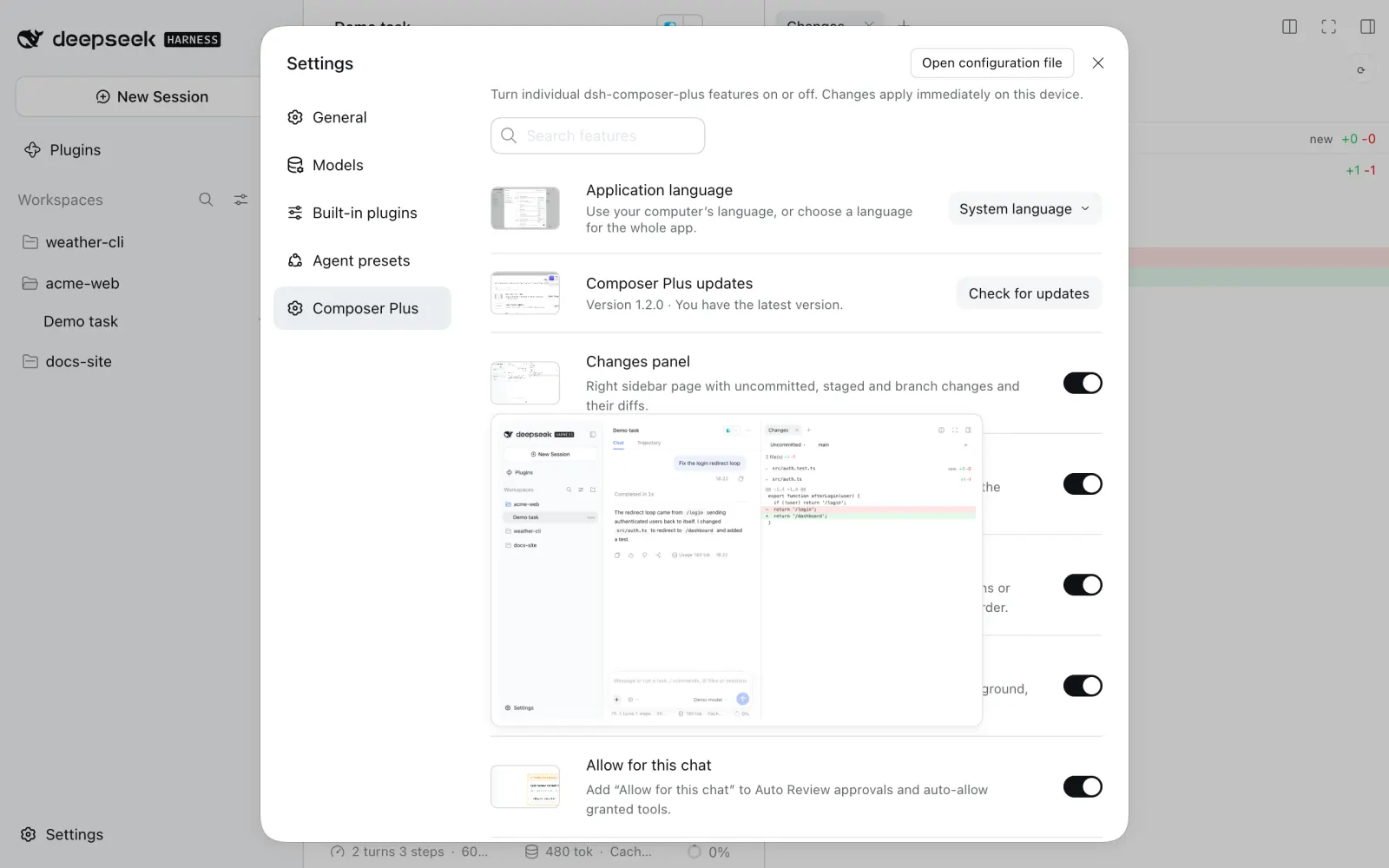
Application language
Open Settings → Composer Plus → Application language and choose System language or one of 13 languages:
English · 中文 · Türkçe · Español · Português (Brasil) · Français · Deutsch · Русский · 日本語 · 한국어 · Bahasa Indonesia · Tiếng Việt · हिन्दी
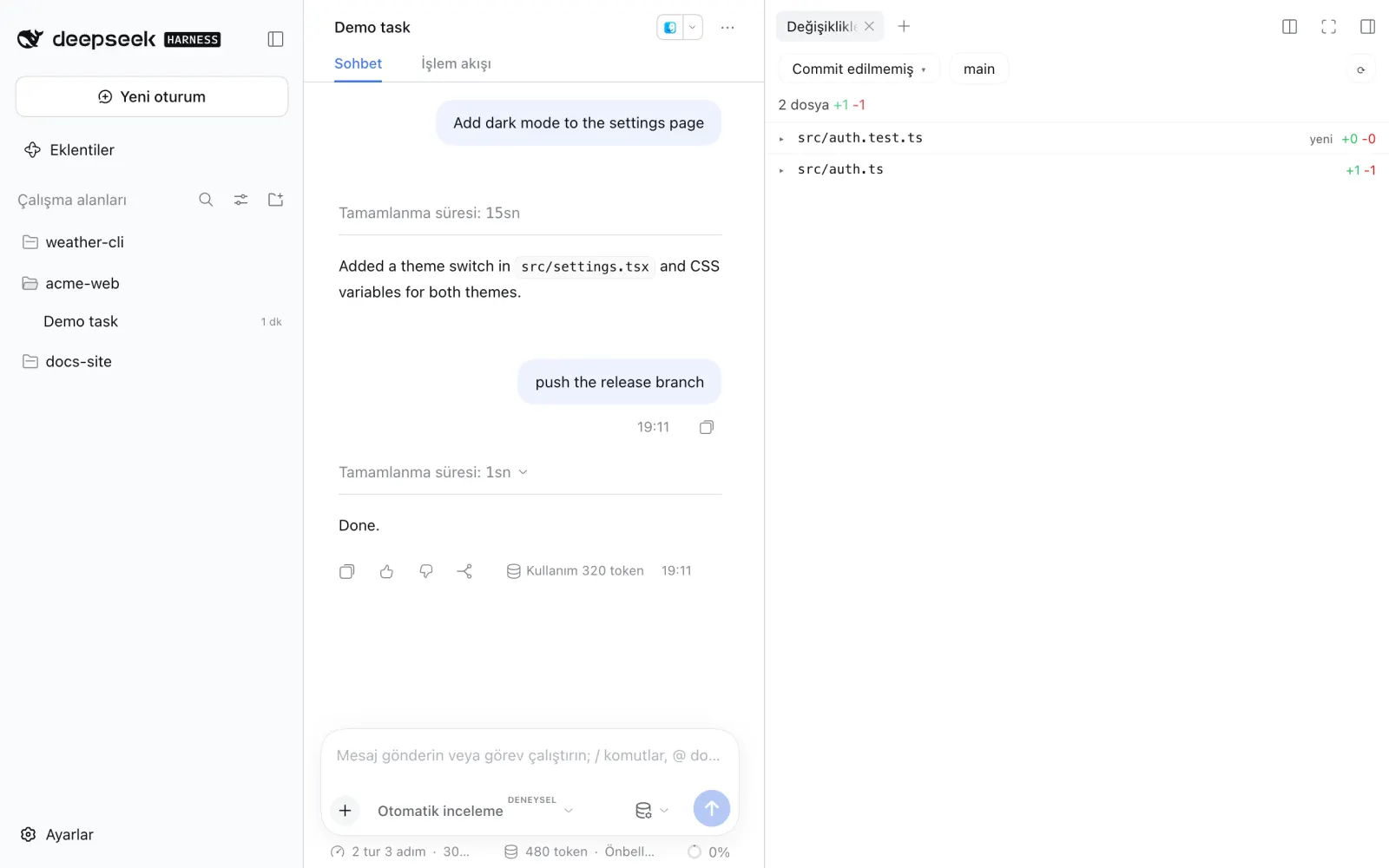
The whole app switches immediately. The choice is dsh’s own saved locale.preference (the same one as General → Language), so it survives restarts. System language clears that choice: the desktop app follows the OS language, the web UI the browser language, and an unsupported language falls back to English. Installing the plugin never overrides a language you already picked.
Each pack covers all 2,872 UI strings of dsh 0.2.0-rc.2 and 0.2.1-alpha.2 (chats, sidebar, settings, approvals, schedules, file previews, plugin manager), the plugin’s own controls, and the popular dsh-rewind plugin. Not translated: your messages, model output, code, slash-command names (/plan, /compact), provider-owned labels such as the High reasoning effort, other plugins’ texts, and the desktop app’s native menus/update dialogs (dsh ships those in English/Chinese only). Strings added by a newer dsh show in English until the packs are updated. If another plugin already provides a language, that plugin keeps it.
Keyboard shortcuts
| Key | Where | Action |
|---|---|---|
↑ / ↓ | empty composer | previous / next sent message |
Shift+Tab | composer | add/remove /plan , or leave plan mode |
↑ / ↓ | focused queue grip | move the queued message |
Esc | while dragging | cancel the move |
An open / or @ menu keeps these keys for itself.
Compatibility
Tested on dsh 0.2.0-rc.2 (desktop and web) and 0.2.1-alpha.2 (web). CI runs the tests on every push.
Privacy and security
-
Continue: the authenticated local endpoint resumes only the last interrupted turn, rejects stale or duplicate requests, and preserves the existing approval hooks. It does not send a new user message.
-
Changes panel: git runs read-only on your machine, in the chat's own folder, through dsh's authenticated
/apichannel. It never commits, stages or fetches, and only shows paths git itself listed. -
Allow for this chat: grants are stored in
$DSH_HOME/storages/dsh-composer-plus/grants.json(owner-only permissions). A grant covers one exact tool in one chat. If that tool can write, the grant covers any write too. Revoke it from the header chip. -
Auto Review still runs on every call; review failures are never auto-allowed.
-
Updates: the Host half asks
api.github.comfor the latest release andregistry.npmjs.orgfor that exact version; nothing about you or your chats is sent. Installation uses dsh's plugin manager (pnpm add dsh-composer-plus@<version>), so dsh's own registry, script and version-compatibility checks apply. Pre-release tags and older versions are never installed.
Troubleshooting
- No notifications on macOS: System Settings → Notifications → DeepSeek Harness → allow. Choose Alerts to keep them on screen.
- ▶, queue grips, project status, Allow for this chat or right-click missing after a dsh update: these attach to dsh's current HTML because dsh has no slot for them yet. If dsh changes that markup they hide themselves; nothing else breaks. Please open an issue.
- "Update failed" or "not installed from npm": a copy linked from a local folder or renamed can't update itself; reinstall
dsh-composer-plusfrom Settings → Plugins. Otherwise the message shows the first line of pnpm's error; Check for updates retries. - Install fails right after a release: add the version (
dsh-composer-plus@1.2.1), see the install note above.
Limits
-
Message-free Continue relies on dsh’s
agent/pre-step→agent/requestlifecycle. Recheck compatibility when upgrading dsh. -
dsh's queue has no
moveaction, so a reorder rewrites the affected rows' text. If the agent picks up a row mid-move, the move is undone and nothing is lost. Messages with images or files can't be moved. -
An update needs a dsh restart to take effect; the plugin never restarts dsh for you. Web/CLI profiles without dsh's plugin manager only report a new version.
-
A deeplink works inside chats; clicking it does not open the chat.
-
A notification sent before a restart only brings dsh to the front when clicked.
-
Active projects are moved with dsh's saved project order, so the new order is kept after a restart. Chats outside any project ("Ungrouped") can't be moved; dsh always lists them last.
-
Built-in support is requested upstream: queue
movein #773, a Continue state in #9269.
FAQ
How do I add a Changes / git diff panel to DeepSeek Harness? Install dsh-composer-plus, then right sidebar → + → Changes.
How do I get ↑/↓ message history in the dsh composer? Install this plugin; in an empty composer ↑ / ↓ walk through messages you sent.
How do I continue a stopped or failed dsh turn without typing "continue"? With this plugin the Send button becomes ▶ after a stopped, failed or cut-off turn; one click resumes it.
How do I reorder queued messages in dsh? Drag the ⠿ grip on a queued message, or focus it and press ↑ / ↓.
How do I stop Auto Review asking about the same tool in one chat? Click Allow for this chat on the approval card. It covers that exact tool in that chat only; revoke it from the header chip.
How do I get macOS / Windows notifications when a dsh task finishes or needs approval? Keep Background notifications on (default) and allow notifications for DeepSeek Harness in the OS settings.
How do I switch the DeepSeek Harness interface to Turkish, Spanish, Japanese…? Settings → Composer Plus → Application language.
Does it work with the desktop app? Yes: Settings → Plugins → Add plugin → dsh-composer-plus. Tested on dsh 0.2.0-rc.2 (desktop and web) and 0.2.1-alpha.2 (web).
Development
Screenshots are regenerated from a throwaway dsh with a fake model and made-up demo projects (acme-web, weather-cli, docs-site), so they contain no real data. Feature thumbnails go to assets/features/ (shipped, shown in Settings); README-only pictures go to docs/images/ (not in the npm package):
PLAYWRIGHT=/path/to/playwright node scripts/capture-screenshots.mjs /path/to/dsh/lib/bin.js
npm run build:locales # after editing locales/<id>.json
npm test
The tests run the real client.js against a fake React/DOM and the real index.js (Host half) against a temporary git repository. node test/browser-history.mjs '<dsh web URL with ?token=…>' checks input history in a real browser against a throwaway dsh web with its own DSH_HOME.
Language packs are data-only JSON in locales/<id>.json, embedded into the single client entry by npm run build:locales (no translation service or runtime download). npm test checks every pack for full key coverage, identical placeholders and line breaks, and the system/override behaviour. For isolated real-app checks with a locally installed Playwright:
PLAYWRIGHT=/path/to/playwright node test/browser-language.mjs /path/to/dsh/lib/bin.js
License
MIT
Похожие плагины
dsh-web (dsh-git-graph)
zhu1090093659/dsh-web
dsh-web-ui (dsh-git-graph)
zhu1090093659/dsh-web-ui
codex-guard (dsh)
akimiya-z/codex-guard
dsh-file-review
left0ver/dsh-file-review