dsh-ui-peak-rate
haoliangwu/dsh-ui-peak-rate
Install
dsh plugin --profile web add github:haoliangwu/dsh-ui-peak-rateREADME
dsh-ui-peak-rate
DSH web composer 🔥 2× peak-rate badge — shows when the session's model selection matches a DeepSeek peak-rate route during DeepSeek peak hours.
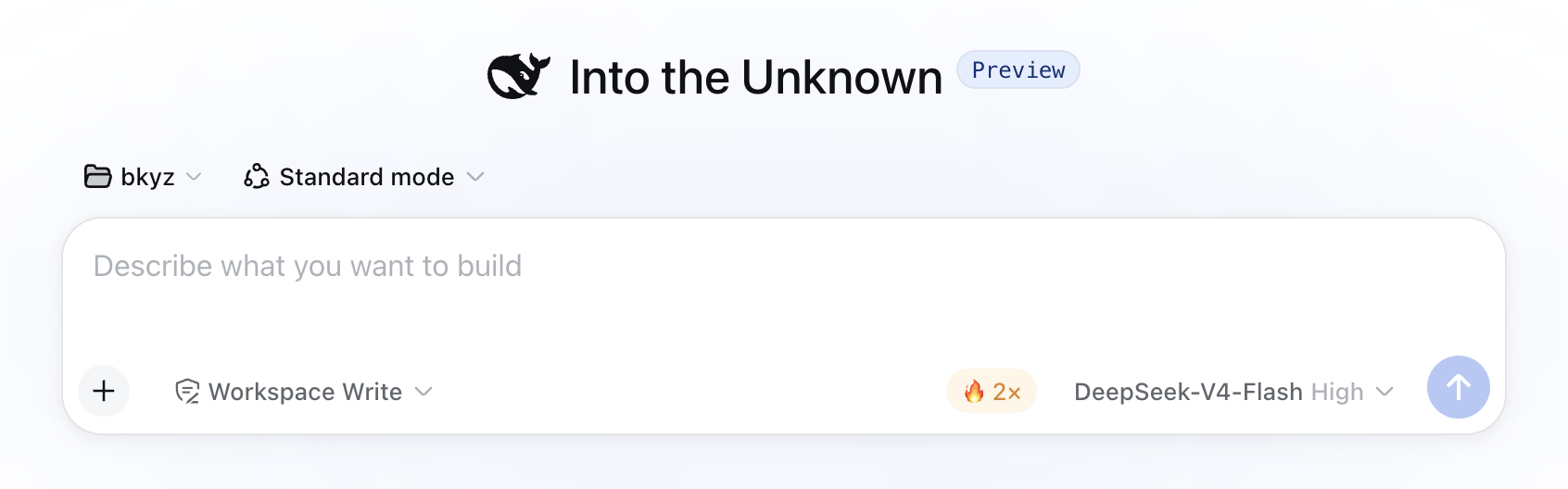
A web client plugin for DeepSeek Harness. It paints a 🔥 2× pill in the composer's trailing input row, just left of the model trigger, when both of these hold:
- The session's current model selection matches the DeepSeek peak-rate policy (see Match rule).
- The current UTC time is inside a DeepSeek peak window (by default
01:00–04:00 UTCor06:00–10:00 UTC, configurable).
Otherwise the badge is hidden entirely — no layout cost.
Install
dsh plugin --profile web add github:haoliangwu/dsh-ui-peak-rate
Built lib/ is committed, so the git install is one line — no prepare script, no allowBuilds permission. Restart dsh --profile web after install (bundle layer stacks compose at boot).
Configure
All three fields default to the DeepSeek peak-rate policy; override any of them in your profile's cordis.patch.yml (~/.dsh/profiles/web/cordis.patch.yml):
- id: dsh-ui-peak-rate
  config:
    # Provider ids whose sessions may show the badge (default: ['deepseek-official'])
    providers:
      - deepseek-official
    # Peak windows [startHour, endHour) UTC, left-closed right-open (default: [[1,4],[6,10]])
    peakWindows:
      - [1, 4]
      - [6, 10]
    # Peak multiplier vs off-peak rate (default: 2)
    multiplier: 2
An empty peakWindows: [] disables the badge entirely (always off-peak). Invalid windows (start >= end, start < 0, or end > 24) fail loud at load.
Disable the badge entirely:
- id: dsh-ui-peak-rate
  disabled: true
The host half reads Config (schemastery) and exposes it to the browser half through a Connection RPC channel (/peak-rate endpoint config). No transport carries host plugin Config into the browser context automatically; the RPC channel is the explicit transport.
Match rule
The badge shows when the session's current model selection satisfies both of:
state.current.provider ∈ Config.providers(provider match, default['deepseek-official']), ANDstate.current.modelcontainsdeepseek(case-insensitive).
The model-id check narrows the provider list so a non-DeepSeek model routed through a listed provider does not trigger the badge. To match a provider whose model ids do not contain deepseek, neither condition holds and the badge stays hidden — extend Config.providers only when the route actually serves DeepSeek peak-priced models.
How it works
- Peak state is a pure client-side clock fact.
isPeak(date, windows)returns true iff the UTC hour is inside one of the configured windows (left-closed, right-open). The component re-evaluates every 60 s through asetIntervalcleared on unmount, and re-evaluates immediately when the config arrives. - The peak-rate policy is fetched once from the host through a Connection RPC channel. The host half registers
ctx.connection.rpc.handle('/peak-rate', ...), readsConfig(schemastery:providers,peakWindows,multiplier) from the profile'scordis.patch.yml, and returns it on theconfigendpoint. The browser half callsctx.connection.rpc.call('/peak-rate', 'config', {})once and exposes the result as a reactive source (useSyncExternalStore); the badge stays hidden until the fetch settles. - The badge and tooltip render from locale dictionaries with config values interpolated. The badge text is
🔥 {multiplier}×; the tooltip lists the formatted windows and multiplier ({windows}/{multiplier}placeholders, e.g.01:00–04:00, 06:00–10:00). - The component reads the session's current selection through
ctx.modelDirectories.directoryFor(sessionId).store(the same instanceModelSelectreads), subscribes viauseSyncExternalStore, and applies the match rule. - No model-visible output, no session events, no durable state. The plugin reads only the clock, the existing model-directory store, and the one-shot policy fetch. The peak schedule is a published 2026 constant; a DeepSeek schedule change requires a plugin update to the default
peakWindows.
Build from source
pnpm install
pnpm build         # emits lib/index.js, lib/invariant.js, lib/client.js + sourcemaps
lib/ is committed to the repo so git installs work without a build step. After changing source, run pnpm build and commit the updated lib/.
License
MIT
Related plugins
DeepSeek-Balance-Whale-Widget
meteornox/deepseek-balance-whale-widget
dsh-context
bowenliang123/dsh-context
dsh-cost-meter
han-1413141/dsh-cost-meter
dsh-damage-pulse
wssfk12138/dsh-damage-pulse