dsh-open-in-ide
harrithy/dsh-open-in-ide
Open file references from the DeepSeek Harness chat output in your IDE (VS Code family or JetBrains, Visual Studio Code by default), positioned at the referenced line, in its project window, brought to the foreground, and self-updating from GitHub.
Установка
dsh plugin --profile web add github:harrithy/dsh-open-in-ideREADME
dsh-open-in-ide


English | 中文
Open file references from the DeepSeek Harness chat in your IDE — Visual Studio Code by default, or any detected VS Code family / JetBrains IDE — positioned at the referenced line, instead of the in-app document preview.
A DeepSeek Harness plugin (bundle + browser half). Tested with DeepSeek Harness
0.2.1-rc.2 (Desktop / Web profile).
Supported editors, detected on the machine hosting the Harness:
- VS Code family (
--goto <path>:<line>:<column>): Visual Studio Code, VS Code Insiders, Cursor, Windsurf. - JetBrains family (
--line <line> <path>): IntelliJ IDEA, PyCharm, WebStorm, GoLand, CLion, PhpStorm, Rider, RubyMine, DataGrip, RustRover.
Where to find it
After installing the bundle, reload the Harness page once.
1. Enable it — Settings → Plugins → Installed plugins (已安装插件)
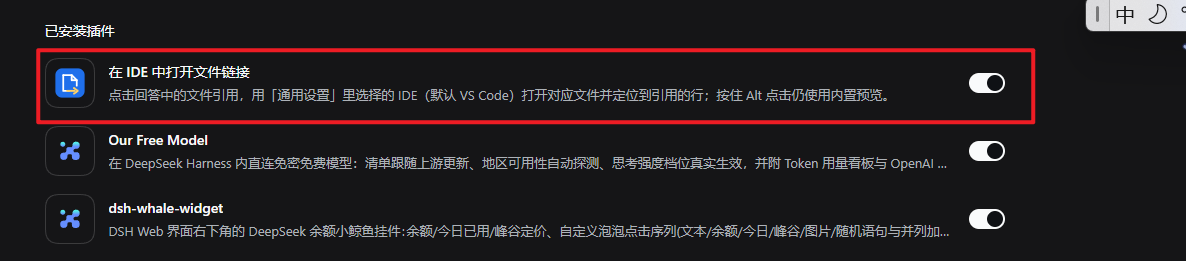
The bundle appears as “Open File Links in Your IDE” (Chinese UI: “在 IDE 中打开文件链接”) with its on/off switch.
2. Choose your IDE — Settings → General → “IDE for file links” (打开文件的 IDE)
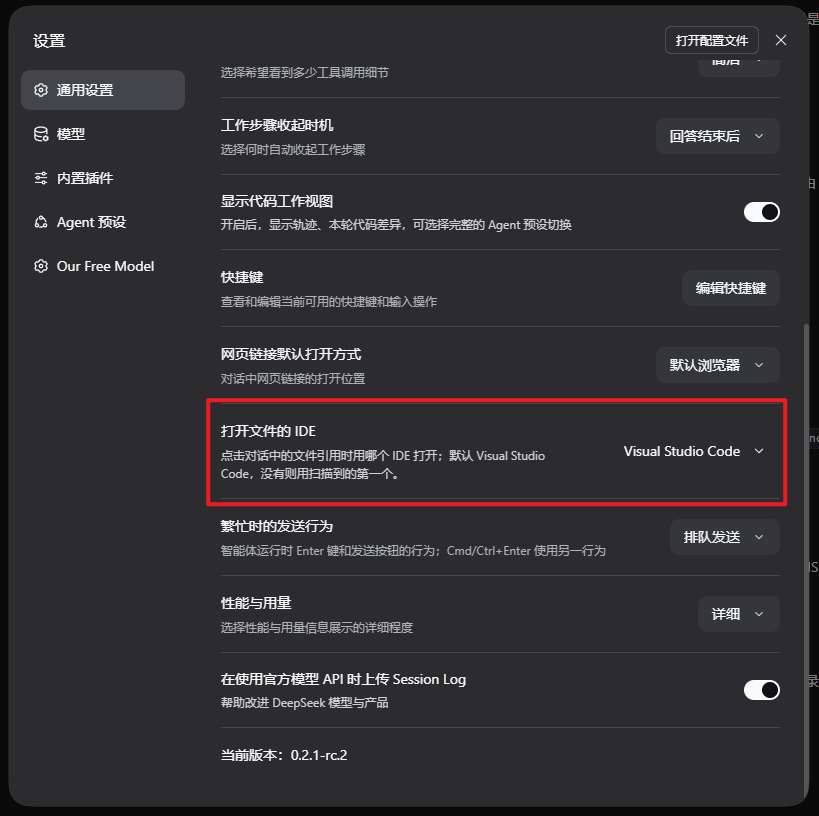
The row lists only the IDEs detected on the machine hosting the Harness; Visual Studio Code is the default, and the first detected IDE is used when VS Code is not installed.
Features
- Plain click on a file-reference chip in an assistant message opens that file in the selected IDE at the referenced line.
- The file's project opens with it. For the VS Code family the host finds the
nearest project root (
.git/.hg, elsepackage.json,Cargo.toml,pom.xml, …) and passes it as a folder argument, so VS Code opens or reuses the project window instead of dropping a loose file into the most recently used window. A file without any project marker opens as before. - After opening, the editor window is brought to the foreground (and restored
if it was minimized). Windows uses a small Win32 helper to defeat the
background-process foreground lock; macOS activates via
osascript; Linux trieswmctrl/xdotool. - Two editor families: VS Code / VS Code Insiders / Cursor / Windsurf are
launched with
--goto; JetBrains IDEs (IntelliJ IDEA, PyCharm, WebStorm, GoLand, CLion, PhpStorm, Rider, RubyMine, DataGrip, RustRover) with--line <line> <path>. The browser only names an editor id from a fixed set. - Settings → General → “IDE for file links” lists only the IDEs the host can
actually launch, detected by scanning known install locations and
PATHon every request. The default is Visual Studio Code; when it is not installed the first detected IDE is used, and a saved choice that is no longer installed is reconciled the same way. - Clicking a directory reference opens it as a workspace folder.
- Alt / Shift / Ctrl + click keeps the shipped in-app preview.
- A toast names the target and the IDE, including failures (missing file, uninstalled editor, launch error).
- No build step, no dependencies, no telemetry. The browser half ships as the
package's
./clientexport; the host half only uses Node built-ins.
Requirements
- A DeepSeek Harness Web GUI (Desktop or a
webprofile). The host composition must providewebServer,connection,subprocess,fs, andsessions; the desktop and web profiles do. - At least one supported IDE:
- VS Code family: Visual Studio Code, VS Code Insiders, Cursor, Windsurf.
- JetBrains family: IntelliJ IDEA, PyCharm, WebStorm, GoLand, CLion, PhpStorm, Rider, RubyMine, DataGrip, RustRover.
- Compatibility note: the browser half keys off the shipped chat's
file-reference chip markup (
_fileMention_*buttons with the authored path intitle). A future Harness UI change may need an update here; pin or report the Harness version when filing an issue.
Install
The plugin is published on npm as
dsh-open-in-ide and is a
standard DSH bundle, installed through the Plugin Manager (Settings → Plugins)
or the plugin_manager tool.
From npm (easiest)
In the Harness, install the bundle by name. Either use
Settings → Plugins → install with the spec dsh-open-in-ide, or ask the
agent to run the plugin_manager tool with action: install_bundle and
target: "dsh-open-in-ide". The profile package manager can also do it:
dsh plugin --profile <profile> add dsh-open-in-ide
From a git checkout (enables self-update)
A local checkout install links the directory, so the plugin can update itself from GitHub hot, and later edits apply live.
-
Clone the repository:
git clone https://github.com/harrithy/dsh-open-in-ide.git -
Install the bundle from that directory. In the Harness, either use Settings → Plugins → install, or ask the agent to run the
plugin_managertool withaction: install_bundleand this absolute directory astarget. Alink:install from the profile's package manager works too:dsh plugin --profile <profile> add link:/path/to/dsh-open-in-ide -
Reload the Harness page (
F5). The bundledsh-open-in-ideand rowopen-in-ideappear in Plugin Manager, and a new row appears in Settings → General (see Where to find it).
Both installs get the same features; only the self-updater follows the install kind: a linked checkout pulls from GitHub and reloads in place, while an npm install is updated from the Plugin Manager.
Auto update
When the plugin is installed from a git checkout (a link: install, as
described above), it can update itself while Harness keeps running:
- The page checks the configured repository once per load (
updateCheck, default on), and the Settings → General → “Plugin updates” row has a check button at any time. - When the remote has new commits the row shows the new version and an
Update button. Updating runs
git pull --ff-onlyin the checkout and then asks HMR to reload the plugin in place — no Harness restart. - The updater only trusts the configured
updateRepositoryorigin. It refuses a dirty working tree, a foreign origin, and non-fast-forward histories. - Installs that are not git checkouts (tarball, registry copy) are reported as such; update those through the Plugin Manager.
This needs git on PATH and network access to the repository.
Usage
- Click a file reference such as
src/app.ts:42in an answer. The file opens in the selected IDE at line 42. - Choose the IDE in Settings → General → “IDE for file links”. The row lists the IDEs detected on the machine hosting the Harness.
- The choice is stored in the browser (
localStorage, keydsh.open-in-ide.editor); the legacy key of the plugin's former name is read once for migration. - Line/column come from a
:42/:42:7suffix in the chip label. The harness exposes only the path as a DOM attribute, so the label is the line channel. Absolute and workspace-relative paths are both accepted; relative paths resolve against the Session's workspace directory on the host. - The column (when present) is only forwarded to VS Code-family launchers; JetBrains launchers receive the line only.
- Directories open as workspace folders.
Configuration
The row config lives in cordis.patch.yml; override it in the profile's own
cordis.patch.yml to tune behavior (the user patch layer survives plugin
updates):
- id: open-in-ide
  config:
    command: 'C:\Users\me\AppData\Local\Programs\Microsoft VS Code\bin\code.cmd'
    reuseWindow: true
| Field | Default | Meaning |
|---|---|---|
command | '' | Explicit editor CLI: a bare PATH name (code) or an absolute path (...\bin\code.cmd). When set it wins over the Settings selector; empty keeps the selector authoritative. |
commandKind | vscode | Launcher contract used for a configured command: vscode (--goto) or jetbrains (--line). Ignored while command is empty. |
editor | vscode | Fallback IDE when a request carries no selection: any supported id, e.g. vscode, cursor, idea, pycharm, webstorm. |
reuseWindow | false | Add --reuse-window so the file opens in the most recent window (VS Code family only). VS Code already routes files into a window that has the containing folder open. |
openProjectFolder | true | Pass the file's project root as a folder argument so VS Code opens or reuses the project window (VS Code family only). Set false to let VS Code decide. |
projectMarkers | built-in list | Override the project-root markers: file or directory names without separators, e.g. ['.git', 'package.json', 'Cargo.toml']. |
focusWindow | true | Bring the editor window to the foreground after opening it (restore if minimized). Disable to let the OS decide. |
focusDelayMs | 350 | Delay before the first foreground attempt; when a cold-started editor has no window yet the plugin retries a few times. |
updateCheck | true | Check the repository for a newer version once per page load. The settings row's check button works regardless. |
updateRepository | this GitHub URL | Repository the updater is allowed to pull from; a different origin is refused. |
updateDirectory | plugin directory | Checkout directory to update (defaults to the directory this plugin was loaded from). |
extraArgs | [] | Extra arguments placed before the target arguments, e.g. ["-n"]. |
launchWatchMs | 2000 | Early-failure watch window for the detached launcher; a launcher still running when it closes counts as launched. |
Detection and launch resolution
The host serves two routes, both fenced by the composition's connection trust checks (Host/Origin fence plus browser authentication):
GET /open-in-ide/editors— probes each supported editor id on every request (cheap existence checks plus in-processPATHlookups) and answers which ones this host can launch.POST /open-in-ide/open— validates{ sessionId, path, line, column, editor }, resolves the path in the Session's workspace, then launches the selected editor detached with the family's contract and a credential-scrubbed environment.
Detection order:
- Windows:
- VS Code family: known install roots under
%LOCALAPPDATA%/%ProgramFiles%, then the IDE's CLI name onPATH. A machine where Cursor registered itself ascodestill resolves thevscodeid to the real VS Code install, because known roots are tried beforePATH. - JetBrains: Toolbox launcher scripts
(
%LOCALAPPDATA%\JetBrains\Toolbox\scripts\<cli>.cmd), Toolbox apps (…\Toolbox\apps\<app>\ch-<n>\<version>\bin\<exe>), standalone installs (%ProgramFiles%\JetBrains\<Product 2024.x>\bin\<exe>), then the CLI name onPATH.
- VS Code family: known install roots under
- macOS: VS Code family uses the
.appbundle'sContents/Resources/app/bin/<cli>; JetBrains uses<App>.app/Contents/MacOS/<cli>. Both fall back toPATH. - Linux: known install paths (
/opt/...,/usr/bin/..., snap paths) and the JetBrains Toolbox scripts directory under~/.local/share/JetBrains, thenPATH.
The browser never sends a command line: it names an editor id from a fixed set, and the host resolves it to an executable it verified.
Limits
- Only the shipped Markdown file-reference chips are redirected. Tool-call card file names, delivered-file cards, and the document preview keep their own openers.
- Supported editors and their launcher contracts: VS Code family
(
--goto <path>:<line>:<col>) and the JetBrains family (--line <line> <path>). A customcommandmust accept the contract named bycommandKind. - Detection covers the editor ids listed above. A portable build not on
PATH, or an editor outside those families, needscommand. - The column (when present) is only forwarded to the VS Code family; JetBrains launchers receive the line only.
- Window raising is best-effort: Windows uses a Win32 helper (an unusual
foreground policy or security tool can still refuse the change), while macOS
and Linux depend on
osascript/wmctrl/xdotoolbeing available. - Project-folder injection is heuristic and VS Code-family only: it walks up to
the nearest
.git/.hgor manifest marker. JetBrains IDEs keep their own project management and receive only the file/line; no folder is passed. - Self-update only works for git checkouts whose origin matches
updateRepository, and requiresgitplus network access. Local uncommitted changes block it on purpose; commit or stash them first. - Line/column come from the visible chip label; when a link's label does not repeat the line, the file opens without a line target.
- The editor choice is per browser (
localStorage); another browser or origin keeps its own choice.
Development
index.js               Host half: detection + open routes, launch logic
client.js              Browser half: settings row, click bridge, toasts
cordis.patch.yml       Bundle row declaration + defaults
locale/{en,zh}.json    Plugin Manager title/description
icon.svg               Plugin artwork
docs/                  Screenshots used by this README
There is no build step: index.js is loaded by the Loader, client.js is served
to the browser as the package's ./client export. A local directory install is
linked into the profile, so editing either file takes effect through HMR (client
immediately; host after the plugin row reloads).
Releases
Pushing a v* tag publishes the version in package.json to npm from GitHub
Actions (.github/workflows/publish.yml) through OIDC trusted publishing — no
token or 2FA prompt involved.
License
MIT — see LICENSE.
Похожие плагины
dsh-web (dsh-git-graph)
zhu1090093659/dsh-web
dsh-web-ui (dsh-git-graph)
zhu1090093659/dsh-web-ui
codex-guard (dsh)
akimiya-z/codex-guard
dsh-file-review
left0ver/dsh-file-review