dsh-update-copilot
hezhongtang/dsh-update-copilot
Помощник обновлений для DeepSeek Harness: одно сканирование охватывает ядро DeepSeek Harness и все плагины каждого профиля; объясняет, что изменилось и насколько рискованно каждое обновление, а затем обновляет только подтверждённое.
Установка
dsh plugin --profile web add github:hezhongtang/dsh-update-copilotREADME
dsh-update-copilot




An update copilot for DeepSeek Harness: tracks the dsh core, shipped bundles, and every installed plugin — merged package-centric across all profiles — with gated one-click plugin updates, a gated core update (always the newest healthy version, full compatibility gate, global-npm installs only), and a patch-name audit that catches config silently dropped by dsh upgrades.
English | 中文
Why this exists
DSH moves fast, and so does its plugin ecosystem. Every profile installs plugins through pnpm specs — npm versions, GitHub commit pins, local link: checkouts — and each channel drifts out of date in its own way. Checking them by hand means walking every repo; auto-updating everything blindly means trusting third-party code with your environment.
This plugin takes the middle path: detect everything, summarize what changed, update only what you trigger. Updates are one click — no confirmation ceremony between you and the button — and target only the eligible profiles shown for that package. The DSH core is a gated action (ADR-0001): on a writable global npm install, the core card can execute the update after the full compatibility gate — always pinned to the newest verified version (never a dist-tag string), with a resolved downgrade refused unless explicitly forced. Every other install shape (npx, untraceable) keeps the copy-the-command behavior, and the core is never part of any auto-update pass.
Features
| 🔭 Full radar | dsh core + shipped bundles (dsh-base, dsh-web-app) + every profile's plugin dependencies, in one scan |
| 🔄 Dual channel | npm registry versions (full semver compare, prerelease-aware) and git upstreams (pinned-commit vs HEAD). link:/file: checkouts are listed but never probed or managed |
| 🤖 Agent tools | update_copilot_scan / update_copilot_preflight / update_copilot_update / update_copilot_core — ask your agent "any updates?" and get an honest, data-backed answer. Scans are package-centric (one row per package, merged across profiles); inferred mount relationships are presentation-only, while official packages follow the harness install (that is what update_copilot_core is for) and each direct dependency keeps its own update policy. profile is optional on preflight/update: without it, preflight evaluates every profile that has the package, and an update runs only across those eligible profiles |
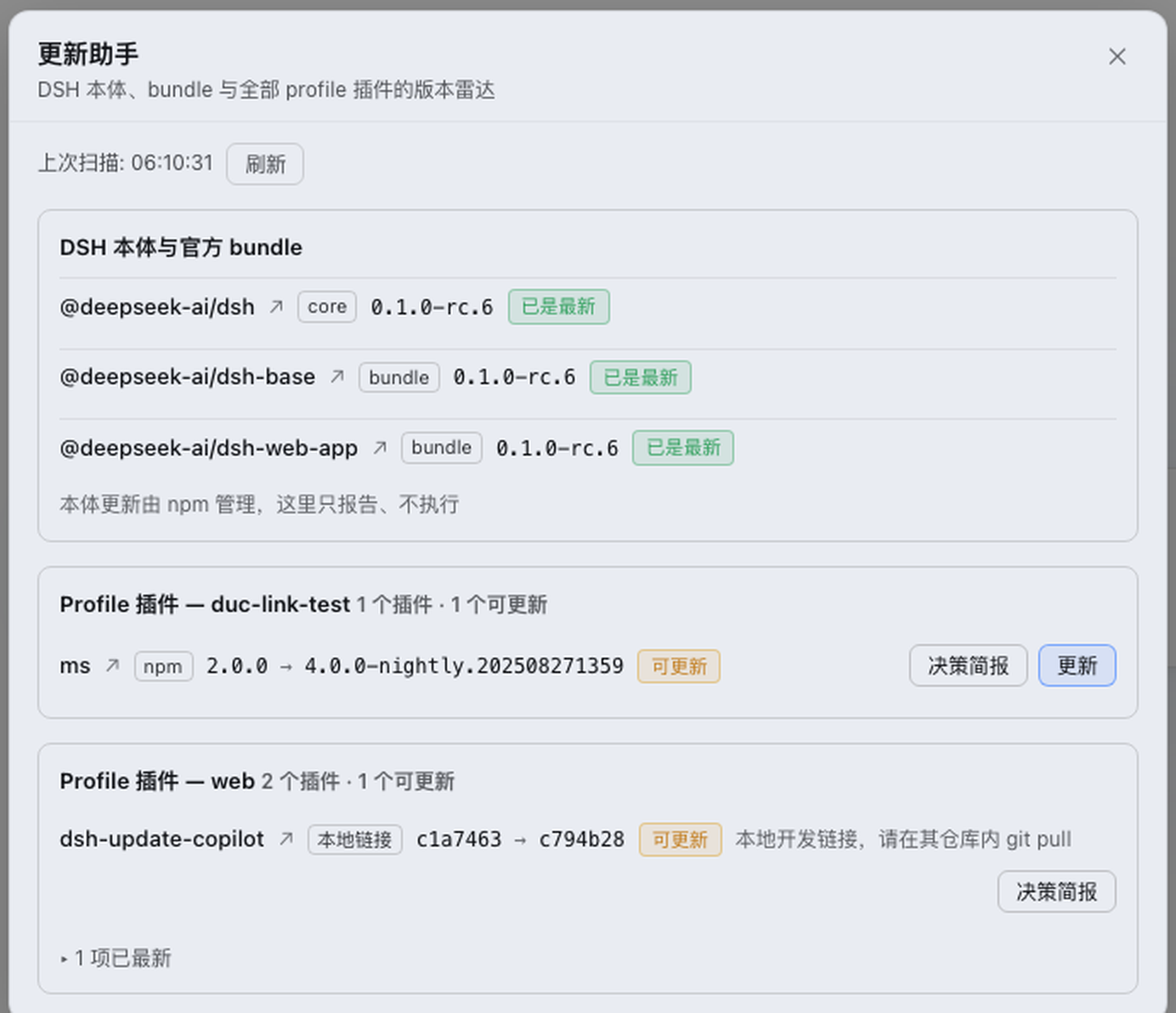
| 🖥 Web surfaces | A sidebar trigger beside Settings (its badge hydrates on mount and refreshes after the startup scan) opens the compact radar popup, and a ⚡ Update all quick button sits right beside it — no view needed: one click runs every outdated auto-updatable plugin in sequence (running shows an n/m readout and disables, completion flashes ✓/✗, failures or restart-required open the popup with details). The popup carries the whole radar in one folded layout — the DeepSeek Harness core card starts collapsed, and plugins split into an "Updates available" section plus a folded "Up to date" section (expand on click), inferred mount relationships staying with their parent. Plugins are merged across profiles into one row per package, each installed profile's current → latest listed inline; mounted packages expand beneath their parent for disclosure while keeping independent ownership and update actions — a child Update targets only that child, a parent Update only the parent, and Update bundle updates only outdated eligible targets (outdated parent first, then outdated mounted children within each relationship's profile scope). One click on Update updates the package across its explicit eligible profiles, and a toolbar Update all runs every eligible outdated package in sequence (tick Auto-update on button click inside the popup and a click on the sidebar trigger starts that same pass automatically whenever outdated plugins are found; the dsh core is never part of that auto pass). All mutation actions share one UI operation lock; refresh is disabled until updates and refresh state settle. Updates stream live progress over SSE straight into a per-row progress bar: the plugin path runs pnpm's NDJSON reporter, so downloads report real byte progress (downloaded / total bytes, the package in flight, plus measured speed and ETA), resolution and linking report package counts, and any phase whose total is genuinely unknown renders a striped indeterminate bar instead of an invented percentage (the npm-only core path is indeterminate — npm prints nothing non-TTY — until its final summary). Updates are never silent — whoever started one (the auto-run, the agent tools, another tab), the sidebar badge turns into a pulsing updating dot and the popup keeps a live "Updating: <package>" banner with the current stage, byte counters, and percentage, with update buttons disabled while one is running; whoever started the update, the matching row also renders the same live progress bar inline (the initiating row via its own SSE stream, every other seat mirrored from the 2-second status poll), and a new round for that package clears the row's stale previous result — a background update never collides with a foreground click into the confusing "another update is already running" error |
| 🛡 Update guardrails | Same-origin POST + explicit confirm, strict target allowlist, single-flight lock, 5-minute timeout; a preflight hard gate refuses updates the target dsh demonstrably breaks (missing named exports) until an explicit force; npm/github specs run only through the official dsh plugin CLI, while link:/file: installs and official @deepseek-ai/* packages remain refused — local checkouts are updated inside their own repository; empty husk publishes (frozen latest / no entry / no dsh.bundle / tiny tarball) are skipped when resolving the update target and refused for install |
| 🩹 Patch-name audit | dsh's patch loader strict-name-checks every cordis.patch.yml entry and silently skips the whole entry (config included) when the pinned package name no longer exists — the 0.1.7-rc.2 dsh-llm-deepseek → dsh-llm-deepseek-api-key rename dropped users' custom model lists with one stderr line as the only signal. The radar now audits every profile's patch file against all loader resolution sources (deps, declared bundles, both node_modules layers, bundle-patch rows) and banners stale pins with the fix and a per-profile verify command (`dsh --profile --dump-config 2>&1 >/dev/null |
| 🧯 Host export check | Scans third-party plugins' named imports of @deepseek-ai/* against the current DSH host packages (and the target version when the core is behind) — that class of error fails the whole plugin tree at boot. The core card and plugin rows surface the finding with a copy-pasteable cordis.patch.yml disable snippet and dsh plugin remove command. When DSH itself will not start, run node …/dsh-update-copilot/lib/cli.js (it does not boot a profile). |
| 🧭 Upgrade-card corridor + layered preflight | Preflight findings use the community failure layers (link-time / mount-time / run-time, plus storage / breaking-card) via layerFindings with action level, evidence, and fix hints. Release-note and commit breaking-change markers (!:, BREAKING CHANGE, removal/rename wording) are scanned the same way and ride the gate as warnings. Host hops walk the oh-my-dsh upgrade-card corridor — a missing edge stops the move (no curated cards means not safe). Session formats V2→V3→V4 migrate forward only; a jump demands a snapshot first. Known run-time contract traps (prepareCall, Session.events, registerContinuableSetup, …) surface as static capability risks. |
| 🩹 Post-update collateral check | After a successful update, every plugin member of the profile is re-verified, not just the updated package — pnpm rewrites shared dependencies tree-wide, so a sibling plugin can break without being touched. Newly broken or missing rows appear in the result, flagged as collateral. |
| ↩️ Update history & rollback | Before any mutation the copilot snapshots the installed version, spec, pinned commit, and the bundle patch text into its own history directory under $DSH_HOME (10 kept per package, best-effort). Rolling back is an update with the recorded old target through the normal confirmed flow — a two-step button on the row's last result. The offline CLI lists snapshots with manual rollback commands: node …/lib/cli.js history [profile] [package]. |
| 🌐 Fully bilingual | Every user-facing string — popup, badges, update errors — follows the UI language (zh/en); the agent tool path keeps stable English identifiers |
Install
# from npm (recommended)
dsh plugin --profile web add dsh-update-copilot

# or straight from the GitHub repo
dsh plugin --profile web add github:hezhongtang/dsh-update-copilot
Restart dsh web, then click the Update Copilot trigger beside Settings in the sidebar. Works the same in any other profile (--profile <name>).
Usage
Ask your agent
"check for updates"
The agent runs update_copilot_scan, then update_copilot_preflight on the outdated items and presents the risks before doing anything. Updates run only after you say yes — the update tool rejects calls without confirm: true.
Or use the popup
The sidebar button beside Settings opens the compact radar popup (ESC or backdrop click closes). The ⚡ Update all button right beside it runs the whole pass without opening anything: sequential updates for every outdated auto-updatable plugin, an n/m readout while running, ✓/✗ flash on completion, and the popup opening automatically when something failed or a restart is required. With Auto-update on button click enabled inside the popup, that same click also kicks off "Update all" the moment outdated plugins show up, with progress streaming right inside the popup.
Updates are visible from anywhere. Whoever started one — the sidebar auto-run, a row's Update button, the agent tool (update_copilot_update), another browser tab — while it is running the sidebar badge becomes a pulsing dot (tooltip names the package) when the popup is closed, and the popup keeps a live "Updating: <package> (<profile>)…" banner on top that follows the server-side stage (resolving / downloading / linking / retrying), byte or package counters, measured speed, ETA, and percentage. While the banner is up, every mutation action — per-row Update, Update bundle, toolbar Update all — is disabled, so a background update and a foreground click never fight over the single-flight lock and surface the "another update is already running" error. Sequential passes (Update all, Update bundle) render their queue inline: the executing row shows "Updating…" with a live progress bar, rows not reached yet flip their button to "Queued" (tooltip: it starts automatically when the current item finishes), and rows already attempted keep the regular disabled button so a stale "Update available" never reads as "not started"; when the pass finishes, the list refreshes itself to the new versions.
The popup is the whole radar: the core card with a single gated Update core action (always the newest verified version, never a dist-tag string; on a writable global npm install, a two-step confirmed button runs the gated npm install -g and reports the restart requirement plus a rollback command — other install shapes show the command only), every installed plugin merged across profiles into one row per package (each profile's current → latest listed inline), expandable mount relationships, and a one-click Update button per row. A child row's Update affects only that child; a parent row's normal Update affects only that parent. Update bundle skips current targets, runs the outdated parent first when eligible, then each outdated selected mounted child in its relationship's profile scope, and reports progress/results. Each package carries explicit eligible profiles, so it never updates every same-named install blindly. A toolbar Update all button remains the separate global action, running every eligible outdated package in sequence. Live SSE progress drives a per-row progress bar. After an update, the result reports the dsh restart requirement and the popup shows the restart banner.
Agent tool reference
| Tool | Read/Write | Purpose |
|---|---|---|
update_copilot_scan | read | Full scan across core + all profiles, merged package-centric (10-min cache, force to bypass) |
update_copilot_update | write | Execute one confirmed update — without a profile, across its explicit eligible profiles only; npm/github specs through the official dsh plugin CLI (transient failures retry automatically — up to 3 attempts with jittered exponential backoff; deterministic errors like a missing version or refused auth fail fast). link:/file: checkouts are not managed — update them inside their own checkout. target rolls back to an exact recorded version; force: true overrides a preflight hard block (set it only after the user approved) |
update_copilot_preflight | read | The gate decision for one package without updating anything: ok / warning / blocked per profile, with blocker evidence (target dsh missing named exports), host-API capability risks, and breaking-change signals from release notes and commits |
update_copilot_core | write | Execute the confirmed DSH core update. Always targets the newest healthy published version, resolved to a concrete version first (never a dist-tag string); a resolved downgrade is refused without force. Gates before the spawn: upgrade-card corridor, session-format storage boundary, and per-plugin missing-export evidence across every profile; force overrides only after user approval with the evidence kept on the outcome. Runs only on a writable global npm install — npx/untraceable launches get the manual command back. The result always reports requiresRestart and a rollback command |
How it works
Every dependency spec is classified into a channel, and each channel has its own comparison. Scans merge the profiles' plugin lists package-centric: the same package installed in web, headless, and desktop appears once, carrying each profile's channel and versions. Within each profile, an active bundle whose contained patch mounts at least two production dependencies exposes presentation-only mount relationships; overlapping parents choose the largest verified child set, then package name. Mounting does not transfer update ownership: each direct dependency keeps its own update policy, and bundle updates use the selected relationship's profile scope. Local link: and file: dependencies stay local, and official @deepseek-ai/* packages remain report-only.
What counts as a plugin row: the packages a profile's manifest declares under dsh.profile.bundles (the list the host actually loads), plus every link: / file: checkout, which stays visible even before it is activated, plus the verified patch-mounted children of active bundles — their insert records are how the host loads those. Other plain dependencies in the manifest — a CLI or server runtime someone added for convenience — are not dsh plugins and don't render as one; that used to put a ghost update button beside the real plugin sharing the same GitHub repo. A manifest without a bundle list falls back to showing every dependency.
| Channel | Example spec | Current | Latest |
|---|---|---|---|
| npm | ^0.1.4 | installed package.json version | newest version in the full registry doc |
| github | github:owner/repo#sha | pinned commit in pnpm-lock.yaml | upstream HEAD via GitHub API |
| linked | link:../my-plugin | installed package.json version | — (not probed; managed in its own checkout) |
The npm channel deliberately ignores the latest dist-tag: monorepo sub-packages often leave that tag stale, which false-flags installs that are actually newer than the tag. Versions are compared with full semver precedence (prereleases included), so 0.1.0-rc.6 > 0.1.0-rc.5 and 1.0.0 > 1.0.0-rc.1 both hold.
Updates execute through vetted paths, never a raw shell string: npm/github specs run dsh plugin --profile <p> add <target> — the same path a human would type — with the target string validated against an allowlist; link:/file: checkouts are never touched. That child runs with pnpm's NDJSON reporter (--reporter=ndjson): the only non-TTY output carrying byte-level fetch progress, which the panel renders as a determinate download bar; the reporter's error events are reconstructed into readable pnpm: <code> <message> lines in the captured output so the deterministic-failure classification (ERR_PNPM_NO_MATCHING_VERSION, E404, auth refusals) keeps failing fast. The DSH core runs through its own gated executor: the target resolves to a concrete pinned version (never a dist-tag string), the install must be a writable global npm install, and the gate — corridor, storage boundary, per-plugin export evidence over every profile — must pass before npm install -g @deepseek-ai/dsh@<version> spawns; the gate also emits advisory warnings for patch entries pinning names the target line no longer ships, and a successful replacement runs a post-flight --dump-config probe per profile whose skip lines join those warnings; the running process is never the updated one, so a change always reports a restart requirement plus the rollback command. Transient failures are retried automatically: up to 3 total attempts, spaced by full-jitter exponential backoff (1s base, 8s cap) so a batch of updates doesn't re-hammer the registry in lockstep; deterministic failures — missing package/version (E404, ETARGET), refused auth (E401/403) — skip the remaining attempts and fail fast. Child, parent, and bundle actions preserve the package row's explicit eligible profiles; global Update all remains separate and never updates every same-named dependency blindly.
When DSH will not start
If a third-party plugin import { aRemovedName } from '@deepseek-ai/…', the loader fails the whole plugin tree and the copilot UI never mounts. From any Node shell:
node ~/.dsh/profiles/web/node_modules/dsh-update-copilot/lib/cli.js
# linked install:
node /path/to/dsh-update-copilot/lib/cli.js
It checks the on-disk DSH only (no npm, no target-version preview), so it still runs when DSH will not boot. Exit 1 when the current host is already incompatible (prints disable / uninstall commands). To recover from a bad update without a running DSH, list the pre-update snapshots and their manual rollback commands:
node ~/.dsh/profiles/web/node_modules/dsh-update-copilot/lib/cli.js history          # every profile
node …/lib/cli.js history web my-plugin                                              # one package
Security
- The mutating routes are
POST /dsh-update-copilot/update(plugins) andPOST /dsh-update-copilot/update-core(the gated core update): same-origin and same-transport-scheme checks are enforced, withconfirm: truerequired; forwarded scheme headers are not trusted. TLS-terminating proxies may setDSH_UPDATE_COPILOT_PUBLIC_ORIGINto their public HTTP(S) origin; requests must match it exactly, and an invalid value fails closed. - Official
@deepseek-ai/*packages and the dsh core are never auto-updated; the core executes only from an explicit confirmed action, and only on a writable global npm install. - All upstream queries are read-only (
registry.npmjs.org,api.github.com,git ls-remote) with hard timeouts; a failed check degrades that one item instead of failing the scan.
Limitations
- Every changed update requires a
dshrestart to take effect: the result reportsrequiresRestart: trueand the popup shows the restart hint. There is no in-process hot reload. link:/file:checkouts are listed in the radar but never probed or updated: manage them inside their own repository (git pull there).- Unauthenticated GitHub API is rate-limited (60 req/h) — breaking-change signals degrade gracefully to none.
- Raw
git+https://specs are reported as-is without a comparison channel. - The host export check is static named imports: dynamic
import(), APIs only reached at runtime, andimport * as nsare not flagged. Official@deepseek-ai/*packages are skipped. The target pass only packs@deepseek-ai/dsh-*at the DSH version line; a failed pack or an independently versioned package (cordis,schemastery) is skipped rather than reported as incompatible. - History snapshots are best-effort — an unwritable history directory means no rollback suggestion, never a blocked update.
Contributing
Issues and PRs welcome at hezhongtang/dsh-update-copilot. The codebase is intentionally small and dependency-free — plain ESM on the host, a hand-authored CJS bundle in the browser, no build step to set up.
License
MIT © 2026 hezhongtang
Похожие плагины
deepseek-harness
deepseek-ai/deepseek-harness
dsh-web (dsh-plugin-manager)
zhu1090093659/dsh-web
dsh-web
zhu1090093659/dsh-web
dsh-web-ui (dsh-plugin-manager)
zhu1090093659/dsh-web-ui