dsh-open-efforts
hyp6666/dsh-open-efforts
Выбирайте уровень рассуждений (reasoning effort) для дополнительных моделей в DeepSeek Harness — с опцией «Выкл.» и пятью стандартными уровнями.
Установка
dsh plugin --profile web add github:hyp6666/dsh-open-effortsREADME
dsh-open-efforts
Choose reasoning effort for additional models in DeepSeek Harness.
中文 · English
Overview
dsh-open-efforts adds official per-model reasoningEfforts metadata to models explicitly configured through @deepseek-ai/dsh-llm-pi-ai. DeepSeek Harness displays the native Effort control in its existing model menu and submits each selection through the standard request path.
Screenshots
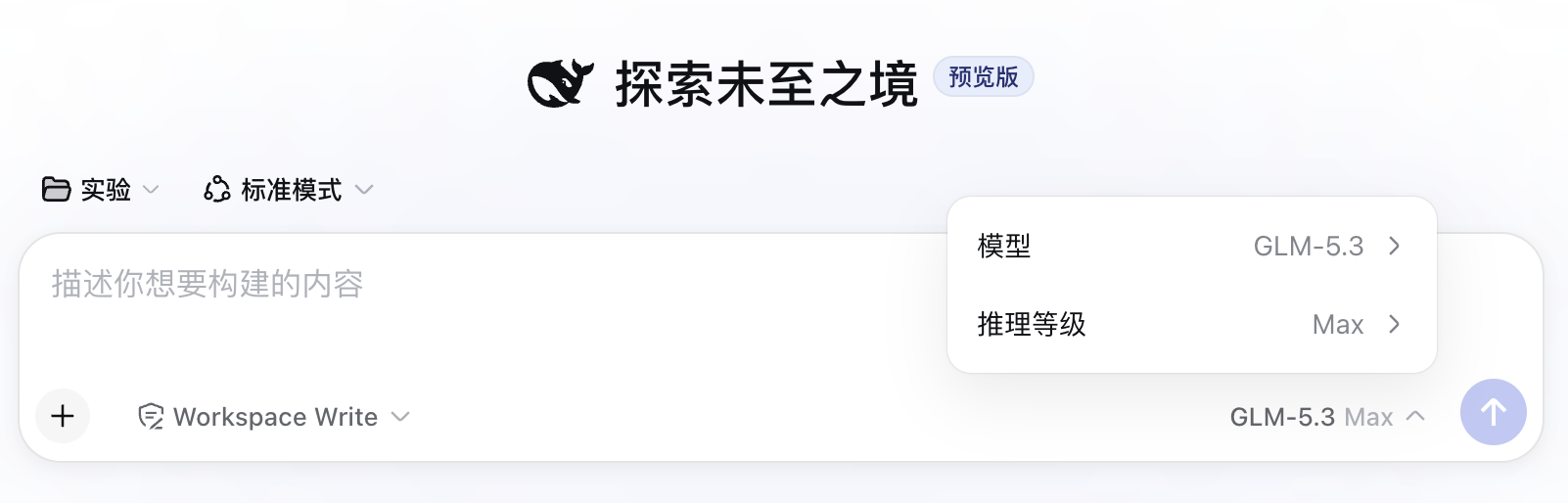
Figure 1: Models connected through Chat Completions, Responses, or Messages can use the same reasoning-effort selector.
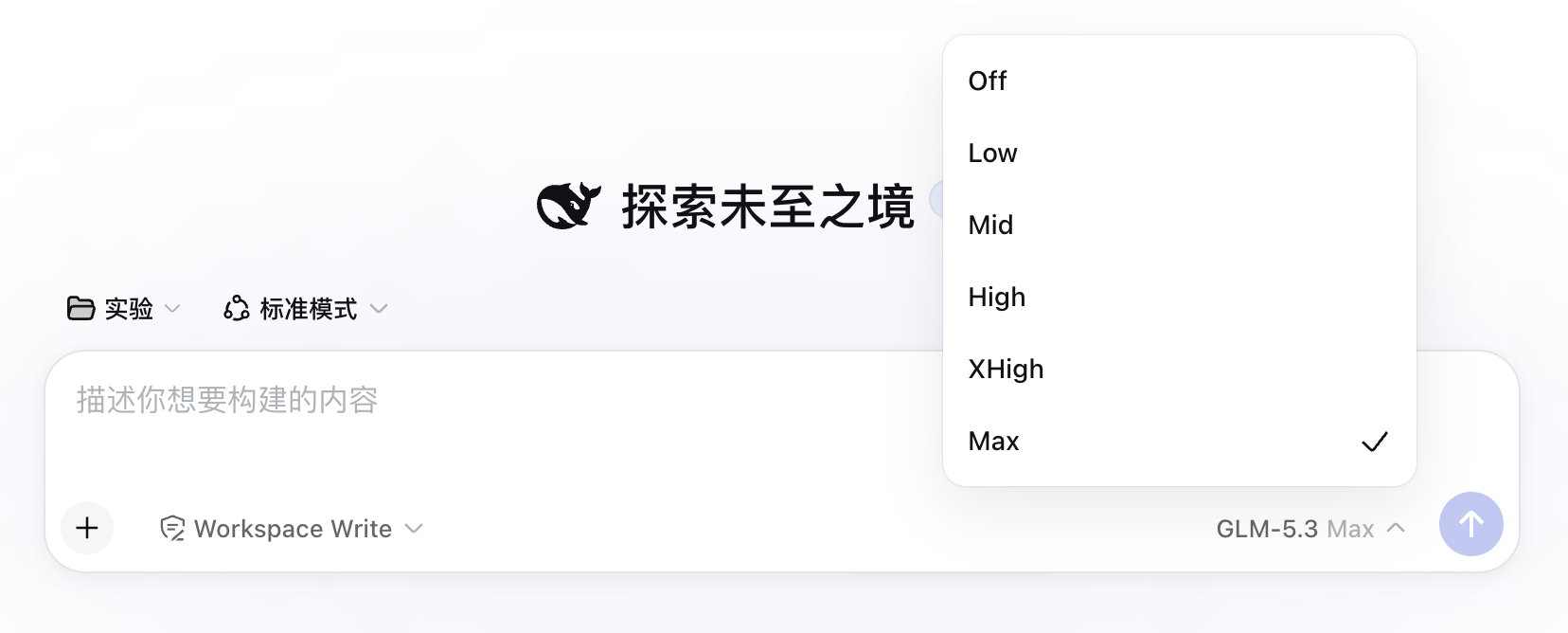
Figure 2: The menu provides Off and five standard levels. Each model and provider defines the levels it actually accepts.
Effort levels
The plugin exposes these six choices:
| UI label | reasoningEfforts key | Wire value |
|---|---|---|
| Off | off | none |
| Low | low | low |
| Mid | medium | medium |
| High | high | high |
| XHigh | xhigh | xhigh |
| Max | max | max |
The protocol field uses the official id medium, while the UI displays Mid. The selectable range consists of the six rows above; minimal sits outside that range.
Unofficial community plugin: This independent project is developed and maintained by community contributors.
Scope
The plugin handles models explicitly declared in the llm-pi-ai settings section:
providers.<route>.models[]providers.<route>.modelOverrides.<modelId>
Catalog-only routes retain their existing configuration. The official deepseek-official adapter also retains its existing configuration.
DSH supports three protocols for custom routes:
openai-completionsopenai-responsesanthropic-messages
For openai-completions, the plugin writes the official compatibility switch:
compat:
  supportsReasoningEffort: true
Responses and Messages use their protocol-native reasoning fields directly.
Model compatibility
The UI always displays all six choices. Each model and provider determines which values it accepts. A model may accept only High and Max, or it may reject every effort value. Provider compatibility errors surface through the standard DSH request path.
Off uses the supported off: none wire mapping. Generic Chat Completions routes explicitly send reasoning_effort: "none". Responses and Messages translate the same logical choice into their protocol-native disable formats.
Installation
Requirements:
- Node.js
^22.19.0or>=24.0.0 - DeepSeek Harness
0.1.0-rc.7or a newer release with per-modelreasoningEfforts @deepseek-ai/dsh-llm-pi-aienabled
Run these commands from the repository directory:
npm run verify:release
dsh plugin --profile web add .
dsh plugin resolves the local path from the current working directory and adds the package's dsh.bundle declaration to the selected profile.
Verify the profile configuration:
dsh --profile web --dump-config
The output should contain open-efforts and dsh-open-efforts. Restart the matching DSH Web process and refresh the page.
For another profile, replace web with its name. Install the plugin separately for each profile.
Usage
Once a custom model appears in llm-pi-ai under models or modelOverrides:
- Open the model menu in the composer.
- Select the target model.
- Open Effort.
- Select
Off / Low / Mid / High / XHigh / Max.
The plugin watches model-topology and settings updates. Reopen the model menu after adding or editing a model to load the latest metadata.
Configuration written by the plugin
A Chat Completions model receives this capability configuration:
models:
  - id: your-model
    reasoningEfforts:
      off: none
      low: low
      medium: medium
      high: high
      xhigh: xhigh
      max: max
    compat:
      supportsReasoningEffort: true
Model names, context windows, output limits, existing compat.thinkingFormat values, and unrelated fields remain intact. The plugin replaces each models array as a whole to follow DSH settings path-mutation rules for arrays.
Data and permissions
- Runtime access is limited to
llm-pi-aimodel-capability settings andresolveModelmetadata. - API keys, conversations, system prompts, messages, and model output stay outside the plugin's access scope.
- Network requests generated by the plugin: zero.
- Native DSH adapters continue to handle all model traffic.
Uninstall and full rollback
Remove the package from the profile:
dsh plugin --profile web remove dsh-open-efforts
Then inspect the profile and restart it:
dsh --profile web --dump-config
Uninstalling restores the runtime resolveModel method. Official declarations already stored in the settings backend remain available. For a full rollback, remove these fields from affected model entries:
reasoningEfforts- the plugin-added
compat.supportsReasoningEffort
Keep all other compat fields.
Compatibility baseline
- Last verified:
2026-08-18 - DeepSeek Harness:
0.1.0-rc.7 - Official repository commit checked:
99f6f02fecdb7dff40c3fbc9470f5907c29f74ca - Node.js:
^22.19.0or>=24.0.0
The supported baseline starts with DeepSeek Harness 0.1.0-rc.7 and relies on per-model reasoningEfforts, reasoningEffort call configuration, and the native Model/Effort UI.
Development
The package uses TypeScript source, keeps zero runtime npm dependencies, and compiles ESM plus declarations into lib/:
npm run lint
npm test
npm run build
npm run verify:package
npm pack --dry-run
License
MIT. Report security issues through the private channel described in SECURITY.md. Credentials and pending vulnerabilities belong in the same private channel.
Похожие плагины
dsh-routing-suite
yjh051108/dsh-routing-suite
dsh-plugin-subscriptions
v1ki/dsh-plugin-subscriptions
dsh-commandcode-provider
mars-sea/dsh-commandcode-provider
dsh-workbuddy-connect
corrinehu/dsh-workbuddy-connect