agent-site (dsh-plugin)
iswalterwu/agent-site/packages/dsh-plugin
Opens a separately downloaded Windows desktop pixel monitor for pi, Claude Code and DSH sessions. DSH monitoring is read-only.
Установка
dsh plugin --profile web add github:iswalterwu/agent-siteЭтот плагин находится в подкаталоге packages/dsh-plugin репозитория.
README
agent-site
Your agents work in the terminal. Watch the site from your desktop.
A pixel-art construction site for pi, Claude Code, and DeepSeek Harness sessions. See who's working, who's stopped, and who needs you—without checking every terminal.
中文 · Quick start · Supported agents · Docs · MIT
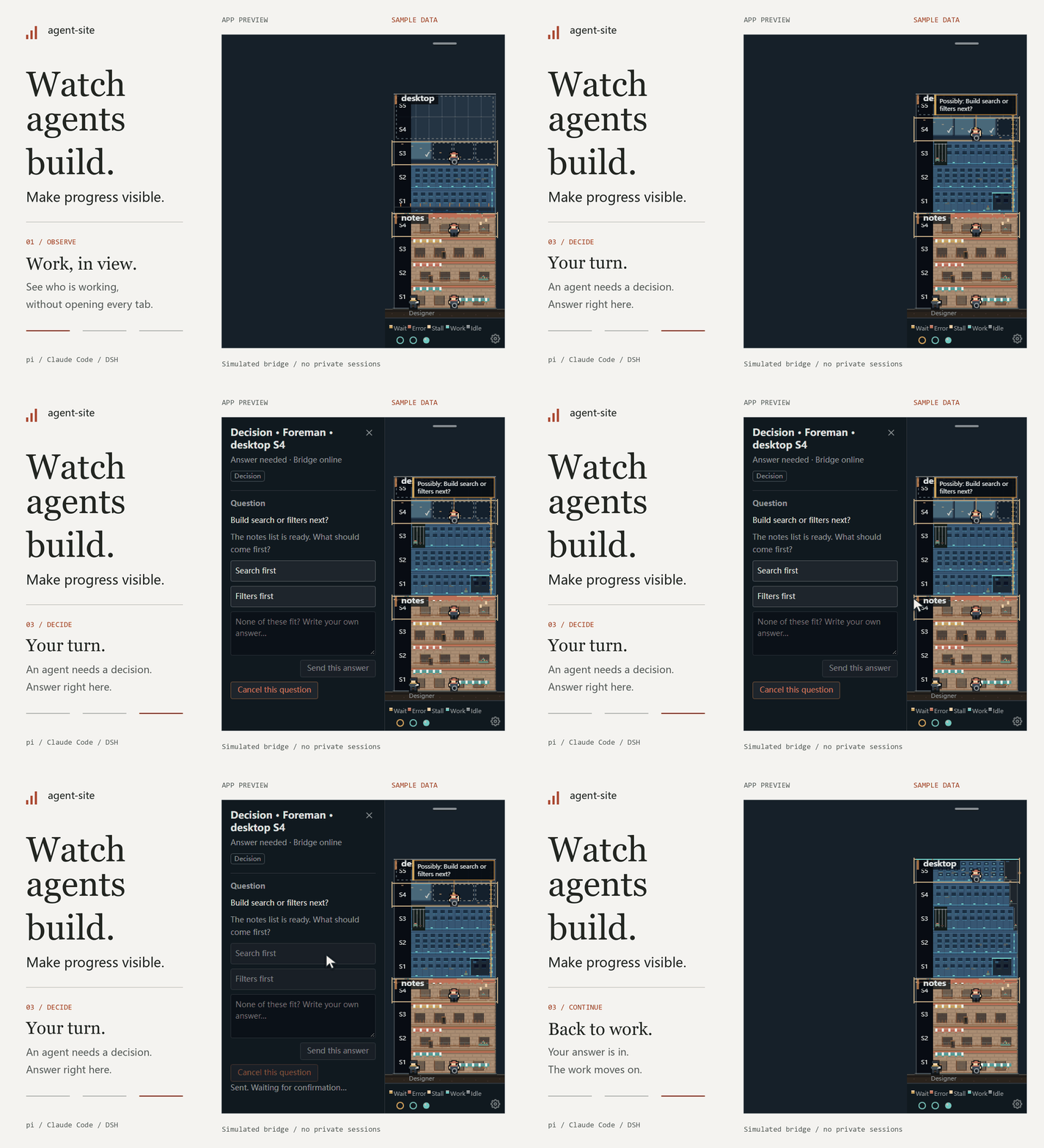
Real app renderer, fictional projects and sessions. The pi bridge interaction is simulated; no live agent or private session is recorded.
What it does
- See the activity. Sessions become workers. Working, idle, stalled, and waiting states get visible cues. Click a worker for recent actions and session details.
- Watch progress take shape. Plan slices or session todos become floors: solid when complete, outlined when pending, occupied while in progress.
- Stay out of the terminal. With the pi bridge, pause, resume, interrupt, send suggestions, and answer questions from the desktop.
- Keep your workspace. The window sits at the screen edge. Empty areas are click-through, and the building folds into a narrow ribbon when you don't need it.
- Make it yours. Choose a tower, factory, or row of storefronts, with light and dark themes. Projects are discovered automatically; pin one to keep it in view.
This isn't an agent launcher or scheduler. Keep using your terminal. Agent-site makes the work visible.
Quick start
Developed and tested for Windows 11 x64, with English and Simplified Chinese interfaces.
Portable desktop
Download a portable ZIP from Releases, extract the whole folder, and run AgentSite.exe. No separate Node.js, npm or Electron installation is needed. See the installation, checksum, unsigned-build and rollback guide. If no packaged release is listed, use the source route below.
The optional dsh-agent-site plugin opens this independent window from local DSH. Install its prebuilt .tgz into the DSH instance/profile you use, then save the extracted executable's path. The desktop component is downloaded separately; DSH monitoring stays read-only. DSH plugin details.
Run from source
Requires Node.js ≥ 22.19 and Git ≥ 2.31. Clone the repository, then run:
cd agent-site
npm install
npm run start:app
The app discovers projects from local session logs. No project list is required. With no sessions, it shows an empty site.
Optional: connect the pi bridge
Monitoring works without the bridge. To control pi, answer questions, or record todos with site_todo, use pi ≥ 1.5 and build the bridge:
npm run build:bridge
Copy dist/bridge/site-bridge.js to:
%USERPROFILE%\.pi\agent\extensions\site-bridge.js
Create the directory if needed. Keep the app running and reopen your pi session. If you already load a bridge from another location, replace that copy instead—don't install two.
Do not load the file directly from dist/. Builds and tests overwrite it, and a broken extension can prevent pi from starting. To update, rebuild, copy, and restart pi. To uninstall, delete the copy or remove its entry from pi's extensions setting. If pi fails to start, use pi -ne to skip extensions.
Set AGENT_SITE_BRIDGE=off before launching a pi process to disable the bridge for that process and its children. The app can still show their logs in read-only mode.
Supported agents
| Source | Activity and progress | Pause, suggestions, and answers |
|---|---|---|
| pi | Supported | With the bridge, for top-level sessions and direct children |
| Claude Code | Supported | Read-only |
| DeepSeek Harness | Supported | Read-only |
The pi site_todo tool is available only to top-level sessions in watched projects.
Do I need plan files?
No. Agent-site uses plan slices from specs/<feature>/spec.md when available. Otherwise, it uses top-level session todos. Without either, you still get workers and a small one-story building. You don't need to use dev-circuit-ultra to run the app.
Floors show recorded plan progress, not a completion percentage guessed from code. Activity states are derived from logs and bridge signals, so they won't catch every stalled run.
Runs locally
The app reads local session logs and project plans without changing project files. It needs no additional model API key. pi controls connect over localhost only.
Common secret patterns are masked in displayed text. Still review project names, paths, and conversation content before sharing screenshots.
Settings live in %APPDATA%\agent-site\settings.json, or in AGENT_SITE_HOME when set. In Settings, choose System, Chinese, or English and save to switch immediately. The default follows your system language (Chinese for zh, English otherwise). Project names and session content stay in their original language. The gear menu also controls the theme, building style, and startup behavior.
Development
TypeScript · Electron · Canvas 2D · Vue 3
npm run typecheck
npm test
npm run build:app
To inspect the data without opening the window:
npm run -s snapshot
Design · Architecture · Contributor guide — currently in Chinese.
License
MIT © agent-site contributors.
Похожие плагины
dsh-web (dsh-task-board)
zhu1090093659/dsh-web
dsh-web (dsh-web-all)
zhu1090093659/dsh-web
dsh-TUI
ccch1mneyyy/dsh-tui
dsh-web-ui (dsh-task-board)
zhu1090093659/dsh-web-ui