dsh-quick-run
jiaowocheung/dsh-quick-run
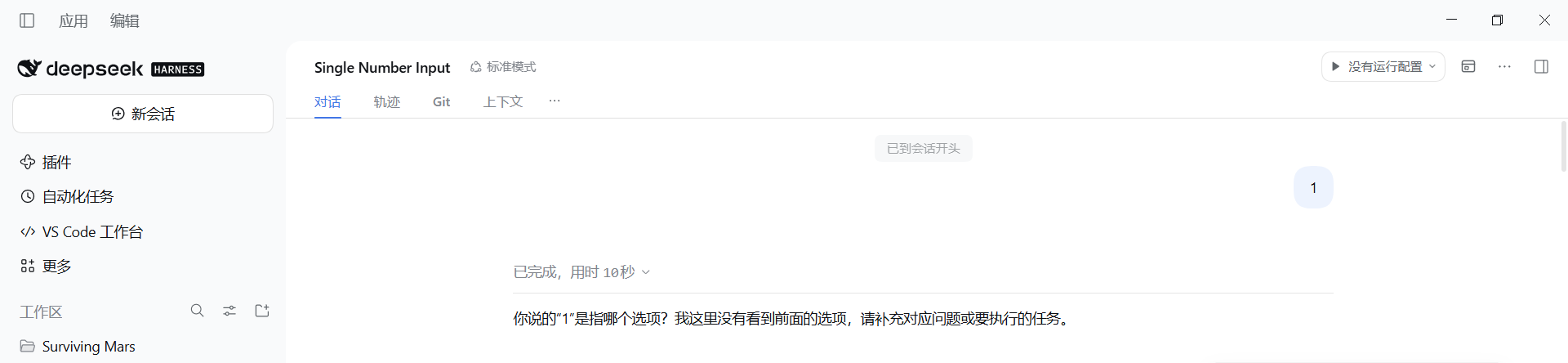
Run configurations in the DSH conversation header: it lists the scripts already in the project (package.json scripts and root .ps1/.bat/.cmd/.sh files), runs the selected one in the session working directory, and streams the output in a floating panel.
Установка
dsh plugin --profile web add github:jiaowocheung/dsh-quick-runREADME
dsh-quick-run
English | 简体中文
Run configurations in the DSH conversation header — like VS Code / IDEA. Pick a script, press ▶, watch the output.
Why another run button
Most run plugins ask you to save commands first (add a config, name it, pick a scope). dsh-quick-run does the opposite: it reads what your project already has.
package.json→ everyscriptsentry, launched asnpm run <name>- project root → every
*.ps1,*.bat,*.cmd,*.sh(.ps1runs throughpowershell -NoProfile -ExecutionPolicy Bypass -File, the others throughcmd.exe) - optional
.dsh-quick-run.jsonat the project root, only when you want to pin something down
No configuration file is required. If a project has no scripts, the widget says so instead of showing invented entries.
Install
dsh plugin --profile web add github:jiaowoCheung/dsh-quick-run
Or install the local directory from Plugins → Add plugin.
The widget appears in the Session header, in the utilities cluster before the … menu. It reads the session's working directory, so each session runs the scripts of the project it is working in.
Usage
| Control | What it does |
|---|---|
▶ | Run the selected configuration (re-attaches if that one is already running) |
▾ | Pick a configuration, view the running one, edit, refresh, or reset to auto-discovery |
■ | Stop the run — the whole process tree (taskkill /T /F on Windows) |
| output panel | Live output, status, exit code and duration; auto-scrolls until you scroll up |
Output never goes into the conversation log: it is fetched by polling the host over the same-origin HTTP route, so nothing is appended to the transcript and no command is executed through the chat.
.dsh-quick-run.json
Only needed when you want to add, rename or override configurations:
{
  "configs": [
    { "name": "Run client", "command": "gradlew.bat runClient" },
    { "name": "Serve", "command": "npm run serve", "cwd": "." },
    { "name": "PowerShell", "script": "scripts/build.ps1" }
  ]
}
| Field | Meaning |
|---|---|
name | Label shown in the dropdown |
command | Command line, run through cmd.exe /d /s /c |
script | Script file relative to the project root |
program + args | Run an executable directly |
cwd | Working directory relative to the project root |
env | Extra environment variables |
includeDiscovered | false disables the automatic script discovery |
Limits
- Server-side output buffer: 200 KB per run; client-side display cap: 400 KB.
- Finished runs are kept for 10 minutes; at most 20 runs are tracked.
- Windows-oriented process handling (
cmd.exe,taskkill); on other platforms,commandstrings are passed to the default shell.
Notes
- No
@deepseek-ai/*runtime dependency: the client half uses React from the host's module table and draws its own controls, so a harness change cannot blank out the slot. - The host half registers one
webServerprefix route (/dsh-quick-run/api) and checks the browser session on every request.
MIT © jiaowoCheung
简体中文
dsh-quick-run
DSH 会话头部的运行配置控件——像 VS Code / IDEA 那样,选一个脚本,点 ▶,看输出。
和其他运行插件的区别
大多数运行插件要求你先保存命令(新建配置、起名、选作用域)。这个插件反过来:读项目里已经有的东西。
package.json→ 每个scripts条目,按npm run <名字>启动- 项目根目录 → 每个
*.ps1/*.bat/*.cmd/*.sh(.ps1走powershell -NoProfile -ExecutionPolicy Bypass -File,其余走cmd.exe) - 可选的
.dsh-quick-run.json(只在你想固定某些配置时才需要)
不需要任何配置文件。项目里没有脚本时,控件会如实说没有,而不是编出几条来。
安装
dsh plugin --profile web add github:jiaowoCheung/dsh-quick-run
也可以在 插件 → 添加插件 里装本地目录。
控件出现在会话标题行的工具区(… 菜单左边),运行目录取当前会话的工作目录,所以每个会话跑的都是它正在做的那个项目的脚本。
用法
| 控件 | 作用 |
|---|---|
▶ | 运行选中的配置(同一条已在运行就直接接回它) |
▾ | 选配置、查看正在运行的、编辑配置、刷新、重置为自动发现 |
■ | 停止——整棵进程树一起杀(Windows 上 taskkill /T /F) |
| 输出面板 | 实时输出、状态、退出码与耗时;你往上滚之前自动贴底 |
输出不写进会话日志:客户端通过同源 HTTP 轮询 host 半边,所以既不会往对话记录里追加东西,也不会借聊天执行命令。
.dsh-quick-run.json
只有在需要新增、改名或覆盖配置时才用:
{
  "configs": [
    { "name": "运行客户端", "command": "gradlew.bat runClient" },
    { "name": "启动服务", "command": "npm run serve", "cwd": "." },
    { "name": "构建脚本", "script": "scripts/build.ps1" }
  ]
}
| 字段 | 含义 |
|---|---|
name | 下拉里显示的名字 |
command | 命令行,经 cmd.exe /d /s /c 执行 |
script | 相对项目根目录的脚本文件 |
program + args | 直接运行一个可执行文件 |
cwd | 相对项目根目录的工作目录 |
env | 额外的环境变量 |
includeDiscovered | false 关掉自动发现 |
限制
- 服务端每次运行缓冲 200 KB 输出,客户端最多显示 400 KB。
- 运行结束后保留 10 分钟;最多同时记录 20 次运行。
- 进程处理偏 Windows(
cmd.exe、taskkill);其他平台把command交给默认 shell。
说明
- 不依赖任何
@deepseek-ai/*运行时包:客户端半边用宿主模块表里的 React、自己画控件,harness 升级不会让整个座位变空白。 - Host 半边只注册一条
webServer前缀路由(/dsh-quick-run/api),每个请求都校验浏览器会话。
MIT © jiaowoCheung
Похожие плагины
deepseek-harness
deepseek-ai/deepseek-harness
dsh-market
dsh-market/dsh-market
dsh-web (dsh-plugin-manager)
zhu1090093659/dsh-web
dsh-web
zhu1090093659/dsh-web