commandcode-usage (dsh)
jovan1666/commandcode-usage/plugins/dsh
Квота тарифа Command Code на боковой панели DSH над настройками: окна 5 часов, неделя и месяц в виде использованных процентов с обратным отсчётом до сброса, команда /quota и CLI без зависимостей. Ключ читается из вашего собственного маршрута провайдера, поэтому настройка и другие плагины не нужны.
Установка
dsh plugin --profile web add github:jovan1666/commandcode-usageЭтот плагин находится в подкаталоге plugins/dsh репозитория.
README
Command Code Usage
See how much of your Command Code plan is left — 5-hour, weekly and monthly windows with reset times — inside the coding agent you already have open.
Runs on your machine. No model round-trip, so checking your quota costs no quota.
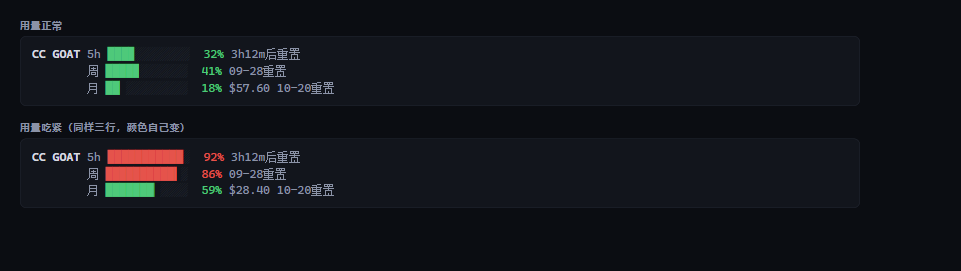
CC GOAT │ 5h █▎░░░░░░░░ 12% 4h27m后重置 │ 周 █▏░░░░░░░░ 11% 09-27重置 │ 月 ▋░░░░░░░░░ 6% $66.03 10-20重置

Install
Each agent has its own way of loading plugins, so pick yours. Six of the seven end up running
the same core script (core/cc-usage.mjs); the DeepSeek Harness adapter keeps its own data
layer, for the reason given under Layout.
| Agent | How | Persistent? |
|---|---|---|
| Claude Code | /plugin marketplace add Jovan1666/commandcode-usage then /plugin install commandcode-usage@commandcode-usage, then node ~/.claude/plugins/marketplaces/commandcode-usage/plugins/claude-code/scripts/setup.mjs | ✅ status line |
| Codex CLI | plugin marketplace (.agents/plugins/marketplace.json) — the bundled hook runs each turn; Codex will ask you to trust it | ⚠️ per-turn line |
| Grok Build | grok plugin marketplace add Jovan1666/commandcode-usage, then run plugins/grok/scripts/setup.mjs | ✅ status line |
| opencode | run plugins/opencode/scripts/setup.mjs | ✅ sidebar |
| pi | pi install ./commandcode-usage/plugins/pi, or copy index.ts into ~/.pi/agent/extensions/ | ✅ above the input |
| DeepSeek Harness | clone this repo, then dsh plugin --profile web add ./commandcode-usage/plugins/dsh (needs dsh ^0.1.5-rc.1) | ✅ sidebar |
| ZCode | /plugin marketplace add Jovan1666/commandcode-usage then /plugin install command-code-usage (its marketplace and plugin name differ) | ⚠️ command only |
Nothing here asks for your API key up front. The script finds it — see Credentials.
The DeepSeek Harness card has its own three-state screenshot in
plugins/dsh/assets/screenshot.png — collapsed badge, light expanded,
and dark expanded. The other five platforms all render the same one line shown above, so they get text
rather than a picture.
Why some installs need a setup script
Claude Code and Grok keep their status line in the user's config, and neither lets a
plugin declare it (settings.json accepts only agent / subagentStatusLine;
Grok's plugin format has no status-line slot). So the last step is a script that writes
that one setting for you. It backs up what was there, refuses to overwrite someone else's
status line unless you pass --force, and --remove puts yours back.
On Windows the Grok script writes one more file: a small cc-usage.cmd beside
cc-usage.mjs, with the config naming that batch and nothing else. Grok starts command
through CreateProcess, which refuses an argument that is an absolute path (os error 123)
and refuses a quoted program name just the same, so a bare executable path is the only form
that survives — the node call lives inside the batch, and the config names it unquoted,
which also keeps a path containing a space working.
What it shows
| Window | Meaning | On GOAT |
|---|---|---|
| 5-hour | Rolling burst limit — one long session cannot drain the month | $14 |
| Weekly | Rolling 7-day limit | $35 |
| Monthly | The billing period's credit allowance | $70 |
Each window shows percent used, a bar, and when it resets (a countdown under a day, a date beyond that). The monthly one also shows the credit left.
Colors follow how full the window is — green under 60 %, amber to 85 %, red above. (The terminal and HTML panels use a slightly earlier 50 / 80 split; the status line is the one that had to be tuned for a glance, so it warns later.)
Plans with no rolling windows (Provider, Enterprise) show the balance alone. Plans without API access (Go) render nothing at all in the status line — no error, no empty box. Ask for the terminal panel on such a plan and it does fail loudly, because there you asked a direct question and silence would be the wrong answer.
It hides itself when you are not using it
If you configured Command Code but switched to another model, a permanent quota bar is noise. The script decides per turn whether this session is actually routed there:
- Your local router's own mapping — tools like
cc-switchwriteANTHROPIC_DEFAULT_OPUS_MODEL/..._MODEL_NAMEpairs into the env; the script reads the pair to learn the real upstream model. This is the router's own configuration, not a guess. (This one is an inference rather than a measurement — see what was verified — so if it ever comes up empty the script falls through to the next level rather than guessing.) - The model name the host hands over directly. Codex's hook puts
modelin as a plain string ("gpt-5.6-terra") — and gives an emptytranscript_path, so without this level Codex would never resolve. Claude Code sends an object here, so it skips to level 3. - The session transcript — the model each message actually used
(Claude Code's
message.model, Grok'smodelId). - Account activity — fallback, only when the three above say nothing.
The resolved model is checked against Command Code's public model catalog
(/provider/v1/models, no auth needed). Not in the catalog → hidden.
Some model names are genuinely ambiguous (a bare claude-opus-5 exists both natively and in
Command Code's catalog), and those are deliberately not guessed — add your own with
--model <substring> instead.
Commands
Claude Code, Codex, Grok and ZCode also get a /quota command that prints the compact panel.
That one does go through the model — it is a prompt, so it costs a turn; the status line is
the free path, and /quota is for when you want the numbers in the transcript.
pi has /ccq-bar on|off|toggle|refresh|status instead (handled by the extension, no model
turn), and the opencode adapter has no command at all — its sidebar is the whole surface.
Credentials
Found automatically, in this order:
COMMAND_CODE_API_KEY/COMMANDCODE_API_KEY/CMD_API_KEY- any env var whose name contains
commandcode ~/.commandcode/auth.json(the official CLI's login state)- a Command Code provider route in your agent's own config
(
~/.zcode/…,~/.config/opencode/…,~/.claude/settings.json,~/.pi/agent/…) dsh/ Codex / Grokconfig.tomlorsettings.yaml, includingapiKeyEnvindirection
If nothing is found the status line simply does not render — it never prints an error into your editor.
One exception: the DeepSeek Harness adapter (
plugins/dsh) keeps its own data layer rather than importingcore/cc-usage.mjs. Its host/client halves and 141 offline checks are built against that contract, so it stays as-is for now. Seeplugins/dsh/README.md.
Layout
core/cc-usage.mjs        ← the only implementation; everything else is a synced copy
scripts/sync-core.mjs    ← copies core into every adapter (--check for CI)
docs/FINDINGS.md         ← what was measured, and what to revisit when things change
plugins/<agent>/         ← one thin adapter per agent
The adapters are copies, not imports, so each one is self-contained and can be installed
without a package manager. Edit core/, never a copy, then run node scripts/sync-core.mjs.
Requirements
- Node 18+ (for the script; the adapters themselves need nothing else)
- A Command Code plan with API access — the
$1Go tier does not have one - Windows: Claude Code runs status line commands through Git Bash when it is installed, through PowerShell when it is not. Git Bash itself costs ~29 ms per repaint, and PowerShell roughly three times that — so if repaints feel slow, install Git Bash.
A note on pacing warnings
The script computes a burn-rate projection. The status line and the Codex hook never show
it; the terminal panel, --compact, --md and --html still print it, and --json always
carries it.
It stays out of the status line for a reason: extrapolating from a short sample says "you will run out" almost every time — 25 minutes into a 5-hour window a normal burst projects to 140 % — and a warning that is always on is not a warning. Where it is printed you asked for a panel, so the extra line costs you nothing.
Contributing
node scripts/check.mjs          # everything: sync, rendering, gating, secrets, dsh's 141 checks
node scripts/check.mjs --quiet  # one line per suite
That is the same script CI runs, so a local pass means a green build. The dsh suite needs React
first — see plugins/dsh/README.md.
core/cc-usage.mjs is the only file you edit. The per-adapter copies are generated; after a
change to the core run node scripts/sync-core.mjs (or let the check tell you).
License
MIT — see LICENSE.
Похожие плагины
DeepSeek-Balance-Whale-Widget
meteornox/deepseek-balance-whale-widget
dsh-context
bowenliang123/dsh-context
dsh-cost-meter
han-1413141/dsh-cost-meter
dsh-damage-pulse
wssfk12138/dsh-damage-pulse