dsh-plugins (sessions-insight)
mt-youya/dsh-plugins/plugins/sessions-insight
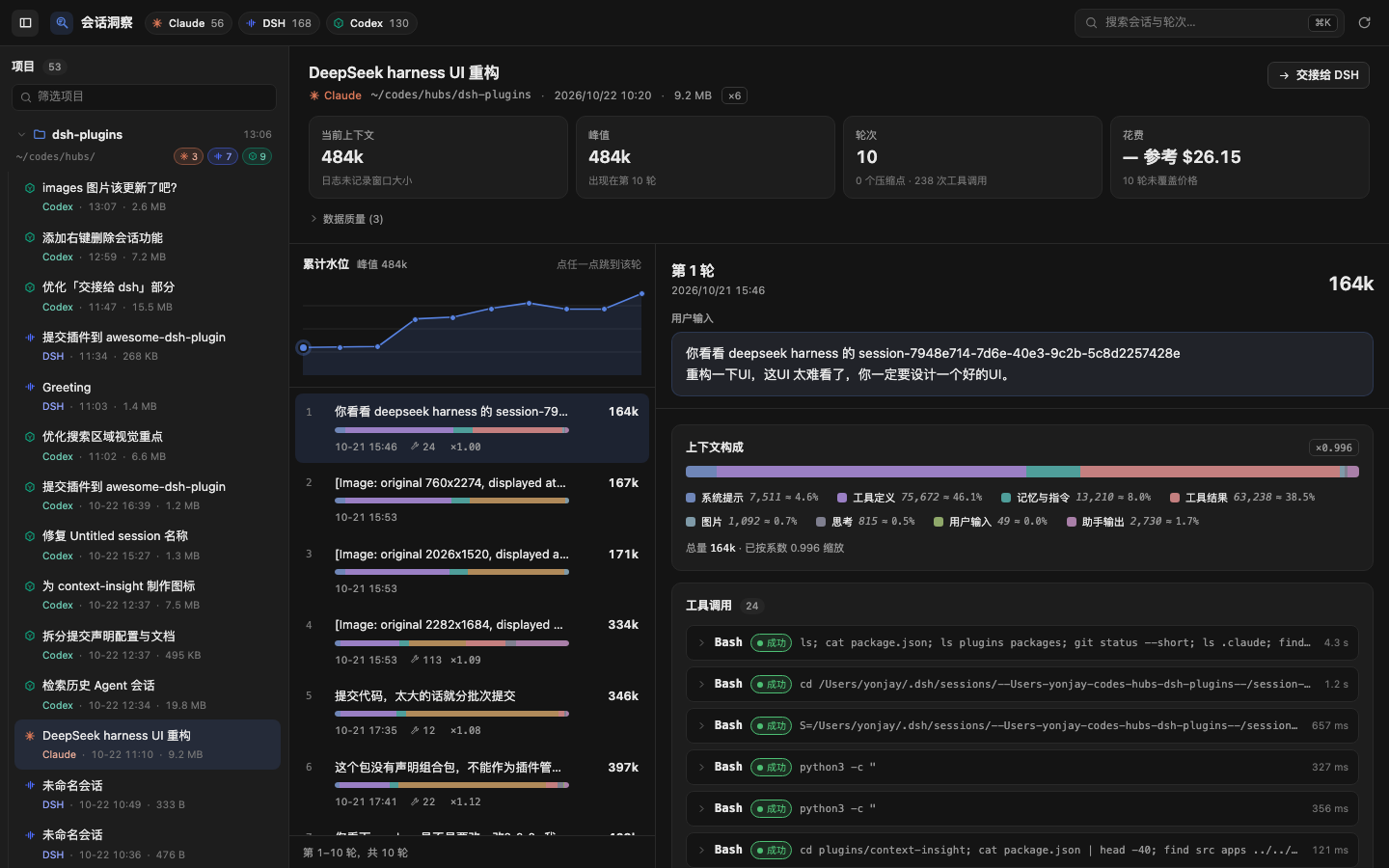
Browse Claude Code, DSH and Codex session logs by working directory, with per-turn context composition, token usage, compaction markers and cost estimates.
Установка
dsh plugin --profile web add github:mt-youya/dsh-pluginsЭтот плагин находится в подкаталоге plugins/sessions-insight репозитория.
README
English | 简体中文
Cyrus Plugins · @cyrus/dsh-plugins
A plugin collection for DeepSeek Harness (DSH). Install this one bundle to get every plugin listed below; each plugin can also be installed on its own.
Plugins
| Plugin | npm package | What it does |
|---|---|---|
| Sessions Insight | @cyrus/dsh-sessions-insight | Opens up what each turn of a Claude Code, DSH or Codex session actually fed the model: composition, tool calls, compactions, cost. Includes confirmed session deletion. |
Install
Requires DSH 0.2.1-rc.2 or newer (see docs/adr/0002-asar-021-is-the-contract.md). First decide which profile to install into: the desktop app uses desktop, dsh web on the command line uses web. Installing into the wrong profile does not error; the plugin just never shows up.
Install the collection (recommended) to get every plugin at once; when a plugin is added to the collection later, upgrading the collection brings it in.
dsh plugin --profile desktop add @cyrus/dsh-plugins
Install a single plugin:
dsh plugin --profile desktop add @cyrus/dsh-sessions-insight
Then fully quit and reopen DSH. "Cyrus Plugins" or "Sessions Insight" in the plugin manager means it worked.
Pick one of the two. The collection and the standalone plugin insert the same id into the loader tree; with both in
dsh.profile.bundles, DSH fails at boot withduplicate loader entry id. Rundsh plugin --profile <name> removeon one before switching to the other.Do not install from the git URL (
pnpm add https://github.com/...): the root depends onworkspace:^, which is only rewritten to a version number when publishing to npm.
Installing from this working tree (developing the collection): the desktop plugin manager's "Add plugin" also accepts a local directory — point it at this checkout's absolute path. DSH records it as "@cyrus/dsh-plugins": "link:<that path>": a symlink into your working tree, not a copy, and nothing is built for you. The host resolves lib/index.js through that link, and lib/ is gitignored, so build it first:
npx tsdown
Then fully quit and reopen DSH. Later edits only need a rebuild and a restart — there is no need to reinstall.
Each plugin's usage, permission boundary and known limitations live in its own README.
Repository layout
This is a pnpm monorepo. Only the collection and plugins/* are published; the rest is inlined into the plugins at build time.
| Path | Contents | Published |
|---|---|---|
/ (root) | The collection bundle: cordis.patch.yml + locale/ | yes, @cyrus/dsh-plugins |
plugins/sessions-insight | The Sessions Insight plugin: host half and browser half | yes, @cyrus/dsh-sessions-insight |
packages/session-contract | The unified IR, wire types and their guards | no |
packages/session-readers | Claude Code / Codex / DSH readers | no |
packages/plugin-kit | Plugin-agnostic JSON envelope and URL spelling | no |
packages/plugin-kit-host | Host-half plumbing: route table, same-origin gate, envelope, LRU | no |
packages/plugin-kit-client | Browser-half plumbing: decoding fetch, style injection, slot registration | no |
apps/preview | Local preview harness on :5178 | no |
scripts | CSS build, bundle-contract check, install script, session probes | no |
tooling | Package alias table, tsconfig base, tsdown config | no |
Dependencies point one way only: plugins/* → packages/*. The package-name-to-source mapping lives in tooling/aliases.ts, and tsconfig.json's paths mirrors it, so tests, the preview app and the build never need the internal packages built first.
Development
pnpm install
pnpm dev
The preview runs at http://localhost:5178 and reads your real local sessions; add ?theme=light or ?theme=dark to switch themes.
Run the gates before you commit:
npx tsc --noEmit && npx tsc --noEmit -p tsconfig.client.json && npx vitest run && npx tsdown && node scripts/check-bundle.mjs plugins/sessions-insight
Rebuild the artifacts and check that the profile's link really points at your build (this does not install — installation happens in the DSH plugin manager):
pnpm install:plugin
Regenerate the README screenshots from the preview (headless Chrome, 1440×900; add -- --theme light for the light theme). They show the sessions on your machine, so look at them before committing:
pnpm screenshots
Publishing
Follow docs/RELEASE.md: the plugin first, then the collection.
Documentation
docs/RELEASE.md— publishing to npmdocs/PLAN.md— decisions and milestones (Chinese)docs/IR.md— the unified turn IR, the adapter contract (Chinese)docs/API.md— host route contract (Chinese)docs/HANDOFF.md— handoff contract (Chinese)docs/adr/— architecture decision records (Chinese)GLOSSARY.md— vocabulary (Chinese)
License
Похожие плагины
DeepSeek-Balance-Whale-Widget
meteornox/deepseek-balance-whale-widget
dsh-context
bowenliang123/dsh-context
dsh-cost-meter
han-1413141/dsh-cost-meter
dsh-damage-pulse
wssfk12138/dsh-damage-pulse