dsh-scheduled-send
ottttto/dsh-scheduled-send
Отложенная отправка: в заданное время отправляет подготовленное сообщение в связанную беседу как обычное сообщение пользователя. Работает на стороне хоста, поэтому браузер можно закрыть; отправки изолированы по сессиям и безопасно повторяются после перезапуска.
Установка
dsh plugin --profile web add github:ottttto/dsh-scheduled-sendREADME
dsh-scheduled-send · 定时发送
EN: Scheduled send for DeepSeek Harness (DSH) Web — draft a message in the composer, tap ⏰, and it fires into the bound conversation as a normal user bubble at the set time. Runs host-side: close the browser, it still sends. 中文说明如下。









在 DSH Web 输入框打好草稿,点 ⏰ 选个时间——到点后消息以正常用户气泡出现在原会话中并自动触发模型响应。定好就可以关掉浏览器睡觉,调度在服务端照常执行。
📑 目录
✨ 功能一览
- ⏰ 输入框定时按钮:挂在输入框工具行(与发送按钮同行)——正常打字 → 点「⏰ 定时」→ 时间确认浮层(
datetime-local,默认当前 +5 分钟,可改任意未来时刻)→ 确认后内容转为定时任务、输入框清空、不立即发送;支持多行 / Markdown 源码原样保存 - ✉️ 以你的身份发送:到点投递走与真实发送一致的路径(
role: 'user'气泡 +followup),渲染为正常用户消息并触发模型响应 - 🖥️ 服务端调度,关浏览器不影响:定时调度与消息注入都在 dsh 宿主进程执行,浏览器只是展示层——这是与浏览器侧定时插件的本质区别
- 🔒 会话隔离:任务绑定创建时的会话(
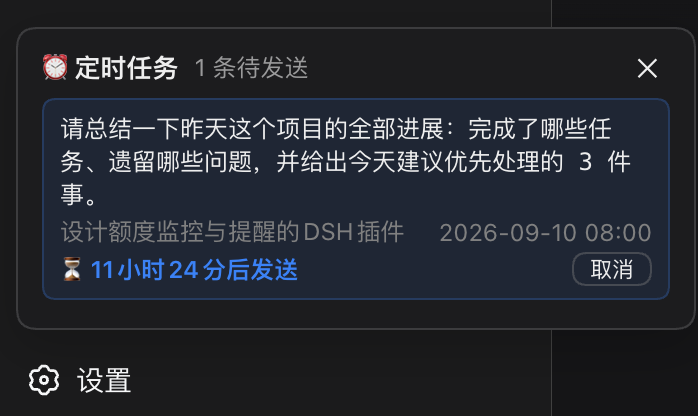
conversationId);切换会话只看到该会话的任务,互不串扰 - 🗂️ 侧边栏「定时任务」面板(v0.3.0+):侧边栏底部入口(含全库未发送任务数气泡角标)→ 独立面板列出所有会话的未发送任务(sendAt 升序、内容摘要等宽展示、计划时间、倒计时、会话名);点击条目跳转到对应会话;支持跨会话取消;会话已删除的条目置灰标注仍可取消
- 📋 会话内折叠列表:输入框上方显示本会话任务;多条时常显最先到期 1 条 + 「其余 N 条 ⌄」可展开/收起;任意条数均可手动折叠
- ♻️ 断电补发:任务持久化在本地(
~/.dsh/dsh-scheduled-send/tasks.json),重启 DSH 后恢复队列并向原会话补发;会话不在线时保留任务,恢复即补发 - 📱 移动端适配:≤480px 近全宽弹窗、≥40px 触控高度、面板默认收起、防横向溢出
🚀 安装
前置:已装好 DSH(dsh web 可正常运行)。
dsh plugin --profile web add @ottttto/dsh-scheduled-send
装完重启 dsh web 并硬刷新浏览器(Cmd/Ctrl+Shift+R)——输入框工具排出现「⏰ 定时」按钮,侧边栏底部出现「⏰ 定时任务」入口。
更新 / 指定版本
dsh plugin --profile web update @ottttto/dsh-scheduled-send        # 升到最新
dsh plugin --profile web add @ottttto/dsh-scheduled-send@0.3.9     # 锁定版本
从源码安装(开发调试)
git clone https://github.com/OTTTTTO/dsh-scheduled-send.git
dsh plugin --profile web add /path/to/dsh-scheduled-send   # 本地路径安装
常见问题
| 现象 | 原因与解决 |
|---|---|
启动报 Cannot find package 'dsh-scheduled-send' | 旧版(≤0.2.1)挂载条目用了裸名。先 dsh plugin --profile web remove dsh-scheduled-send,再重装 scoped 包 |
| 到点没发送 | 确认 dsh 宿主进程在运行(浏览器可关,进程不能停);查启动日志中 [dsh-scheduled-send] 告警 |
| 到点后消息没显示成气泡 | 升级到 ≥0.2.3(旧版 source.kind:'plugin' 会渲染为注入行) |
| 插件 UI 不出现 | 硬刷新浏览器(Cmd/Ctrl+Shift+R)加载新 bundle |
🖼️ 使用演示
① 输入内容,点「⏰ 定时」设置时间
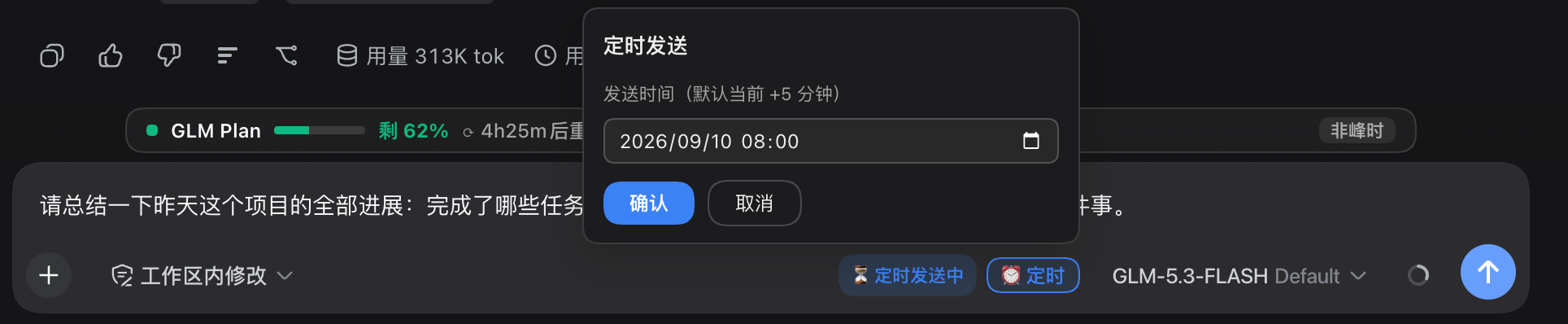
② 会话内已排程 / 侧边栏全库任务面板

③ 到点后以正常用户气泡出现在会话中
🧠 工作原理
- 宿主半(
src/index.js):调度器持久化任务队列;到点经runMaintenance + followup把消息(source.kind: "user",与官方发送路径一致)注入目标会话的 agent——这正是消息能以正常用户气泡渲染、且无需浏览器在线的原因 - 客户端半(
lib/client.js):⏰ 按钮与任务列表挂conversation.input.right/conversation.input.dock槽位;侧边栏面板挂sidebar.footer.action(与 usage-stats 同型);会话跳转用sessions.open(sessionId);经只读状态路由GET /plugin-data/dsh-scheduled-send/state轮询宿主状态 - 边界诚实声明:dsh 宿主进程停止期间任务不会发送,重启后自动补发
🔒 隐私
- 无遥测:不发起任何统计、上报或第三方网络请求
- 数据本地:任务仅持久化在本机
<dataDir>/tasks.json,不上传任何内容;状态路由响应不携带任何凭据
⚠️ 已知限制
- 不支持重复规则(每日/每周)——单个任务一次性触发
- 不支持指定模型发送(曾实现,因切换可靠性问题移除;计划以更可靠的宿主 API 重做);旧任务的
model字段被忽略,照常投递 - 到点投递要求创建时的会话在 DSH 宿主中存在;不活跃则保留任务,恢复即补发
🛠️ 开发
npm install
npm test            # 63 项测试全绿(node --test,红绿 TDD 全程)
npm run build       # 重建客户端 bundle(改 src/client-*.js 后必须执行)
纯 JS、零运行时依赖(DSH 能力全部内联实现,无需 peerDependencies)。结构:src/scheduler.js(持久化队列/补发/退避)、src/delivery.js(kind:'user' 气泡注入)、src/host-routes.js(state/schedule 路由)、src/client-core.js(纯逻辑)、src/client-view.js(⏰ 按钮 + dock + 侧边栏面板)、lib/client.js(构建产物)。
已收录 awesome-dsh-plugin 列表(workflow 分类)。功能建议 / 缺陷欢迎到 Issues。
⭐ Star History
Похожие плагины
webnovel-writer
lingfengqaq/webnovel-writer
loopx (dsh-loopx-plugin)
loopx-project/loopx
ouroboros (dsh-plugin)
q00/ouroboros
loopx (dsh-loopx-plugin)
huangruiteng/loopx