dsh-remote-hub
reshdh/dsh-remote-hub
Community fork of KyoMio/dsh-zen-remote (do not enable both simultaneously — shares the ~/.dsh/zen-remote state and /_dsh/zen-remote/* wire protocol, and auto-defers if dsh-zen-remote is active): keeps the pairing-code PWA with Web Push and multi-host session relay, and adds a desktop Local / Remote / All workspace switcher, remote directory browsing with folder creation and workspace rename/delete (/v1/workspace-manage), automatic custom LLM provider and API-key sync to paired hosts, and bidirectional cross-host @ session reference hydration (session-ref-bridge). The gateway binds 127.0.0.1 by default; the LAN/Tailscale mode binds 0.0.0.0 behind a private-IP wall, and a paired desktop client runs terminals and file previews with the host's OS-user permissions.
Установка
dsh plugin --profile web add github:reshdh/dsh-remote-hubREADME
dsh-remote-hub
Multi-host remote workspace hub for DeepSeek Harness — extended from KyoMio/dsh-zen-remote (v2.4.2, MIT). Combines the mobile PWA gateway & multi-host session relay with a desktop Local / Remote / All workspace scope switcher, remote folder browser & workspace creation, model & API credential sync, and bidirectional cross-host @ session reference bridging.






Coexistence Note & Attribution:
dsh-remote-hubbuilds uponKyoMio/dsh-zen-remote(v2.4.2, MIT) and preserves full wire & state compatibility (~/.dsh/zen-remote*) so existing paired hosts and shared sessions work without re-pairing. Disable or uninstalldsh-zen-remotebefore enablingdsh-remote-hub(only onezenRemoteprovider can run per DSH profile).
Key Enhancements over dsh-zen-remote
- Host-Scoped Sidebar Switcher: Switch cleanly between
Local, individual paired remote hosts (with live online/connecting/offline status dots), andAllunified view; scopes the top New Session button to the active host and keeps 0-session workspaces visible immediately. - Remote Directory Browser & Workspace Manager: Intercepts Add Workspace (
Ctrl+O) to browse remote host directories, toggle hidden folders, create subdirectories (mkdir), and open/rename/delete remote workspaces directly from the desktop client. - Bidirectional Cross-Host
@Session References: Query and@-mention sessions across your local machine and paired remote hosts (dsh-session:URI surface staging), with automatic host-tag labeling and plain-text UUID mention upgrading. - Model Provider & Credential Sync: Edits to custom LLM providers, endpoints, and API credentials on the client automatically mirror to connected remote hosts (adapting loopback/LAN gateway addresses) and trigger live model catalog refreshes.
| Session list home | Session page | Session info card |
|---|---|---|
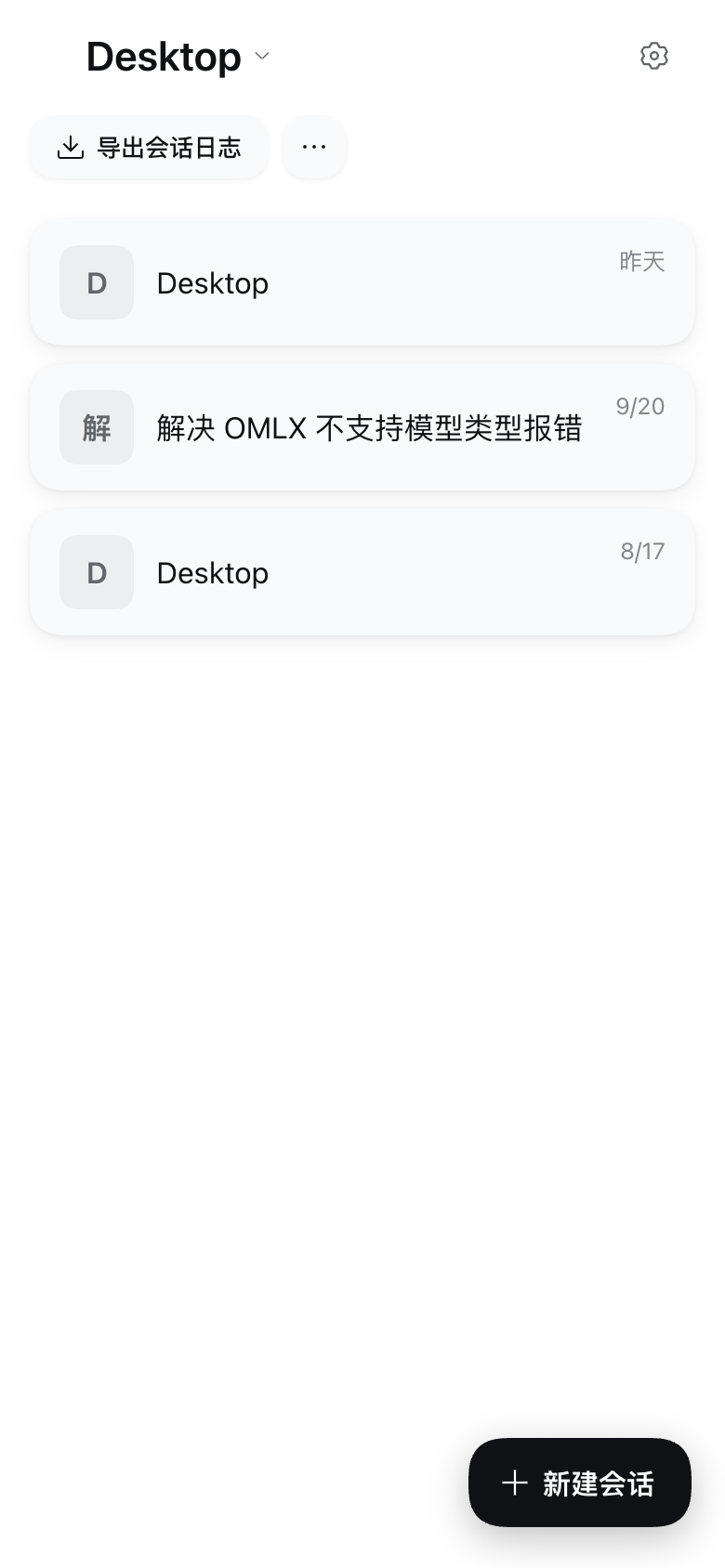 | 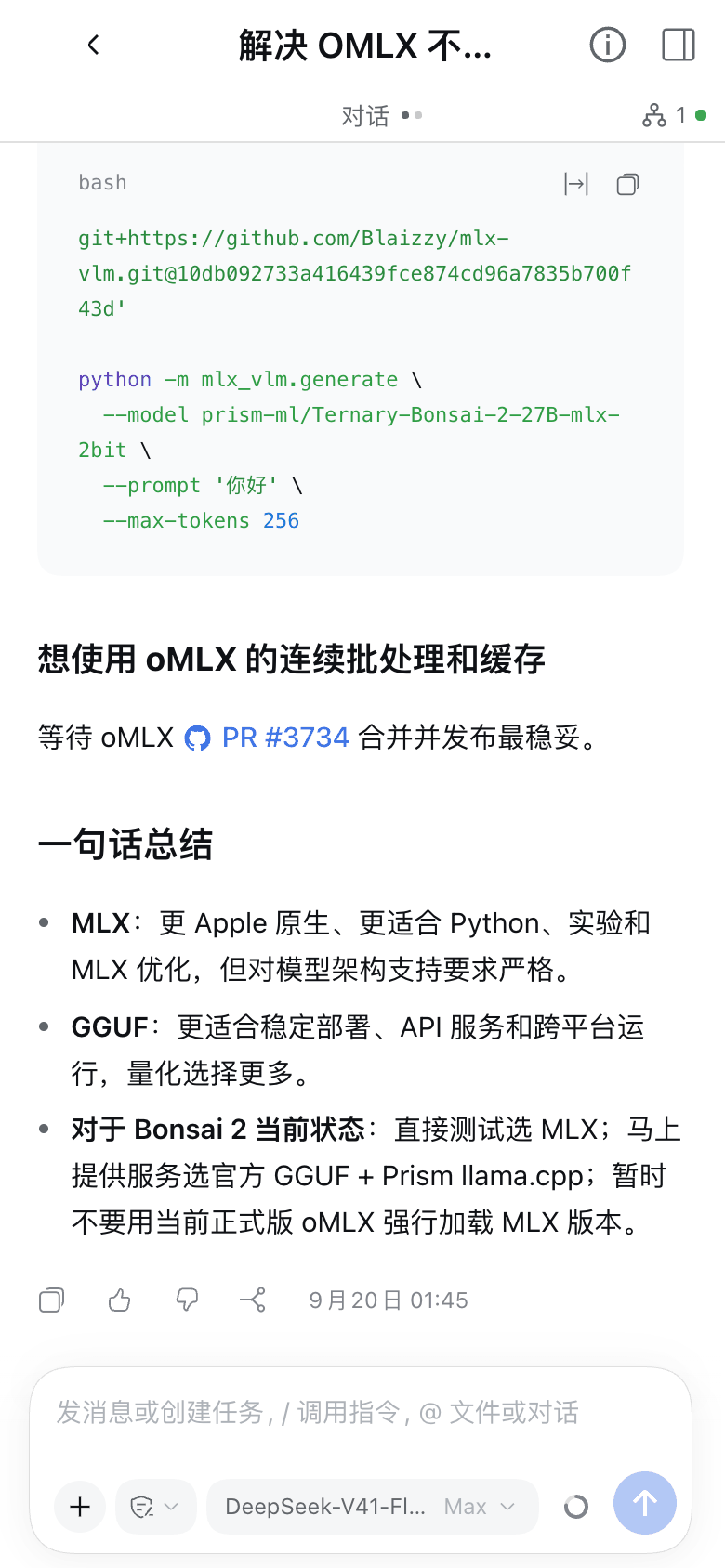 | 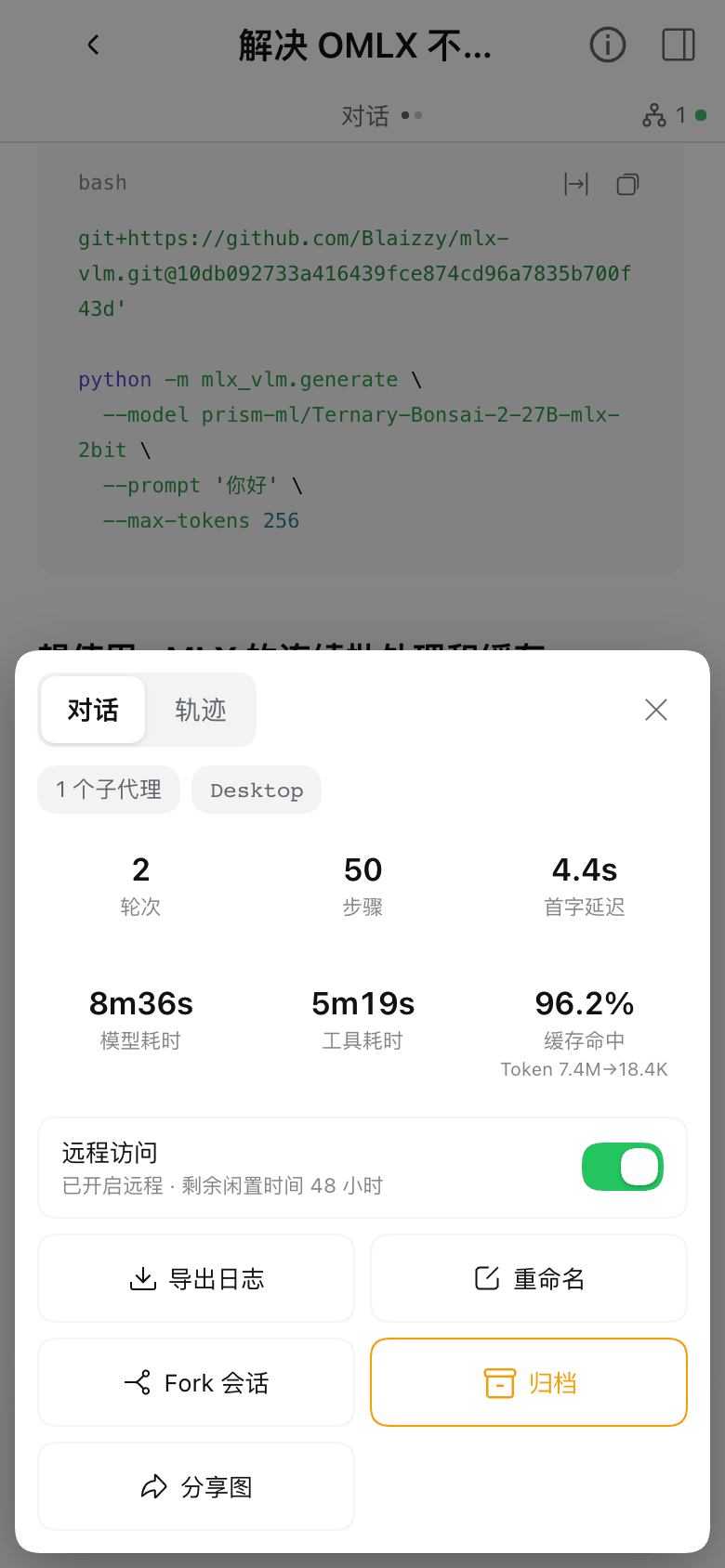 |
| Composer permission sheet | Pairing page a public visitor sees |
|---|---|
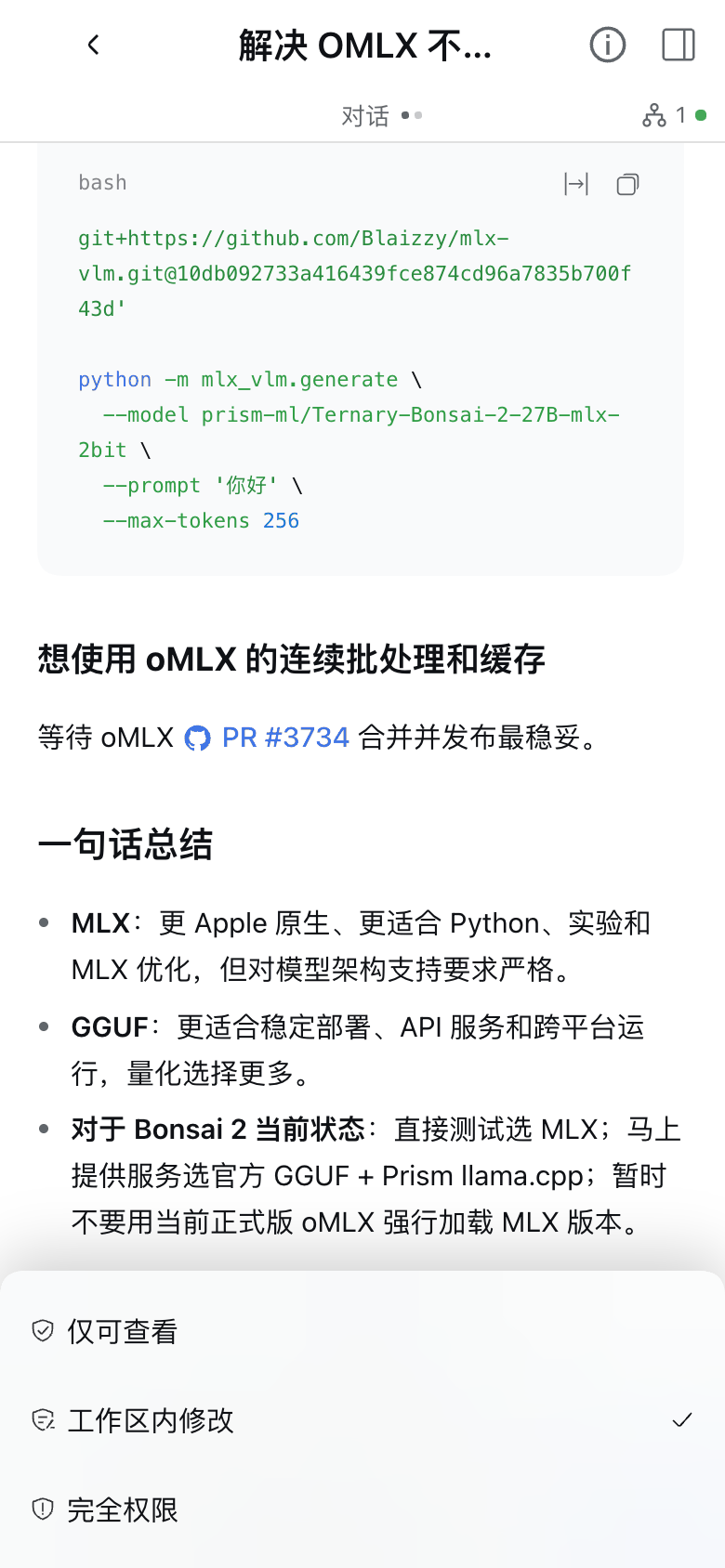 | 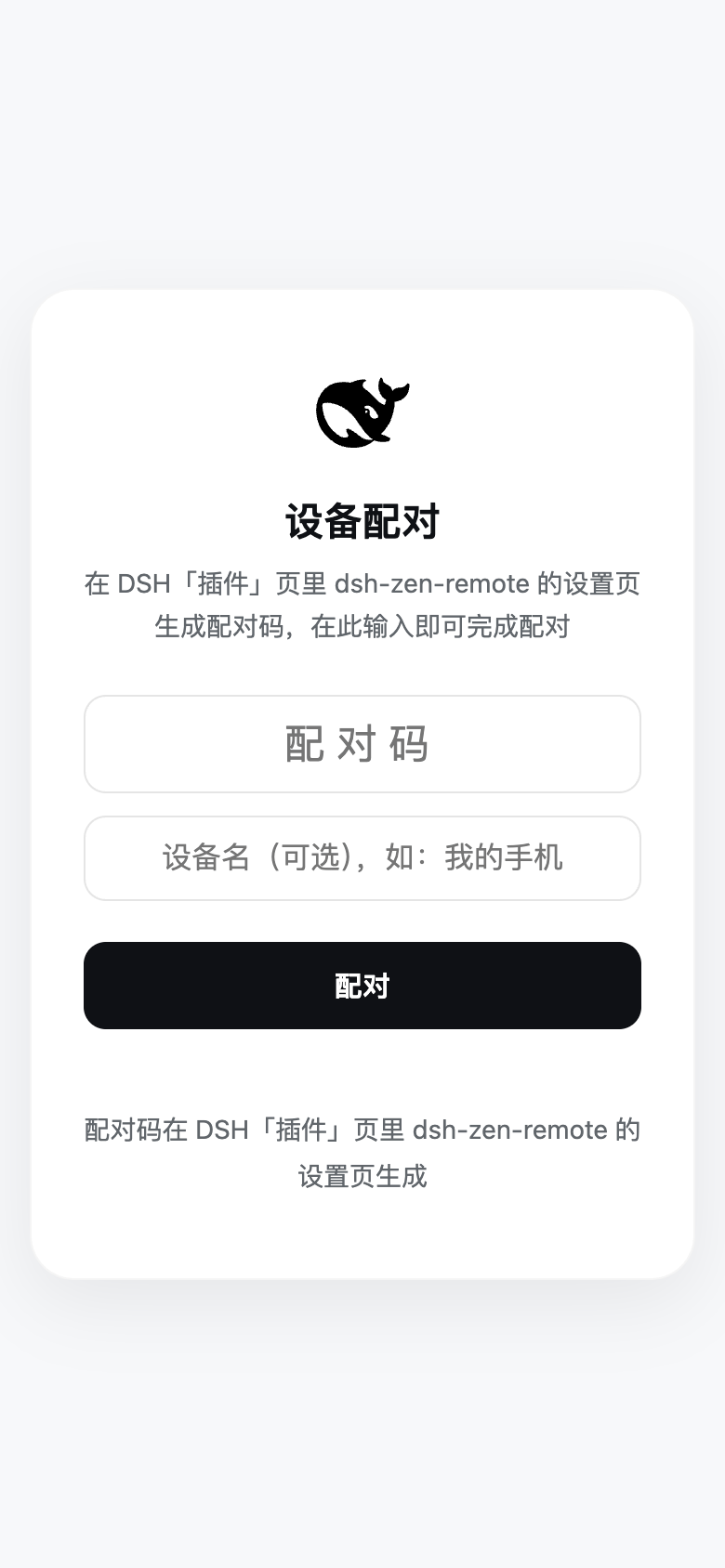 |
Screenshots are a 390×844 phone viewport in the light theme; both themes are supported. The pairing page is drawn by the gateway in DSH's official style, following the system light / dark appearance.
Contents
- Install
- Quick Start (Unified Setup & Pairing Wizard)
- Daily Usage: Session Sharing & Cross-Device Workflow
- Lock-Screen Push: When Notifications Fire
- Features
- Advanced Settings & Field Reference
- Security Model, Version Tolerance & Known Notes
1. Install
If you previously installed
dsh-zen-remote, disable or uninstall it first —dsh-remote-hubreuses your existing~/.dsh/zen-remote*state and pairings automatically.
Install from the UI (Desktop App & Web UI)
Open the Plugins page in the DSH sidebar → search dsh-remote-hub in the Plugin Market (or click Add plugin and paste the GitHub Release tarball URL https://github.com/reshdh/dsh-remote-hub/releases/download/v1.0.0/dsh-remote-hub-1.0.0.tgz) → click Enable now, then restart DSH.
Install from the CLI (Headless dsh web server)
dsh plugin --profile web add https://github.com/reshdh/dsh-remote-hub/releases/download/v1.0.0/dsh-remote-hub-1.0.0.tgz
# then restart dsh web (or run `dsh-remote-hub setup` to configure and pair)
dsh pluginrequires--profileto name the target profile. The desktop app'sdesktopprofile is managed exclusively by the app (--profile desktopis refused on the CLI), so use the UI install above on the desktop app.
Headless Server CLI Wizard (dsh-remote-hub)
The plugin ships a bundled CLI tool so remote VPS / headless servers (dsh web) can complete the entire setup, ingress configuration, three-light verification, and QR / desktop pairing flow in a terminal without opening a browser:
dsh-remote-hub setup            # 3-step interactive wizard: role → ingress → verify + terminal QR & desktop pairing
dsh-remote-hub status           # current role, gateway & connection state (--json; --debug exports redacted diagnostics)
Expand full CLI subcommand reference (host / client / non-interactive flags)
# Host commands (when role is host)
dsh-remote-hub host device pair --device-role web              # mint a phone/browser pairing code + terminal QR (or desktop-client)
dsh-remote-hub host device list                                # list paired devices (--json supported)
dsh-remote-hub host device revoke <id|--all> [--yes]           # revoke one or all paired devices
dsh-remote-hub host ingress start --mode lan                   # configure & start ingress (caddy | cloudflared | external | lan)
dsh-remote-hub host ingress stop [--yes]                       # stop managed Caddy / Cloudflare Tunnel processes
dsh-remote-hub host ingress verify [--no-wait]                 # three-light check + mint web QR & desktop pairing codes
dsh-remote-hub host ingress snippet [--proxy nginx|caddy|lucky] # print reverse-proxy config snippets

# Client commands (when role is client, up to 8 paired hosts)
dsh-remote-hub client pair http://192.168.1.2:3088 --code 12345678 [--name My-Mac]
dsh-remote-hub client list                                     # list all paired hosts (up to 8) and connection states
dsh-remote-hub client unpair <hostUrl|entryId|--all> [--yes]   # remove one or all paired hosts
- Preflight & non-interactive automation:
setupautomatically scans candidate profiles for multi-select plugin installation (desktopis skipped) and launches the DSH daemon / app before starting the wizard. Pass--yeswith the required flags (e.g.setup --role host --ingress lan --no-wait --yes) for unattended scripts. - Architecture: the CLI communicates with the running plugin over a
0600local IPC socket (~/.dsh/zen-remote-cli.sock); Caddy andcloudflaredstay managed by the plugin process. Use--lang zh|ento switch output language.
Manual Profile Edit / Local Development (link:), Upgrading & Uninstall
Editing the profile by hand (local development, link: installs): add the dependency to the profile's package.json (~/.dsh/profiles/desktop for the desktop app, ~/.dsh/profiles/web for the web service) and append "dsh-remote-hub" to the dsh.profile.bundles array:
// ~/.dsh/profiles/desktop/package.json
{
  "dependencies": {
    "dsh-remote-hub": "^1.0.0"        // for local development: "link:/path/to/dsh-remote-hub"
  }
}
cd ~/.dsh/profiles/desktop && pnpm install
# For a link: checkout, also run `npm install --omit=dev` inside the repository so the gateway subprocess can resolve `web-push`.
Upgrading & migration notes:
- Upgrading with HMR on: remove
dsh-zen-remotefirst, then install the new version (dsh plugin --profile <name> remove dsh-zen-remote→add dsh-zen-remote, or Uninstall → Add in the Plugins page). - DSH 0.2.1-alpha.3+ profile reset:
dsh --profile <name> --from-default-profile <template>replaces an existing custom profile with a fresh copy; back up~/.dsh/profiles/<name>first. - Upgrading from 1.x: since 2.0.0 the composition layer is a single row (
dsh-zen-remote). Remove any legacydsh-zen-remote-gateway,dsh-zen-remote-push, or manualdsh-push.mjslines fromcordis.patch.yml. Existing~/.dsh/lan-gate.config.jsonsettings and paired devices carry over automatically. - Uninstalling: click Uninstall on the
dsh-zen-remoteplugin page and restart. To also wipe pairing and share state, delete~/.dsh/lan-gate-state.json,~/.dsh/lan-gate.config.json, and~/.dsh/zen-remote-state.json(older versions also kept~/.dsh/zen-remote-shares.jsonand~/.dsh/zen-remote-server.json— they migrate into the state file automatically on first start and are then deleted).
2. Quick Start (Unified Setup & Pairing Wizard)
The same plugin supports two roles:
- Server (
role: host, default): runs your sessions, spawns the local security gateway and Web Push service, and lets your phone (PWA) or another computer connect. - Desktop Client (
role: client): runs inside another computer's DSH desktop app, connects to up to 8 hosts simultaneously, and mounts their shared sessions directly into its own sidebar (without spawning a local gateway or fighting for port 3088).
Open Plugins → dsh-zen-remote in DSH. The Remote Access & Device Pairing card sits right at the top of the page (or run npx dsh-zen-remote setup on a headless server):
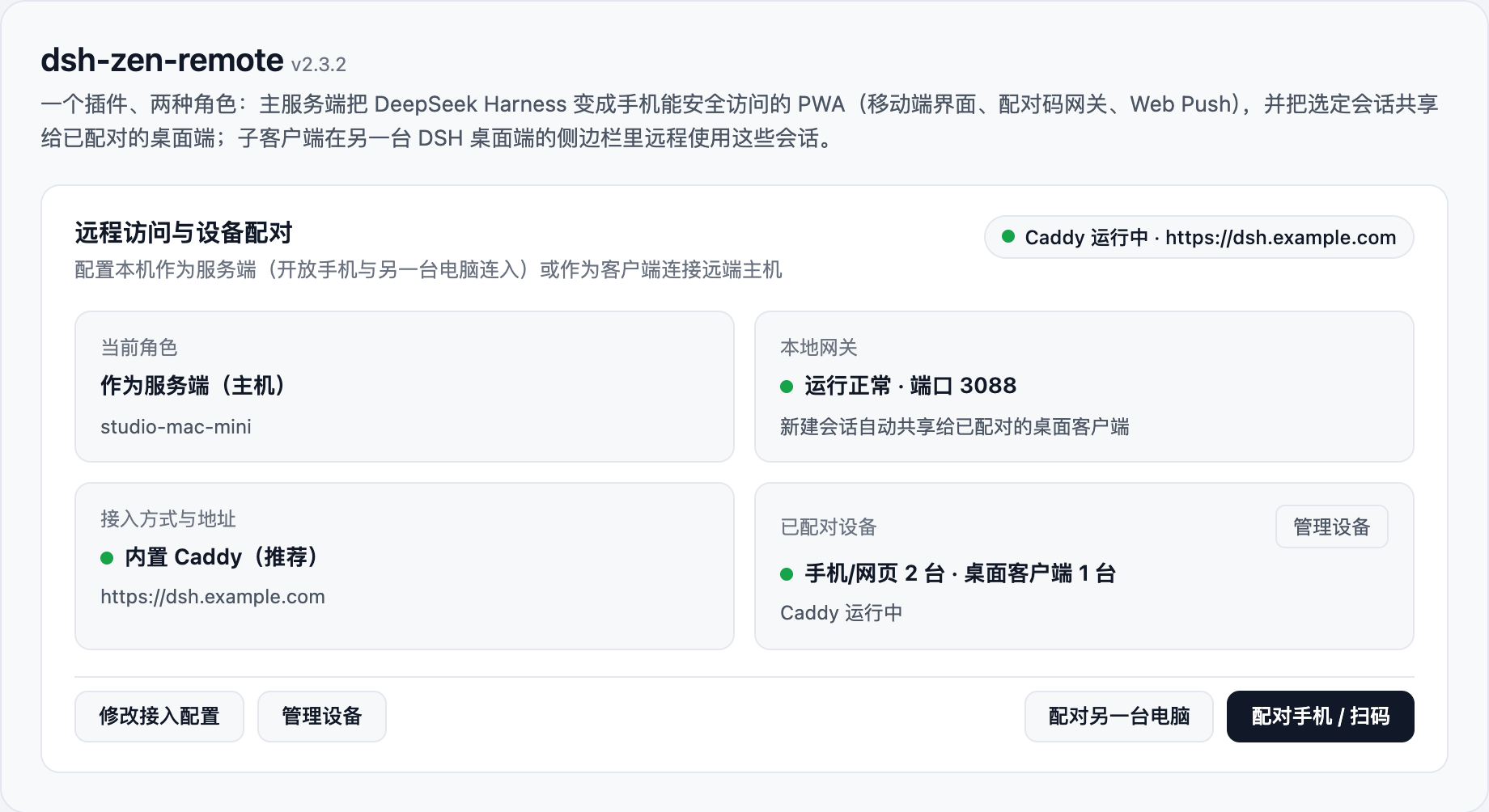
Scenario A: Set up as Host (Phone & Desktop Access)
Click Start Setup Wizard (or Reconfigure Wizard) to complete setup in three guided steps:
Step 1: Choose "Act as Server (Host)" & an Access Method
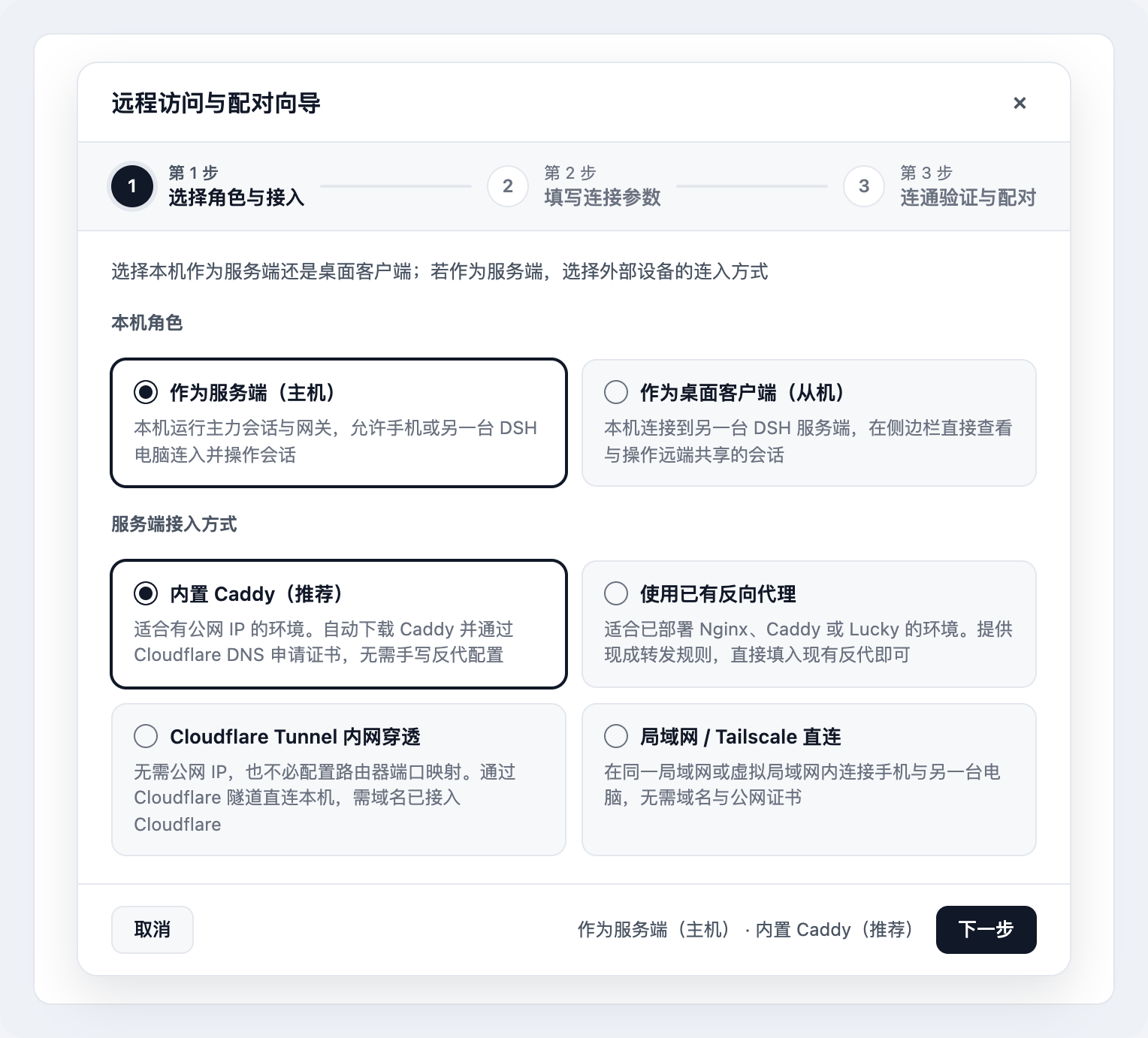
| Access method | Best for | What the wizard automates |
|---|---|---|
| Managed Caddy (Recommended) | Public IP (or router port forwarding) + domain on Cloudflare | Downloads prebuilt Caddy + caddy-dns/cloudflare and issues/renews TLS certificates via DNS-01 (127.0.0.1:3088) |
| Existing Reverse Proxy | Already running Nginx, Caddy, or Lucky | Generates ready-to-paste proxy snippets + one-click trustedProxies registration (manual guide) |
| Cloudflare Tunnel | No public IP / no port forwarding + domain on Cloudflare | Downloads cloudflared, creates/reuses a tunnel, configures CNAME, and starts the tunnel (127.0.0.1:3088) |
| LAN / Tailscale Direct | Same Wi-Fi / LAN or shared Tailscale network | Auto-detects LAN / Tailscale IPv4 and binds 0.0.0.0:3088 behind the built-in private-IP wall (403 public-direct-forbidden) |
Step 2: Fill in Connection Parameters
- Managed Caddy / Cloudflare Tunnel: enter your public domain (e.g.
dsh.example.com) and paste your Cloudflare API Token. - Existing Reverse Proxy: enter the external
https://URL and copy the generated Nginx / Caddy / Lucky configuration snippet. - LAN / Tailscale Direct: confirm the auto-detected
http://<your-LAN-or-Tailscale-IP>:3088address.
Step 3: Verify Connectivity & Pair Devices
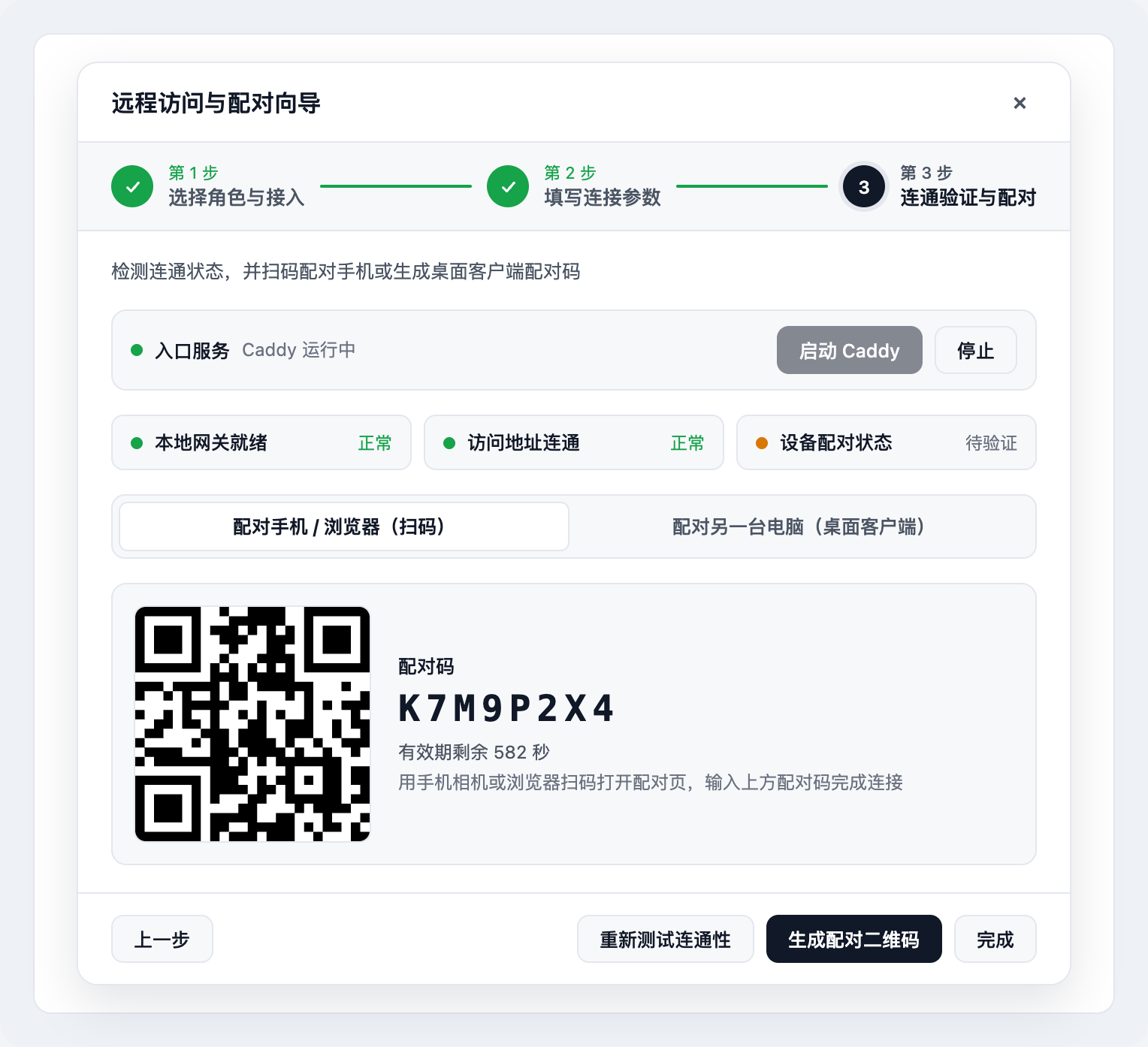
- Start Ingress Service & Auto-Probe: click Start Caddy or Create & Start Tunnel if applicable; the wizard automatically checks Local gateway ready and Access URL reachable.
- Pair Phone / Browser (Web App): on the Pair Phone / Browser (QR) tab, click Generate Pairing QR, scan with your phone, enter the 8-character code, and use "Add to Home Screen" to install DSH as a standalone PWA with lock-screen push.
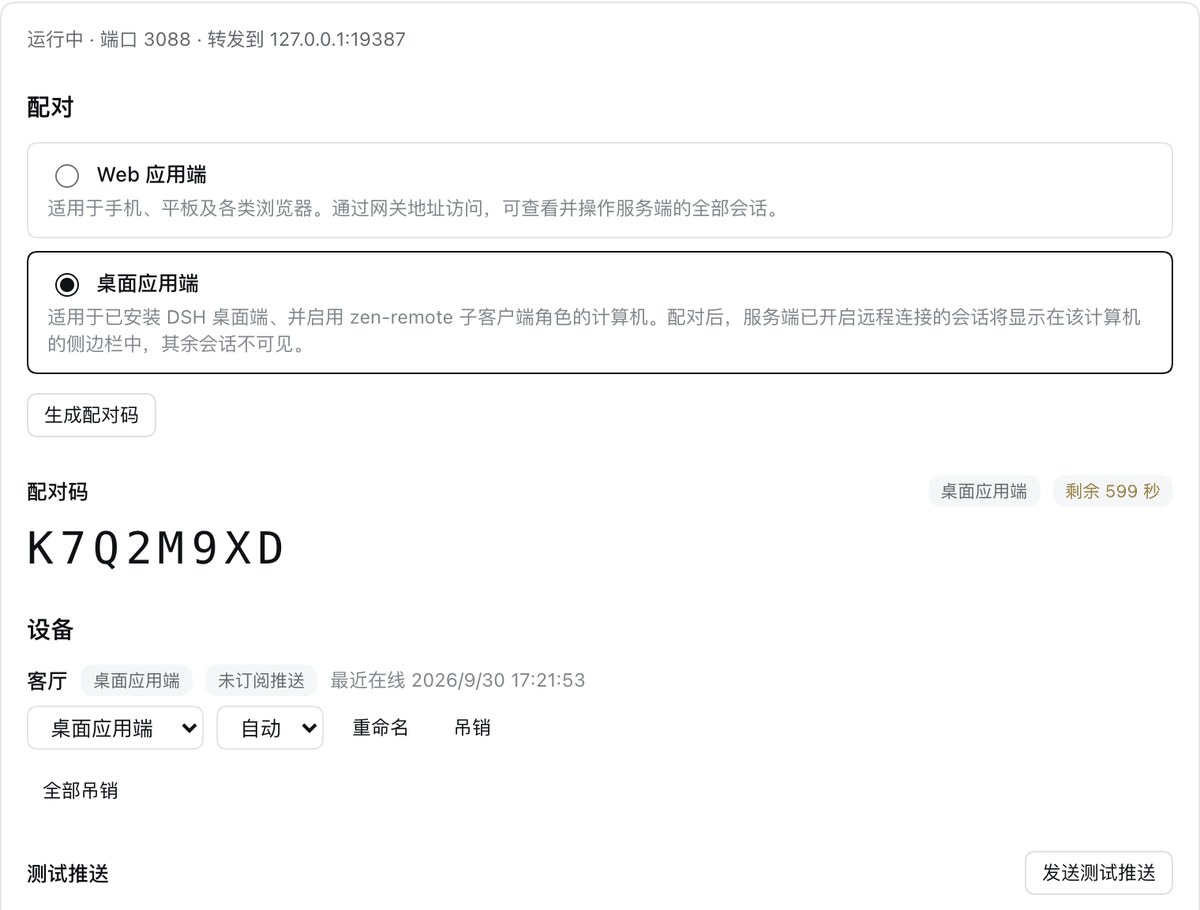
- Pair Another Computer (Desktop Client): switch to the Pair Desktop Client tab, click Generate Desktop Pairing Code, and click Copy Server URL & Code.
Quick actions after setup: once configured, you can directly click Pair Phone (QR), Pair Desktop Client, or Manage Devices right from the overview card footer without re-running the wizard.
Scenario B: Set up as Desktop Client (Connect up to 8 Hosts)
On another computer running the DSH desktop app (or via dsh-zen-remote client pair <hostUrl> --code <8-char-code> on the CLI):
- Open Plugins →
dsh-zen-remoteand click Start Setup Wizard (or + Add Server if already in client mode). - Step 1: select Desktop Client and click Next.
- Step 2: enter this computer's display name (e.g.
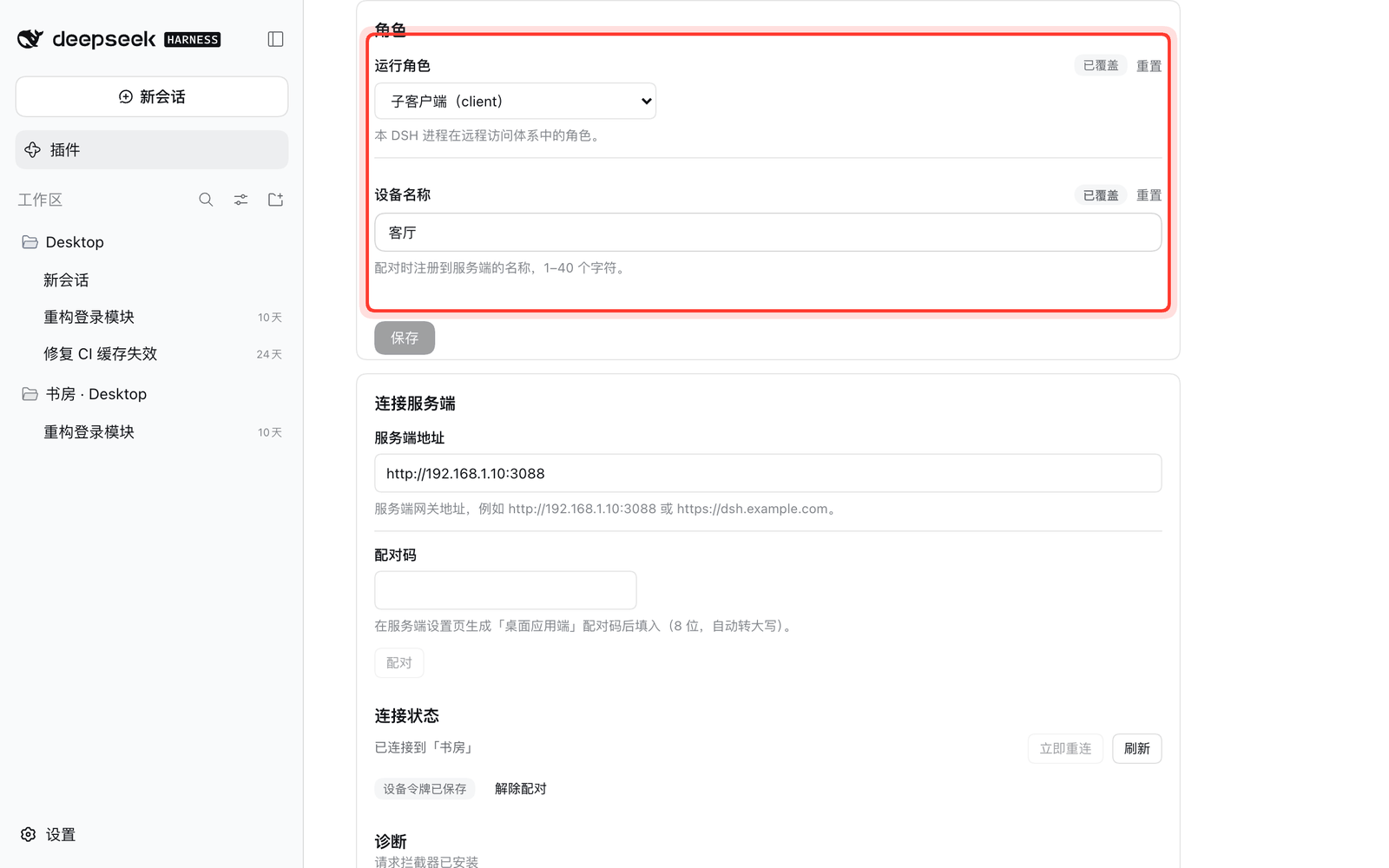
Living-Room-Mac), the host's gateway URL (https://for public URLs, orhttp://192.168.x.x:3088/http://100.x.x.x:3088for LAN / Tailscale), and the 8-character desktop pairing code from the host, then click Pair & Connect. - Step 3: once all three status lights (Pairing token, Server connection, Session & plugin sync) turn green, the host's shared workspaces and sessions appear in your left sidebar immediately.
- Multi-Server Management (up to 8 hosts):
- Click + Add Another Server in Step 3, + Add Server on the overview card, or Manage Servers to view per-server status, Reconnect, Re-pair, Remove, or Remove All (when all
8 / 8slots are full, a red limit notice appears; re-pairing an existing URL still overwrites in place). - Sidebar groups from all paired hosts merge in pairing order after your local workspaces. Duplicate host names are automatically numbered
Name-1,Name-2; model pickers, connection status icons, read-only banners, plugin bridges, and file uploads are strictly isolated per hostserverId.
- Click + Add Another Server in Step 3, + Add Server on the overview card, or Manage Servers to view per-server status, Reconnect, Re-pair, Remove, or Remove All (when all
3. Daily Usage: Session Sharing & Cross-Device Workflow
| Web App Device (Phone / Tablet / Browser) | Desktop Client (Another DSH Desktop App) | |
|---|---|---|
| Visible sessions | All sessions on the host | Only sessions with remote access enabled on the host (enforced server-side) |
| Credential | Long-lived HttpOnly cookie | Secret device token stored in ~/.dsh/zen-remote-state.json (Bearer token) |
Enabling or Disabling Remote Access on a Session
Remote access is controlled per session (or automatically enabled for new sessions if you turn on Auto-share new sessions). You can toggle it from four places:
-
Host sidebar: open a session's
"…"menu and click 开启远程 / 关闭远程 (Enable / Disable remote);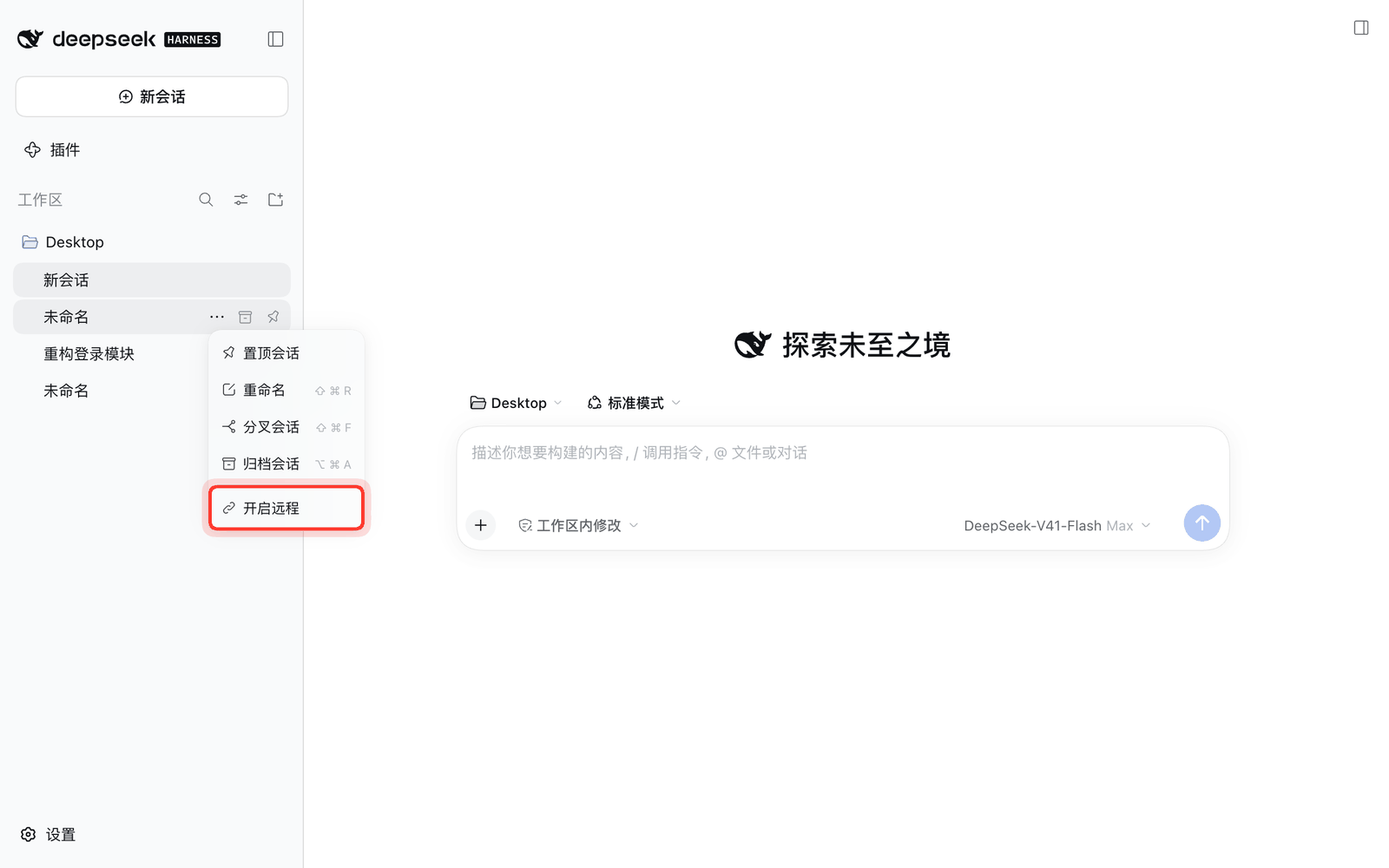
-
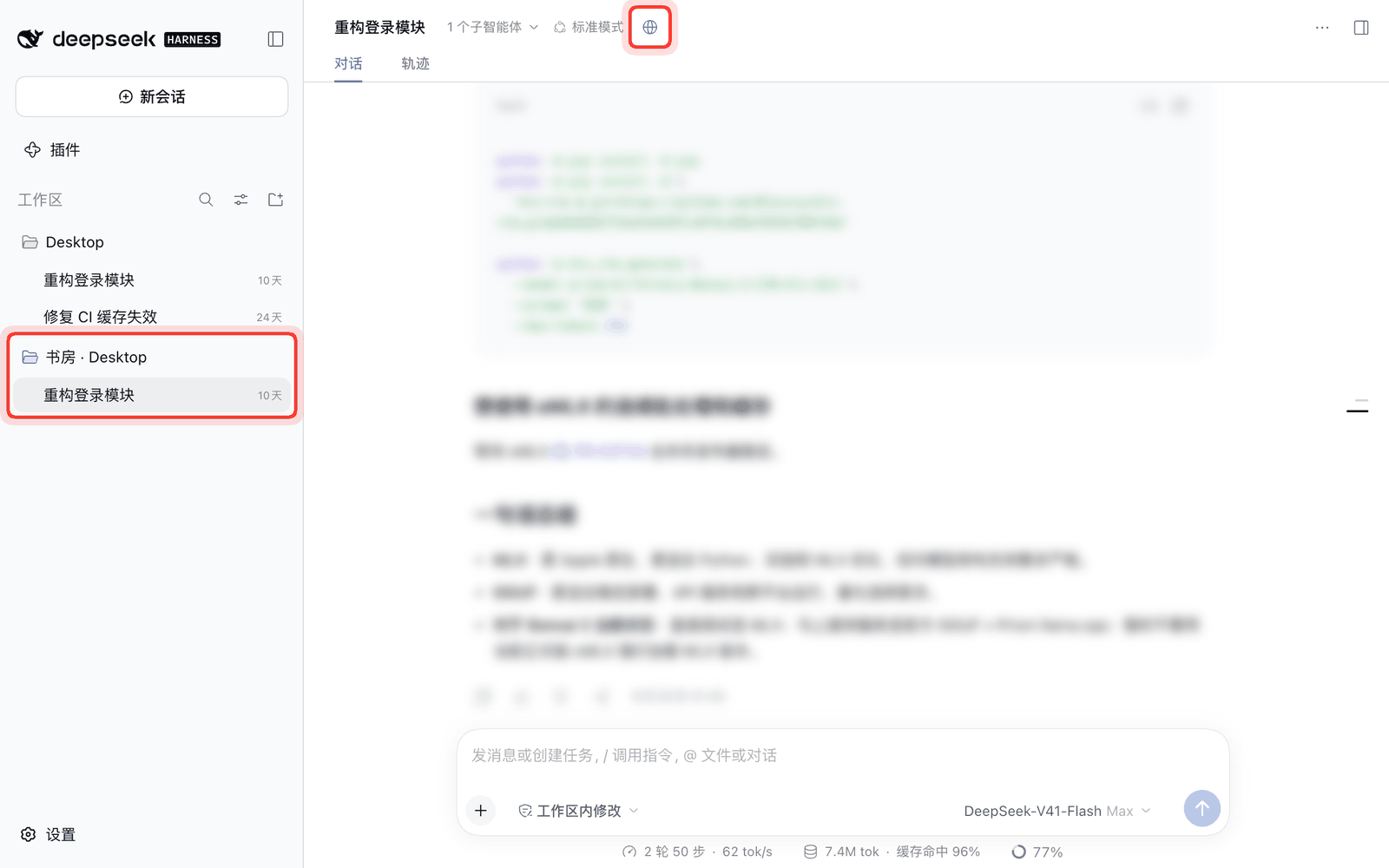
Host session header: click the globe icon in the session title row (hover to see remaining idle time; a green dot indicates a desktop client is currently viewing it);
-
Phone (Web App) session info card: open the
ⓘinfo card at the top right of a session and toggle 远程访问 (Remote access);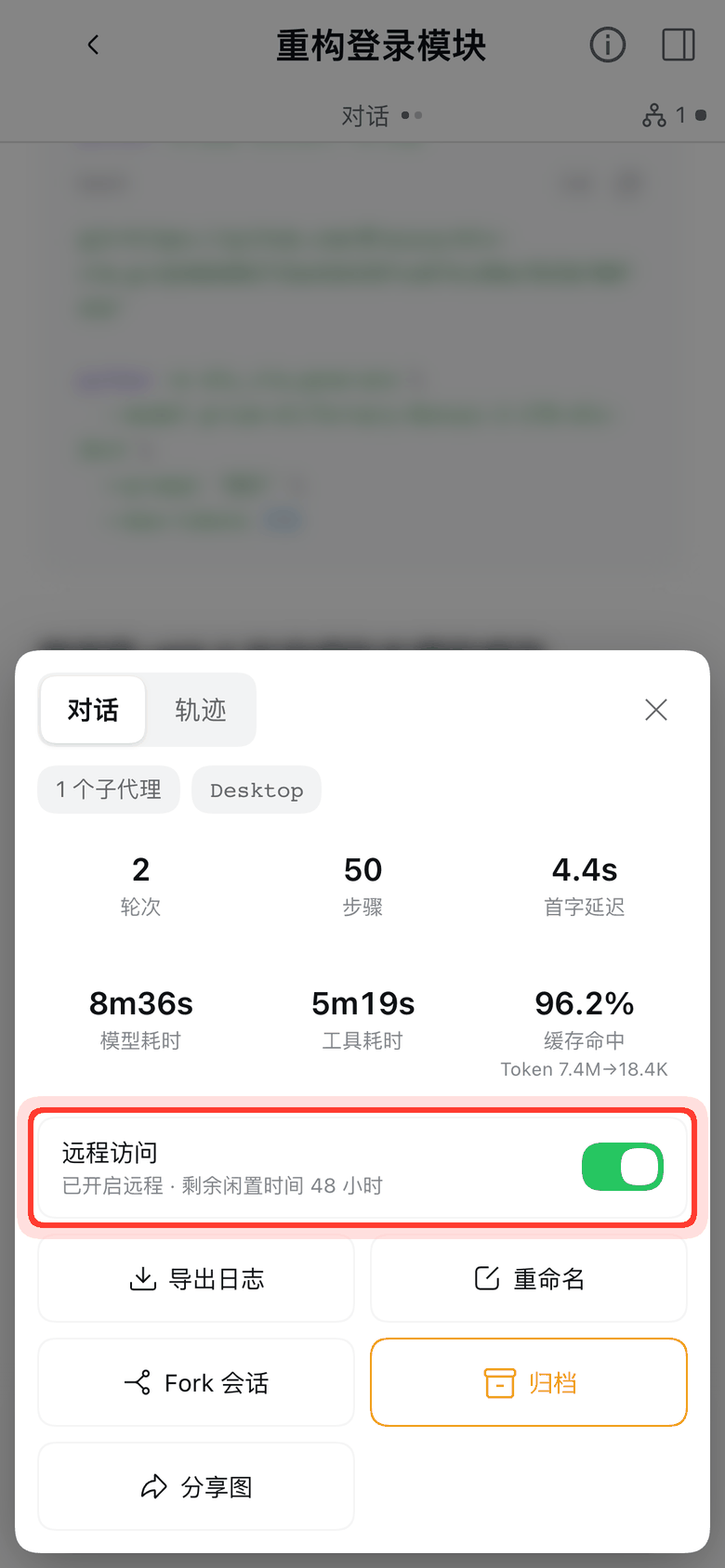
-
Host settings page: view and close shared sessions individually or all at once under the shared sessions list.
Working in Remote Sessions on a Desktop Client
-
Sidebar groups: once a host workspace has at least one remote-enabled session, a "Server Name · Workspace Name" group appears in the client's sidebar (up to 8 paired hosts, stacked in pairing order). Click any session to view full history, stream responses, approve tools, use the server terminal, browse files and diffs, preview inline images, download deliverables, or drag/paste/pick files to upload.
-
Closing & idle sleep: a shared session automatically closes remote access after 48 hours (
idleHours) of inactivity (running or waiting sessions never sleep). Closed or unpaired sessions are automatically archived/hidden from the sidebar; an actively open session displays a "remote closed" banner and recovers automatically if re-shared.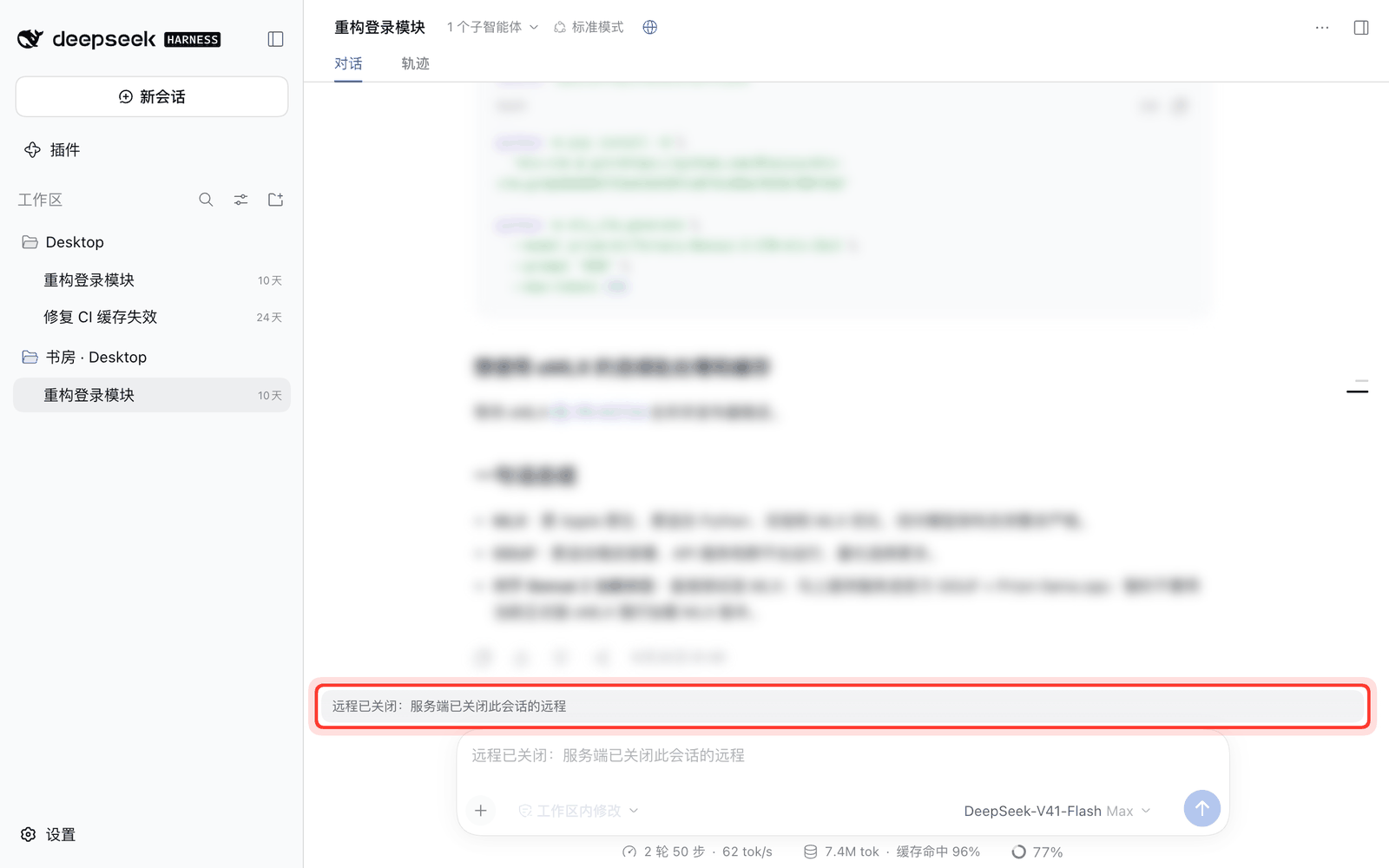
4. Lock-Screen Push: When Notifications Fire
Notifications fire only when you are actually needed, along two independent paths (all payloads are end-to-end encrypted with aes128gcm; toggle pushEnabled to disable all notifications and unregister push_notify, or enable pushSessionName to show Session: <name> on the first line of the notification body):
- System-triggered (always on when
pushEnabledis on, never suppressed by debounce):- Tool waiting for approval: pushes "DSH needs your approval" with the tool name after
DSH_PUSH_APPROVAL_GRACE_MS(default 5s, so fast auto-approvers can answer first without buzzing your phone). ask_user_questionwaiting for your answer: pushes "DSH is waiting for your answer".
- Tool waiting for approval: pushes "DSH needs your approval" with the tool name after
- Model-triggered (
push_notifytool):- Called by the agent when you asked to be notified upon completion, or when it hits a blocker that requires your decision. Ordinary turn completions do not push by default (enable
pushTurnEndif wanted; enablepushSummaryto include up to 120 characters of the final reply).
- Called by the agent when you asked to be notified upon completion, or when it hits a blocker that requires your decision. Ordinary turn completions do not push by default (enable
5. Features
- Mobile PWA UI (Host): two-level page stack (session list home + session page with swipe-back and Android back-gesture support, first-frame boot skeleton, immutable asset caching), auto-discovered plugin entry chips, compact mobile composer with bottom sheets and phone attachment uploads, and a session info card (6-tile stats with
tok/soutput speed, log export, rename, fork, archive, one-tap full-conversation PNG share image, and remote access switch). - Unified Setup Wizard & Headless CLI (
dsh-zen-remote): top-of-page 2×2 live overview card, 3-step modal wizard, and a full-featured terminal CLI (setup/status/host/client) covering all four host ingress modes (Managed Caddy, Existing Reverse Proxy, Cloudflare Tunnel, LAN / Tailscale Direct with private-IP wall) and client pairing. - Cross-Desktop Remote Sessions & Multi-Server Pool (Client): connect up to 8 main servers simultaneously in pairing order; supports full history & live streaming, approval/question sync, per-server isolated model catalog, file tree & Git diffs, duplex server-side terminal (
terminal/attach), inline Markdown image & media forwarding, windowed artifact downloads, server-side LibreOffice PDF preview, up to 500 MiB file uploads (drag-and-drop, paperclip picker, and paste), and one-click redacted diagnostics export. - Plugin Bridge: cooperative plugins and built-in adapters (such as
dsh-better-sidebar0.25.0–0.30.1) route their panel HTTP and WebSocket requests in remote sessions to the host machine (with explicit owner consent for whole-machine data). See Plugin Bridge Guide.
In depth: Interface Design · Public Access & Relay Protocol
6. Advanced Settings & Field Reference
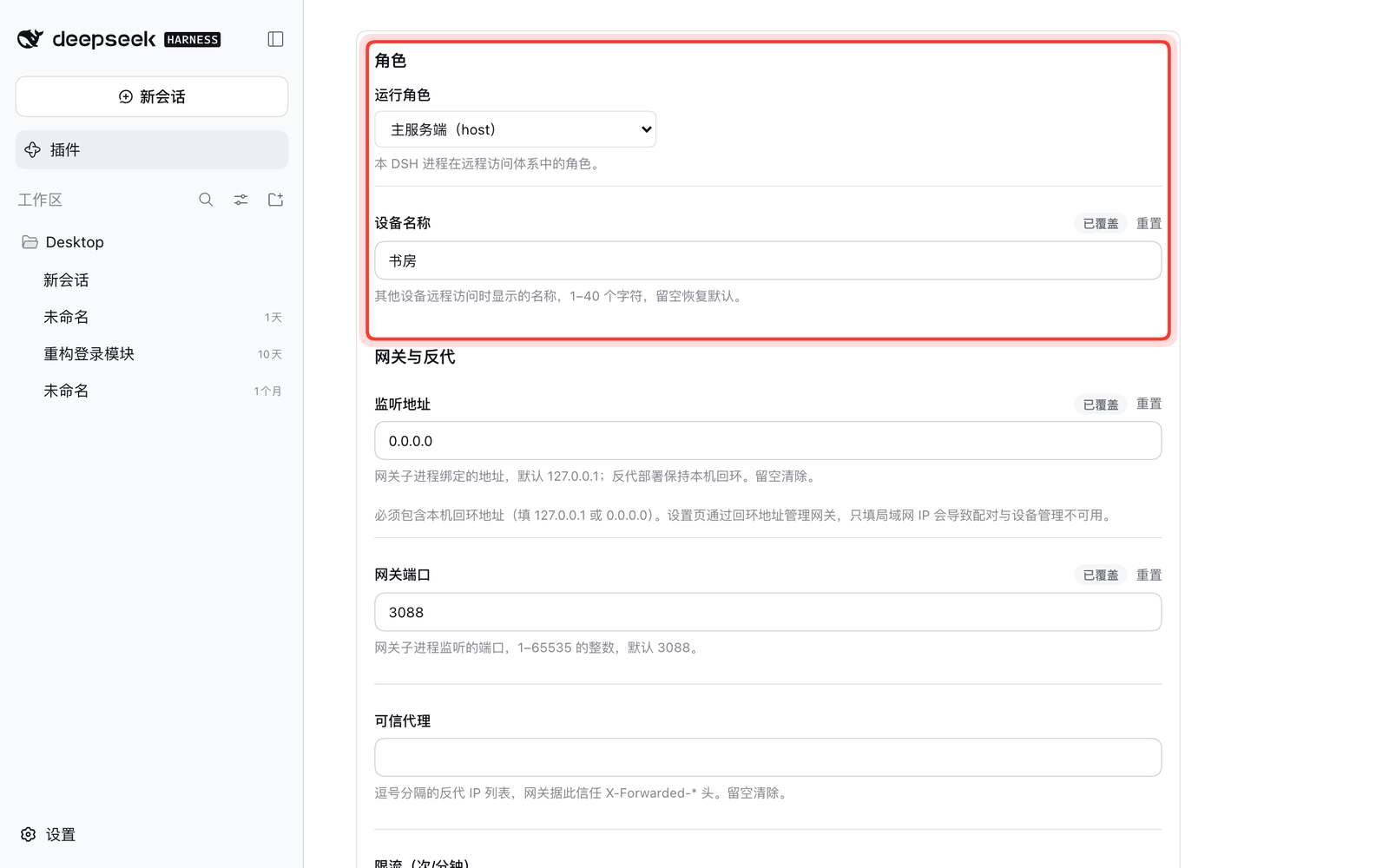
Day-to-day setup and device management are handled entirely by the Remote Access & Device Pairing Wizard (or npx dsh-zen-remote setup). To fine-tune individual low-level fields, click dsh-zen-remote a second time under Included components on the plugin detail page.
| Host Role & Pairing Cards | Shared Sessions List | Client Settings & Diagnostics |
|---|---|---|
  |  |  |
Expand full configuration field reference table & environment variables
Each field resolves in order: environment variable > plugin row settings > ~/.dsh/lan-gate.config.json > default. Saving a field that requires a gateway/push restart reloads the plugin row automatically without restarting the app.
| Field | Default | What it does |
|---|---|---|
role | host | host runs gateway + push + sharing; client connects to a remote host |
serverName | computer name | Device name (≤ 40 chars): sidebar group title on a host, registered device name on a client; renaming on a client broadcasts the new name to all its paired servers (one-way — the server never rewrites it) |
port | 3088 | Gateway port; retries upward (up to +20) if occupied |
host | 127.0.0.1 | Gateway bind address (127.0.0.1 for local proxy/tunnel, 0.0.0.0 for LAN/Tailscale direct) |
targetPort | (auto) | Local DSH Web UI port; leave empty to auto-discover the host's listening port |
rateLimit | 120 | Per-minute cap on unpaired requests per client IP |
trustedProxies | empty | Comma-separated trusted proxy IPs when the reverse proxy runs on another machine |
vapidSubject | mailto:admin@localhost | Web Push contact (must be a real mailto: or https:// URL for iOS delivery) |
lang | auto | Gateway & notification language: auto (browser Accept-Language), zh, or en |
pushEnabled | on | Master switch for session notifications; off stops every automatic push and unregisters the push_notify tool and its system-prompt hint |
pushSessionName | off | Open the notification body with Session: <name> (the source session's name; the title keeps the fixed event heading) |
pushTurnEnd | off | Also send a push when an ordinary turn finishes (approvals/questions always push) |
pushEvents | agent/turn-stopping | Comma-separated events that count as turn end when pushTurnEnd is on |
pushDebounceMs | 15000 | Minimum interval (ms) between automatic pushes |
pushSummary | off | Include up to 120 chars of the final reply in notification bodies |
pushTool | on | Register the model-callable push_notify tool |
idleHours | 48 | Idle-sleep window in hours for shared sessions; range (0, 8760] |
autoShareNewSessions | off | Automatically enable remote access on new sessions created on the host |
pluginBridgeConsent | {} | Whole-machine data consent map (pluginName -> boolean) for the plugin bridge |
serverUrl (client) | empty | Remote server gateway URL (https:// required for public hosts; http:// allowed on private LAN/Tailscale ranges). Legacy single-server field: the paired list now lives in ~/.dsh/zen-remote-state.json (up to 8 servers) and these row credentials migrate into it automatically on first start |
deviceToken (client) | empty | Paired client token (secret field, redacted everywhere). Legacy single-server field, migrated into ~/.dsh/zen-remote-state.json like serverUrl; new pairings go through the settings card / wizard and never echo the token back to the browser |
turnFoldDesktop | off | Enable turn-process folding on desktop widths as well as mobile |
keyboardLiftRatio / keyboardLiftMaxPx / keyboardSafetyPadPx | 0.42 / 400 / 15 | Soft-keyboard lift calibration fallback for environments where the OS hides keyboard height |
maxUploadBytes | 20 MB | Mobile attachment upload cap |
Legacy environment variables (outrank row settings): LAN_GATE_PORT, LAN_GATE_HOST, LAN_GATE_TARGET_PORT, LAN_GATE_RATE_LIMIT, LAN_GATE_TRUSTED_PROXIES, LAN_GATE_VAPID_SUBJECT, LAN_GATE_LANG, DSH_PUSH_ENABLED, DSH_PUSH_SESSION_NAME, DSH_PUSH_TURN_END, DSH_PUSH_EVENTS, DSH_PUSH_DEBOUNCE_MS, DSH_PUSH_SUMMARY, DSH_PUSH_TOOL, DSH_PUSH_LANG, DSH_PUSH_APPROVAL_GRACE_MS.
7. Security Model, Version Tolerance & Known Notes
- Trusted client & strict session isolation: a paired desktop client runs terminals and file previews as the host's OS user, while unshared sessions are strictly filtered and refused at the relay layer. Even when binding
0.0.0.0for LAN/Tailscale, the gateway's private-IP wall rejects any unproxied public internet IP (403 public-direct-forbidden), and all admin/wizard mutations are restricted to the host machine itself. - Version tolerance: both ends must run the same
dsh-zen-remoteversion; DSH host versions may differ (interface fingerprints are compared at handshake and degrade only mismatched panels).
Expand security & state-file details, known limitations, iOS PWA notes & adapted third-party plugins
Data & state files
- The plugin reports nothing to any third party. Pairing state lives in
~/.dsh/lan-gate-state.json; the unified state file~/.dsh/zen-remote-state.json(0600) carries the localserverId, the shared-session tablesessions, and the client's paired servers listservers(up to 8 servers, tokens included); Cloudflare tokens live in0600files under~/.dsh/zen-remote-ingress/.
Known limitations
- With multiple DSH windows open simultaneously on a client, active-session detection may occasionally dismiss a closed session early.
- Switching between different servers or recreating a workspace with the same ID requires reloading the client page once.
- "Export session" and server-local OS dialogs ("Reveal in Finder" / "Open in app") are hidden in remote sessions.
- DSH's own Settings RPCs are loopback-only by upstream design, so plugin settings must be edited on the machine running DSH rather than through a remote browser.
iOS standalone PWA notes
- iOS 26.x viewport shrinkage: home-screen PWAs may lose a status-bar height at the bottom (an iOS WebKit bug); three mitigation layers are built in, and restarting the PWA restores full height.
- iOS 26+ top progressive blur: opening from the home screen may show a system
WKScrollPocketblur across the top ~95px; entering any session and navigating back to the list clears it.
Third-party plugins with mobile & bridge adaptations
| Plugin | Adaptation summary | Version tested |
|---|---|---|
| dsh-better-sidebar | Full-screen mobile right-sidebar drawer with notch safe-area padding and swipe-back; Plugin Bridge built-in adapter for 0.25.0 through 0.30.1 (nine versions) (reads/writes host file/Git/task panels in remote sessions with host owner consent) | 0.19.1 / adapter 0.25–0.30.1 |
| @nanmicoder/dsh-agent-teams | Repositions AgentTeams floating pill below session header and preserves parent session back-link | 0.1.9 |
| @ychris12138/dsh-usage-stats | Moves usage & balance entry into the mobile home chips bar | 0.2.9 |
| @opendsh/dsh-plugin-scheduled-tasks | Moves scheduled tasks entry into the mobile home chips bar | 0.2.3 |
| dsh-at-file | Deduplicates .dsh-uploads/ attachment rows on mobile | 0.6.7 |
| @ace-zone/dsh-market | Compacts marketplace modal header on mobile so the close button stays reachable | 0.1.66 |
| dsh-vision-toolkit | Works with mobile attachment uploads for image Q&A/OCR | — |
| dsh-web-ui bundle | Mobile width-constrained centered overlays for file tree / preview | — |
Upstream credits
This plugin's interface layer derives from mexiaosqwq/dsh-web-mobile, and its channel layer from zylzyqzz/dsh-mobile-pwa (itself derived from Bernardxu123/dsh-mobile-gate), both MIT. The original copyright lines are preserved in LICENSE.
License
Похожие плагины
dsh-web (dsh-ssh)
zhu1090093659/dsh-web
dsh-web (dsh-remote-web-ui)
zhu1090093659/dsh-web
dsh-web-ui (dsh-ssh)
zhu1090093659/dsh-web-ui
dsh-purge
kingcharleslzy-ai/dsh-purge