dsh-memos-local
steven-stack-s/dsh-memos-local
Плагин памяти Reflect2Evolve: слои L1/L2/L3, обратное распространение ценности с весом рефлексии, выведение политик между задачами, кристаллизация skills и трёхуровневое извлечение для OpenClaw, Hermes Agent и DeepSeek Harness.
Установка
dsh plugin --profile web add github:steven-stack-s/dsh-memos-localREADME
dsh-memos-local
English | 简体中文
DSH fork of
@memtensor/memos-local-plugin(MemTensor/MemOS). Subtree-split from the MemOS monorepo (apps/memos-local-plugin) with full commit history preserved. Maintained by steven-stack-s for DeepSeek Harness (DSH).
Screenshots
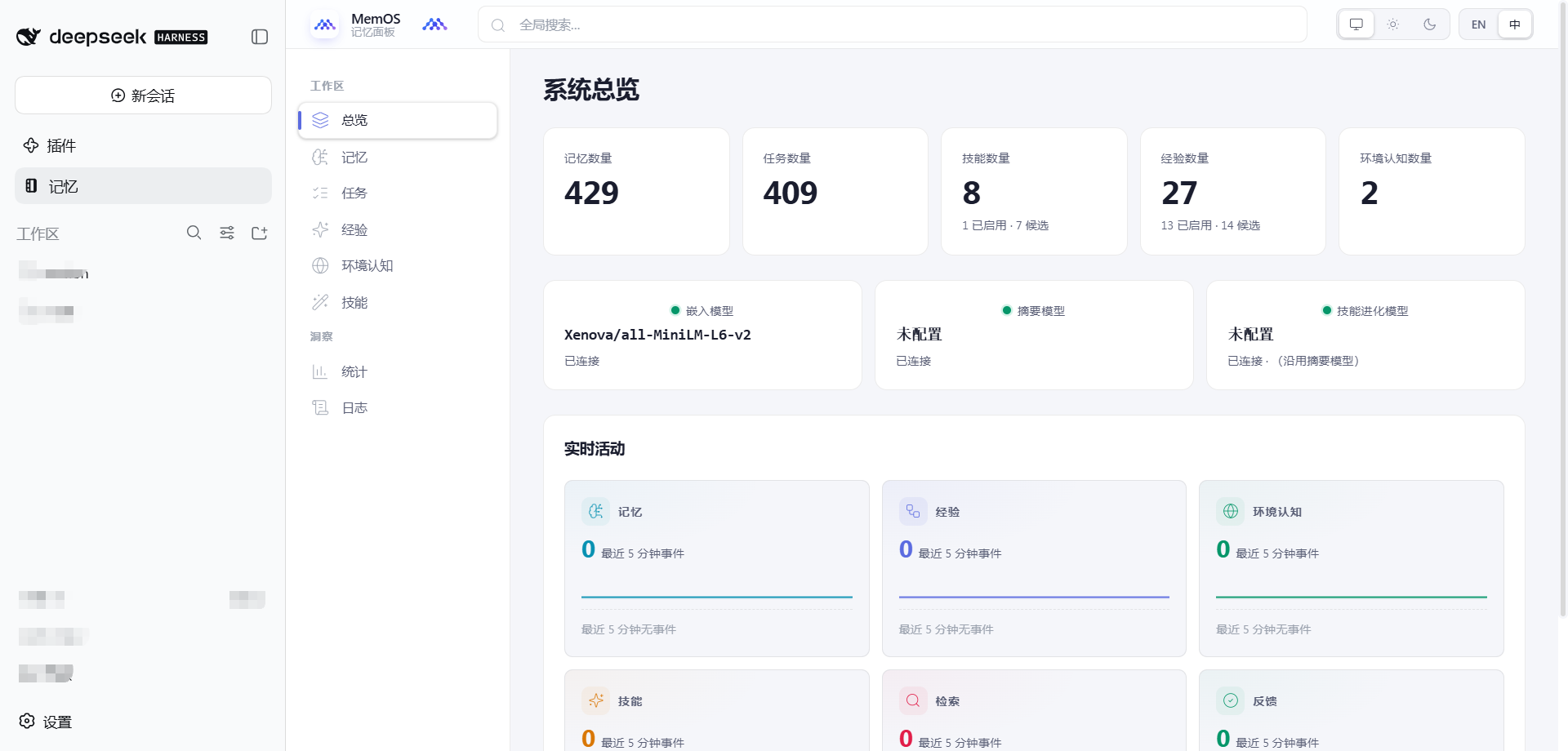
Memory panel in the DSH shell — the sidebar's Memory entry opens the MemOS viewer inline, so memory browsing sits next to your normal DSH session:
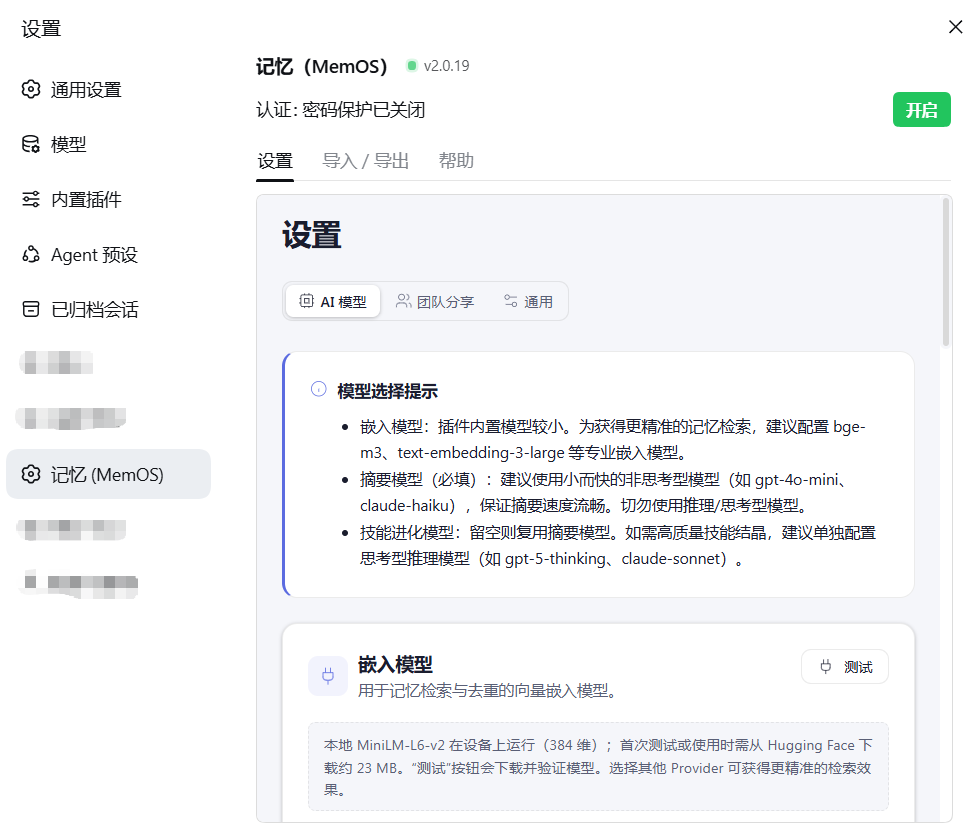
Settings → Memory (MemOS) — authentication toggle, model status, and the embedded Settings / Import-Export / Help pages:
Install
From npmjs (recommended — no credentials needed)
dsh plugin --profile web add @steven-stack-s/dsh-memos-local
@steven-stack-s/dsh-memos-local is published to the public npm registry, so
anyone can install it anonymously. No token, no .npmrc, no GitHub account.
From GitHub Packages (requires a token)
GitHub Packages mirrors the same version, but its npm registry requires
authentication even for a public package — that is GitHub's documented
behaviour, not a misconfiguration. Each user supplies their own token (any
GitHub account, read:packages scope):
# .npmrc — route the @steven-stack-s scope to GitHub Packages
echo '@steven-stack-s:registry=https://npm.pkg.github.com' >> ~/.npmrc
echo '//npm.pkg.github.com/:_authToken=<YOUR_OWN_GITHUB_TOKEN>' >> ~/.npmrc

dsh plugin --profile web add @steven-stack-s/dsh-memos-local
From a git tag (no registry at all)
The repository ships its build output (dist/, viewer/dist/), so a git
install is runnable without a build step — useful when a proxy blocks the
registries:
dsh plugin --profile web add \
  'https://codeload.github.com/steven-stack-s/dsh-memos-local/tar.gz/refs/tags/v<version>'
github:owner/repo#tagalso works, but it resolves the ref over the git protocol againstgithub.com; the codeload URL above only needscodeload.github.com.
Version policy
A version has two parts: the upstream baseline, plus a local revision.
<upstream-version> - dsh.<local-revision>
      2.0.19       -     dsh.1
2.0.19is the upstream@memtensor/memos-local-pluginrelease this fork is synced to. It says which upstream code the algorithms match.-dsh.Nis this fork's own revision counter within that baseline. It increments on every fork-only change we publish (2.0.19-dsh.1,2.0.19-dsh.2, …), and resets todsh.1when we move to a new upstream baseline (2.0.20-dsh.1).
Why -dsh.N and not +dsh.N
The -dsh.N segment is semver prerelease syntax. A prerelease sorts below
its release: 2.0.19-dsh.1 < 2.0.19. That is a real cost — see
"Caveat: range matching" below.
The obvious alternative, build metadata (2.0.19+dsh.1), looks strictly better
on paper because build metadata is ignored in precedence comparisons, so
2.0.19+dsh.1 still satisfies ^2.0.19. It does not work. It was
implemented and tested against the real registry, and npm strips the +
segment on the publish path:
package.json          "version": "2.0.19+dsh.1"
npm publish produced  npm notice version: 2.0.19
                      npm notice filename: ...-2.0.19.tgz
registry PUT          https://registry.npmjs.org/@steven-stack-s%2fdsh-memos-local
                      -> 400 Cannot publish over previously published version "2.0.19"
The version we asked to publish is not the version npm publishes, so build metadata cannot be used to distinguish fork releases from the upstream number. Prerelease syntax survives the publish path intact, which is why it is used here.
Tag ⇄ version mapping
The git tag is v plus the version, unchanged:
package.json version | git tag |
|---|---|
2.0.19-dsh.1 | v2.0.19-dsh.1 |
2.0.19-dsh.2 | v2.0.19-dsh.2 |
2.0.20-dsh.1 | v2.0.20-dsh.1 |
Both publish workflows fail if the tag does not match package.json.version.
Caveat: range matching
Because prereleases sort below the release, 2.0.19-dsh.1 does not satisfy
^2.0.19 — npm's semver excludes prereleases from range matches unless the
range itself names a prerelease on the same tuple. Consequences:
- A dependency written as
"^2.0.19"will not resolve to2.0.19-dsh.1. - Install it by exact version (
2.0.19-dsh.1), by dist-tag (latest, which resolves to the newest published version regardless of range rules), or viadsh plugin add, which installs the named package directly.
This is acceptable for how this fork is distributed — users install the package
by name, not by depending on it through a caret range. If a range-matched
release ever becomes necessary, either publish a non-prerelease version or have
consumers depend on latest.
Why a local revision series exists
Because npm version numbers are permanent. Publishing is not reversible in
the way it looks: npm unpublish deletes the artifacts, but the version
number stays burned — the registry keeps a tombstone in the packument's time
table and refuses any later publish of that number with
400 Cannot publish over previously published version. Re-using an upstream
number therefore permanently consumes it, and a fork that tracks upstream
exactly will eventually have nothing left to publish. The -dsh.N series gives
every fork release a fresh, never-used version string.
Bumping
# 1. set the version in package.json
#      fork-only change on the same baseline:  2.0.19-dsh.1 -> 2.0.19-dsh.2
#      synced to a new upstream release:       2.0.20-dsh.1
node -e "
  const fs = require('fs');
  const p = JSON.parse(fs.readFileSync('package.json', 'utf8'));
  p.version = '2.0.19-dsh.2';            // <-- edit me
  fs.writeFileSync('package.json', JSON.stringify(p, null, 2) + '\n');
"
# 2. refresh the in-repo build output
npm run build:package
# 3. commit and tag
git commit -am 'chore(release): v2.0.19-dsh.2'
git tag -a v2.0.19-dsh.2 -m 'v2.0.19-dsh.2'
git push origin main --tags
A tag push only runs a dry-run package check. Actually publishing requires a manual
workflow_dispatchrun withdry_run: false. See the release notes in the workflow files.
Relation to upstream (subtree sync)
This repository was split out of the MemTensor/MemOS monorepo's
apps/memos-local-plugin directory with git subtree split, preserving that
subtree's full commit history. To pull in upstream core algorithm updates:
# The read-only "upstream" remote is already configured. Fetch one complete
# monorepo tree from upstream:
git fetch upstream
# Merge the up-to-date apps/memos-local-plugin node (subtree merge):
git subtree merge --squash -P . upstream/<branch>
# or extract the subtree's latest content with --prefix and integrate it.
Keep core algorithm changes minimal to reduce subtree merge conflicts. DSH specific changes live in the "distribution layer" —
adapters/deepseek-harness/,client/, andpackage.json(exports) — and may need manual conflict resolution during merges.
What it is
A local-first, file-backed memory system that gives an agent four cooperating layers of memory and a feedback-driven self-evolution loop:
- L1 trace — step-level grounded records (action + observation + reflection + value).
- L2 policy — sub-task strategies induced across many traces.
- L3 world model — compressed environmental cognition derived from L2 + L1.
- Skill — callable, crystallized capabilities the agent can invoke directly.
The plugin learns continuously from two feedback channels:
- Step-level — model ↔ environment (tool result, observation deltas).
- Task-level — human ↔ model (explicit ratings + implicit signals).
Reflection-weighted reward is back-propagated along each trace, and high-value patterns crystallize into reusable Skills. At inference time, a three-tier retriever (Skill → trace/episode → world model) injects the right context at the right time.
Layout (high-level)
adapters/deepseek-harness/ # DSH Cordis plugin (server) — this fork's only adapter
agent-contract/            # Stable types + JSON-RPC protocol shared with adapters
core/                      # Agent-agnostic algorithm (memory, reward, retrieval, skill, hub, …)
server/                    # HTTP + SSE server (powers the viewer)
client/                    # DSH browser bundle (Memory tab, settings)
viewer/                    # Runtime viewer (Vite, served by server/)
templates/                 # config.yaml templates copied to the user's home on install
docs/                      # Developer-facing docs (algorithm, data model, prompts, …)
scripts/                   # Build / packaging / release helpers
tests/                     # unit / integration / e2e (vitest)
For the full structural breakdown read ARCHITECTURE.md.
Where data lives
Runtime code and user state stay separate. DSH installs the package into a
profile with dsh plugin and initializes its runtime home on first boot:
| Agent | Code installed to | Runtime data + config in |
|---|---|---|
| DeepSeek Harness | Profile dependency managed by dsh plugin | $DSH_HOME/memos-plugin/ (default ~/.dsh/memos-plugin/) |
Inside the runtime folder:
config.yaml      # MemOS core config (includes API keys; chmod 600 when written)
data/memos.db    # SQLite (L1/L2/L3/Skill/Episode/Feedback/…)
skills/          # crystallized skill packages
logs/            # rotating logs (memos.log, error.log, audit.log, …)
DSH runs MemoryCore and the existing HTTP/SSE Viewer in the DSH Node.js
process, without a JSON-RPC bridge or sidecar daemon. The Viewer listens on
http://127.0.0.1:18801 by default; set viewerEnabled: false in the DSH
Cordis row to run without that listener.
Uninstalling the plugin does not delete data/, skills/, logs/, or
config.yaml. Startup after an upgrade may migrate the SQLite schema, so back
up the runtime directory before upgrading.
Quick start (DeepSeek Harness)
[!IMPORTANT] Do not run
npm install -g @memtensor/memos-local-plugin. This is an agent plugin package, not a standalone CLI. Use DSH's package management (dsh plugin) or the installer's--agent dshtarget.
DSH support is an out-of-tree Cordis bundle. The one-command installer keeps
DSH in control of its profile while handling pnpm's reviewed native dependency
build policy non-interactively. If pnpm is not already on PATH, it prepares
an isolated pnpm@11.7.0 for that installer run without changing the user's
global package-manager setup:
curl -fsSL https://raw.githubusercontent.com/MemTensor/MemOS/main/apps/memos-local-plugin/install.sh \
  | bash -s -- --agent dsh --profile web --version 2.0.19
--version 2.0.19here is the upstream@memtensor/memos-local-pluginrelease, not this fork's version. The installer lives in the upstream repo and installs the upstream package; this fork publishes its own@steven-stack-s/dsh-memos-localat<upstream>-dsh.<n>(see Version policy).
The installer delegates package ownership and bundle reconciliation to
dsh plugin. If pnpm reports the reviewed build-script set, it enables
better-sqlite3, esbuild, onnxruntime-node, and sharp, explicitly
disables the unnecessary protobufjs and MemOS hint scripts, retries the same
package spec, and verifies the composed memos-local-memory row. Any unknown
build-script package fails closed for manual review; the installer never uses
approve-builds --all.
The temporary pnpm is removed when the installer exits. It is not needed for
normal dsh --profile ... runtime use. Users who later run lower-level
dsh plugin commands directly still need pnpm on PATH; install the
DSH-pinned version persistently with npm install -g pnpm@11.7.0 if desired.
To develop from a local checkout instead, build it and add it to the desired DSH profile directly:
cd /path/to/dsh-memos-local
npm install
npm run build
dsh plugin --profile web add .
Memory tab and Viewer in DSH
The adapter mounts the Viewer (default 127.0.0.1:18801) at the /memos
prefix on DSH's own web server, so you can:
- Open the Memory tab in the DSH left sidebar — an iframe embedding the
same-origin
/memos/viewer (no Mixed-Content issues). - Directly open
https://<your-dsh-domain>/memos/after logging in to DSH.
The /memos reverse proxy is registered on DSH's webServer after the Viewer
starts; it injects <base href="/memos/"> and a fetch/XHR/EventSource shim so
the Viewer's absolute /api/v1/... paths land on /memos/api/v1/....
The browser-side Memory integration is registered by client/client.js:
| UI | Slot | Description |
|---|---|---|
| Main panel | main (key=memos) | iframe embedding the /memos/ viewer |
| Sidebar entry | sidebar.panellist (id=memos) | "Memory" button alongside conversation/trajectory |
| Settings | settings.section | "Memory (Memos)" config + Viewer status |
If the memory viewer has password protection enabled, you must enter your viewer password on first open. This is a separate auth from DSH login.
Memory retrieval policy (DSH)
- Every accepted, non-empty direct-user DSH turn performs one automatic recall, including greetings and restored-session turns.
- The query is ordered before the source-labeled
memos-local-memorycontext. - The model can additionally call
memos_searchfor a shorter or reformulated lookup. - Automatic recall and explicit
memos_searchshare one absolute deadline:min(recallTimeoutMs, 3000)ms (3,000 ms default; config may shorten but not extend this DSH foreground bound). - Capture, relation, intent, summaries, and embeddings are background work; the next turn never waits for the previous turn's queue.
Configuration
The shared MemOS core reads config.yaml from the runtime directory. DSH host
controls such as viewerEnabled and viewerPort live in the profile's Cordis
row; shared Viewer settings such as viewer.bindHost remain in config.yaml.
The runtime/config location is resolved in the following priority order:
MEMOS_HOMEenvironment variable — points to the runtime root directoryMEMOS_CONFIG_FILEenvironment variable — points directly to the config file- Adapter-specific explicit home — the DSH Cordis
homefield DSH_HOME— defaults the DSH memory root to$DSH_HOME/memos-plugin/- Default path —
~/.dsh/memos-plugin/
Troubleshooting
npm install -g @memtensor/memos-local-plugin says "not found" or "404".
You are likely trying to install the package as if it were a standalone CLI.
It is an agent plugin. Use dsh plugin (DSH) as shown above.
The web/ or site/ directory only contains a README.
Those directory names are stale; the runtime viewer source lives in viewer/.
If you see them with only a README, you are looking at a published npm tarball,
not a fresh clone of this repository.
Developer documentation
See docs/ — index of algorithm, data model, prompts, protocol, logging, and release docs.
See also the DeepSeek Harness adapter guide
for exact Node compatibility, DSH_HOME, restart/uninstall steps, viewer
lifecycle, and the reviewed pnpm approval flow.